
IBM 3270-like terminal UI library for Python
Verified details
These details have been verified by PyPIProject links
GitHub Statistics
Maintainers

Project description
ux3270
IBM 3270-like terminal UI library for Python.
Overview
Create terminal applications with an IBM 3270-style interaction model: display a form, let the user fill it in, continue when they submit.
Screenshots
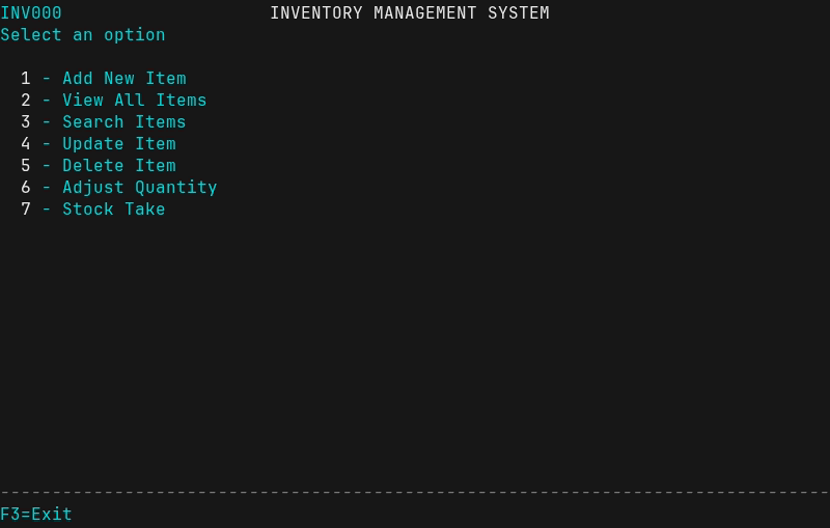
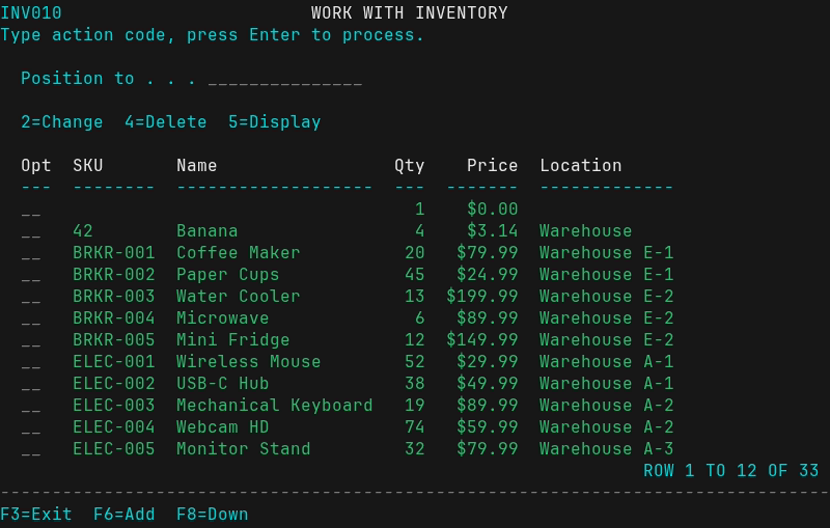
The inventory management demo app showcases the library's capabilities:
| Main Menu | Inventory List | Data Entry Form |
|---|---|---|
 |
 |
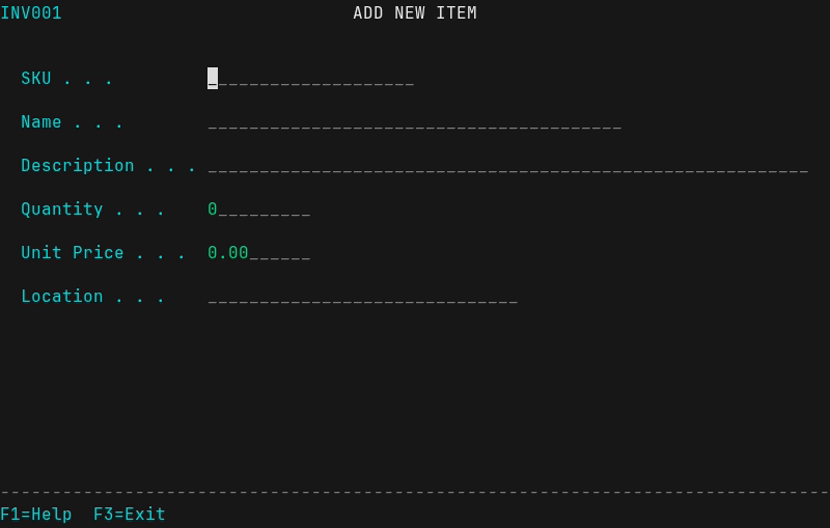 |
| Menu with single-key selection | Work-with list with action codes | Form with field validation |
Installation
pip install ux3270
Or with uv:
uv add ux3270
For development of ux3270 itself:
git clone https://github.com/ljosa/ux3270.git
cd ux3270
uv venv && uv pip install -e .
Quick Start
from ux3270.dialog import Menu, Form, Table, TabularEntry, WorkWithList, SelectionList, show_message

# Create a form with help text
form = Form("DATA ENTRY", help_text="Enter your information")
form.add_field("Name", length=30, required=True,
               help_text="Your full name")
form.add_field("Email", length=40)
result = form.show()  # F1 for help, F3 to cancel
if result:
    print(f"Hello, {result['Name']}!")

# Form with F4=Prompt lookup
def select_dept():
    sel = SelectionList("SELECT DEPARTMENT", ["Code", "Name"])
    sel.add_row(Code="ENG", Name="Engineering")
    sel.add_row(Code="SAL", Name="Sales")
    selected = sel.show()
    return selected["Code"] if selected else None

form = Form("ASSIGNMENT")
form.add_field("Department", prompt=select_dept)  # F4 shows list
result = form.show()

# Work-with list (action codes per row)
wwl = WorkWithList("WORK WITH ITEMS", ["ID", "Name", "Status"])
wwl.add_action("2", "Change")
wwl.add_action("4", "Delete")
wwl.add_action("5", "Display")
wwl.set_add_callback(add_new_item)  # F6=Add
wwl.add_row(ID="001", Name="Item 1", Status="Active")
wwl.add_row(ID="002", Name="Item 2", Status="Inactive")
result = wwl.show()  # Returns [{"action": "2", "row": {...}}, ...]
for item in result or []:
    if item["action"] == "2":
        edit_item(item["row"]["ID"])

# Create a menu
menu = Menu("MAIN MENU")
menu.add_item("1", "Option 1", lambda: print("Selected 1"))
menu.add_item("2", "Option 2", lambda: print("Selected 2"))
menu.run()  # Runs until user exits with F3 or X

# Display a table (with pagination)
table = Table("RESULTS", ["ID", "Name", "Status"])
table.add_row("001", "Item 1", "Active")
table.add_row("002", "Item 2", "Inactive")
table.show()  # F7/F8 to page up/down

# Tabular entry (table with editable columns)
te = TabularEntry("PORTFOLIO UPDATE", panel_id="PORT01")
te.add_column("Ticker", width=8)
te.add_column("Name", width=20)
te.add_column("New Amount", width=12, editable=True, required=True)
te.add_column("Previous", width=12)
te.add_row(Ticker="AAPL", Name="Apple Inc", Previous="1,234.56")
te.add_row(Ticker="GOOGL", Name="Alphabet", Previous="5,678.90")
result = te.show()  # Tab between cells, Enter to submit

# Show a message
show_message("Operation completed", msg_type="success")
Demo App
The inventory management system demonstrates the library:
# Load sample data and run
inventory-app --demo

# Or just run (empty database)
inventory-app

# Other options
inventory-app --help
Keyboard Controls
| Context | Key | Action |
|---|---|---|
| All | F1 | Help |
| All | F3 | Cancel/Exit |
| Forms | Tab | Next field |
| Forms | Shift+Tab | Previous field |
| Forms | Enter | Submit |
| Forms | F4 | Prompt (show selection list) |
| Fields | Left/Right | Move cursor |
| Fields | Home/End | Start/end of field |
| Fields | Delete | Delete at cursor |
| Fields | Backspace | Delete before cursor |
| Fields | Insert | Toggle insert/overwrite mode |
| Fields | Ctrl+E | Erase to end of field |
| Menus | 1-9, A-Z | Select item |
| Tables/Lists | F7 | Page backward |
| Tables/Lists | F8 | Page forward |
| Tables | Enter | Return |
| Selection Lists | S | Select item |
| Work-with Lists | 1-9, A-Z | Enter action code |
| Work-with Lists | Enter | Process actions |
| Work-with Lists | F6 | Add new record |
| Tabular Entry | Tab | Next editable cell |
| Tabular Entry | Shift+Tab | Previous editable cell |
| Tabular Entry | Enter | Submit all values |
Terminal Width
Tables and lists automatically adapt to terminal width:
- Uses actual terminal width (not hardcoded 80 columns)
- Short columns are preserved at natural width
- Long columns are truncated to fit available space
- Truncated content shows
>indicator (e.g., "Very long tex>")
IBM 3270 Colors
The library uses IBM 3270 color conventions:
- Green: Input fields
- Turquoise: Labels (protected fields)
- White: Titles, headers (intensified)
- Red: Error messages
- Yellow: Warnings
Requirements
- Python 3.10+
- Unix-like system (Linux, macOS)
- Terminal with ANSI support
Development
Building and Viewing Documentation Locally
uv run mkdocs serve
Then open http://127.0.0.1:8000 in your browser. The site auto-reloads on changes.
Regenerating Screenshots
Screenshots require Docker with VHS:
./screenshots/generate.sh
Cutting a Release
The version number must be updated in two places that must match:
pyproject.toml: Theversionfield (e.g.,version = "0.2.0")- Git tag: Must be
v+ version (e.g.,v0.2.0)
Release process:
# 1. Update version in pyproject.toml
#    Edit: version = "0.2.0"

# 2. Commit the version bump
git add pyproject.toml
git commit -m "Bump version to 0.2.0"

# 3. Create and push tag (triggers release workflow)
git tag v0.2.0
git push origin main --tags
The GitHub Actions workflow will automatically:
- Build and publish the package to PyPI
- Deploy versioned documentation to GitHub Pages
Documentation Versions
Documentation is versioned using mike. Each release gets its own version, with latest always pointing to the most recent release. Users can switch versions using the dropdown in the docs.
License
MIT
Project details
Verified details
These details have been verified by PyPIProject links
GitHub Statistics
Maintainers
Release history Release notifications | RSS feed


Download files
Download the file for your platform. If you're not sure which to choose, learn more about installing packages.
Source Distribution
Built Distribution
Filter files by name, interpreter, ABI, and platform.
If you're not sure about the file name format, learn more about wheel file names.
Copy a direct link to the current filters
File details
Details for the file ux3270-1.0.0.tar.gz.
File metadata
- Download URL: ux3270-1.0.0.tar.gz
- Upload date:
- Size: 879.5 kB
- Tags: Source
- Uploaded using Trusted Publishing? Yes
- Uploaded via: twine/6.1.0 CPython/3.13.7
File hashes
| Algorithm | Hash digest | |
|---|---|---|
| SHA256 |
b00cbd0afc8254164cbc3c463ca681d470fd4e1da7f31b998b48015cef482c29
|
|
| MD5 |
913e5b14f1ede30639b2d2c1ff675a12
|
|
| BLAKE2b-256 |
083a97fdd4620a971164db1bb4eb4d43ace3c3268bebb6d39fac9dc8b2b32b02
|
Provenance
The following attestation bundles were made for ux3270-1.0.0.tar.gz:
Publisher:
release.yml on ljosa/ux3270
-
Statement:
-
Statement type:
https://in-toto.io/Statement/v1 -
Predicate type:
https://docs.pypi.org/attestations/publish/v1 -
Subject name:
ux3270-1.0.0.tar.gz -
Subject digest:
b00cbd0afc8254164cbc3c463ca681d470fd4e1da7f31b998b48015cef482c29 - Sigstore transparency entry: 872178381
- Sigstore integration time:
-
Permalink:
ljosa/ux3270@0adeadf3dec815cb084076b97b86cb0602c642b6 -
Branch / Tag:
refs/tags/v1.0.0 - Owner: https://github.com/ljosa
-
Access:
public
-
Token Issuer:
https://token.actions.githubusercontent.com -
Runner Environment:
github-hosted -
Publication workflow:
release.yml@0adeadf3dec815cb084076b97b86cb0602c642b6 -
Trigger Event:
push
-
Statement type:
File details
Details for the file ux3270-1.0.0-py3-none-any.whl.
File metadata
- Download URL: ux3270-1.0.0-py3-none-any.whl
- Upload date:
- Size: 42.3 kB
- Tags: Python 3
- Uploaded using Trusted Publishing? Yes
- Uploaded via: twine/6.1.0 CPython/3.13.7
File hashes
| Algorithm | Hash digest | |
|---|---|---|
| SHA256 |
50c54b2ebe47973e0fc5bb925dd8ec9142d77cef279c7de3d2e89642bdf13dab
|
|
| MD5 |
f88b34ee0d4c4209e737c3d66c0588b5
|
|
| BLAKE2b-256 |
e62c5987b8af3f6339b6434644e70db557943c49e3f2b28bdf54eb66ac54ef06
|
Provenance
The following attestation bundles were made for ux3270-1.0.0-py3-none-any.whl:
Publisher:
release.yml on ljosa/ux3270
-
Statement:
-
Statement type:
https://in-toto.io/Statement/v1 -
Predicate type:
https://docs.pypi.org/attestations/publish/v1 -
Subject name:
ux3270-1.0.0-py3-none-any.whl -
Subject digest:
50c54b2ebe47973e0fc5bb925dd8ec9142d77cef279c7de3d2e89642bdf13dab - Sigstore transparency entry: 872178386
- Sigstore integration time:
-
Permalink:
ljosa/ux3270@0adeadf3dec815cb084076b97b86cb0602c642b6 -
Branch / Tag:
refs/tags/v1.0.0 - Owner: https://github.com/ljosa
-
Access:
public
-
Token Issuer:
https://token.actions.githubusercontent.com -
Runner Environment:
github-hosted -
Publication workflow:
release.yml@0adeadf3dec815cb084076b97b86cb0602c642b6 -
Trigger Event:
push
-
Statement type:






