
Generate SQL queries from natural language


Project description

| GitHub | PyPI | Colab | Documentation |
|---|---|---|---|
 |
 |
 |
 |
Vanna.AI - Personalized AI SQL Agent
Let Vanna.AI write your nasty SQL for you. Vanna is a Python based AI SQL agent trained on your schema that writes complex SQL in seconds. pip install vanna to get started now.
https://github.com/vanna-ai/vanna-py/assets/7146154/61f5f0bf-ce03-47e2-ab95-0750b8df7b6f
An example
A business user asks you "who are the top 2 customers in each region?". Right in the middle of lunch. And they need it for a presentation this afternoon. 😡😡😡
The old way 😡 😫 💩
Simple question to ask, not so fun to answer. You spend over an hour a) finding the tables, b) figuring out out the joins, c) look up the syntax for ranking, d) putting this into a CTE, e) filtering by rank, and f) choosing the correct metrics. Finally, you come up with this ugly mess -
with ranked_customers as (SELECT c.c_name as customer_name,
  r.r_name as region_name,
  row_number() OVER (PARTITION BY r.r_name
     ORDER BY sum(l.l_quantity * l.l_extendedprice) desc) as rank
     FROM   snowflake_sample_data.tpch_sf1.customer c join snowflake_sample_data.tpch_sf1.orders o
         ON c.c_custkey = o.o_custkey join snowflake_sample_data.tpch_sf1.lineitem l
         ON o.o_orderkey = l.l_orderkey join snowflake_sample_data.tpch_sf1.nation n
         ON c.c_nationkey = n.n_nationkey join snowflake_sample_data.tpch_sf1.region r
         ON n.n_regionkey = r.r_regionkey
             GROUP BY customer_name, region_name)
SELECT region_name,
       customer_name
FROM   ranked_customers
WHERE  rank <= 2;
And you had to skip your lunch. HANGRY!
The Vanna way 😍 🌟 🚀
With Vanna, you train up a custom model on your data warehouse, and simply enter this in your Jupyter Notebook -
import vanna as vn
vn.set_model('your-model')
vn.ask('who are the top 2 customers in each region?')
Vanna generates that nasty SQL above for you, runs it (locally & securely) and gives you back a Dataframe in seconds:
| region_name | customer_name | total_sales |
|---|---|---|
| ASIA | Customer#000000001 | 68127.72 |
| ASIA | Customer#000000002 | 65898.69 |
| ... |
And you ate your lunch in peace. YUMMY!
How Vanna works
Vanna works in two easy steps - train a model on your data, and then ask questions.
- Train a model on your data.
- Ask questions.
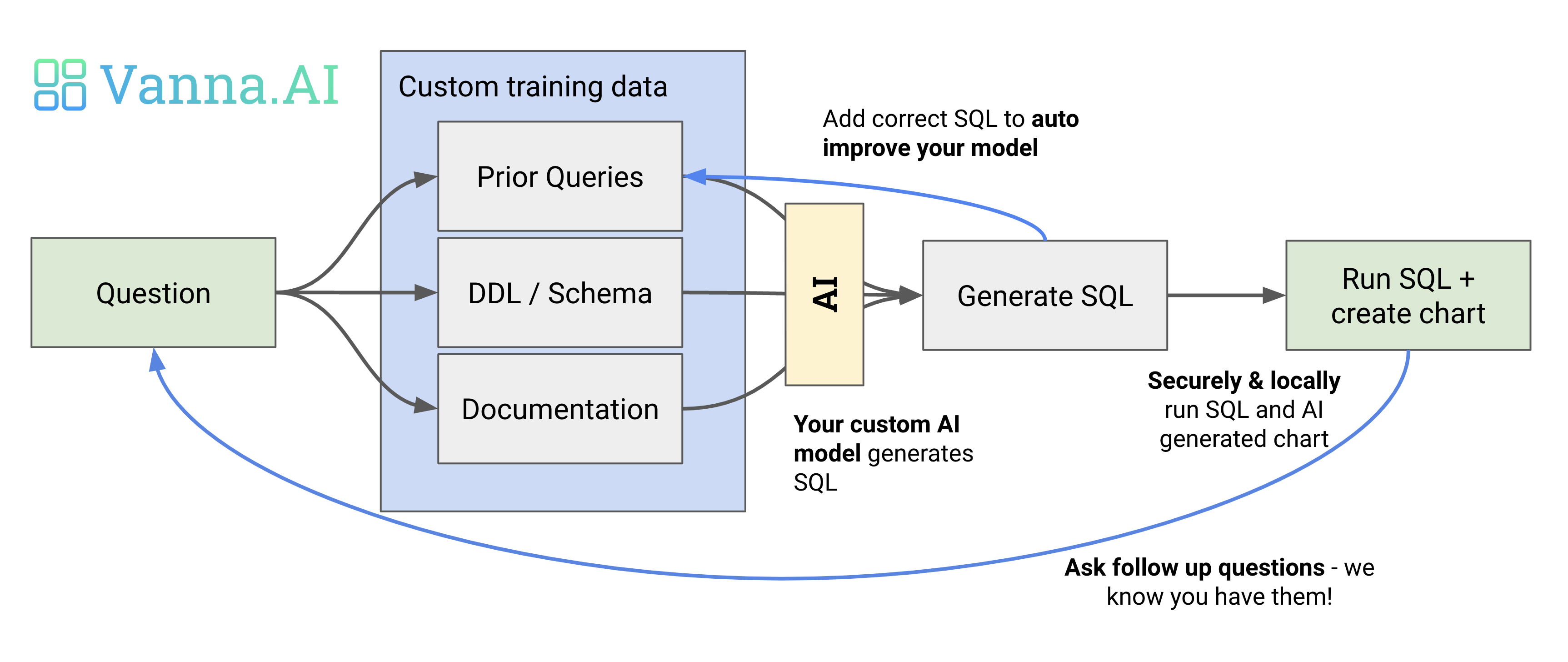
When you ask a question, we utilize a custom model for your dataset to generate SQL, as seen below. Your model performance and accuracy depends on the quality and quantity of training data you use to train your model.
Why Vanna?
- High accuracy on complex datasets.
- Vanna’s capabilities are tied to the training data you give it
- More training data means better accuracy for large and complex datasets
- Secure and private.
- Your database contents are never sent to Vanna’s servers
- We only see the bare minimum - schemas & queries.
- Isolated, custom model.
- You train a custom model specific to your database and your schema.
- Nobody else can use your model or view your model’s training data unless you choose to add members to your model or make it public
- We use a combination of third-party foundational models (OpenAI, Google) and our own LLM.
- Self learning.
- As you use Vanna more, your model continuously improves as we augment your training data
- Supports many databases.
- We have out-of-the-box support Snowflake, BigQuery, Postgres
- You can easily make a connector for any database
- Pretrained models.
- If you’re a data provider you can publish your models for anyone to use
- As part of our roadmap, we are in the process of pre-training models for common datasets (Google Ads, Facebook ads, etc)
- Choose your front end.
- Start in a Jupyter Notebook.
- Expose to business users via Slackbot, web app, Streamlit app, or Excel plugin.
- Even integrate in your web app for customers.
Getting started
You can start by automatically training Vanna (currently works for Snowflake) or add manual training data.
Train with DDL Statements
If you prefer to manually train, you do not need to connect to a database. You can use the train function with other parmaeters like ddl
vn.train(ddl="""
    CREATE TABLE IF NOT EXISTS my-table (
        id INT PRIMARY KEY,
        name VARCHAR(100),
        age INT
    )
""")
Train with Documentation
Sometimes you may want to add documentation about your business terminology or definitions.
vn.train(documentation="Our business defines OTIF score as the percentage of orders that are delivered on time and in full")
Train with SQL
You can also add SQL queries to your training data. This is useful if you have some queries already laying around. You can just copy and paste those from your editor to begin generating new SQL.
vn.train(sql="SELECT * FROM my-table WHERE name = 'John Doe'")
Asking questions
vn.ask("What are the top 10 customers by sales?")
SELECT c.c_name as customer_name,
       sum(l.l_extendedprice * (1 - l.l_discount)) as total_sales
FROM   snowflake_sample_data.tpch_sf1.lineitem l join snowflake_sample_data.tpch_sf1.orders o
        ON l.l_orderkey = o.o_orderkey join snowflake_sample_data.tpch_sf1.customer c
        ON o.o_custkey = c.c_custkey
GROUP BY customer_name
ORDER BY total_sales desc limit 10;
| CUSTOMER_NAME | TOTAL_SALES | |
|---|---|---|
| 0 | Customer#000143500 | 6757566.0218 |
| 1 | Customer#000095257 | 6294115.3340 |
| 2 | Customer#000087115 | 6184649.5176 |
| 3 | Customer#000131113 | 6080943.8305 |
| 4 | Customer#000134380 | 6075141.9635 |
| 5 | Customer#000103834 | 6059770.3232 |
| 6 | Customer#000069682 | 6057779.0348 |
| 7 | Customer#000102022 | 6039653.6335 |
| 8 | Customer#000098587 | 6027021.5855 |
| 9 | Customer#000064660 | 5905659.6159 |

AI-generated follow-up questions:
- What is the country name for each of the top 10 customers by sales?
- How many orders does each of the top 10 customers by sales have?
- What is the total revenue for each of the top 10 customers by sales?
- What are the customer names and total sales for customers in the United States?
- Which customers in Africa have returned the most parts with a gross value?
- What are the total sales for the top 3 customers?
- What are the customer names and total sales for the top 5 customers?
- What are the total sales for customers in Europe?
- How many customers are there in each country?
More resources
Release history Release notifications | RSS feed


Download files
Download the file for your platform. If you're not sure which to choose, learn more about installing packages.
Source Distribution
Built Distribution
Filter files by name, interpreter, ABI, and platform.
If you're not sure about the file name format, learn more about wheel file names.
Copy a direct link to the current filters
File details
Details for the file vanna-0.0.21.tar.gz.
File metadata
- Download URL: vanna-0.0.21.tar.gz
- Upload date:
- Size: 20.8 kB
- Tags: Source
- Uploaded using Trusted Publishing? No
- Uploaded via: twine/4.0.2 CPython/3.9.17
File hashes
| Algorithm | Hash digest | |
|---|---|---|
| SHA256 |
a08705ff83cb30fe8d43ed952b9702b2f8fcb3a68c53976400b6b20dd360c770
|
|
| MD5 |
56914ba3d837638f9f3adc1b9e5e45d7
|
|
| BLAKE2b-256 |
728e74fb0d00b90bc407897744817e96731fb7589e2b595b94b98b20b0ef73e0
|
File details
Details for the file vanna-0.0.21-py3-none-any.whl.
File metadata
- Download URL: vanna-0.0.21-py3-none-any.whl
- Upload date:
- Size: 18.5 kB
- Tags: Python 3
- Uploaded using Trusted Publishing? No
- Uploaded via: twine/4.0.2 CPython/3.9.17
File hashes
| Algorithm | Hash digest | |
|---|---|---|
| SHA256 |
fbc47e0ff9a9621d36f11584a89f08b8002179e6c968d9ba9fe812189968e02d
|
|
| MD5 |
298b1274049fcf8285155630b0f74641
|
|
| BLAKE2b-256 |
06d2131243620847989a10395f522acdbef439c4c85138cb66dff7da6f2b2817
|






