
VAST Admin MCP Server



A Model Context Protocol (MCP) server for VAST Data administration. Enables AI assistants to interact with VAST clusters for monitoring, management, and data protection operations.
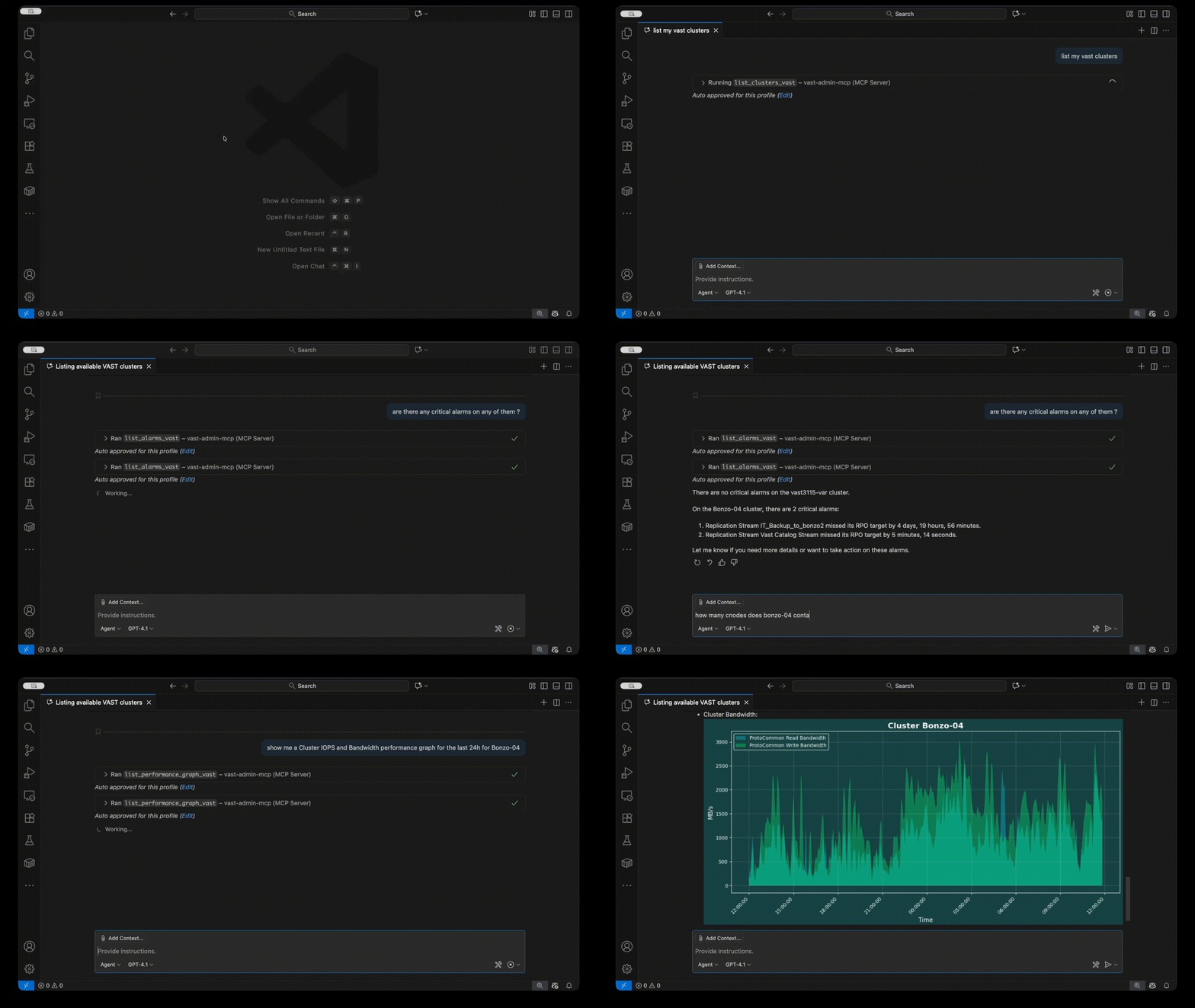
Features
- 🤖 Full MCP Integration - Native support for Claude Desktop, Cursor, VSCode, and other MCP clients
- 🔧 Cluster Management - List and monitor VAST clusters, views, tenants, quotas, and more
- 📊 Performance Metrics - Real-time performance data and graph generation
- 🔐 Secure Credentials - Encrypted password storage using system keyring
- 🛡️ API Whitelist - Security through endpoint and method restrictions
- ✏️ Read-Write Mode - Optional write access for create operations (views, snapshots, quotas)
- 🎨 Customizable - YAML-based templates for adding custom list functions
Installation
pip install vast-admin-mcp
Requirements:
- Python 3.10+
jqcommand-line tool (for JSON transformations)
Installing jq
macOS:
brew install jq
Linux (Ubuntu/Debian):
sudo apt-get install jq
Linux (RHEL/CentOS):
sudo yum install jq
Quick Start
1. Configure VAST Cluster Connection
vast-admin-mcp setup
This will prompt you for:
- Cluster address (IP, FQDN, or URL)
- Username and password
- Tenant name (if applicable)
2. Configure Your AI Assistant
Get setup instructions for your AI tool:
# For Cursor
vast-admin-mcp mcpsetup cursor

# For Claude Desktop
vast-admin-mcp mcpsetup claude-desktop

# For VSCode
vast-admin-mcp mcpsetup vscode

# For Windsurf
vast-admin-mcp mcpsetup windsurf
Note: Add --read-write as an argument in the config to enable create operations.
3. Start Using with Your AI Assistant
Example prompts:
List all VAST clusters
Show me all views on cluster1 with capacity information
Create a bandwidth and IOPS graph for cluster1 over the last hour
List all snapshots for view path /data/app1
Show me any critical alarms that haven't been acknowledged
CLI Usage
Test functions directly from the command line:
# List available commands
vast-admin-mcp list

# List clusters
vast-admin-mcp clusters

# List views with filters
vast-admin-mcp list views --cluster cluster1 --tenant mytenant
Read-Only vs Read-Write Mode
By default, the MCP server runs in read-only mode for safety:
- ✅ All list/query operations
- ✅ Performance monitoring
- ✅ Viewing configurations
- ❌ Create operations disabled
Enable read-write mode to allow:
- ✅ Creating views
- ✅ Creating snapshots and clones
- ✅ Setting quotas
- ✅ Creating view templates
Add --read-write to the MCP server configuration to enable write operations.
Available MCP Tools
List Tools
list_clusters_vast- Cluster information and statuslist_views_vast- Views with capacity and protocolslist_tenants_vast- Tenant information and capacitylist_volumes_vast- NVMe volumes/namespaceslist_quotas_vast- Quota configurationslist_snapshots_vast- Snapshot informationlist_alarms_vast- Active alarms and alertslist_performance_vast- Performance metrics- And many more...
Create Tools (read-write mode only)
create_view_vast- Create new viewscreate_view_from_template_vast- Create from templatescreate_snapshot_vast- Create snapshotscreate_clone_vast- Clone from snapshotscreate_quota_vast- Set quotas
Docker Support
Docker images are available for easy deployment:
# Using helper script
./vast-admin-mcp-docker.sh setup
./vast-admin-mcp-docker.sh list clusters

# Or with docker directly
docker run --rm -it \
  -v ~/.vast-admin-mcp:/root/.vast-admin-mcp \
  vast-admin-mcp:latest \
  vast-admin-mcp list clusters
See the full documentation for complete Docker setup instructions.
Configuration Files
- Cluster Config:
~/.vast-admin-mcp/config.json - Template Customizations:
~/.vast-admin-mcp/mcp_list_template_modifications.yaml - View Templates:
~/.vast-admin-mcp/view_templates.json - Logs:
~/.vast-admin-mcp/vast_admin_mcp.log
Documentation
For comprehensive documentation, including:
- Detailed installation instructions
- Template customization guide
- API whitelist configuration
- Advanced Docker usage
- Security best practices
- Full prompt examples
Visit: https://github.com/vast-data/vast-admin-mcp#readme
Platform Support
- ✅ macOS
- ✅ Linux
- ❌ Windows (not supported)
Community & Support
VAST Admin MCP Server welcomes questions, feedback, and feature requests. Join the conversation on https://community.vastdata.com/
License
Apache License 2.0 - See LICENSE for details.
Author
Haim Marko <haim.marko@vastdata.com>
Links
1 maintainer

Release files for vast-admin-mcp 0.2.4
For a detailed explanation of source distributions (sdists) and built distributions (wheels), please see the package formats documentation.
Source distribution (sdist)
| File | Size | Uploaded | |
|---|---|---|---|
| vast_admin_mcp-0.2.4.tar.gz | 5.7 MB | Details |
Built distribution (wheel)
| File | Interpreter | ABI | Platform | Reset |
|---|---|---|---|---|
| vast_admin_mcp-0.2.4-py3-none-any.whl | Python 3 | none | any | Details |
Total release size: 5.9 MB
Release files / vast_admin_mcp-0.2.4.tar.gz
| Download URL | vast_admin_mcp-0.2.4.tar.gz |
|---|---|
| Size | 5.7 MB |
| Tags | Source |
|
SHA-256 checksum How to use checksums |
9402eca6242ec31be1b778a8e41e3e7670eaea408d13cfd694dc8c3ad27cc0e1
|
|
BLAKE2b-256 checksum How to use checksums |
666e84612cdbd5d7ccae05ba328a2c30262fd65d635ccb10329d7fe994e1550c
|
| Upload date | |
|
Uploaded using Trusted Publishing? What is trusted publishing? |
No |
| Uploaded via |
twine/6.2.0 CPython/3.9.21
|
Release files / vast_admin_mcp-0.2.4-py3-none-any.whl
| Download URL | vast_admin_mcp-0.2.4-py3-none-any.whl |
|---|---|
| Size | 190.3 kB |
| Tags | Python 3 |
|
SHA-256 checksum How to use checksums |
90e71b59f7d586cfcd39f3777fd46a8339f76697a47380c6338ee3c0eb3e5949
|
|
BLAKE2b-256 checksum How to use checksums |
5a9b65341868b4bdb9758157cd59f4bae5951967f21198e20ec601c563f81c8d
|
| Upload date | |
|
Uploaded using Trusted Publishing? What is trusted publishing? |
No |
| Uploaded via |
twine/6.2.0 CPython/3.9.21
|














