
Development kit for VBR SLAM dataset

Project description
VBR Development Kit



Install
pip install vbr-devkit
Run without installing (uvx)
If you have uv installed, you can run the kit without installing it into your environment:
uvx vbr-devkit list
uvx fetches the package into a temporary, isolated environment and runs it. Any vbr command works through the vbr-devkit entry point, for example:
uvx vbr-devkit download campus_train0 ~/data/
uvx vbr-devkit convert kitti <input.bag> <output_dir>
You can install autocompletion for our package by typing:
vbr --install-completion
you might need to restart the shell for the autocompletion to take effect.
Usage
Download sequences
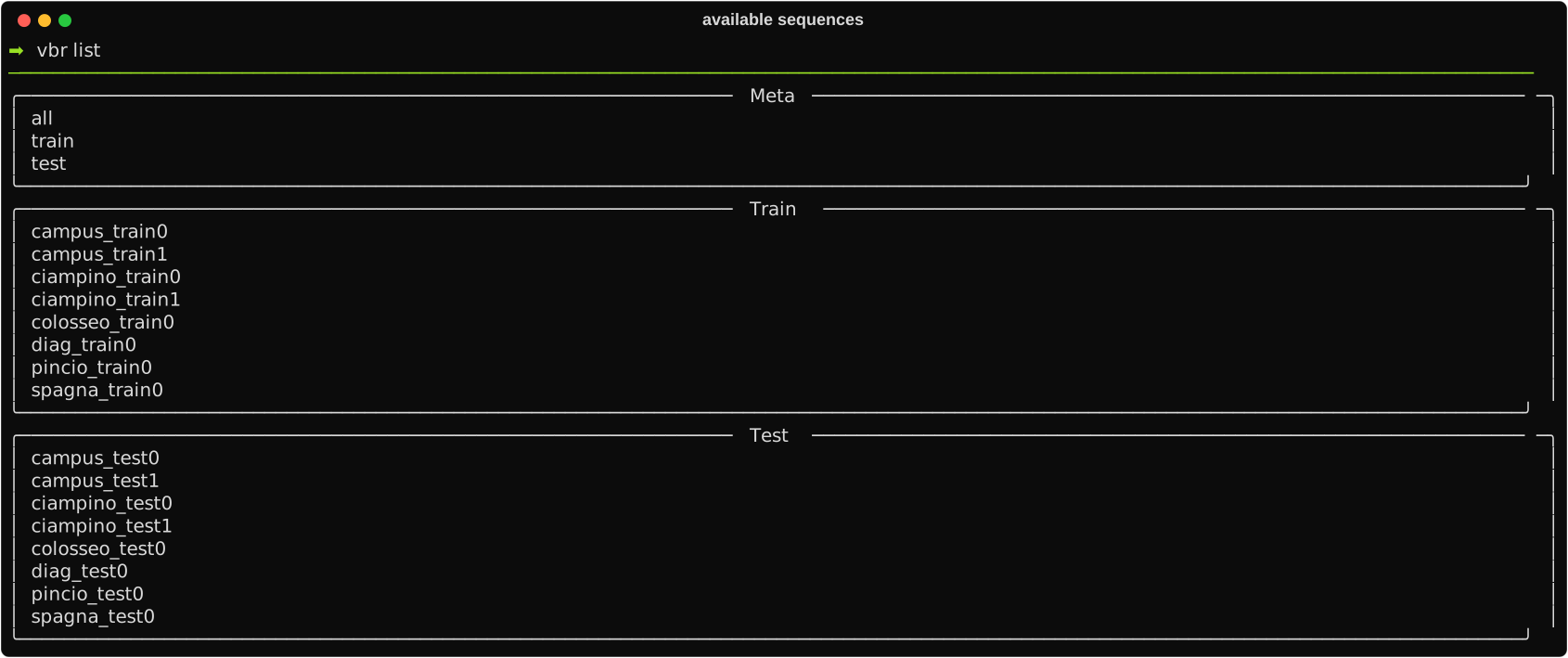
You can list the available sequences you can download by typing:
vbr list
You should see something similar to this
After choosing your sequence, you can type
vbr download <sequence_name> <save_directory>
For instance, we could save campus_train0 as follows:
vbr download campus_train0 ~/data/
N.B. The script will actually save the sequence at <save_directory>/vbr_slam/<sequence_prefix>/<sequence_name>. Moreover, by calling the previous command, we expect the following directory:
data
  - vbr_slam
    - campus
      - campus_train0
        - vbr_calib.yaml
        - campus_train0_gt.txt
        - campus_train0_00.bag
        - campus_train0_01.bag
        - campus_train0_02.bag
        - campus_train0_03.bag
        - campus_train0_04.bag
Convert format
The sequences are provided in ROS1 format. We offer a convenient tool to change representation if you prefer working on a different format. You can see the supported formats by typing:
vbr convert --help
To convert a bag or a sequence of bags, type:
vbr convert <desired_format> <input_directory/input_bag> <output_directory>
for instance, we could convert the campus_train0 sequence to kitti format as follows:
vbr convert kitti ~/data/vbr_slam/campus/campus_train0/campus_train0_00.bag ~/data/campus_train0_00_kitti/
We can expect the following result:
data
  - campus_train0_00_kitti
    - camera_left
      - timestamps.txt
      - data
        - 0000000000.png
        - 0000000001.png
        - ...
    - camera_right
      - timestamps.txt
      - data
        - 0000000000.png
        - 0000000001.png
        - ...
    - ouster_points
      - timestamps.txt
      - data
        - .dtype.pkl
        - 0000000000.bin
        - 0000000001.bin
        - ...
    - ...
N.B. In KITTI format, point clouds are embedded in binary files that can be opened using Numpy and pickle as follows:
import numpy as np
import pickle

with open("campus_train0_00_kitti/ouster_points/data/.dtype.pkl", "rb") as f:
    cdtype = pickle.load(f)

cloud_numpy = np.fromfile("/campus_train0_00_kitti/ouster_points/data/0000000000.bin", dtype=cdtype)
Release history Release notifications | RSS feed


Download files
Download the file for your platform. If you're not sure which to choose, learn more about installing packages.
Source Distribution
File details
Details for the file vbr_devkit-0.1.2.tar.gz.
File metadata
- Download URL: vbr_devkit-0.1.2.tar.gz
- Upload date:
- Size: 10.4 kB
- Tags: Source
- Uploaded using Trusted Publishing? No
- Uploaded via: twine/6.1.0 CPython/3.13.12
File hashes
| Algorithm | Hash digest | |
|---|---|---|
| SHA256 |
09a1d5ab27c13c576bae2f369995f1465995f405624b7867aea0b0cad13a09c6
|
|
| MD5 |
1cb1e1a1327a370b2039607c6766365b
|
|
| BLAKE2b-256 |
ad3c64d7d8824fe7196bfc589f30bb014d7ece7bb816dc7404f0314836c12ac7
|






