
VD3
A DVC-backed media database for computer vision and ML developers. Tracks video and imageset assets, annotations, and worksets as MP4/JSON media with CSV-based metadata, so datasets stay versioned and reproducible across local disks and remote storage backends.
Contents
- Installation
- Quick Start
- Core Concepts
- Adding Assets
- Worksets
- Datasources
- Remote Storage
- Override DB Path
- Listing & Inspection
- Health Checks
- Exporting
- Library API
- Versioning & stability
- CLI Reference
- Misc
Installation
pip install vd3
With uv run:
uv pip install vd3
Add as a dependency to your project:
# pyproject.toml
[project]
dependencies = ["vd3"]
Then resolve dependencies and sync:
uv sync
Quick Start
# Initialize a content database in the current directory
vd3 db init

# ...or in a specific directory
vd3 db init /path/to/mydb

# Add a video under a datasource
vd3 datasource add-video my-datasource clip.mp4 -p /path/to/mydb

# Add multiple videos with a glob (quote to prevent shell expansion)
vd3 datasource add-video my-datasource '*.mp4' -p /path/to/mydb

# List assets in a datasource
vd3 datasource assets my-datasource -p /path/to/mydb

# Show media availability
vd3 media status -p /path/to/mydb
Every command reads vd3 <noun> <verb> [args]. The nouns are db,
datasource, workset, asset, layer, media, eval, and ontology.
Containers (datasource, workset) own ingest verbs and contained-asset
listings; the asset noun is reserved for operations on a known asset.
Core Concepts
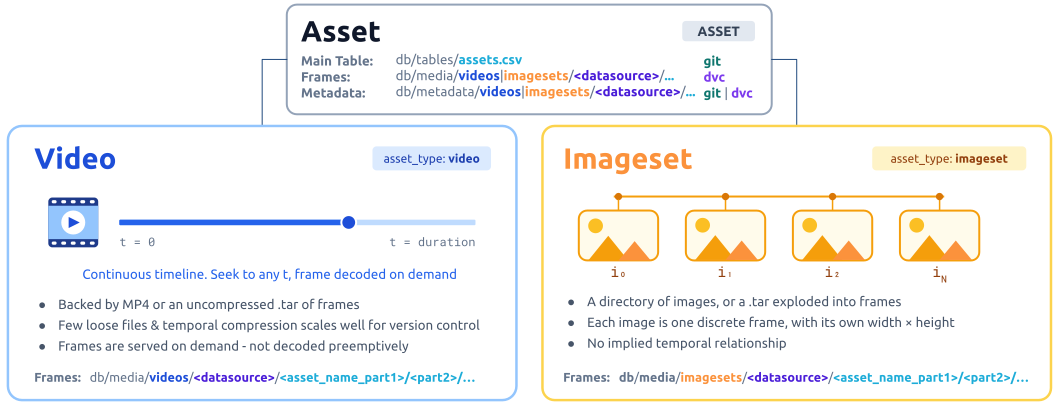
- An Asset is a single Video or Imageset (directory of images).
- A Video implies a temporal relationship and is backed either by:
- A compressed
.mp4file. - An uncompressed
.tarof images (a "tar-of-images").
- A compressed
- An Imageset: can be a directory of images (version controlled at the directory) or similarly an uncompressed
.tarof images.
- A Video implies a temporal relationship and is backed either by:
-
vd3provides consistent iteration of all Asset frames straight from the video, directory, or archive.Benefits of each asset storage mechanism:
Video as .mp4Video or Imageset as .tar("tar-of-images")High temporal compression for space savings No additional re-encoding (vs image to mp4) and easy to inspect each frame Stores original data without modification Kept intact as one DVC blob - good for version control scaling NOTE: It is still possible to store an imageset as a directory of images, but this is not recommended due to the version control overhead (this leads to long transfer times).
-
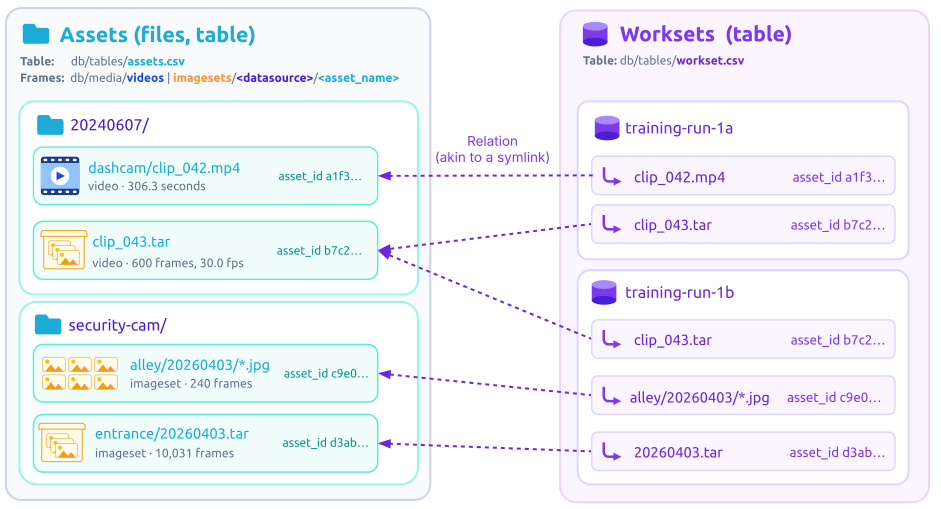
Datasource: groups assets by origin (e.g.
dashcam,security-cam). Datasource is all about traceability to the raw source. If you have questions about “where did this come from” you look at the datasource It is required when importing. -
Workset: a named subset of assets, optionally organized into packages (folders). Independent of storage layout and used as a general purpose organizational tool for your workspace.
- Annotation Layer: Often referred to as just a layer. Layers hold frame-aligned metadata for an asset. By convention they are typically prefixed with a key to describe the type of data (e.g.
gtfor ground truth,det/yolo-v8to describe CNN detections). Layers also have a source:GROUND_TRUTH- the authoritative layer used for computing metrics. Can be derived from human annotations or machine annotations (or a fused combination).HUMAN_ANNOTATED- a layer created by humans. May be reviewed or unreviewed. May contain sparsely annotated frames (every N frames).RESULT- machine annotations from experiments.
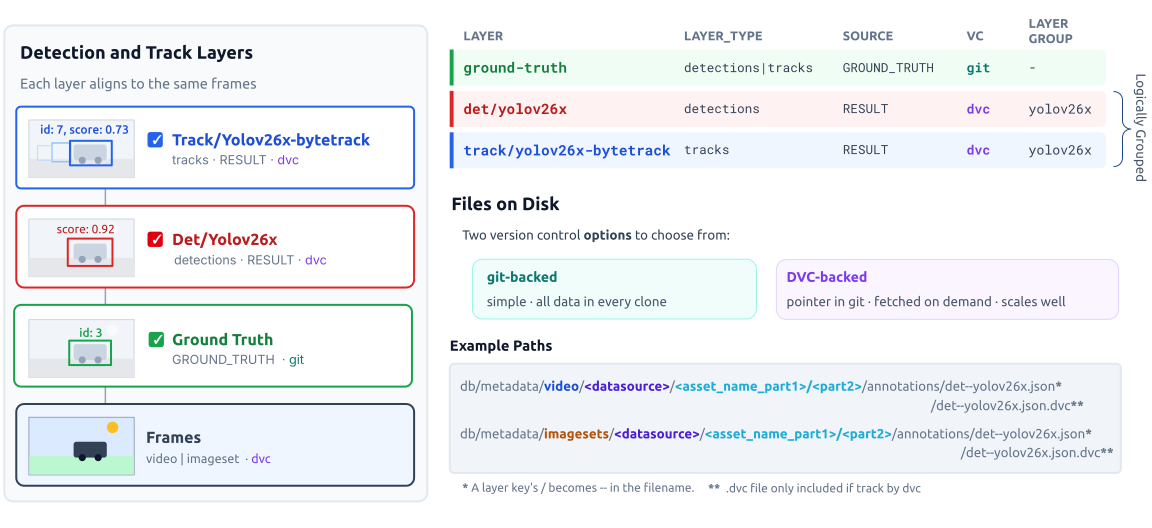
An asset may have at most one GROUND_TRUTH layer per layer-type family (its bbox layers — detections/tracks — and its classification layers are counted separately, so a ground-truth bbox layer and a ground-truth classification layer can coexist). Layers can be git-backed or DVC-backed (recommended at scale). DVC allows fetching layers on demand like media.
A layer can also be kept purely local (uncommitted — for experiments) via --local, then promoted to version-controlled layer. See Local (uncommitted) layers.
-
Imageset Metadata layer: This is special layer for storing arbitrary non-bbox metadata attached per image (labels, attributes, etc). It keeps bulky per-image metadata out of the git-tracked
db/metadata/<datasource>/<asset_name>/imageset.jsonmanifest. Usevd3 layer migrate-imageset-extrato move existing inline content from theextrafield into a imageset metadata layer . -
Layer Group: a per-layer identifier that groups the outputs of one computer-vision solution together (a CNN detector + a background-model MTI detector + the tracker built from either, all belonging to the same pipeline release). Downstream selectors can organize this by these logical groups to better track experiments. See Layer groups.
-
Classification layer + Ontology: a
classificationlayer records fine-grained classes for a tracks layer — its body is anentriesmap keyed bytrack_id, one verdict per track from a single model ({ontology_node_id, raw_label?, confidence?, chips?, …}). It names the tracks layer it describes viatarget_layer, and its classes are governed by an ontology: a git-versioned, hierarchical taxonomy (e.g.Vehicle → Truck → Ford F150) stored in the database, managed with thevd3 ontologynoun. Run several classification layers over one tracks layer (one per model) to keep every model's verdict side by side for consensus. Import withvd3 layer add-classification; inspect withvd3 layer classifications.
Adding Assets
Videos
# Single file
vd3 datasource add-video dashcam clip.mp4

# Glob (recursive)
vd3 datasource add-video dashcam 'rawdata/**/*.mp4'

# Tar-of-images video (frames served from the archive; --fps stamps a nominal rate)
vd3 datasource add-video dashcam frames.tar --fps 30

# Force re-import of a duplicate (matched by SHA-256)
vd3 datasource add-video dashcam clip.mp4 --force

# Add and assign to a workset/package
vd3 datasource add-video dashcam clip.mp4 -w my-workset -k batch1
Imagesets
# Directory of images
vd3 datasource add-imageset my-datasource /path/to/images

# Tar archive
vd3 datasource add-imageset my-datasource images.tar
See also asset and data source name validation rules.
Annotation layers
Import VD3 JSON detections/tracks into an existing asset. The second positional is a
layer-name prefix prepended to every layer field in the file (e.g. importing a
file with det/yolo under run-1 produces run-1/det/yolo):
vd3 layer add-vd3 clip run-1 results.json -p /path/to/mydb
Layers can also be added directly from Python — pass the frame-indexed annotations
plus a source (GROUND_TRUTH / HUMAN_ANNOTATED / RESULT) and a layer_type
(detections / tracks):
from vd3storage import VD3Storage

with VD3Storage("/path/to/mydb") as db:
    asset = db.get_asset("dashcam", "clip1")
    db.add_annotation_layer(
        asset.asset_id,
        layer="det/cnn-v1",
        display_name="CNN detector v1",
        annotations={0: [{"class_name": "car", "bbox": [10, 20, 30, 40], "confidence": 0.91}]},
        source="RESULT",
        layer_type="detections",
    )
Layer groups
A layer_group labels each annotation layer with the computer-vision solution it
belongs to, so multiple outputs from the same pipeline surface together in downstream
tools. This matters as soon as a single "solution" writes more than one layer per asset —
which is the common case for modern CV pipelines. Consider a solution named sb-v3 that
runs three stages:
layer |
layer_type |
layer_group |
What it holds |
|---|---|---|---|
det/sb-v3-cnn |
detections | sb-v3 |
CNN detector output (per-frame boxes) |
det/sb-v3-mti |
detections | sb-v3 |
MTI detector output (from a background model) |
track/sb-v3 |
tracks | sb-v3 |
Tracker output that fused the two detection sources |
Terminology
det- Detection (e.g. bounding box)track- A detection with temporal information (e.g. bounding box with track id)MTI- Moving Target Indicator (e.g. bounding box from background subtraction method)
All three carry layer_group="sb-v3". When you open the asset in VisData, the layer picker
shows one entry for sb-v3, and clicking it exposes the three underlying overlays
individually — you can toggle the CNN detections, the MTI detections, and the resulting
tracks against each other without hunting through the full flat list.
Default rule — when layer_group is not set explicitly, vd3 uses the trailing
segment of the layer field after the last /, so a common naming convention already
groups related layers together for free:
# The det/track pair land in group "sb-v3" via the default rule; the MTI layer
# defaults to its own group -- see below.
db.add_annotation_layer(asset.asset_id, "det/sb-v3",   "SB v3 CNN", cnn_dets, source="RESULT", layer_type="detections")
db.add_annotation_layer(asset.asset_id, "det/sb-v3-mti", "SB v3 MTI", mti_dets, source="RESULT", layer_type="detections")  # default -> "sb-v3-mti"
db.add_annotation_layer(asset.asset_id, "track/sb-v3", "SB v3 tracks", tracks, source="RESULT", layer_type="tracks")
Notice the MTI layer defaults to its own group because the trailing segment is
sb-v3-mti. To pull it into the shared sb-v3 group, pass layer_group= explicitly:
db.add_annotation_layer(
    asset.asset_id,
    layer="det/sb-v3-cnn",
    display_name="SB v3 CNN",
    annotations=cnn_dets,
    source="RESULT",
    layer_type="detections",
    layer_group="sb-v3",          # <- explicit
)
db.add_annotation_layer(
    asset.asset_id,
    layer="det/sb-v3-mti",
    display_name="SB v3 MTI",
    annotations=mti_dets,
    source="RESULT",
    layer_type="detections",
    layer_group="sb-v3",          # <- share the group with the CNN layer
)
db.add_annotation_layer(
    asset.asset_id,
    layer="track/sb-v3",
    display_name="SB v3 tracks",
    annotations=tracker_output,
    source="RESULT",
    layer_type="tracks",
    layer_group="sb-v3",          # <- and with the tracker built from them
)
When you write a layer JSON directly — for example when generating results from a
model-serving pipeline that emits VD3 JSON files — set the layer_group field in the
body itself:
{
  "layer": "det/sb-v3-mti",
  "display_name": "SB v3 MTI detections",
  "layer_type": "detections",
  "layer_group": "sb-v3",
  "source": "RESULT",
  "frames": { "0": [ ... ], "1": [ ... ] }
}
Import it the same way as any VD3 JSON layer (vd3 layer add-vd3 …); the layer_group
value round-trips into the asset_layers table on write and is re-read from the JSON
body on future scans. layer_group is stored and queryable, but no CLI listing groups by
it today — the database-wide inventory aggregates by layer key:
vd3 layer list          # per-layer-key coverage: Layer / Types / Assets / %
vd3 asset layers clip1  # per-asset detail
Import COCO Annotations
Import COCO annotations into an existing imageset:
vd3 layer add-coco my-imageset gt annotations.json \
    --source GROUND_TRUTH --reviewed-all
Import a full COCO dataset (creates the imageset and imports annotations in one step):
vd3 datasource add-imageset-from-coco my-datasource gt annotations.json \
    --image-root /path/to/images
Git-backed vs. DVC-backed annotations
Annotation layers are git-backed by default — the JSON is committed directly, so
it's always present after a clone (ideal for small ground-truth files). Large or bulky
layers can instead be DVC-backed, like media: git tracks only a small .json.dvc
pointer, and the body is fetched on demand and travels with its media on push/pull.
(Media/video files are always DVC-backed; only annotations offer the choice.)
Add a new layer straight to DVC with --dvc:
vd3 layer add-vd3 clip run-1 results.json --dvc -p /path/to/mydb
Already have layers on disk? Use add-to-dvc to add them to version control via DVC.
It handles both cases uniformly: a brand-new, not-yet-committed layer is added straight
to DVC, and a layer already tracked by Git is untracked from Git first, then added.
Preview first, then scope by asset/layer or add everything (optionally only layers above
a size):
vd3 layer add-to-dvc --all --dry-run        # preview what would be added
vd3 layer add-to-dvc --all                  # add every layer
vd3 layer add-to-dvc clip --layer det/qm    # or scope to one asset/layer
vd3 layer add-to-dvc --all --min-size 1     # only layers ≥ 1 MB
Use --layer to add just one layer while leaving the rest un-added — handy when some
layers on an asset are ready to version but others are still work-in-progress and should
stay uncommitted:
# Add only det/qm to DVC across every asset; det/wip and any others are left as-is.
vd3 layer add-to-dvc --all --layer det/qm
add-to-dvc git rm --cacheds each already-tracked body, dvc adds it, and writes the
.dvc pointer plus an annotations/.gitignore entry. Afterward, commit the new pointers
and .gitignore, then push the bodies to your remote:
vd3 media push --all
add-to-dvc scans each registered asset's db/metadata/.../annotations/ directory and acts
on every *.json body it finds (subject to --layer / --min-size) — including a file
dropped in by hand, which is dvc add-ed as-is, with no schema check. Importing instead
(vd3 layer add-vd3 … --dvc, or import then add) validates the body against the VD3 layer
schema before it is versioned.
Local (uncommitted) layers
Running experiments you're not ready to share? Add a layer with --local and nothing about it
enters version control — not the annotations, not even the layer's name. Its JSON body is
excluded through .git/info/exclude (which is per-clone and never committed, just like the layer
itself) and its index row goes into a git-ignored asset_layers_local.csv sidecar instead of the
committed asset_layers.csv. So git add -A sweeps up nothing, and your teammates never see rows
pointing at layers they don't have.
# Import an experiment as a local, uncommitted layer
vd3 layer add-vd3 clip exp-42 results.json --local -p /path/to/mydb

# (COCO too — create the imageset first, then import the layer locally)
vd3 datasource add-imageset-from-coco … then: vd3 layer add-coco porch gt anns.json --local
Local layers still behave normally in your workspace — they show up in vd3 asset layers
(marked local in the Storage column) and are readable/queryable. --local is mutually
exclusive with --dvc (DVC implies sharing).
When an experiment proves out, promote it into version control — a one-way operation:
vd3 layer track-local clip exp-42/det/yolo --dry-run   # preview
vd3 layer track-local clip exp-42/det/yolo             # strip the local flag, git-stage the body,
                                                       # move the row into asset_layers.csv
After track-local the layer is a normal git-backed layer; commit it to share, or run
vd3 layer add-to-dvc if it's large. There is no reverse command (version-controlled → local).
The layer JSON files under db/metadata/.../annotations/ are the source of truth; the
asset_layers.csv / asset_layers_local.csv tables are derived caches. If they ever drift
(out-of-band file edits, a git checkout, a pull), rebuild them from disk:
vd3 layer reassociate --dry-run   # preview what would change
vd3 layer reassociate             # rescan every asset, re-split local vs. shared, drop dangling rows
reassociate also repairs local layers' git exclusions: it re-asserts a .git/info/exclude rule
for every local layer on disk — needed after a git init (or re-clone) that post-dates them, since
that file is per-clone — and migrates any 1.1.0-era rule out of the tracked annotations/.gitignore.
Practical usage example
A full round-trip — add an experiment locally, rename it, confirm the annotations never leak
into git, then promote it once it proves out (assumes an asset clip and VD3_DB set, or pass
-p <db>):
# 1) Add an experiment as a local (uncommitted) layer
vd3 layer add-vd3 clip exp1 results.json --local   # imports under the "exp1/…" prefix, kept local

# 2) It's local — the Storage column shows "local", and the body is excluded from git
vd3 asset layers clip
git status --short                                  # nothing referencing the layer shows up
git check-ignore -v db/metadata/videos/*/clip/annotations/exp1--det--yolo.json
                                                    # -> .git/info/exclude

# 3) Rename it (rename previews by default; --no-dry-run applies)
vd3 layer rename exp1/det/yolo exp2/det/yolo --asset clip --no-dry-run

# 4) Still local after the rename
vd3 asset layers clip                               # now exp2/det/yolo, Storage = local
git add -A && git status --short                    # the renamed body is NOT staged — the
                                                    # exclude rule moved with it

# 5) When you're ready to share it (one-way)
vd3 layer track-local clip exp2/det/yolo            # promotes it into version control
add-vd3's second argument is a prefix prepended to each layer field in the file, so a file
containing det/yolo becomes exp1/det/yolo — hence the full key in the rename.
Layer versioning (status, push, pull, revert)
DVC-backed annotation layers have the same push/pull lifecycle as media, plus tooling to
inspect sync state and undo local edits. These commands are grouped under a Versioning
panel in vd3 layer --help. All of push / pull / revert scope with
--asset / --datasource / --workset / --all.
See what's synced and what changed locally — a per-layer counterpart to vd3 media status:
vd3 layer status                     # backing breakdown (git / dvc / local-only) + DVC sync state
vd3 layer status --list              # one row per layer (Datasource/Asset/Layer/Backing/Status)
vd3 layer status --datasource dashcam
The summary and the by-datasource table group layers by backing — git-tracked,
DVC-tracked, and local-only (uncommitted, tracked by neither) — so each is equally
visible. A second summary line and --list report each DVC layer's sync state: synced (on the
remote), local (not pushed), remote-only (pointer present, body not pulled), modified
(edited since its last dvc add, or uncommitted git changes for a git-backed layer), or local
(DVC-backed but no remote configured); a committed git-backed layer is git-tracked, a git-backed
body that is not yet committed (tracked by neither git nor DVC) is untracked and counts under
Local Only, and a stamped local layer is local-only.
Push / pull layer bodies — a layer-only counterpart to vd3 media push / pull (which
bundle media and layers). Use these to move just the annotations:
vd3 layer push --datasource dashcam  # upload DVC-backed layers in the datasource
vd3 layer pull --workset my-experiment
vd3 layer push --all                 # every DVC-backed layer in the database
A layer shown as
modifiedwon't upload its new bytes with a plain push —dvc pushsends what the.dvcpointer currently references. Re-record it first (dvc add db/metadata/.../annotations/<layer>.json), thenvd3 layer push.
Revert local modifications — discard edits and restore the last-recorded content (DVC-backed bodies from the DVC cache, git-backed tracked bodies from git). Dry-run by default, so you always preview first:
vd3 layer revert --all               # DRY RUN — lists what would be reverted, changes nothing
vd3 layer revert --all --no-dry-run  # actually restore
vd3 layer revert --asset clip        # scope to one asset
Untracked git-backed bodies have no previously-recorded version, so revert leaves them
untouched.
Worksets
# Create
vd3 workset create "My Experiment"

# Add assets by name or ID
vd3 workset add my-experiment clip-001 clip-002

# ...or by media-path glob (run from the database root; files must be on disk)
cd /path/to/mydb
vd3 workset add my-experiment 'db/media/videos/fc/*.mp4'

# Inspect
vd3 workset list
vd3 workset show my-experiment      # metadata + packages (use `workset layers` for layers)
vd3 workset assets my-experiment    # assets in the workset

# Edit the workset's own attributes
vd3 workset set-description my-experiment "Held-out clips for the v3 eval"
vd3 workset rename my-experiment "My Experiment V2"
vd3 workset rename my-experiment "My Experiment V2" --slug my-experiment-v2

# Remove an asset / delete the workset
vd3 workset remove my-experiment clip-001
vd3 workset delete my-experiment
Changing the slug is safe: membership is keyed by the workset's ID and no on-disk path contains the slug, so the workset's assets come along unchanged. The new slug must be unused.
Datasources
A datasource is a name carried on its assets, plus an optional description row that exists only to hold that description:
vd3 datasource list
vd3 datasource set-description dashcam "Forward-facing 2024 dashcam clips"
Removing one is therefore ambiguous — forget the description, or delete everything under the name? — so the command makes you say which:
vd3 datasource remove dashcam                       # DRY RUN; blocks if the datasource has assets
vd3 datasource remove dashcam --assets              # DRY RUN — lists what would go, changes nothing
vd3 datasource remove dashcam --assets --no-dry-run # delete the assets and the description row
vd3 datasource remove dashcam --assets --media --no-dry-run   # ...and the media files
Three things guard it, the same three that guard vd3 layer remove:
- A populated datasource is refused unless you pass
--assets, with an error naming the asset count. An empty one just drops its description row.--mediameans nothing on its own and is rejected without--assets. - Dry run is the default. Nothing is deleted until you pass
--no-dry-run; there is no confirmation prompt, so every invocation stays scriptable. - The blast radius is printed before anything is deleted, on both paths — the assets, the
layer-index rows the cascade drops, the media size (or
not pulled, size unknownfor DVC-backed media that isn't local, ormissing from diskwhen there is no pointer either), and whether a description row goes. The preview and the real run share one rendering, so what you read is what happens; the real run then confirms with aRemoved datasource …line once the work is done.
The cascade is all-or-nothing. Files are moved aside rather than destroyed and the affected
rows are snapshotted first, so a failure on the tenth asset — or a failed rename — rolls the whole
operation back and reports Rolled back — nothing was deleted. rather than leaving you with half a
datasource. Only once every row and file is dealt with are the staged copies destroyed. In the rare
case where the rollback itself cannot put a file back, vd3 says so — RECOVERY NEEDED, with the
paths and the journal that describes them — instead of claiming a clean rollback.
A killed process is recovered on the next open. Before anything moves, vd3 snapshots the table files the removal will rewrite and journals every path it may move — both fsynced — so an interrupted removal can be finished deterministically: if the deletion had not been committed, rows and media are restored together (a crash midway through writing the tables cannot leave orphan tags or memberships behind); if it had, the staged copies are binned. Recovery runs before the database's tables are read, validates every journal entry before moving anything, and leaves a journal that is unreadable, altered, or names a path outside the database in place for you to look at rather than guessing — including a journal whose entries do not account for everything sitting in the staging area. It will also never overwrite a file that has reappeared at an original path: both copies are kept and reported.
And it never claims more than it knows. Rolled back — nothing was deleted. appears only after
a rollback verified complete. If files could not be put back you get RECOVERY NEEDED with their
locations; if the rows were deleted but recording the outcome failed you get OUTCOME UNCERTAIN,
because at that point the journal on disk — not the command — decides what the next open does.
A delete only ever touches paths inside the database. An asset's media_path is data — it can
be hand-edited in assets.csv — so it is validated on write and on load (must be relative, no
..), and re-checked at use time against the datasource directory it must live in. A media file
or directory that turns out to be a symlink pointing out of the database is refused, not followed.
Deleting media is not recoverable from the content database itself. Empty per-datasource
directories left under db/media/ and db/metadata/ are pruned with rmdir only — a stray file
blocks the removal rather than being destroyed.
Remote Storage
Media files are tracked by DVC. A content database has a single configured remote.
# Set the remote (replaces any existing one)
vd3 media remote set gs://my-bucket/vd3-data
vd3 media remote show

# Sync (push and pull both accept --workset/-w, --asset/-a, --datasource/-d, --all)
vd3 media push --all
vd3 media pull --workset my-experiment
vd3 media status
Supported backends:
| Backend | URL form | Notes |
|---|---|---|
| Google Cloud Storage | gs://bucket/path |
gcloud auth application-default login |
| Amazon S3 | s3://bucket/path |
Standard AWS credential chain |
| Azure Blob Storage | azure://container/path |
|
| Google Drive | gdrive://folder-id |
via dvc-gdrive |
| Local / NAS | /mnt/nas/vd3-backup |
Override DB Path
All commands that accept --path also honor the VD3_DB environment variable, so
you can point at a database once and drop the -p flag from individual commands.
On startup vd3 automatically loads a .env file from the current directory or
the nearest ancestor, so a project-level .env containing:
VD3_DB=/path/to/mydb
is enough — no export or shell sourcing required:
vd3 asset list
vd3 media status
Precedence: explicit --path > shell-exported VD3_DB > .env VD3_DB > current
directory. Shell-exported values win over .env so you can do one-off overrides
without editing the file.
--path on a specific command still overrides the env var.
Listing & Inspection
vd3 asset list                       # all assets (cross-container)
vd3 datasource list                  # all datasources
vd3 datasource assets dashcam        # assets in a datasource
vd3 datasource assets dashcam --paths      # one media path per line
vd3 datasource assets dashcam --filenames  # one filename per line
vd3 datasource layers dashcam        # annotation layers across the datasource
vd3 workset assets my-experiment     # assets in a workset
vd3 workset layers my-experiment     # annotation layers across the workset
vd3 asset layers clip                # annotation layers on an asset
vd3 layer list                       # annotation layers across the whole database (per-layer coverage)
vd3 layer status                     # layers by backing (git / dvc / local-only) + DVC sync state
vd3 asset show clip                  # asset details
vd3 db info                          # database overview
vd3 db query "SELECT ..."            # raw DuckDB SQL against the CSV tables
vd3 db doctor                        # consistency check across tables, media and metadata
Health Checks
vd3 db doctor scans a content database for the ways its CSV tables and its on-disk tree can
disagree, and reports each finding as OK, WARN or ERROR. Without --fix the checks only
read, and it exits non-zero if anything ERROR-level turns up, so it drops straight into CI.
(One caveat worth knowing: opening a database applies any pending schema migration and rewrites
db/tables/.schema_version — true of every vd3 command, db doctor included. The schema
check reads the marker before that open, so it reports what was on disk rather than what the open
left behind.)
vd3 db doctor          # report only (exit 1 on any ERROR)
vd3 db doctor --fix    # apply the safe repairs, then list what still needs a human
What it checks:
| Check | Looks for |
|---|---|
schema |
.schema_version present and matching the version this vd3 understands |
layer-tables |
asset_layers.csv / asset_layers_local.csv vs. the annotation JSONs on disk |
ground-truth |
Assets carrying more than one GROUND_TRUTH layer |
media |
Assets whose media_path has neither a local file nor a .dvc pointer |
media-pointers |
.dvc pointers under db/media/ with no asset row behind them |
media-pointers-unpulled |
Orphaned .dvc pointers whose media was never fully pulled (never auto-removed) |
workset-assets |
Membership rows referencing a missing asset or workset |
tags / evaluations |
Rows referencing a missing asset / workset scope |
metadata-dirs |
Directories under db/metadata/ with no row in assets.csv |
asset-metadata |
Imported assets whose metadata directory is gone |
--fix applies only the provably safe repairs: rebuilding the layer index, deleting orphaned
.dvc pointer files whose media is still here locally, and dropping stale workset-membership
rows. No asset, media file or annotation body is ever deleted — duplicate ground truth,
missing media and a schema version from the future are reported for a human to resolve. An
orphaned pointer whose media was never pulled is reported too, never deleted: with no local copy
that pointer is the only record of the content's md5, and removing it would strand the bytes in
the DVC cache/remote. The doctor is entirely offline (it never
shells out to DVC); for remote sync state use vd3 media status.
Exporting
# Extract frames from a video or images from an imageset
vd3 asset export-frames clip -o ./out
Library API
The CLI is a thin wrapper around VD3Storage, which is also usable directly.
from vd3storage import VD3Storage, Asset, Workset  # Tag, WorksetAsset also exported

# Open an existing database (or use VD3Storage.init(path) to create one)
storage = VD3Storage("/path/to/mydb")

# Browse assets
for a in storage.list_assets(datasource="dashcam"):
    print(f"{a.name} ({a.asset_type}): {a.frame_count} frames @ {a.nominal_fps} fps")

# Look up by (datasource, name) or by ID
clip = storage.get_asset("dashcam", "clip-001")
clip = storage.get_asset_by_id("3f1a...")

# Import a video
asset = storage.import_video("clip.mp4", datasource="dashcam")

# Resolve where the media file lives on disk
storage.resolve_media_path(clip)

# Annotation layers
storage.list_annotation_layers(clip.asset_id)
storage.read_annotation_layer(clip.asset_id, "gt")

# Worksets
ws = storage.create_workset("My Experiment")
storage.add_asset_to_workset(ws.workset_id, clip.asset_id, package="batch1")
storage.list_workset_assets(ws.workset_id)

# Raw DuckDB SQL against the underlying CSV tables
rows = storage.execute_sql("SELECT name, frame_count FROM assets WHERE asset_type = 'video'")
Other useful methods: import_imageset, import_coco, import_coco_dataset, import_result, export_coco, open_video, open_imageset, get_frame_image, add_tag, is_media_available, pull, push. Inspect help(VD3Storage) for the full surface.
Versioning & stability
The package follows Semantic Versioning. All notable
changes are recorded in CHANGELOG.md, and every release is
tagged vX.Y.Z in git.
Since 1.0.0 (2026-07-13) the package follows strict SemVer: MAJOR = breaking,
MINOR = additive, PATCH = fix. Every breaking change is called out under a
### Breaking heading in the CHANGELOG entry for that release.
(Before 1.0.0, minor bumps such as 0.2 → 0.3 could contain breaking changes; the pre-1.0 entries in the CHANGELOG should be read with that in mind.)
Public API
A change is "breaking" only if it alters one of the following:
- Names re-exported from the top-level
vd3storagepackage (i.e. listed invd3storage.__all__):VD3Storageand its documented methodsAlreadyInitializedError- The model classes
Asset,Tag,Workset,WorksetAsset(including their field names and types) __version__
- The
vd3CLI — command names, option names, exit codes, and the documented input file formats (VD3 JSON, COCO). - The on-disk layout of a content database — directory structure under
db/, CSV table schemas (tracked bySCHEMA_VERSIONindb/tables/), the shape ofvideo.json/imageset.json/ annotation JSON files, and the structure of generatedpyproject.toml/.gitignore.
Everything else is internal and may change without a major-version bump
even if it is reachable via an import path. That includes the vd3storage.orm,
vd3storage.dvc, vd3storage.media, vd3storage.importers,
vd3storage.exporters, and vd3storage.cli submodules; helper functions in
vd3storage.storage that start with _; and the on-disk format of files
written into .dvc/ (those belong to DVC).
Deprecations
When a public API needs to change incompatibly, the old form keeps working and
emits DeprecationWarning for at least one minor release before being removed.
Current deprecations are listed in the CHANGELOG under each release's
### Deprecated heading.
To surface them in your own code:
python -W "default::DeprecationWarning:vd3storage" your_script.py
CLI Reference
vd3 --help                       Top-level help
vd3 <noun> --help                Help for a noun
vd3 <noun> <verb> --help         Help for a specific command
Every command reads vd3 <noun> <verb> [args]. Positionals carry identity
(target → composite parts → payload); flags carry modifiers
(--paths, --filenames, --source GROUND_TRUTH, ...).
| Command | Description |
|---|---|
db init |
Initialize a content database (defaults to cwd) |
db info |
Show database overview |
db query |
Run raw DuckDB SQL against the CSV tables |
db doctor |
Check the database for consistency problems (--fix applies the safe repairs) |
datasource list |
List datasources |
datasource show |
Show datasource stats |
datasource assets |
List assets in a datasource |
datasource layers |
List annotation layers across a datasource (per-layer coverage) |
datasource add-video |
Import video files into a datasource |
datasource add-imageset |
Import an imageset (directory or tar) into a datasource |
datasource add-imageset-from-coco |
Import a COCO dataset as imageset + layer |
datasource set-description |
Set a datasource's human-readable description |
datasource remove |
Remove a datasource: its description row, and with --assets (required if it has any) every asset in it, plus --media for the files; dry-run by default (--no-dry-run to apply) |
workset create |
Create a workset |
workset list |
List worksets |
workset show |
Show workset metadata + packages |
workset assets |
List assets in a workset |
workset layers |
List annotation layers across a workset (per-layer coverage) |
workset add |
Add assets to a workset |
workset remove |
Remove an asset from a workset |
workset set-description |
Set a workset's description |
workset rename |
Rename a workset (--slug also changes its slug; membership is unaffected) |
workset delete |
Delete a workset (assets are kept) |
asset list |
List every asset (cross-container) |
asset layers |
List annotation layers on an asset |
asset show |
Show asset details |
asset remove |
Delete an asset |
asset export-frames |
Extract frames from a video or imageset |
asset split |
Set dataset split affinity (trainval/train/val/test/omit, or "" for unassigned) |
asset star / unstar |
Set or clear the queryable bookmark flag (asset list --starred filters on it) |
asset set-comments |
Set the free-text comments field on an asset |
asset extra / extra-set |
Read or write a consumer's namespaced blob in extra_json (sibling namespaces preserved) |
asset environment |
Set capture environment (urban, rural, highway, marine, …) |
asset placement |
Set sensor placement (outdoor, indoor, various, unknown) |
asset time-of-day |
Set lighting conditions (day, night, dawn_dusk_cloudy, unknown) |
asset spectrum |
Set sensor spectrum (visible, infrared, various, unknown) |
asset synthetic |
Mark whether the media was synthetically generated (no, yes, unknown) |
layer list |
List annotation layers across the whole database (per-layer coverage) |
layer status |
Break layers down by backing (git-tracked / DVC-tracked / local-only), plus DVC sync state (synced / not pushed / remote-only) and local modifications (--asset/--datasource/--workset, --list) |
layer push |
Push DVC-backed annotation layers to the remote by scope (--asset/--datasource/--workset/--all) |
layer pull |
Fetch DVC-backed annotation-layer bodies from the remote by scope |
layer revert |
Discard local modifications to layers (DVC cache / git); dry-run by default (--no-dry-run to apply) |
layer add-coco |
Import COCO annotations into an existing imageset (--local keeps it uncommitted) |
layer add-vd3 |
Import VD3 JSON detections/tracks under a layer-name prefix (--dvc stores them DVC-backed; --local keeps them uncommitted) |
layer add-classification |
Import a fine-grained classification file as a classification layer (--target-layer, --ontology, --source) |
layer classifications |
Print a classification layer's per-track verdicts with node paths resolved (--track, --node) |
layer rename |
Rename a layer key on one asset (--asset) or every asset (--all); dry-run by default (--no-dry-run to apply) |
layer remove |
Delete a layer from one asset (--asset) or every asset that has it (--all, required); dry-run by default (--no-dry-run to apply) |
layer add-to-dvc |
Add layers to version control via DVC, or migrate Git-backed layers to DVC (--layer, --all, --min-size, --dry-run) |
layer track-local |
Promote a local (uncommitted) layer into version control — one-way (--dry-run to preview) |
layer reassociate |
Rebuild asset_layers.csv / asset_layers_local.csv from the on-disk layer JSONs; drops rows for deleted assets (--dry-run to preview) |
layer source |
Re-classify a layer's source (GROUND_TRUTH / HUMAN_ANNOTATED / RESULT) |
layer promote |
Promote a result layer to ground truth |
layer approve / reject |
Record a human review verdict on a ground-truth layer (--by, --reason); surfaces as Asset.gt_reviewed |
layer unreview |
Clear the review verdict and its audit fields |
layer pin / unpin |
Set or clear the asset's canonical RESULT layer (Asset.pinned_result) |
layer migrate-source |
Rewrite legacy human/machine source values to the current taxonomy |
layer migrate-imageset-extra |
Move inline imageset.json extra data into an image_metadata layer |
media status |
Show media availability |
media push |
Push media to remote storage |
media pull |
Pull media from remote storage |
media remote set |
Set the remote storage URL |
media remote show |
Show the configured remote |
eval add |
Record an evaluation/metrics blob for an asset or workset (--run, --metrics, --config) |
eval list |
List recorded evaluations |
eval show |
Show one evaluation's metrics and config |
eval update |
Correct a stored evaluation's --metrics / --config / --run (scope and id are immutable) |
eval remove |
Delete one evaluation by id; dry-run by default (--no-dry-run to apply) |
ontology create |
Create a new, empty ontology (a hierarchical class taxonomy) |
ontology list |
List ontologies (slug, name, node count, roots) |
ontology show |
Show an ontology as a tree (--flat for a path table; --node <ref> scopes to a subtree) |
ontology add-node / rename-node / move-node / remove-node |
Edit the tree; a node ref is a node_id or a path (--ontology when the db has more than one) |
ontology import / export |
Bulk-create a tree from nested JSON / dump it back |
ontology rebuild-paths |
Recompute every node's path from parent_id (mirrors layer reassociate) |
Misc
Asset and datasource names
An asset's name and its datasource are both used verbatim as URL path components and on-disk
metadata/media path segments (…/<datasource>/<name>), so both are validated to stay safe in those
roles.
Asset name - the --name you pass to an ingest command, or the source filename it defaults to
- Allowed characters: letters, digits, and
-_./— all URL-safe. - Slashes are path separators.
--name batch1/clip3nests the asset one directory deeper. Segments between slashes must be non-empty (no leading/trailing/, no//) and must not be.or... - Length: up to 200 characters.
Datasource — same rules, but stricter: because a datasource is a single path/URL segment (never
nested), it may contain no slashes at all (neither / nor \). Allowed characters are letters,
digits, and - _ .; it may not be . or ..; up to 200 characters.
Invalid names are rejected up front (before any file is copied) with a clear error, and are also
validated when a database is loaded — so a hand-edited assets.csv / datasources.csv can't smuggle
in an unsafe value.
Metadata
Release files for vd3 1.2.1
For a detailed explanation of source distributions (sdists) and built distributions (wheels), please see the package formats documentation.
Source distribution (sdist)
| File | Size | Uploaded | |
|---|---|---|---|
| vd3-1.2.1.tar.gz | 756.1 kB | Details |
Built distribution (wheel)
| File | Interpreter | ABI | Platform | Reset |
|---|---|---|---|---|
| vd3-1.2.1-py3-none-any.whl | Python 3 | none | any | Details |
Total release size: 961.7 kB
Release files / vd3-1.2.1.tar.gz
| Download URL | vd3-1.2.1.tar.gz |
|---|---|
| Size | 756.1 kB |
| Tags | Source |
|
SHA-256 checksum How to use checksums |
596031f379012d8afbfac1ee0ed97ea48aaa52f973e0a6ff2fc4204fc85cda63
|
|
BLAKE2b-256 checksum How to use checksums |
5255a249410c508c4deb3341f576a1e70d9b1fd30c8d2f5744c5f25e295fe2f2
|
| Upload date | |
|
Uploaded using Trusted Publishing? What is trusted publishing? |
No |
| Uploaded via |
twine/6.2.0 CPython/3.12.11
|
Release files / vd3-1.2.1-py3-none-any.whl
| Download URL | vd3-1.2.1-py3-none-any.whl |
|---|---|
| Size | 205.6 kB |
| Tags | Python 3 |
|
SHA-256 checksum How to use checksums |
6c9fe16831a0881797858b4671489222544dd05f27891335dd3e9b1ede44b74c
|
|
BLAKE2b-256 checksum How to use checksums |
3d6ca6973e99f14e5d0e3d83fedba2bf881141c5b280d391d9bc85282300af8e
|
| Upload date | |
|
Uploaded using Trusted Publishing? What is trusted publishing? |
No |
| Uploaded via |
twine/6.2.0 CPython/3.12.11
|














