
Efficient LLM inference on Slurm clusters using vLLM.


Project description
Vector Inference: Easy inference on Slurm clusters




This repository provides an easy-to-use solution to run inference servers on Slurm-managed computing clusters using vLLM. All scripts in this repository runs natively on the Vector Institute cluster environment. To adapt to other environments, update launch_server.sh, vllm.slurm, multinode_vllm.slurm and models.csv accordingly.
Installation
If you are using the Vector cluster environment, and you don't need any customization to the inference server environment, run the following to install package:
pip install vec-inf
Otherwise, we recommend using the provided Dockerfile to set up your own environment with the package
Launch an inference server
launch command
We will use the Llama 3.1 model as example, to launch an OpenAI compatible inference server for Meta-Llama-3.1-8B-Instruct, run:
vec-inf launch Meta-Llama-3.1-8B-Instruct
You should see an output like the following:
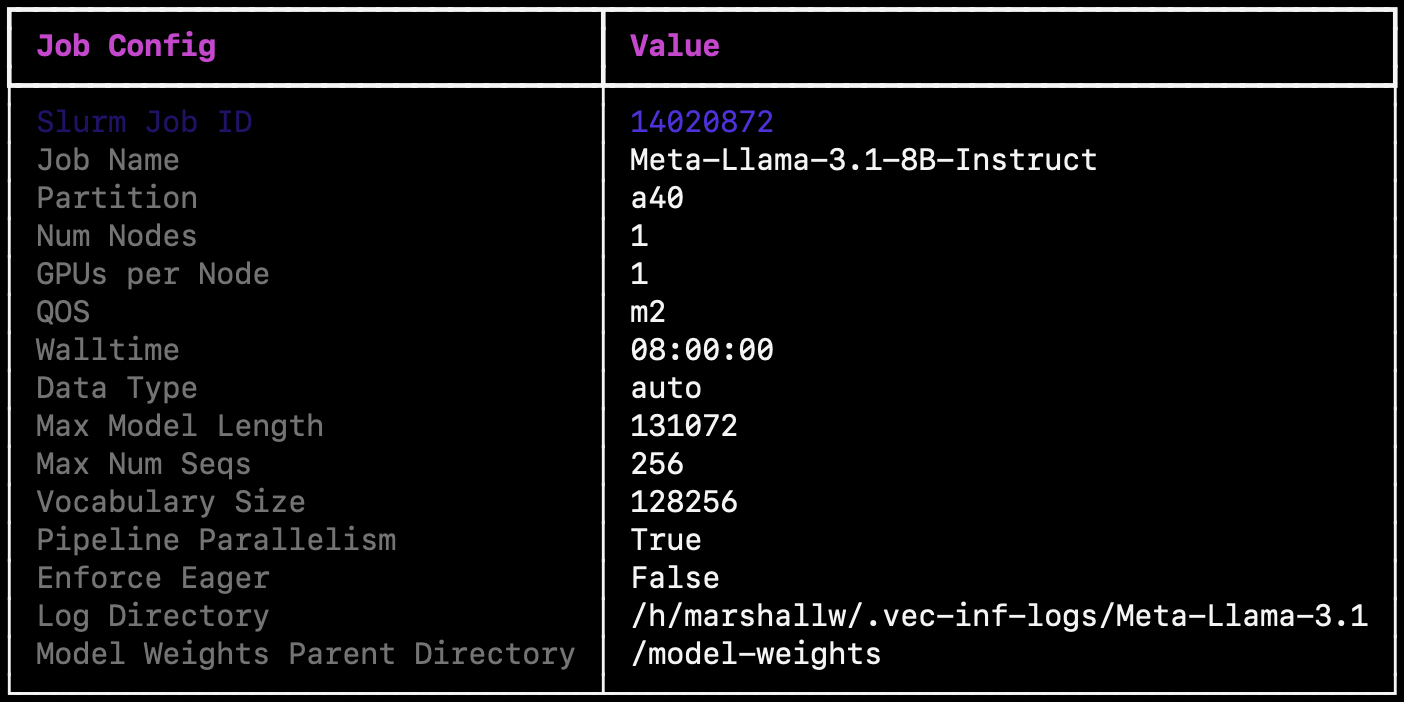
The model would be launched using the default parameters, you can override these values by providing additional parameters, use --help to see the full list. You can also launch your own customized model as long as the model architecture is supported by vLLM, and make sure to follow the instructions below:
- Your model weights directory naming convention should follow
$MODEL_FAMILY-$MODEL_VARIANT. - Your model weights directory should contain HF format weights.
- The following launch parameters will conform to default value if not specified:
--max-num-seqs,--partition,--data-type,--venv,--log-dir,--model-weights-parent-dir,--pipeline-parallelism,--enforce-eager. All other launch parameters need to be specified for custom models. - Example for setting the model weights parent directory:
--model-weights-parent-dir /h/user_name/my_weights. - For other model launch parameters you can reference the default values for similar models using the
listcommand .
status command
You can check the inference server status by providing the Slurm job ID to the status command:
vec-inf status 13014393
You should see an output like the following:
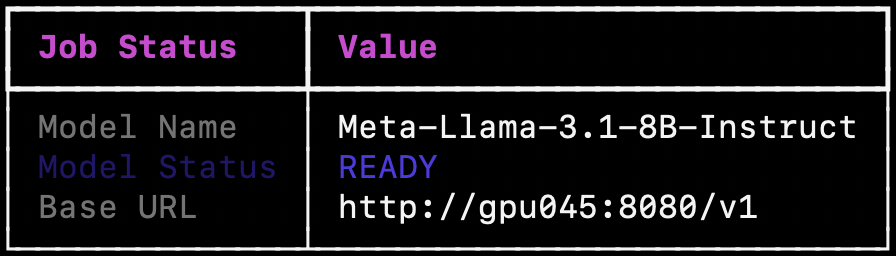
There are 5 possible states:
- PENDING: Job submitted to Slurm, but not executed yet. Job pending reason will be shown.
- LAUNCHING: Job is running but the server is not ready yet.
- READY: Inference server running and ready to take requests.
- FAILED: Inference server in an unhealthy state. Job failed reason will be shown.
- SHUTDOWN: Inference server is shutdown/cancelled.
Note that the base URL is only available when model is in READY state, and if you've changed the Slurm log directory path, you also need to specify it when using the status command.
metrics command
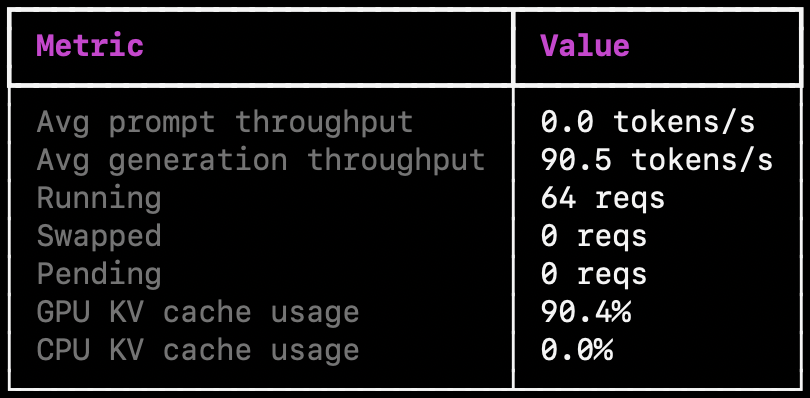
Once your server is ready, you can check performance metrics by providing the Slurm job ID to the metrics command:
vec-inf metrics 13014393
And you will see the performance metrics streamed to your console, note that the metrics are updated with a 10-second interval.
shutdown command
Finally, when you're finished using a model, you can shut it down by providing the Slurm job ID:
vec-inf shutdown 13014393

> Shutting down model with Slurm Job ID: 13014393
list command
You call view the full list of available models by running the list command:
vec-inf list
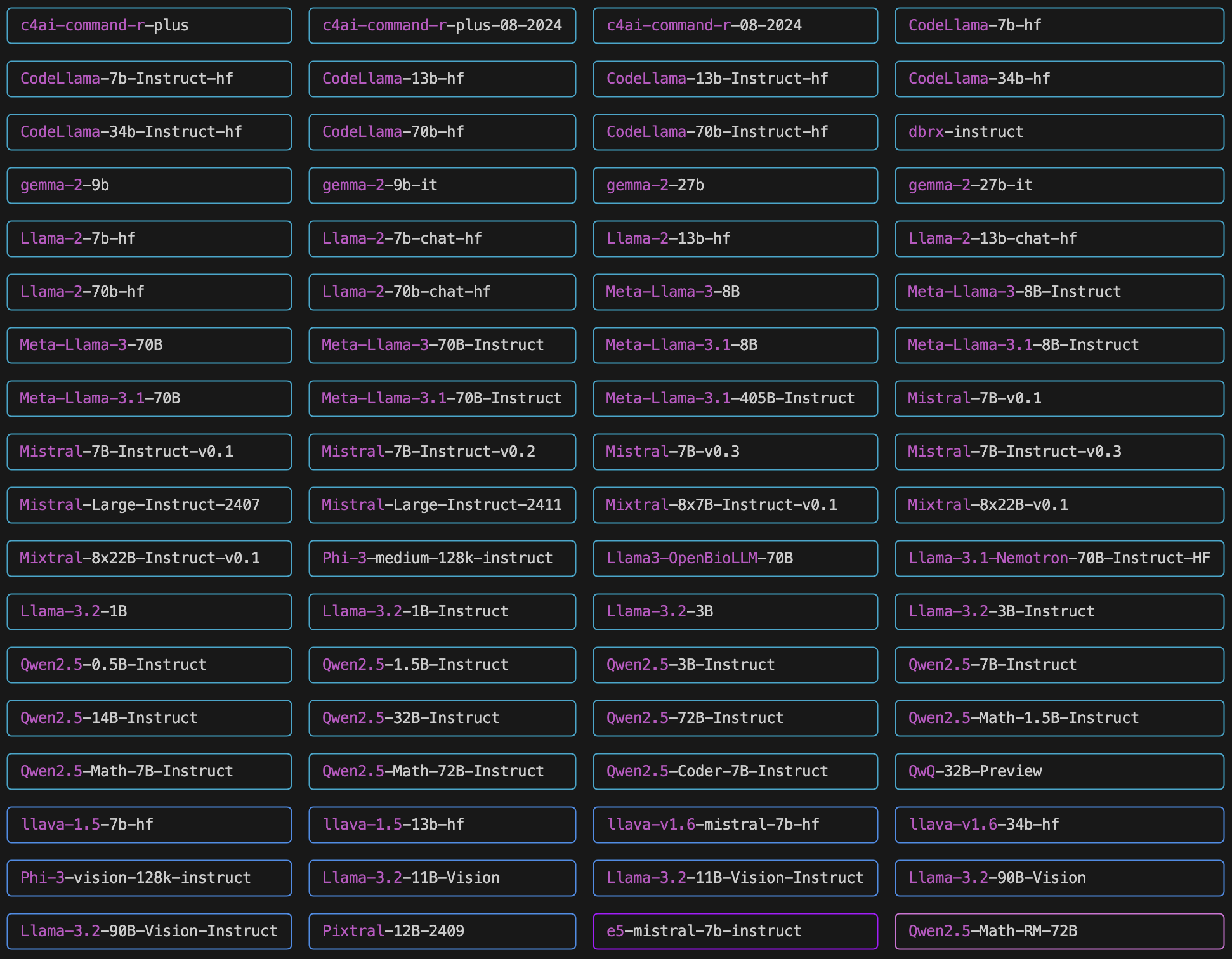
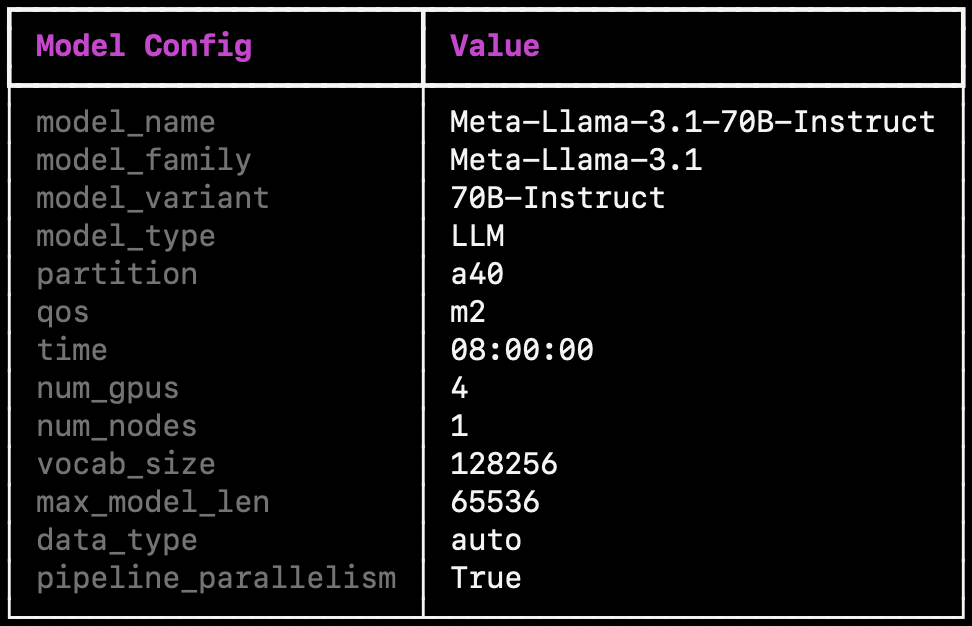
You can also view the default setup for a specific supported model by providing the model name, for example Meta-Llama-3.1-70B-Instruct:
vec-inf list Meta-Llama-3.1-70B-Instruct
launch, list, and status command supports --json-mode, where the command output would be structured as a JSON string.
Send inference requests
Once the inference server is ready, you can start sending in inference requests. We provide example scripts for sending inference requests in examples folder. Make sure to update the model server URL and the model weights location in the scripts. For example, you can run python examples/inference/llm/completions.py, and you should expect to see an output like the following:
{"id":"cmpl-c08d8946224747af9cce9f4d9f36ceb3","object":"text_completion","created":1725394970,"model":"Meta-Llama-3.1-8B-Instruct","choices":[{"index":0,"text":" is a question that many people may wonder. The answer is, of course, Ottawa. But if","logprobs":null,"finish_reason":"length","stop_reason":null}],"usage":{"prompt_tokens":8,"total_tokens":28,"completion_tokens":20}}
NOTE: For multimodal models, currently only ChatCompletion is available, and only one image can be provided for each prompt.
SSH tunnel from your local device
If you want to run inference from your local device, you can open a SSH tunnel to your cluster environment like the following:
ssh -L 8081:172.17.8.29:8081 username@v.vectorinstitute.ai -N
Where the last number in the URL is the GPU number (gpu029 in this case). The example provided above is for the vector cluster, change the variables accordingly for your environment
Release history Release notifications | RSS feed


Download files
Download the file for your platform. If you're not sure which to choose, learn more about installing packages.
Source Distribution
Built Distribution
Filter files by name, interpreter, ABI, and platform.
If you're not sure about the file name format, learn more about wheel file names.
Copy a direct link to the current filters
File details
Details for the file vec_inf-0.4.1.tar.gz.
File metadata
- Download URL: vec_inf-0.4.1.tar.gz
- Upload date:
- Size: 222.9 kB
- Tags: Source
- Uploaded using Trusted Publishing? No
- Uploaded via: uv/0.5.29
File hashes
| Algorithm | Hash digest | |
|---|---|---|
| SHA256 |
1b437c0dc800965fc6559263d51b01de5005446d0bfd1e4b4cde4983d62ec40b
|
|
| MD5 |
b3859756c340bd33f2cc14c995308511
|
|
| BLAKE2b-256 |
6a77bd5628439af615561068b9c36ba2e471e6281ee05b6b2c30bbe2f17d4ad1
|
File details
Details for the file vec_inf-0.4.1-py3-none-any.whl.
File metadata
- Download URL: vec_inf-0.4.1-py3-none-any.whl
- Upload date:
- Size: 20.0 kB
- Tags: Python 3
- Uploaded using Trusted Publishing? No
- Uploaded via: uv/0.5.29
File hashes
| Algorithm | Hash digest | |
|---|---|---|
| SHA256 |
7cb25d4307d32563819cfc575e16bedc8eb659f9f547e806d5fd0e123c36e4e1
|
|
| MD5 |
5f9057afd8f19dfd8d3871cfaacce978
|
|
| BLAKE2b-256 |
4192df6a5081129b9fb651c9782a87834063fe159dfc10ec781ba6b17dede068
|






