

Agentic AI framework for autonomous data engineering, science, and storytelling.




Versifai provides specialized AI agents that automate the complete data lifecycle -from raw file discovery and schema design, through statistical analysis and modeling, to compelling narrative reports. Each agent operates autonomously using a ReAct (Reason-Act-Observe) loop, with human-in-the-loop oversight at every stage.
Built on LiteLLM for multi-provider LLM support (Anthropic, OpenAI, Azure, and 100+ more).
Table of Contents
- Features
- Agent Families
- Installation
- Quick Start
- Usage Examples
- Architecture
- Building Custom Agents
- Configuration
- Contributing
- License
Features
- Autonomous agent loop -ReAct-based agents that reason, act, and observe iteratively until a task is complete
- Multi-provider LLM -Swap between Claude, GPT-4, Azure, Gemini, or any LiteLLM-supported provider with a single parameter
- Modular tool system -Plug-and-play tools with a shared registry; add your own in minutes
- Smart resume -Agents persist state to disk and resume from where they left off after interruption
- Run isolation -Each run gets its own directory with metadata, progress logs, and artifacts
- Human-in-the-loop -Built-in
ask_humantool lets agents pause and request guidance - Databricks native -First-class support for Notebooks, Unity Catalog, Delta tables, and Volumes.
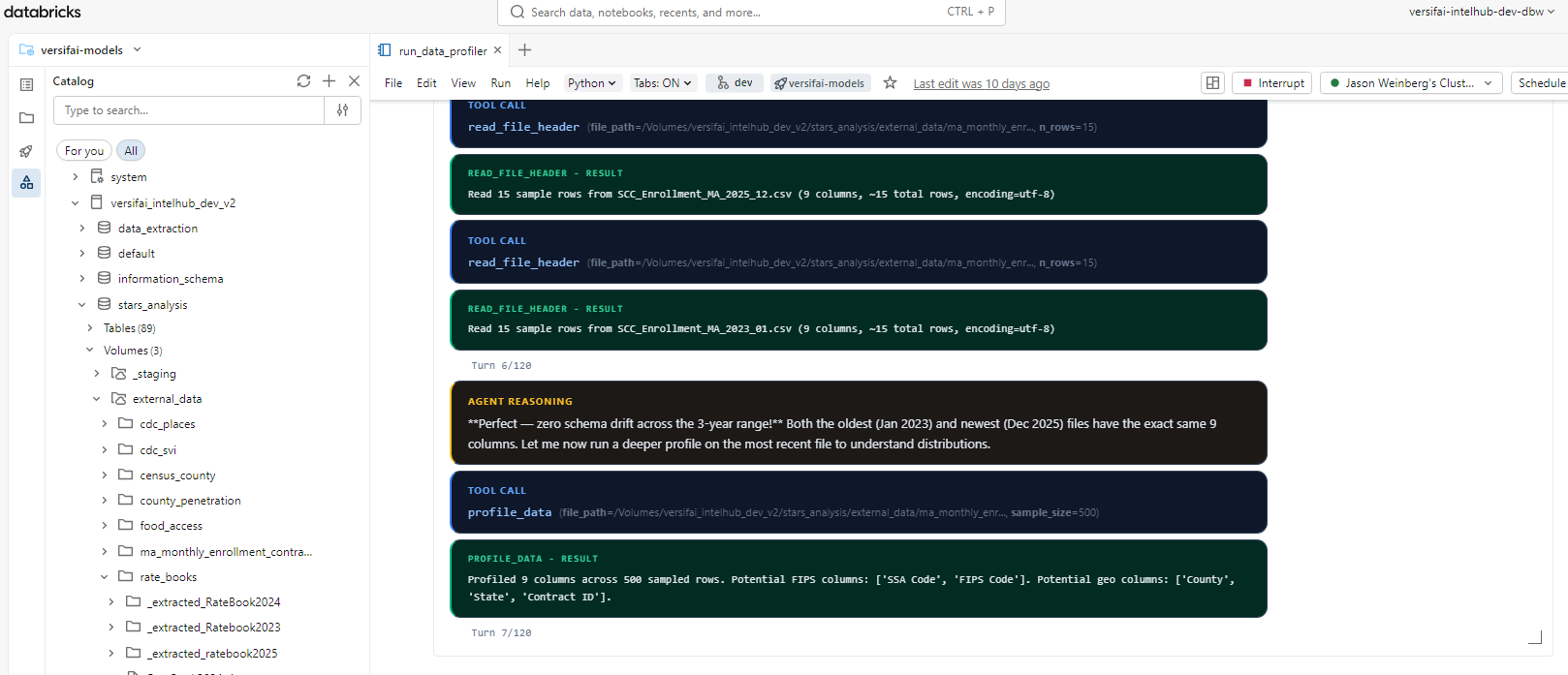
See It In Action
Read a full research report produced end-to-end by Versifai's agent pipeline -from raw CMS data ingestion through statistical analysis to narrative output:
CMS Stars Adjustment: An Autonomous Policy Research Report
Agent Families
| Family | Agents | What It Does |
|---|---|---|
versifai.data_agents |
DataEngineerAgent, DataAnalystAgent |
Discover raw files, profile data, design schemas, transform and load into structured tables. The analyst validates quality. |
versifai.science_agents |
DataScientistAgent |
Autonomous research -builds analytical datasets, runs hypothesis tests, fits models, produces charts and findings. |
versifai.story_agents |
StoryTellerAgent |
Transforms research findings into evidence-grounded narrative reports with citations, visual references, and editorial review. |
Installation
From PyPI
# Install with all runtime dependencies
pip install versifai

# With development tools (ruff, mypy, pytest, pre-commit)
pip install "versifai[dev]"
From Source (development)
git clone https://github.com/jweinberg-a2a/versifai-data-agents.git
cd versifai-data-agents
python -m venv .venv
source .venv/bin/activate
pip install -e ".[dev]"
Quick Start
1. Set your LLM API key
# Anthropic (default)
export ANTHROPIC_API_KEY="sk-ant-..."

# Or OpenAI
export OPENAI_API_KEY="sk-..."
2. Run a data engineering agent
from versifai.data_agents import DataEngineerAgent, ProjectConfig

cfg = ProjectConfig(
    name="Sales Pipeline",
    catalog="analytics",
    schema="sales",
    volume_path="/Volumes/analytics/sales/raw_data",
)

agent = DataEngineerAgent(cfg=cfg, dbutils=dbutils)
result = agent.run()
print(f"Processed {result['sources_completed']} sources")
3. Run a data science agent
from versifai.science_agents import DataScientistAgent, ResearchConfig

cfg = ResearchConfig(
    name="Customer Churn Analysis",
    catalog="analytics",
    schema="churn",
    results_path="/tmp/results/churn",
    themes=[...],  # Define research themes
)

agent = DataScientistAgent(cfg=cfg, dbutils=dbutils)
result = agent.run()
4. Generate a narrative report
from versifai.story_agents import StoryTellerAgent, StorytellerConfig

cfg = StorytellerConfig(
    name="Churn Analysis Report",
    thesis="Customer churn is driven primarily by...",
    research_results_path="/tmp/results/churn",
    narrative_output_path="/tmp/narrative/churn",
    narrative_sections=[...],  # Define report sections
)

agent = StoryTellerAgent(cfg=cfg, dbutils=dbutils)
result = agent.run()
print(f"Wrote {result['sections_written']} sections")
Usage Examples
Multi-Provider LLM Support
Versifai uses LiteLLM under the hood. Switch providers with a single parameter:
from versifai.core import LLMClient

# Anthropic Claude (default)
llm = LLMClient(model="claude-sonnet-4-6")

# OpenAI GPT-4o
llm = LLMClient(model="gpt-4o")

# Azure OpenAI
llm = LLMClient(
    model="azure/gpt-4o",
    api_base="https://my-endpoint.openai.azure.com",
)

# Google Gemini
llm = LLMClient(model="gemini/gemini-1.5-pro")

# Pass the LLM to any agent
agent = DataEngineerAgent(cfg=cfg, dbutils=dbutils)
agent._llm = llm  # Override the default
Smart Resume
All agents support resuming from interruption:
# First run -gets interrupted at source 3 of 10
agent = DataEngineerAgent(cfg=cfg, dbutils=dbutils)
agent.run()  # Ctrl+C after source 3

# Re-run -automatically picks up from source 4
agent = DataEngineerAgent(cfg=cfg, dbutils=dbutils)
agent.run()  # Skips sources 1-3, continues from 4
Running Specific Sections
Both science and story agents support targeted re-runs:
# Re-run only themes 0 and 3
scientist = DataScientistAgent(cfg=cfg, dbutils=dbutils)
scientist.run_themes(themes=[0, 3])

# Re-run only sections 1 and 2 of the narrative
storyteller = StoryTellerAgent(cfg=cfg, dbutils=dbutils)
storyteller.run_sections(sections=[1, 2])
Editorial Review (Human-in-the-Loop)
The storyteller agent has a dedicated editor mode:
agent = StoryTellerAgent(cfg=cfg, dbutils=dbutils)

# Guided review
agent.run_editor(
    instructions="Simplify the methodology section for a policymaker audience."
)

# Open-ended review
agent.run_editor()
Complete Workflow Example
See examples/ for full end-to-end configurations.
from versifai.data_agents import DataEngineerAgent
from versifai.science_agents import DataScientistAgent
from versifai.story_agents import StoryTellerAgent

# Step 1: Engineer ingests raw data
engineer = DataEngineerAgent(cfg=engineer_cfg, dbutils=dbutils)
engineer.run()

# Step 2: Scientist analyzes the data
scientist = DataScientistAgent(cfg=science_cfg, dbutils=dbutils)
scientist.run()

# Step 3: Storyteller writes the report
storyteller = StoryTellerAgent(cfg=story_cfg, dbutils=dbutils)
storyteller.run()
Architecture
src/versifai/
├── core/                  # Shared agentic framework
│   ├── agent.py           # BaseAgent -ReAct loop engine
│   ├── llm.py             # LLMClient -multi-provider via LiteLLM
│   ├── memory.py          # AgentMemory -conversation + carryover context
│   ├── display.py         # AgentDisplay -rich progress output
│   ├── config.py          # CatalogConfig, AgentSettings
│   ├── run_manager.py     # Run isolation + state persistence
│   └── tools/             # Shared tools (BaseTool, ToolRegistry, etc.)
│
├── data_agents/           # Data engineering & analysis
│   ├── engineer/          # DataEngineerAgent + planning + tools
│   ├── analyst/           # DataAnalystAgent (quality validation)
│   └── models/            # FileInfo, TargetSchema, AgentState
│
├── science_agents/        # Data science & research
│   └── scientist/         # DataScientistAgent + analysis tools
│
├── story_agents/          # Narrative & storytelling
│   └── storyteller/       # StoryTellerAgent + narrative tools
│
└── _utils/                # Internal utilities (naming, FIPS codes)
Key Design Patterns
- BaseAgent -All agents subclass
BaseAgent, which provides the ReAct loop, error recovery, and tool dispatch - ToolRegistry -Tools are registered at construction time; the agent's loop automatically matches LLM tool calls to registered tools
- BaseTool -Every tool implements
name,description,parameters_schema, andexecute(). Drop-in replaceable. - AgentMemory -Manages conversation history with automatic summarization for long-running tasks
Building Custom Agents
Create a Custom Tool
from versifai.core import BaseTool, ToolResult

class FetchWeatherTool(BaseTool):
    name = "fetch_weather"
    description = "Fetch current weather for a city"
    parameters_schema = {
        "type": "object",
        "properties": {
            "city": {"type": "string", "description": "City name"},
        },
        "required": ["city"],
    }

    def execute(self, city: str) -> ToolResult:
        # Your implementation here
        data = call_weather_api(city)
        return ToolResult(success=True, data=data)
Create a Custom Agent
from versifai.core import (
    BaseAgent, LLMClient, AgentMemory, AgentDisplay, ToolRegistry,
)

class WeatherAgent(BaseAgent):
    def __init__(self):
        registry = ToolRegistry()
        registry.register(FetchWeatherTool())

        super().__init__(
            display=AgentDisplay(),
            memory=AgentMemory(),
            llm=LLMClient(model="gpt-4o"),
            registry=registry,
        )
        self._system_prompt = "You are a helpful weather assistant."

    def ask(self, question: str) -> str:
        return self._run_phase(prompt=question, max_turns=10)

# Use it
agent = WeatherAgent()
answer = agent.ask("What's the weather in San Francisco?")
Where to Put Your Code
| What you're adding | Where it goes |
|---|---|
| A tool used by multiple agent families | src/versifai/core/tools/ |
| A tool specific to one agent | src/versifai/<family>/<agent>/tools/ |
| A new agent in an existing family | src/versifai/<family>/<new_agent>/ |
| A new agent family | src/versifai/<new_family>/ |
| Shared config or data models | src/versifai/core/config.py or src/versifai/<family>/models/ |
| Internal helpers | src/versifai/_utils/ |
Configuration
CatalogConfig (shared)
All agents that interact with Databricks Unity Catalog use CatalogConfig:
from versifai.core import CatalogConfig

catalog = CatalogConfig(
    catalog="my_catalog",
    schema="my_schema",
    volume_path="/Volumes/my_catalog/my_schema/data",
    staging_path="/Volumes/my_catalog/my_schema/staging",
)
AgentSettings (shared)
Tune agent behavior globally:
from versifai.core import AgentSettings

settings = AgentSettings(
    max_agent_turns=200,        # Max ReAct iterations per run
    max_turns_per_source=120,   # Max turns per data source
    max_acceptance_iterations=3, # Validation retry limit
    sample_rows=10,             # Rows shown in profiling previews
)
Environment Variables
| Variable | Purpose | Required |
|---|---|---|
ANTHROPIC_API_KEY |
Anthropic Claude API key | If using Claude |
OPENAI_API_KEY |
OpenAI API key | If using GPT models |
DATABRICKS_HOST |
Databricks workspace URL | For catalog operations |
DATABRICKS_TOKEN |
Databricks PAT | For catalog operations |
Contributing
We welcome contributions! See CONTRIBUTING.md for the full guide.
Quick Start for Contributors
git clone https://github.com/jweinberg-a2a/versifai-data-agents.git
cd versifai-data-agents
python -m venv .venv && source .venv/bin/activate
make install-dev   # installs with all deps + pre-commit hooks
make test          # run tests
make lint          # check code style
make format        # auto-format code
Where to Contribute
- New tools -The easiest way to contribute. Subclass
BaseTool, implementexecute(), and submit a PR. See Building Custom Agents for the pattern. - New agents -Add a new agent type to an existing family or propose a new family.
- LLM provider support -We use LiteLLM, so most providers work out of the box. If you find one that doesn't, help us fix it.
- Documentation and examples -Add example configs in
examples/for your domain. - Bug fixes and tests -Always appreciated.
License
Business Source License 1.1. Free to use, modify, and extend for non-commercial purposes. See LICENSE for full terms.
1 maintainer

Metadata
1 maintainer
Release files for versifai 0.1.2
For a detailed explanation of source distributions (sdists) and built distributions (wheels), please see the package formats documentation.
Source distribution (sdist)
| File | Size | Uploaded | |
|---|---|---|---|
| versifai-0.1.2.tar.gz | 708.8 kB | Details |
Built distribution (wheel)
| File | Interpreter | ABI | Platform | Reset |
|---|---|---|---|---|
| versifai-0.1.2-py3-none-any.whl | Python 3 | none | any | Details |
Total release size: 1.0 MB
Release files / versifai-0.1.2.tar.gz
| Download URL | versifai-0.1.2.tar.gz |
|---|---|
| Size | 708.8 kB |
| Tags | Source |
|
SHA-256 checksum How to use checksums |
4752c4b92323a5a84d1744d16c2e471c5844263291472ef6719b75205bac2c94
|
|
BLAKE2b-256 checksum How to use checksums |
529728bd4aae66438b473583e2e1c76906d83e7cfd1f82284c80d2badc0b9b14
|
| Upload date | |
|
Uploaded using Trusted Publishing? What is trusted publishing? |
No |
| Uploaded via |
twine/6.2.0 CPython/3.12.12
|
Release files / versifai-0.1.2-py3-none-any.whl
| Download URL | versifai-0.1.2-py3-none-any.whl |
|---|---|
| Size | 293.3 kB |
| Tags | Python 3 |
|
SHA-256 checksum How to use checksums |
207a6906cef0da8f58ec233a55b63c91f95ae01d56af41049244ffd01d9ededb
|
|
BLAKE2b-256 checksum How to use checksums |
b2bbb71fae2707c58e3da699ffb06c7ddffdb7b85f5d359e6849cc096735fa7d
|
| Upload date | |
|
Uploaded using Trusted Publishing? What is trusted publishing? |
No |
| Uploaded via |
twine/6.2.0 CPython/3.12.12
|














