
Track AI coding agent usage across Claude Code, Codex, and OpenCode

Project description
vibe-clock
WakaTime for AI coding agents. Track usage across Claude Code, Codex, and OpenCode — then show it off on your GitHub profile.


Quick Start
pip install vibe-clock
vibe-clock init          # auto-detects agents, sets up config
vibe-clock summary       # see your stats in the terminal
Privacy & Security
Your code never leaves your machine. vibe-clock reads only session metadata (timestamps, token counts, model names) from local JSONL logs. Before anything is pushed:
- Sanitizer strips all PII — file paths, project names, usernames, and code are removed (
sanitizer.py) - Projects are anonymized — real names become "Project A", "Project B"
--dry-runlets you inspect exactly what will be pushed before it goes anywhere
What is pushed (to your own public gist):
- Session counts, message counts, durations
- Token usage totals per model
- Model and agent names
- Daily activity aggregates
What is NEVER pushed: file paths, project names, message content, code snippets, git info, or any PII.
Configurable Charts
Generate only the charts you want with --type:
vibe-clock render --type card,donut           # just these two
vibe-clock render --type all                  # all 7 charts (default)
| Chart | File | Description |
|---|---|---|
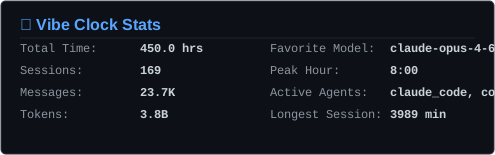
card |
vibe-clock-card.svg |
Summary stats card |
heatmap |
vibe-clock-heatmap.svg |
Daily activity heatmap |
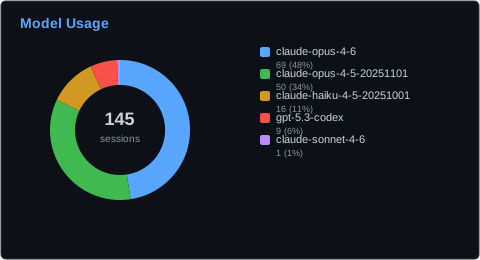
donut |
vibe-clock-donut.svg |
Model usage breakdown |
bars |
vibe-clock-bars.svg |
Project session bars |
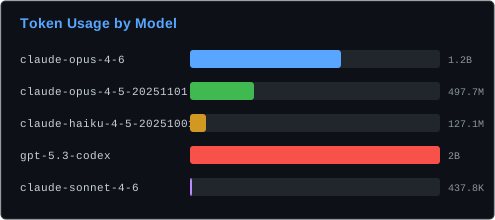
token_bars |
vibe-clock-token-bars.svg |
Token usage by model |
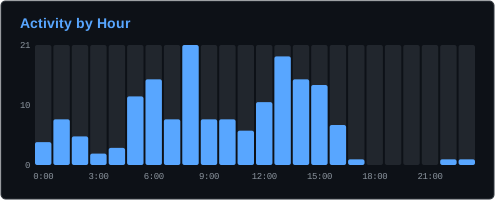
hourly |
vibe-clock-hourly.svg |
Activity by hour of day |
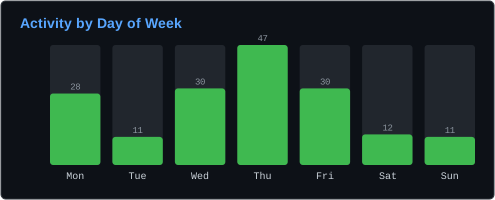
weekly |
vibe-clock-weekly.svg |
Activity by day of week |
GitHub Actions Setup
Add to your <username>/<username> profile repo to auto-update SVGs daily.
1. Push your stats
vibe-clock push          # creates a public gist with sanitized data
# Note the gist ID printed
2. Add the secret
In your profile repo: Settings → Secrets → Actions → add:
VIBE_CLOCK_GIST_ID— the gist ID from step 1
3. Create the workflow
.github/workflows/vibe-clock.yml:
name: Update Vibe Clock Stats

on:
  schedule:
    - cron: '0 0 * * *'
  workflow_dispatch:

jobs:
  update:
    runs-on: ubuntu-latest
    steps:
      - uses: actions/checkout@v4

      - uses: dexhunter/vibe-clock@v1.1.0
        with:
          gist_id: ${{ secrets.VIBE_CLOCK_GIST_ID }}
4. Add SVGs to your README
<img src="images/vibe-clock-card.svg" alt="Vibe Clock Stats" />
<img src="images/vibe-clock-heatmap.svg" alt="Activity Heatmap" />
<img src="images/vibe-clock-donut.svg" alt="Model Usage" />
<img src="images/vibe-clock-bars.svg" alt="Projects" />
5. Run it
Go to Actions tab → "Update Vibe Clock Stats" → Run workflow
Action Inputs
| Input | Default | Description |
|---|---|---|
gist_id |
required | Gist ID containing vibe-clock-data.json |
theme |
dark |
dark or light |
output_dir |
./images |
Where to write SVG files |
chart_types |
all |
Comma-separated: card,heatmap,donut,bars,token_bars,hourly,weekly or all |
commit |
true |
Auto-commit generated SVGs |
commit_message |
chore: update vibe-clock stats |
Commit message |
How it works
You (local)                    GitHub
─────────                      ──────
vibe-clock push  ──▶  Gist (sanitized JSON)
                              │
                      Actions (daily cron)
                              │
                       fetch gist JSON
                       generate SVGs
                       commit to profile repo
Supported Agents
| Agent | Log Location | Status |
|---|---|---|
| Claude Code | ~/.claude/ |
Supported |
| Codex | ~/.codex/ |
Supported |
| OpenCode | ~/.local/share/opencode/ |
Supported |
Commands
| Command | Description |
|---|---|
vibe-clock init |
Interactive setup — detects agents, asks for GitHub token |
vibe-clock summary |
Rich terminal summary of usage stats |
vibe-clock status |
Show current configuration and connection status |
vibe-clock render |
Generate SVG visualizations locally |
vibe-clock export |
Export raw stats as JSON |
vibe-clock push |
Push sanitized stats to a GitHub gist |
vibe-clock push --dry-run |
Preview what would be pushed |
vibe-clock schedule |
Auto-schedule periodic push (launchd / systemd / cron) |
vibe-clock unschedule |
Remove the scheduled push task |
Configuration
Config file: ~/.config/vibe-clock/config.toml
Environment variable overrides:
GITHUB_TOKEN— GitHub PAT withgistscopeVIBE_CLOCK_GIST_ID— Gist ID for push/pullVIBE_CLOCK_DAYS— Number of days to aggregate
License
MIT


Download files
Download the file for your platform. If you're not sure which to choose, learn more about installing packages.
Source Distribution
Built Distribution
Filter files by name, interpreter, ABI, and platform.
If you're not sure about the file name format, learn more about wheel file names.
Copy a direct link to the current filters
File details
Details for the file vibe_clock-1.2.1.tar.gz.
File metadata
- Download URL: vibe_clock-1.2.1.tar.gz
- Upload date:
- Size: 71.0 kB
- Tags: Source
- Uploaded using Trusted Publishing? Yes
- Uploaded via: uv/0.10.4 {"installer":{"name":"uv","version":"0.10.4","subcommand":["publish"]},"python":null,"implementation":{"name":null,"version":null},"distro":{"name":"Ubuntu","version":"24.04","id":"noble","libc":null},"system":{"name":null,"release":null},"cpu":null,"openssl_version":null,"setuptools_version":null,"rustc_version":null,"ci":true}
File hashes
| Algorithm | Hash digest | |
|---|---|---|
| SHA256 |
9dd97acfd3398f0dc85c3a2a69be5ab3aa5ecf8e60ed6098030473a618d30e78
|
|
| MD5 |
14ea96feb25bd9ef34947863b351dcae
|
|
| BLAKE2b-256 |
a4deddb2f4f1fbdb6a7ab49b1ad6ae2f7704bbeb428f3e80d88cfed775cbf73f
|
File details
Details for the file vibe_clock-1.2.1-py3-none-any.whl.
File metadata
- Download URL: vibe_clock-1.2.1-py3-none-any.whl
- Upload date:
- Size: 32.6 kB
- Tags: Python 3
- Uploaded using Trusted Publishing? Yes
- Uploaded via: uv/0.10.4 {"installer":{"name":"uv","version":"0.10.4","subcommand":["publish"]},"python":null,"implementation":{"name":null,"version":null},"distro":{"name":"Ubuntu","version":"24.04","id":"noble","libc":null},"system":{"name":null,"release":null},"cpu":null,"openssl_version":null,"setuptools_version":null,"rustc_version":null,"ci":true}
File hashes
| Algorithm | Hash digest | |
|---|---|---|
| SHA256 |
f623c288000b5dab493afd5450268fcc6be714b814d908facda2694cf3c85539
|
|
| MD5 |
c0dbb53d89a654e1949c85d064afd86f
|
|
| BLAKE2b-256 |
cd71db33d242b2d4cf7e15e097881fdbe5cb77ae76b89ea6bcf4965ec0710ee1
|






