
vibe-clock
WakaTime for AI coding agents. Track your usage of Claude Code, Codex, Gemini CLI, and OpenCode — then show it off on your GitHub profile.


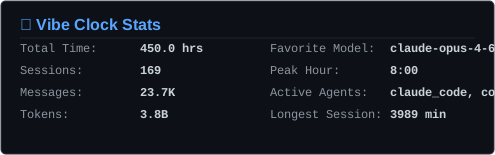
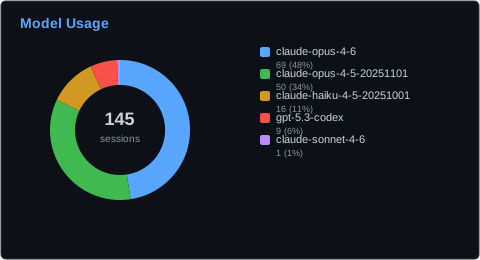
Your agents already write session logs to your disk. vibe-clock reads them, keeps everything local by default, and — only when you explicitly opt in — publishes a small, allowlisted summary that a GitHub Action turns into SVGs on your profile.
Quick start
# Recommended — works on macOS, Linux, and WSL
uv tool install vibe-clock      # or: pipx install vibe-clock, or: pip install vibe-clock
This README documents 1.5.0 and newer; vibe-clock setup and vibe-clock workflow do not exist in earlier releases. Check with vibe-clock --version.
vibe-clock summary              # see your stats in the terminal; nothing leaves your machine

cd ~/path/to/your-profile-repo  # setup writes a workflow file into this checkout
vibe-clock setup                # publish to your profile, when you're ready
vibe-clock setup detects your agents, borrows a token from gh if you have one, shows you the exact JSON it would publish, creates the Gist, sets the repo secret, writes the workflow file, and installs the daily push. Every step that changes anything outside your machine asks first, and any step it cannot do for you it prints instructions for.
Three things are yours to do afterwards, because they are commits to your own repo and a button in your own browser:
- Add the
<img>tags below to your profileREADME.md—setupprints the exact block. - Commit and push both that and
.github/workflows/vibe-clock.yml. - Run the workflow once from the repo's Actions tab. After that its cron takes over.
Run setup from anywhere else and it prints the workflow YAML for you to save by hand instead of writing it — it will not write files into a directory that is not the repo you named.
Other install methods
# macOS, Apple Silicon only (the tap ships an arm64 binary; no Intel or Linux build)
brew install dexhunter/tap/vibe-clock
If vibe-clock --version disagrees with what you just installed, you have two copies. Check with which -a vibe-clock — ~/.local/bin comes before /opt/homebrew/bin on most PATHs, so a uv tool install shadows a Homebrew one. Upgrade with uv tool upgrade vibe-clock or brew upgrade vibe-clock to match.
What is published, and what never is
Nothing leaves your machine until you confirm a preview. This is worth being precise about, so here is the whole contract.
Always published once you opt in — ten fields, and that is the complete list:
| Field | Example | What it is |
|---|---|---|
schema_version, producer_version |
3, "1.4.1" |
So a stale reader fails loudly instead of drawing wrong numbers |
generated_at |
2026-08-24T00:00:00Z |
The push date, floored to UTC midnight — never a wall-clock time |
days_covered, active_days |
7, 5 |
Window length, and how many of those days you used an agent |
total_sessions, total_minutes |
12, 321.0 |
Session count and active minutes |
active_agents |
["claude_code", "codex"] |
Only names from a fixed list of four |
favorite_model, models[] |
"Claude", [{"model": "OpenAI", "session_count": 3}] |
Model families, with session counts |
Opt-in, each behind its own flag — off unless you pass the flag:
| Flag | Adds |
|---|---|
--daily-activity |
daily[]: one entry per date with a session count. This adds real calendar dates. |
--time-patterns |
hourly[] and peak_hour: a 24-slot histogram of when you work |
--message-counts |
total_messages, plus per-model and per-day message counts |
--token-counts |
total_tokens, plus per-model and per-day token counts |
--project-aliases |
projects[], as Project A, Project B, … — never real names |
Never published, under any flag:
- File paths, directory names, your home directory, your username
- Real project or repository names — they are replaced by
Project A,Project B, … - Raw model IDs —
claude-sonnet-4-6-20260101andgpt-5-codex-internal-previeware published asClaudeandOpenAI, so an internal or preview model name cannot leak through - Prompts, responses, code, file contents, tool calls
- Session IDs, git branches or remotes, hostnames, IP addresses
- Any agent name that is not one of the four known ones
What enforces it is the allowlist in sanitizer.py: the payload is built from a fixed set of fields, so a field not named there cannot be sent, project names are replaced by aliases and model IDs are mapped to a closed list of families before anything is serialized. Behind that sits _validate_no_pii, a backstop assertion — it re-checks the handful of fields that carry text derived from your machine, and raises rather than publishing if your home path or username survived the mapping. It is there to turn a future bug into a local crash instead of a public Gist; it is not a second independent filter, and you should read the allowlist, not the assertion, as the guarantee.
Check any of this yourself, before publishing anything:
vibe-clock push --dry-run # prints the exact JSON, byte for byte, and sends nothing
To stop: vibe-clock unshare deletes the Gist together with its revision history and disables future updates. Note that a public Gist keeps every past revision, so if you shared something you regret, deleting the Gist is what removes it — changing a setting and pushing again does not. SVGs already committed to your profile repo are separate; remove them there.
vibe-clock export writes the unsanitized local stats — real project names and model IDs included. It exists for local analysis. Don't commit its output. It is the only command that writes unsanitized data to a file; render is not, which is why its SVGs are safe to commit.
What the numbers mean
Agent Time — the headline number, and the one worth being careful about. It is wall-clock time during which one of your agents was writing to its log, measured by grouping log events into stretches (a silence longer than five minutes ends one) and then taking the union across every session, so two agents running at once cost one minute rather than two.
It is not a stopwatch on you. A log cannot tell whether you were at the keyboard, so an autonomous run grinding away overnight counts exactly like a session you sat through. If you run long unattended jobs, expect a number that is larger than your working day — that is the machine's time, which is what the card says. The metric is deliberately not named "Active Time" for this reason.
The old definition was last-event-minus-first-event per session, summed. That billed lunch breaks, overnight gaps and a CLI process left open for a fortnight as usage, and double-counted concurrent agents; it produced 59 hours per day on the author's own machine.
Sessions counts what each agent calls a session, which is not the same unit across agents: a Codex session is one rollout file, a Claude Code session is one sessionId. Compare it to itself over time, not between agents.
Active Days is the number of days in the window on which any agent was active for a non-zero time.
Charts
vibe-clock render --type card,donut       # write SVGs to the current directory
vibe-clock render --type all
render builds the same allowlisted payload described above and draws from that, whether it collects locally or reads a published Gist with --from-json. The two produce the same picture, and neither can put a real project name, a path, or a raw model ID into a file you are about to commit. It also means render shows your public window (privacy.public_days, 7 days by default) and only the data your share flags publish — for the unrestricted local view use vibe-clock summary, or vibe-clock export for JSON.
| Chart | File | Needs |
|---|---|---|
card |
vibe-clock-card.svg |
— |
donut |
vibe-clock-donut.svg |
— |
heatmap |
vibe-clock-heatmap.svg |
share --daily-activity |
weekly |
vibe-clock-weekly.svg |
share --daily-activity |
hourly |
vibe-clock-hourly.svg |
share --time-patterns |
token_bars |
vibe-clock-token-bars.svg |
share --token-counts |
bars |
vibe-clock-bars.svg |
share --project-aliases |
A chart whose data you never shared is refused with a message naming the flag that fixes it, rather than drawn as an empty picture.
Keeping it updated
There are two clocks, and both have to be running:
your machine                              GitHub
────────────                              ──────
vibe-clock push        ──── writes ───▶   Gist (allowlisted JSON)
(daily, ~00:00 UTC)                          │
                                             │ read by
                                             ▼
                                       Actions workflow
                                       (daily, 00:30 UTC)
                                             │
                                             ▼
                                       SVGs committed to
                                       your profile repo
The Actions cron runs half an hour after the local push, so it renders fresh data. If only the workflow runs, it redraws the same numbers forever; if only the push runs, the Gist updates but your profile never changes.
vibe-clock setup installs the local half for you. To do it separately:
vibe-clock schedule                  # daily, at your local equivalent of 00:00 UTC
vibe-clock schedule --interval hourly
vibe-clock unschedule
| Platform | Backend | Verify with |
|---|---|---|
| macOS | launchd user agent, ~/Library/LaunchAgents/com.vibe-clock.push.plist |
launchctl list | grep vibe-clock |
| Linux | systemd user timer, ~/.config/systemd/user/vibe-clock-push.timer |
systemctl --user status vibe-clock-push.timer |
| Any Unix | crontab, when neither of the above is available | crontab -l | grep vibe-clock |
| Windows | none — run vibe-clock inside WSL, or point Task Scheduler at vibe-clock push |
Two Linux notes:
- A systemd user timer is suspended when you log out. On a machine you do not stay logged into, run
sudo loginctl enable-linger $USERso it keeps firing. - The generated unit deliberately stays a user unit and does not set
ProtectHome. Moving it to a system service withProtectHome=truewould stop it executing auv toolorpipxbinary under$HOME— and stop it reading your agent logs, which is the whole job. Keep it in the user session.
GitHub Actions, by hand
vibe-clock setup does all of this. Here it is spelled out for anyone who would rather not let a tool touch their repo.
1. Publish the Gist. You need a Classic personal access token with the gist scope — create one here. Fine-grained tokens cannot write Gists. If you already use gh, vibe-clock setup borrows its token and you can skip this entirely.
vibe-clock push --dry-run       # inspect first
vibe-clock share                # previews again, asks, then creates the Gist
Note the Gist ID it prints. Add opt-in data here if you want it, e.g. vibe-clock share --daily-activity --token-counts.
2. Add the secret. In your profile repo: Settings → Secrets and variables → Actions → New repository secret, named VIBE_CLOCK_GIST_ID, with that ID as the value.
3. Add the workflow. Create .github/workflows/vibe-clock.yml. Run vibe-clock workflow to print exactly this, or vibe-clock workflow --write from inside the repo:
name: Update Vibe Clock Stats

on:
  schedule:
    # Runs after your local `vibe-clock push` updates the Gist.
    - cron: "30 0 * * *"
  workflow_dispatch:

# Required: the action commits the generated SVGs back to this repo, and
# GITHUB_TOKEN is read-only by default.
permissions:
  contents: write

concurrency:
  group: vibe-clock
  cancel-in-progress: false

jobs:
  update:
    runs-on: ubuntu-latest
    steps:
      - uses: actions/checkout@v4

      - uses: dexhunter/vibe-clock@v1.5.0
        with:
          gist_id: ${{ secrets.VIBE_CLOCK_GIST_ID }}
          chart_types: card,donut
The permissions: block is not optional: the action commits the SVGs back to your repo, and GITHUB_TOKEN is read-only by default. Without it the run fails with a 403.
4. Reference the SVGs from your profile README.md:
<p align="center">
  <img src="images/vibe-clock-card.svg" alt="Vibe Clock Stats" />
  <img src="images/vibe-clock-donut.svg" alt="Model Usage" />
</p>
5. Run it once from the repo's Actions tab → Update Vibe Clock Stats → Run workflow. After that the cron takes over.
6. Schedule the local push — see Keeping it updated. Skip this and your profile freezes at whatever the first push contained.
Action inputs
| Input | Default | Description |
|---|---|---|
gist_id |
required | Gist containing vibe-clock-data.json |
theme |
dark |
dark or light |
output_dir |
./images |
Where to write the SVGs |
chart_types |
card,donut |
Comma-separated, or all |
commit |
true |
Commit the generated SVGs |
commit_message |
chore: update vibe-clock stats |
Commit message |
The action reads the Gist belonging to the owner of the repo it runs in, so it needs no change to work in yours.
Supported agents
| Agent | Log location |
|---|---|
| Claude Code | ~/.claude/ |
| Codex | ~/.codex/ |
| Gemini CLI | ~/.gemini/ |
| OpenCode | ~/.local/share/opencode/ |
Detected automatically. Override any of them under [paths] in the config file.
Commands
| Command | Description |
|---|---|
vibe-clock setup |
Full onboarding: agents, Gist, repo secret, workflow, schedule |
vibe-clock summary |
Rich terminal summary — local only |
vibe-clock status |
The same numbers on one line |
vibe-clock render |
Generate SVGs locally |
vibe-clock workflow |
Print the Actions workflow to install (--write to save it) |
vibe-clock init |
Create or refresh just the config file |
vibe-clock export |
Export raw, unsanitized stats as JSON, locally |
vibe-clock push --dry-run |
Print the exact public payload without sending it |
vibe-clock share |
Preview, confirm, and enable the public Gist |
vibe-clock push |
Update a share you already enabled |
vibe-clock unshare |
Delete the Gist and its revisions, and stop publishing |
vibe-clock schedule |
Install the periodic local push |
vibe-clock unschedule |
Remove it |
Configuration
~/.config/vibe-clock/config.toml, written 0600 inside a 0700 directory.
[general]
default_days = 30       # window for local commands; the public window is privacy.public_days
theme = "dark"          # dark | light

[paths]                 # override if an agent stores its logs somewhere else
claude_code = "~/.claude"
codex = "~/.codex"
gemini_cli = "~/.gemini"
opencode = "~/.local/share/opencode"

[github]
token = ""              # Classic PAT, gist scope
gist_id = ""            # set by `share` / `setup`
profile_repo = ""       # "owner/repo" that renders your SVGs
workflow_file = "vibe-clock.yml"   # name your workflow whatever you like
trigger_workflow = false           # see below

[agents]
enabled = ["claude_code", "codex", "gemini_cli", "opencode"]

[privacy]
exclude_projects = []       # glob patterns or plain substrings, case-insensitive
exclude_date_ranges = []    # [["2026-01-01", "2026-01-07"], ...]
public_sharing_enabled = false
public_days = 7
share_daily_activity = false
share_message_counts = false
share_token_counts = false
share_time_patterns = false
share_project_aliases = false

[schedule]
enabled = false
interval = "daily"
time = "00:00"
backend = ""
Environment overrides: GITHUB_TOKEN (used only when the TOML token is empty), VIBE_CLOCK_GIST_ID, VIBE_CLOCK_DAYS.
trigger_workflow makes push dispatch your render workflow immediately instead of waiting for its cron. It is off because dispatching a workflow requires a token with the repo scope, which grants read/write access to all of your repositories — far more than the gist scope everything else needs. The cron path costs you at most one day of latency and no extra permission.
Troubleshooting
The workflow fails with 403 on git push. Your workflow is missing permissions: contents: write. Run vibe-clock workflow and compare.
"payload carries no schema_version", or "written by vibe-clock <something older>". The machine that runs push is older than the action rendering it. Upgrade it (uv tool upgrade vibe-clock) and push again. This failure is deliberate — the alternative was rendering Active Days: 0 for someone who was active every day.
"chart 'hourly' needs hourly time patterns". You asked for a chart built from data you did not share. Re-run vibe-clock share --time-patterns, or drop that chart from chart_types.
vibe-clock: command not found after installing. ~/.local/bin may not be on your PATH; uv tool update-shell fixes that for uv installs.
Push fails with 401. The token is fine-grained, or lacks gist. It must be a Classic PAT.
The Gist updates but the profile doesn't. The workflow is not running. Check the Actions tab — GitHub disables a scheduled workflow after 60 days of repository inactivity.
The profile stopped updating. The local push is not running. Check with launchctl list | grep vibe-clock, systemctl --user status vibe-clock-push.timer, or crontab -l. Logs are in ~/.config/vibe-clock/logs/.
No sessions found. Check that the directories in Supported agents exist and contain session files.
SVGs don't refresh in the README. GitHub caches proxied images hard. Wait, or hard-refresh.
Contributing
Bug reports and pull requests are welcome — see CONTRIBUTING.md. Adding a collector for another agent is the most useful contribution, and the smallest.
License
MIT
1 maintainer

Metadata
1 maintainer
Release files for vibe-clock 1.5.0
For a detailed explanation of source distributions (sdists) and built distributions (wheels), please see the package formats documentation.
Source distribution (sdist)
| File | Size | Uploaded | |
|---|---|---|---|
| vibe_clock-1.5.0.tar.gz | 134.3 kB | Details |
Built distribution (wheel)
| File | Interpreter | ABI | Platform | Reset |
|---|---|---|---|---|
| vibe_clock-1.5.0-py3-none-any.whl | Python 3 | none | any | Details |
Total release size: 198.1 kB
Release files / vibe_clock-1.5.0.tar.gz
| Download URL | vibe_clock-1.5.0.tar.gz |
|---|---|
| Size | 134.3 kB |
| Tags | Source |
|
SHA-256 checksum How to use checksums |
3d4f99bf85b79d5029ba0bd84d8eb9cba2488c82fd6228dc2b066def9fb0ba4b
|
|
BLAKE2b-256 checksum How to use checksums |
2c7f7343f45f4823b76155c59e43849febd05c634f78802ea509b643ecf85798
|
| Upload date | |
|
Uploaded using Trusted Publishing? What is trusted publishing? |
Yes |
| Uploaded via |
uv/0.12.5 {"installer":{"name":"uv","version":"0.12.5","subcommand":["publish"]},"python":null,"implementation":{"name":null,"version":null},"distro":{"name":"Ubuntu","version":"24.04","id":"noble","libc":null},"system":{"name":null,"release":null},"cpu":null,"openssl_version":null,"setuptools_version":null,"rustc_version":null,"ci":true}
|
Release files / vibe_clock-1.5.0-py3-none-any.whl
| Download URL | vibe_clock-1.5.0-py3-none-any.whl |
|---|---|
| Size | 63.8 kB |
| Tags | Python 3 |
|
SHA-256 checksum How to use checksums |
46a12e01637361b2108f6051ef193a96efa1f461f67bec3b86f22c553ca0a893
|
|
BLAKE2b-256 checksum How to use checksums |
10203bb7a854b42394d94d6ed3e066a4807a0516c94a2df0dc19b78ec7f0c745
|
| Upload date | |
|
Uploaded using Trusted Publishing? What is trusted publishing? |
Yes |
| Uploaded via |
uv/0.12.5 {"installer":{"name":"uv","version":"0.12.5","subcommand":["publish"]},"python":null,"implementation":{"name":null,"version":null},"distro":{"name":"Ubuntu","version":"24.04","id":"noble","libc":null},"system":{"name":null,"release":null},"cpu":null,"openssl_version":null,"setuptools_version":null,"rustc_version":null,"ci":true}
|














