
vibe-clock
WakaTime for AI coding agents. Track usage across Claude Code, Codex, and OpenCode — then show it off on your GitHub profile.


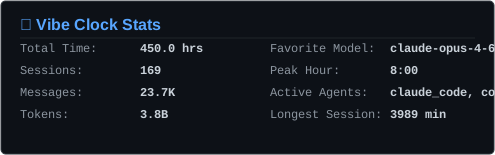
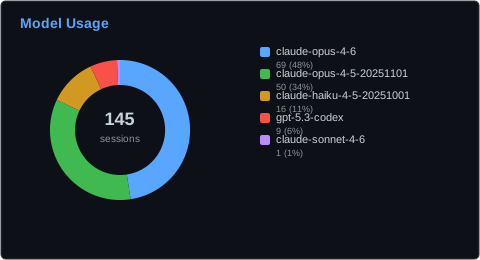
Quick Start
# macOS (Homebrew)
brew install dexhunter/tap/vibe-clock

# or via pip
pip install vibe-clock
vibe-clock init          # auto-detects agents, sets up config
vibe-clock summary       # see your stats in the terminal
Privacy & Security
Everything stays local until you explicitly run vibe-clock share. The default public profile covers the last seven complete UTC days and contains only:
- Session and active-day counts
- Known agent names
- Normalized model families such as OpenAI, Claude, and Gemini
The payload is built from a fixed allowlist in sanitizer.py. Exact dates, message counts, token counts, hourly patterns, and anonymous project aliases are separate opt-ins. Raw model IDs are always reduced to public families.
Never shared: paths, real project names, prompts, responses, code, git data, session IDs, host data, durations, or raw timestamps. Run vibe-clock push --dry-run to inspect the exact payload. Public Gist updates retain revision history; vibe-clock unshare deletes the Gist and disables future updates.
Configurable Charts
Generate only the charts you want with --type:
vibe-clock render --type card,donut           # just these two
vibe-clock render --type all                  # all 7 charts
| Chart | File | Description |
|---|---|---|
card |
vibe-clock-card.svg |
Summary stats card |
heatmap |
vibe-clock-heatmap.svg |
Daily activity heatmap (share --daily-activity) |
donut |
vibe-clock-donut.svg |
Model usage breakdown |
bars |
vibe-clock-bars.svg |
Anonymous project sessions (share --project-aliases) |
token_bars |
vibe-clock-token-bars.svg |
Token usage by family (share --token-counts) |
hourly |
vibe-clock-hourly.svg |
Activity by hour (share --time-patterns) |
weekly |
vibe-clock-weekly.svg |
Activity by weekday (share --daily-activity) |
GitHub Actions Setup
Add to your <username>/<username> profile repo to auto-update SVGs daily.
1. Preview and explicitly share
vibe-clock push --dry-run
vibe-clock share         # confirms before creating a public Gist
# Note the gist ID printed
Upgrading from an older release with an existing Gist? Run vibe-clock unshare first to delete the legacy revision history, then run vibe-clock share and update the repository secret with the new Gist ID.
Optional fields must be selected explicitly, for example:
vibe-clock share --daily-activity --token-counts
2. Add the secret
In your profile repo: Settings → Secrets → Actions → add:
VIBE_CLOCK_GIST_ID— the gist ID from step 1
3. Create the workflow
.github/workflows/vibe-clock.yml:
name: Update Vibe Clock Stats

on:
  workflow_dispatch:

jobs:
  update:
    runs-on: ubuntu-latest
    steps:
      - uses: actions/checkout@v4

      - uses: dexhunter/vibe-clock@v1.4.1
        with:
          gist_id: ${{ secrets.VIBE_CLOCK_GIST_ID }}
4. Add SVGs to your README
<img src="images/vibe-clock-card.svg" alt="Vibe Clock Stats" />
<img src="images/vibe-clock-donut.svg" alt="Model Usage" />
5. Run it
Go to Actions tab → "Update Vibe Clock Stats" → Run workflow
Action Inputs
| Input | Default | Description |
|---|---|---|
gist_id |
required | Gist ID containing vibe-clock-data.json |
theme |
dark |
dark or light |
output_dir |
./images |
Where to write SVG files |
chart_types |
card,donut |
Comma-separated: card,heatmap,donut,bars,token_bars,hourly,weekly or all |
commit |
true |
Auto-commit generated SVGs |
commit_message |
chore: update vibe-clock stats |
Commit message |
How it works
You (local)                    GitHub
─────────                      ──────
vibe-clock share ──▶  Gist (allowlisted JSON)
                     │
                     └──▶  workflow_dispatch
                              │
                       fetch gist JSON
                       generate SVGs
                       commit to profile repo
Supported Agents
| Agent | Log Location | Status |
|---|---|---|
| Claude Code | ~/.claude/ |
Supported |
| Codex | ~/.codex/ |
Supported |
| Gemini CLI | ~/.gemini/ |
Supported |
| OpenCode | ~/.local/share/opencode/ |
Supported |
Commands
| Command | Description |
|---|---|
vibe-clock init |
Interactive setup — detects agents, asks for GitHub token |
vibe-clock summary |
Rich terminal summary of usage stats |
vibe-clock status |
Show current configuration and connection status |
vibe-clock render |
Generate SVG visualizations locally |
vibe-clock export |
Export raw stats as JSON |
vibe-clock share |
Preview, confirm, and enable a public GitHub Gist |
vibe-clock push |
Update a public share that was previously enabled |
vibe-clock push --dry-run |
Preview the exact public allowlist without pushing |
vibe-clock unshare |
Delete the public Gist and disable future updates |
vibe-clock schedule |
Auto-schedule periodic push (launchd / systemd / cron) |
vibe-clock unschedule |
Remove the scheduled push task |
Configuration
Config file: ~/.config/vibe-clock/config.toml
Environment variable overrides:
GITHUB_TOKEN— GitHub PAT withgistscopeVIBE_CLOCK_GIST_ID— Gist ID for push/pullVIBE_CLOCK_DAYS— Number of days to aggregate
Public sharing defaults are stored under [privacy]: seven complete days, with daily activity, message counts, token counts, time patterns, and project aliases disabled unless explicitly selected with vibe-clock share.
License
MIT
1 maintainer

Download files
Download the file for your platform. If you're not sure which to choose, learn more about installing packages.
Source Distribution
Built Distribution
Filter files by name, interpreter, ABI, and platform.
If you're not sure about the file name format, learn more about wheel file names.
Copy a direct link to the current filters
File details
Details for the file vibe_clock-1.4.1.tar.gz.
File metadata
- Download URL: vibe_clock-1.4.1.tar.gz
- Upload date:
- Size: 83.0 kB
- Tags: Source
- Uploaded using Trusted Publishing? Yes
- Uploaded via:
uv/0.12.5 {"installer":{"name":"uv","version":"0.12.5","subcommand":["publish"]},"python":null,"implementation":{"name":null,"version":null},"distro":{"name":"Ubuntu","version":"24.04","id":"noble","libc":null},"system":{"name":null,"release":null},"cpu":null,"openssl_version":null,"setuptools_version":null,"rustc_version":null,"ci":true}
File hashes
| Algorithm | Hash digest | |
|---|---|---|
| SHA256 |
df4a2990ce6ebb68f712d59571670cac7cdadf9c970d67b7e1e2e5b2e75a7115
|
|
| MD5 |
1ffbc5875b8e77b7323c676aa6e70296
|
|
| BLAKE2b-256 |
bf4fa16a9017b835cc7cfbaa70184571e29377d5ff3e81606e00ef0fe21fc607
|
File details
Details for the file vibe_clock-1.4.1-py3-none-any.whl.
File metadata
- Download URL: vibe_clock-1.4.1-py3-none-any.whl
- Upload date:
- Size: 40.4 kB
- Tags: Python 3
- Uploaded using Trusted Publishing? Yes
- Uploaded via:
uv/0.12.5 {"installer":{"name":"uv","version":"0.12.5","subcommand":["publish"]},"python":null,"implementation":{"name":null,"version":null},"distro":{"name":"Ubuntu","version":"24.04","id":"noble","libc":null},"system":{"name":null,"release":null},"cpu":null,"openssl_version":null,"setuptools_version":null,"rustc_version":null,"ci":true}
File hashes
| Algorithm | Hash digest | |
|---|---|---|
| SHA256 |
c60dcae56e4dd6219bcbd35752aba4a8cffb758d9c314cfad6744401f157022f
|
|
| MD5 |
36aaa74b4fb237001a81bce538d31cdf
|
|
| BLAKE2b-256 |
a4a37a6cafb852d05c65d5029fac734259e62dda783a02a290f16f076e896b35
|







