
VibeNotification




English | 中文
Stop waiting when vibe coding — Give a notification when Claude Code or Codex finishes replies —
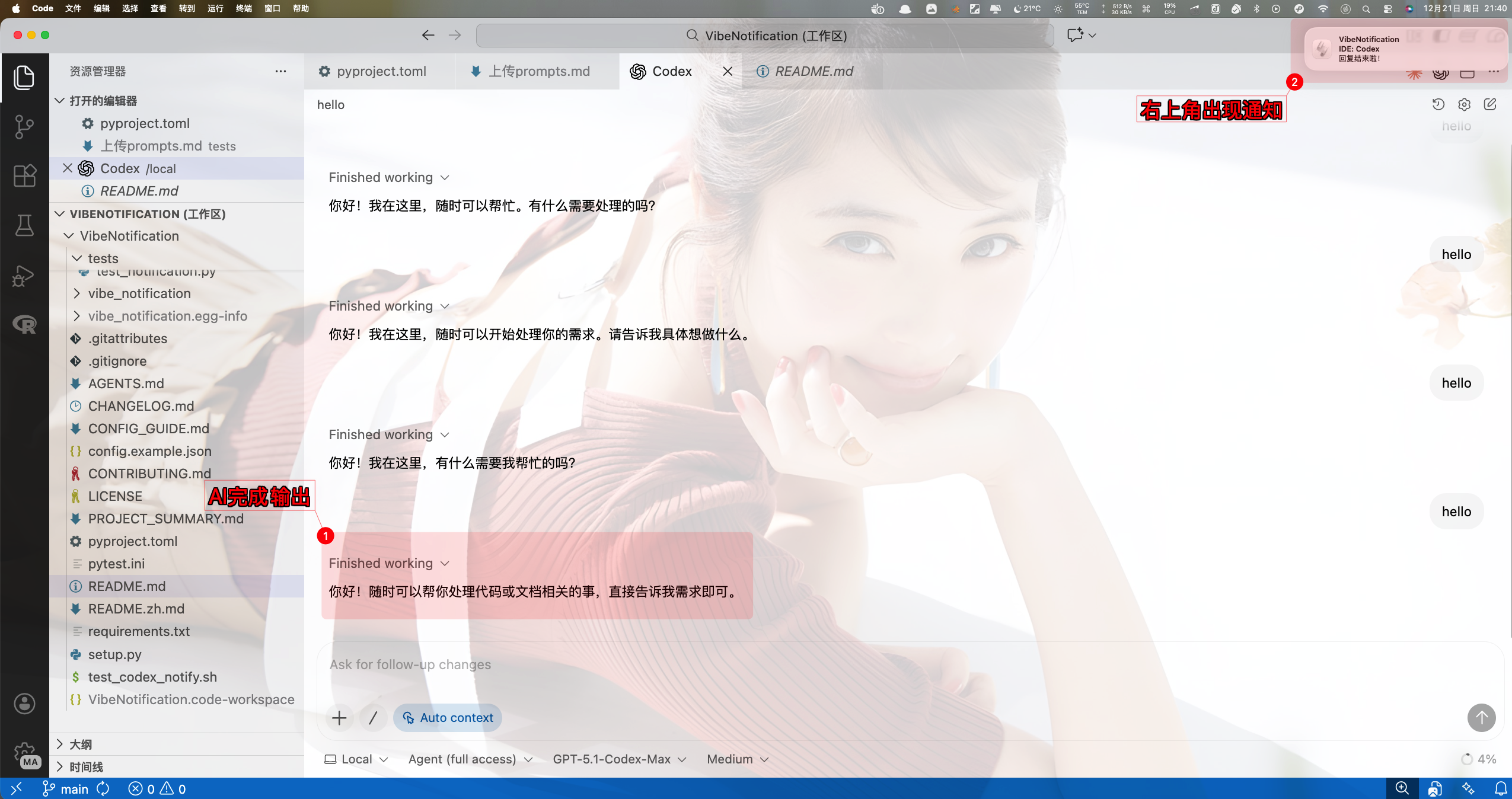
Installation
- Stable (PyPI):
pip install vibe-notification - Dev:
pip install -e . - Optional venv:
python -m venv venv && source venv/bin/activate - Verify:
python -m vibe_notification --test(should toast and chime when enabled) - Interactive setup:
python -m vibe_notification --config- Default config file:
~/.config/vibe-notification/config.json - Make sure both sound and system notifications are enabled
- Default config file:
Quick Start
Claude Code
- Recommended hook:
Stop(when each main reply completes). - If what you want is "notify me when this reply is done", use
Stop. That is the default and the only recommended hook. - Do not attach the notifier command to
SessionEndorSubagentStop: VibeNotification ignores them by default to avoid duplicate alerts from session-exit, subagent, or tool-chain lifecycle events. - On macOS, VibeNotification now defaults to
senderoff in Claude Code hook contexts and terminal-hosted CLI contexts for more reliable banners. If you explicitly want host-app attribution/icon, setVIBE_NOTIFICATION_SENDER_MODE=auto. - If a notification appears only in Notification Center, check
System Settings > Notificationsfor the effective app (terminal-notifierwhen sender is off, or the host app such as VS Code / Terminal when sender is auto/force). Make sure notifications are allowed, banner/alert style is enabled, and Focus is not suppressing them. - Edit
~/.claude/settings.jsonand add a Stop hook:
{
  "hooks": {
    "Stop": [
      {
        "hooks": [
          {
            "type": "command",
            "command": "env VIBE_NOTIFICATION_SENDER_MODE=off python -m vibe_notification"
          }
        ]
      }
    ]
  }
}
- Example full settings snippet with environment variables:
{
  "$schema": "https://json.schemastore.org/claude-code-settings.json",
  "env": {
    "ANTHROPIC_AUTH_TOKEN": "xxx",
    "ANTHROPIC_BASE_URL": "https://open.bigmodel.cn/api/anthropic",
    "ANTHROPIC_DEFAULT_HAIKU_MODEL": "glm-4.6",
    "ANTHROPIC_DEFAULT_OPUS_MODEL": "glm-4.6",
    "ANTHROPIC_DEFAULT_SONNET_MODEL": "glm-4.6",
    "ANTHROPIC_MODEL": "glm-4.6",
    "CLAUDE_CODE_DISABLE_NONESSENTIAL_TRAFFIC": "1",
    "DISABLE_ERROR_REPORTING": "1",
    "DISABLE_TELEMETRY": "1",
    "MCP_TIMEOUT": "60000"
  },
  "hooks": {
    "Stop": [
      {
        "hooks": [
          {
            "command": "env VIBE_NOTIFICATION_SENDER_MODE=off python -m vibe_notification",
            "type": "command"
          }
        ]
      }
    ]
  },
  "includeCoAuthoredBy": false,
  "outputStyle": "engineer-professional"
}
Codex CLI
Use a Stop hook in ~/.codex/config.toml. It runs when the main agent stops the current turn after its tool calls and multi-step work; receiving a user message, a subagent stopping, or the whole session exiting does not count as task completion:
[[hooks.Stop]]

[[hooks.Stop.hooks]]
type = "command"
command = "python3 -m vibe_notification"
timeout = 30
Do not configure this Stop hook and the legacy notify command at the same time, because the same task can arrive through both event channels. If an older Codex version requires notify = ["python3", "-m", "vibe_notification"], VibeNotification waits for a 10-second quiet period by default and processes only the last agent-turn-complete. Set VIBE_DEBOUNCE_COOLDOWN to tune the delay, or set it to 0 to explicitly disable compatibility debouncing.
Note: Stop means that the main agent stopped the current turn; it is not a whole-session exit event.
If you only want one notification after the whole Codex session exits, do not use Stop. Use the built-in wrapper:
python -m vibe_notification --wrap-codex
You can pass normal Codex arguments through unchanged:
python -m vibe_notification --wrap-codex -- --help
python -m vibe_notification --wrap-codex -- -C /path/to/project
If you want this as your everyday entrypoint, add a shell alias such as:
alias codexn='python3 -m vibe_notification --wrap-codex --'
Then launch codexn; VibeNotification will fire only once, after the Codex process actually exits.
To inspect your local integration and spot config/semantic mismatches quickly:
python -m vibe_notification --doctor
Typical placement in config.toml:
model_provider = "xxx"
model = "gpt-5.1-codex-max"
model_reasoning_effort = "medium"
disable_response_storage = true

[[hooks.Stop]]

[[hooks.Stop.hooks]]
type = "command"
command = "python3 -m vibe_notification"
timeout = 30

[model_providers.xxx]
name = "xxx"
base_url = "https://xxx/v1"
wire_api = "responses"
requires_openai_auth = true

[tui]
notifications = true
Configuration Recipes
Visual only (no sound)
- Codex
~/.codex/config.toml:
command = "python3 -m vibe_notification --sound 0"
- Claude Code
~/.claude/settings.json:
{
  "hooks": {
    "Stop": [
      {
        "hooks": [
          {
            "type": "command",
            "command": "python -m vibe_notification --sound 0"
          }
        ]
      }
    ]
  }
}
- Quick test:
python -m vibe_notification --sound 0 --test
Sound only (no system toast)
- Codex:
command = "python3 -m vibe_notification --notification 0"
- Claude Code:
{
  "hooks": {
    "Stop": [
      {
        "hooks": [
          {
            "type": "command",
            "command": "python -m vibe_notification --notification 0"
          }
        ]
      }
    ]
  }
}
- Quick test:
python -m vibe_notification --notification 0 --test
Temporary toggles (environment variables)
VIBE_NOTIFICATION_SOUND=0— mute soundVIBE_NOTIFICATION_NOTIFY=0— disable system notificationVIBE_NOTIFICATION_LOG_LEVEL=DEBUG— enable debug logging; raw Codex payloads are also appended to~/.config/vibe-notification/debug/codex-events.jsonlVIBE_NOTIFICATION_SENDER_MODE=off|auto|force— control macOSterminal-notifiersender binding; Claude Code hooks and terminal-hosted CLI contexts default tooff
Codex examples (replace command under [[hooks.Stop.hooks]] above):
# Temporarily mute sound
command = "env VIBE_NOTIFICATION_SOUND=0 python3 -m vibe_notification"

# Disable all notifications (for debugging)
command = "env VIBE_NOTIFICATION_NOTIFY=0 VIBE_NOTIFICATION_SOUND=0 python3 -m vibe_notification"

# Enable debug logging
command = "env VIBE_NOTIFICATION_LOG_LEVEL=DEBUG python3 -m vibe_notification"
Claude Code example:
{
  "hooks": {
    "Stop": [
      {
        "hooks": [
          {
            "type": "command",
            "command": "env VIBE_NOTIFICATION_SOUND=0 VIBE_NOTIFICATION_SENDER_MODE=off python -m vibe_notification"
          }
        ]
      }
    ]
  }
}
CLI tests:
VIBE_NOTIFICATION_SOUND=0 python -m vibe_notification --test
VIBE_NOTIFICATION_SOUND=0 VIBE_NOTIFICATION_NOTIFY=0 python -m vibe_notification --test
VIBE_NOTIFICATION_LOG_LEVEL=DEBUG python -m vibe_notification --test
VIBE_NOTIFICATION_SENDER_MODE=off python -m vibe_notification --test
Sound type
Available macOS sound types: Glass (default), Ping, Pop, Tink, Basso.
command = "env VIBE_NOTIFICATION_SOUND_TYPE=Ping python3 -m vibe_notification"
# Low tone
command = "env VIBE_NOTIFICATION_SOUND_TYPE=Basso python3 -m vibe_notification"
Claude Code:
{
  "hooks": {
    "Stop": [
      {
        "hooks": [
          {
            "type": "command",
            "command": "env VIBE_NOTIFICATION_SOUND_TYPE=Pop python -m vibe_notification"
          }
        ]
      }
    ]
  }
}
Test different sounds:
VIBE_NOTIFICATION_SOUND_TYPE=Tink python -m vibe_notification --test
VIBE_NOTIFICATION_SOUND_TYPE=Ping python -m vibe_notification --test
Volume control
Volume range is 0.0–1.0.
command = "env VIBE_NOTIFICATION_SOUND_VOLUME=0.2 python3 -m vibe_notification"
command = "env VIBE_NOTIFICATION_SOUND_VOLUME=0.5 python3 -m vibe_notification"
command = "env VIBE_NOTIFICATION_SOUND_VOLUME=0 python3 -m vibe_notification" # mute
Claude Code:
{
  "hooks": {
    "Stop": [
      {
        "hooks": [
          {
            "type": "command",
            "command": "env VIBE_NOTIFICATION_SOUND_VOLUME=0.3 python -m vibe_notification"
          }
        ]
      }
    ]
  }
}
Quick test:
VIBE_NOTIFICATION_SOUND_VOLUME=0.1 python -m vibe_notification --test
VIBE_NOTIFICATION_SOUND_VOLUME=0.8 python -m vibe_notification --test
Notification timeout
Edit ~/.config/vibe-notification/config.json:
{
  "enable_sound": true,
  "enable_notification": true,
  "notification_timeout": 5000,
  "sound_type": "Glass",
  "sound_volume": 0.1,
  "log_level": "INFO"
}
5000= 5s auto-dismiss10000= 10s (default)30000= 30s0= sticky, manual close
Or use the interactive config:
python -m vibe_notification --config
Prebuilt combos
Focus mode (low volume + toast only + short display):
command = "env VIBE_NOTIFICATION_SOUND_VOLUME=0.1 VIBE_NOTIFICATION_SOUND_TYPE=Basso python3 -m vibe_notification"
Meeting mode (sound only, louder, specific tone):
command = "env VIBE_NOTIFICATION_NOTIFY=0 VIBE_NOTIFICATION_SOUND_VOLUME=0.7 VIBE_NOTIFICATION_SOUND_TYPE=Ping python3 -m vibe_notification"
Debug mode (all on + debug logs):
command = "env VIBE_NOTIFICATION_LOG_LEVEL=DEBUG python3 -m vibe_notification"
CLI Reference
Command-line options
| Option | Type | Default | Description |
|---|---|---|---|
event_json |
positional | - | Optional Codex event JSON string |
--test |
flag | - | Send a test notification |
--config |
flag | - | Interactive configuration |
--sound {0,1} |
choice | config value | Enable/disable sound (0=off, 1=on) |
--notification {0,1} |
choice | config value | Enable/disable system notification (0=off, 1=on) |
--log-level {DEBUG,INFO,WARNING,ERROR} |
choice | config value | Set log level |
--version |
flag | - | Show version |
Config file
Location: ~/.config/vibe-notification/config.json
| Key | Type | Default | Description |
|---|---|---|---|
enable_sound |
bool | true |
Enable sound |
enable_notification |
bool | true |
Enable system notification |
notification_timeout |
int | 10000 |
Duration in ms |
sound_type |
string | "default" |
Sound type |
sound_volume |
float | 0.1 |
Sound volume |
log_level |
string | "INFO" |
Log level |
detect_conversation_end |
bool | true |
Detect end of conversation |
macos_sender_mode |
string | "auto" |
Sender mode for macOS: auto, off, or force |
Environment variables
| Env | Description | Example |
|---|---|---|
VIBE_NOTIFICATION_SOUND |
Override sound setting | VIBE_NOTIFICATION_SOUND=0 |
VIBE_NOTIFICATION_NOTIFY |
Override notification setting | VIBE_NOTIFICATION_NOTIFY=0 |
VIBE_NOTIFICATION_LOG_LEVEL |
Override log level | VIBE_NOTIFICATION_LOG_LEVEL=DEBUG |
VIBE_NOTIFICATION_SENDER_MODE |
Override macOS sender binding mode | VIBE_NOTIFICATION_SENDER_MODE=off |
Typical commands
# Test (toast + sound)
python -m vibe_notification --test

# Toast only
python -m vibe_notification --sound 0 --test

# Sound only
python -m vibe_notification --notification 0 --test

# Debug logs
python -m vibe_notification --log-level DEBUG --test
Hook usage examples
Claude Code:
echo '{"toolName": "Bash"}' | python -m vibe_notification
VIBE_NOTIFICATION_SOUND=0 echo '{"toolName": "Task"}' | python -m vibe_notification
VIBE_NOTIFICATION_NOTIFY=0 python -m vibe_notification
Codex:
python -m vibe_notification '{"type":"agent-turn-complete","thread-id":"thread-1","turn-id":"turn-1","cwd":"/tmp/project","input-messages":["fix tests"],"last-assistant-message":"Done"}'
python -m vibe_notification '{"type":"agent-turn-complete","thread-id":"thread-1","turn-id":"turn-1","cwd":"/tmp/project","input-messages":["fix tests"],"last-assistant-message":"Done"}' --notification 1 --sound 0
VIBE_NOTIFICATION_SOUND=1 VIBE_NOTIFICATION_NOTIFY=1 python -m vibe_notification '{"type":"agent-turn-complete","thread-id":"thread-1","turn-id":"turn-1","cwd":"/tmp/project","input-messages":["fix tests"],"last-assistant-message":"Done"}'
Publishing to PyPI
- Bump the version in
pyproject.toml(single source of truth). - Install tooling:
python -m pip install --upgrade build twine. - Build:
python -m build(creates.tar.gzand.whlunderdist/). - Validate:
python -m twine check dist/*. - Upload:
TWINE_USERNAME=__token__ TWINE_PASSWORD=<pypi-token> python -m twine upload dist/*(use--repository testpypito dry run). - Install + verify:
pip install -U vibe-notificationthenpython -m vibe_notification --test.
1 maintainer

Download files
Download the file for your platform. If you're not sure which to choose, learn more about installing packages.
Source Distribution
Built Distribution
Filter files by name, interpreter, ABI, and platform.
If you're not sure about the file name format, learn more about wheel file names.
Copy a direct link to the current filters
File details
Details for the file vibe_notification-1.0.26.tar.gz.
File metadata
- Download URL: vibe_notification-1.0.26.tar.gz
- Upload date:
- Size: 55.8 kB
- Tags: Source
- Uploaded using Trusted Publishing? No
- Uploaded via:
twine/6.2.0 CPython/3.12.7
File hashes
| Algorithm | Hash digest | |
|---|---|---|
| SHA256 |
ede9e01f9c8e080c60b41aac3d94b04e51923211da10ac56676705fbd0d5ef10
|
|
| MD5 |
5bbfcbba324314dcd6705cff5458207a
|
|
| BLAKE2b-256 |
7f4e1daa4756de87075debecfa986df14b31f3169d0cf86c0a30a1600707087e
|
File details
Details for the file vibe_notification-1.0.26-py3-none-any.whl.
File metadata
- Download URL: vibe_notification-1.0.26-py3-none-any.whl
- Upload date:
- Size: 62.6 kB
- Tags: Python 3
- Uploaded using Trusted Publishing? No
- Uploaded via:
twine/6.2.0 CPython/3.12.7
File hashes
| Algorithm | Hash digest | |
|---|---|---|
| SHA256 |
ca251a024a241f72432fcd561c35078eb7a28a644d5d7ec117596432d5ff6d1f
|
|
| MD5 |
4a3bf5c481df91ddcfeb5ef21e6114af
|
|
| BLAKE2b-256 |
89715b2c79445daa515d060ecf5636deb2fcbba5ea29c76a6d9fe795b2ae0708
|














