
VideoQL





Searching through video data by asking the right questions.
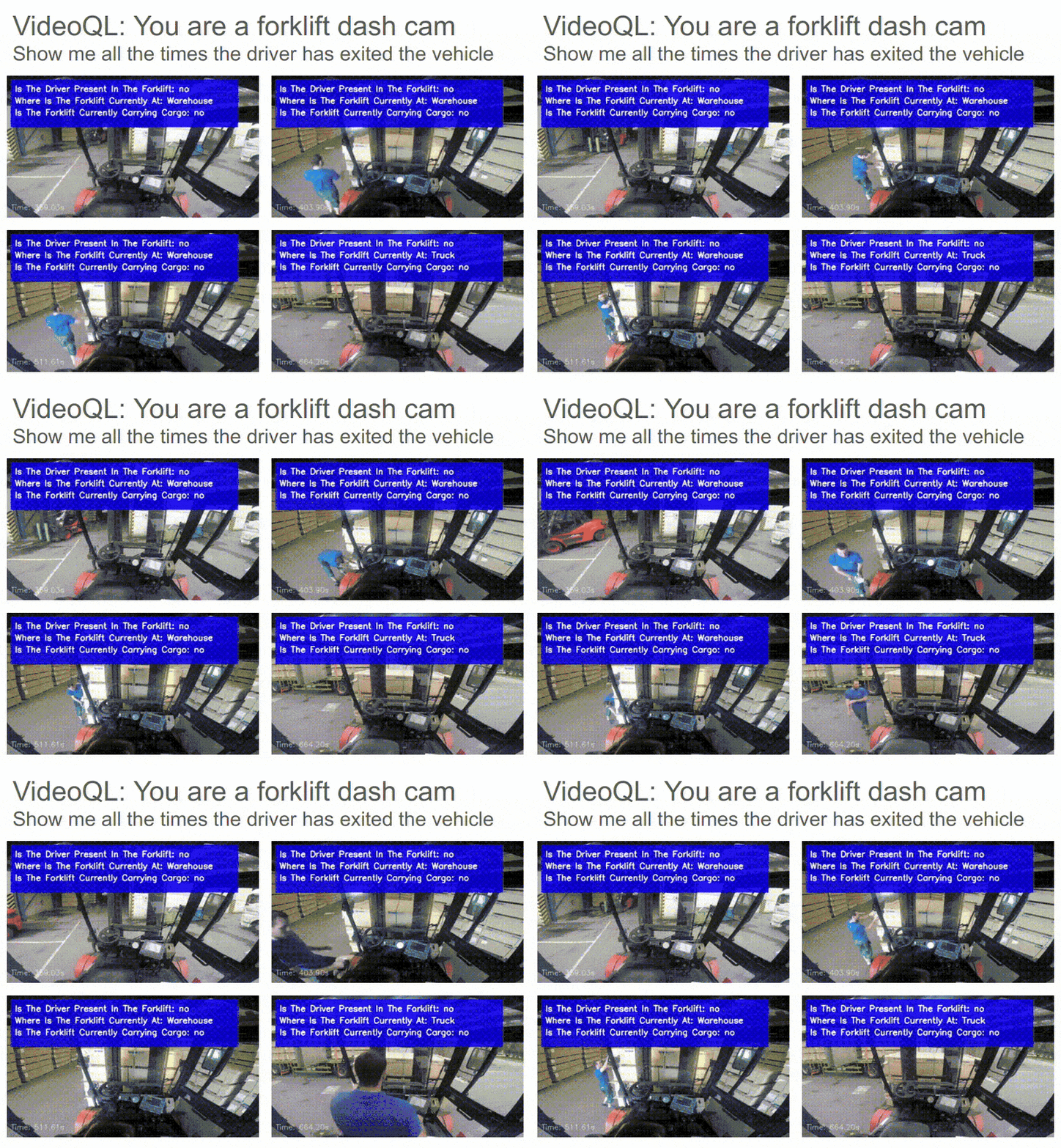
Install it from PyPI
pip install video_ql
Usage
video_ql provides both a Python API and a CLI interface for video analysis and querying.
Python API
from video_ql import VideoQL
from video_ql.models import Query, QueryCondition, OrCondition, QueryConfig

# Define your queries
queries = [
    Query(
        query="Is the driver present in the forklift?",
        options=["yes", "no"]
    ),
    Query(
        query="Where is the forklift currently at?",
        options=["Truck", "Warehouse", "Charging"]
    ),
    Query(
        query="Is the forklift currently carrying cargo?",
        options=["yes", "no"]
    )
]

# Initialize VideoQL
video_ql = VideoQL(
    video_path="path/to/your/video.mp4",
    queries=queries,
    context="You are viewing the POV from inside a forklift"
)

# Analyze entire video
results = video_ql.analyze_video(display=True)

# Query specific conditions using our Pydantic models
query_config = QueryConfig(
    queries=[
        QueryCondition(
            query="Is the driver present in the forklift?",
            options=["yes"]
        )
    ]
)

# Query the video
matching_frames = video_ql.query_video(query_config)
You can also have VideoQL automatically generate the queries and query config as shown below:
from video_ql import VideoQL
from video_ql.query_proposer import generate_queries_from_context

# Define the context for your video analysis
context = "You are watching a construction site for safety compliance monitoring."

# Automatically generate queries based on the context using the selected model
queries = generate_queries_from_context(
    context=context,
    model_name="gpt-4o-mini",  # Model can be substituted as desired
    num_queries=5
)

# Initialize VideoQL with generated queries
video_ql = VideoQL(
    video_path="path/to/your/video.mp4",
    queries=queries,
    context=context
)

# Proceed with video analysis as usual
results = video_ql.analyze_video(display=True)
Command Line Interface
Natural Language Analysis
Use the CLI tool to analyze your video
$video_ql --video path/to/video.mp4
=====================================
   Welcome to Interactive VideoQL
=====================================

First, let's create a context for your video analysis.
Describe the video content and what you're interested in tracking or analyzing.
Video context:  ... your context here

Generating queries based on your description...

Generated queries:
1. Query 1?
   Options: Yes, No
2. Another generated query?
   Options: ...

... enjoy your video analysis
YAML Analysis
- Create a config file (
config.yaml):
queries:
  - query: "Is the driver present in the forklift?"
    options: ["yes", "no"]
  - query: "Where is the forklift currently at?"
    options: ["Truck", "Warehouse", "Charging"]
  - query: "Is the forklift currently carrying cargo?"
    options: ["yes", "no"]
context: "You are viewing the POV from inside a forklift"
fps: 1.0
tile_frames: [3, 3]
frame_stride: 9
max_resolution: [640, 360]
- Create a query file (
query.yaml):
queries:
  - OR:
    - query: "Is the driver present in the forklift?"
      options: ["yes"]
- Run the CLI:
python3 -m video_ql.yaml_analysis --video path/to/video.mp4 \
         --config config.yaml \
         --query query.yaml \
         --output results/query_results \
         --threads 100 \
         --display
You may also process a single frame using the following
python3 -m video_ql.single_frame \
         --image path/to/image.png \
         --config config.yaml \
         --output results/query_results.json \
         --display
The query proposer helps you automatically generate relevant queries for your video content based on a provided context.
from video_ql.query_proposer import generate_queries_from_context, save_queries_to_yaml

# Generate queries based on context
context = "Security camera footage of a parking lot at night"
queries = generate_queries_from_context(
    context=context,
    model_name="gpt-4o-mini",  # or "claude-3-haiku-20240307"
    num_queries=5
)

# Save queries to a YAML file
save_queries_to_yaml(queries, "generated_queries.yaml")
You can use the query proposer from the command line:
python -m video_ql.query_proposer \
    --context "Dashcam footage of urban driving in rainy conditions" \
    --model "gpt-4o-mini" \
    --num-queries 7 \
    --output "dashcam_queries.yaml"
Development
Read the CONTRIBUTING.md file.
1 maintainer

Metadata
1 maintainer
Release files for video-ql 1.6.0
For a detailed explanation of source distributions (sdists) and built distributions (wheels), please see the package formats documentation.
Source distribution (sdist)
| File | Size | Uploaded | Provenance | Actions |
|---|---|---|---|---|
| video_ql-1.6.0.tar.gz | 4.7 MB | Without provenance | Details for video_ql-1.6.0.tar.gz |
Built distribution (wheel)
| File | Interpreter | ABI | Platform | Actions Reset |
|---|---|---|---|---|
| video_ql-1.6.0-py3-none-any.whl | Python 3 | none | any | Details for video_ql-1.6.0-py3-none-any.whl |
Total release size: 4.7 MB
Release files / video_ql-1.6.0.tar.gz
| Download URL | video_ql-1.6.0.tar.gz |
|---|---|
| Size | 4.7 MB |
| Tags | Source |
|
SHA-256 checksum How to use checksums |
73141ca702f4ea6899e237a0f3269388f8c43ab157742a9c4268375fa8c476fd
|
|
BLAKE2b-256 checksum How to use checksums |
7e8e204aad922b1bb825c615eac7414d22fa1d40817038026b701242a76f1ed5
|
| Upload date | |
|
Uploaded using Trusted Publishing? What is trusted publishing? |
No |
| Uploaded via |
twine/6.1.0 CPython/3.13.5
|
Release files / video_ql-1.6.0-py3-none-any.whl
| Download URL | video_ql-1.6.0-py3-none-any.whl |
|---|---|
| Size | 43.5 kB |
| Tags | Python 3 |
|
SHA-256 checksum How to use checksums |
151ecd470cdc8dd4169a0e814641a8a50cee05a0bb26cc29d0e4ed68633d5916
|
|
BLAKE2b-256 checksum How to use checksums |
d108ee7b73dff61640ad5d1f75eabd5fb42632ac7b87998280cf858fdea249b5
|
| Upload date | |
|
Uploaded using Trusted Publishing? What is trusted publishing? |
No |
| Uploaded via |
twine/6.1.0 CPython/3.13.5
|
Security for video-ql 1.6.0
Provenance
Provenance describes where a file came from. On PyPI, provenance is shared via attestations, which provide a verifiable record of the build or publishing details. View details, limitations and caveats.
No provenance found
None of the files in this release were uploaded with provenance metadata.
A note on package security
PyPI is a repository for distributing packages, not a service for auditing them. While third-party security researchers and our staff do their best to detect and remove malicious packages, PyPI cannot guarantee the quality, security or suitability of any given package.
To learn more about protecting yourself from malicious actors, visit our package security documentation.














