

vinoWhisper




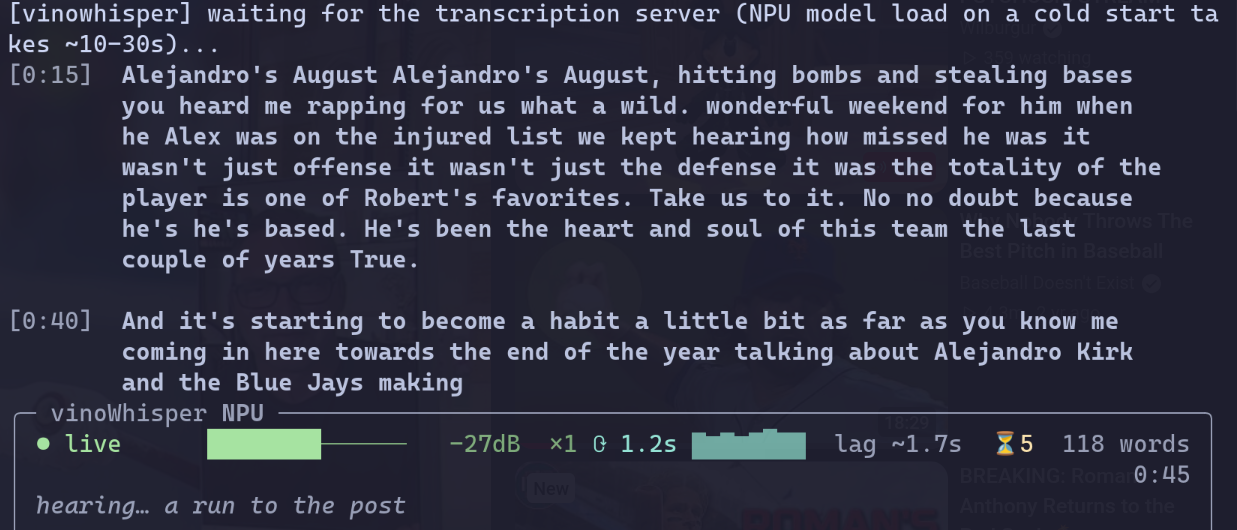
Live captions for anything playing on your Linux laptop, running on the NPU that came with it. No cloud, no API key, no account, no audio leaving the machine. Point it at whatever is playing and it captions in your terminal, or in a floating box above everything else on screen. The same box does dictation too: hold a key, talk, and let go to type what you said. There is nothing to configure: start it and it goes.
pip install vinowhisper && vinowhisper-setup && vinowhisper-caption
Why this exists
To be upfront about the bias: I did not build this because local speech-to-text is hard to find. I built it because my laptop has an Intel NPU rated at 16 TOPS that was doing absolutely nothing, and captioning a video turns out to be the rare workload that suits it: continuous, latency-sensitive, and small enough to fit. 16 TOPS is a coprocessor, not a GPU, and whisper-small.en is one of the genuinely useful models that fits in it.
So the pitch is not "another Whisper wrapper." It is: the transcription runs on
a chip that is otherwise idle, so it costs you no CPU, no GPU, no fan, and no
network. openvino-genai's WhisperPipeline with device="NPU" does the
work, the same idea as vinoAuthFace,
different feature.
Measured on this laptop (Wildcat Lake, stepping A0), whisper-small.en on the NPU, 2026-09-12:
Per 12s window (the default), generate() |
0.70s mean, 0.85s p90 |
| Captions behind the audio | ~1.5s at best |
| First streamed token | 0.204s |
| Idle cost after you stop | zero, the server exits itself |
The Intel iGPU does the same window in 0.95s and the CPU in 2.30s, so both fallbacks are usable, just laggier.
What makes it different from a shell script around Whisper
Words are never rewritten once printed. The stitcher runs LocalAgreement-2:
a word is committed only when two overlapping windows independently agree on
it. That is why the transcript can live in your terminal's own scrollback,
where it survives quitting and where your terminal's selection and search still
work on it. The hearing… line is the words heard once and still waiting on a
second opinion, so the two-cycle commit delay is visible rather than felt as
a freeze.
It scales to zero, the systemd way. The NPU model load costs 10-30s, so something has to hold it. A socket unit owns a private Unix socket at boot with no process running, systemd spawns the server on the first connection, and the server exits itself after 5 minutes idle. Serverless, on your laptop, with no framework.
The model download is verified. The Hugging Face source is pinned to a
commit and every file is sha256-checked before the export reads it, and the
export is then hashed against pins in vinowhisper/model_digests.json before
anything loads it.
Details in SECURITY.md.
A missing NPU degrades instead of bricking. Selection walks NPU, then GPU,
then CPU, and a fallback is never silent: it shows up in the server journal, in
/health, in vinowhisper-doctor, and on the status bar as a red border.
It tells you how to fix it. Nearly every error path here prints the command that resolves it, in your distro's package names (see Supported distros).
The overlay is optional, and native. vinowhisper-gui is a 6.3MB Rust
binary that floats a caption box above every window, fullscreen video
included, with a tray icon, a global shortcut and a start-at-login toggle. It
links nothing but libc, adds nothing to the Python install, and draws the same
event stream as the terminal UI. It also does dictation: hold Meta+H (the
dictation key on laptops that have one), talk, and let go to type what you
said into the focused window, one NPU decode per utterance.
docs/gui.md
Install
curl -fsSL https://raw.githubusercontent.com/karanshukla/vinoWhisper/main/scripts/install.sh | bash
That installs uv, clones the latest release,
builds the locked environment, and hands over to vinowhisper-setup, which is where every
machine-specific decision happens: your capture tool, your NPU driver, the
model export your device needs, and systemd units generated against paths that
actually exist. It prints every command before running it and asks first.
The desktop overlay (floating captions and dictation) is one more command:
vinowhisper-setup --gui. It downloads the binary from the GitHub release and
checks it against a digest pinned in the Python package.
Or from PyPI, if you would rather wire up the machine yourself:
pip install vinowhisper   # needs Python 3.11-3.13
vinowhisper-setup         # still worth running: NPU driver, model export, units
pip gets you the commands. It cannot get you an NPU driver, a model export or
systemd units, which is what vinowhisper-setup is for either way.
docs/install.md
covers installing from a checkout and the OpenVINO version floor.
What you need
| OS | Linux. Developed on Fedora 45 / KDE Plasma 6 / Wayland. See Supported distros |
| Audio | PipeWire (pw-record) or PulseAudio (parec), picked automatically |
| Accelerator | Intel NPU for the numbers above. An Intel GPU or the CPU runs, slower. AMD NPUs are detected and not usable (no OpenVINO plugin) |
| Python | 3.11 to 3.13. 3.14 cannot export the model |
| Disk | ~1.5GB for the model export |
| Overlay (optional) | A Wayland compositor with wlr-layer-shell: KDE Plasma 6, Sway, Hyprland, niri, COSMIC. Not GNOME |
The NPU needs a userspace driver half that no distro packages completely, and
vinowhisper-doctor will tell you exactly which half is missing.
docs/hardware.md
covers every way it fails to appear.
Supported distros
vinowhisper-setup and vinowhisper-doctor read /etc/os-release and print
install commands in your distro's own package names. Eight families are
covered:
| Family | Includes | NPU driver | Confidence |
|---|---|---|---|
| Fedora | RHEL, CentOS, Alma, Rocky, Nobara, Bazzite, Silverblue | intel-npu-driver in the repos |
Built and run here |
| Debian | Ubuntu, Pop!_OS, Mint, elementary, Raspbian | Intel's upstream .debs |
From the package index |
| Arch | CachyOS, EndeavourOS, Manjaro, Garuda | AUR (intel-npu-driver) |
From the package index |
| openSUSE | Tumbleweed, Leap, SLES | Upstream release | From the package index |
| Gentoo | Some overlays, else upstream | From the package index | |
| Void | Upstream release | From the package index | |
| Alpine | None: musl, so upstream glibc builds do not apply | From the package index | |
| NixOS | hardware.intel-npu (unstable) |
Config snippets, not nix-env lines |
Anything else gets generic advice, and says so. Derivatives not listed are
matched through ID_LIKE. On every distro the NPU compiler library
(libopenvino_intel_npu_compiler.so) comes from Intel's release archive,
because nobody packages it; the doctor detects that and prints the steps.
docs/audio.md
has the capture side.
Commands
vinowhisper-caption                       # caption system audio
vinowhisper-caption --source mic          # caption yourself
vinowhisper-caption --list-targets        # capture one app instead of the whole sink
vinowhisper-caption --debug               # per-cycle timings, levels, raw transcript
vinowhisper-caption --record ~/sess       # save the session for replay
vinowhisper-caption --plain > out.txt     # no status bar (implied when piping)
vinowhisper-caption --json                # one event per line, what the overlay reads

vinowhisper-setup --language fr           # French (de, es, auto): sets up the multilingual model
vinowhisper-setup --language auto --task translate   # foreign speech, captioned in English

vinowhisper-gui                           # the floating overlay and tray icon
vinowhisper-gui toggle                    # show/hide it; Meta+Alt+C does the same
vinowhisper-gui dictate                   # start/finish dictating; hold Meta+H does the same
vinowhisper-gui --install --autostart     # launcher entry, and the tray at login
                                          #   (or tick "Start at login" in the tray)

vinowhisper-setup                         # guided install; re-runnable, idempotent
vinowhisper-setup --dry-run               # print the plan, change nothing
vinowhisper-setup --print-units           # the systemd units it would generate
vinowhisper-setup --gui                   # just the optional overlay and dictation
vinowhisper-setup --ovfetch               # just ovfetch, NPU driver data for the doctor

vinowhisper-doctor                        # devices, model, digests, audio, live levels
vinowhisper-doctor --json                 # the same, for a bug report
vinowhisper-doctor --no-probe             # skip the 2s-per-target level capture

vinowhisper-replay ~/sess --restitch      # re-run the merge logic offline
vinowhisper-replay ~/sess --sweep 8,12,20 # measure what --window actually costs
Docs
| Installing | What the installer does, the OpenVINO version floor and why, digest pinning, pinning the window on top |
| Terminal captions | Scrollback, paragraphs, the level meter, and plain output |
| Overlay and dictation | The floating box, tray icon and shortcuts, dictation and how its text is typed, which desktops it works on, and why it is Rust |
| Hardware | Device selection, the two model exports, and every way the NPU fails to appear |
| Audio capture | PipeWire vs PulseAudio, distro coverage, and what actually silences a capture (it is not the mute button) |
| Latency | Why captions trail the audio, the one knob that changes it, and why the wording drifts |
| Debugging | --record, offline replay, and what vinowhisper-doctor measures |
| Architecture | Socket activation and scale-to-zero, and how to stop it |
| Development | Tests without the hardware, the build config, CI and releases |
Other languages
French, German and Spanish work offline with Whisper's multilingual
whisper-small, the same size and architecture as the default model. It is
opt-in: vinowhisper-setup --language fr exports it beside the English one
(about 1GB more disk) and saves the choice to ~/.config/vinowhisper/language.json,
which the server reads at start (vinowhisper-server --language fr overrides it).
The overlay's tray menu switches it too: Language and Translate to English.
A switch stops the captions, restarts the server on the new model (the same 10-30s
load as a cold start) and starts them again. en, the default, keeps
whisper-small.en.
- Translation is Whisper's own, and only goes into English.
--task translatecaptions French, German or Spanish speech in English from the same model, at no extra cost. Translating into any other language needs a separate translation model, which this does not do. - Name the language when you know it.
--language autodetects it on every window and can flip mid-caption. A forced language on the wrong audio does not fail: Whisper answers in that language anyway. - Not verified on the NPU. The checks (2026-10-06) ran on the CPU device with an int8 multilingual small and synthetic speech: transcription, forced language, auto-detect and translate all worked. The NPU export of the multilingual model has not been built or benchmarked, so latency is unmeasured, and its digests are not pinned yet (the doctor reports it unpinned). Accuracy on real speech and accents is untested, and small is noticeably weaker than English-only small.en.
Honest limits
Worth saying before you install it, because the numbers above are all from one machine:
- Every benchmark here is n=1, on one laptop, with early-silicon NPU drivers. The GPU and CPU fallbacks have run on this laptop's Xe3 iGPU and Core 5 320 and nowhere else, and 2 of 15 GPU model loads segfaulted inside OpenVINO's GPU plugin.
- Captions trail the audio by roughly twice the cycle time. That is inherent to a two-cycle commit policy, not a bug to be tuned away. docs/latency.md explains the one knob that moves it.
- Wording drifts between cycles, because each window is re-decoded with more right-context than the last. The stitcher hides most of it and not all.
- The overlay needs wlr-layer-shell. Tested on KDE Plasma 6.7 only. GNOME does not offer the protocol, so there the overlay refuses to start and the terminal UI is the way in. Sway, Hyprland, niri and COSMIC should work and are untested.
- Dictation pastes into whatever has focus. Wayland does not say what that is, so it cannot check. Outside KDE the paste goes through the compositor's virtual keyboard, which has not been tried on a live compositor yet. docs/gui.md has the details.
- Only Fedora's package names have been used for real. The other seven families come from their package indexes. If one is wrong for yours, that is expected, and it is the fastest thing in this repo to fix. The PulseAudio capture backend has never run against a real PulseAudio server either.
- The NPU export needs
transformers<5.4. 5.4.0 and up produce a model that compiles and then fails atgenerate()(bisected 2026-09-04). Thevinowhisper[export]extra holds the pin. That version carries two open transformers CVEs, and both need you to export a malicious model repo, which the defaultopenai/whisper-small.enis not. docs/install.md has the bisect table.
More
- CONTRIBUTING.md and docs/development.md
- SECURITY.md: what stays on the machine, and the local server's trust boundary
- CHANGELOG.md
If you run this on hardware that isn't a Wildcat Lake laptop, I want the
report, working or not. An
issue with
vinowhisper-doctor --json pasted into it is worth more than any benchmark I
can run here.
MIT licensed.
1 maintainer

Metadata
1 maintainer
Release files for vinowhisper 0.9.0
For a detailed explanation of source distributions (sdists) and built distributions (wheels), please see the package formats documentation.
Source distribution (sdist)
| File | Size | Uploaded | |
|---|---|---|---|
| vinowhisper-0.9.0.tar.gz | 142.8 kB | Details |
Built distribution (wheel)
| File | Interpreter | ABI | Platform | Reset |
|---|---|---|---|---|
| vinowhisper-0.9.0-py3-none-any.whl | Python 3 | none | any | Details |
Total release size: 230.1 kB
Release files / vinowhisper-0.9.0.tar.gz
| Download URL | vinowhisper-0.9.0.tar.gz |
|---|---|
| Size | 142.8 kB |
| Tags | Source |
|
SHA-256 checksum How to use checksums |
ec6df42ac25d27e8db9ef95da12a468eeb11af2dfa9a3731cab49cc232fb8293
|
|
BLAKE2b-256 checksum How to use checksums |
4cc498d114210cce41198a9d98fca712cb8397ad45555e92c356b97efcf1f2d1
|
| Upload date | |
|
Uploaded using Trusted Publishing? What is trusted publishing? |
Yes |
| Uploaded via |
uv/0.12.24 {"installer":{"name":"uv","version":"0.12.24","subcommand":["publish"]},"python":null,"implementation":{"name":null,"version":null},"distro":{"name":"Ubuntu","version":"24.04","id":"noble","libc":null},"system":{"name":null,"release":null},"cpu":null,"openssl_version":null,"setuptools_version":null,"rustc_version":null,"ci":true}
|
Release files / vinowhisper-0.9.0-py3-none-any.whl
| Download URL | vinowhisper-0.9.0-py3-none-any.whl |
|---|---|
| Size | 87.3 kB |
| Tags | Python 3 |
|
SHA-256 checksum How to use checksums |
2ee380cc42a95ada2268b1603e92da2b477162c70a17cdd21949a96741f59ded
|
|
BLAKE2b-256 checksum How to use checksums |
d151a015ec03e81fd6642ceda8a0aafb0a8d9d0148a189b09ddc94a66c80ab32
|
| Upload date | |
|
Uploaded using Trusted Publishing? What is trusted publishing? |
Yes |
| Uploaded via |
uv/0.12.24 {"installer":{"name":"uv","version":"0.12.24","subcommand":["publish"]},"python":null,"implementation":{"name":null,"version":null},"distro":{"name":"Ubuntu","version":"24.04","id":"noble","libc":null},"system":{"name":null,"release":null},"cpu":null,"openssl_version":null,"setuptools_version":null,"rustc_version":null,"ci":true}
|














