
ViQR v1.0.0
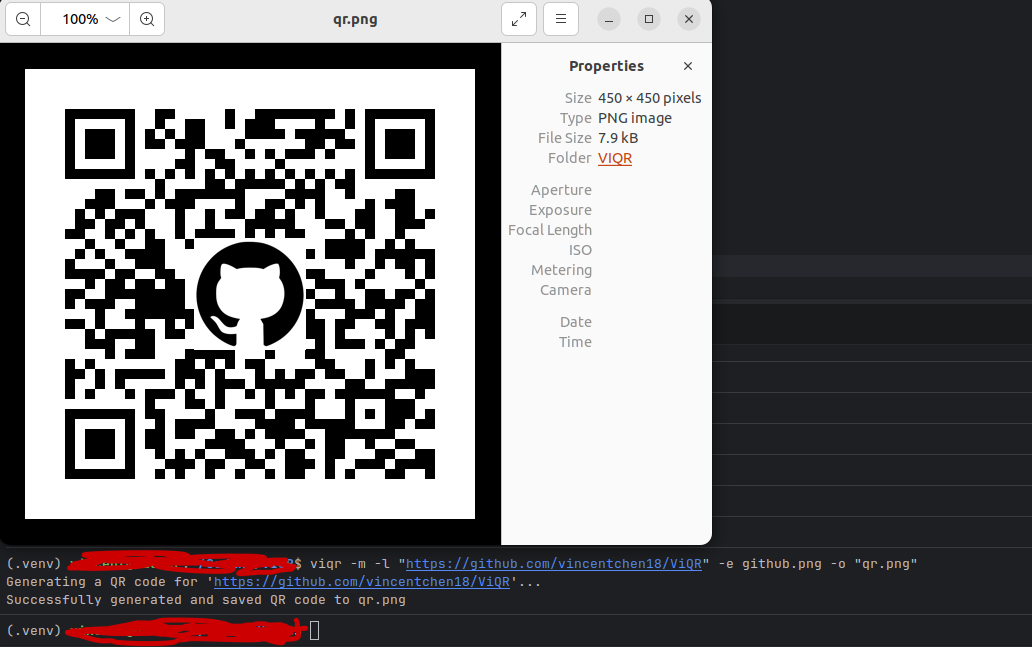
ViQR (Vinnie's QR) is a QR image forensics tool that allows you to read and generate your own QR Codes, with logo embedding supported!
Features
QR Code Generation
-
Customisable data generation
-
QR Code generation from text file also supported
-
Logo embedding supported for business / social media specific QR codes and others
-
QR image size is customisable
-
Customisable saving filepath
-
Overwrite prevention mechanism
-
Immediate QR Preview after generation with multi-OS support
QR Code Reading
-
Scans up to multiple QR Codes in the same image.
-
Proper image validation
Usage
QR Code generation:
viqr -m -l [data] (optional -o [output_path]) (optional -s [size]) (optional -e [path_to_embed_file])
--> Generates a QR Code for [data] sized [size] pixels at output path [output_path] and optionally embeds the specified image.
viqr -m -f [file_path] (optional -o [output_path]) (optional -s [size]) (optional -e [path_to_embed_file])
--> Generates a QR Code for the first data in [file_path] sized [size] pixels at output path [output_path] and optionally embeds the specified image.
QR Code decoding:
viqr -r [file_path]
--> Reads (up to multiple) QR codes inside the image at [file_path].
Usage Table:
| Flag | Description | Default |
|---|---|---|
-m, --make |
Generate a QR code | — |
-r, --read |
Read QR code(s) from an image at the given path | — |
-l, --link |
Data/text to encode (use quotes for URLs) | — |
-f, --file |
Encode the first line of data from a text file | — |
-e, --embed |
Path to a logo image to embed in the center | none |
-o, --output |
Output file path | auto (qr.png, qr1.png, …) |
-s, --size |
Output size in pixels (minimum 100) | auto |
Installation
The ViQR Tool can be installed onto any computer with the following command:
pip install viqr
Requirements/Dependencies:
- Python 3.8+
- qrcode 7.0+
- Pillow 9.0+
- opencv-python 4.3.0+
AI Use Disclosure for this project:
AI was used minimally to assist in the learning of the argparse module and PyPI publication.
1 maintainer

Release files for viqr 1.0.0
For a detailed explanation of source distributions (sdists) and built distributions (wheels), please see the package formats documentation.
Source distribution (sdist)
| File | Size | Uploaded | |
|---|---|---|---|
| viqr-1.0.0.tar.gz | 5.8 kB | Details |
Built distribution (wheel)
| File | Interpreter | ABI | Platform | Reset |
|---|---|---|---|---|
| viqr-1.0.0-py3-none-any.whl | Python 3 | none | any | Details |
Total release size: 12.0 kB
Release files / viqr-1.0.0.tar.gz
| Download URL | viqr-1.0.0.tar.gz |
|---|---|
| Size | 5.8 kB |
| Tags | Source |
|
SHA-256 checksum How to use checksums |
8c96611531cfe5b312302df26480d13d01182070bcf60b1aeb2d87fd52389aa3
|
|
BLAKE2b-256 checksum How to use checksums |
fd64df5695f40b7be984886c8b6e74d509a8442a93f71d4ae59e83401af76547
|
| Upload date | |
|
Uploaded using Trusted Publishing? What is trusted publishing? |
No |
| Uploaded via |
twine/6.2.0 CPython/3.10.12
|
Release files / viqr-1.0.0-py3-none-any.whl
| Download URL | viqr-1.0.0-py3-none-any.whl |
|---|---|
| Size | 6.2 kB |
| Tags | Python 3 |
|
SHA-256 checksum How to use checksums |
ec26630b6f48a9f97ff80f23ce98c81cdbce0666d17a77b03207f7f053265acf
|
|
BLAKE2b-256 checksum How to use checksums |
7f9edcc16239e093d4dd144ca9278e9f668edd5e5b06e8daf238fc6f68ecfb0f
|
| Upload date | |
|
Uploaded using Trusted Publishing? What is trusted publishing? |
No |
| Uploaded via |
twine/6.2.0 CPython/3.10.12
|













