
A command-line tool to generate and read QR codes, with logo embedding.

Project description
ViQR v1.0.0
ViQR (Vinnie's QR) is a QR image forensics tool that allows you to read and generate your own QR Codes, with logo embedding supported!
Features
QR Code Generation
-
Customisable data generation
-
QR Code generation from text file also supported
-
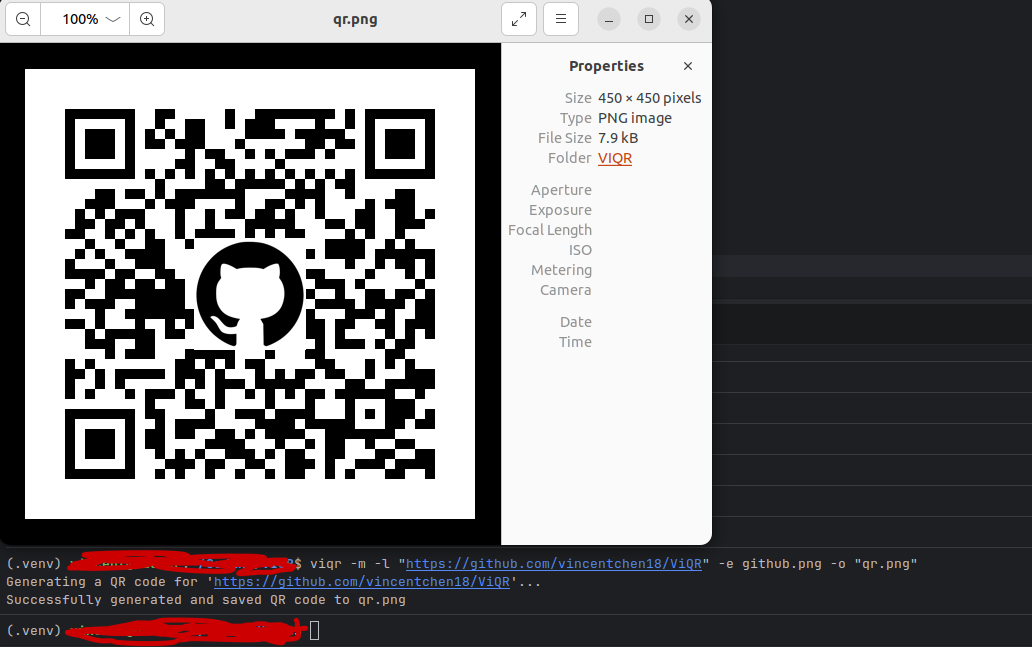
Logo embedding supported for business / social media specific QR codes and others
-
QR image size is customisable
-
Customisable saving filepath
-
Overwrite prevention mechanism
-
Immediate QR Preview after generation with multi-OS support
QR Code Reading
-
Scans up to multiple QR Codes in the same image.
-
Proper image validation
Usage
QR Code generation:
viqr -m -l [data] (optional -o [output_path]) (optional -s [size]) (optional -e [path_to_embed_file])
--> Generates a QR Code for [data] sized [size] pixels at output path [output_path] and optionally embeds the specified image.
viqr -m -f [file_path] (optional -o [output_path]) (optional -s [size]) (optional -e [path_to_embed_file])
--> Generates a QR Code for the first data in [file_path] sized [size] pixels at output path [output_path] and optionally embeds the specified image.
QR Code decoding:
viqr -r [file_path]
--> Reads (up to multiple) QR codes inside the image at [file_path].
Usage Table:
| Flag | Description | Default |
|---|---|---|
-m, --make |
Generate a QR code | — |
-r, --read |
Read QR code(s) from an image at the given path | — |
-l, --link |
Data/text to encode (use quotes for URLs) | — |
-f, --file |
Encode the first line of data from a text file | — |
-e, --embed |
Path to a logo image to embed in the center | none |
-o, --output |
Output file path | auto (qr.png, qr1.png, …) |
-s, --size |
Output size in pixels (minimum 100) | auto |
Installation
The ViQR Tool can be installed onto any computer with the following command:
pip install viqr
Requirements/Dependencies:
- Python 3.8+
- qrcode 7.0+
- Pillow 9.0+
- opencv-python 4.3.0+
AI Use Disclosure for this project:
AI was used minimally to assist in the learning of the argparse module and PyPI publication.
Release history Release notifications | RSS feed

Download files
Download the file for your platform. If you're not sure which to choose, learn more about installing packages.
Source Distribution
Built Distribution
Filter files by name, interpreter, ABI, and platform.
If you're not sure about the file name format, learn more about wheel file names.
Copy a direct link to the current filters
File details
Details for the file viqr-1.0.0.tar.gz.
File metadata
- Download URL: viqr-1.0.0.tar.gz
- Upload date:
- Size: 5.8 kB
- Tags: Source
- Uploaded using Trusted Publishing? No
- Uploaded via: twine/6.2.0 CPython/3.10.12
File hashes
| Algorithm | Hash digest | |
|---|---|---|
| SHA256 |
8c96611531cfe5b312302df26480d13d01182070bcf60b1aeb2d87fd52389aa3
|
|
| MD5 |
764d4b406605e615b137de96f144a751
|
|
| BLAKE2b-256 |
fd64df5695f40b7be984886c8b6e74d509a8442a93f71d4ae59e83401af76547
|
File details
Details for the file viqr-1.0.0-py3-none-any.whl.
File metadata
- Download URL: viqr-1.0.0-py3-none-any.whl
- Upload date:
- Size: 6.2 kB
- Tags: Python 3
- Uploaded using Trusted Publishing? No
- Uploaded via: twine/6.2.0 CPython/3.10.12
File hashes
| Algorithm | Hash digest | |
|---|---|---|
| SHA256 |
ec26630b6f48a9f97ff80f23ce98c81cdbce0666d17a77b03207f7f053265acf
|
|
| MD5 |
9ad3903a628daeac6a3c43f778a492b0
|
|
| BLAKE2b-256 |
7f9edcc16239e093d4dd144ca9278e9f668edd5e5b06e8daf238fc6f68ecfb0f
|






