
A Python GUI application for controlling test equipment over VISA

Project description
VISA Vulture
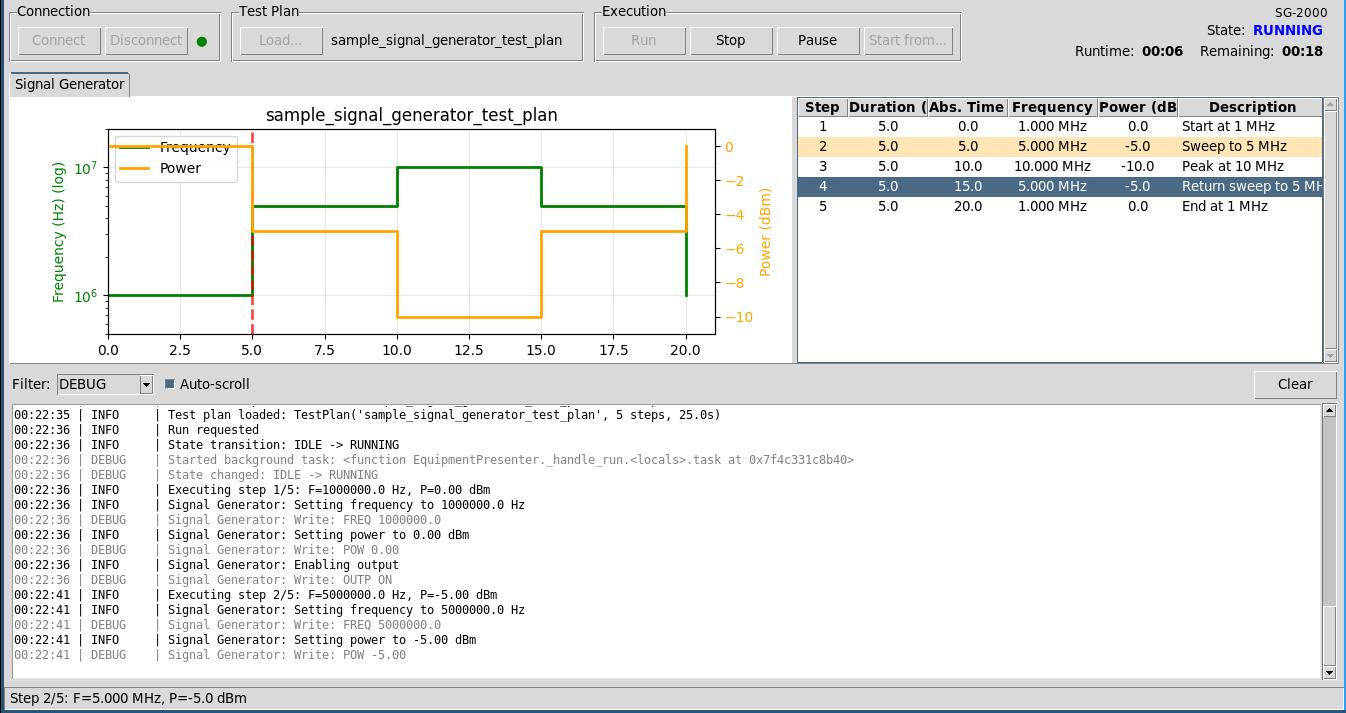
A Python GUI application for controlling test equipment over VISA. Load test plans from CSV files, execute them against connected instruments, and monitor results through real-time logging and plotting.
Features
- VISA Instrument Control: Connect to power supplies, signal generators, and other test equipment
- Test Plan Execution: Load CSV-based test plans for different instrument types
- Real-time Plotting: Monitor voltage/current or frequency/power during test execution
- Test Points Table: View all test plan steps in a tabular format
- Comprehensive Logging: Filterable log panel with file output
- Simulation Mode: Develop and test without hardware using PyVISA-sim
Requirements
- Python 3.10+
- Tkinter (usually included with Python)
Installation
From PyPI
pip install visa-vulture
From Source
-
Clone the repository:
git clone https://github.com/dekmeister/visa-vulture.git
cd visa-vulture
-
Install the package:
pip install .
Or for development (includes pytest, black, mypy):
pip install -e ".[dev]"
Usage
Running the Application
After installation via pip:
# Run with default configuration (simulation mode)
visa-vulture

# Run with simulation mode explicitly enabled
visa-vulture --simulation

# Run with custom configuration file
visa-vulture --config path/to/config.json
If running from source:
python run.py
# or
python -m visa_vulture
Test Plan Format
Test plans are CSV files. The format depends on the instrument type. Step numbers are assigned automatically based on row order. The instrument type of the test plan is defined in a header row (indicated by lines starting with #).
Power Supply Test Plans
| Column | Required | Description |
|---|---|---|
| duration | Yes | Duration of this step in seconds |
| voltage | Yes | Voltage setpoint in volts |
| current | Yes | Current limit in amps |
| description | No | Optional step description |
Example (./plans/sample_power_supply_test_plan.csv):
# instrument_type: power_supply
duration,voltage,current,description
5.0,5.0,1.0,Initial voltage
5.0,10.0,1.5,Ramp to 10V
10.0,12.0,2.0,Final voltage
5.0,0.0,0.0,Power down
Signal Generator Test Plans
| Column | Required | Description |
|---|---|---|
| duration | Yes | Duration of this step in seconds |
| frequency | Yes | Frequency in Hz |
| power | Yes | Power level in dBm |
| description | No | Optional step description |
Example (./plans/sample_signal_generator_test_plan.csv):
# instrument_type: signal_generator
duration,frequency,power,description
5.0,1000000,0,Start at 1 MHz
5.0,5000000,-5,Sweep to 5 MHz
5.0,10000000,-10,Peak at 10 MHz
Configuration
Configuration is stored in JSON format. Key settings:
{
    "simulation_mode": true,
    "log_level": "INFO"
}
See visa_vulture/config/default_config.json for full configuration options.
Architecture
The application follows the Model-View-Presenter (MVP) pattern:
┌─────────────────────────────────────────────────────────┐
│                        Model                            │
│  • Equipment state machine (UNKNOWN/IDLE/RUNNING/ERROR) │
│  • Test plan representation                             │
│  • Instrument abstraction                               │
└─────────────────────────────────────────────────────────┘
                          ▲
                          │
                          ▼
┌─────────────────────────────────────────────────────────┐
│                      Presenter                          │
│  • Coordinates model and view                           │
│  • Manages background threads for VISA communication    │
└─────────────────────────────────────────────────────────┘
                          ▲
                          │
                          ▼
┌─────────────────────────────────────────────────────────┐
│                         View                            │
│  • Tkinter GUI components                               │
│  • Log panel, plot panel, controls                      │
└─────────────────────────────────────────────────────────┘
Project Structure
visa_vulture/
├── main.py                 # Entry point
├── config/                 # Configuration loading
├── model/                  # Business logic, state machine
├── view/                   # Tkinter GUI components
├── presenter/              # MVP coordination
├── file_io/                # CSV parsing, results writing
├── instruments/            # VISA instrument classes
├── logging_config/         # Logging setup
├── simulation/             # PyVISA-sim configuration
└── utils/                  # Threading helpers
Adding New Instruments
- Create a new class in
visa_vulture/instruments/inheriting fromBaseInstrument - Implement required methods:
connect,disconnect,get_status - Add instrument-specific commands
- Register the type in
visa_vulture/model/equipment.py - Add simulation responses to
visa_vulture/simulation/instruments.yaml
Development
Running with Hardware
- Set
simulation_mode: falsein configuration - Update instrument
resource_addressto match your equipment - Ensure VISA drivers are installed (NI-VISA, Keysight IO Libraries, etc.)
Extending Simulation
Edit visa_vulture/simulation/instruments.yaml to add:
- New instrument responses
- Additional SCPI commands
- Stateful properties
License
MIT License
Release history Release notifications | RSS feed


Download files
Download the file for your platform. If you're not sure which to choose, learn more about installing packages.
Source Distribution
Built Distribution
Filter files by name, interpreter, ABI, and platform.
If you're not sure about the file name format, learn more about wheel file names.
Copy a direct link to the current filters
File details
Details for the file visa_vulture-0.1.0.tar.gz.
File metadata
- Download URL: visa_vulture-0.1.0.tar.gz
- Upload date:
- Size: 41.7 kB
- Tags: Source
- Uploaded using Trusted Publishing? No
- Uploaded via: twine/6.2.0 CPython/3.14.2
File hashes
| Algorithm | Hash digest | |
|---|---|---|
| SHA256 |
4d9b99cc83a38df27e7bc6f67cfa46bf920cf14b45d0631c6836bbebf8c13983
|
|
| MD5 |
d7aa8b8ec6324dddaf3be5d7e2d99389
|
|
| BLAKE2b-256 |
fe3d2d32de9ab13f977d52978b3385cd7676f414fc4fee26b0bd561642891b2e
|
File details
Details for the file visa_vulture-0.1.0-py3-none-any.whl.
File metadata
- Download URL: visa_vulture-0.1.0-py3-none-any.whl
- Upload date:
- Size: 54.5 kB
- Tags: Python 3
- Uploaded using Trusted Publishing? No
- Uploaded via: twine/6.2.0 CPython/3.14.2
File hashes
| Algorithm | Hash digest | |
|---|---|---|
| SHA256 |
787bbcae2485fba7ef3e9732b03e882bcd1591dcd27ec8d6dc87c8286e0bc335
|
|
| MD5 |
5556f426cbe0c7c5d1f76b65542db47b
|
|
| BLAKE2b-256 |
d8abf8005200a2ecd9340e440d6c3d90fd1c89fb6d452ba03bf692a29f2fc532
|






