
Browser-based exploration of vision embeddings in 3D space.

Project description
Vision Embedding Space Travelling (VEST)
Browser-based exploration of vision embeddings in 3D space. Navigate using your mouse, touchscreen and keyboard, save keypoints along your trajectory and allow others to follow your path.
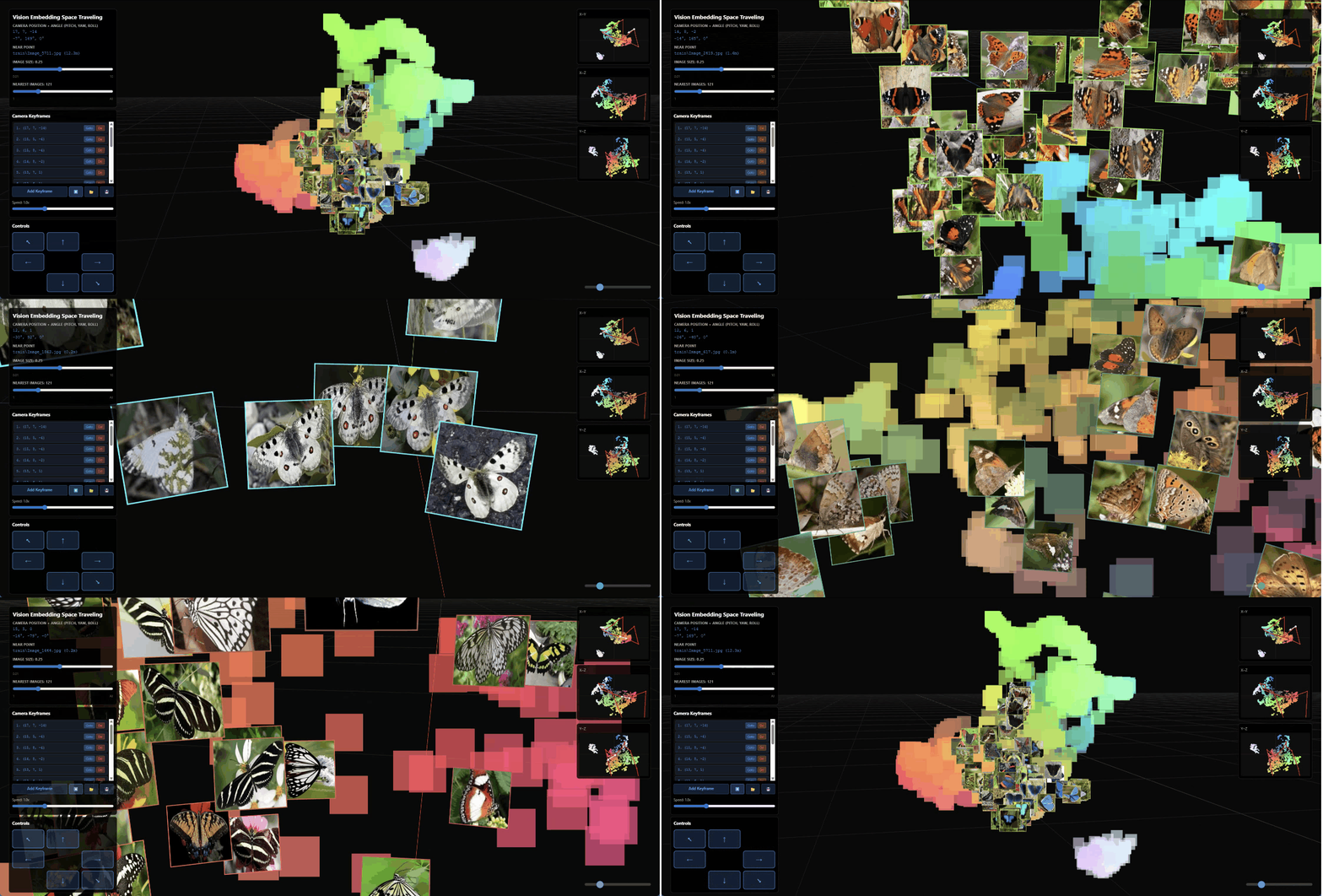
This video shows a VEST through butterfly images published on kaggle by DePie. The embedding was generated using openai/clip-vit-base-patch32 and reduced to 3 dimensions using a UMAP. Read the full example and download the video.
Features
- Interactive 3D Visualization: Explore images placed at 3D coordinates
- Browser-Based: Runs entirely in your web browser using Three.js
- Pip-Installable: Easy installation as a Python package
- Flexible Data Input: Works with CSV files containing
filename,x,yandzcolumns and folders of .png or .jpg files. - Fast Navigation: Smooth keyboard movement, mouse and touchscreen controls
Installation
Installation of VEST is commonly done like this:
pip install vision-embedding-space-travelling
Or the development version:
git clone https://github.com/scads/vest.git
cd vest
pip install -e .
While VEST uses minimal dependencies only (pandas and Flask), you may need to install additional requirements such as pytorch, transformers, umap-learn, kagglehub depending on which example notebook you use. For more details, check the instructions in the example directories and the 'environmnent.yml' files.
Quick Start
Navigate to a folder containing a VEST-compatible data.csv file and an images subfolder with content as explaned below. E.g.:
cd examples/mnist
Run VEST like this:
vest data.csv --image-path ./images
The images folder may contain sub-folders, as long as these are secified in the filename column of the CSV file.
Data Format
To use VEST with your own data, you need a .csv file with image locations and coordinates in these following columns:
| Column | Type | Description |
|---|---|---|
x |
float | X coordinate in 3D space |
y |
float | Y coordinate in 3D space |
z |
float | Z coordinate in 3D space |
filename |
string | Relative path to image file (.png, .jpg, etc.) |
Example:
filename, x, y, z
test\Image_420.jpg, 11.708443, 5.975971, 1.1601356
train\Image_420.jpg, 14.487134, 3.430255, -2.0715249
test\Image_2562.jpg, 12.263655, 5.8971086, -0.066879705
Controls
Camera Movement
- W / A / S / D - Move forward, left, backward, right
- E - Move up
- Y - Move down
- Mouse - Look around (click to enable pointer lock)
- Touch control
- 1 finger: Pan view
- 2 fingers: Zoom

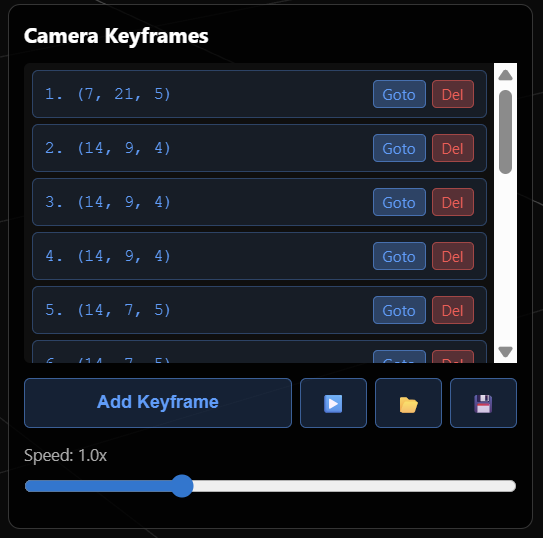
While navigating through space, you can press the "Add keyframe" button in this panel. You can also save and load lists of keyframes and play an animation travelling along the given path.
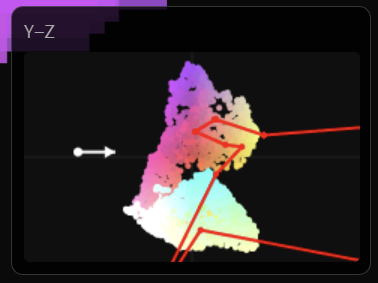
On the right, you see three panels visualizing X-Y, X-Z and Y-Z projections. The small white arrow in there is your current view point and direction. The red line corresponds to the path of keyframes which is currently loaded.
Example Gallery
CHAMMI-75 Microscopy Images

This example was generated using the CHAMMI-75 microscopy images dataset, which is licensed CC-BY 4.0. See how to download this dataset programmatically and generate vest-compatible embeddings / data files. Read the full example.
Satellite Images of wind turbines (and without)

This video shows VEST through Overhead Wind Turbine Dataset (NAIP) which is licensed CC-BY 4.0 by Komfein C. et al. It contains satellite images from the US National Agricultural Imagery Program showing wind turbines and without wind turbines. The embedding was generated using openai/clip-vit-base-patch32 and reduced to 3 dimensions using a UMAP. Read the full example.
MNist Image of Numbers

This visualization uses a subsample of the MNist dataset embedded using nomic-ai/nomic-embed-vision-v1.5 reduced to 3 dimensions using UMAP. See this data generation notebook. Read the full example.
Troubleshooting
Images not loading
- Check that
image-pathpoints to the correct directory - Ensure image filenames match exactly (case-sensitive on Linux/Mac)
- Supported formats: PNG, JPG
License
MIT License - see LICENSE file for details
Contributing
Contributions are welcome! Please feel free to submit a Pull Request. Note: Most of the code in this repository was vibe-coded using Github copilot integration in Visual Studio Code. When modifying code here, consider using a similar tool.
Citation
If you use VEST (Vision Embedding Space Travelling) in your work, please cite:
@software{vest,
  title={VEST: Vision Embedding Space Travelling - 3D Browser-Based Visualization for Image Data},
  author={Robert Haase},
  year={2026},
  url={https://github.com/scads/vest}
}
Acknowledgements
Big thanks goes to Lea Kabjesz and Lea Gihlein for inspiration and code snippets in the example notebooks for creating embeddings. We acknowledge the financial support by the Federal Ministry of Education and Research of Germany and by Sächsische Staatsministerium für Wissenschaft, Kultur und Tourismus in the programme Center of Excellence for AI-research “Center for Scalable Data Analytics and Artificial Intelligence Dresden/Leipzig”, project identification number: ScaDS.AI


Download files
Download the file for your platform. If you're not sure which to choose, learn more about installing packages.
Source Distribution
Built Distribution
Filter files by name, interpreter, ABI, and platform.
If you're not sure about the file name format, learn more about wheel file names.
Copy a direct link to the current filters
File details
Details for the file vision_embedding_space_travelling-0.2.0.tar.gz.
File metadata
- Download URL: vision_embedding_space_travelling-0.2.0.tar.gz
- Upload date:
- Size: 32.0 kB
- Tags: Source
- Uploaded using Trusted Publishing? No
- Uploaded via: twine/6.2.0 CPython/3.14.3
File hashes
| Algorithm | Hash digest | |
|---|---|---|
| SHA256 |
aea8dccd8badb1ffbe0573f6df3aad2bf9353920b5e36c2486e96efdd8cf8c73
|
|
| MD5 |
413e4b1769a2ea1a2171d1df914a7784
|
|
| BLAKE2b-256 |
8e56814258ccd952a5197a85269f56fe87fc6a9fe81576ca28d6f22507cd51a1
|
File details
Details for the file vision_embedding_space_travelling-0.2.0-py3-none-any.whl.
File metadata
- Download URL: vision_embedding_space_travelling-0.2.0-py3-none-any.whl
- Upload date:
- Size: 30.0 kB
- Tags: Python 3
- Uploaded using Trusted Publishing? No
- Uploaded via: twine/6.2.0 CPython/3.14.3
File hashes
| Algorithm | Hash digest | |
|---|---|---|
| SHA256 |
c7df4b05c42bb4b72fa9946cbb2ee0ebbe0d54b186cc99168806d09e83f5c539
|
|
| MD5 |
3e03cee3ca67c4abcfc408f911ec7700
|
|
| BLAKE2b-256 |
4480ca67b6774e60eb10ceb631124d52286cdc3aded6b08ff9f51b805a9fbecb
|






