

visionstyle
Beautiful, fully configurable bounding boxes for object detection.
Boxes, labels, fills, glow, glass, film grain and tracking trails — described by one Style,
tuned live in the Studio, saved as YAML, rendered with one call.
import visionstyle as vs

dets = vs.Detections(xyxy=boxes, class_id=classes, confidence=scores, track_id=ids, names=model.names)
frame = vs.annotate(frame, dets, style="cinematic")



Explore visionstyle on GitHub Pages →
The site deploys through GitHub Actions. Its static source and update notes live in site/README.md.
Install
pip install visionstyle              # core: numpy, opencv-headless, pillow, pydantic, pyyaml
pip install "visionstyle[yolo]"      # + ultralytics for the demos / CLI model support
pip install "visionstyle[studio]"    # + fastapi/uvicorn for the Studio web app
pip install "visionstyle[all]"
Presets
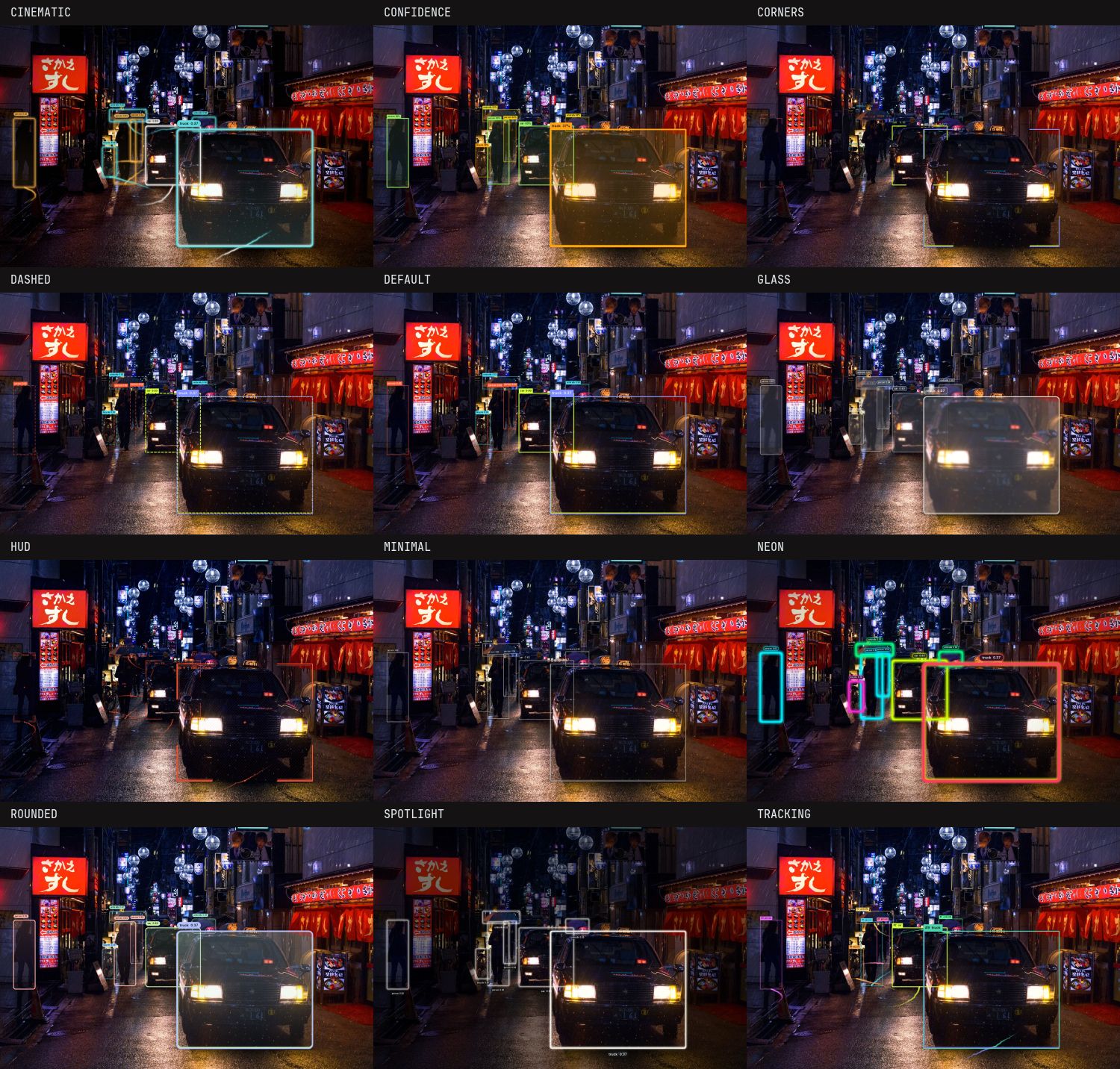
Twelve built-in looks. Every one is a plain YAML file you can copy and edit.
| Preset | Look |
|---|---|
default |
Clean rectangle, solid tag |
minimal |
Hairline outline, bare text |
corners |
Thin L-brackets, monospace tag |
rounded |
Rounded corners, gradient tint, pill label |
dashed |
Dashed perimeter with marching ants |
glass |
Frosted-glass fill and label |
neon |
Glowing hue-cycling gradient outlines |
hud |
Double frame, reticle marks, inside mono labels, dotted trails |
cinematic |
Rounded amber/teal frames, gradient fill, pill labels, glow, filmic grade |
tracking |
Bold per-track trails, id-first labels |
spotlight |
Dims everything outside the detections |
confidence |
Stroke and tag color follow the confidence score |
visionstyle presets list
visionstyle presets show cinematic
Python API
import cv2
import visionstyle as vs

frame = cv2.imread("street.jpg")

# 1. detections: boxes in pixels, everything else optional
dets = vs.Detections(
    xyxy=[[590, 650, 720, 1040], [1060, 660, 1520, 1000]],
    class_name=["person", "car"],
    confidence=[0.93, 0.88],
    track_id=[14, 31],
)
# or: dets = vs.Detections.from_ultralytics(model.predict(frame)[0])

# 2. a style: preset name, YAML path, or built in code
style = vs.Style.preset("cinematic")
style.label.components = ["track_id", "text"]   # every option is a typed attribute
style.trail.enabled = True

# 3. render. Keep one Annotator per video stream so trails/animations carry across frames.
annotator = vs.Annotator(style)
out = annotator.annotate(frame, dets)

# one-liner for stills
out = vs.annotate(frame, dets, style="minimal")
Detections accepts lists, NumPy arrays or torch tensors; xyxy is pixel x1, y1, x2, y2
(Detections.from_xywh, from_xywh_topleft, from_dicts also exist). Frames are BGR uint8 like
OpenCV; pass rgb=True for RGB arrays.
What you can configure
| Section | Options |
|---|---|
| Box | rectangle, rounded (radius), corners (bracket length, curved elbows), reticle, none; double line; center mark |
| Stroke | thickness, opacity, color (palette per class/track, confidence ramp, or any hex/rgb/name) |
| Fill | on/off, opacity, color, solid / gradient (5 directions) / hatch |
| Line | solid / dashed / dotted, dash & gap sizes, multi-color segments or perimeter gradient, animation march / hue_cycle / pulse |
| Label | ordered components (text, confidence, track_id, class_id, custom template), 9 anchors × inside/outside, vertical tags on the sides, fonts (Inter, JetBrains Mono or your .ttf), size, weight, uppercase, solid / pill / glass / underline / none backgrounds, border, padding, formats |
| Effects | glow, shadow, frosted glass, spotlight dimming, vignette, film grain, color grade |
| Tracking | trail length, anchor (feet/center/top), solid / dotted / dashed / ribbon, fade & taper, smoothing, glow, points |
| Global | palette (built-in or custom list), per-class color overrides, confidence threshold, resolution scaling, per-object scaling (strength, clamps, box/label), fps |
All sizes are in reference pixels at ~1080p and scale automatically with the frame size
(style.scale = "auto"), so one style looks the same on a webcam and a 4K photo.
On top of that, strokes and label tags scale with each detected object's size
(style.object_scale, on by default): far-away objects get thin outlines and small tags, close-up
ones get heavier outlines and larger text. Tune strength, min_factor / max_factor, or restrict
it with apply_to: box | label; set enabled: false for constant sizes.
Save and share styles
style.save("my_style.yaml")                 # anywhere
style.save_preset("my-look")                # ~/.visionstyle/presets/my-look.yaml
vs.Style.preset("my-look")                  # found by name from now on
vs.presets.list()                           # built-in + yours
Lookup order: $VISIONSTYLE_PRESETS_DIR → ~/.visionstyle/presets → built-ins → file path.
Studio
Design a style visually, on your own image and model, and save it as a preset the package loads by name.
pip install "visionstyle[studio,yolo]"
visionstyle studio          # opens http://127.0.0.1:8420
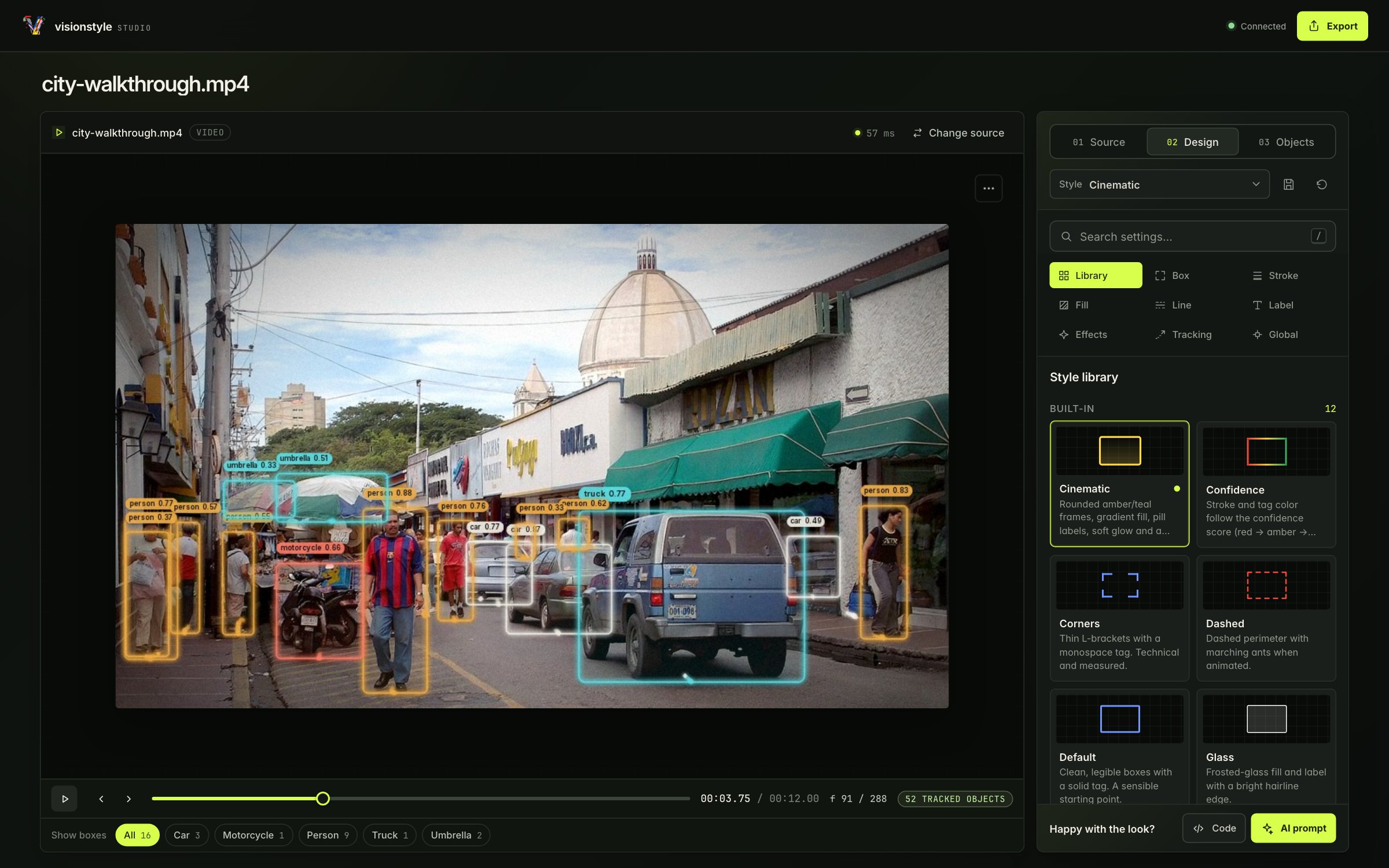
- Source: choose a bundled scene or upload an image or video, set the confidence threshold, and run detection. The sample video includes tracks; new video tracking requires the YOLO extra.
- Design: start with a preset, then adjust boxes, strokes, labels, effects, and trails beside
the preview. The Python package itself renders every change, matching
annotate()output. Save (next to the Style menu) stores the look as a named preset with an optional description; the Style menu lists your saved presets, and built-ins stay in the Library. - Objects: filter by class, hide objects, or isolate a track. Scrub video frames or play the timeline; use the preview menu to save an annotated frame.
- Export: copy or download the YAML, a self-contained Python snippet, or a prompt for AI coding tools.
Presets saved in the Studio go to ~/.visionstyle/presets and load by name anywhere on that machine
with vs.Style.preset("my-look"). To keep them with a project instead, start the Studio from the
repo with visionstyle studio --presets-dir ./styles; each preset becomes styles/<name>.yaml,
which you commit and load with vs.Style.load("styles/my-look.yaml") (or set
VISIONSTYLE_PRESETS_DIR=./styles to load them by name).
Keyboard shortcuts: Space plays or pauses, ← / → steps through video frames, Shift + ← / → jumps ten frames, and R resets the style. Focused controls keep their own keyboard behavior.
CLI
visionstyle render photo.jpg -s neon --model yolo11n.pt -o out.jpg
visionstyle render clip.mp4  -s tracking --model yolo11n.pt --track -o out.mp4
visionstyle render 0         -s hud --model yolo11n.pt --track -o webcam.mp4   # webcam index
visionstyle render photo.jpg -d detections.json -s corners                    # no model needed
visionstyle gallery photo.jpg --model yolo11n.pt -o gallery.png               # every preset at once
visionstyle presets list | show NAME | export NAME -o my.yaml
visionstyle schema -o style.schema.json
detections.json is a list of {"xyxy": [...], "class_name": "...", "confidence": 0.9, "track_id": 1}.
Development
uv sync --all-extras --group dev
uv run pytest && uv run ruff check . && uv run mypy src

cd studio && npm install
npm run dev            # Vite dev server on :5173 proxying /api to :8420
npm run build          # -> src/visionstyle/studio/static (bundled into the wheel)
When src/visionstyle/style/schema.py changes, regenerate the frontend schema and types:
uv run visionstyle schema -o studio/schema.json && (cd studio && npm run gen:types)
Releases: bump __version__ in src/visionstyle/__init__.py, update CHANGELOG.md, tag vX.Y.Z
and push. release.yml builds the frontend + wheel, publishes to PyPI via trusted publishing (register
the pypi environment / publisher once on pypi.org) and creates a GitHub release.
For a dry run first, start the TestPyPI workflow from the Actions tab: it publishes the current
commit as X.Y.Z.devN to test.pypi.org (environment testpypi), installs it into a clean venv and
smoke-tests the CLI and the Studio.
Credits
Sample photos: see src/visionstyle/assets/samples/CREDITS.md.
Fonts: Inter and JetBrains Mono, both under the SIL Open Font License.
MIT © Basel Mather
1 maintainer

Release files for visionstyle 0.1.0
For a detailed explanation of source distributions (sdists) and built distributions (wheels), please see the package formats documentation.
Source distribution (sdist)
| File | Size | Uploaded | |
|---|---|---|---|
| visionstyle-0.1.0.tar.gz | 4.3 MB | Details |
Built distribution (wheel)
| File | Interpreter | ABI | Platform | Reset |
|---|---|---|---|---|
| visionstyle-0.1.0-py3-none-any.whl | Python 3 | none | any | Details |
Total release size: 8.6 MB
Release files / visionstyle-0.1.0.tar.gz
| Download URL | visionstyle-0.1.0.tar.gz |
|---|---|
| Size | 4.3 MB |
| Tags | Source |
|
SHA-256 checksum How to use checksums |
d4521b24b9e6cb9a1bcc1fec0e77a4ca38cd310b914985736b6119ba2c72e39d
|
|
BLAKE2b-256 checksum How to use checksums |
87bdf51ff804817544916b3b11b1e368b87b97eea14e3d0f1c27ea3d3ed998ff
|
| Upload date | |
|
Uploaded using Trusted Publishing? What is trusted publishing? |
Yes |
| Uploaded via |
twine/7.0.0 CPython/3.13.14
|
Provenance
Provenance describes where a file came from. On PyPI, provenance is shared via attestations, which provide a verifiable record of the build or publishing details. View details, limitations and caveats.


PyPI Publish Attestation
PyPI verified that this artifact, at this checksum, originated from the publisher listed below.
Signed by GitHub Actions, verified by PyPI on Sep 24, 2026.
Transparency logRelease files / visionstyle-0.1.0-py3-none-any.whl
| Download URL | visionstyle-0.1.0-py3-none-any.whl |
|---|---|
| Size | 4.3 MB |
| Tags | Python 3 |
|
SHA-256 checksum How to use checksums |
8134e4156b1d66b7f784cd0ac31e9a71b0c442f3d3ab9ea41a914c483186e2b4
|
|
BLAKE2b-256 checksum How to use checksums |
ecc8099e5b3bebf61204157bfa631279776bda9af9dba38eab398ddde848f97f
|
| Upload date | |
|
Uploaded using Trusted Publishing? What is trusted publishing? |
Yes |
| Uploaded via |
twine/7.0.0 CPython/3.13.14
|
Provenance
Provenance describes where a file came from. On PyPI, provenance is shared via attestations, which provide a verifiable record of the build or publishing details. View details, limitations and caveats.
PyPI Publish Attestation
PyPI verified that this artifact, at this checksum, originated from the publisher listed below.
Signed by GitHub Actions, verified by PyPI on Sep 24, 2026.
Transparency log












