
README | API | CLI | SPEC | CHANGELOG
vistab
vistab is a lightweight Python library for creating beautiful text-based ASCII/Unicode tables. It comes out-of-the-box with support for fluid terminal formatting (ANSI escape sequences), coordinate-based discrete cell styling, and guarantees consistent string lengths across languages and scripts (RTL and LTR) and color variations. (See the Showcase for a one-glance demo of everything.)
Using vistab from Python? Import the Vistab class (see the API reference). A command-line entry point also exists, but the CLI is for ad-hoc terminal/CSV use only. In code, do not shell out to the vistab command: import and use the API.
from vistab import Vistab

t = Vistab(header=["Name", "Age"])
t.add_row(["Sarah", 27])
t.set_cols_align(["l", "r"])
print(t.draw())
Key Features
- Lightweight Native Core: Built on the Python standard library with
wcwidthfor accurate string widths. - Color-Aware Word Wrapping: Wraps table content over embedded ANSI format sequences without corrupting geometries.
- Coordinate Styling API: Style rows, columns, headers, or specific cells via clean method chaining.
- Hierarchical Configuration: Load table paddings and themes from localized configurations (
vistab.toml). - Data-Aware Engine: Auto-wraps text, infers data types, and parses CSV formats natively.
Showcase
The fastest way to see what vistab can do is the built-in flagship demo, which renders one
table exercising the headline capabilities at once (column spanning in both headers and data
rows, a theme, CJK/Thai/Arabic/Hebrew scripts with correct widths, inline ANSI color, and
color-aware word wrapping):
vistab show showcase
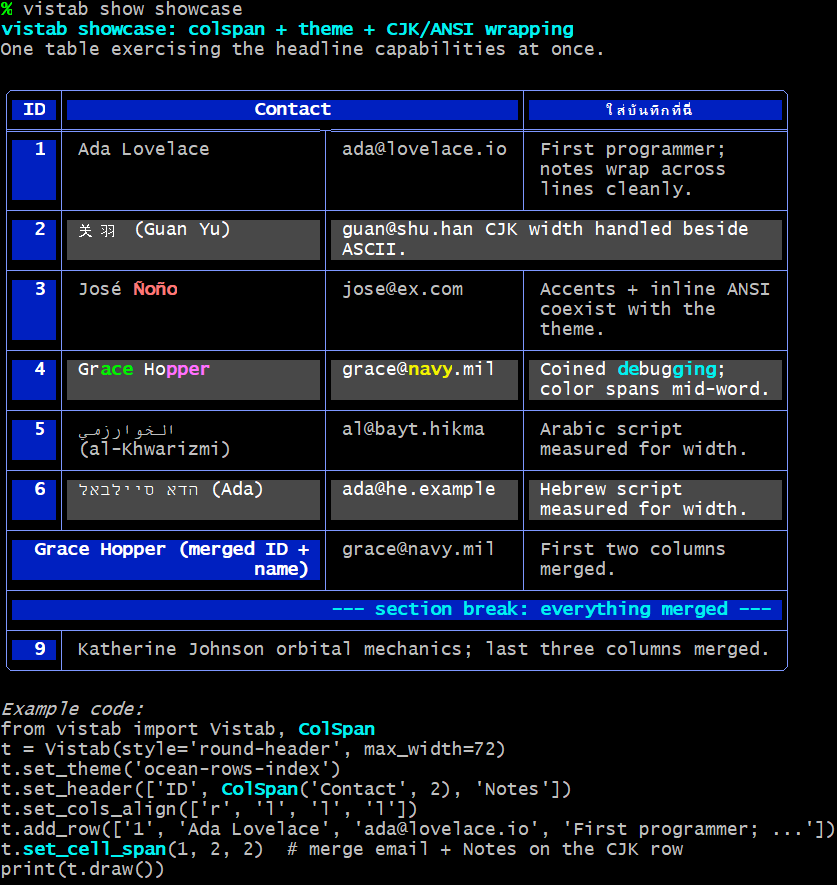
The demo also prints the Python that builds it. Right-to-left scripts (Arabic, Hebrew) are
kept from flipping the grid via Unicode LTR isolates; disable that with --no-bidi, and
disable color with --no-color, if your terminal needs it.
Detailed Documentation
Looking for an exhaustive configuration breakdown or command-line parser bindings?
- Vistab Python API Reference (the primary interface: all objects, data formatting algorithms, and properties)
- Command-Line (CLI) Manual (secondary, for ad-hoc terminal/CSV use: mapping raw CSV structures and terminal limits)
Installation
You can install vistab directly via pip:
pip install vistab
Note: For complex Asian/CJK full-width character wrapping support, install the optional component using
pip install vistab[cjk].
Quick Start
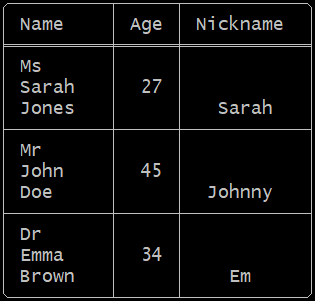
Getting started with vistab is simple. Initialize a Vistab instance, set up column alignments and paddings, and append your rows.
from vistab import Vistab

table = Vistab(style="round-header", padding=1)
# Left, Right, Center alignment
table.set_cols_align(["l", "r", "c"])
# Top, Middle, Bottom vertical alignment
table.set_cols_valign(["t", "m", "b"])

table.add_rows([
    ["Name", "Age", "Nickname"],
    ["Ms\nSarah\nJones", 27, "Sarah"],
    ["Mr\nJohn\nDoe", 45, "Johnny"],
    ["Dr\nEmma\nBrown", 34, "Em"]
])

print(table.draw())
Output:
Note on Web Rendering: We display the raw output below as an image because some package registries (like PyPI) enforce code-block font stacks (e.g.,
Source Code Pro) that lack glyphs for Unicode Extended Box Drawing characters. When falling back to secondary system fonts for characters like╭or╪, the physical grid mathematically misaligns. On your local terminal (and on full-featured renderers like GitHub or BitBucket) the actual text output mathematically aligns perfectly!
Built-in Styles
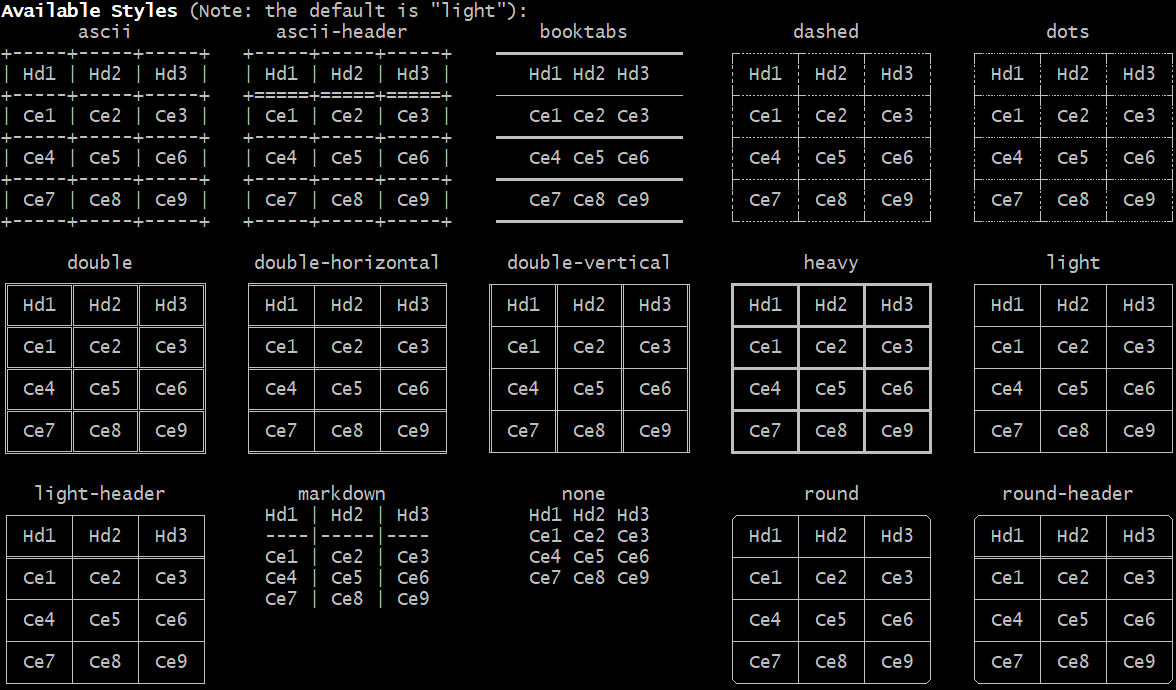
To view available styles, run:
vistab show styles
Cookbook Examples
Vistab's fluent API lets you chain layout and formatting mutations cleanly without intermediate variables.
1. Data Modification & Sorting
Replace datasets or sort rows by column index without Pandas overhead:
table = Vistab(style="round", padding=1)

# Sort the array tracking the second column (col_idx=1) descending...
table.set_rows(my_messy_csv_data, header=True).sort_by(1, reverse=True)
2. Output Formatting & Safe Dimensional Windows
Constrain table outputs to fit terminal dimensions when logging large datasets:
# Force-limit outputs protecting CLI limits!
table.set_max_rows(10).set_max_cols(5)
3. Data Formatting & Precision
You can apply data overrides directly to lock precision across specific columns:
# Force all floats to evaluate to precisely two digits
table.set_precision(2)

# Pass formatting arrays coercing columns sequentially
# a=auto, t=text, i=int, f=float, e=sci
table.set_cols_dtype(["a", "t", "f", "i"])

# Bypass the global precision using inline modifiers
# Here, col 2 maps `f4` (float + precision 4 digits)
table.set_cols_dtype("a,t,f4,i")
When evaluated, the a (automatic) datatype parses columns by inferring numeric types (scientific -> float -> integer), creating uniform alignment.
4. Shorthand Styling & Native Formatting
You don't need to pass massive syntax strings to evaluate layout injections:
# Conditionally highlight physical elements:
for i, condition in enumerate(my_events):
    table.color_row(i, bg="red" if condition == 'CRITICAL' else None)

# Make the header globally bold instantly:
table.bold_header()
5. Column Spanning (Colspan)
You can easily define cells that span multiple horizontal columns inline using ColSpan or programmatically:
from vistab import Vistab, ColSpan

table = Vistab(style="light")
# Inline colspan in headers and rows:
table.set_header(["Name", ColSpan("Details Block", 2), "Status"])
table.add_row(["Alice", ColSpan("Age: 25, Paris", 2), "Active"])

# Or programmatic post-ingestion spanning:
# table.set_cell_span(row_idx, col_idx, colspan, combine=" ")
# table.set_header_span(col_idx, colspan, combine=" ")

print(table.draw())
Coordinate-Based Cell Styling
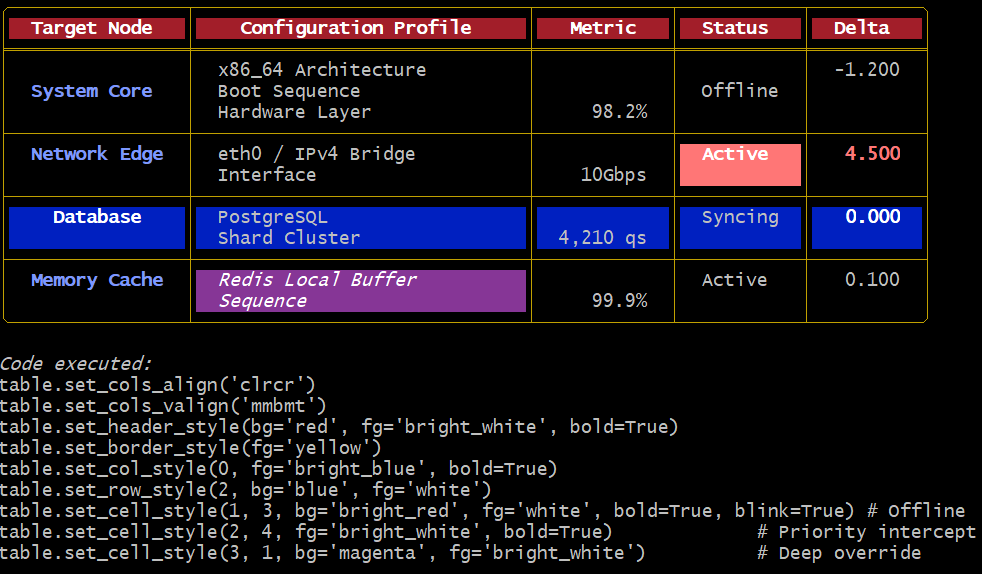
vistab supports a fluent, declarative API to inject background colors, foreground colors, and text styles (like bolding and underlining) targeting specific grids, ranging from individual cells, whole rows, columns, headers, or borders.
You can view this demonstration yourself by running vistab show anatomy:
Coordinate-Based Word Wrapping (Nested Tables)
If you need absolute structural control over spatial layouts (for example, if you are embedding pre-rendered ASCII tables inside the cells of another Vistab) you can bypass the internal word-wrapping engine entirely using coordinate mapping.
By setting wrap=False on specific axes, Vistab guarantees it will preserve your structural spacing verbatim without snapping or aggressively pruning layouts:
# Globally bypass word-wrapping for the entire table
table.set_table_wrap(False)

# Or target specific structural coordinates
table.set_row_wrap(0, False)
table.set_col_wrap(2, False)
table.set_cell_wrap(0, 1, False)
If a cell bypassed with wrap=False exceeds table.max_width, Vistab uses a constraint router (table.on_wrap_conflict = "warn") that drops trailing characters while reconstructing your internal ANSI styling sequences to prevent terminal boundary collapse.
Streaming & Caveat Emptor Pipeline Constraints
For extremely large or infinitely generating files, you can stream data iteratively using the --stream flag to bypass native memory buffering constraints:
$ cat large_dataset.csv | vistab --stream
Hierarchical Configuration System
Stop re-typing your constructor arguments! vistab actively scans your execution environment for two distinct configuration architectures:
1. Default Fallbacks (vistab.toml / config.toml)
It evaluates paths sequentially, merging configurations: [./vistab.toml, ./.vistab.toml, ./.config/vistab.toml, ~/.config/vistab/config.toml, ~/.config/vistab.toml, ~/.vistab.toml].
You can generate a default configuration file into the global user profile directly using the CLI:
vistab --create-config
2. Custom Aesthetic Themes (themes.json)
You can lock in CLI layout arguments by saving custom styles into ~/.config/vistab/themes.json using the --save-theme directive. Once saved, these aesthetics become addressable on your machine using --theme.
# Safely capture a global background wash + custom last row colors
vistab data.csv --table-bg-color bright_black --last-row-color magenta --save-theme my_custom_theme

# Execute the saved layout on another dataset modularly universally!
vistab another_data.csv --theme my_custom_theme
Built-in Themes
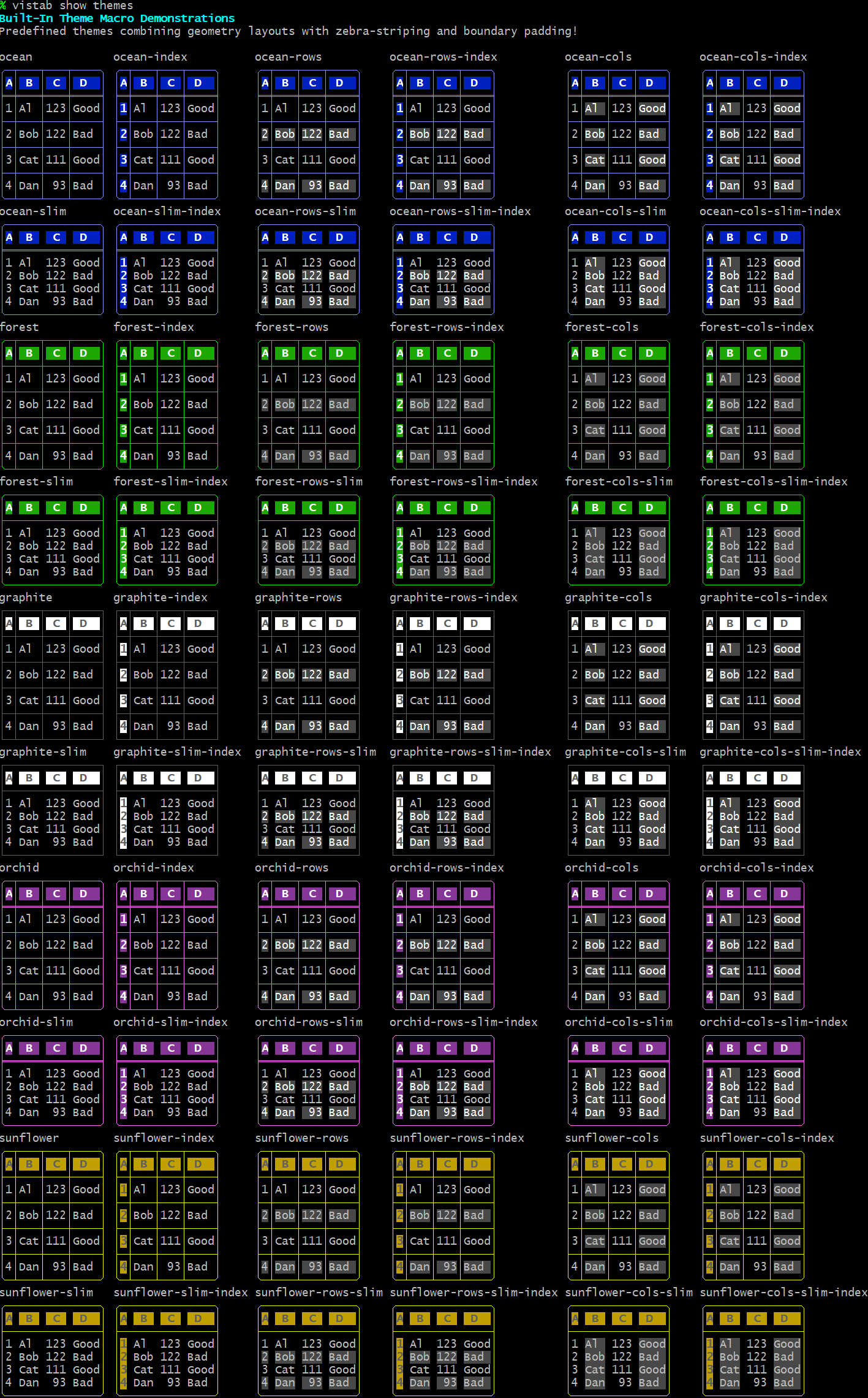
vistab comes with predefined themes including ocean, forest, graphite, orchid, and sunflower.
You can view the built-in themes (which you can alter and save as new themes) by running:
vistab show themes
Custom Themes
Let's create a test table:
cat > ~/test.csv << EOF
# ,Nam,Scor,Stat,Val
1,Al,12,Good,0.1
2,Bob,3,Bad,1.1
3,Cat,67,Ugly,1.2
4,Dan,12,Okay,3.0
5,Eve,15,Fine,0.4
6,Will,18,Meh,9.1
7,Pat,21,Great,10.2
8,Kim,24,Super,4.9
9,Sam,27,Awesome,5.9
10,Jo,30,Amazing,0.1
EOF
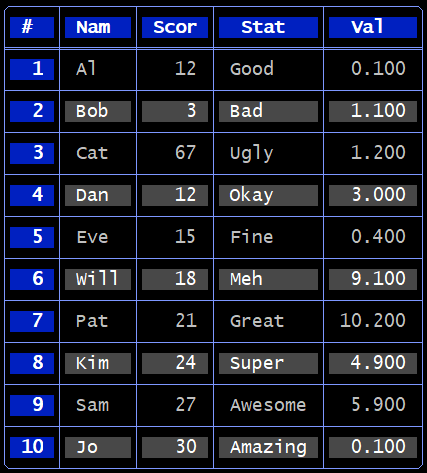
Running:
vistab ~/test.csv --theme ocean-rows-index
produces:
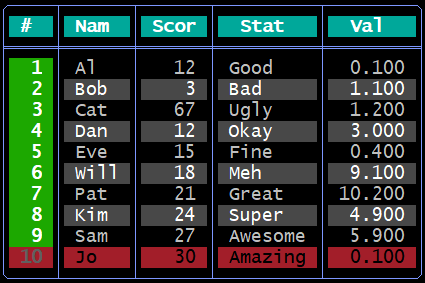
You may then change that theme by running:
vistab ~/test.csv --theme ocean-rows-index --no-hlines \
    --header-bg-color cyan --last-row-bg-color red --last-row-color black \
    --col0-bg-color green
Which results in:
To see how to generate that specific output using code, you can run:
vistab ~/test.csv --theme ocean-rows-index --no-hlines \
    --header-bg-color cyan --last-row-bg-color red --last-row-color black \
    --col0-bg-color green --show-code
Which will output the code you need to generate that table look and feel:
import vistab

custom_theme = {
    "style": "round-header",
    "decorations": 11,
    "header": {
        "fg": "bright_white",
        "bg": "cyan",
        "bold": true
    },
    "border": {
        "fg": "bright_blue"
    },
    "col_0": {
        "fg": "bright_white",
        "bg": "green",
        "bold": true
    },
    "row_-1": {
        "fg": "black",
        "bg": "red"
    },
    "alt_rows": [
        {
            "fg": "white",
            "bg": "black"
        },
        {
            "fg": "bright_white",
            "bg": "bright_black"
        }
    ]
}

table = vistab.Vistab().set_theme(custom_theme)

# ... map inputs and execute drawing
print(table.draw())
OR you can save it for later use using the --save-theme flag:
vistab ~/test.csv --theme ocean-rows-index --no-hlines \
    --header-bg-color cyan --last-row-bg-color red --last-row-color black \
    --col0-bg-color green --save-theme my_custom_theme
You should see something like:
[SUCCESS] Saved layout globally as 'my_custom_theme' in /home/USER/.config/vistab/themes.json
You can now use it on the command line like this:
vistab ~/test.csv --theme my_custom_theme
Or in code like this:
import vistab

table = vistab.Vistab().set_theme("my_custom_theme")

# ... map inputs and execute drawing
print(table.draw())
Discovering Output Colors (CLI)
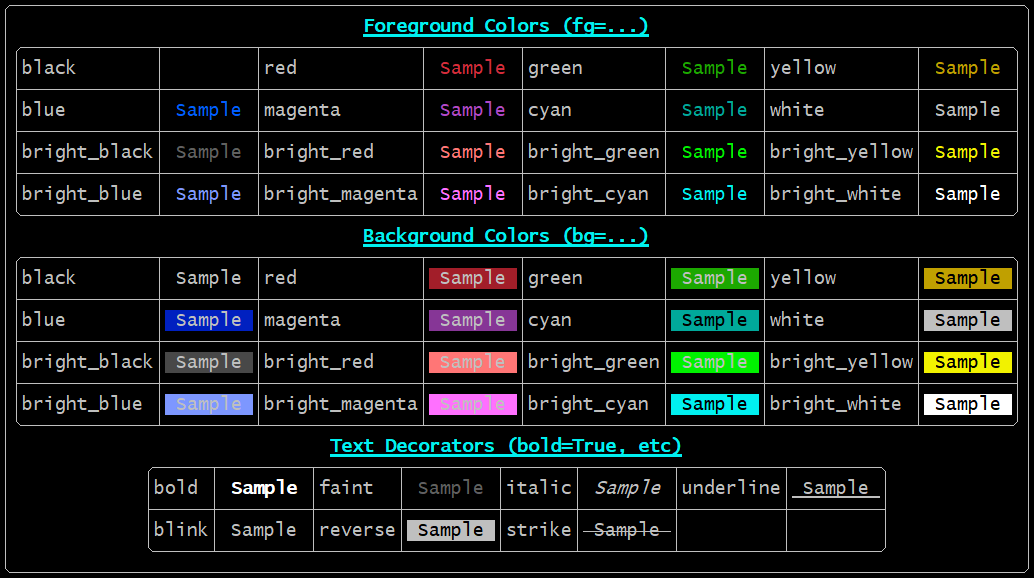
Because terminal color renderings vary across different user host profiles and color palettes, vistab comes packaged with a native matrix test exposing every foreground, background, and styling text option you can safely deploy.
You can view the palette directly on the console by executing:
vistab show colors
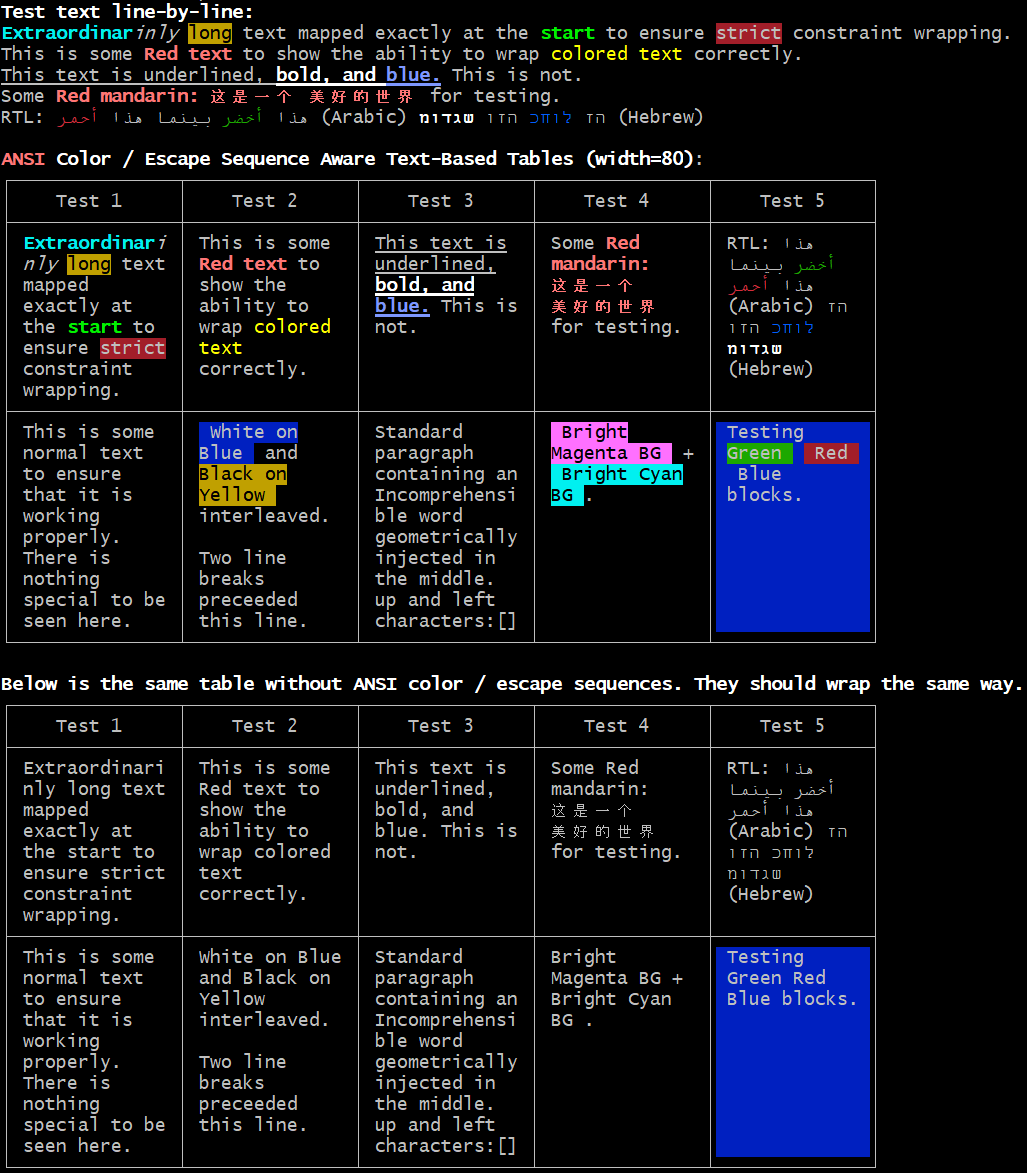
ANSI Color Layout Support
A major benchmark advantage of vistab is native, invisible terminal styling support. Common ASCII libraries frequently break their visual wrapper alignments when raw terminal colors are embedded because they incorrectly count invisible geometry bytes.
You can view a comprehensive color-wrapping conformance test demonstrating dynamic alignment across complex CJK blocks by executing:
vistab show capabilities
Advanced Formatting (Datatypes)
vistab can infer and parse formatting rules by passing data types, controlling precision for scientific floats and integers.
from vistab import Vistab

table = Vistab(style="ascii")
table.set_cols_dtype(['t', 'f', 'e', 'i', 'a'])
table.set_cols_align(["l", "r", "r", "r", "l"])

table.add_rows([
    ["text", "float", "exp", "int", "auto"],
    ["alpha", "23.45", 543, 100, 45.67],
    ["beta", 3.1415, 1.23, 78, 56789012345.12],
    ["gamma", 2.718, 2e-3, 56.8, .0000000000128]
])
Limitations & Known Gaps
- Sorting vs. Streaming: Vistab's
--streamcapability processes inputs infinitely, rendering data row-by-row on the fly. However, attempting to sort the stream (--sort-by) requires the engine to cache the entire dataset in physical memory. Streaming extremely large files combined with--sort-bywill trigger anOut of Memoryevent. - Terminal Boundaries: The
max_widthstring constraint wraps data accurately according to integer text lengths. If structural tables are placed into boundaries too thin to support physical text cells (e.g., width=2), the engine will throw aValueErrorrather than attempting to print physically broken graphics.
Detailed API Reference
For the complete list of endpoints, configuration schemas, parameters, and wrapping constraints available in vistab:
Please refer to the absolute granular Vistab Core API Documentation
License
This project is licensed under the Apache License 2.0. See LICENSE and NOTICE for details.
README | API | CLI | SPEC | CHANGELOG
License, Attribution & Citation
vistab is licensed under the Apache License 2.0 (see LICENSE and NOTICE).
Attribution (required). Under Apache-2.0 §4(d), any distribution of this software or a
derivative work must retain the NOTICE file and display its attribution reasonably
prominently. Concretely, derived/redistributed works must include the following, visibly,
in the project README (or equivalent top-level documentation) and in any "About"/credits
screen the software presents:
Based on the original vistab by Gabriele G. R. Fariello (https://github.com/fariello/vistab).
Citation. If you use vistab in academic or scholarly work, please cite it. GitHub's
"Cite this repository" button (backed by CITATION.cff) provides ready-to-use formats. A
suggested citation:
Fariello, Gabriele G. R. vistab. 2026. https://github.com/fariello/vistab
The attribution and citation requests impose no warranty or liability on the author; the software is provided "AS IS" per the LICENSE.
1 maintainer

Release files for vistab 1.2.0
For a detailed explanation of source distributions (sdists) and built distributions (wheels), please see the package formats documentation.
Source distribution (sdist)
| File | Size | Uploaded | |
|---|---|---|---|
| vistab-1.2.0.tar.gz | 79.8 kB | Details |
Built distribution (wheel)
| File | Interpreter | ABI | Platform | Reset |
|---|---|---|---|---|
| vistab-1.2.0-py3-none-any.whl | Python 3 | none | any | Details |
Total release size: 139.7 kB
Release files / vistab-1.2.0.tar.gz
| Download URL | vistab-1.2.0.tar.gz |
|---|---|
| Size | 79.8 kB |
| Tags | Source |
|
SHA-256 checksum How to use checksums |
e6dcb3b2c0ffc8277c2fa47ce673afbf19f40b0c71c9601e07e8aa2a666de825
|
|
BLAKE2b-256 checksum How to use checksums |
958f8d11ff2d67285ef115cc6555b30426eca182a9d3534ddfe826806b65cf07
|
| Upload date | |
|
Uploaded using Trusted Publishing? What is trusted publishing? |
No |
| Uploaded via |
twine/6.2.0 CPython/3.14.6
|
Release files / vistab-1.2.0-py3-none-any.whl
| Download URL | vistab-1.2.0-py3-none-any.whl |
|---|---|
| Size | 59.9 kB |
| Tags | Python 3 |
|
SHA-256 checksum How to use checksums |
b375832a1aee460ea39762bb76e4d3962d7a7b8cfd42d3ecbb79b7814ddaf7d6
|
|
BLAKE2b-256 checksum How to use checksums |
f3585b6eeb5b95e759bb343559fdb27a8f5b44d86e13c2a0f906c62f15fae352
|
| Upload date | |
|
Uploaded using Trusted Publishing? What is trusted publishing? |
No |
| Uploaded via |
twine/6.2.0 CPython/3.14.6
|














