
vLLM Playground
A modern web interface for managing and interacting with vLLM servers (www.github.com/vllm-project/vllm). Supports GPU and CPU modes, with special optimizations for macOS Apple Silicon and enterprise deployment on OpenShift/Kubernetes.
🆕 vLLM-Omni Multimodal Generation
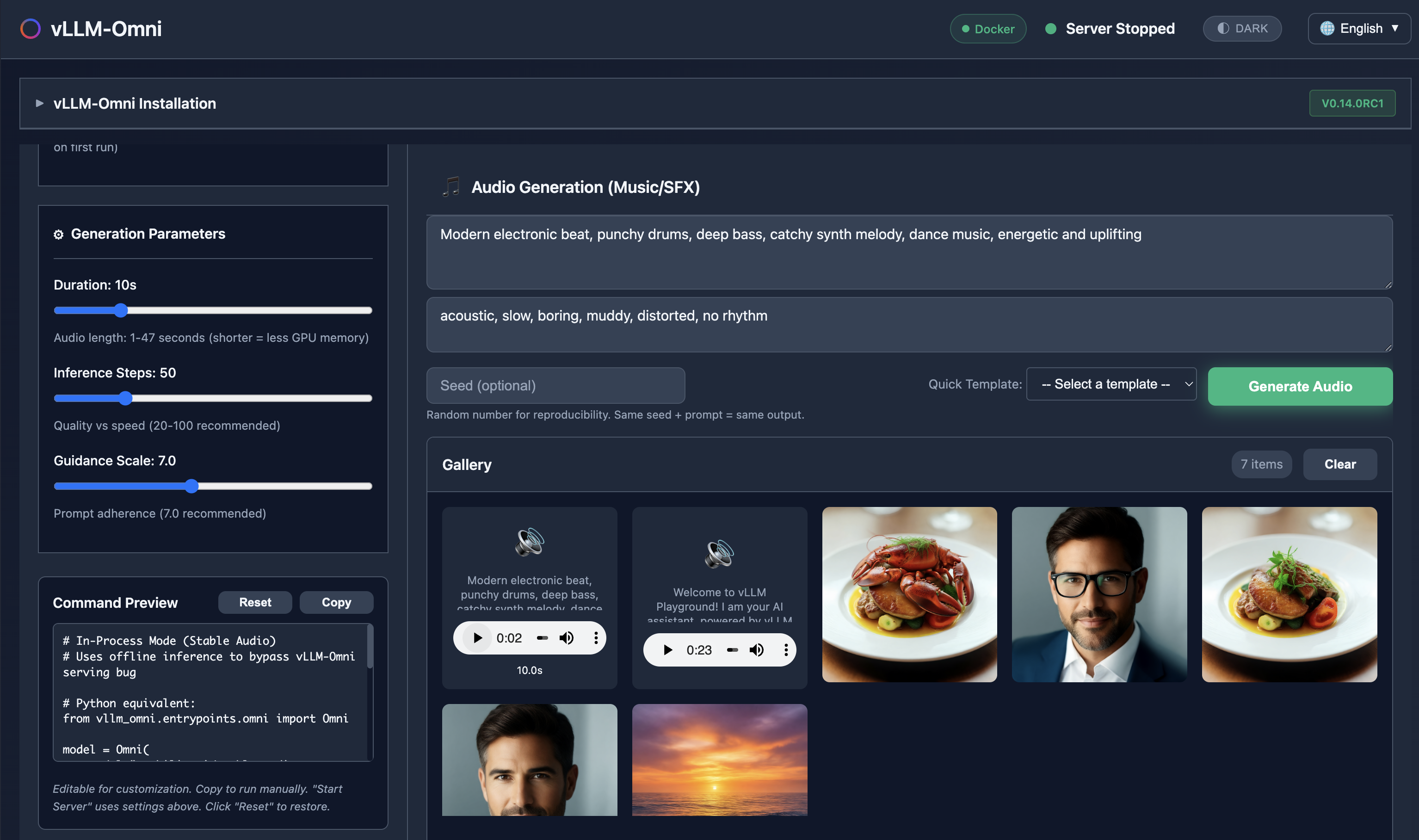
Generate images, edit photos, create speech, and produce music - all with vLLM-Omni integration.
✨ Claude Code Integration
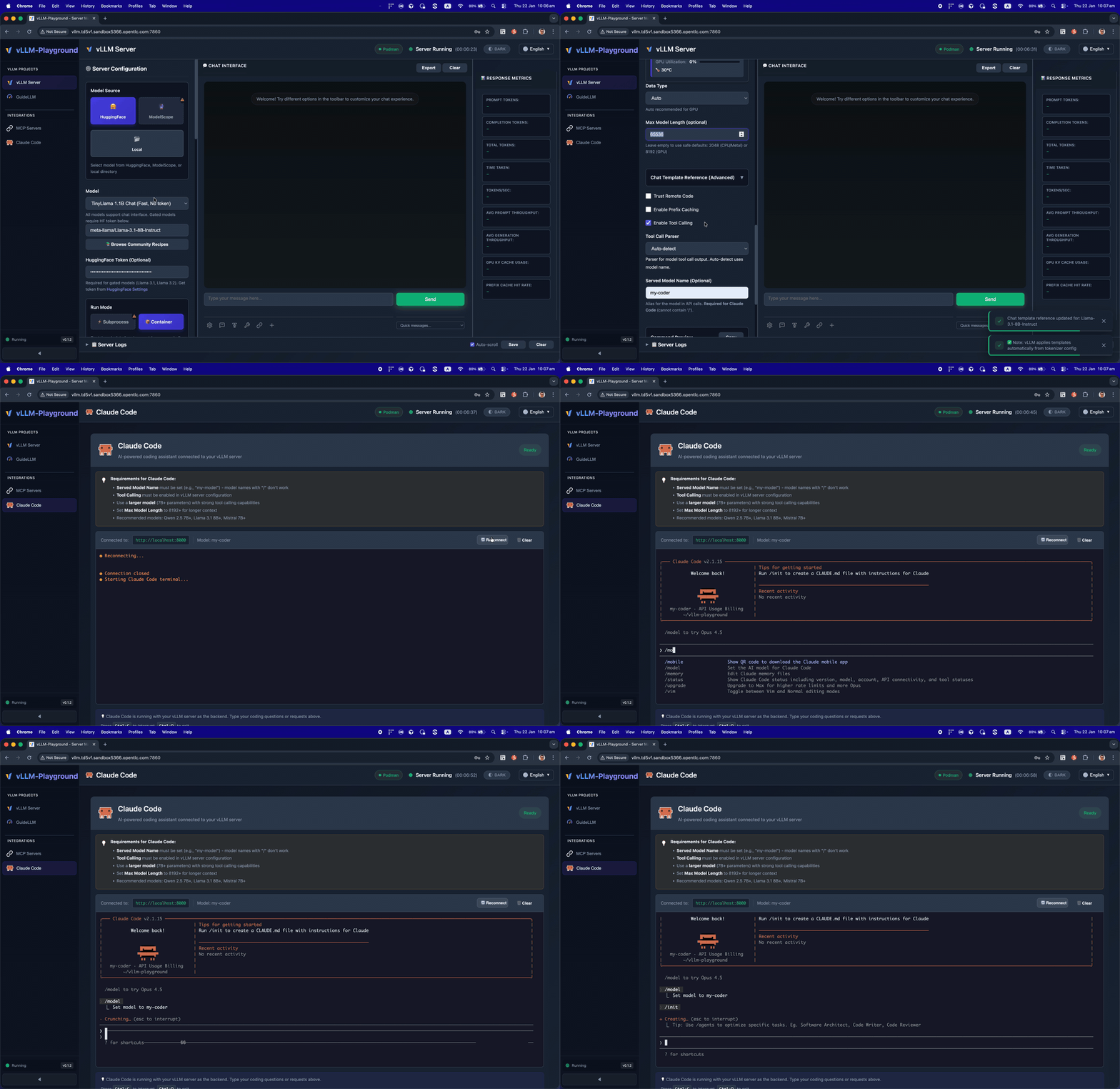
Run Claude Code with open-source models served by vLLM - your private, local coding assistant.
✨ Agentic-Ready with MCP Support
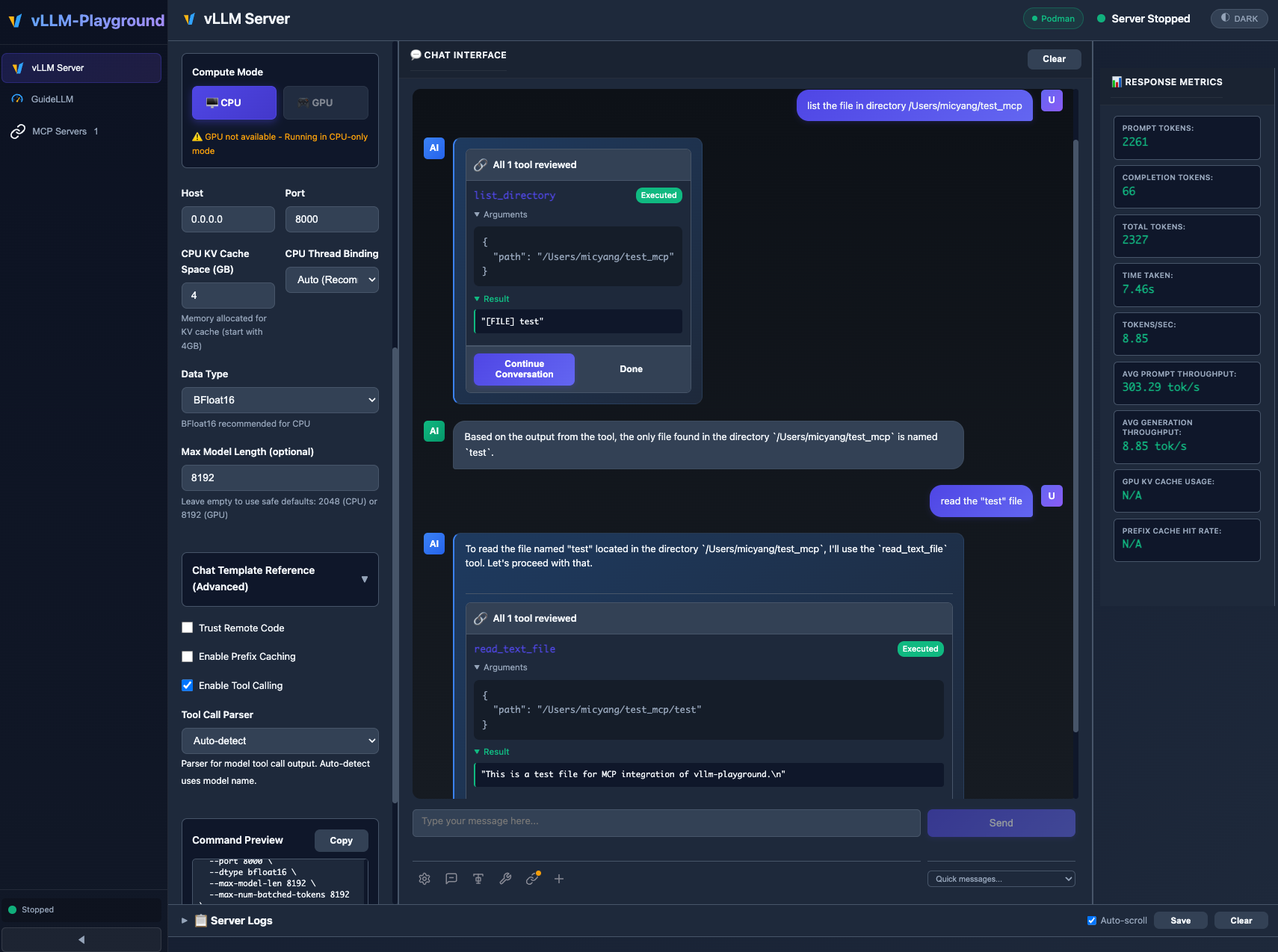
MCP (Model Context Protocol) integration enables models to use external tools with human-in-the-loop approval.
🖼️ VLM (Vision Language Model)
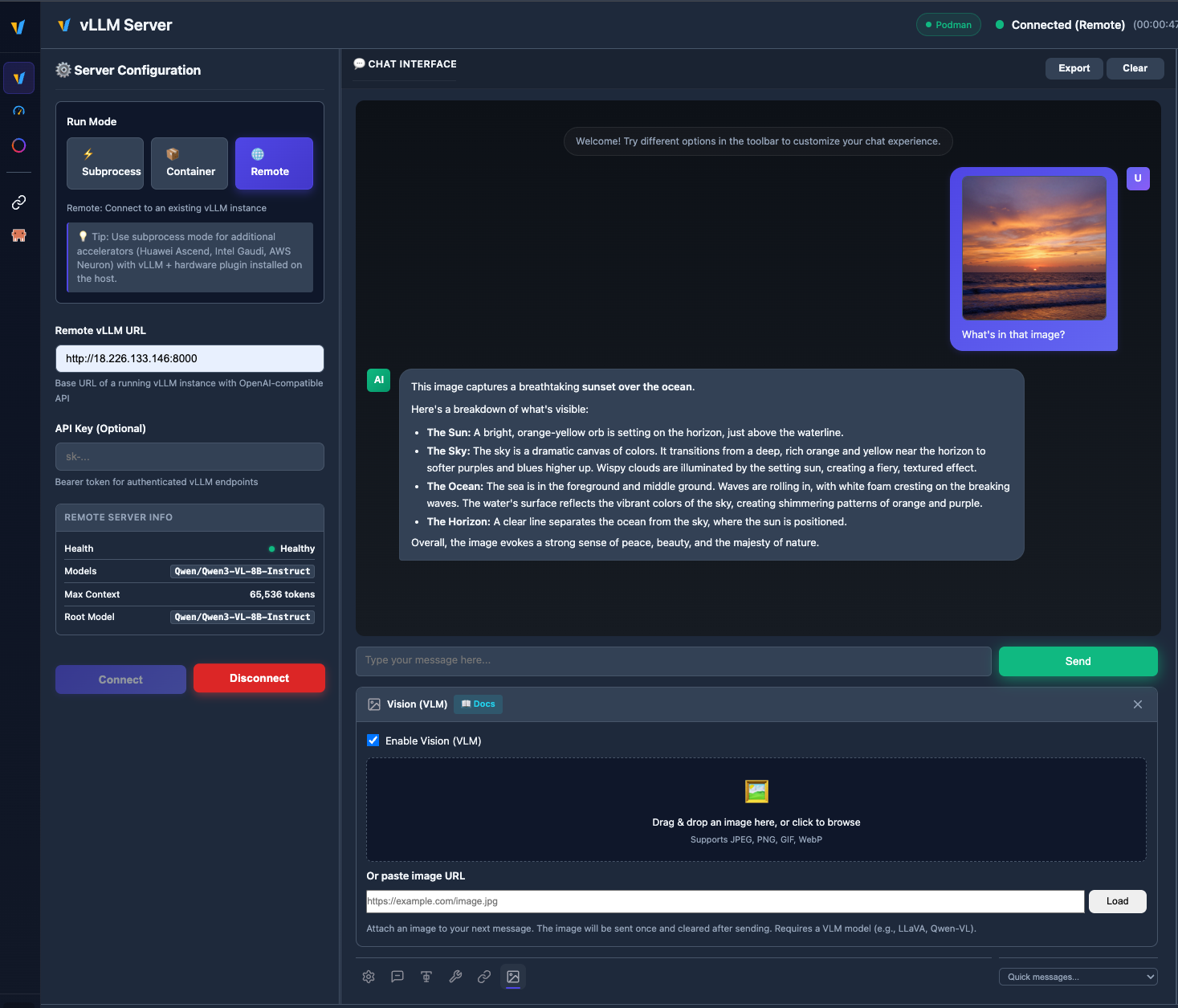
Upload images and chat with vision models like Qwen2.5-VL, LLaVA, and more.
🧩 Multiple instances & backends
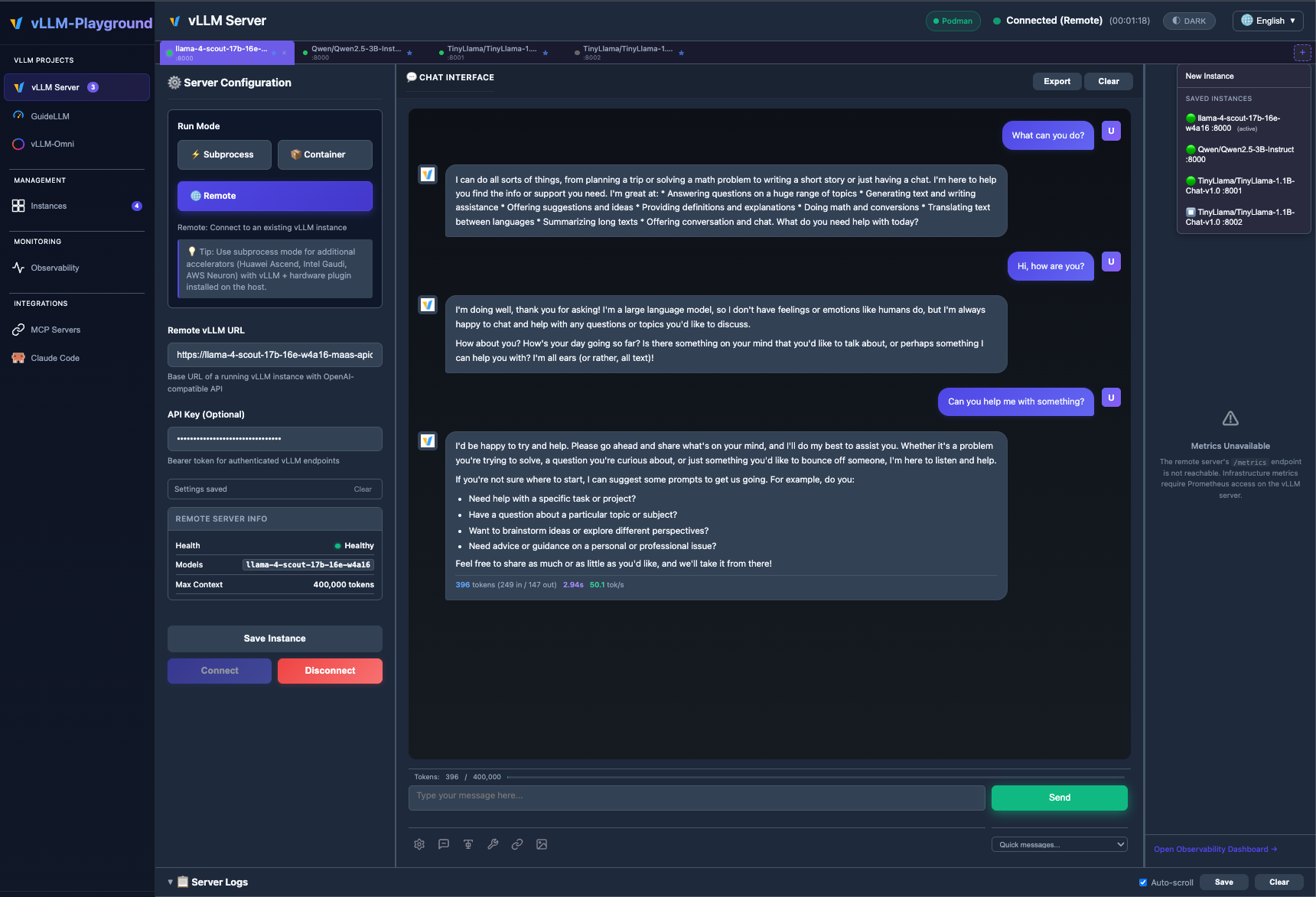
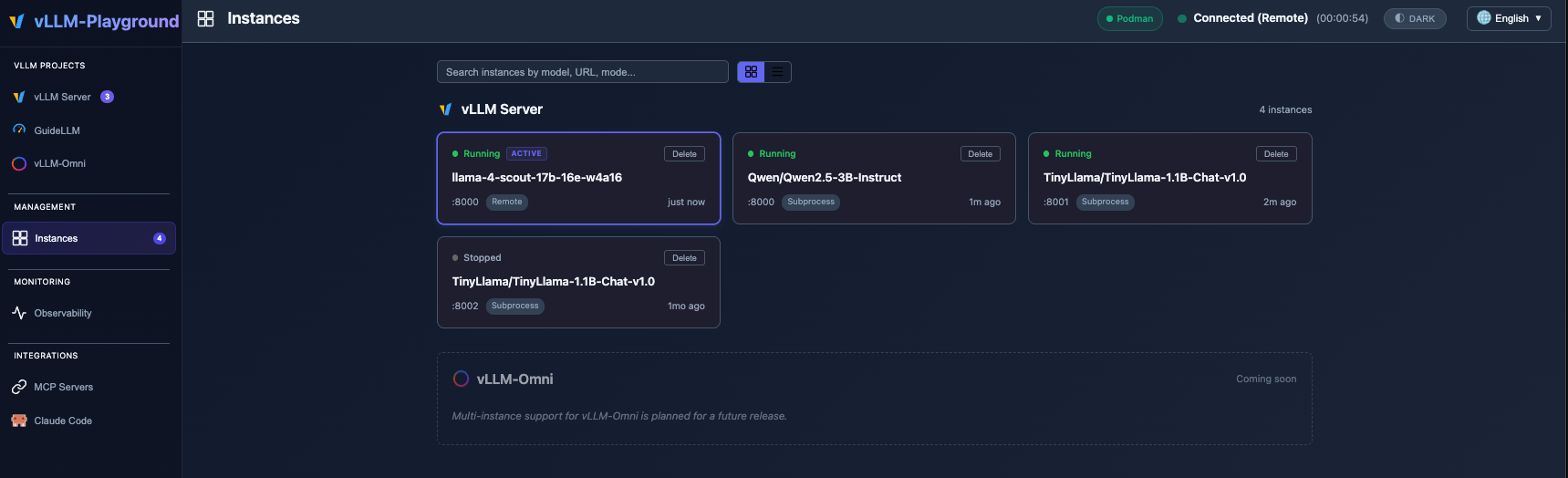
Run subprocess, container, and remote vLLM servers side by side; switch tabs, save configs, and manage everything from Management → Instances. See Multi-Instance Guide for details.
🆕 What's New in v0.1.8
- Multi-instance backends — Registry-backed tabs and Management → Instances; run subprocess, container, and remote servers side by side (guide).
- Remote & LiteLLM — Tougher URL/probing,
/v1/modelsfor the chat model list, better context limits from gateway metadata. - Benchmarking — Remote Bearer auth and UI API key (remote only); model ID follows the benchmark’s target instance so local vLLM is not called with a stale remote model name.
v0.1.6 introduced the Observability Dashboard, PagedAttention visualizer, token counter, logprobs, and speculative decoding — see Changelog and v0.1.6 for details.
🚀 Quick Start
# Install from PyPI
pip install vllm-playground

# Pre-download container image (~10GB for GPU)
vllm-playground pull

# Start the playground
vllm-playground
Open http://localhost:7860 and click "Start Server" - that's it! 🎉
CLI Options
vllm-playground pull                # Pre-download GPU image (NVIDIA)
vllm-playground pull --nvidia       # Pre-download NVIDIA GPU image
vllm-playground pull --amd          # Pre-download AMD ROCm image
vllm-playground pull --tpu          # Pre-download Google TPU image
vllm-playground pull --cpu          # Pre-download CPU image
vllm-playground pull --all          # Pre-download all images
vllm-playground --port 8080         # Custom port
vllm-playground stop                # Stop running instance
vllm-playground status              # Check status
✨ Key Features
| Feature | Description |
|---|---|
| 🌐 Remote Server | Connect to any remote vLLM instance via URL + API key |
| 🧩 Multi-instance | Several backends at once (subprocess, container, remote); tabs + Instances page |
| 🖼️ VLM Support | Upload images and chat with vision models (Qwen2.5-VL, LLaVA) |
| 🤖 Claude Code | Use open-source models as Claude Code backend via vLLM |
| 💬 Modern Chat UI | Markdown-rendered chat with streaming responses |
| 🔧 Tool Calling | Function calling with Llama, Mistral, Qwen, and more |
| 🔗 MCP Integration | Connect to MCP servers for agentic capabilities |
| 🏗️ Structured Outputs | Constrain responses to JSON Schema, Regex, or Grammar |
| 🐳 Container Mode | Zero-setup vLLM via automatic container management |
| ☸️ OpenShift/K8s | Enterprise deployment with dynamic pod creation |
| 📊 Benchmarking | GuideLLM integration for load testing |
| 📚 Recipes | One-click configs from vLLM community recipes |
📦 Installation Options
| Method | Command | Best For |
|---|---|---|
| PyPI | pip install vllm-playground |
Most users |
| With Benchmarking | pip install vllm-playground[benchmark] |
Load testing |
| From Source | git clone + python run.py |
Development |
| OpenShift/K8s | ./openshift/deploy.sh |
Enterprise |
📖 See Installation Guide for detailed instructions.
🔧 Configuration
Tool Calling
Enable in Server Configuration before starting:
- Check "Enable Tool Calling"
- Select parser (or "Auto-detect")
- Start server
- Define tools in the 🔧 toolbar panel
Supported Models:
- Llama 3.x (
llama3_json) - Mistral (
mistral) - Qwen (
hermes) - Hermes (
hermes)
Claude Code Integration
Use vLLM to serve open-source models as a backend for Claude Code:
- Go to Claude Code in the sidebar
- Start vLLM with a recommended model (see tips on the page)
- The embedded terminal connects automatically
Requirements:
- vLLM v0.12.0+ (for Anthropic Messages API)
- Model with native 65K+ context and tool calling support
- ttyd installed for web terminal
Recommended Model for most GPUs:
meta-llama/Llama-3.1-8B-Instruct
--max-model-len 65536 --enable-auto-tool-choice --tool-call-parser llama3_json
Note: This integration demonstrates using vLLM as a backend for Claude Code. Claude Code is a separate product by Anthropic - users must install it independently and comply with Anthropic's Commercial Terms of Service. vLLM Playground provides the terminal interface only.
MCP Servers
Connect to external tools via Model Context Protocol:
- Go to MCP Servers in the sidebar
- Add a server (presets available: Filesystem, Git, Fetch, Time)
- Connect and enable in chat panel
⚠️ MCP requires Python 3.10+
CPU Mode (macOS)
Edit config/vllm_cpu.env:
export VLLM_CPU_KVCACHE_SPACE=40
export VLLM_CPU_OMP_THREADS_BIND=auto
Metal GPU Support (macOS Apple Silicon)
vLLM Playground supports Apple Silicon GPU acceleration:
- Install vllm-metal following official instructions
- Configure playground to use Metal:
- Run Mode: Subprocess
- Compute Mode: Metal
- Venv Path:
~/.venv-vllm-metal(or your installation path)
See macOS Metal Guide for details.
Custom vLLM Installations
Use specific vLLM versions or custom builds:
- Install vLLM in a virtual environment
- Configure playground:
- Run Mode: Subprocess
- Venv Path:
/path/to/your/venv
See Custom venv Guide for details.
📖 Documentation
Getting Started
- Installation Guide - All installation methods
- Quick Start - Get running in minutes
- macOS CPU Guide - Apple Silicon CPU setup
- macOS Metal Guide - Apple Silicon GPU acceleration
- Custom venv Guide - Using custom vLLM installations
Features
- Features Overview - Complete feature list
- Multi-Instance Guide - Multiple backends, tabs, and Instances management
- Gated Models Guide - Access Llama, Gemma, etc.
Deployment
- OpenShift/K8s Deployment - Enterprise deployment
- Architecture Overview - System design
- Container Variants - Container options
Reference
- Troubleshooting - Common issues
- Performance Metrics - Benchmarking
- Command Reference - CLI cheat sheet
Releases
- Changelog - Version history and changes
- v0.1.8 - Multi-instance backends & remote polish
- v0.1.7 - Hotfix & tutorials
- v0.1.6 - Observability dashboard, PagedAttention visualizer, token counter, logprobs
- v0.1.5 - Remote server, VLM vision support, markdown rendering
- v0.1.4 - vLLM-Omni multimodal, Studio UI
- v0.1.3 - Multi-accelerators, Claude Code, vLLM-Metal
- v0.1.2 - ModelScope integration, i18n improvements
- v0.1.1 - MCP integration, runtime detection
- v0.1.0 - First release, modern UI, tool calling
🏗️ Architecture
┌──────────────────┐
│   User Browser   │
└────────┬─────────┘
         │ http://localhost:7860
         ↓
┌──────────────────┐
│   Web UI (Host)  │  ← FastAPI + JavaScript
└────────┬─────────┘
         │
    ┌────┴────┐
    ↓         ↓
┌───────-─┐ ┌────────┐
│ vLLM    │ │  MCP   │  ← Containers / External Servers
│Container│ │Servers │
└────────-┘ └────────┘
📖 See Architecture Overview for details.
🆘 Quick Troubleshooting
| Issue | Solution |
|---|---|
| Port in use | vllm-playground stop |
| Container won't start | podman logs vllm-service |
| Tool calling fails | Restart with "Enable Tool Calling" checked |
| Image pull errors | vllm-playground pull --all |
📖 See Troubleshooting Guide for more.
🔗 Related Projects
- vLLM - High-throughput LLM serving
- Claude Code - Anthropic's agentic coding tool
- LLMCompressor Playground - Model compression & quantization
- GuideLLM - Performance benchmarking
- MCP Servers - Official MCP servers
📝 License
Apache 2.0 License - See LICENSE file for details.
🤝 Contributing
Contributions welcome! Please see CONTRIBUTING.md for setup instructions and guidelines.
Made with ❤️ for the vLLM community
1 maintainer

Metadata
1 maintainer
Release files for vllm-playground 0.1.9
For a detailed explanation of source distributions (sdists) and built distributions (wheels), please see the package formats documentation.
Source distribution (sdist)
| File | Size | Uploaded | |
|---|---|---|---|
| vllm_playground-0.1.9.tar.gz | 9.2 MB | Details |
Built distribution (wheel)
| File | Interpreter | ABI | Platform | Reset |
|---|---|---|---|---|
| vllm_playground-0.1.9-py3-none-any.whl | Python 3 | none | any | Details |
Total release size: 18.5 MB
Release files / vllm_playground-0.1.9.tar.gz
| Download URL | vllm_playground-0.1.9.tar.gz |
|---|---|
| Size | 9.2 MB |
| Tags | Source |
|
SHA-256 checksum How to use checksums |
fb380d0d98b2a3d020a73bdc72a24b90cf731a28888515e8b5ead7b75c5cf5cc
|
|
BLAKE2b-256 checksum How to use checksums |
3c0059aaca229ec14d893c552dfc372913b6fdd2ff647ebb0ea9962e5bda8766
|
| Upload date | |
|
Uploaded using Trusted Publishing? What is trusted publishing? |
Yes |
| Uploaded via |
twine/7.0.0 CPython/3.13.14
|
Provenance
Provenance describes where a file came from. On PyPI, provenance is shared via attestations, which provide a verifiable record of the build or publishing details. View details, limitations and caveats.


PyPI Publish Attestation
PyPI verified that this artifact, at this checksum, originated from the publisher listed below.
Signed by GitHub Actions, verified by PyPI on Sep 20, 2026.
Transparency logRelease files / vllm_playground-0.1.9-py3-none-any.whl
| Download URL | vllm_playground-0.1.9-py3-none-any.whl |
|---|---|
| Size | 9.2 MB |
| Tags | Python 3 |
|
SHA-256 checksum How to use checksums |
2988aa120ccce394f061526530f934011faf0c3606e938780a280f08552afe24
|
|
BLAKE2b-256 checksum How to use checksums |
5afd449df0273f3dcc557b1cc387e6daa13d7a01af4911c2dc74cff76e3f36eb
|
| Upload date | |
|
Uploaded using Trusted Publishing? What is trusted publishing? |
Yes |
| Uploaded via |
twine/7.0.0 CPython/3.13.14
|
Provenance
Provenance describes where a file came from. On PyPI, provenance is shared via attestations, which provide a verifiable record of the build or publishing details. View details, limitations and caveats.
PyPI Publish Attestation
PyPI verified that this artifact, at this checksum, originated from the publisher listed below.
Signed by GitHub Actions, verified by PyPI on Sep 20, 2026.
Transparency log













