
🚀 vLLM.rs
Blazing-fast LLM inference in pure Rust. No PyTorch. No Python runtime. Just fast, portable, production-ready inference.
✨ Why vLLM.rs?
- Zero Python dependencies — Pure Rust backend, no PyTorch, no CUDA Python bindings.
- Fast —
Native Flash Attention, FlashInfer, CUDA Graphs, continuous batching, prefix caching, and PD disaggregation. Up to 175 tok/s decode speed for30B+models on consumer GPUs. - Tiny footprint — Core scheduling + attention logic in < 5000 lines of Rust.
- Cross-platform — CUDA (Linux/Windows), Metal (macOS). Same binary, same API.
- Production-ready — OpenAI/Anthropic-compatible APIs, built-in
ChatGPT-styleWeb UI, MCP tool calling, structured outputs, embedding + tokenizer endpoints. - Aggressive KV compression — TurboQuant (
2–4 bitKV cache) extends context up to 4.3× with minimal quality loss. Run30B+MoE models with millions of context on single 24/32 GB GPUs. - Lightweight Python bindings — Optional PyO3 wheel when you need a Python entry point.
Quick Start
Option A — 🚀 Rust (recommended)
# Prerequisites: Rust compiler and CUDA Toolkit (if not installed)
curl --proto '=https' --tlsv1.2 -sSf https://sh.rustup.rs | sh
sudo apt-get install -y git build-essential libssl-dev pkg-config

# Repo for install
export VLLM_RS_REPO="https://github.com/guoqingbao/vllm.rs"

# 1. Install (one-time, remove `flashinfer` and `cutlass` features on SM_70/SM_75, e.g., V100)
cargo install --git $VLLM_RS_REPO vllm-rs --features cuda,nccl,flashinfer,cutlass

# or, git clone and install from local source code
# git clone $VLLM_RS_REPO && cd vllm.rs
# ./build.sh --install --features cuda,nccl,flashinfer,cutlass

# 2. Run
vllm-rs --m Qwen/Qwen3.6-27B-FP8 --kvcache-dtype turbo4 --ui-server

# local model
# vllm-rs --w /home/Qwen3.6-35B-A3B --d 0,1 --ui-server

# 3. Vibe Coding Client (optinal)
cargo install xbot # config to use local Base URL
Open http://IP:8001 for the built-in chat UI, or use http://IP:8000/v1/ as API server Base URL.
Optionally add --kvcache-dtype to compress KV cache and extend context:
Flag (--kvcache-dtype) |
Compression | Quality | GPU Requirement |
|---|---|---|---|
| (default) | 1× (BF16) | Baseline | All |
fp8 |
2× | Near-lossless | SM70+ / Apple M1 |
turbo8 |
2.6× | 79–100% throughput | SM70+ / Apple M1 |
turbo4 |
3.7× | Best balance | SM70+ / Apple M1 |
turbo3 |
4.7× | Max compression | SM70+ |
Option B — 📦 Python (pip install)
- 💡Turing/V100 (SM70/SM75), Hopper (SM90) / Blackwell (SM100+): download wheel from
GitHub Releases;
# Metal (macOS) / Ampere (SM80, A100)
pip install vllm_rs
python3 -m vllm_rs.server --m Qwen/Qwen3.6-27B-FP8 --kvcache-dtype turbo4 --ui-server
Option C — Install with Docker
- 💡Change
sm_xxto sm_70/sm_75 (Turing/V100, removeflashinferandcutlassfeatures), sm_80/sm_89 (Ampere), sm_90 (Hopper), sm_100/sm_120 (Blackwell)
# Example: Hopper (SM_90, CUDA 13.0.0), append extra argument 1 for rust crate mirror (Chinese Mainland)
./build_docker.sh "cuda,nccl,flashinfer,cutlass" sm_90 13.0.0
See Docker guide →
📈 Performance
V100-32G, A100-40G, Hopper-80G and RTX 5090
| Model | Format | Size | Decoding Speed |
|---|---|---|---|
| Ministral-3-3B (Multimodal) | ISQ (BF16→Q4K) | 3B | 171.92 tokens/s |
| Qwen3-VL-8B-Instruct (Multimodal) | Q8_0 | 8B | 105.31 tokens/s |
| Llama-3.1-8B | ISQ (BF16→Q4K) | 8B | 120.74 tokens/s |
| DeepSeek-R1-0528-Qwen3-8B | Q4_K_M | 8B | 124.87 tokens/s |
| GLM-4-9B-0414 | Q4_K_M | 9B | 70.38 tokens/s |
| QwQ-32B | Q4_K_M | 32B | 41.36 tokens/s |
| Qwen3-30B-A3B | NVFP4 | 30B (MoE) | 175.30 tokens/s (RTX 5090) |
| Qwen3-30B-A3B | NVFP4 | 30B (MoE) | 67.10 tokens/s (V100, Software FP4) |
| Qwen3.5-27B (Multimodal) | Q4_K_M | 27B (Dense) | 45.20 tokens/s |
| Qwen3.5-27B/Qwen3.6-27B | FP8 | 27B (Dense) | 42 tokens/s (Hopper) |
| Qwen3.6-35B-A3B (Multimodal) | FP8 | 35B (MoE) | 102 tokens/s (Hopper) |
| GLM4.7 Flash | NVFP4 | 30B (MoE) | 79 tokens/s (Hopper, Software FP4) |
| Gemma4-31B | ISQ (BF16→Q4K) | 31B (Dense) | 41 tokens/s (Hopper) |
| Gemma4-26B-A4B | NVFP4 | 26B (MoE) | 131 tokens/s (RTX 5090) |
| MiniMax-M2.5 | NVFP4 | 229B (MoE) | 62 tokens/s (Hopper, Software FP4, TP=2) |
Apple Silicon (M4)
| Model | Batch Size | Output Tokens | Time (s) | Throughput (tokens/s) |
|---|---|---|---|---|
| Qwen3-0.6B (BF16) | 128 | 63488 | 83.13s | 763.73 |
| Qwen3-0.6B (BF16) | 32 | 15872 | 23.53s | 674.43 |
| Qwen3-0.6B (BF16) | 1 | 456 | 9.23s | 49.42 |
| Qwen3-4B (Q4_K_M) | 1 | 1683 | 52.62s | 31.98 |
| Qwen3-8B (Q2_K) | 1 | 1300 | 80.88s | 16.07 |
| Qwen3.5-4B (Q3_K_M) | 1 | 1592 | 69.04s | 23.06 |
| Qwen3.5-2B (NVFP4) | 1 | 1883 | 60.76s | 30.99 |
| Qwen3.5-2B (NVFP4) | 2 | 3942 | 81.96s | 48.10 |
🧠 Supported Models
- ✅ LLaMa (LLaMa2, LLaMa3, LLaMa4, IQuest-Coder)
- ✅ Qwen (Qwen2, Qwen3)
- ✅ Qwen2/Qwen3 MoE
- ✅ Qwen3 Next
- ✅ Qwen3.5/3.6 Dense/MoE (27B, 35B, 122B, 397B, Multimodal model)
- ✅ Mistral v1, v2
- ✅ Mistral-3-VL Reasoning (3B, 8B, 14B, Multimodal model)
- ✅ GLM4 (0414, Not ChatGLM)
- ✅ GLM4 MoE (4.6/4.7)
- ✅ GLM4.7 Flash
- ✅ DeepSeek V3/R1/V3.2
- ✅ Phi3 / Phi4 (Phi-3, Phi-4, Phi-4-mini, etc.)
- ✅ Gemma3/Gemma4 (Multimodal model)
- ✅ Qwen3-VL (Dense, Multimodal model)
- ✅ MiroThinker-v1.5 (30B, 235B)
Formats: Safetensors (BF16, FP8-blockwise, GPTQ, AWQ, MXFP4, NVFP4) | GGUF (all quant types) | ISQ (on-the-fly quantization)
TurboQuant KV Cache — Run 30B+ Models on Consumer GPUs
TurboQuant compresses KV cache to 2–4 bits via Walsh-Hadamard transform rotation + per-head absmax quantization. Max context tokens with turbo4:
| Model | KV budget | BF16 | turbo4 | Gain |
|---|---|---|---|---|
| Qwen3.6-35B-A3B (NVFP4) | 7 GB (24 GB GPU) | 700k | 2.7M | 3.9× |
| 15 GB (32 GB GPU) | 1.5M | 5.8M | 3.9× | |
| Qwen3.6-27B (FP8) | 7 GB | 112k | 434k | 3.9× |
| 15 GB | 240k | 930k | 3.9× | |
| Qwen3-30B-A3B (Q4_K_M) | 7 GB | 74k | 281k | 3.8× |
| 15 GB | 160k | 602k | 3.8× | |
| Gemma4-26B-A4B (NVFP4) | 7 GB | 32k | 125k | 3.9× |
| 15 GB | 70k | 271k | 3.9× |
Hybrid models (Qwen3.6) have fewer full attention layers, making TurboQuant especially effective. MLA models (DeepSeek, GLM4.7 Flash) use
fp8instead. The KV budget in the table is the theoretical maximum; actual usage can only utilize up to 90% of the KV budget (--kv-fraction 0.9), leaving room for runtime and batching buffers.
# 35B MoE on single 24/32 GB GPU
vllm-rs --m unsloth/Qwen3.6-35B-A3B-NVFP4 --kvcache-dtype turbo4

# Production precision
vllm-rs --m Qwen/Qwen3.6-35B-A3B-FP8 --kvcache-dtype fp8

# 27B Dense + turbo4
vllm-rs --m Qwen/Qwen3.6-27B-FP8 --kvcache-dtype turbo4

# 30B MoE GGUF + turbo4
vllm-rs --m unsloth/Qwen3-30B-A3B-Instruct-2507-GGUF \
  --f Qwen3-30B-A3B-Instruct-2507-Q4_K_M.gguf --kvcache-dtype turbo4
📘 Usage (Rust)
Installation
CUDA (Linux)
# Prerequisites
curl --proto '=https' --tlsv1.2 -sSf https://sh.rustup.rs | sh
sudo apt-get install -y git build-essential libssl-dev pkg-config

# Optional: CUDA toolkit + NCCL
sudo apt-get install -y cuda-nvcc-12-9 cuda-nvrtc-dev-12-9 libcublas-dev-12-9 libcurand-dev-12-9
sudo apt-get install -y libnccl2 libnccl-dev

# Build & install
./build.sh --install --features cuda,nccl,flashinfer,cutlass
# Flash Attention backend alternative:
./build.sh --install --features cuda,nccl,flashattn,cutlass
# V100 / older (no flash backends):
./build.sh --install --features cuda,nccl
Metal (macOS)
# Install Xcode command-line tools first
cargo install --features metal
Docker
# sm_80 = A100, sm_90 = Hopper, sm_120 = Blackwell
./build_docker.sh "cuda,nccl,flashinfer,cutlass,python" sm_80 12.9.0 0
# Production image with Flash Attention:
./build_docker.sh --prod "cuda,nccl,flashattn,cutlass,python" sm_90 13.0.0
See Docker guide →
Running Models
-
💡By default, vllm-rs starts an OpenAI-compatible API server at
http://localhost:8000. Add--ui-serverto also launch the built-in ChatGPT-style Web UI athttp://localhost:8001. -
💡For built within Docker, refer Run vLLM.rs in docker →
# FP8 model (sm90+ with cutlass) + web UI
vllm-rs --m Qwen/Qwen3.6-27B-FP8 --ui-server

# Unquantized Safetensors (multi-GPU)
vllm-rs --d 0,1 --m Qwen/Qwen3-30B-A3B-Instruct-2507 --kvcache-dtype fp8

# ISQ on-the-fly quantization
vllm-rs --m Qwen/Qwen3.6-35B-A3B --isq q4k

# NVFP4 model
vllm-rs --m unsloth/Qwen3.6-27B-NVFP4

# MXFP4
vllm-rs --m olka-fi/Qwen3.5-4B-MXFP4

# GGUF model (4-bit KvCache)
vllm-rs --m unsloth/Qwen3.5-27B-GGUF --f Qwen3.5-27B-Q4_K_M.gguf --kvcache-dtype turbo4

# FP8 on Metal
vllm-rs --m Qwen/Qwen3.5-4B-FP8

# Gemma4 26B (NVFP4)
vllm-rs --m unsloth/gemma-4-26b-a4b-it-NVFP4

# MLA model (GLM4.7 Flash)
vllm-rs --m GadflyII/GLM-4.7-Flash-NVFP4

# Interactive CLI chat
vllm-rs --i --m unsloth/Qwen3.5-27B-GGUF --f Qwen3.5-27B-Q4_K_M.gguf
ISQ (on-the-fly quantization) + KV cache compression
# ISQ Q4K + FP8 KV cache
vllm-rs --m Qwen/Qwen3.6-35B-A3B --isq q4k --kvcache-dtype fp8

# ISQ Q4K + TurboQuant KV cache
vllm-rs --m Qwen/Qwen3.6-35B-A3B --isq q4k --kvcache-dtype turbo4

# Metal ISQ
vllm-rs --w /path/Qwen3-4B --isq q6k
GGUF models
# Single GPU — GGUF
vllm-rs --m unsloth/Qwen3.5-27B-GGUF --f Qwen3.5-27B-Q4_K_M.gguf

# Multi-GPU — GGUF
vllm-rs --d 0,1 --f /path/Qwen3-30B-A3B-Instruct-2507-Q4_K_M.gguf
TurboQuant KV cache (2–4 bit) — see TurboQuant section
# turbo4: 4-bit K+V — 3.7× compression, best tradeoff
vllm-rs --m Qwen/Qwen3.6-27B-FP8 --kvcache-dtype turbo4

# turbo3: 3-bit K + 4-bit V — 4.7× compression
vllm-rs --m Qwen/Qwen3.6-27B-FP8 --kvcache-dtype turbo3

# turbo8: FP8 K + 4-bit V — 2.6× compression, highest quality
vllm-rs --m Qwen/Qwen3.6-27B-FP8 --kvcache-dtype turbo8

# 35B MoE (NVFP4 + turbo4) — fits on single 24 GB GPU
vllm-rs --m unsloth/Qwen3.6-35B-A3B-NVFP4 --kvcache-dtype turbo4

# 30B MoE (GGUF Q4_K_M + turbo4) — consumer GPU
vllm-rs --m unsloth/Qwen3-30B-A3B-Instruct-2507-GGUF \
  --f Qwen3-30B-A3B-Instruct-2507-Q4_K_M.gguf --kvcache-dtype turbo4
Multimodal models (Qwen3-VL, Gemma4, Mistral3-VL)
# Upload images via built-in Chat UI or send image_url in API requests

# Qwen3.6 35B MoE (FP8, multimodal)
vllm-rs --m Qwen/Qwen3.6-35B-A3B-FP8 --ui-server

# Qwen3-VL 8B (GGUF)
vllm-rs --m unsloth/Qwen3-VL-8B-Instruct-GGUF --f Qwen3-VL-8B-Instruct-Q8_0.gguf --ui-server

# Gemma4 26B MoE (NVFP4, multimodal)
vllm-rs --m unsloth/gemma-4-26b-a4b-it-NVFP4 --ui-server

# Mistral-3 VL 3B (BF16, multimodal)
vllm-rs --m mistralai/Ministral-3-3B --ui-server
📘 Usage (Python)
Running Models
# FP8 model + web UI
python3 -m vllm_rs.server --m Qwen/Qwen3.6-27B-FP8 --ui-server

# Unquantized Safetensors (multi-GPU)
python3 -m vllm_rs.server --m Qwen/Qwen3.5-122B-A10B --d 0,1 --kvcache-dtype fp8

# ISQ on-the-fly quantization
python3 -m vllm_rs.server --w /path/Qwen3.6-35B-A3B --isq q4k --d 0 --kvcache-dtype turbo8

# NVFP4 / MXFP4
python3 -m vllm_rs.server --m unsloth/Qwen3.6-27B-NVFP4
python3 -m vllm_rs.server --m olka-fi/Qwen3.5-4B-MXFP4
python3 -m vllm_rs.server --m GadflyII/GLM-4.7-Flash-NVFP4

# GGUF
python3 -m vllm_rs.server --m unsloth/Qwen3.5-27B-GGUF --f Qwen3.5-27B-Q4_K_M.gguf

# Multimodal
python3 -m vllm_rs.server --m Qwen/Qwen3.6-35B-A3B-FP8 --kvcache-dtype fp8

# GPTQ / AWQ
python3 -m vllm_rs.server --w /home/Meta-Llama-3.1-8B-Instruct-GPTQ-INT4-Marlin
Build Python wheel from source
pip install maturin maturin[patchelf]

# FlashInfer backend (SM80+)
./build.sh --release --features cuda,nccl,flashinfer,cutlass,python

# Flash Attention backend
./build.sh --release --features cuda,nccl,flashattn,cutlass,python

# macOS Metal
maturin build --release --features metal,python

# Install
pip install target/wheels/vllm_rs-*.whl --force-reinstall
🔀 Prefill-Decode Disaggregation
Split prefill (prompt processing) and decode (token generation) across GPUs or machines. Eliminates decode stalls during long-context prefilling. PD Server and PD Client must use same KvCache type (--kvcache-dtype). API request(s) must send to PD Client and the PD Server only process internal prefill requests sent from PD Client.
| Mode | Config | Use Case |
|---|---|---|
| Local IPC | (default, no flag) | Same machine, CUDA |
| File IPC | --pd-url file:///path |
Docker containers, shared volume |
| Remote TCP | --pd-url tcp://host:port |
Different machines |
Local IPC (multirank)
# PD Server (prefill GPU, default port 7000)
vllm-rs --d 0,1 --m Qwen/Qwen3-30B-A3B-Instruct-2507 --pd-server

# PD Client (decode GPU + API)
vllm-rs --d 2,3 --w /path/Qwen3-30B-A3B-Instruct-2507 --isq q4k --ui-server --port 8000 --pd-client
Multinode (tcp mode)
# Server machine (192.168.1.100)
target/release/vllm-rs --d 0,1 --m Qwen/... --pd-server --pd-url tcp://0.0.0.0:8100

# Client machine
target/release/vllm-rs --d 0,1 --w /path/... --pd-client --pd-url tcp://192.168.1.100:8100 --ui-server --port 8000
Metal/macOS requires
--pd-url(no LocalIPC support).
Multi-container(file:// mode)
mkdir -p /tmp/pd-sockets

# Server container
docker run --gpus '"device=0,1"' -v /tmp/pd-sockets:/sockets ...
target/release/vllm-rs --d 0,1 --m Qwen/... --pd-server --pd-url file:///sockets

# Client container
docker run --gpus '"device=2,3"' -v /tmp/pd-sockets:/sockets ...
target/release/vllm-rs --d 0,1 --w /path/... --pd-client --pd-url file:///sockets --ui-server --port 8000
🔌 MCP Tool Calling
vllm-rs --m unsloth/Qwen3-30B-A3B-Instruct-2507-GGUF \
  --f Qwen3-30B-A3B-Instruct-2507-Q4_K_M.gguf --ui-server --mcp-config ./mcp.json
🔌 Structured Outputs
Constraint-based generation via llguidance — Lark grammars, regex, JSON Schema.
Structured outputs documentation →
📚 Documentation
| Guide | Description |
|---|---|
| Get Started | Build, run, and configure |
| Docker | Container builds and deployment |
| Performance | Full benchmark tables |
| Prefix Cache | Automatic KV cache reuse |
| Multimodal | Vision-language models |
| Embedding | Text embedding API |
| Tokenizer API | Tokenize / detokenize endpoints |
| Tool Parsing | Tool call detection and parsing |
| MCP Integration | Model Context Protocol |
| Guided Decoding | Structured outputs |
| Rust Crate | Use as a library |
| Add a Model | Port a new architecture (AI-assisted) |
| Test a Model | Validate model quality (AI-assisted) |
Using Agents under vLLM.rs backend: xbot · OpenCode · Kilo Code · Claude Code · Goose
⚙️ CLI Reference
| Flag | Description |
|---|---|
--m |
HuggingFace model ID (auto-download) |
--w |
Local Safetensors model path |
--f |
GGUF file path (or filename when --m is given) |
--d |
Device IDs (e.g. --d 0,1) |
--ui-server |
API server + built-in ChatGPT-style web UI |
--server |
API server only (no web UI) |
--i |
Interactive CLI chat |
--isq |
On-the-fly quantization: q2k, q3k, q4k, q5k, q6k, q8_0 |
--kvcache-dtype |
KV cache quantization: fp8, turbo8, turbo4, turbo3 |
--max-num-seqs |
Max concurrent requests (default: 32, macOS: 8) |
--max-tokens |
Max tokens per response (default: 16384) |
--kv-fraction |
GPU memory fraction for KV cache |
--cpu-mem-fold |
CPU swap memory ratio (default: 0.2) |
--pd-server |
Run as PD prefill server |
--pd-client |
Run as PD decode client |
--pd-url |
PD connection URL (tcp://, http://, file://) |
--disable-prefix-cache |
Disable prefix caching |
--prefix-cache-max-tokens |
Cap prefix cache size |
--disable-cuda-graph |
Disable CUDA graph capture |
--yarn-scaling-factor |
YARN RoPE context extension factor |
--temperature |
Sampling temperature (0–1) |
--top-k / --top-p |
Top-k / nucleus sampling |
--presence-penalty |
Penalize repeated tokens (−2 to 2) |
--frequency-penalty |
Penalize frequent tokens (−2 to 2) |
--mcp-config |
MCP servers JSON config |
--mcp-command / --mcp-args |
Single MCP server command + args |
📽️ Demo
🛠️ Roadmap
- Batched inference (Metal)
- GGUF format support
- FlashAttention (CUDA)
- CUDA Graph
- OpenAI-compatible API (streaming support)
- Continuous batching
- Multi-gpu inference (Safetensors, GPTQ, AWQ, GGUF)
- Speedup prompt processing on Metal/macOS
- Chunked Prefill
- Prefix cache (available on
CUDAwhenprefix-cacheenabled) - Model loading from hugginface hub
- Model loading from ModelScope (China)
- Prefix cache for Metal/macOS
- FP8 KV Cache (CUDA, all backends including FlashInfer on SM80+)
- FP8 KV Cache (Metal)
- FP8 KV Cache (with FlashInfer, SM80+)
- TurboQuant KV Cache (2-4 bit compression with WHT rotation)
- FP8 Models (CUDA: MoE, Dense; Metal: Dense)
- Additional model support (Kimi K2, GLM 5.1 etc.)
- CPU KV Cache Offloading
- Prefill-decode Disaggregation (CUDA)
- Prefill-decode Disaggregation (Metal)
- Built-in ChatGPT-like Web Server
- Embedding API
- Tokenize/Detokenize API
- MCP Integration & Tool Calling
- Prefix Caching
- Claude/Anthropic-compatible API Server
- Support CUDA 13
- Support FlashInfer backend
- Support DeepGEMM backend (Hopper)
- MXFP4/NVFP4 Model Support
- Support Turboquant (4-bit, 3-bit) KvCache
- TentorRT-LLM
📚 References
- Candle-vLLM
- Python nano-vllm
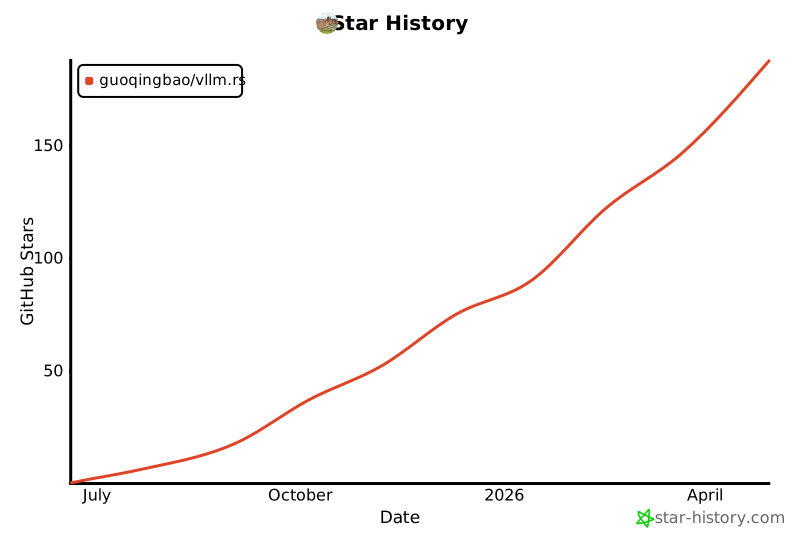
Star History
Like this project? Give it a ⭐ and contribute!
1 maintainer

Download files
Download the file for your platform. If you're not sure which to choose, learn more about installing packages.
Source Distributions
Built Distribution
Filter files by name, interpreter, ABI, and platform.
If you're not sure about the file name format, learn more about wheel file names.
Copy a direct link to the current filters
File details
Details for the file vllm_rs-0.11.5-cp38-abi3-macosx_11_0_arm64.whl.
File metadata
- Download URL: vllm_rs-0.11.5-cp38-abi3-macosx_11_0_arm64.whl
- Upload date:
- Size: 11.2 MB
- Tags: CPython 3.8+, macOS 11.0+ ARM64
- Uploaded using Trusted Publishing? No
- Uploaded via:
maturin/1.9.0
File hashes
| Algorithm | Hash digest | |
|---|---|---|
| SHA256 |
892470cc26d2cc45c2f5b048b74c70895f221454d11cd7228b1b7d100e8f1f0c
|
|
| MD5 |
8709ce31642cf83039b1f0f718f9cc5a
|
|
| BLAKE2b-256 |
2b9c3918782cba82e55c8fe97e949e67140d71d20395da4c6f52b0875d3055a5
|














