
A minimal, high-performance large language model (LLM) inference engine implementing vLLM in Rust.

Project description
🚀 vLLM.rs – A Minimalist vLLM in Rust
A blazing-fast ⚡, lightweight Rust 🦀 implementation of vLLM.
✨ Key Features
- 🔧 Pure Rust Backend – Absolutely no PyTorch required
- 🚀 High Performance (with Context-cache and PD Disaggregation)
- 🧠 Minimalist Core – Core logic written in <3000 lines of clean Rust
- 💻 Cross-Platform – Supports CUDA (Linux/Windows) and Metal (macOS)
- 🤖 Built-in API Server and ChatGPT-like Web UI – Native Rust server for both CUDA and Metal
- 🔌 MCP Integration – Model Context Protocol for tool calling support
- 📊 Embedding & Tokenizer APIs – Full text processing support
- 🐍 Lightweight Python Interface – PyO3-powered bindings for chat completion
📈 Performance
💬 Chat Performance
A100 (Single Card, 40G)
| Model | Format | Size | Decoding Speed |
|---|---|---|---|
| Ministral-3-3B (Multimodal) | BF16 | 3B | 118.49 tokens/s |
| Ministral-3-3B (Multimodal) | ISQ (BF16->Q4K) | 3B | 171.92 tokens/s |
| Qwen3-VL-8B-Instruct (Multimodal) | Q8_0 | 8B | 105.31 tokens/s |
| Llama-3.1-8B | ISQ (BF16->Q4K) | 8B | 120.74 tokens/s |
| DeepSeek-R1-0528-Qwen3-8B | Q4_K_M | 8B | 124.87 tokens/s |
| GLM-4-9B-0414 | Q4_K_M | 9B | 70.38 tokens/s |
| QwQ-32B | Q4_K_M | 32B | 41.36 tokens/s |
| Qwen3-30B-A3B | Q4_K_M | 30B (MoE) | 97.16 tokens/s |
| Qwen3.5-27B | Q4_K_M | 27B (Dense) | 45.20 tokens/s |
| Qwen3.5-27B | FP8 | 27B (Dense) | 42 tokens/s (Hopper) |
| Qwen3.5-35B-A3B | FP8 | 35B (MoE) | 97 tokens/s (Hopper) |
| GLM4.7 Flash | NVFP4 | 30B (MoE) | 79 tokens/s (Hopper) |
| Gemma4-31B | ISQ (BF16->Q4K) | 31B (Dense) | 41 tokens/s (Hopper) |
| Gemma4-26B-A4B | NVFP4 | 26B (MoE) | 82 tokens/s (Hopper) |
| MiniMax-M2.5 | NVFP4 | 229B (MoE) | 62 tokens/s (Hopper, TP=2) |
Metal (Apple Silicon, M4)
| Model | Batch Size | Output Tokens | Time (s) | Throughput (tokens/s) |
|---|---|---|---|---|
| Qwen3-0.6B (BF16) | 128 | 63488 | 83.13s | 763.73 |
| Qwen3-0.6B (BF16) | 32 | 15872 | 23.53s | 674.43 |
| Qwen3-0.6B (BF16) | 1 | 456 | 9.23s | 49.42 |
| Qwen3-4B (Q4_K_M) | 1 | 1683 | 52.62s | 31.98 |
| Qwen3-8B (Q2_K) | 1 | 1300 | 80.88s | 16.07 |
| Qwen3.5-4B (Q3_K_M) | 1 | 1592 | 69.04s | 23.06 |
See Full Performance Benchmarks →
🧠 Supported Architectures
- ✅ LLaMa (LLaMa2, LLaMa3, LLaMa4, IQuest-Coder)
- ✅ Qwen (Qwen2, Qwen3)
- ✅ Qwen2/Qwen3 Moe
- ✅ Qwen3 Next
- ✅ Qwen3.5 Dense/MoE (27B, 35B, 122B, 397B, Multimodal model)
- ✅ Mistral v1, v2
- ✅ Mistral-3-VL Reasoning (3B, 8B, 14B, Multimodal model)
- ✅ GLM4 (0414, Not ChatGLM)
- ✅ GLM4 MoE (4.6/4.7)
- ✅ GLM4.7 Flash
- ✅ DeepSeek V3/R1/V3.2
- ✅ Phi3 / Phi4 (Phi-3, Phi-4, Phi-4-mini, etc.)
- ✅ Gemma3/Gemma4 (Multimodal model)
- ✅ Qwen3-VL (Dense, Multimodal model)
- ✅ MiroThinker-v1.5 (30B, 235B)
Supports both Safetensor (including GPTQ, AWQ, MXFP4, NVFP4, and FP8-blockwise formats) and GGUF formats.
All models support hardware FP8 KV-cache acceleration (requires SM90+ and disable flashinfer or flashattn).
📚 Guides
- Get Started
- Docker Build
- Tool Parsing
- MCP Integration and Tool Calling
- Guided Decoding / Structured Output
- Work with OpenCode
- Work with Kilo Code
- Work with Claude Code
- Embedding
- Multimodal (Qwen3-VL, Gemma3, Mistral3-VL)
- Prefix cache
- Rust crate
- Tokenize/Detokenize
- Performance Benchmarks
- Model Testing (AI-Assisted)
- Adding New Model Architectures to this project (AI-Assisted)
📘 Usage in Python
📦 Install with pip
- 💡 CUDA compute capability < 8.0 (e.g., V100) requires a manual build
(noflashattnandflashinfersupport; alternatively use Rust mode). - 💡 The prebuilt wheel is built with the
flashinferbackend.
To use FP8 KV Cache, you must build manually (remove theflashinferorflashattnbuild flag).
🍎 Metal (macOS)
python3 -m pip install vllm_rs
🟩 CUDA (Linux)
Ampere / Ada (SM80+)
#(Optional) Install NCCL
apt-get install -y libnccl2 libnccl-dev
python3 -m pip install vllm_rs
Hopper (SM90+) / Blackwell (SM120+)
Download the wheel from the Release Assets, unzip it, then install the .whl
🌐✨ API Server + Built-in ChatGPT-like Web Server
💡Start with --ui-server will also start ChatGPT-like web server, no external chat client required in that case.
💡Use the Rust PD Server (see PD Disaggregation) if decoding stalls during prefilling of long-context requests.
💡Prefix cache is automatic and does not require session_id.
💡Use --disable-reasoning if you want requests that omit thinking / enable_thinking to default to non-reasoning mode.
Single GPU + GGUF model
# CUDA
python3 -m vllm_rs.server --m unsloth/Qwen3.5-27B-GGUF --f Qwen3.5-27B-Q4_K_M.gguf --ui-server --prefix-cache
# Metal/MacOS (response can be seriously degradated on MacOS pre-Tahoe, use a smaller `--max-model-len` or `--kv-fraction` parameter)
python3 -m vllm_rs.server --m unsloth/Qwen3.5-4B-GGUF --f Qwen3.5-4B-Q3_K_M.gguf --ui-server --prefix-cache
Multi-GPU + Safetensors model
python3 -m vllm_rs.server --m Qwen/Qwen3.5-122B-A10B --d 0,1 --ui-server --prefix-cache
Unquantized load as GGUF model (ISQ)
# Load as Q4K format, other options (q2k, q3k, q5k, q6k, q8_0):
python3 -m vllm_rs.server --w /path/Qwen3.5-35B-A3B --isq q4k --d 0 --ui-server --prefix-cache
FP8/FP4 Model
FP8-Blockwise format:
python3 -m vllm_rs.server --m Qwen/Qwen3.5-27B-FP8 --ui-server --prefix-cache
MXFP4 format:
python3 -m vllm_rs.server --m olka-fi/Qwen3.5-4B-MXFP4 --ui-server --prefix-cache
NVFP4 format:
python3 -m vllm_rs.server --m AxionML/Qwen3.5-9B-NVFP4 --ui-server --prefix-cache
Multimodal model (Qwen3.5, with images)
# Use the built-in ChatUI to upload images or refer image url (ended with '.bmp', '.gif', '.jpeg', '.png', '.tiff', or '.webp')
python3 -m vllm_rs.server --m Qwen/Qwen3.5-35B-A3B --ui-server --prefix-cache
GPTQ/AWQ Marlin-compatible model
python3 -m vllm_rs.server --w /home/Meta-Llama-3.1-8B-Instruct-GPTQ-INT4-Marlin
📘 Usage (Rust)
Install on CUDA (CUDA 11+, 12+, 13.0)
Option 1: Install into Docker
cd vllm.rs
# change `sm_80` to your hardware spec, e.g., sm_75 (V100), sm_80 (A100), sm_86 (RTX4096), sm_90 (Hopper), sm_100/sm_120 (Blackwell); change CUDA version `12.9.0` to match your host driver; change last parameter `0` to `1` to enable rust crate mirror (Chinese Mainland)
./build_docker.sh "cuda,nccl,graph,flashinfer,cutlass,python" sm_80 12.9.0 0

# You can also use `flash attention` backend, use `--prod` to build the production image
./build_docker.sh --prod "cuda,nccl,graph,flashattn,cutlass,python" sm_90 13.0.0
Option 2: Manual Installation
Install the Rust toolchain
curl --proto '=https' --tlsv1.2 -sSf https://sh.rustup.rs | sh
Install build dependencies
sudo apt-get update
sudo apt-get install -y git build-essential libssl-dev pkg-config
Install CUDA toolkit (optional)
# CUDA 12.9 (<= Host Driver Version)
sudo apt-get install -y \
  cuda-nvcc-12-9 \
  cuda-nvrtc-dev-12-9 \
  libcublas-dev-12-9 \
  libcurand-dev-12-9

# NCCL
sudo apt-get install -y libnccl2 libnccl-dev
Install vLLM.rs
# Remove `nccl` for single-gpu usage
# Add `cutlass` for sm90+ (fp8 models)
# Use `--dst` to change installation folder
./build.sh --install --features cuda,nccl,graph,flashinfer,cutlass

# Use Flash Attention backend
./build.sh --install --features cuda,nccl,graph,flashattn,cutlass

# Remove `flashinfer` or `flashattn` for V100 or older hardware
Install on MacOS/Metal
Install Xcode command line tools
Install with metal feature
cargo install --features metal
Running
By default, vllm-rs starts in API server mode on port 8000. Use --i for interactive CLI chat 🤖, --ui-server for API server with web UI 🌐, --m to specify a Huggingface model, --w for a local Safetensors model path, or --f for a GGUF model file:
API server + Web UI
Single GPU
# CUDA
vllm-rs --m unsloth/Qwen3.5-27B-GGUF --f Qwen3.5-27B-Q4_K_M.gguf --ui-server --prefix-cache
# Metal/MacOS
vllm-rs --m unsloth/Qwen3.5-4B-GGUF --f Qwen3.5-4B-Q3_K_M.gguf --ui-server --prefix-cache
Multi-GPU + Unquantized Model
# Replace "--ui-server" with "--server" will only start API server
vllm-rs --d 0,1 --m Qwen/Qwen3-30B-A3B-Instruct-2507 --ui-server --prefix-cache
Multi-GPU + GGUF Model
vllm-rs --d 0,1 --f /path/Qwen3-30B-A3B-Instruct-2507-Q4_K_M.gguf --ui-server --prefix-cache
FP8/FP4 Model
FP8-Blockwise format:
# CUDA (MoE, Dense), be sure to enable `cutlass` feature on sm90+
vllm-rs --m Qwen/Qwen3.5-27B-FP8 --ui-server --prefix-cache
# Or Qwen3-Next 80B
vllm-rs --m Qwen/Qwen3-Coder-Next-FP8 --ui-server --d 0,1 --prefix-cache
# MacOS/Metal (Dense)
vllm-rs --m Qwen/Qwen3.5-4B-FP8 --ui-server --prefix-cache
MXFP4 format:
vllm-rs --m olka-fi/Qwen3.5-4B-MXFP4 --ui-server --prefix-cache
NVFP4 format:
vllm-rs --m AxionML/Qwen3.5-9B-NVFP4 --ui-server --prefix-cache
ISQ model + FP8 KvCache
# CUDA: Disabled flashinfer/flashattn feature to use fp8-kvcache
./run.sh --release --features cuda,nccl,graph,cutlass --d 0 --m Qwen/Qwen3.5-35B-A3B --isq q4k --fp8-kvcache
# MacOS/Metal
vllm-rs --ui-server --w /path/Qwen3-4B --isq q6k
🔌 Guided decoding (Structured Outputs & Constraints)
vLLM.rs now supports structured output and constraint-based generation via llguidance:
- Custom Constraints: allow clients to submit Lark/Regex/JSON Schema constraints via OpenAI-compatible structured_outputs/response_format
See Structured Outputs Documentation →
🔌 MCP Integration (Tool Calling)
Enable LLMs to call external tools via Model Context Protocol.
# Start with multiple mcp servers
python3 -m vllm_rs.server --m unsloth/Qwen3-30B-A3B-Instruct-2507-GGUF --f Qwen3-30B-A3B-Instruct-2507-Q4_K_M.gguf --ui-server --prefix-cache --mcp-config ./mcp.json
🔀 Prefill-Decode Separation (PD Disaggregation)
PD Disaggregation separates prefill (prompt processing) and decode (token generation) into separate instances. This helps avoid decoding stalls during long-context prefilling.
Connection Modes
| Mode | URL Format | Use Case |
|---|---|---|
| LocalIPC (default) | No --pd-url |
Same machine, CUDA only |
| File-based IPC | file:///path/to/sock |
Containers with shared volume |
| Remote TCP | tcp://host:port or http://host:port |
Different machines |
Start PD server
No need to specify port, since the server does not directly handle user requests.
The size of KvCache is controlled by --max-model-len and --max-num-seqs.
# Build with `flashinfer` or `flashattn` for maximum speed in long-context prefill
# Use unquantized model to obtain maximum prefill speed
vllm-rs --d 0,1 --m Qwen/Qwen3-30B-A3B-Instruct-2507 --pd-server
Or, use prebuilt Python package as PD server:
python3 -m vllm_rs.server --d 0,1 --m Qwen/Qwen3-30B-A3B-Instruct-2507 --pd-server
Start PD client
# Client can use different format of the same model
# Use Q4K to obtain higher decoding speed for small batches
vllm-rs --d 2,3 --w /path/Qwen3-30B-A3B-Instruct-2507 --isq q4k --ui-server --port 8000 --pd-client
Or, start with prebuild Python package:
python3 -m vllm_rs.server --d 2,3 --w /path/Qwen3-30B-A3B-Instruct-2507 --isq q4k --ui-server --port 8000 --pd-client
Multi-container setup with shared filesystem (file:// mode)
When running PD server and client in different Docker containers on the same machine, use a shared volume for socket communication:
# Create shared directory
mkdir -p /tmp/pd-sockets

# Start PD server container with shared volume
docker run --gpus '"device=0,1"' -v /tmp/pd-sockets:/sockets ...
target/release/vllm-rs --d 0,1 --m Qwen/... --pd-server --pd-url file:///sockets

# Start PD client container with same shared volume
docker run --gpus '"device=2,3"' -v /tmp/pd-sockets:/sockets ...
target/release/vllm-rs --d 0,1 --w /path/... --pd-client --pd-url file:///sockets --ui-server --port 8000
Multi-machine setup (tcp:// or http:// mode)
The PD server and client must use the same model and rank count (GPU count). They may use different formats of the same model (e.g., server uses unquantized Safetensor, client uses GGUF).
# On server machine (e.g., 192.168.1.100)
target/release/vllm-rs --d 0,1 --m Qwen/... --pd-server --pd-url tcp://0.0.0.0:8100

# On client machine
target/release/vllm-rs --d 0,1 --w /path/... --pd-client --pd-url tcp://192.168.1.100:8100 --ui-server --port 8000
Note: Metal/macOS does not support LocalIPC, so
--pd-urlis required for PD disaggregation on macOS.
📽️ Demo Video
Watch it in action 🎉
🔨 Build Python Package from source (Optional)
⚠️ The first build may take time if
Flash Attentionis enabled.
⚠️ When enabling context caching or multi-GPU inference, you also need to compile
Runner(usingbuild.shorrun.sh).
🛠️ Prerequisites
- For Python bindings, install Maturin
Building steps
- Install Maturin
# install build dependencies (Linux)
sudo apt install libssl-dev pkg-config -y
pip install maturin
pip install maturin[patchelf]  # For Linux/Windows
- Build the Python package
# Naive CUDA (No NCCL, single GPU only)
maturin build --release --features cuda,python

# CUDA (with FP8 KV Cache, use Paged Attention, compatible with V100)
./build.sh --release --features cuda,nccl,graph,python

# CUDA (Use Flash Attention backend)
./build.sh --release --features cuda,nccl,graph,flashattn,cutlass,python

# CUDA (Use Flashinfer backend)
./build.sh --release --features cuda,nccl,graph,flashinfer,cutlass,python

# macOS (Metal, single GPU only, with FP8 kvcache support)
maturin build --release --features metal,python
- Install packages
# the package you built
pip install target/wheels/vllm_rs-*-cp38-abi3-*.whl --force-reinstall
⚙️ Command Line Arguments
| Flag | Description |
|---|---|
--m |
Hugginface Model ID |
--w |
Path to Safetensors model |
--f |
GGUF filename when model_id given or GGUF file path |
--d |
Device ID (e.g. --d 0) |
--max-num-seqs |
Maximum number of concurrent requests (default: 32, 8 on macOS) |
--max-tokens |
Max tokens per response (default: 16384, up to max_model_len) |
--batch |
Only used for benchmark (this will replace max-num-seqs and ignore prompts) |
--prompts |
Prompts separated by | |
--dtype |
KV cache dtype: bf16 (default), f16, or f32 |
--isq |
Load unquantized model as GGUF quantized format such as q2k, q4k, etc. |
--temperature |
Controls randomness: lower (0.) → deterministic, higher (1.0) → creative/random. |
--top-k |
Limits choices to the top k highest-probability tokens. smaller k → more stable;larger k → more random |
--top-p |
Dynamically chooses the smallest set of tokens whose cumulative probability ≥ p. Range: 0.8 ~ 0.95 |
--presence-penalty |
Presence penalty, controls whether the model avoids reusing tokens that have already appeared. Range [-2, 2]. Higher positive values → more likely to introduce new tokens; negative values → more likely to repeat previously used tokens |
--frequency-penalty |
Frequency penalty, controls whether the model reduces the probability of tokens that appear too often. Range [-2, 2]. Higher positive values → stronger penalty for frequently repeated tokens; negative values → encourages more repetition |
--server |
Explicitly start API server (this is the default when no --i, --prompts, or --batch is given) |
--i |
Interactive CLI chat mode |
--fp8-kvcache |
Use FP8 KV Cache (when flashinfer and flashattn not enabled) |
--cpu-mem-fold |
The percentage of CPU KVCache memory size compare to GPU (default 0.2, range from 0.1 to 10.0) |
--pd-server |
When using PD Disaggregation, specify the current instance as the PD server (this server is only used for Prefill) |
--pd-client |
When using PD Disaggregation, specify the current instance as the PD client (this client sends long-context Prefill requests to the PD server for processing) |
--pd-url |
PD communication URL: tcp://host:port or http://host:port for remote TCP, file:///path for filesystem socket (containers), or omit for local IPC |
--ui-server |
server mode: start the API server and also start the ChatGPT-like web server |
--kv-fraction |
control kvcache usage (percentage of remaining gpu memory after model loading) |
--prefix-cache |
Enable prefix caching for multi-turn conversations |
--prefix-cache-max-tokens |
Cap prefix cache size in tokens (rounded down to block size) |
--yarn-scaling-factor |
YARN RoPE scaling factor for context extension (e.g., 4.0 extends 4x context) |
MCP Configuration
| Flag | Description |
|---|---|
--mcp-command |
Path to single MCP server executable |
--mcp-args |
Comma-separated arguments for MCP server |
--mcp-config |
Path to JSON config file for multiple MCP servers |
📌 Project Status
🚧 Under active development – breaking changes may occur!
🛠️ Roadmap
- Batched inference (Metal)
- GGUF format support
- FlashAttention (CUDA)
- CUDA Graph
- OpenAI-compatible API (streaming support)
- Continuous batching
- Multi-gpu inference (Safetensors, GPTQ, AWQ, GGUF)
- Speedup prompt processing on Metal/macOS
- Chunked Prefill
- Prefix cache (available on
CUDAwhenprefix-cacheenabled) - Model loading from hugginface hub
- Model loading from ModelScope (China)
- Prefix cache for Metal/macOS
- FP8 KV Cache (CUDA)
- FP8 KV Cache (Metal)
- FP8 KV Cache (with Flash-Attn / Flashinfer)
- FP8 Models (CUDA: MoE, Dense; Metal: Dense)
- Additional model support (Kimi K2, GLM 5.1 etc.)
- CPU KV Cache Offloading
- Prefill-decode Disaggregation (CUDA)
- Prefill-decode Disaggregation (Metal)
- Built-in ChatGPT-like Web Server
- Embedding API
- Tokenize/Detokenize API
- MCP Integration & Tool Calling
- Prefix Caching
- Claude/Anthropic-compatible API Server
- Support CUDA 13
- Support FlashInfer backend
- Support DeepGEMM backend (Hopper)
- MXFP4/NVFP4 Model Support
- TentorRT-LLM
📚 References
- Candle-vLLM
- Python nano-vllm
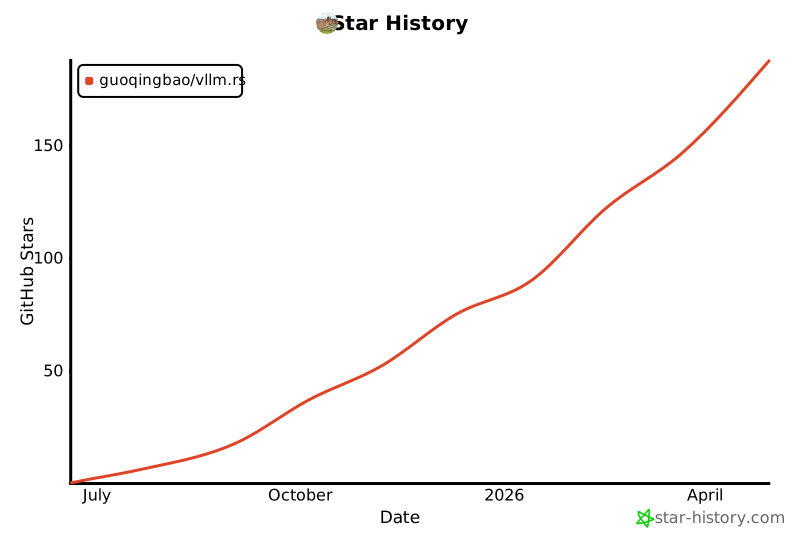
Star History
💡 Like this project? Give it a ⭐ and contribute!
Release history Release notifications | RSS feed


Download files
Download the file for your platform. If you're not sure which to choose, learn more about installing packages.
Source Distributions
Built Distributions
Filter files by name, interpreter, ABI, and platform.
If you're not sure about the file name format, learn more about wheel file names.
Copy a direct link to the current filters
File details
Details for the file vllm_rs-0.10.6-cp38-abi3-manylinux_2_39_x86_64.whl.
File metadata
- Download URL: vllm_rs-0.10.6-cp38-abi3-manylinux_2_39_x86_64.whl
- Upload date:
- Size: 49.2 MB
- Tags: CPython 3.8+, manylinux: glibc 2.39+ x86-64
- Uploaded using Trusted Publishing? No
- Uploaded via: maturin/1.12.6
File hashes
| Algorithm | Hash digest | |
|---|---|---|
| SHA256 |
425f83af54126214845e173cc1668de349bc2d74e89c4c4ca1033a459e07c057
|
|
| MD5 |
5481cef8a8f1de6216bb6cf2ddc7fad0
|
|
| BLAKE2b-256 |
7bedaf2bf2999d17f1847f11cf87611f9ebbd65204e9f73cccc00341990c4807
|
File details
Details for the file vllm_rs-0.10.6-cp38-abi3-macosx_11_0_arm64.whl.
File metadata
- Download URL: vllm_rs-0.10.6-cp38-abi3-macosx_11_0_arm64.whl
- Upload date:
- Size: 11.0 MB
- Tags: CPython 3.8+, macOS 11.0+ ARM64
- Uploaded using Trusted Publishing? No
- Uploaded via: maturin/1.9.0
File hashes
| Algorithm | Hash digest | |
|---|---|---|
| SHA256 |
b80d13dff3de7555cb8123e332aae4979e1cb9d961e46d26935e9e5b0482c6b7
|
|
| MD5 |
2de83506331f9fc0cba2ad3912ecca16
|
|
| BLAKE2b-256 |
a1887090bba9cb7614aadb4b89e3a3eb49e10b5d625611c4dd4f030c8444469a
|






