VLM Run Hub for various industry-specific schemas


Project description






Welcome to VLM Run Hub, a comprehensive repository of pre-defined Pydantic schemas for extracting structured data from unstructured visual domains such as images, videos, and documents. Designed for Vision Language Models (VLMs) and optimized for real-world use cases, VLM Run Hub simplifies the integration of visual ETL into your workflows.
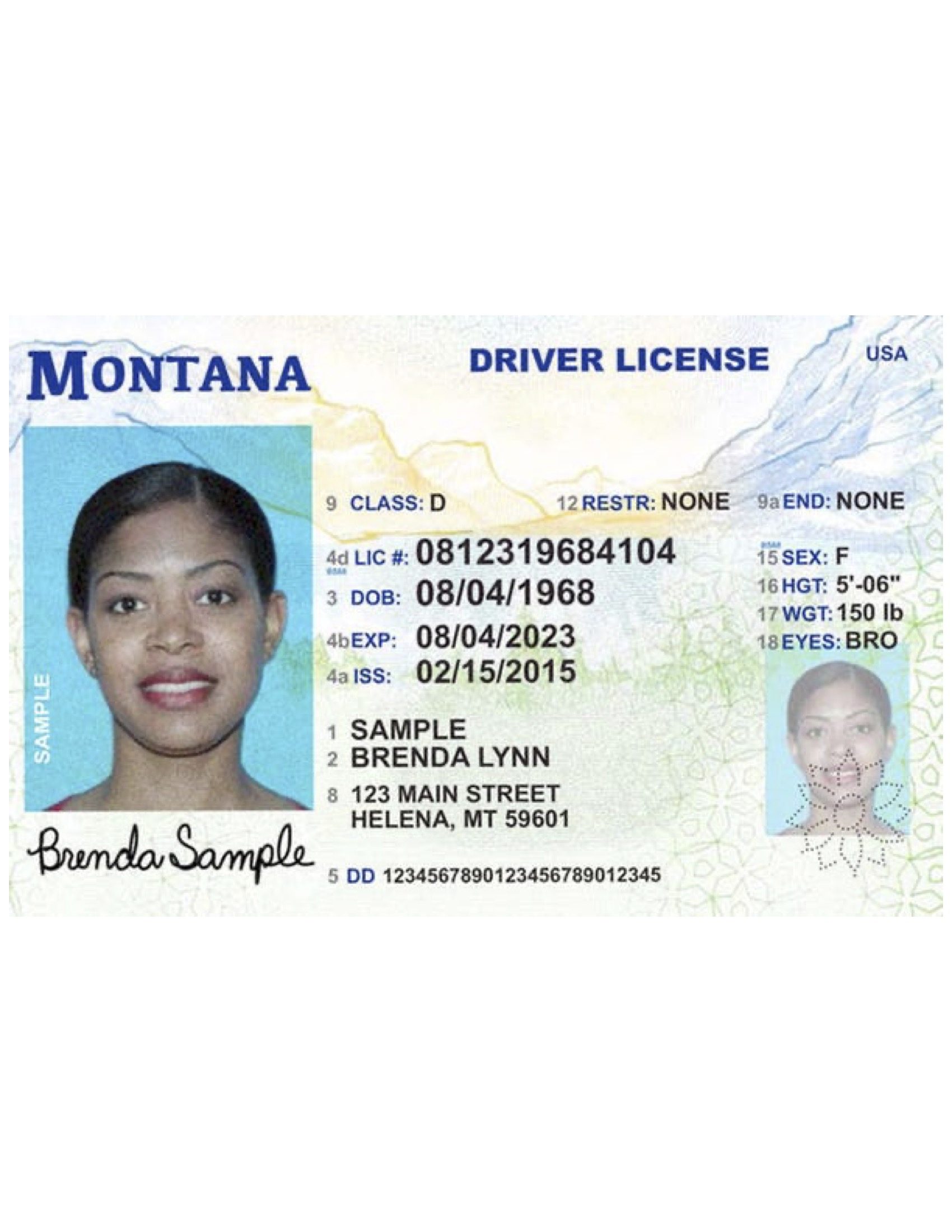
| Image | JSON |
|
{
  "issuing_state": "MT",
  "license_number": "0812319684104",
  "first_name": "Brenda",
  "middle_name": "Lynn",
  "last_name": "Sample",
  "address": {
    "street": "123 MAIN STREET",
    "city": "HELENA",
    "state": "MT",
    "zip_code": "59601"
  },
  "date_of_birth": "1968-08-04",
  "gender": "F",
  "height": "5'06\"",
  "weight": 150.0,
  "eye_color": "BRO",
  "issue_date": "2015-02-15",
  "expiration_date": "2023-08-04",
  "license_class": "D"
}
|
💡 Motivation
While vision models like OpenAI’s GPT-4o and Anthropic’s Claude Vision excel in exploratory tasks like "chat with images," they often lack practicality for automation and integration, where strongly-typed, validated outputs are crucial.
The Structured Outputs API (popularized by GPT-4o, Gemini) addresses this by constraining LLMs to return data in precise, strongly-typed formats such as Pydantic models. This eliminates complex parsing and validation, ensuring outputs conform to expected types and structures. These schemas can be nested and include complex types like lists and dictionaries, enabling seamless integration with existing systems while leveraging the full capabilities of the model.
🧰 Why use this hub of pre-defined Pydantic schemas?
- 📚 Easy to use: Pydantic is a well-understood and battle-tested data model for structured data.
- 🔋 Batteries included: Each schema in this repo has been validated across real-world industry use cases—from healthcare to finance to media—saving you weeks of development effort.
- 🔍 Automatic Data-validation: Built-in Pydantic validation ensures your extracted data is clean, accurate, and reliable, reducing errors and simplifying downstream workflows.
- 🔌 Type-safety: With Pydantic’s type-safety and compatibility with tools like
mypyandpyright, you can build composable, modular systems that are robust and maintainable. - 🧰 Model-agnostic: Use the same schema with multiple VLM providers, no need to rewrite prompts for different VLMs.
- 🚀 Optimized for Visual ETL: Purpose-built for extracting structured data from images, videos, and documents, this repo bridges the gap between unstructured data and actionable insights.
📖 Schema Catalog
The VLM Run Hub maintains a comprehensive catalog of all available schemas in the vlmrun/hub/catalog.yaml file. The catalog is automatically validated to ensure consistency and completeness of schema documentation. We refer the developer to the catalog-spec.yaml for the full YAML specification. Here are some featured schemas:
- Documents: document.bank-statement, document.invoice, document.receipt, document.resume, document.us-drivers-license, document.utility-bill, document.w2-form
- Other industry-specific schemas: healthcare.medical-insurance-card, retail.ecommerce-product-caption, media.tv-news, aerospace.remote-sensing
If you have a new schema you want to add to the catalog, please refer to the SCHEMA-GUIDELINES.md for the full guidelines.
🚀 Getting Started
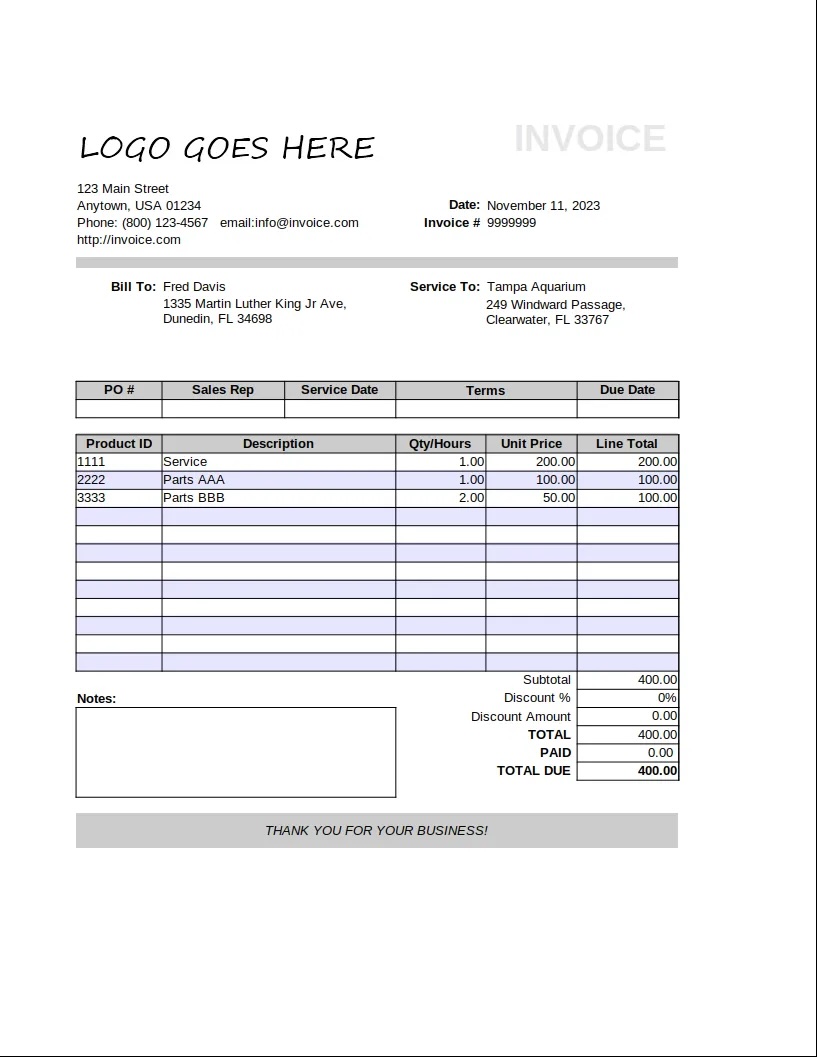
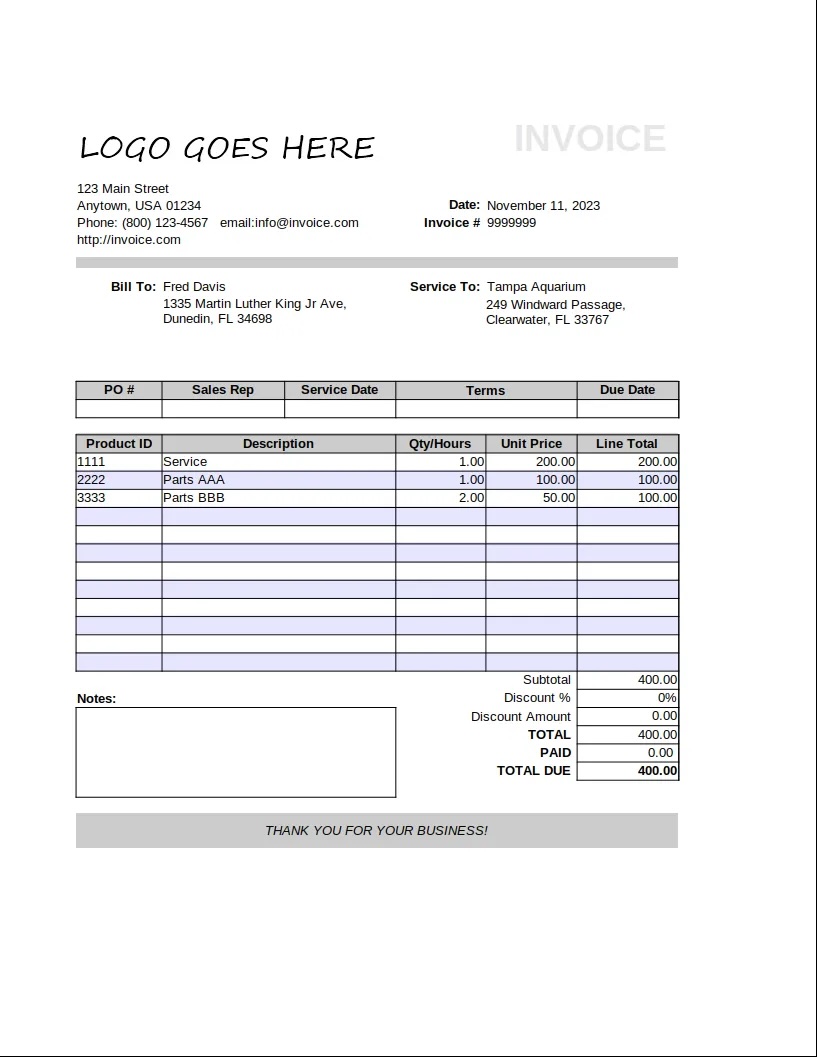
Let's say we want to extract invoice metadata from an invoice image. You can readily use our Invoice schema we have defined under vlmrun.hub.schemas.document.invoice and use it with any VLM of your choosing.
💾 Installation
pip install vlmrun-hub
With Instructor / OpenAI
import instructor
from openai import OpenAI

from vlmrun.hub.schemas.document.invoice import Invoice

IMAGE_URL = "https://storage.googleapis.com/vlm-data-public-prod/hub/examples/document.invoice/invoice_1.jpg"

client = instructor.from_openai(
    OpenAI(), mode=instructor.Mode.MD_JSON
)
response = client.chat.completions.create(
    model="gpt-4o-mini",
    messages=[
        { "role": "user", "content": [
            {"type": "text", "text": "Extract the invoice in JSON."},
            {"type": "image_url", "image_url": {"url": IMAGE_URL}, "detail": "auto"}
        ]}
    ],
    response_model=Invoice,
    temperature=0,
)
JSON Response:
| Image | JSON Output 🔐 |
|
{
  "invoice_id": "9999999",
  "period_start": null,
  "period_end": null,
  "invoice_issue_date": "2023-11-11",
  "invoice_due_date": null,
  "order_id": null,
  "customer_id": null,
  "issuer": "Anytown, USA",
  "issuer_address": {
    "street": "123 Main Street",
    "city": "Anytown",
    "state": "USA",
    "postal_code": "01234",
    "country": null
  },
  "customer": "Fred Davis",
  "customer_email": "email@invoice.com",
  "customer_phone": "(800) 123-4567",
  "customer_billing_address": {
    "street": "1335 Martin Luther King Jr Ave",
    "city": "Dunedin",
    "state": "FL",
    "postal_code": "34698",
    "country": null
  },
  "customer_shipping_address": {
    "street": "249 Windward Passage",
    "city": "Clearwater",
    "state": "FL",
    "postal_code": "33767",
    "country": null
  },
  "items": [
    {
      "description": "Service",
      "quantity": 1,
      "currency": null,
      "unit_price": 200.0,
      "total_price": 200.0
    },
    {
      "description": "Parts AAA",
      "quantity": 1,
      "currency": null,
      "unit_price": 100.0,
      "total_price": 100.0
    },
    {
      "description": "Parts BBB",
      "quantity": 2,
      "currency": null,
      "unit_price": 50.0,
      "total_price": 100.0
    }
  ],
  "subtotal": 400.0,
  "tax": null,
  "total": 400.0,
  "currency": null,
  "notes": "",
  "others": null
}
|
With VLM Run
import requests

from vlmrun.hub.schemas.document.invoice import Invoice


IMAGE_URL = "https://storage.googleapis.com/vlm-data-public-prod/hub/examples/document.invoice/invoice_1.jpg"

json_data = {
    "image": IMAGE_URL,
    "model": "vlm-1",
    "domain": "document.invoice",
    "json_schema": Invoice.model_json_schema(),
}
response = requests.post(
    f"https://api.vlm.run/v1/image/generate",
    headers={"Authorization": f"Bearer <your-api-key>"},
    json=json_data,
)
With OpenAI Structured Outputs API
import instructor
from openai import OpenAI

from vlmrun.hub.schemas.document.invoice import Invoice

IMAGE_URL = "https://storage.googleapis.com/vlm-data-public-prod/hub/examples/document.invoice/invoice_1.jpg"

client = OpenAI()
completion = client.beta.chat.completions.parse(
    model="gpt-4o-mini",
    messages=[
        {"role": "user", "content": [
            {"type": "text", "text": "Extract the invoice in JSON."},
            {"type": "image_url", "image_url": {"url": IMAGE_URL}, "detail": "auto"}
        ]},
    ],
    response_format=Invoice,
    temperature=0,
)
When working with the OpenAI Structured Outputs API, you need to ensure that the
response_formatis a valid Pydantic model with the supported types.
Locally with Ollama
from ollama import chat

from vlmrun.hub.schemas.document.invoice import Invoice
from vlmrun.hub.utils import encode_image, remote_image

IMAGE_URL = "https://storage.googleapis.com/vlm-data-public-prod/hub/examples/document.invoice/invoice_1.jpg"

img = remote_image(IMAGE_URL)
chat_response = chat(
    model="llama3.2-vision:11b",
    format=Invoice.model_json_schema(),
    messages=[
        {
            "role": "user",
            "content": "Extract the invoice in JSON.",
            "images": [encode_image(img, format="JPEG").split(",")[1]],
        },
    ],
    options={
        "temperature": 0
    },
)
response = Invoice.model_validate_json(
    chat_response.message.content
)
📖 Qualitative Results
We periodically run popular VLMs on each of the examples & schemas in the catalog.yaml file and publish the results in the benchmarks directory.
| Provider | Model | Date | Results |
|---|---|---|---|
| OpenAI | gpt-4o-2024-11-20 | 2025-01-09 | link |
| OpenAI | gpt-4o-mini-2024-07-18 | 2025-01-09 | link |
| Gemini | gemini-2.0-flash-exp | 2025-01-10 | link |
| Llama 3.2 11B | llama3.2-vision:11b | 2025-01-10 | link |
| Microsoft | phi-4 | 2025-01-10 | link |
📂 Directory Structure
Schemas are organized by industry for easy navigation:
vlmrun
└── hub
    ├── schemas
    |   ├── <industry>
    |   |   ├── <use-case-1>.py
    |   |   ├── <use-case-2>.py
    |   |   └── ...
    │   ├── aerospace
    │   │   └── remote_sensing.py
    │   ├── document  # all document schemas are here
    |   |   ├── invoice.py
    |   |   ├── us_drivers_license.py
    |   |   └── ...
    │   ├── healthcare
    │   │   └── medical_insurance_card.py
    │   └── retail
    │   │   └── ecommerce_product_caption.py
    │   └── contrib  # all contributions are welcome here!
    │       └── <schema-name>.py
    └── version.py
✨ How to Contribute
We’re building this hub for the community, and contributions are always welcome! Follow the CONTRIBUTING and SCHEMA-GUIDELINES.md to get started.
🔗 Quick Links
- 💬 Send us an email at support@vlm.run or join our Discord for help.
- 📣 Follow us on Twitter, and LinkedIn to keep up-to-date on our products.
Release history Release notifications | RSS feed


Download files
Download the file for your platform. If you're not sure which to choose, learn more about installing packages.
Source Distribution
Built Distribution
Filter files by name, interpreter, ABI, and platform.
If you're not sure about the file name format, learn more about wheel file names.
Copy a direct link to the current filters
File details
Details for the file vlmrun_hub-0.1.16.tar.gz.
File metadata
- Download URL: vlmrun_hub-0.1.16.tar.gz
- Upload date:
- Size: 32.4 kB
- Tags: Source
- Uploaded using Trusted Publishing? No
- Uploaded via: twine/6.0.1 CPython/3.12.8
File hashes
| Algorithm | Hash digest | |
|---|---|---|
| SHA256 |
a301eba7fa5d1e4ab85c16cf69ae6367c34f7aabef0fe059f2c0df0dc0fee754
|
|
| MD5 |
99b6776ac11ba8274007ad5edc3875d0
|
|
| BLAKE2b-256 |
1bf0cd8a77f069fdd913b53cb3e7eaf1131f660929bfc22b69824563c3ec5594
|
File details
Details for the file vlmrun_hub-0.1.16-py3-none-any.whl.
File metadata
- Download URL: vlmrun_hub-0.1.16-py3-none-any.whl
- Upload date:
- Size: 21.1 kB
- Tags: Python 3
- Uploaded using Trusted Publishing? No
- Uploaded via: twine/6.0.1 CPython/3.12.8
File hashes
| Algorithm | Hash digest | |
|---|---|---|
| SHA256 |
67d09eaaf29df0a93d5f2a9808eb48f1b19c716108e67103f4611432afcbba94
|
|
| MD5 |
e477dcbdfe6ff92293b90dc0b90d0334
|
|
| BLAKE2b-256 |
c54d93bdd9d668ff3d87753c1b5ed77b9688fe36eb3ff16923fec2253c04cdf2
|