
An Ethernet software-based open source demarcation NID

Project description
vMark-node by Pathgate
World's first open source Ethernet software-based demarcation NID.
Latest version: 0.3.8 / Release notes: Link / News at: LinkedIn
🚀 Features:
- Modular tree-style CLI with tab autocompletions and '?' helper.
- Shell/Dispatcher/Modules/Plugins architecture.
- Complete Interface management.
- GPLv3 License.
- Add & delete sub.interfaces (QinQ / dual-tags supported) (v0.2)
- TWAMP (RFC5357) implementation for End-to-End L3 tests. (ipv4 & ipv6, sender/responder modes). (v0.3)
- Pypi (pip) packaging. (v0.3.1)
- Remote Management via vMark. (v0.3.4)
🔧 Feature roadmap:
- Ethernet OAM. (IEEE 802.1ag / Y.1731)
- Timing protocols support (ITU-T G.8262 Sync-E and IEEE 1588v2)
- MEF3 Services deployment with 100% L2 transparency (l2tp).
- Automated MEF3 Service WAN failover.
- Remote loop testing with automatic timeout.
- RFC2544 Service Activation testing and reflector.
- open-BFDD implementation for service session assurance.
- fiber-interface management and optic levels monitoring.
- SNMP Support.
- Multi-vendor IPSec Tunnel support.
- VXLAN Tunneling.
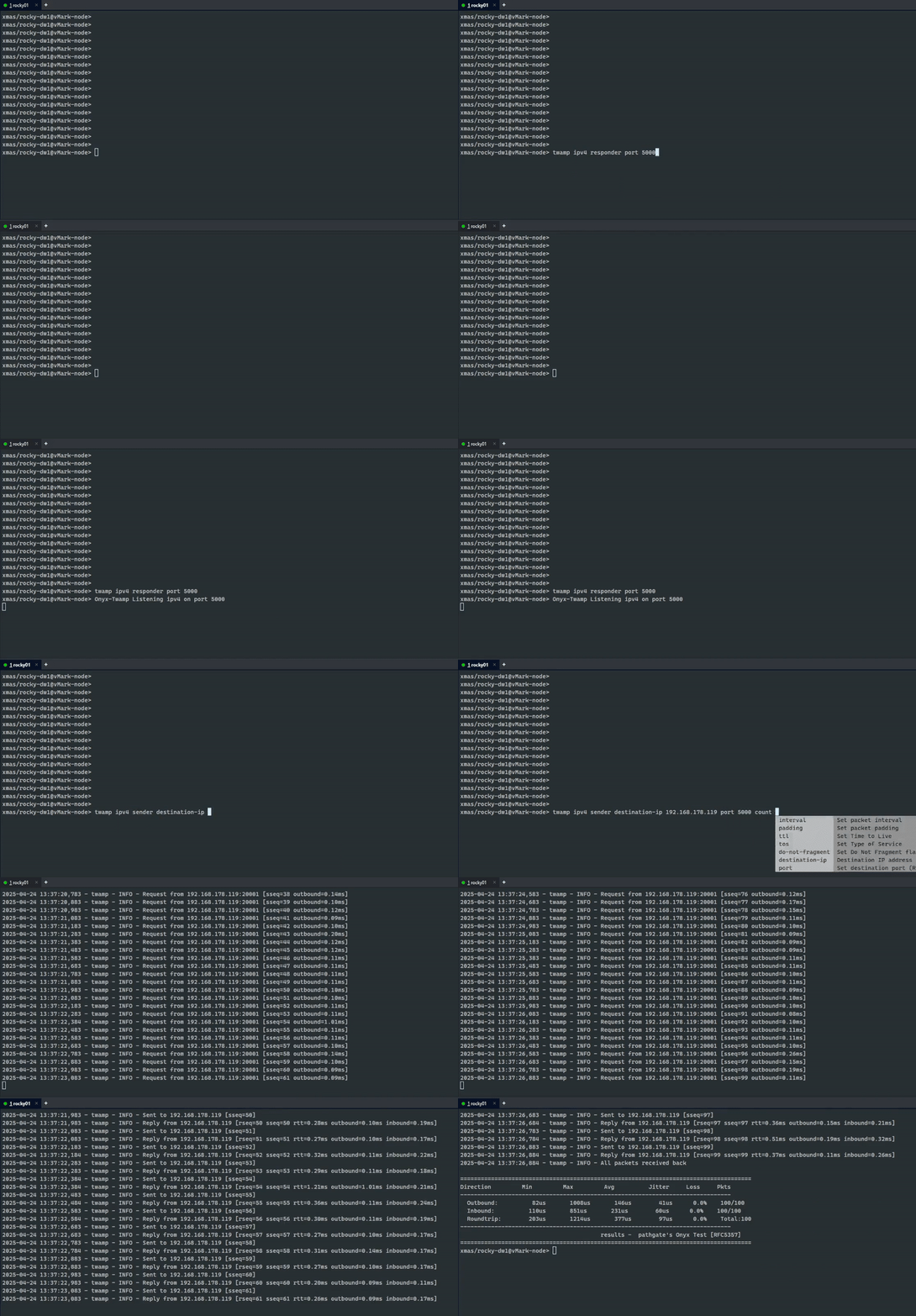
# Overview
vMark-node is a software-based open-source Ethernet demarcation NID designed for flexibility and democratization in the Carrier industry.
The "-node"** refers to this being the client-side of vMark server. (vMark-node doenst need vMark to work).

# Architecture
Shell: Provides command-line auto-completion, some help-related features and dynamically builds the command tree based on the modules and installed plugins. This enables a modular, scalable and re-usable interactive CLI experience.
Dispatcher: Interprets user commands, determines the appropriate module to handle each command, and routes execution accordingly. The dispatcher acts as the central coordinator between the shell and the available modules/plugins, Web-UI and API interactions talk directly with the Dispatcher.
Modules: Shell modules encapsulate core command logic and define the command tree structure. Examples: 'show', 'config', and 'system', each representing a set of related commands and subcommands with item descriptions.
Plugins: Integrate external libraries or tools to extend functionality. For example, plugins can provide access to third-party systems such as OpenBFDD, allowing seamless integration with external services.
📎 Installation methods
Quick Install
git clone https://github.com/xmas-ar/vMark-node
cd vMark-node/vMark-node
pip3 install -r requirements.txt
python3 main.py
PIP Install
pip install vmark-node
~/.local/bin/vmark-node
🔄 Running as a Background Service (Production)
To ensure vmark-node stays running in the background (e.g., to keep the API server accessible by vMark), you can use systemd or tmux.
✅ Option 1: systemd Service (Recommended for Linux)
- Create a service file:
bash
sudo nano /etc/systemd/system/vmark-node.service
Paste this configuration:
[Unit]
Description=vMark-node Service
After=network.target

[Service]
Type=simple
ExecStart=/usr/local/bin/vmark-node
WorkingDirectory=/opt/vmark-node
Restart=always
RestartSec=3
User=nobody

[Install]
WantedBy=multi-user.target
⚠️ Replace /usr/local/bin/vmark-node and /opt/vmark-node with your actual install path (check with which vmark-node if installed via pip).
- Enable and start the service:
sudo systemctl daemon-reload
sudo systemctl enable vmark-node
sudo systemctl start vmark-node
- Useful commands:
sudo systemctl status vmark-node
sudo journalctl -u vmark-node -f
✅ Option 2: TMUX (Simpler option)
- Install tmux and launch vmark (after installed with pip):
sudo apt install tmux
tmux
vmark-node
- Then press:
Ctrl + B, then D
👉 That detaches the session, leaving vmark-node running.
- To resume later:
tmux attach
Release history Release notifications | RSS feed


Download files
Download the file for your platform. If you're not sure which to choose, learn more about installing packages.
Source Distribution
Built Distribution
Filter files by name, interpreter, ABI, and platform.
If you're not sure about the file name format, learn more about wheel file names.
Copy a direct link to the current filters
File details
Details for the file vmark_node-0.3.8.tar.gz.
File metadata
- Download URL: vmark_node-0.3.8.tar.gz
- Upload date:
- Size: 87.0 kB
- Tags: Source
- Uploaded using Trusted Publishing? No
- Uploaded via: twine/6.1.0 CPython/3.9.21
File hashes
| Algorithm | Hash digest | |
|---|---|---|
| SHA256 |
7ef3d2feb7bb6766f87c88dd57ac2af1334b10ccd7469ef178ade6a92d87ffdc
|
|
| MD5 |
4a4ca33c3b6af53a99420c41392313c8
|
|
| BLAKE2b-256 |
1a31654e2fb18409a0e7a70bd1bdf87afe02a2e47675d6ae15287337d7d391f8
|
File details
Details for the file vmark_node-0.3.8-py3-none-any.whl.
File metadata
- Download URL: vmark_node-0.3.8-py3-none-any.whl
- Upload date:
- Size: 86.3 kB
- Tags: Python 3
- Uploaded using Trusted Publishing? No
- Uploaded via: twine/6.1.0 CPython/3.9.21
File hashes
| Algorithm | Hash digest | |
|---|---|---|
| SHA256 |
f5f9cb25d8cad959790fea37bab2027db5777d5e825166dec62cb5792f690f3c
|
|
| MD5 |
b61528ba84d3e25fdbd943b2f23cc49a
|
|
| BLAKE2b-256 |
1f267e18e82731f7ff52afe77bcf4e4efe043e00d808c7ca8a8fb89a41f23caf
|






