
Plot volcano on map

Project description
volcano-pygmt



A Python package for plotting volcano maps using PyGMT. Generate scientific-quality maps with terrain relief, contours, seismic station markers, scale bars, north arrows, and country-level locator insets.
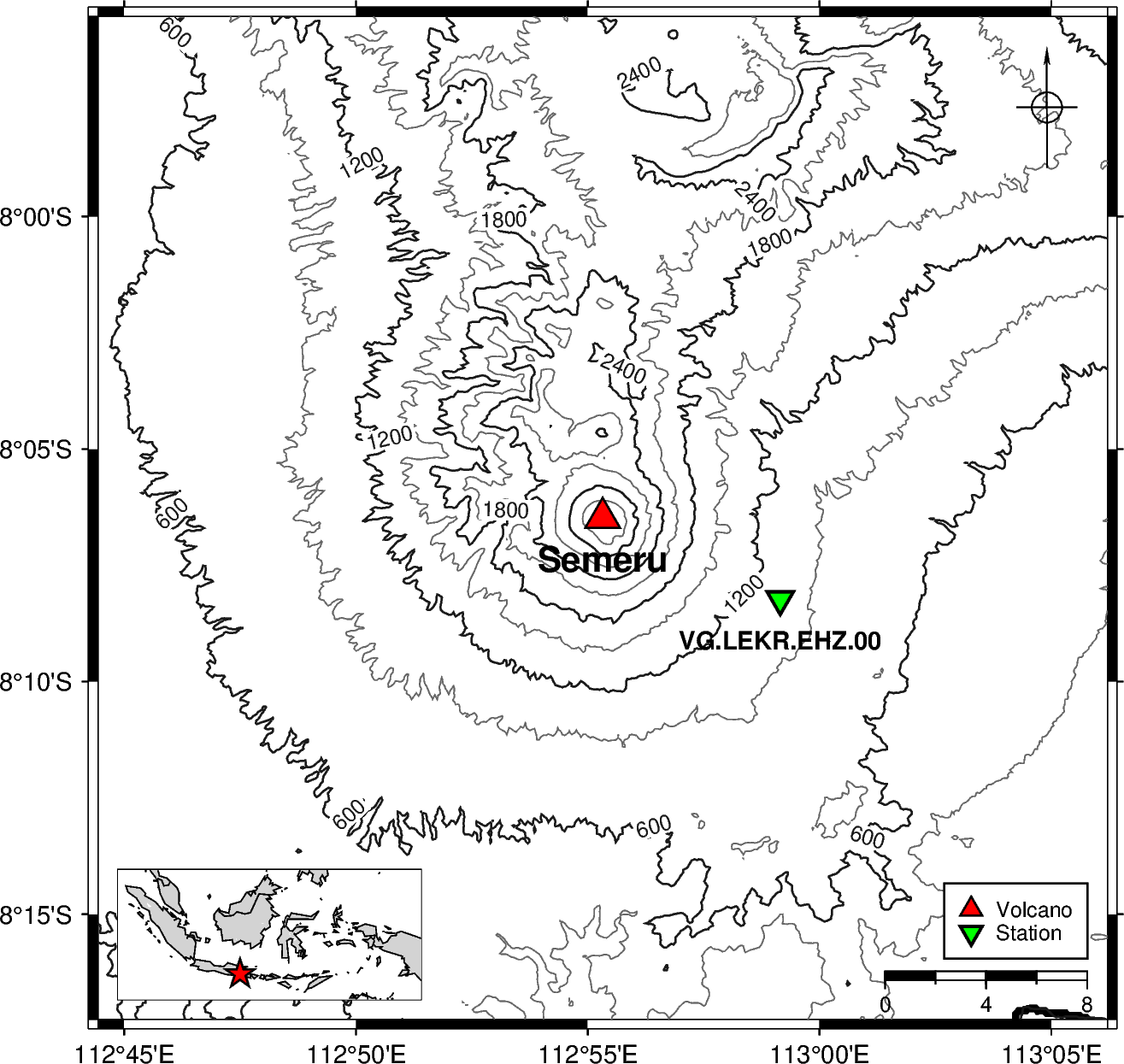
Semeru · East Java, Indonesia Contour interval 300 m · padding 20 km |
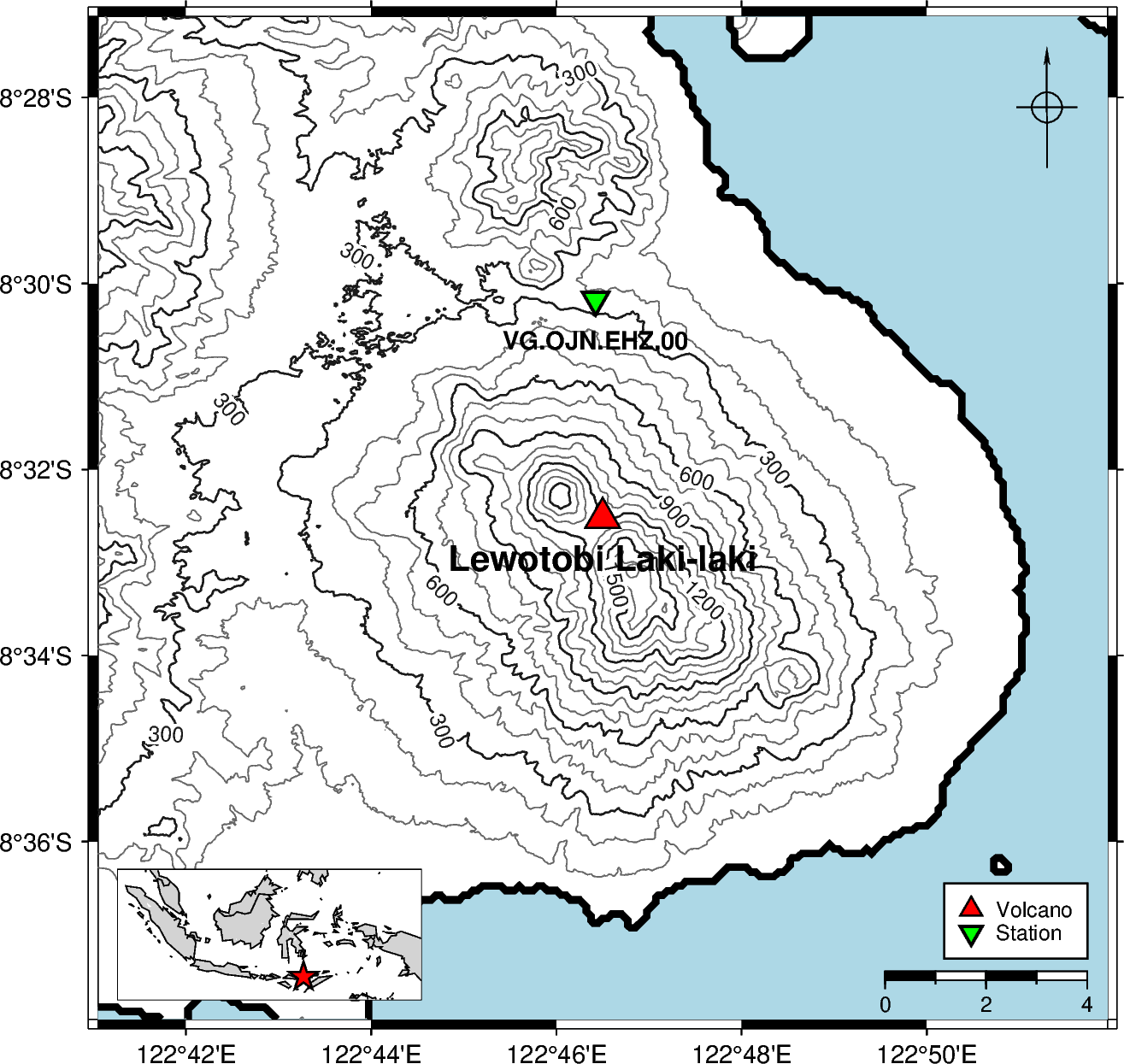
Lewotobi Laki-laki · East Nusa Tenggara, Indonesia Contour interval 300 m · padding 10 km |
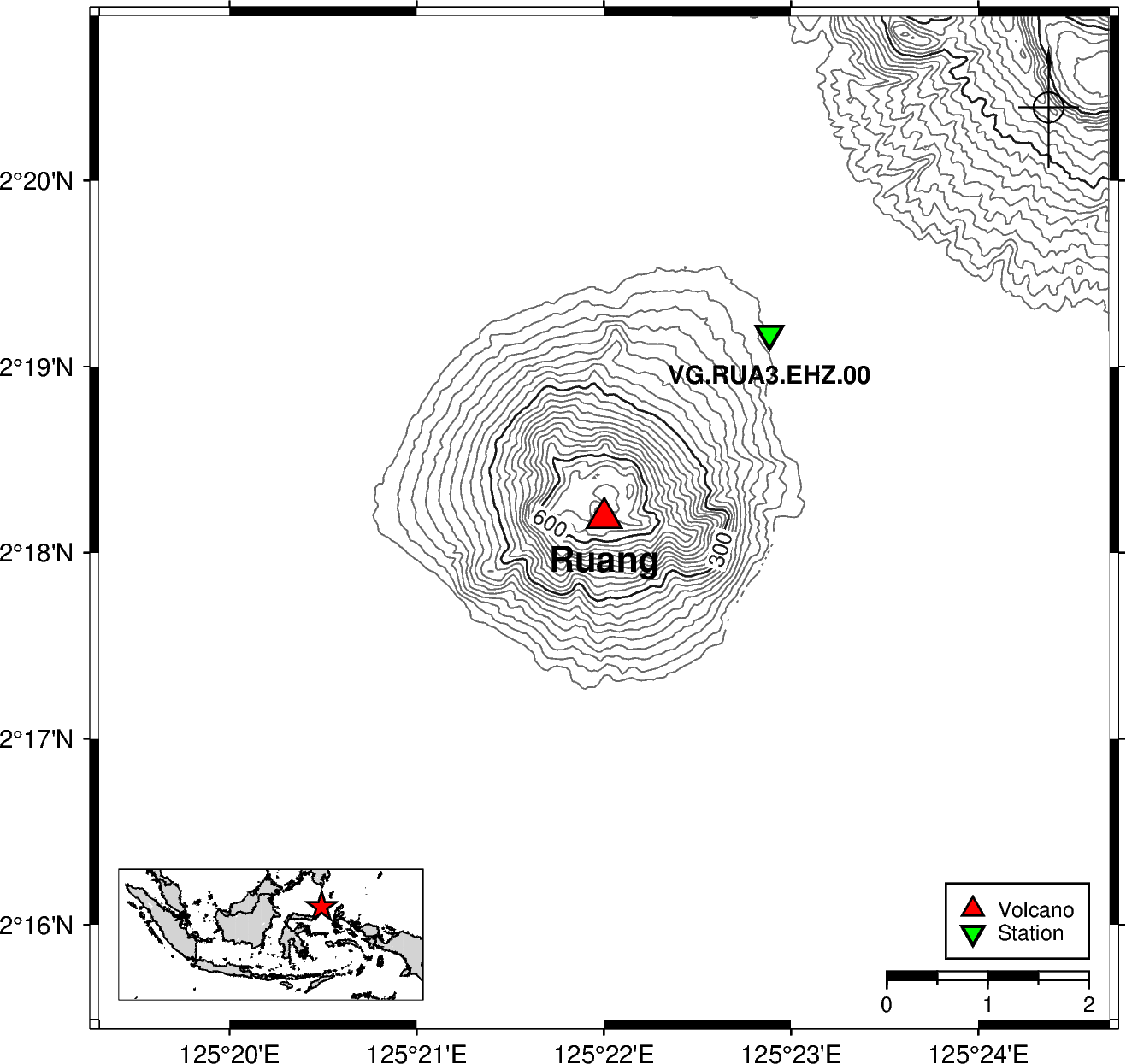
Ruang · North Sulawesi, Indonesia Contour interval 200 m · padding 5 km |
Table of Contents
Requirements
- Python
>=3.12 - uv — Python package manager (installation guide)
- GMT (Generic Mapping Tools) — required by PyGMT (download, troubleshooting)
Configuration
[!IMPORTANT]
GMT_LIBRARY_PATHmust be set in your environment beforepygmtis imported. Importing PyGMT without it will raise a library-not-found error.
If PyGMT cannot find the GMT shared library at import time, set GMT_LIBRARY_PATH to the directory that contains the GMT shared library (gmt_c.dll on Windows, libgmt.dylib on macOS, libgmt.so on Linux).
1. Copy the example file
cp .env.example .env
Open .env in any text editor. It will look like this:
GMT_LIBRARY_PATH=
Fill in the path to the directory containing the GMT shared library:
GMT_LIBRARY_PATH=C:/Program Files/GMT6/bin
2. Edit .env and set the path
GMT_LIBRARY_PATH=/path/to/gmt/lib
Platform examples:
| Platform | Typical value |
|---|---|
| Windows | C:/Program Files/GMT6/bin |
| macOS (Homebrew) | /opt/homebrew/lib |
| Linux | /usr/lib/x86_64-linux-gnu |
Tip: Run
gmt --versionin your terminal to confirm GMT is installed, then locate the library withfind / -name "libgmt*" 2>/dev/null(Linux/macOS) orwhere gmt(Windows). The library lives in the same directory as (or adjacent to) thegmtexecutable.
3. How it works
The package calls load_config() automatically on import, which reads .env and injects GMT_LIBRARY_PATH into the process environment before PyGMT is imported. You do not need to set the variable globally in your shell — the .env file is enough.
If you need to load the configuration manually (e.g. in a standalone script that imports PyGMT directly), call load_config() before any PyGMT import:
from volcano_pygmt.config import load_config

load_config()  # reads .env and sets GMT_LIBRARY_PATH

import pygmt  # now safe to import
Installation
From PyPI
pip install volcano-pygmt
From source
- Clone the repository:
git clone https://github.com/martanto/volcano-pygmt.git
cd volcano-pygmt
- Install dependencies with
uv:
uv sync
This installs all runtime dependencies (pygmt, rioxarray, loguru, dotenv) and dev tools (ruff, ty, pytest, etc.).
Quick Start
from volcano_pygmt import plot

maps = [
    {
        "padding_km": 20,
        "volcano": {"lon": 112.922, "lat": -8.108, "elev": 3672, "name": "Semeru"},
        "stations": {
            "VG.LEKR.EHZ.00": {"lat": -8.137244444, "lon": 112.9858444},
        },
        "contour": True,
        "contour_interval": 300.0,
        "contour_annotation": 600.0,
        "colorbar": True,
    },
]

files = plot(maps)
print(files)  # [PosixPath('.../output/semeru.png')]
Output PNG files are saved to ./output/<volcano-name-slug>.png.
See main.py for a more complete example with multiple volcanoes and local DEM files.
Examples
Multiple volcanoes in a batch
The following example (from main.py) plots three Indonesian volcanoes — Semeru, Lewotobi Laki-laki, and Ruang — each with one seismic station and contour lines. Semeru and Lewotobi use local DEM files; Ruang falls back to SRTM data:
from volcano_pygmt import plot

maps = [
    {
        "volcano": {"lon": 112.922, "lat": -8.108, "elev": 3672, "name": "Semeru"},
        "stations": {
            "VG.LEKR.EHZ.00": {"lat": -8.137244444, "lon": 112.9858444},
        },
        "dem_files": [
            "DEMNAS_1608-12_v1.0.tif",
            "DEMNAS_1608-21_v1.0.tif",
            "DEMNAS_1607-42_v1.0.tif",
            "DEMNAS_1607-44_v1.0.tif",
            "DEMNAS_1607-53_v1.0.tif",
        ],
        "padding_km": 20,
        "color_relief": False,
        "contour": True,
        "contour_interval": 300.0,
        "contour_annotation": 600.0,
        "colorbar": True,
    },
    {
        "volcano": {
            "lon": 122.775,
            "lat": -8.542,
            "elev": 3672,
            "name": "Lewotobi Laki-laki",
        },
        "stations": {
            "VG.OJN.EHZ.00": {"lat": -8.502944444, "lon": 122.7737222},
        },
        "dem_files": [
            "DEMNAS_2207-33_v1.0.tif",
            "DEMNAS_2207-34_v1.0.tif",
            "DEMNAS_2207-61_v1.0.tif",
            "DEMNAS_2207-62_v1.0.tif",
        ],
        "padding_km": 10,
        "color_relief": False,
        "contour": True,
        "contour_interval": 100.0,
        "contour_annotation": 300.0,
        "colorbar": True,
    },
    {
        "volcano": {"lon": 125.3667, "lat": 2.3031, "elev": 703, "name": "Ruang"},
        "stations": {
            "VG.RUA3.EHZ.00": {"lat": 2.3196, "lon": 125.3814},
        },
        "padding_km": 5,
        "color_relief": False,
        "contour": True,
        "contour_interval": 200.0,
        "contour_annotation": 200.0,
        "colorbar": True,
    },
]

plot(maps, "png")
Run it with:
uv run main.py
Single volcano with color relief and hillshade
from volcano_pygmt.plot import create_figure

volcano = {"lon": 107.65, "lat": -6.9, "name": "Tangkuban Parahu"}

fig = create_figure(
    volcano,
    padding_km=10.0,
    hillshade=True,
    contour=True,
    contour_interval=100.0,
    color_relief=True,
    colorbar=True,
    relief_cmap="gmt/haxby",
)

fig.savefig("tangkuban-parahu.png")
API Reference
plot(maps, file_type, water_color)
Batch-render a list of volcano map specs and save each as a file to ./output/<slug>.<file_type>.
Parameters:
| Parameter | Type | Default | Description |
|---|---|---|---|
maps |
list[dict] |
required | List of map specification dicts (see keys below) |
file_type |
str |
"png" |
Output file format: "png" or "pdf" |
water_color |
str |
"lightblue" |
Default water fill colour for all maps using DEM files (overridden per-map by "water_color" key) |
Returns: list[pathlib.Path] — absolute paths to the saved files, in input order.
Map spec keys:
| Key | Type | Default | Description |
|---|---|---|---|
volcano |
dict |
required | Volcano info — must include "lon" (float), "lat" (float), "name" (str) |
padding_km |
float |
required | Half-extent of the map around the volcano centre in kilometres |
stations |
dict | None |
None |
Station codes mapped to {"lon": float, "lat": float}; omit or set None to skip |
dem_files |
list[str] | None |
None |
Local GeoTIFF DEM file paths; falls back to SRTM download when None |
country |
str |
"Indonesia" |
Country name for the locator inset (must be in COUNTRY_REGIONS) |
hillshade |
bool |
False |
Render a grayscale shaded-relief layer |
contour |
bool |
False |
Draw elevation contour lines |
contour_interval |
float |
100.0 |
Spacing between contour lines in metres |
contour_annotation |
float | None |
None |
Contour label interval in metres; defaults to 5 × contour_interval when None |
color_relief |
bool |
False |
Render a colour-filled elevation image |
colorbar |
bool |
False |
Add an elevation colorbar (requires color_relief=True) |
relief_cmap |
str |
"gmt/haxby" |
GMT colormap for colour relief — any valid GMT CPT name (e.g. "geo", "topo", "dem1", "gray") |
show_title |
bool |
False |
Display the volcano name as the map title |
water_color |
str |
"lightblue" |
Fill colour for water areas when dem_files is set — "white", "blue", "lightblue", or "lightgray" |
create_figure(volcano, stations, padding_km, ...)
Create and return a fully composed pygmt.Figure for a single volcano. Includes coastlines, optional terrain relief, volcano and station symbols, a legend, a scale bar, a north-arrow rose, and a country-level locator inset.
Parameters:
| Parameter | Type | Default | Description |
|---|---|---|---|
volcano |
dict |
required | Must include "lon" (float), "lat" (float), "name" (str) |
stations |
dict | None |
None |
Station codes mapped to {"lon": float, "lat": float}; omit or set None to skip |
padding_km |
float |
5.0 |
Half-extent of the map around the volcano centre in kilometres |
country |
str |
"Indonesia" |
Country name for the locator inset |
dem_files |
list[str] | None |
None |
Local GeoTIFF DEM file paths; falls back to SRTM download when None |
hillshade |
bool |
False |
Render a grayscale shaded-relief layer |
contour |
bool |
False |
Draw elevation contour lines |
contour_interval |
float |
100.0 |
Spacing between contour lines in metres |
contour_annotation |
float | None |
None |
Contour label interval in metres; defaults to 5 × contour_interval when None |
color_relief |
bool |
False |
Render a colour-filled elevation image |
colorbar |
bool |
False |
Add an elevation colorbar (requires color_relief=True) |
relief_cmap |
str |
"gmt/haxby" |
GMT colormap for colour relief |
show_title |
bool |
True |
Display the volcano name as the map title |
water_color |
str |
"lightblue" |
Fill colour for water areas when dem_files is set — "white", "blue", "lightblue", or "lightgray" |
Returns: pygmt.Figure — fully rendered figure ready to save or display.
add_relief(fig, region, projection, ...)
Download SRTM 3-arc-second earth relief for region and composite one or more terrain layers onto fig.
Parameters:
| Parameter | Type | Default | Description |
|---|---|---|---|
fig |
pygmt.Figure |
required | The PyGMT figure to draw on |
region |
list[float] |
required | Map extent as [lon_min, lon_max, lat_min, lat_max] in decimal degrees |
projection |
str |
required | PyGMT/GMT projection string, e.g. "M10c" |
hillshade |
bool |
False |
Render a grayscale shaded-relief layer (radiance 315°/45°, exponential normalisation) |
contour |
bool |
False |
Draw elevation contour lines |
contour_interval |
float |
100.0 |
Spacing between contour lines in metres |
contour_annotation |
float | None |
None |
Contour label interval in metres; defaults to 5 × contour_interval when None |
color_relief |
bool |
False |
Render a colour-filled elevation image using relief_cmap |
colorbar |
bool |
False |
Add an elevation colorbar labelled in metres (requires color_relief=True) |
relief_cmap |
str |
"gmt/haxby" |
GMT colormap name for the colour-relief image |
Returns: pygmt.Figure — the same fig with the requested layers added in-place.
plot_from_dem(fig, dem_files, projection, ...)
Load one or more local GeoTIFF DEM files and composite hillshade, color relief, and/or contours onto fig.
Parameters:
| Parameter | Type | Default | Description |
|---|---|---|---|
fig |
pygmt.Figure |
required | The PyGMT figure to draw on |
dem_files |
str | list[str] |
required | Path or list of paths to GeoTIFF DEM files; multiple files are merged before plotting |
projection |
str |
required | PyGMT/GMT projection string, e.g. "M10c" |
region |
list[float] | None |
None |
Map extent as [lon_min, lon_max, lat_min, lat_max]; uses full DEM extent when None |
hillshade |
bool |
False |
Render a grayscale shaded-relief layer |
contour |
bool |
False |
Draw elevation contour lines |
contour_interval |
float |
100.0 |
Spacing between contour lines in metres |
contour_annotation |
float | None |
None |
Contour label interval in metres; defaults to 5 × contour_interval when None |
color_relief |
bool |
False |
Render a colour-filled elevation image |
colorbar |
bool |
False |
Add a colorbar showing the elevation scale |
relief_cmap |
str |
"gmt/haxby" |
GMT colormap name for the colour-relief image |
water_color |
str |
"lightblue" |
Fill colour for sea/water areas — "white", "blue", "lightblue", or "lightgray" |
Returns: pygmt.Figure — the same fig with the requested layers added in-place.
add_inset(fig, volcano, country)
Add a country-level locator inset to the bottom-left corner of fig, with a red star marking the volcano position.
Parameters:
| Parameter | Type | Default | Description |
|---|---|---|---|
fig |
pygmt.Figure |
required | The PyGMT figure to add the inset to |
volcano |
dict |
required | Must include "lon" (float) and "lat" (float) |
country |
str |
"Indonesia" |
Country name to look up in COUNTRY_REGIONS for the inset extent |
Returns: pygmt.Figure — the same fig with the inset added in-place.
Raises: ValueError — if country is not a key in COUNTRY_REGIONS.
Development
# Run tests
uv run pytest

# Lint
uv run ruff check src/

# Auto-fix lint issues
uv run ruff check --fix src/

# Type check
uv run ty check

# Start Jupyter notebook
uv run jupyter notebook
License
MIT — see LICENSE for details.
Release history Release notifications | RSS feed


Download files
Download the file for your platform. If you're not sure which to choose, learn more about installing packages.
Source Distribution
Built Distribution
Filter files by name, interpreter, ABI, and platform.
If you're not sure about the file name format, learn more about wheel file names.
Copy a direct link to the current filters
File details
Details for the file volcano_pygmt-0.3.0.tar.gz.
File metadata
- Download URL: volcano_pygmt-0.3.0.tar.gz
- Upload date:
- Size: 16.4 kB
- Tags: Source
- Uploaded using Trusted Publishing? No
- Uploaded via: uv/0.9.22 {"installer":{"name":"uv","version":"0.9.22","subcommand":["publish"]},"python":null,"implementation":{"name":null,"version":null},"distro":null,"system":{"name":null,"release":null},"cpu":null,"openssl_version":null,"setuptools_version":null,"rustc_version":null,"ci":null}
File hashes
| Algorithm | Hash digest | |
|---|---|---|
| SHA256 |
7024e62cdefbe8ce33631b3969e5567c5bd3b4fe5506ac833593a20c4be5120e
|
|
| MD5 |
f8da83e175258c8f8fcb1726513f0df6
|
|
| BLAKE2b-256 |
03e8b3456cc15acaf48ab9d111e3dc275e5d5ce0642eddb01c10cb1d0467cc88
|
File details
Details for the file volcano_pygmt-0.3.0-py3-none-any.whl.
File metadata
- Download URL: volcano_pygmt-0.3.0-py3-none-any.whl
- Upload date:
- Size: 20.2 kB
- Tags: Python 3
- Uploaded using Trusted Publishing? No
- Uploaded via: uv/0.9.22 {"installer":{"name":"uv","version":"0.9.22","subcommand":["publish"]},"python":null,"implementation":{"name":null,"version":null},"distro":null,"system":{"name":null,"release":null},"cpu":null,"openssl_version":null,"setuptools_version":null,"rustc_version":null,"ci":null}
File hashes
| Algorithm | Hash digest | |
|---|---|---|
| SHA256 |
b0ac88fedbc0d11d83bb32d4a65cd969355472450b0f0ddc13691a87aacedb0f
|
|
| MD5 |
8d313ec9fe2c8db4fb9aca36f01384f8
|
|
| BLAKE2b-256 |
b700af293558a94b0f8804410598fc5fa54705d7453c7f17040fb6722e0300de
|






