
Programmable worlds for artificial intelligence
Verified details
These details have been verified by PyPIProject links
GitHub Statistics
Maintainers

Project description
Volnix
Programmable worlds for AI agents.
Every AI agent today runs in a vacuum. It calls APIs, gets responses, and has no idea whether the world it's operating in is consistent, adversarial, or even real. There's no state between calls. No other actors with their own goals. No policies that push back. No consequences that cascade. No world that moves while the agent is thinking.
Volnix changes that. It creates complete, living realities — with places, institutions, actors that have personalities and agendas, budgets, policies, communication systems, and causal chains — where AI agents exist as participants inside a world that doesn't stop when they do.
pip install volnix

# Create a world from natural language
volnix create "A fintech support team handling refunds, escalations, and a VIP \
  threatening a chargeback — data is messy, Stripe is flaky" --reality messy

# Serve it for external agents
volnix serve customer_support --behavior dynamic --port 8080

# Or run an autonomous internal team that produces a deliverable
volnix serve market_prediction_analysis \
  --internal agents_market_analysts.yaml --port 8080
Your agent connects via MCP, REST, or any SDK. It sees a world with 50 customers, open tickets, payment histories, Slack channels, and a supervisor who takes 5 minutes to respond. But this world doesn't sit still. While your agent investigates ticket #1, the VIP sends a furious follow-up email. A new customer opens a duplicate ticket. The supervisor posts a policy reminder in Slack. An SLA timer expires and auto-escalates a forgotten ticket. Your agent comes back from its API call and the world has changed — just like production.
Internal agent teams go further. A 3-agent market analysis crew — economist, technical analyst, risk analyst — collaborates through world channels, reads Twitter sentiment, analyzes Reddit discussions, debates in Slack, and produces a quarterly market prediction. All from compiled world data. No real APIs called. The deliverable is real; the world that produced it was simulated.
Two modes control how alive the world is
| Mode | The world... | Use when... |
|---|---|---|
| Static | Frozen after compilation. Only agents move. | Deterministic, reproducible benchmarks |
| Dynamic | Lives on its own. NPCs create events, follow up, escalate, change their minds. | Testing how agents handle a world that doesn't wait |
The 7-Step Governance Pipeline
Every action — from any agent, through any protocol — flows through this pipeline before it touches the world:
  ┌──────────┐   ┌────────┐   ┌────────┐   ┌────────────┐   ┌───────────┐   ┌────────────┐   ┌────────┐
  │Permission│──▶│ Policy │──▶│ Budget │──▶│ Capability │──▶│ Responder │──▶│ Validation │──▶│ Commit │
  └──────────┘   └────────┘   └────────┘   └────────────┘   └───────────┘   └────────────┘   └────────┘
   Can this       Does a       Is there     Does this       Generate the    Is the result    Apply state
   actor do       policy       budget       tool exist?     service         consistent?      changes and
   this?          block it?    remaining?                   response                         record event
Each step can halt the action. A refund that exceeds the agent's authority is held for supervisor approval. An API call that exceeds the budget is denied. A response that violates state consistency is rejected. Every decision is recorded in the causal graph and visible in the dashboard.
How It Works
┌─────────────────────────────────┐      ┌──────────────────────────────────┐
│        YOUR AGENTS              │      │           VOLNIX                 │
│                                 │      │                                  │
│  CrewAI / LangGraph / PydanticAI│─MCP─▶│  Gateway                        │
│  OpenAI SDK / Anthropic SDK     │─REST─▶│    │                            │
│  Claude Desktop / Cursor        │─MCP─▶│    ▼                            │
│  Custom HTTP client             │─HTTP─▶│  7-Step Pipeline                │
│                                 │      │    │                            │
│  Internal Agent Teams           │      │    ▼                            │
│  (autonomous, LLM-powered)      │◀────▶│  Simulated Services             │
│                                 │      │  (Stripe, Zendesk, Slack, ...)  │
└─────────────────────────────────┘      │    │                            │
                                         │    ▼                            │
                                         │  World State + Causal Graph     │
                                         │  Scorecards + Event Log         │
                                         └──────────────────────────────────┘
External agents connect via any protocol and interact with the world as if it were real services. They don't know they're in a simulation. The pipeline enforces governance on every action.
Internal agent teams are LLM-powered actors that live inside the world. They collaborate through world channels (Slack, email), follow a lead-delegate workflow, and produce deliverables (predictions, decisions, syntheses). The world is their workspace — compiled from YAML, populated with realistic data, and optionally alive with NPCs in dynamic mode.
What Volnix is not
Not a mock server. Mock servers return canned responses. Volnix maintains deep, interconnected state — a refund changes the customer's balance, triggers an activity log entry, updates the ticket status, and may cause the customer's sentiment to shift. Actions have consequences. Consequences have consequences.
Not a test harness. Test harnesses verify outputs. Volnix evaluates behavior — how your agent handles ambiguity, conflicting information, policy constraints, resource limits, uncooperative actors, and situations it has never seen before.
Volnix is a world engine. Describe a reality. Compile it. Turn it on. Put agents inside it. Watch what happens when the world pushes back.
What you can do with it
- Stress-test any AI agent — Connect your CrewAI crew, LangGraph workflow, PydanticAI agent, or custom code. Volnix speaks MCP, OpenAI, Anthropic, and Gemini protocols. Your agent doesn't know it's in a simulation.
- Run autonomous multi-agent teams — Define internal agent teams with roles, personalities, and permissions. A supervisor delegates, specialists investigate, and Volnix orchestrates the collaboration through world channels — producing predictions, decisions, and syntheses as deliverables.
- Build worlds that fight back — Flaky APIs, stale data, hostile actors, budget exhaustion. Five reality dimensions with presets from
idealtohostile. In dynamic mode, the world generates surprises your agent never trained for. - Compare models and architectures — Same world, same seed, different agent. Run Claude against GPT against Gemini. Diff the governance scorecards. See which one holds up when the world gets messy.
- Build governed agent systems — Permissions, policies, budgets, and approval workflows are first-class primitives. An agent that tries to issue a refund beyond its authority gets held for supervisor approval — automatically, structurally, not through prompt engineering.
Quick Start
System Requirements
| Dependency | Version | Purpose |
|---|---|---|
| Python | 3.12+ | Core runtime |
| uv | latest | Package manager (install) |
| SQLite | 3.35+ | Bundled with Python — no separate install needed |
| Node.js | 18+ | Dashboard only (optional) |
| LLM API key | any one | Google (GOOGLE_API_KEY), OpenAI (OPENAI_API_KEY), or Anthropic (ANTHROPIC_API_KEY). See docs/llm-providers.md |
Install
# From PyPI
pip install volnix

# Or from source
git clone https://github.com/janaraj/volnix.git
cd volnix
uv sync --all-extras

# Set an LLM provider (at least one required)
export GOOGLE_API_KEY=AIza...
export OPENAI_API_KEY=sk-...         # optional, needed for agency engine
export ANTHROPIC_API_KEY=sk-ant-...  # optional

# Verify setup
volnix check
Dashboard (optional — requires source install)
The React dashboard is not included in the pip package. Clone the repo to use it:
git clone https://github.com/janaraj/volnix.git
cd volnix/volnix-dashboard
npm install && npm run dev
# Open http://localhost:3000 — connects to any running Volnix server
Run with Internal Agents (autonomous multi-agent simulation)
Internal agents are LLM-powered actors that collaborate within the world without external input:
# Compile a world + run a 3-agent support team
uv run volnix serve demo_support_escalation \
  --internal volnix/blueprints/official/agents_support_team.yaml \
  --port 8080
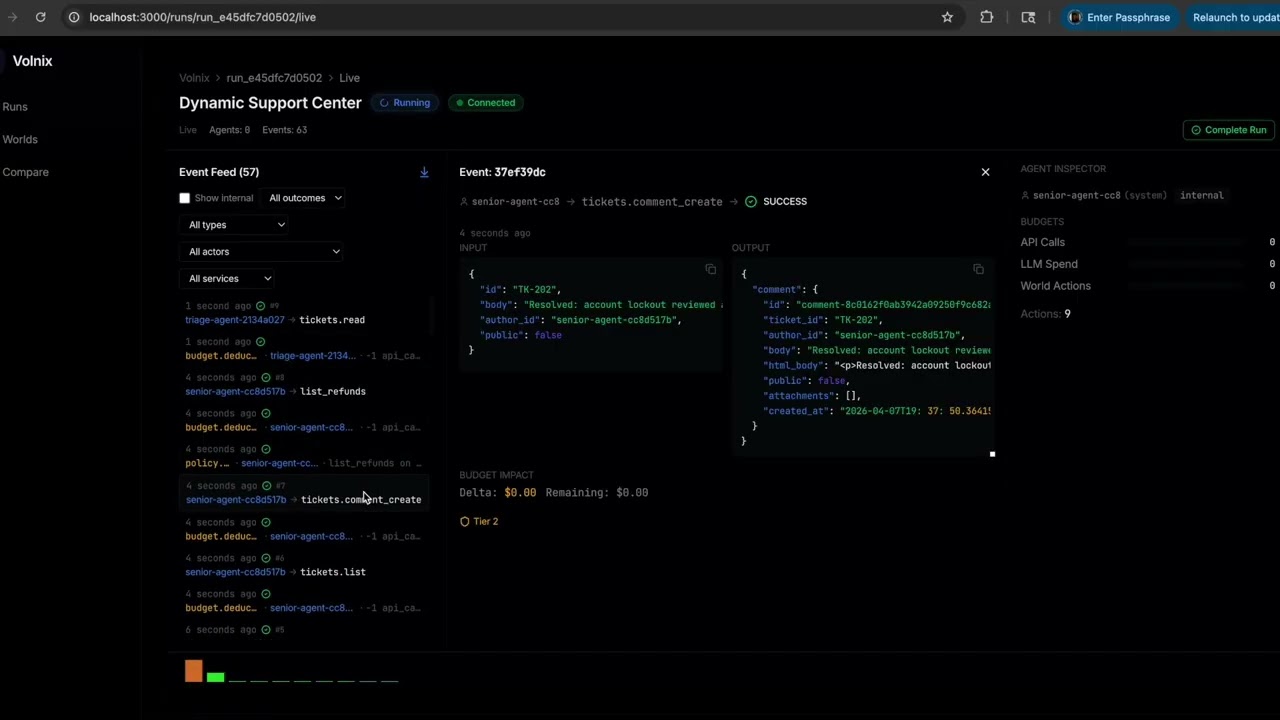
The team (supervisor, senior-agent, triage-agent) autonomously delegates tasks, investigates tickets, and produces a deliverable. Open the dashboard at http://localhost:3000 to watch live.
Run with External Agents (connect your own AI agent)
External agents connect to a running Volnix server via MCP, REST, or native SDK protocols. Two modes:
Mode 1: Single agent (no profile) — agent auto-registers with default permissions:
uv run volnix serve customer_support --port 8080
# PydanticAI via MCP — zero Volnix imports
from pydantic_ai import Agent
from pydantic_ai.mcp import MCPServerStreamableHTTP

server = MCPServerStreamableHTTP("http://localhost:8080/mcp/")
agent = Agent("openai:gpt-4.1-mini", toolsets=[server])

async with agent:
    result = await agent.run("Check the support queue and handle urgent tickets.")
Mode 2: Multi-agent with profile — define roles, permissions, and budgets per agent:
# agents_stock_analysts.yaml
agents:
  - id: financial-analyst        # Must match actor_id in your framework
    role: financial-analyst
    permissions:
      read: [alpaca]
      write: []
    budget:
      api_calls: 200

  - id: research-analyst
    role: research-analyst
    permissions:
      read: [alpaca]
    budget:
      api_calls: 200
uv run volnix serve stock_analysis --agents agents_stock_analysts.yaml --port 8080
# CrewAI — each agent gets tools bound to its actor_id
from volnix.adapters.crewai import crewai_tools

analyst_tools = await crewai_tools("http://localhost:8080", actor_id="financial-analyst")
research_tools = await crewai_tools("http://localhost:8080", actor_id="research-analyst")
# Permissions and budgets enforced per-agent by Volnix
The actor_id is the contract between your framework and Volnix. Every tool call carries the actor identity through the governance pipeline. This works identically across CrewAI, PydanticAI, LangGraph, AutoGen, OpenAI SDK, or any HTTP client.
See docs/agent-integration.md for the full guide and examples/ for working code.
How It Works
Volnix is built on a two-half architecture:
World Law (Deterministic Engine) owns state, events, the causal graph, permissions, policy enforcement, budget accounting, time, visibility, mutation validation, and replay. The engine never guesses and never generates text. It enforces structure.
World Content (Generative Layer) creates realistic data, service behavior, actor responses, and scenario complications. But it operates inside constraints set by the engine. The generative layer proposes; the engine disposes.
The Pipeline
Every agent action flows through a 7-step governance pipeline:
Permission --> Policy --> Budget --> Capability --> Responder --> Validation --> Commit
Each step can halt the action. A refund that exceeds the agent's authority is held for supervisor approval. An API call that exceeds the budget is denied. A response that violates state consistency is rejected.
The 10 Engines
| Engine | Responsibility |
|---|---|
| World Compiler | Transforms NL/YAML into runnable worlds |
| State Engine | Single source of truth for all entities |
| Policy Engine | Evaluates governance rules (hold, block, escalate, log) |
| Permission Engine | RBAC + visibility scoping per actor |
| Budget Engine | Tracks resource consumption (API calls, LLM spend, time) |
| World Responder | Generates service responses within constraints |
| World Animator | Generates events between agent turns (reactive or dynamic) |
| Agency Engine | Manages internal actor lifecycle and collaboration |
| Agent Adapter | Translates between external protocols and internal actions |
| Report Generator | Produces scorecards, gap logs, causal traces |
Defining Worlds
Worlds are defined in YAML under a single world: section:
world:
  name: "Customer Support"
  description: "A mid-size SaaS company support team handling tickets and refunds."
  behavior: reactive          # static | reactive | dynamic
  mode: governed              # governed | ungoverned
  reality:
    preset: messy             # ideal | messy | hostile

  services:
    gmail: verified/gmail
    slack: verified/slack
    zendesk: verified/zendesk
    stripe: verified/stripe

  actors:
    - role: support-agent
      type: external
      count: 2
      permissions:
        read: [gmail, slack, zendesk, stripe]
        write: [gmail, slack, zendesk]
        actions:
          refund_create: { max_amount: 5000 }
      budget:
        api_calls: 500
        llm_spend: 10.00

    - role: supervisor
      type: internal
      personality: "Experienced and cautious. Asks clarifying questions."

  policies:
    - name: "Refund approval"
      trigger: "refund amount exceeds agent authority"
      enforcement: hold
      hold_config:
        approver_role: supervisor
        timeout: "30m"

  seeds:
    - "VIP customer has been waiting 7 days for a $249 refund"
    - "Three tickets are past SLA deadline"
Or create a world from natural language:
uv run volnix create "Market analysis team with an economist, data analyst, and strategist \
  collaborating via Slack to produce a quarterly prediction" \
  --reality messy --output market_world.yaml
Reality Dimensions
Every world has 5 personality dimensions that shape the data, service behavior, and actor attitudes:
| Dimension | What It Controls | Range |
|---|---|---|
| Information Quality | Data staleness, incompleteness, noise | pristine ... chaotic |
| Reliability | Service failures, timeouts, degradation | rock_solid ... barely_functional |
| Social Friction | Actor cooperation, deception, hostility | everyone_helpful ... actively_hostile |
| Complexity | Ambiguity, edge cases, contradictions | straightforward ... overwhelmingly_complex |
| Boundaries | Access limits, rule clarity, enforcement gaps | locked_down ... wide_open |
Three presets bundle these: ideal (best case), messy (realistic, default), hostile (adversarial).
Behavior Modes
| Mode | Animator | Description |
|---|---|---|
static |
OFF | World frozen after compilation. No NPC events. Fully deterministic. |
reactive |
Cause-effect only | World responds to agent actions. Same actions produce same reactions. |
dynamic |
Fully active | World generates organic events (NPCs create tickets, follow up, escalate). |
Override at runtime: --behavior static on any serve or run command.
See docs/behavior-modes.md for details on how the Animator engine works.
Internal Agent Teams
Internal agents are LLM-powered actors that collaborate autonomously within the world. Define a team in a separate YAML file:
mission: "Handle the support queue as a team. Investigate tickets, resolve issues, process refunds."
deliverable: synthesis

agents:
  - role: supervisor
    lead: true                    # Coordinator — delegates, monitors, synthesizes
    personality: "Experienced support manager who delegates effectively."
    permissions:
      read: [zendesk, stripe, slack]
      write: [zendesk, stripe, slack]

  - role: senior-agent
    personality: "Thorough investigator with deep product knowledge."
    permissions:
      read: [zendesk, stripe, slack]
      write: [zendesk, stripe, slack]

  - role: triage-agent
    personality: "Fast categorizer who prioritizes by urgency."
    permissions:
      read: [zendesk, slack]
      write: [zendesk, slack]
Run it against any compiled world:
uv run volnix serve customer_support \
  --internal volnix/blueprints/official/agents_support_team.yaml \
  --port 8080
Lead Agent Lifecycle
The agent marked lead: true follows 4 phases:
| Phase | Trigger | Lead's Job |
|---|---|---|
| 1. Delegate | First activation | Assign tasks to each team member, set expectations |
| 2. Monitor | Team messages arrive | Validate findings, direct next steps, assign new work |
| 3. Buffer | Approaching event limit | Request all agents to share final findings |
| 4. Synthesize | Scheduled deadline | Generate the final deliverable from team conversation |
Sub-agents investigate, share findings in the team channel, and respond to lead direction. The lead never investigates deeply — it orchestrates.
See docs/internal-agents.md for the complete guide.
CLI Commands
| Command | Description |
|---|---|
volnix create <description> |
Generate a world YAML from natural language |
volnix run <world> |
Compile and execute a simulation |
volnix serve <world> |
Start HTTP/MCP servers for agent connections |
volnix dashboard |
Start the API server for browsing historical runs (no world needed) |
volnix mcp |
Start MCP stdio server (for agent subprocesses) |
volnix blueprints |
List available world blueprints and presets |
volnix check |
System health check (Python, packages, LLM providers) |
volnix report [run_id] |
Generate governance report for a run |
volnix inspect <run_id> |
Deep dive into run details |
volnix diff <run1> <run2> |
Compare two runs |
volnix list |
List runs, tools, services, engines |
volnix show <id> |
Show details of a run, tool, or service |
volnix ledger |
Query and display audit ledger entries |
volnix config |
Export configuration for agent integration |
Key flags for serve and run:
| Flag | Purpose | Example |
|---|---|---|
--internal <yaml> |
Run with an internal agent team | --internal agents_support_team.yaml |
--agents <yaml> |
External agent permissions/budgets | --agents external_agents.yaml |
--behavior <mode> |
Override behavior: static, reactive, dynamic | --behavior static |
--deliverable <type> |
Deliverable type: synthesis, decision, prediction | --deliverable synthesis |
--world <id> |
Use existing compiled world (skip compilation) | --world world_83a6d1e3 |
--port <n> |
HTTP server port | --port 8080 |
# Browse past runs without starting a world (API-only mode for the dashboard)
volnix dashboard --port 8200
Run volnix --help or volnix <command> --help for full option details.
Agent Integration
Volnix speaks multiple protocols. Pick the one your agent uses:
| Protocol | Endpoint | Best For |
|---|---|---|
| MCP | http://localhost:8080/mcp |
Claude Desktop, Cursor, Windsurf, PydanticAI |
| OpenAI compat | http://localhost:8080/openai/v1/ |
OpenAI SDK, LangGraph, AutoGen |
| Anthropic compat | http://localhost:8080/anthropic/v1/ |
Anthropic SDK |
| Gemini compat | http://localhost:8080/gemini/v1/ |
Google Gemini SDK |
| REST API | http://localhost:8080/api/v1/ |
Custom agents, scripts, any HTTP client |
All protocols expose the same world tools and go through the same governance pipeline. See docs/agent-integration.md for setup guides and examples/ for working code.
Built-in Blueprints
World Definitions
Worlds with Dynamic behavior generate organic events and work with --internal agent teams. Reactive worlds wait for external agents to connect. Static worlds are frozen after compilation.
| Blueprint | Domain | Behavior | Services |
|---|---|---|---|
customer_support |
Support | Reactive | Gmail, Slack, Zendesk, Stripe |
demo_support_escalation |
Support | Dynamic | Stripe, Zendesk, Slack |
dynamic_support_center |
Support | Dynamic | Stripe, Zendesk, Slack |
support_ticket_triage |
Support | Reactive | Zendesk, Gmail, Slack |
incident_response |
DevOps | Dynamic | Slack, GitHub, Calendar |
stock_analysis |
Finance | Static | Alpaca |
market_prediction_analysis |
Finance | Dynamic | Slack, Twitter, Reddit |
notion_project_tracker |
Product | Static | Notion, Slack |
hubspot_sales_pipeline |
Sales | Dynamic | HubSpot (Tier 2), Slack |
campaign_brainstorm |
Marketing | Dynamic | Slack |
climate_research_station |
Research | Dynamic | Slack, Gmail |
feature_prioritization |
Product | Dynamic | Slack |
security_posture_assessment |
Security | Dynamic | Slack, Zendesk |
open_sandbox |
Testing | Static | All services (ungoverned) |
governance_test |
Testing | Reactive | Stripe, Zendesk, Slack |
Internal Agent Team Profiles
Pair these with a world definition using --internal:
| Profile | Team Size | Roles | Deliverable |
|---|---|---|---|
agents_support_team |
3 | Supervisor, Senior-agent, Triage-agent | Synthesis |
agents_dynamic_support |
3 | Supervisor, Senior-agent, Triage-agent | Synthesis |
agents_market_analysts |
3 | Macro-economist, Technical-analyst, Risk-analyst | Prediction |
agents_climate_researchers |
4 | Lead-researcher, Physicist, Oceanographer, Statistician | Synthesis |
agents_campaign_creatives |
3 | Creative-director, Copywriter, Social-media-specialist | Brainstorm |
agents_feature_team |
3 | Product-lead, Engineer, Designer | Decision |
agents_security_team |
3 | Security-lead, Network-engineer, Compliance-officer | Assessment |
# List all blueprints
uv run volnix blueprints

# Example: market analysis with internal team
uv run volnix serve market_prediction_analysis \
  --internal volnix/blueprints/official/agents_market_analysts.yaml \
  --port 8080
See docs/blueprints-reference.md for the full catalog.
Verified Service Packs
Each verified pack simulates a real service with deterministic state machines — no LLM at runtime. For services without a verified pack, Volnix supports YAML profiles, OpenAPI specs, and zero-config bootstrapping (the compiler generates a profile from real API docs via the Context Hub + LLM inference).
BYOSP — Bring Your Own Service Pack. Put any service name in your world YAML. If no verified pack exists, the compiler auto-resolves it. Or write a YAML profile in minutes for curated fidelity. See docs/service-packs.md for the full guide.
| Pack | Category | Simulates |
|---|---|---|
gmail |
Communication | Gmail API (messages, drafts, labels, threads) |
slack |
Communication | Slack API (channels, messages, reactions, threads) |
zendesk |
Work Management | Zendesk API (tickets, users, organizations) |
stripe |
Payments | Stripe API (charges, customers, refunds, invoices) |
github |
Code/DevOps | GitHub API (repos, issues, PRs, commits) |
google_calendar |
Scheduling | Calendar API (events, calendars, attendees) |
twitter |
Social | Twitter API (tweets, replies, followers) |
reddit |
Social | Reddit API (posts, comments, subreddits) |
notion |
Documents | Notion API (pages, databases, blocks, search) |
alpaca |
Trading | Alpaca API (orders, positions, market data) |
browser |
Web | HTTP browsing (GET/POST to custom sites) |
Configuration
Volnix uses a layered TOML configuration system:
| Layer | File | Purpose |
|---|---|---|
| Base | volnix.toml |
Shipped defaults (committed to repo) |
| Environment | volnix.{env}.toml |
Environment-specific overrides |
| Local | volnix.local.toml |
Machine-specific, git-ignored |
| Env vars | VOLNIX__section__key |
Runtime overrides |
See docs/configuration.md and volnix.toml for the complete reference.
LLM Providers
Volnix supports any OpenAI SDK-compatible provider, plus native Gemini, Anthropic, CLI tools, and ACP (Agent Communication Protocol). Different engine tasks route to different providers — use a cheap model for compilation, a strong model for agent reasoning, and a local model for the animator.
| Provider Type | Examples | Auth |
|---|---|---|
google |
Gemini (native) | GOOGLE_API_KEY |
anthropic |
Claude (native) | ANTHROPIC_API_KEY |
openai_compatible |
OpenAI, Gemini-via-OpenAI, Ollama, vLLM, Together, Groq | *_API_KEY or none |
cli |
claude, codex, gemini CLI tools |
Provider-managed |
acp |
codex-acp, claude-agent-acp |
Provider-managed |
See docs/llm-providers.md for the full provider guide, tested models, and how to add custom providers.
Dashboard
Volnix includes a React dashboard for observing simulations in real time. Start it alongside any serve command:
cd volnix-dashboard && npm run dev # http://localhost:3000
Features: run history, live event streaming (WebSocket), governance scorecards, policy trigger logs, deliverable inspection, agent activity timeline, entity browser.
Project Structure
volnix/
  core/           # Types, protocols, event bus, envelope, context
  engines/        # The 10 engines (state, policy, permission, budget, ...)
  pipeline/       # 7-step governance pipeline (DAG executor)
  bus/            # Event bus (inter-engine communication)
  ledger/         # Audit log (observability)
  packs/          # Service packs (verified + profiled)
  kernel/         # Semantic kernel (service classification)
  llm/            # LLM router (multi-provider routing)
  persistence/    # SQLite async persistence layer
  simulation/     # SimulationRunner, EventQueue, config
  actors/         # Actor state, subscriptions, replay
  gateway/        # External request gateway
  blueprints/     # Official world blueprints and agent profiles
  cli.py          # CLI entry point (typer)
  app.py          # Application bootstrap
docs/             # User-facing guides
examples/         # Integration examples (OpenAI, Anthropic, Gemini, etc.)
internal_docs/    # Specifications and architecture documents
Documentation
| Document | Description |
|---|---|
| Getting Started | Installation, first run, connecting agents |
| Creating Worlds | World YAML schema, reality dimensions, seeds |
| Internal Agents | Agent teams, lead coordination, deliverables |
| Agent Integration | MCP, REST, SDK, framework adapters |
| Behavior Modes | Static vs reactive vs dynamic, Animator engine |
| Blueprints Reference | Complete catalog of blueprints and pairings |
| Service Packs & Profiles | Verified packs, YAML profiles, fidelity tiers, custom services |
| Configuration | TOML config system, LLM providers, tuning |
| Architecture | Two-half model, 10 engines, governance pipeline |
| Vision | Where Volnix is heading — world memory, generative worlds, visual reality |
| Design Principles | Architectural rules and patterns |
| Contributing | Development setup, code standards, PR process |
Development
# Install with dev dependencies
uv sync --all-extras

# Run tests
uv run pytest

# Run a single test file
uv run pytest tests/simulation/test_runner.py -v

# Lint
uv run ruff check volnix/ tests/

# Format check
uv run ruff format --check volnix/ tests/

# Type check
uv run mypy volnix/
Vision
Volnix today creates worlds that are believable at the API level — realistic data, consistent state, cascading consequences, actors with personalities. This is Stage 1.
Where it's heading:
| Stage | What changes |
|---|---|
| World Memory | Actors remember past interactions across runs. The customer who was angry last simulation remembers being angry. Persistent worlds that evolve. |
| Deep Cross-Service Consistency | A company announces layoffs → employee morale drops → Slack messages become cautious → some employees start job searching → spending patterns change. One event creates coherent ripples across every service. |
| Generative Worlds | You don't define what happens — you define initial conditions and the world writes its own story. "50-person startup, Series A, one toxic executive." Press play. Six months unfold. |
| Visual Reality | The world isn't just APIs and reports. A 3D trading floor with characters at desks. A startup office where you watch the designer working late. Opinion clusters forming in a town square as misinformation spreads. |
The primitive isn't "agent." The primitive is world — a reality with services, actors, events, policies, and information physics. What you do with that world is up to you: agent testing, behavioral research, outcome prediction, collaborative intelligence, synthetic data generation, or automated agent evolution.
Read the full vision: docs/volnix-vision.md
Acknowledgments
- Context Hub by Andrew Ng — curated, versioned documentation for coding agents. Volnix uses Context Hub for dynamic API schema extraction during service profile resolution, fetching real documentation to build accurate service surfaces directly without LLM inference.
License
MIT License. See LICENSE for details.
Copyright (c) 2026 Janarthanan Rajendran
Project details
Verified details
These details have been verified by PyPIProject links
GitHub Statistics
Maintainers
Release history Release notifications | RSS feed


Download files
Download the file for your platform. If you're not sure which to choose, learn more about installing packages.
Source Distribution
Built Distribution
Filter files by name, interpreter, ABI, and platform.
If you're not sure about the file name format, learn more about wheel file names.
Copy a direct link to the current filters
File details
Details for the file volnix-0.1.3.tar.gz.
File metadata
- Download URL: volnix-0.1.3.tar.gz
- Upload date:
- Size: 2.0 MB
- Tags: Source
- Uploaded using Trusted Publishing? Yes
- Uploaded via: twine/6.1.0 CPython/3.13.12
File hashes
| Algorithm | Hash digest | |
|---|---|---|
| SHA256 |
37757376dc649d5593ea62e802b273092ac437c3b11c59a00b9cdbaa66a7801b
|
|
| MD5 |
79ce636feedf1567174a37dcc6c934c3
|
|
| BLAKE2b-256 |
d31be458d386364b6c70df04601bbe3362e8b1288667963fab7eb87d2c6ec708
|
Provenance
The following attestation bundles were made for volnix-0.1.3.tar.gz:
Publisher:
publish.yml on janaraj/volnix
-
Statement:
-
Statement type:
https://in-toto.io/Statement/v1 -
Predicate type:
https://docs.pypi.org/attestations/publish/v1 -
Subject name:
volnix-0.1.3.tar.gz -
Subject digest:
37757376dc649d5593ea62e802b273092ac437c3b11c59a00b9cdbaa66a7801b - Sigstore transparency entry: 1248397185
- Sigstore integration time:
-
Permalink:
janaraj/volnix@322866b998d6ded7811639965e242b980800440f -
Branch / Tag:
refs/tags/v0.1.3 - Owner: https://github.com/janaraj
-
Access:
public
-
Token Issuer:
https://token.actions.githubusercontent.com -
Runner Environment:
github-hosted -
Publication workflow:
publish.yml@322866b998d6ded7811639965e242b980800440f -
Trigger Event:
push
-
Statement type:
File details
Details for the file volnix-0.1.3-py3-none-any.whl.
File metadata
- Download URL: volnix-0.1.3-py3-none-any.whl
- Upload date:
- Size: 680.8 kB
- Tags: Python 3
- Uploaded using Trusted Publishing? Yes
- Uploaded via: twine/6.1.0 CPython/3.13.12
File hashes
| Algorithm | Hash digest | |
|---|---|---|
| SHA256 |
1d9f6ce7066910d514ad8193b46907ecd0db5d5e4e0a7035124ae1a15e86acb9
|
|
| MD5 |
1e938f80b994746ef8d26c0a0a90466c
|
|
| BLAKE2b-256 |
cc33e1504944a19c61e42f159d7669fafa4c649e55ac46c2748d48e31e16609f
|
Provenance
The following attestation bundles were made for volnix-0.1.3-py3-none-any.whl:
Publisher:
publish.yml on janaraj/volnix
-
Statement:
-
Statement type:
https://in-toto.io/Statement/v1 -
Predicate type:
https://docs.pypi.org/attestations/publish/v1 -
Subject name:
volnix-0.1.3-py3-none-any.whl -
Subject digest:
1d9f6ce7066910d514ad8193b46907ecd0db5d5e4e0a7035124ae1a15e86acb9 - Sigstore transparency entry: 1248397197
- Sigstore integration time:
-
Permalink:
janaraj/volnix@322866b998d6ded7811639965e242b980800440f -
Branch / Tag:
refs/tags/v0.1.3 - Owner: https://github.com/janaraj
-
Access:
public
-
Token Issuer:
https://token.actions.githubusercontent.com -
Runner Environment:
github-hosted -
Publication workflow:
publish.yml@322866b998d6ded7811639965e242b980800440f -
Trigger Event:
push
-
Statement type:






