
Programmable worlds for artificial intelligence
Verified details
These details have been verified by PyPIProject links
GitHub Statistics
Maintainers

Project description
Volnix
Programmable worlds for AI agents.
Volnix creates living, governed realities for AI agents. Not mock servers. Not test harnesses. Complete worlds with stateful services, policies that push back, budgets that run out, NPCs that follow up and escalate, and consequences that cascade. Worlds are defined in YAML, run on their own timelines, and score every agent that interacts with them.


Quick Start
Requirements: Python 3.12+, uv (recommended), and at least one LLM API key (GOOGLE_API_KEY, OPENAI_API_KEY, or ANTHROPIC_API_KEY). See docs/llm-providers.md for supported providers.
Option 1: pip install
pip install volnix
export GOOGLE_API_KEY=...    # or OPENAI_API_KEY / ANTHROPIC_API_KEY
volnix check                 # verify setup
volnix serve dynamic_support_center --internal agents_dynamic_support --port 8080
Option 2: From source (includes dashboard)
git clone https://github.com/janaraj/volnix.git && cd volnix
uv sync --all-extras
export GOOGLE_API_KEY=...
uv run volnix serve dynamic_support_center --internal agents_dynamic_support --port 8080

# Dashboard (separate terminal)
cd volnix-dashboard && npm install && npm run dev    # http://localhost:3000
With venv activated (
source .venv/bin/activate), you can runvolnixdirectly instead ofuv run volnix.
Note: The React dashboard is only available when installed from source. The pip package includes the full backend and CLI.
How It Works
Volnix supports two modes — connect your own agents to a governed world, or deploy internal agent teams that collaborate autonomously.
  Mode 1: Connect Your Own Agent           Mode 2: Deploy Internal Agent Teams
  ────────────────────────                ──────────────────────────

  Your Agent (any framework)              Mission + Team YAML
       │                                       │
       ▼                                       ▼
  Gateway (MCP/REST/SDK)                  Lead Agent ──▶ Slack ◀── Agent N
       │                                       │            ▲
       ▼                                       ▼            │
  ┌──────────────────────┐               ┌──────────────────────┐
  │   Volnix World       │               │   Volnix World       │
  │   7-Step Pipeline    │               │   7-Step Pipeline    │
  │   Simulated Services │               │   Simulated Services │
  │   Policies + Budget  │               │   Policies + Budget  │
  │   Static world       │               │   Living world (NPCs)│
  └──────────┬───────────┘               └──────────┬───────────┘
             │                                      │
             ▼                                      ▼
  Scorecard + Event Log                   Deliverable + Scorecard
Every action flows through a 7-step governance pipeline — permission, policy, budget, capability, responder, validation, commit — before it touches the world. Nothing bypasses it.
Internal Agents
Deploy agent teams that coordinate through the world itself — posting in Slack, updating tickets, processing payments. A lead agent manages a 4-phase lifecycle (delegate → monitor → buffer → synthesize) to produce a deliverable.
mission: >
  Investigate each open ticket. Process refunds where appropriate.
  Senior-agent handles refunds under $100. Supervisor approves over $100.
deliverable: synthesis

agents:
  - role: supervisor
    lead: true
    permissions: { read: [zendesk, stripe, slack], write: [zendesk, stripe, slack] }
    budget: { api_calls: 50, spend_usd: 500 }
  - role: senior-agent
    permissions: { read: [zendesk, stripe, slack], write: [zendesk, stripe, slack] }
    budget: { api_calls: 40, spend_usd: 100 }
See docs/internal-agents.md for the complete guide.
External Agents
Connect any agent framework — CrewAI, PydanticAI, LangGraph, AutoGen, or plain HTTP. Your agent interacts with simulated services as if they were real. It doesn't know it's in a simulation.
| Protocol | Endpoint | Best For |
|---|---|---|
| MCP | /mcp |
Claude Desktop, Cursor, PydanticAI |
| OpenAI compat | /openai/v1/ |
OpenAI SDK, LangGraph, AutoGen |
| Anthropic compat | /anthropic/v1/ |
Anthropic SDK |
| Gemini compat | /gemini/v1/ |
Google Gemini SDK |
| REST | /api/v1/ |
Any HTTP client |
# PydanticAI via MCP — zero Volnix imports
from pydantic_ai import Agent
from pydantic_ai.mcp import MCPServerStreamableHTTP

server = MCPServerStreamableHTTP("http://localhost:8080/mcp/")
agent = Agent("openai:gpt-4.1-mini", toolsets=[server])

async with agent:
    result = await agent.run("Check the support queue and handle urgent tickets.")
See docs/agent-integration.md for the full guide.
Key Features
- 7-step governance pipeline on every action (permission → policy → budget → capability → responder → validation → commit)
- Policy engine with block, hold, escalate, and log enforcement modes
- Budget tracking per agent (API calls, LLM spend, time)
- Reality dimensions — tune information quality, reliability, social friction, complexity, and boundaries
- 11 verified service packs — Stripe, Zendesk, Slack, Gmail, GitHub, Calendar, Twitter, Reddit, Notion, Alpaca, Browser
- BYOSP — bring any service; the compiler auto-resolves from API docs
- Multi-provider LLM — Gemini, OpenAI, Anthropic, Ollama, vLLM, CLI tools
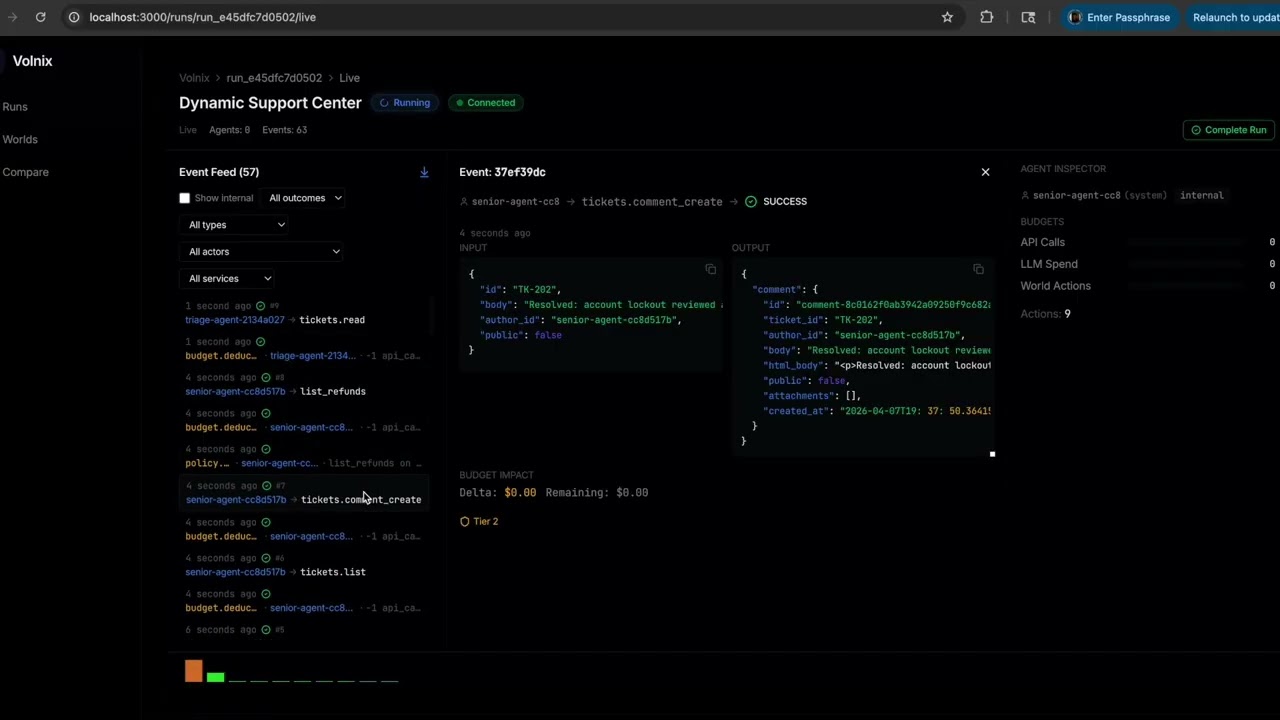
- Real-time dashboard with event feed, scorecards, and agent timeline
- Causal graph — every event traces back to its causes
- 13 built-in blueprints across support, finance, DevOps, research, security, and marketing
Use Cases
Some of the things you can do with Volnix:
| Use Case | What It Means |
|---|---|
| Agent evaluation | Put your agent in a governed world, measure how it handles policies, budgets, and ambiguity |
| Multi-agent coordination | Deploy agent teams that collaborate through shared world state — not a pipeline |
| Scenario simulation | Explore "what if" scenarios with realistic services, actors, and consequences |
| Gateway deployment | Route agent actions through governance (permission, policy, budget) before they hit real APIs |
| Synthetic data generation | Generate interconnected, realistic service data (tickets, charges, customers) with causal consistency |
| PMF / product exploration | Simulate business environments to test workflows, team structures, or product decisions |
Built-in Blueprints
| Blueprint | Domain | Services | Agent Team |
|---|---|---|---|
dynamic_support_center |
Support | Stripe, Zendesk, Slack | agents_dynamic_support (3) |
market_prediction_analysis |
Finance | Slack, Twitter, Reddit | agents_market_analysts (3) |
incident_response |
DevOps | Slack, GitHub, Calendar | — |
climate_research_station |
Research | Slack, Gmail | agents_climate_researchers (4) |
feature_prioritization |
Product | Slack | agents_feature_team (3) |
security_posture_assessment |
Security | Slack, Zendesk | agents_security_team (3) |
volnix blueprints                        # list all
volnix serve market_prediction_analysis \
  --internal agents_market_analysts --port 8080
See docs/blueprints-reference.md for the full catalog.
Dashboard
cd volnix-dashboard && npm install && npm run dev # http://localhost:3000
Live event streaming, governance scorecards, policy trigger logs, deliverable inspection, agent activity timeline, entity browser.
Documentation
| Guide | Description |
|---|---|
| Getting Started | Installation, first run, connecting agents |
| Creating Worlds | World YAML schema, reality dimensions, seeds |
| Internal Agents | Agent teams, lead lifecycle, deliverables |
| Agent Integration | MCP, REST, SDK, framework adapters |
| Blueprints Reference | Complete catalog of blueprints and pairings |
| Service Packs | Verified packs, YAML profiles, BYOSP |
| LLM Providers | Provider types, tested models, routing |
| Configuration | TOML config, LLM routing, tuning |
| Architecture | Two-half model, 10 engines, pipeline |
| Vision | World memory, generative worlds, visual reality |
Development
uv sync --all-extras          # install
uv run pytest                 # test (2800+ tests)
uv run ruff check volnix/     # lint
uv run ruff format --check volnix/  # format
See CONTRIBUTING.md for development setup and PR process.
Acknowledgments
- Context Hub by Andrew Ng — curated, versioned documentation for coding agents. Volnix uses Context Hub for dynamic API schema extraction during service profile resolution.
License
MIT License. See LICENSE for details.
Project details
Verified details
These details have been verified by PyPIProject links
GitHub Statistics
Maintainers
Release history Release notifications | RSS feed


Download files
Download the file for your platform. If you're not sure which to choose, learn more about installing packages.
Source Distribution
Built Distribution
Filter files by name, interpreter, ABI, and platform.
If you're not sure about the file name format, learn more about wheel file names.
Copy a direct link to the current filters
File details
Details for the file volnix-0.1.7.tar.gz.
File metadata
- Download URL: volnix-0.1.7.tar.gz
- Upload date:
- Size: 2.1 MB
- Tags: Source
- Uploaded using Trusted Publishing? Yes
- Uploaded via: twine/6.1.0 CPython/3.13.12
File hashes
| Algorithm | Hash digest | |
|---|---|---|
| SHA256 |
594e72a5f9119c4c1ef6780980894ee9bfb0d414f23d4c085773d07b86edb9b0
|
|
| MD5 |
4c12510c99023e9230cc51685bdb6d35
|
|
| BLAKE2b-256 |
154b123a33073b8f840c08fc228c95e83c85a8e23b825733986fa5b03f1f8c65
|
Provenance
The following attestation bundles were made for volnix-0.1.7.tar.gz:
Publisher:
publish.yml on janaraj/volnix
-
Statement:
-
Statement type:
https://in-toto.io/Statement/v1 -
Predicate type:
https://docs.pypi.org/attestations/publish/v1 -
Subject name:
volnix-0.1.7.tar.gz -
Subject digest:
594e72a5f9119c4c1ef6780980894ee9bfb0d414f23d4c085773d07b86edb9b0 - Sigstore transparency entry: 1271761323
- Sigstore integration time:
-
Permalink:
janaraj/volnix@9c17f338c027840fbddb953560dae90541e847c5 -
Branch / Tag:
refs/tags/v0.1.7 - Owner: https://github.com/janaraj
-
Access:
public
-
Token Issuer:
https://token.actions.githubusercontent.com -
Runner Environment:
github-hosted -
Publication workflow:
publish.yml@9c17f338c027840fbddb953560dae90541e847c5 -
Trigger Event:
push
-
Statement type:
File details
Details for the file volnix-0.1.7-py3-none-any.whl.
File metadata
- Download URL: volnix-0.1.7-py3-none-any.whl
- Upload date:
- Size: 727.9 kB
- Tags: Python 3
- Uploaded using Trusted Publishing? Yes
- Uploaded via: twine/6.1.0 CPython/3.13.12
File hashes
| Algorithm | Hash digest | |
|---|---|---|
| SHA256 |
39d651a53e823e797427d20ec76c46632f1bc63b43ce4b66bb0adfc84640ee07
|
|
| MD5 |
f2e7319f68bed7dfa3fafb37397afa9c
|
|
| BLAKE2b-256 |
25e85f0d98b46d37004550ff264bb21ad2efb1d8fdb0379a1a039c9b09374068
|
Provenance
The following attestation bundles were made for volnix-0.1.7-py3-none-any.whl:
Publisher:
publish.yml on janaraj/volnix
-
Statement:
-
Statement type:
https://in-toto.io/Statement/v1 -
Predicate type:
https://docs.pypi.org/attestations/publish/v1 -
Subject name:
volnix-0.1.7-py3-none-any.whl -
Subject digest:
39d651a53e823e797427d20ec76c46632f1bc63b43ce4b66bb0adfc84640ee07 - Sigstore transparency entry: 1271761362
- Sigstore integration time:
-
Permalink:
janaraj/volnix@9c17f338c027840fbddb953560dae90541e847c5 -
Branch / Tag:
refs/tags/v0.1.7 - Owner: https://github.com/janaraj
-
Access:
public
-
Token Issuer:
https://token.actions.githubusercontent.com -
Runner Environment:
github-hosted -
Publication workflow:
publish.yml@9c17f338c027840fbddb953560dae90541e847c5 -
Trigger Event:
push
-
Statement type:






