
A Python package for Voronoi analysis of molecular structures

Project description
VORPY
Vorpy
Overview
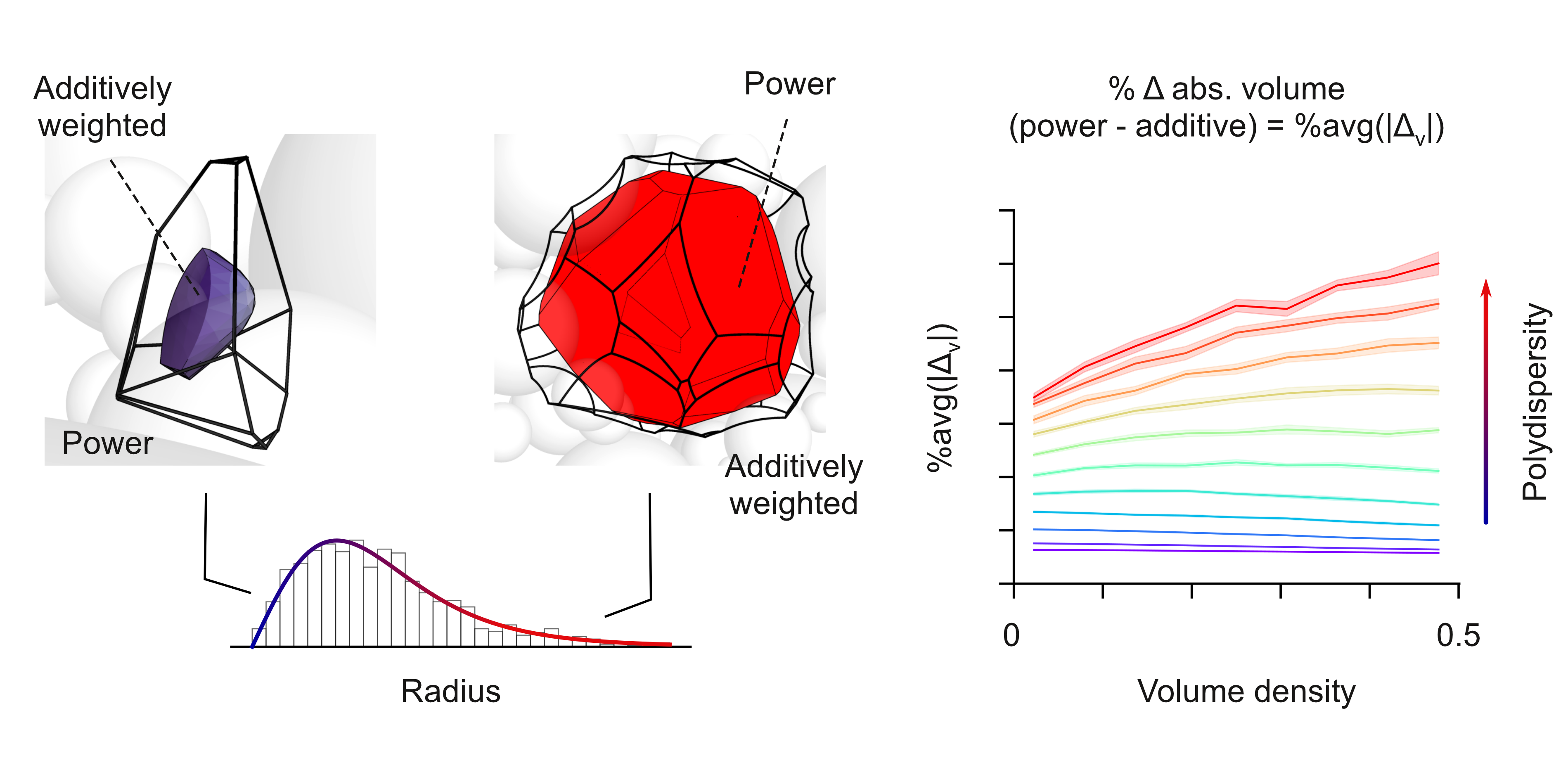
Vorpy is a spatial partitioning tool designed to solve, analyze, and export Additively Weighted, Power (Leguerre), and/or Primitive (Delaunay) Voronoi diagrams for systems of 3D spheres. This tool can accept atomic coordinate files of all major file extensions (or txt files in the right format), solve their Voronoi graphs and output visualizations and analysis of their geometry. With both a grapical user interface for simple cases and a command line interface for more complicated or cases VorPy has a robust input/output abilities.
Usage
With python installed, make sure you have the required packages installed on your system of virtual environment (see Requirements and Dependencies):
python -m pip install -r requirements.txt
To run the VorPy GUI simply call the vorpy.py file in the command line (see VorPy GUI):
python vorpy.py
To run VorPy through the command line follow the basic command line structure (see Command Line):
python vorpy.py <file> [options]
VorPy GUI:
Documentation
For detailed documentation, please visit the documentation website.
- Input File Name: The name of the ball file with the extension and the folder stripped. This will be the name of the folder that will hold the output files and will hold each of the group folders.
- Input File Information: Displays the general information about the input file and the groupings within it.
- Input Locations: Shows where the input file, the output directory, and any other loaded files can be located.
- Radii/Mass Changing: Allows the user to adjust the radii and masses of any given element and/or specific atoms in set residues (see Radii/Mass Adjustments).
- System Exports: Shows the different options for exports at the system level. Launches another window with different options including logs, ball files, set atoms (see System Exports)
- Reset: Clears the program of any system, files, and settings that have been added.
- Groups Section: Holds each of the groups to be built and all of the corresponding selections, settings, and exports (see Groups)
- Group Name: Changes the name for the current group. Works as the name for the sub-directory for the given group's output files
- Group Selections: Allows the user to add/delete atoms/balls, residues, chains, and molecules using and index or a range. If the range entry is unfilled only the single object's index identified in the index entry box will be chosen. The indices start at 0 and correspond to the oder in which they appear in the ball file.
- Group Selection Tracker: Tracks the selections that the the user has added to the group.
- Group Build Settings: Tracks the given settings the given group will be built with (see Group Build Settings.
- Group Exports: Holds the different exports for the given group. There are three default options: small, medium, and large exports (see Group Exports). If the user wants to export custom options, there is a custom exports button with all possible exports for the group (see Group Exports).
- Run Group: Solves the group and exports the given exports. Will only solve the current group and export the current selection.
- Add/Delete Groups: Adjusts the number of groups being solved. The delete button points to the current group and will ask for permission before deleting anything.
- Help: The help button launches a window that explains all of the functions of the program and the GUI and serves as a reminder for the user (see Help Window)
- Run All Groups: Solves and exports all groups as well as the system exports. The main run function for VorPy.
Radii/Mass Adjustments:
When selected, the radii adjustment window will launch:
System Exports
Groups
Group Build Settings
Group Exports
Help Window
Command line:
The general structure of the command line goes like below
File
- The first argument after
vorpy.pyshould be the file address of the ball or atom file. - If the file is located in the
Data/test_datafolder, specify the file name without the path or extension. - Accepted file extensions include
.pdb,.mol,.gro,.cif.
Load Options (Flag -l)
-l <file>
Load additional files like vertex files from previous runs, log files, Voronota vertex files, or GROMACS index files.
Setting Options (Flag -s)
-s <setting value>
Adjust various simulation parameters:
nt- Network Type: Default = Additively Weightedaw, Powerpow, Primitiveprm, or Comparecom 'type1' 'type2'mv- Maximum Vertex: Default =40bm- Box Multiplier: Default =1.25sr- Surface Resolution: Default =0.2sc- Surface Color Map: Default =viridis,plasma,rainbow, or any other matplotlib colormap (note: '_r' inverts the scheme)ss- Surface Coloring Scheme: Default = curvaturecurv, inside vs outside spheresnout, distance from centerdistsf- Surface Coloring Scale: Default = linearlin, loglog, squaredsquare, cubecubear- Adjust Radii:'element' 'value'or'atom name' 'value'or'residue' 'atom name' 'value'. To see the current values for defaults for atomic radii go to the radii file (radii.py) or enter the radii flag-r
Group Options (Flag -g)
-g <identifier>
Select specific balls or molecular elements:
b- Ball Identifier. Used with a ball index'index'or range of indices'index1'-'index2'.a- Atom Identifier. Used with an atom element'element', element name'element name', index'index', or range of indices'index1'-'index2'.r- Residue Identifier. Used with a residue name'residue name'and sequence number'sequence number'(optional), index'index', or range of indices'index1'-'index2'.c- Chain Identifier. Used with a chain name'chain name', index'index', or range of indices'index1'-'index2'.
Note: If multiple of the above components are desired in the same group use the and qualifier between components. If multiple groups are desired use multiple group flags.
Export Options (Flag -e)
-e <export_type>
Specify the intensity and type of exports:
-
Groups of Exports: Default =
large,small,medium,all -
Export choices :
Molecule File -
pdb,mol,cif,gro, Set Atoms Radii PyMol Script -set_atoms, Group Information -info, Network Logs -logs, All Surfaces in One File -surfs, All Surfaces in Separate Files -sep_surfs, All Edges in One File -edges, All Edges in Separate Files -sep_edges, All Vertices in One File -verts, All Vertices in Separate Files -sep_verts, Surrounding Surfaces -shell, Surrounding Edges -shell_edges, Surrounding Vertices -shell_verts, Group Atoms -atoms, Atoms Surrounding Group -surr_atoms
Command Line Notes
- Each option flag and its arguments must be separated by spaces.
- To use multiple commands for a single option use 'and' or repeat the flag (except for groups to avoid creating multiple groups).
- Any range can be set with a hyphen and no space (e.g.
-g a 0-100is a group of the first 101 atoms)
Requirements and Dependencies
Output Examples
The ouputs for the program are either informative or visualizations of the data. In
Examples
Example 1: Simple Molecular Visualization In this example, we look at the molecule EDTA which binds to harmful magnesium ions in food to neutralize them. The EDTA/Mg complex is preloaded into vorPy and can be run simply with the following command:
python vorpy.py EDTA_Mg
This will solve the additively weighted Voronoi diagram for the EDTA molecule and the Mg atom. Once solved, the program will output the default outputs (see outputs).
Example 2: Separately solve the tyrosine 2 and methionine 1 residues of the cambrin molecule, calculate their interface, and export the large export type of the results
python vorpy.py cambrin -s sr 0.05 and mv 80 -g tyr 2 -g met 1 -c iface -e large
Example 3: Calculate the primitive and power networks for the mg atom in the EDTA_Mg molecule and compare the difference
python vorpy.py EDTA_Mg -s nt compare prm pow -g mg
Example 4: Solve the network for hairpin and export the shell with the inside and outside parts of the surfaces highlighted at a high resolution
python vorpy.py hairpin -s ss nout and sr 0.01 -e shell and pdb
License
This project is licensed under the MIT License - see the LICENSE file for details.
Citation
If you use VORPY in your research, please cite:
@software{vorpy2024,
  author = {John Ericson},
  title = {VORPY: A Python package for Voronoi analysis of molecular structures},
  year = {2024},
  publisher = {GitHub},
  url = {https://github.com/jackericson98/vorpy}
}
Contact
- Email: jericson1@gsu.edu
- Site: ericsonlabs.com
- Phone: +1 (404)-413-5491
Release history Release notifications | RSS feed


Download files
Download the file for your platform. If you're not sure which to choose, learn more about installing packages.
Source Distribution
Built Distribution
Filter files by name, interpreter, ABI, and platform.
If you're not sure about the file name format, learn more about wheel file names.
Copy a direct link to the current filters
File details
Details for the file vorpy3-3.0.4.tar.gz.
File metadata
- Download URL: vorpy3-3.0.4.tar.gz
- Upload date:
- Size: 35.5 MB
- Tags: Source
- Uploaded using Trusted Publishing? No
- Uploaded via: twine/6.1.0 CPython/3.9.13
File hashes
| Algorithm | Hash digest | |
|---|---|---|
| SHA256 |
9b4809fb4b5b6f77e998ef4167cc62102787ce4f36ff8f71cd143040b9130712
|
|
| MD5 |
986e613996b38819bd7cae32ef3dd7af
|
|
| BLAKE2b-256 |
35c1980bada127d8271011a7d757a36602e161fede982bbe0acdaf7e07124e87
|
File details
Details for the file vorpy3-3.0.4-py3-none-any.whl.
File metadata
- Download URL: vorpy3-3.0.4-py3-none-any.whl
- Upload date:
- Size: 36.2 MB
- Tags: Python 3
- Uploaded using Trusted Publishing? No
- Uploaded via: twine/6.1.0 CPython/3.9.13
File hashes
| Algorithm | Hash digest | |
|---|---|---|
| SHA256 |
f0599e4d0f2031514a5c34745a133dd13eafff98db0c223672be225151977c2f
|
|
| MD5 |
436f143a4bd2f6b0287a5754cd58d6b4
|
|
| BLAKE2b-256 |
4a879e5217d56848d416f370a411b5ddfb9a530c980dbb236ad0a0e5f2b2731c
|






