

An evaluation arena for realtime voice agents.




VoxArena is a reproducible benchmarking harness for realtime voice agents. Run the same scripted conversation across Gemini Live, OpenAI Realtime, and other Pipecat-supported providers — and compare them apples-to-apples on latency, tool-call accuracy, and hallucinations.
Drop it into your CI pipeline, your dev loop, or the bundled control panel.
📚 Documentation: Full guide with flow diagrams, realistic samples, and an interactive CLI command builder at simkeyur.github.io/vox-arena.
🚀 CI & Pipeline Integration
VoxArena ships a voxarena CLI designed for headless use in your build pipeline. It returns a non-zero exit code when metrics fall below thresholds you define, and emits JUnit XML for native CI reporting.
pip install voxarena

voxarena run \
  --provider gemini \
  --script ./script/utterances.json \
  --min-tool-accuracy 0.9 \
  --max-hallucinations 0 \
  --max-avg-ttfa-ms 1500 \
  --output result.json \
  --junit voxarena.xml
# exit 0 if every threshold passes, 1 otherwise
Compare two providers in one shot
voxarena compare \
  --gemini-model gemini-3.1-flash-live-preview \
  --openai-model gpt-realtime-2 \
  --num-turns 5 \
  --min-tool-accuracy 0.9 \
  --output compare.json
GitHub Actions
- name: Voice agent regression check
  env:
    GOOGLE_API_KEY: ${{ secrets.GOOGLE_API_KEY }}
  run: |
    pip install voxarena
    voxarena run --provider gemini \
      --min-tool-accuracy 0.92 --max-hallucinations 0 \
      --junit voxarena.xml --quiet

- uses: mikepenz/action-junit-report@v4
  if: always()
  with:
    report_paths: voxarena.xml
Subcommands
| Command | What it does |
|---|---|
voxarena run |
Single-provider scripted run; exits 0/1 against thresholds. |
voxarena compare |
Runs Gemini and OpenAI in parallel against the same script. |
voxarena report |
Generates a markdown comparison report from past runs. |
Run voxarena <command> --help for the full flag set.
🖥️ Web Control Panel UI (Zero Setup)
You can configure credentials, build test scripts, and run the benchmark suite entirely from your web browser:
pip install voxarena
voxarena ui
This starts a local server and automatically opens the dashboard in your default browser at http://127.0.0.1:8000.
From the UI, you can:
- Set Up API Keys: Add and save Google Gemini and OpenAI API keys securely in the local database.
- Select Models: Pick from preloaded Gemini and OpenAI realtime models, or write in your own custom model identifiers.
- Load Predefined Templates: Select from built-in use-case templates (Restaurant, Telecom, Smart Home, Financial, Dry Run) to automatically populate agent system prompts, tool schemas, and utterances.
- Edit Test Utterances: Create, edit, and delete turns in your test scripts using the interactive visual list editor (no raw YAML/JSON formatting needed).
- Run & Inspect: Start live comparison runs and watch real-time transcripts, metrics, audio playbacks, and tool-call correctness side-by-side.
Note: If you run voxarena ui in a clean, empty directory, it will automatically bootstrap default script files and pre-recorded audio so you can run benchmarks immediately.
📖 Web UI User Guide & Walkthrough
Click on each step below to view the application interface:
📊 1. Arena Dashboard (Landing Page)

Compare latency showdown (TTFA), tool-call accuracy rates, and total hallucinations side-by-side across voice providers, and view the comparative history log of all past runs.
⚙️ 2. Configure & Launch a Run

Configure custom models, pick predefined benchmarking templates (Restaurant, Telecom, Smart Home, Financial, Dry Run), and choose transport layers (direct-injection or WebRTC) to launch parallel runs.
⚡ 3. Live Telemetry & Pipeline Monitoring

Watch runs execute in real-time. The live flow diagrams display active Pipecat telemetry states (Audio Injector -> Provider Adapter -> Audio Capture -> Metrics Collector) alongside terminal logs.
🔎 4. Deep-Dive Run Inspection

Examine the full turn-by-turn log of any completed run to view exact agent transcripts, latency measurements, and play back bot audio responses turn-by-turn.
🆚 5. Side-by-Side Completed Run Comparison

Select any two completed runs (e.g. Gemini vs OpenAI) and compare their performance turn-by-turn with aligned responses, waveform comparisons, and specific failure notes.
📝 6. Interactive Script Editor

Create, modify, and manage your conversation scripts, expect blocks, and substrings directly from the browser without editing raw YAML/JSON files.
Features
- 🎙️ Provider-agnostic agent — one Pipecat pipeline drives every provider; swap models without re-implementing your agent
- 🎛️ Predefined Use-Case Templates — swap agent profiles (Restaurant, Telecom, Smart Home, Financial, Dry Run) to evaluate different prompts and tool sets dynamically
- 🔁 Scripted conversations — multi-turn JSON or YAML scripts with pre-recorded WAV inputs and expected tool calls / response content
- 📊 Automated scoring — tool-call correctness, response matching, hallucination counts, time-to-first-audio, interruption-stop latency
- 🆚 Side-by-side comparisons — run multiple providers in parallel against the same script
- 🗄️ Persistent run history — JSON manifests on disk, indexed in SQLite
- 🖥️ Web control panel — React UI to launch runs, watch live status, browse results, and edit scripts
- 🧩 Extensible — add a new provider by implementing one adapter class
Architecture
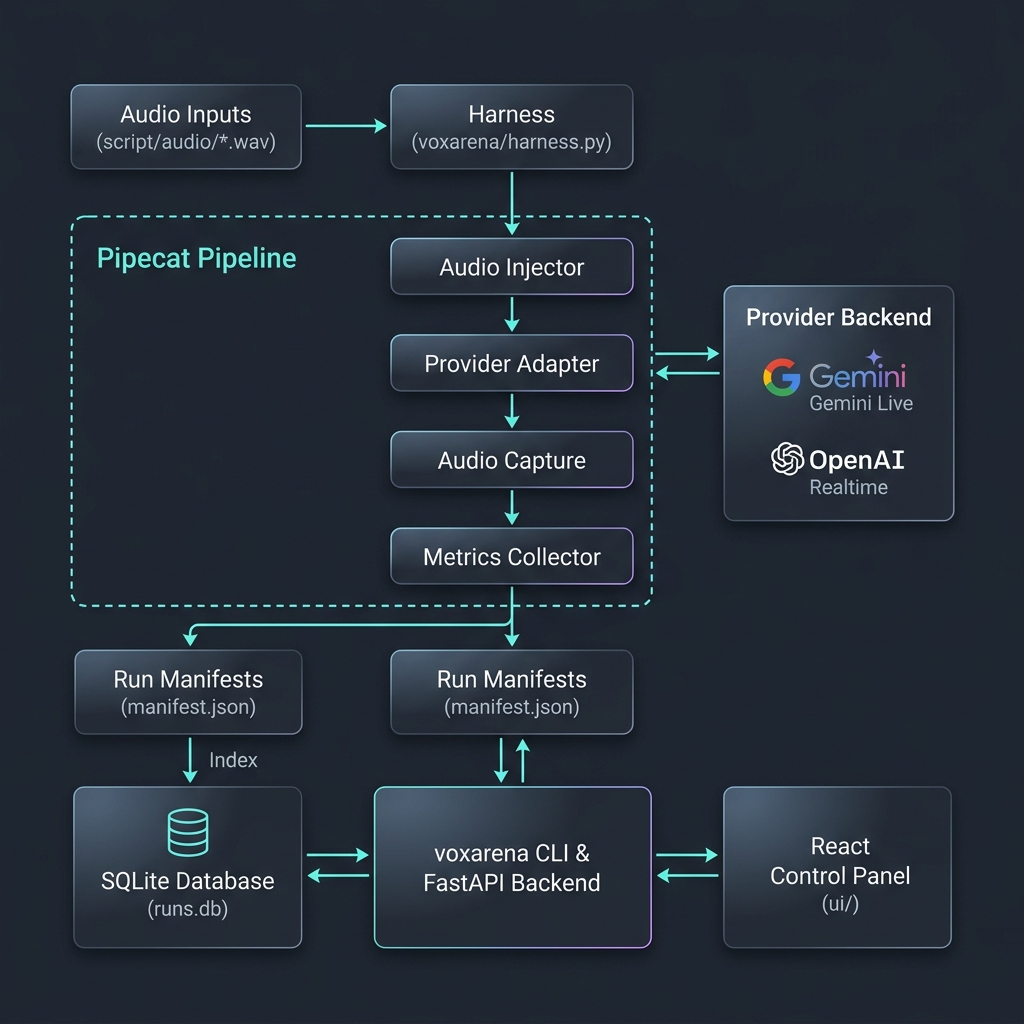
Local Dev (with UI)
git clone https://github.com/simkeyur/vox-arena.git
cd vox-arena
cp .env.example .env  # add GOOGLE_API_KEY / OPENAI_API_KEY

python3 -m venv .venv && source .venv/bin/activate
pip install -e .

uvicorn voxarena.main:app --reload --port 8000
Then in another terminal:
cd ui && npm install && npm run dev
Open the control panel at http://localhost:5173.
Bring Your Own Agent
VoxArena makes it easy to evaluate custom prompts, tools, and conversations:
1. Using Built-In Templates
The harness has preloaded templates (Restaurant, Telecom, Smart Home, Financial, Dry Run) containing predefined prompts, tool schemas, and conversations. You can load and run them instantly from the Web UI or by updating the template configuration database setting.
2. Evaluating Your Custom Agent
To benchmark your own proprietary voice agent:
- Define your own template within
TEMPLATESinvoxarena/templates.py, or modify the legacy files on disk under the default fallback routing. - Register and implement your mock tool execution callbacks inside
voxarena/tools.py(matching your template name). - Record raw
.wavfiles for your test utterances and place them insidescript/audio/. - Define the target scripts in
script/utterances.yamlwithexpectblocks containing correct tool calls, expected argument structures, and transcript string assertions. - Run the arena as normal — every provider gets evaluated head-to-head on your custom agent configuration.
Scripted Conversations
Conversations live in either JSON or YAML script files (e.g., script/utterances.json or script/utterances.yaml). Each turn pairs an utterance ID with an expect block describing the correct tool call and/or response content:
- id: u04
  text: "Are you open on Sundays?"
  expect:
    tool: get_hours
    args:
      day: sunday
    response_contains:
      - "closed"
The harness plays script/audio/{id}.wav into the pipeline and scores the agent's actual tool calls and transcript against expect.
Configuration
All settings can be edited from:
- UI: Settings → Models → "Advanced: Evaluation & TTS"
- CLI:
voxarena config list | get KEY | set KEY VALUE .envfile in your workdir (loaded on startup)
Values from environment variables win over the SQLite settings table, which wins over the in-code defaults below.
Provider models (realtime voice agents)
| Variable | Default | Description |
|---|---|---|
GOOGLE_API_KEY / OPENAI_API_KEY |
— | Provider credentials (also pickable in the UI Settings page) |
GEMINI_MODEL |
gemini-3.1-flash-live-preview |
Gemini Live model under test |
OPENAI_MODEL |
gpt-realtime-2 |
OpenAI Realtime model under test |
Evaluation models (LLM-judge reviewer)
Cheaper text-only models used after a run to score tool-call correctness and hallucinations. Independent from the live voice agent.
| Variable | Default | Description |
|---|---|---|
GEMINI_EVAL_MODEL |
gemini-3.1-flash-lite |
Gemini judge model |
OPENAI_EVAL_MODEL |
gpt-5.4-mini |
OpenAI judge model |
TTS engine (utterance audio synthesis)
Each scripted utterance is rendered into a WAV before being injected into the voice agent. The engine is chosen at run time; auto walks a fallback chain so you don't have to pre-configure anything.
| Variable | Default | Description |
|---|---|---|
TTS_ENGINE |
auto |
One of auto, openai, google, local. auto chain (local-first): local OS → OpenAI → Google. So a fresh install with no API keys still works out of the box on macOS / Linux (with espeak-ng) / Windows. An explicit choice tries that engine first; if it isn't configured/available, the rest of the chain runs. |
OPENAI_TTS_MODEL |
tts-1 |
Any OpenAI TTS model (tts-1, tts-1-hd, gpt-4o-mini-tts, …). |
OPENAI_TTS_VOICE |
nova |
Any OpenAI voice (nova, alloy, echo, fable, onyx, shimmer). |
GOOGLE_TTS_VOICE |
en-US-Journey-F |
Any Google Cloud TTS voice name. |
Local OS engine (no API keys needed):
- macOS — built-in
saycommand. Available out of the box. - Linux —
espeak-ng(preferred) orespeakon PATH. Install withapt install espeak-ng(orbrew install espeak). - Windows — PowerShell's
System.Speech.Synthesis.SpeechSynthesizer. Available out of the box on modern Windows.
Cache entries are signed by engine+voice, so switching between, say, nova and alloy produces a fresh WAV instead of returning stale audio.
Other
| Variable | Description |
|---|---|
PORT |
FastAPI server port (UI) |
BASE_DIR |
Override workdir (CLI: --workdir) |
CLI examples
# Inspect everything
voxarena config list

# Force the local OS TTS so runs work offline
voxarena config set TTS_ENGINE local

# Try the higher-quality OpenAI voice
voxarena config set OPENAI_TTS_MODEL tts-1-hd
voxarena config set OPENAI_TTS_VOICE shimmer

# Swap in a different evaluator model
voxarena config set GEMINI_EVAL_MODEL gemini-2.5-flash
Contributing
To add a new provider: implement an adapter in voxarena/providers/ following the pattern in gemini.py / openai.py, wire it into voxarena/harness.py and voxarena/config.py, and open a PR.
For bugs and feature requests, please open an issue.
License
MIT.
1 maintainer

Metadata
1 maintainer
Release files for voxarena 0.1.15
For a detailed explanation of source distributions (sdists) and built distributions (wheels), please see the package formats documentation.
Source distribution (sdist)
| File | Size | Uploaded | Provenance | |
|---|---|---|---|---|
| voxarena-0.1.15.tar.gz | 1.6 MB | With provenance | Details |
Built distribution (wheel)
| File | Interpreter | ABI | Platform | Reset |
|---|---|---|---|---|
| voxarena-0.1.15-py3-none-any.whl | Python 3 | none | any | Details |
Total release size: 3.2 MB
Release files / voxarena-0.1.15.tar.gz
| Download URL | voxarena-0.1.15.tar.gz |
|---|---|
| Size | 1.6 MB |
| Tags | Source |
|
SHA-256 checksum How to use checksums |
d15f02ef18065fd69f022eb26ac528bcc7d38dd40a02e25bfa160ca4eb6c6d50
|
|
BLAKE2b-256 checksum How to use checksums |
4d318a1c365a6c93ebadcb8c9ca243d76eae2fb652bb1c217bff1eb558c23ebe
|
| Upload date | |
|
Uploaded using Trusted Publishing? What is trusted publishing? |
Yes |
| Uploaded via |
twine/6.1.0 CPython/3.13.12
|
Provenance
Provenance describes where a file came from. On PyPI, provenance is shared via attestations, which provide a verifiable record of the build or publishing details. View details, limitations and caveats.


PyPI Publish Attestation
PyPI verified that this artifact, at this checksum, originated from the publisher listed below.
Signed by GitHub Actions, verified by PyPI on Jun 16, 2026.
Transparency logRelease files / voxarena-0.1.15-py3-none-any.whl
| Download URL | voxarena-0.1.15-py3-none-any.whl |
|---|---|
| Size | 1.6 MB |
| Tags | Python 3 |
|
SHA-256 checksum How to use checksums |
275689212f1d5b353c1bde435fe671c01ca562ab84aedd191cc27bddbe6d64b4
|
|
BLAKE2b-256 checksum How to use checksums |
e005779980e620a431a009b497eba64de8e88b1d9800c4ed69378412f210b31b
|
| Upload date | |
|
Uploaded using Trusted Publishing? What is trusted publishing? |
Yes |
| Uploaded via |
twine/6.1.0 CPython/3.13.12
|
Provenance
Provenance describes where a file came from. On PyPI, provenance is shared via attestations, which provide a verifiable record of the build or publishing details. View details, limitations and caveats.
PyPI Publish Attestation
PyPI verified that this artifact, at this checksum, originated from the publisher listed below.
Signed by GitHub Actions, verified by PyPI on Jun 16, 2026.
Transparency logSecurity for voxarena 0.1.15
Provenance
Provenance describes where a file came from. On PyPI, provenance is shared via attestations, which provide a verifiable record of the build or publishing details. View details, limitations and caveats.
Full provenance
All 2 files in this release have been uploaded with provenance metadata.
Attestation for voxarena-0.1.15.tar.gz
PyPI Publish Attestation
PyPI verified that this artifact, at this checksum, originated from the publisher listed below.
Signed by GitHub Actions, verified by PyPI on Jun 16, 2026.
Transparency logA note on package security
PyPI is a repository for distributing packages, not a service for auditing them. While third-party security researchers and our staff do their best to detect and remove malicious packages, PyPI cannot guarantee the quality, security or suitability of any given package.
To learn more about protecting yourself from malicious actors, visit our package security documentation.














