
VoxLock
The best performing voice isolator there is. VoxLock is an open-source voice isolation model: it keeps the caller's voice and removes the other voices in the room before speech-to-text hears them. Made for voice agents and phone calls: one input, the call audio, and it picks out the caller by itself. It streams on a CPU with 24 ms of algorithmic latency, and plugs into Pipecat and LiveKit voice agents.
Paper · Model on Hugging Face · Try it in your browser · Write-up









https://github.com/user-attachments/assets/d32cf251-b461-4a91-93b1-21a8bd6ad840
Results
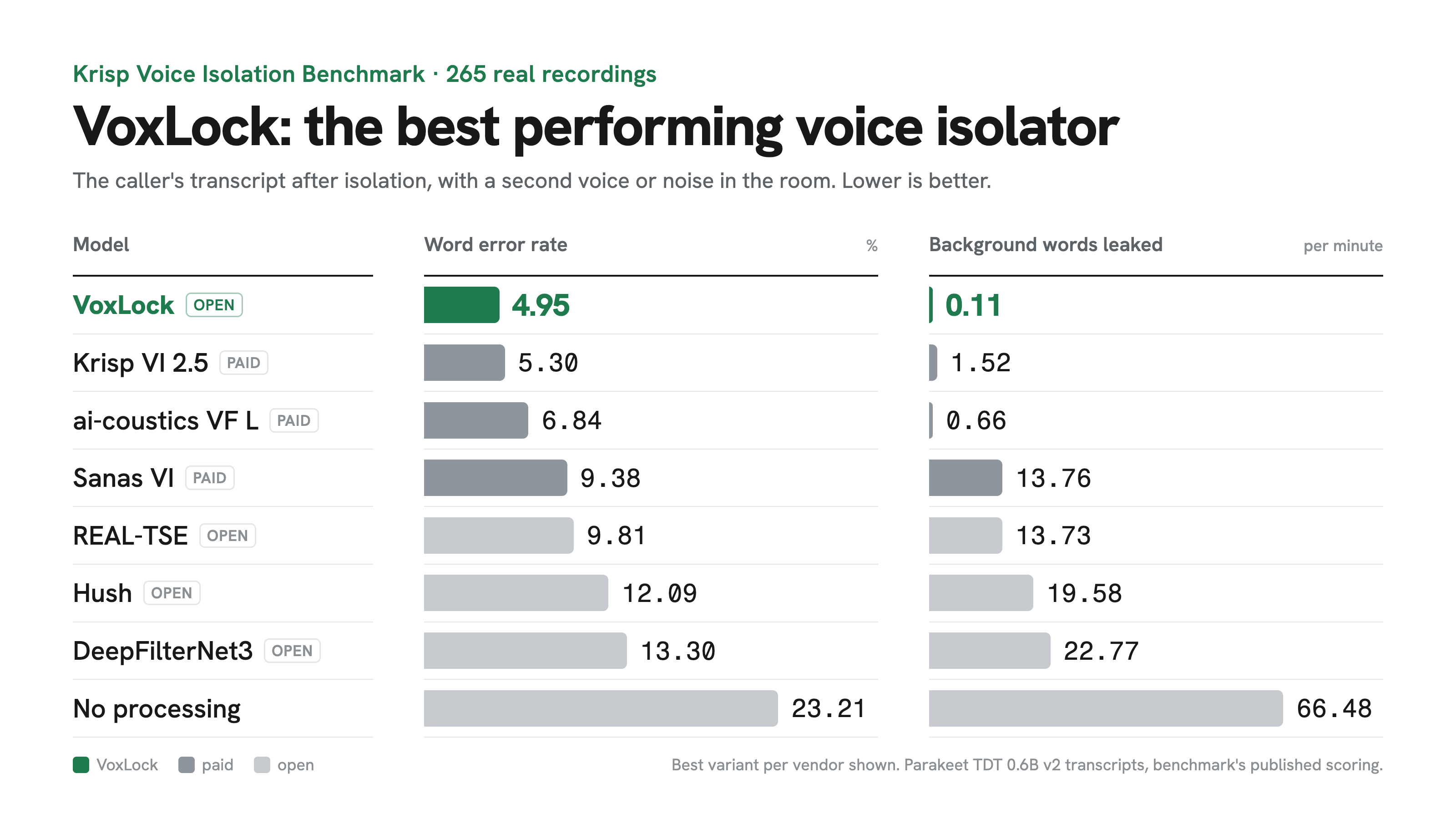
| Model | Access | Word error rate % | Background words leaked / min |
|---|---|---|---|
| VoxLock | open | 4.95 | 0.11 |
| Krisp VI 2.5 Default | paid | 5.30 | 1.52 |
| Krisp VI 2.5 Balanced | paid | 5.32 | 2.02 |
| Krisp VI 2.5 HD | paid | 5.79 | 2.74 |
| Krisp VI 2.5 Lite | paid | 6.21 | 4.52 |
| ai-coustics Voice Focus 2.2 L | paid | 6.84 | 0.66 |
| ai-coustics Voice Focus 2.2 S | paid | 6.91 | 1.00 |
| Sanas Voice Isolation SE 1.0 | paid | 9.38 | 13.76 |
| REAL-TSE causal (VoxLock's starting checkpoint) | open | 9.81 | 13.73 |
| Hush | open | 12.09 | 19.58 |
| DeepFilterNet3 | open | 13.30 | 22.77 |
| TIGER | open | 14.72 | 37.24 |
| No processing | 23.21 | 66.48 | |
| SAM-Audio small (Meta) | open | 33.77 | 21.15 |
| ElevenLabs Voice Isolator** | paid | 43.79** | 144.6** |
265 real recordings from the Krisp Voice Isolation Benchmark, transcribed with Parakeet TDT 0.6B v2 and scored with the benchmark's published method. Background words leaked counts words transcribed while only the background was talking, per minute of that audio.
** ElevenLabs Voice Isolator, run on the 7 of these recordings with the most background speech, not all 265. On the same 7, no processing scores 45.82% and 154.3 leaked words per minute, and VoxLock 2.98% and 0.0.
On real AMI meetings not used in training, with the headset wearer as the caller:
| Model | Access | Word error rate % | Background words leaked / min |
|---|---|---|---|
| VoxLock | open | 10.12 | 2.12 |
| ai-coustics Voice Focus 2.2 S | paid | 11.85 | 1.06 |
| ai-coustics Voice Focus 2.2 L | paid | 12.13 | 1.72 |
| Sanas Voice Isolation SE 1.0 | paid | 13.30 | 5.30 |
| TIGER | open | 22.84 | 36.85 |
| DeepFilterNet3 | open | 26.78 | 38.84 |
| Hush | open | 33.00 | 68.93 |
| No processing | 33.03 | 78.34 |
Caller words missed, deletions, insertions and 95% intervals: bench/results.
Use
For voice agents: a Pipecat audio filter, a LiveKit Agents plugin, and sherpa-onnx in C++. For files and your own streaming loop, read on.
pip install voxlock
voxlock call.wav -o caller.wav
Any sample rate, mono or stereo. The 74 MB model downloads on first use, or ahead of time with voxlock download.
import voxlock

vl = voxlock.VoxLock()                     # precision="fp32" for the benchmarked model
call = voxlock.load_audio("call.wav")      # 16 kHz mono float32
caller = vl.isolate(call)                  # same length as the input
isolate takes the caller's voice sample from the first 15 seconds of the call. Pass sample= (3 seconds or more) to choose it yourself.
Streaming
Push the call in as it arrives, as 16 kHz float32 chunks of any size. Each push returns the isolated audio that is ready, about 24 ms behind the input.
vl = voxlock.VoxLock(threads=1)
stream = vl.live()                         # finds the caller by itself
for chunk in call_audio:                   # e.g. 40 ms = 640 samples
    send(stream.push(chunk))
send(stream.flush())                       # at the end of the call
live() passes audio through until it has heard 3 seconds of the caller, then isolates. On the 265 Krisp recordings it scores 5.15% word error rate (4.95% on whole files).
If you already have a sample, from earlier in the call or from a previous call, isolation starts with the first chunk:
stream = vl.stream(sample) # about 3 s of the caller, 16 kHz mono
On one CPU thread it keeps up with chunks of 40 ms or more (see Performance).
Pipecat
pip install "voxlock[pipecat]"
from pipecat.transports.base_transport import TransportParams
from voxlock.pipecat import VoxLockFilter

params = TransportParams(audio_in_enabled=True, audio_in_filter=VoxLockFilter())
Passes audio through until it has heard 3 seconds of the caller, then isolates (voice_sample= isolates from the start). Any transport rate, Twilio's 8 kHz included. One thread, 61% of a CPU core, 184 ms delay at 16 kHz; chunk_ms=40 gives 104 ms for 77%. Example: examples/pipecat_bot.py. Tested with Pipecat 1.15.0.
LiveKit
pip install "voxlock[livekit]" # or: pip install livekit-plugins-voxlock
from livekit.agents import room_io
from voxlock.livekit import VoxLockFilter   # or: from livekit.plugins import voxlock; voxlock.VoxLockFilter()

await session.start(
    agent,
    room=ctx.room,
    room_options=room_io.RoomOptions(
        audio_input=room_io.AudioInputOptions(sample_rate=16000, noise_cancellation=VoxLockFilter()),
    ),
)
One filter per session. Passes audio through until it has heard 3 seconds of the caller, then isolates (voice_sample= isolates from the start). One thread, about 68% of a CPU core, 124 ms delay at 16 kHz. Call preload() in your prewarm function; download-files fetches the model. Example: examples/livekit_agent.py. Tested with livekit-agents 1.8.10.
sherpa-onnx
Built into sherpa-onnx's speech denoisers from 2.0.1, in C++. Models from this release, then:
sherpa-onnx-offline-denoiser \
  --speech-denoiser-voxlock-enroll-model=voxlock_enroll.onnx \
  --speech-denoiser-voxlock-chunk-model=voxlock_chunk_int8.onnx \
  --input-wav=call.wav --output-wav=caller.wav
sherpa-onnx-online-denoiser streams with the same models; --speech-denoiser-voxlock-voice-sample=caller.wav sets the voice sample.
PyTorch
git clone https://github.com/arbazsiddiqui/voxlock && cd voxlock
pip install -r requirements.txt
huggingface-cli download arbazsiddiqui/voxlock model.safetensors config.yaml --local-dir ckpt
python isolate.py --ckpt ckpt --in call.wav --out caller.wav
Performance
One live call through VoxLock.stream with the default int8 model on one CPU thread: onnxruntime 1.31.1 on a Google Cloud g2-standard-8 (Intel Xeon @ 2.20 GHz), 60 seconds of AMI meeting audio.
| Chunk | CPU per call | Real-time factor |
|---|---|---|
| 20 ms | 110% of a core | 1.10 |
| 40 ms | 77% of a core | 0.77 |
| 80 ms | 61% of a core | 0.61 |
Below 1 keeps up with the call. 20 ms chunks keep up on two threads (0.86). The model has 27M parameters and 24 ms of algorithmic latency, plus the chunk. On the same machine's NVIDIA L4 GPU (fp32, CUDA), a whole recording runs 40 times faster than real time.
Quantized models
The ONNX model comes in four precisions, all in the Hugging Face repository. Choose with VoxLock(precision=...), voxlock --precision ... or VoxLockFilter(precision=...).
| Precision | Quality | Files | Download | Word error rate % | Background words leaked / min | CPU per call, 20 ms chunks |
|---|---|---|---|---|---|---|
int8 (default) |
99.8% | enroll.onnx, chunk_int8.onnx |
74 MB | 5.11 | 0.12 | 110% |
int8-full |
99.1% | enroll.onnx, chunk_int8_full.onnx |
71 MB | 5.85 | 0.04 | 110% |
fp16 |
100%* | enroll_fp16.onnx, chunk_fp16.onnx |
47 MB | 4.95* | 0.11* | 163% |
fp32 |
100% | enroll.onnx, chunk.onnx |
94 MB | 4.95 | 0.11 | 165% |
Quality: the share of fp32's correctly transcribed words each precision keeps, on the 265 Krisp recordings. CPU per call: one live call on one thread of the Xeon in Performance.
* fp16 matches fp32 to over 70 dB, so it carries the fp32 scores. The browser demo uses it.
Training
A 27M causal band-split RNN target-speaker extractor, fine-tuned from the REAL-TSE challenge baseline on a single NVIDIA L4:
REAL-TSE tfmap_context_causal_100
  -> simulated calls        4,000 steps   LibriSpeech callers + background talkers in simulated rooms
  -> real AMI crosstalk     4,000 steps   headset recordings from 40 meetings
  -> long calls (30 s)        800 steps   callers who talk throughout
  -> rooms and distances     400 steps   callers near or far from the mic, background voices dry or in the room, room noise
Repository
| Path | |
|---|---|
voxlock/ |
the pip install voxlock package: whole files, streaming, command line, Pipecat and LiveKit filters |
integrations/ |
livekit-plugins-voxlock, the LiveKit plugin package |
examples/ |
Pipecat and LiveKit voice agents with VoxLock |
tests/ |
unit tests, and the Pipecat and LiveKit filters run as each framework runs them |
isolate.py |
PyTorch inference |
export_onnx.py |
ONNX export |
demo/ |
the browser demo (python demo/serve.py) |
bench/ |
benchmark harness, vendor runners, per-file results |
train/ |
training scripts and data preparation |
Acknowledgements
Built on the REAL-TSE challenge baseline and WeSep by Shuai Wang, Ke Zhang and co-authors, with WeSpeaker's ECAPA model. Trained on LibriSpeech and the AMI Meeting Corpus.
Citation
@misc{siddiqui2026voxlock,
  title         = {VoxLock: Target-Speaker Extraction for Voice Agents Without an Enrollment Step},
  author        = {Siddiqui, Arbaz},
  year          = {2026},
  eprint        = {2610.40727},
  archivePrefix = {arXiv},
  primaryClass  = {eess.AS},
  url           = {https://arxiv.org/abs/2610.40727}
}
License
Apache-2.0.
1 maintainer

Metadata
1 maintainer
Release files for voxlock 1.3.1
For a detailed explanation of source distributions (sdists) and built distributions (wheels), please see the package formats documentation.
Source distribution (sdist)
| File | Size | Uploaded | Provenance | Actions |
|---|---|---|---|---|
| voxlock-1.3.1.tar.gz | 32.2 kB | Without provenance | Details for voxlock-1.3.1.tar.gz |
Built distribution (wheel)
| File | Interpreter | ABI | Platform | Actions Reset |
|---|---|---|---|---|
| voxlock-1.3.1-py3-none-any.whl | Python 3 | none | any | Details for voxlock-1.3.1-py3-none-any.whl |
Total release size: 57.3 kB
Release files / voxlock-1.3.1.tar.gz
| Download URL | voxlock-1.3.1.tar.gz |
|---|---|
| Size | 32.2 kB |
| Tags | Source |
|
SHA-256 checksum How to use checksums |
5a38cc5bfdb19b21b855716de13151299046623eb4228ccda1606383241c9d6a
|
|
BLAKE2b-256 checksum How to use checksums |
7bab06abe2bcdcbbbdf1c6b49a818117c0bcf381d764f3135237fdc719c0d66e
|
| Upload date | |
|
Uploaded using Trusted Publishing? What is trusted publishing? |
No |
| Uploaded via |
twine/7.0.0 CPython/3.12.6
|
Release files / voxlock-1.3.1-py3-none-any.whl
| Download URL | voxlock-1.3.1-py3-none-any.whl |
|---|---|
| Size | 25.1 kB |
| Tags | Python 3 |
|
SHA-256 checksum How to use checksums |
1bbc2e285e9d6d8b84844f631db9e2995545c612b998234347129d34e6523d2a
|
|
BLAKE2b-256 checksum How to use checksums |
6e399c7a06688caab808a6e7c25c2f14a9f902c3779e3d113ad901801a135e6e
|
| Upload date | |
|
Uploaded using Trusted Publishing? What is trusted publishing? |
No |
| Uploaded via |
twine/7.0.0 CPython/3.12.6
|
Security for voxlock 1.3.1
Provenance
Provenance describes where a file came from. On PyPI, provenance is shared via attestations, which provide a verifiable record of the build or publishing details. View details, limitations and caveats.
No provenance found
None of the files in this release were uploaded with provenance metadata.
A note on package security
PyPI is a repository for distributing packages, not a service for auditing them. While third-party security researchers and our staff do their best to detect and remove malicious packages, PyPI cannot guarantee the quality, security or suitability of any given package.
To learn more about protecting yourself from malicious actors, visit our package security documentation.














