
vpnx
| Status | |
|---|---|
| CI checks |  |
| Latest version |  |
| Release date |  |
| Python |  |
| License |  |
| Open issues |  |
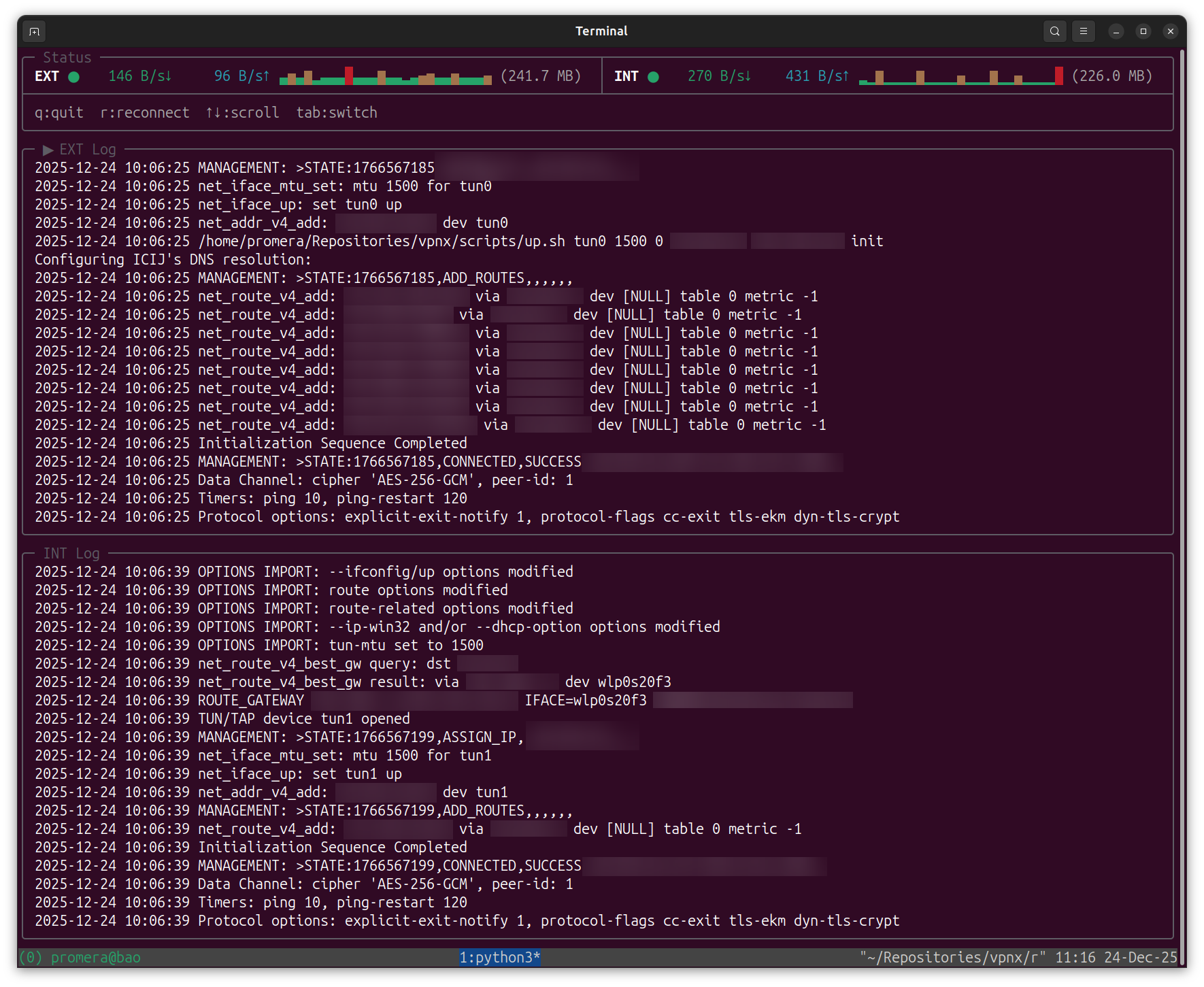
A terminal UI for managing OpenVPN connections with 2FA support.
Features
- Interactive setup wizard for configuring multiple VPNs
- Full-screen TUI with real-time connection status and bandwidth monitoring
- Secure credential storage using GPG encryption
- Support for up scripts (DNS/routing configuration)
- XDG Base Directory compliant configuration
Requirements
- Python 3.8+
- openvpn
- gpg (for encrypted password storage)
# macOS
brew install openvpn gnupg

# Debian/Ubuntu
sudo apt install openvpn gnupg

# Fedora
sudo dnf install openvpn gnupg2

# Arch
sudo pacman -S openvpn gnupg
Installation
Using pipx (recommended):
pipx install vpnx
Or with pip:
pip install vpnx
Setup
vpnx setup
The setup wizard will guide you through:
- Adding VPN configurations (name, path to .ovpn file, up/down scripts)
- Setting your username (optional - will prompt at connection if not set)
- Configuring the password store (GPG key for secure credential storage)
Usage
# Connect to all configured VPNs
vpnx all

# Connect to a specific VPN
vpnx connect <vpn-name>

# List configured VPNs
vpnx list

# Manually run a VPN's configured down script (e.g. to reset DNS / routes
# left behind by a stale tunnel). Does not stop OpenVPN.
vpnx down <vpn-name>
vpnx down <vpn-name> --dev utun3   # override the tunnel interface (default: utun0)
Configuration
Configuration is stored in XDG-compliant directories:
~/.config/vpnx/
├── config.yaml        # Main configuration
└── up.sh              # Optional default up script

~/.local/share/vpnx/
├── credentials.gpg    # GPG-encrypted password
└── credentials.gpg-id # GPG key ID

~/.cache/vpnx/
└── logs/              # Connection logs
config.yaml format
username: your-username                            # optional, will prompt if not set
credentials_path: ~/.local/share/vpnx/credentials  # path to GPG-encrypted password
up_script: /path/to/up.sh                          # optional, global up script
down_script: /path/to/down.sh                      # optional, global down script

vpns:
  - name: PROD
    display: Production VPN
    config_path: /path/to/prod.ovpn
    needs_up_script: true
    up_script: /path/to/prod-up.sh      # optional, per-VPN override
    needs_down_script: true
    down_script: /path/to/prod-down.sh  # optional, per-VPN override
    needs_2fa: true                     # default: true
  - name: DEV
    display: Development VPN
    config_path: /path/to/dev.ovpn
    needs_up_script: false
    needs_down_script: false
    needs_2fa: false
Build from source
git clone https://github.com/pirhoo/vpnx.git
cd vpnx
pip install -e ".[dev]"
Then use make targets to run the project and development tasks:
make setup          # Configure VPN client
make all            # Connect to all configured VPNs
make connect VPN=x  # Connect to a specific VPN
make list           # List configured VPNs

make test           # Run tests
make lint           # Check code style
make format         # Auto-format code
make clean          # Remove cache files
make build          # Build sdist and wheel into dist/
Project Structure
├── vpnx/
│   ├── domain/          # Business logic (entities, services)
│   ├── application/     # Use cases (commands, handlers)
│   ├── infrastructure/  # External integrations (OpenVPN, GPG)
│   └── presentation/    # UI components (TUI, CLI)
└── tests/               # Unit tests
1 maintainer

Release files for vpnx 0.5.0
For a detailed explanation of source distributions (sdists) and built distributions (wheels), please see the package formats documentation.
Source distribution (sdist)
| File | Size | Uploaded | |
|---|---|---|---|
| vpnx-0.5.0.tar.gz | 49.1 kB | Details |
Built distribution (wheel)
| File | Interpreter | ABI | Platform | Reset |
|---|---|---|---|---|
| vpnx-0.5.0-py3-none-any.whl | Python 3 | none | any | Details |
Total release size: 91.4 kB
Release files / vpnx-0.5.0.tar.gz
| Download URL | vpnx-0.5.0.tar.gz |
|---|---|
| Size | 49.1 kB |
| Tags | Source |
|
SHA-256 checksum How to use checksums |
53c3513d37ae052390ad64f7e986c58c7500fa66b05d2bcfb06e93107d6be3dc
|
|
BLAKE2b-256 checksum How to use checksums |
0550faa29d72e8b454b8b1fbd4cbd4b9a592a6f4f10254281d4229a382446118
|
| Upload date | |
|
Uploaded using Trusted Publishing? What is trusted publishing? |
Yes |
| Uploaded via |
twine/7.0.0 CPython/3.13.14
|
Provenance
Provenance describes where a file came from. On PyPI, provenance is shared via attestations, which provide a verifiable record of the build or publishing details. View details, limitations and caveats.


PyPI Publish Attestation
PyPI verified that this artifact, at this checksum, originated from the publisher listed below.
Signed by GitHub Actions, verified by PyPI on Sep 17, 2026.
Transparency logRelease files / vpnx-0.5.0-py3-none-any.whl
| Download URL | vpnx-0.5.0-py3-none-any.whl |
|---|---|
| Size | 42.3 kB |
| Tags | Python 3 |
|
SHA-256 checksum How to use checksums |
0518835f6d1fe4e1b1bb3509b35d5dfe0afc53574ce508ee6cbeceb6a1c873a0
|
|
BLAKE2b-256 checksum How to use checksums |
5283b662e63cfe10284f33102d93207e5840f84bacb364d9fc6614179b9738f1
|
| Upload date | |
|
Uploaded using Trusted Publishing? What is trusted publishing? |
Yes |
| Uploaded via |
twine/7.0.0 CPython/3.13.14
|
Provenance
Provenance describes where a file came from. On PyPI, provenance is shared via attestations, which provide a verifiable record of the build or publishing details. View details, limitations and caveats.
PyPI Publish Attestation
PyPI verified that this artifact, at this checksum, originated from the publisher listed below.
Signed by GitHub Actions, verified by PyPI on Sep 17, 2026.
Transparency log













