
vsix-to-vscodium
A tool to download and install VS Code extensions in VSCodium-based IDEs.
Why does this package exist?
This package was born out of the creator's experience trying out the Windsurf IDE. After discovering that many important extensions were missing, he learned that Windsurf, like other VSCodium-based IDEs, uses a different extensions marketplace due to Microsoft's licensing restrictions.
Rather than manually downloading and installing each extension, he decided to try out Windsurf's AI features by building a package that could copy over VS Code extensions with a single command. That package is vsix-to-vscodium.
Installation
pip install vsix-to-vscodium
Usage
Install a single extension
# Basic usage (defaults to VSCodium)
vsix-to-vscodium publisher.extension-name

# Specify a different IDE
vsix-to-vscodium --ide windsurf publisher.extension-name

# Example: Install Python extension in Windsurf
vsix-to-vscodium --ide windsurf ms-python.python
Transfer all VS Code extensions
If you're switching from VS Code to a VSCodium-based IDE, you can transfer all your installed extensions at once:
# Transfer all extensions (defaults to VSCodium)
vsix-to-vscodium --transfer-all

# Transfer all extensions to a specific IDE
vsix-to-vscodium --transfer-all --ide windsurf
Features
- Downloads extensions from VS Code Marketplace
- Automatically installs extensions in VSCodium-based IDEs
- Supports multiple VSCodium-based IDEs (e.g., Windsurf)
- Bulk transfer of all installed VS Code extensions
- Supports specific version installation
- Caches downloaded extensions to avoid redundant downloads
- Cleans up downloaded files after installation
Caveats
-
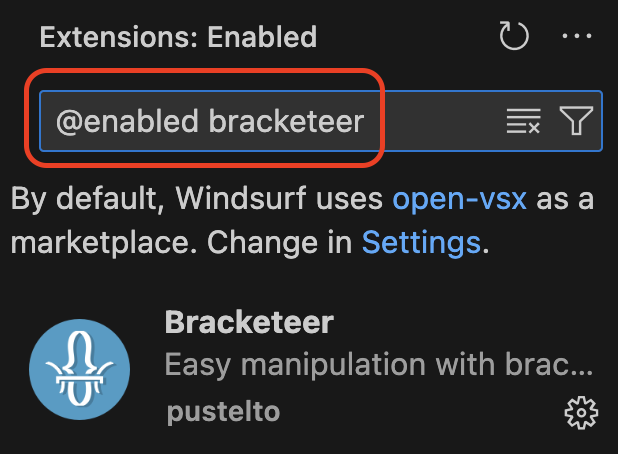
When searching for installed extensions in the Extensions view, you must prepend
@enabledto your search term to see extensions installed via this tool:
Next Steps/Improvements
- Show failed installs in final message when installation is complete, especially when installing multiple extensions
- Allow updates of extensions that have newer versions of what's installed
- Allow selecting extensions for install instead of just installing everything in VS Code
- Some extensions actually don't make sense to copy, e.g., GitHub Copilot when running Windsurf
- Don't install disabled extensions
- Perhaps add a flag that allows user to specify that disabled extensions should also be installed
- Use open-vsx extensions directly when extensions are already available there
Development
To set up the development environment:
# Clone the repository
git clone https://github.com/CodeWithOz/vsix-to-vscodium.git
cd vsix-to-vscodium

# Create and activate a virtual environment
python -m venv .venv
source .venv/bin/activate  # On Windows: .venv\Scripts\activate

# Install development dependencies
pip install flit
flit install -s --deps develop
Run tests:
pytest
License
MIT
1 maintainer

Metadata
1 maintainer
Release files for vsix-to-vscodium 0.5.0
For a detailed explanation of source distributions (sdists) and built distributions (wheels), please see the package formats documentation.
Source distribution (sdist)
| File | Size | Uploaded | Provenance | |
|---|---|---|---|---|
| vsix_to_vscodium-0.5.0.tar.gz | 72.0 kB | Without provenance | Details |
Built distribution (wheel)
| File | Interpreter | ABI | Platform | Reset |
|---|---|---|---|---|
| vsix_to_vscodium-0.5.0-py2.py3-none-any.whl | Python 3, Python 2 | none | any | Details |
Total release size: 78.1 kB
Release files / vsix_to_vscodium-0.5.0.tar.gz
| Download URL | vsix_to_vscodium-0.5.0.tar.gz |
|---|---|
| Size | 72.0 kB |
| Tags | Source |
|
SHA-256 checksum How to use checksums |
967bb5dda0d1e6b8d78606c6130fab0e1d72dffe69f0a8bf16d17ddc8e299ef3
|
|
BLAKE2b-256 checksum How to use checksums |
a61603b99a2284e051b0f94044d37d931ffecaf141c793c5fee678f929f14bf7
|
| Upload date | |
|
Uploaded using Trusted Publishing? What is trusted publishing? |
No |
| Uploaded via |
python-requests/2.32.3
|
Release files / vsix_to_vscodium-0.5.0-py2.py3-none-any.whl
| Download URL | vsix_to_vscodium-0.5.0-py2.py3-none-any.whl |
|---|---|
| Size | 6.1 kB |
| Tags | Python 2 Python 3 |
|
SHA-256 checksum How to use checksums |
97f6f79004d30a328d8e5316275461f59a480d04faabe0f8bdb11f9e0cb4fa04
|
|
BLAKE2b-256 checksum How to use checksums |
20cf9f937aa0d6e5bef97b4afb903800bfdeed44fad959f6b0f228bea068e5bb
|
| Upload date | |
|
Uploaded using Trusted Publishing? What is trusted publishing? |
No |
| Uploaded via |
python-requests/2.32.3
|
Security for vsix-to-vscodium 0.5.0
Provenance
Provenance describes where a file came from. On PyPI, provenance is shared via attestations, which provide a verifiable record of the build or publishing details. View details, limitations and caveats.
No provenance found
None of the files in this release were uploaded with provenance metadata.
A note on package security
PyPI is a repository for distributing packages, not a service for auditing them. While third-party security researchers and our staff do their best to detect and remove malicious packages, PyPI cannot guarantee the quality, security or suitability of any given package.
To learn more about protecting yourself from malicious actors, visit our package security documentation.














