
A tool to download and install VS Code extensions in VSCodium-based IDEs.

Project description
vsix-to-vscodium
A tool to download and install VS Code extensions in VSCodium-based IDEs.
Installation
pip install vsix-to-vscodium
Usage
Install a single extension
# Basic usage (defaults to windsurf)
vsix-to-vscodium publisher.extension-name

# Specify a different IDE
vsix-to-vscodium --ide windsurf publisher.extension-name

# Example: Install Python extension in Windsurf
vsix-to-vscodium --ide windsurf ms-python.python
Transfer all VS Code extensions
If you're switching from VS Code to a VSCodium-based IDE, you can transfer all your installed extensions at once:
# Transfer all extensions (defaults to windsurf)
vsix-to-vscodium --transfer-all

# Transfer all extensions to a specific IDE
vsix-to-vscodium --transfer-all --ide windsurf
Features
- Downloads extensions from VS Code Marketplace
- Automatically installs extensions in VSCodium-based IDEs
- Supports multiple VSCodium-based IDEs (e.g., Windsurf, Cursor)
- Bulk transfer of all installed VS Code extensions
- Supports specific version installation
- Caches downloaded extensions to avoid redundant downloads
- Cleans up downloaded files after installation
Caveats
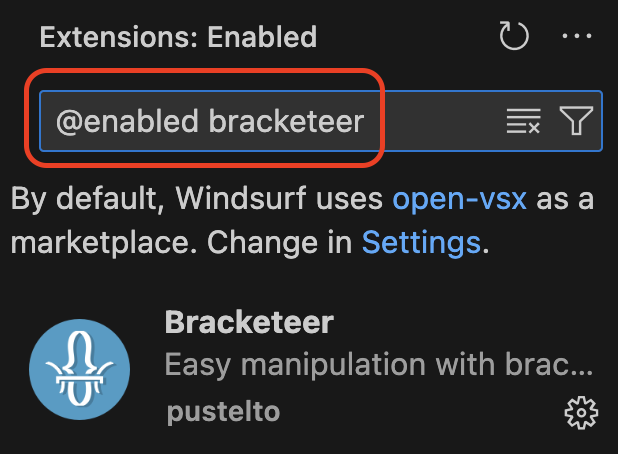
-
When searching for installed extensions in the Extensions view, you must prepend
@enabledto your search term to see extensions installed via this tool:
Next Steps/Improvements
- Always remove downloaded files, even if installation fails
- Show failed installs in final message when installation is complete, especially when installing multiple extensions
- Allow updates of extensions that have newer versions of what's installed
- Allow selecting extensions for install instead of just installing everything in VS Code
- Some extensions actually don't make sense to copy, e.g., GitHub Copilot when running Windsurf
- Don't install disabled extensions
- Perhaps add a flag that allows user to specify that disabled extensions should also be installed
- Use open-vsx extensions directly when extensions are already available there
Development
To set up the development environment:
# Clone the repository
git clone https://github.com/CodeWithOz/vsix-to-vscodium.git
cd vsix-to-vscodium

# Create and activate a virtual environment
python -m venv .venv
source .venv/bin/activate  # On Windows: .venv\Scripts\activate

# Install development dependencies
pip install flit
flit install -s --deps develop
Run tests:
pytest
License
MIT
Release history Release notifications | RSS feed


Download files
Download the file for your platform. If you're not sure which to choose, learn more about installing packages.
Source Distribution
Built Distribution
Filter files by name, interpreter, ABI, and platform.
If you're not sure about the file name format, learn more about wheel file names.
Copy a direct link to the current filters
File details
Details for the file vsix_to_vscodium-0.3.0.tar.gz.
File metadata
- Download URL: vsix_to_vscodium-0.3.0.tar.gz
- Upload date:
- Size: 71.4 kB
- Tags: Source
- Uploaded using Trusted Publishing? No
- Uploaded via: python-requests/2.32.3
File hashes
| Algorithm | Hash digest | |
|---|---|---|
| SHA256 |
98c49d13e9ff6cd125e92705e52a51265f318f0fcad48e46abea504a50187a51
|
|
| MD5 |
c33e50fbf46e52ccb243163d4c887a5d
|
|
| BLAKE2b-256 |
64e3526e7840618052d8efa018780f4c390a4444abd5ea155a532ad7d30721b8
|
File details
Details for the file vsix_to_vscodium-0.3.0-py2.py3-none-any.whl.
File metadata
- Download URL: vsix_to_vscodium-0.3.0-py2.py3-none-any.whl
- Upload date:
- Size: 5.8 kB
- Tags: Python 2, Python 3
- Uploaded using Trusted Publishing? No
- Uploaded via: python-requests/2.32.3
File hashes
| Algorithm | Hash digest | |
|---|---|---|
| SHA256 |
02be12243063164883da14f69860dd749716dd56a61004520d3f98cbb63eaa00
|
|
| MD5 |
cd99d28194d6e56af6e41c9c70970e5a
|
|
| BLAKE2b-256 |
1ec50569a017bf9ab0e80dda1ecee8e41ba2399bd5ec8742dec2114b1a4ea1c8
|






