

A tool to identify remotely exploitable vulnerabilities using LLMs and static code analysis.
World's first autonomous AI-discovered 0day vulnerabilities
Description
Vulnhuntr uses LLMs to analyze entire code call chains starting from remote user input and ending at server output, identifying complex, multi-step vulnerabilities that go beyond what traditional static code analysis tools can find. See the 0-day details including Vulnhuntr output here: Protect AI Vulnhuntr Blog
Vulnerabilities Found
[!TIP] Found a vulnerability using Vulnhuntr? Submit a report to huntr.com to get $$ and submit a PR to add it to the list below!
[!NOTE] This table is just a sample of the vulnerabilities found so far. We will unredact as responsible disclosure periods end.
| Repository | Stars | Vulnerabilities |
|---|---|---|
| gpt_academic | 67k | LFI, XSS |
| ComfyUI | 66k | XSS |
| Langflow | 46k | RCE, IDOR |
| FastChat | 37k | SSRF |
| Ragflow | 31k | RCE |
| LLaVA | 21k | SSRF |
| gpt-researcher | 17k | AFO |
| Letta | 14k | AFO |
Limitations
- Only Python codebases are supported.
- Can only identify the following vulnerability classes:
- Local file include (LFI)
- Arbitrary file overwrite (AFO)
- Remote code execution (RCE)
- Cross site scripting (XSS)
- SQL Injection (SQLI)
- Server side request forgery (SSRF)
- Insecure Direct Object Reference (IDOR)
Installation
[!IMPORTANT] Vulnhuntr requires Python 3.10-3.13 due to dependencies on Jedi for Python code parsing. It will not work reliably with Python 3.9 or earlier, or Python 3.14+.
Recommended: Virtual Environment with pip/uv
We recommend installing in a virtual environment to isolate dependencies:
Using venv and pip:
python3.10 -m venv venv
source venv/bin/activate
pip install vulnhuntr
Using uv (faster):
uv venv --python 3.10
source .venv/bin/activate
uv pip install vulnhuntr
Alternative: pipx or Docker
Using pipx:
pipx install vulnhuntr --python python3.10
Using Docker:
docker build -t vulnhuntr https://github.com/diaz3618/vulnhuntr.git#main
Development Installation
Clone and install from source:
git clone https://github.com/diaz3618/vulnhuntr
cd vulnhuntr
python3.10 -m venv venv
source venv/bin/activate
pip install -e ".[dev]"
Usage
This tool analyzes GitHub repositories for potential remotely exploitable vulnerabilities using LLMs and static code analysis.
API Key Configuration
Set API keys via environment variables or a .env file:
# Environment variable
export ANTHROPIC_API_KEY="sk-ant-..."

# Or .env file (recommended for development)
ANTHROPIC_API_KEY=sk-ant-...
OPENAI_API_KEY=sk-...
OPENROUTER_API_KEY=sk-or-...
[!CAUTION] Always set spending limits or closely monitor costs with the LLM provider you use. This tool has the potential to rack up hefty bills as it tries to fit as much code in the LLMs context window as possible.
[!TIP] We recommend using Claude for the LLM. Through testing we have had better results with it over GPT. For free testing, try OpenRouter with free models like
qwen/qwen3-coder:free.
Command Line Interface
usage: vulnhuntr [-h] -r ROOT [-a ANALYZE] [-l {claude,gpt,ollama,openrouter}] [-v]
                 [--dry-run] [--budget BUDGET] [--resume [RESUME]] [--no-checkpoint]
                 [--sarif PATH] [--html PATH] [--json PATH] [--csv PATH] [--markdown PATH]
                 [--export-all DIR] [--create-issues] [--webhook URL]
                 [--webhook-format {json,slack,discord,teams}] [--webhook-secret SECRET]

Analyze a GitHub project for vulnerabilities. Set API keys via environment variables or .env file.

options:
  -h, --help            show this help message and exit
  -r ROOT, --root ROOT  Path to the root directory of the project
  -a ANALYZE, --analyze ANALYZE
                        Specific path or file within the project to analyze
  -l {claude,gpt,ollama,openrouter}, --llm {claude,gpt,ollama,openrouter}
                        LLM client to use (default: claude). OpenRouter provides access to free models.
  -v, --verbosity       Increase output verbosity (-v for INFO, -vv for DEBUG)

Cost Management:
  --dry-run             Estimate costs without running analysis
  --budget BUDGET       Maximum budget in USD (stops analysis when exceeded)
  --resume [RESUME]     Resume from checkpoint (default: .vulnhuntr_checkpoint)
  --no-checkpoint       Disable checkpointing

Report Generation:
  --sarif PATH          Output SARIF 2.1.0 report to specified file
  --html PATH           Output HTML report to specified file
  --json PATH           Output JSON report to specified file
  --csv PATH            Output CSV report to specified file
  --markdown PATH       Output Markdown report to specified file
  --export-all DIR      Export all report formats to specified directory

Integrations:
  --create-issues       Create GitHub issues for findings
  --webhook URL         Send findings to webhook URL
  --webhook-format      Webhook payload format (json, slack, discord, teams)
Cost Management Features
Vulnhuntr includes built-in cost tracking and budget controls:
Estimate costs before analysis:
vulnhuntr -r /path/to/repo --dry-run
Set a maximum budget:
vulnhuntr -r /path/to/repo --budget 5.0 # Stop at $5.00
Resume interrupted analysis:
# Analysis automatically checkpoints progress
vulnhuntr -r /path/to/repo --resume

# Continue with higher budget if needed
vulnhuntr -r /path/to/repo --resume --budget 10.0
Examples
Basic analysis with .env file:
Create .env file:
# .env
ANTHROPIC_API_KEY=sk-ant-...
Run analysis:
vulnhuntr -r /path/to/target/repo/
[!TIP] We recommend analyzing specific files that handle remote user input rather than entire repositories for better results and lower costs.
Analyze a specific file with budget control:
vulnhuntr -r /path/to/repo -a server.py --budget 3.0 -v
Generate HTML report with cost estimation:
# First estimate costs
vulnhuntr -r /path/to/repo -a api/ --dry-run

# Then run with budget and generate report
vulnhuntr -r /path/to/repo -a api/ --budget 5.0 --html report.html -v
Using environment variables (alternative to .env):
export OPENAI_API_KEY="sk-..."
vulnhuntr -r /path/to/target/repo/ -a server.py -l gpt
Docker installation with volume mount:
docker run --rm \
  -e ANTHROPIC_API_KEY=sk-ant-... \
  -v /path/to/target/repo:/repo \
  vulnhuntr:latest -r /repo -a server.py
Free testing with OpenRouter:
# .env
OPENROUTER_API_KEY=sk-or-...

# Run with free model
vulnhuntr -r /path/to/repo -a api.py -l openrouter --budget 0.50
Experimental
Ollama is included as an option, however we haven't had success with the open source models structuring their output correctly.
export OLLAMA_BASE_URL=http://localhost:11434/api/generate
export OLLAMA_MODEL=llama3.2
vulnhuntr -r /path/to/target/repo/ -a server.py -l ollama
Logic Flow
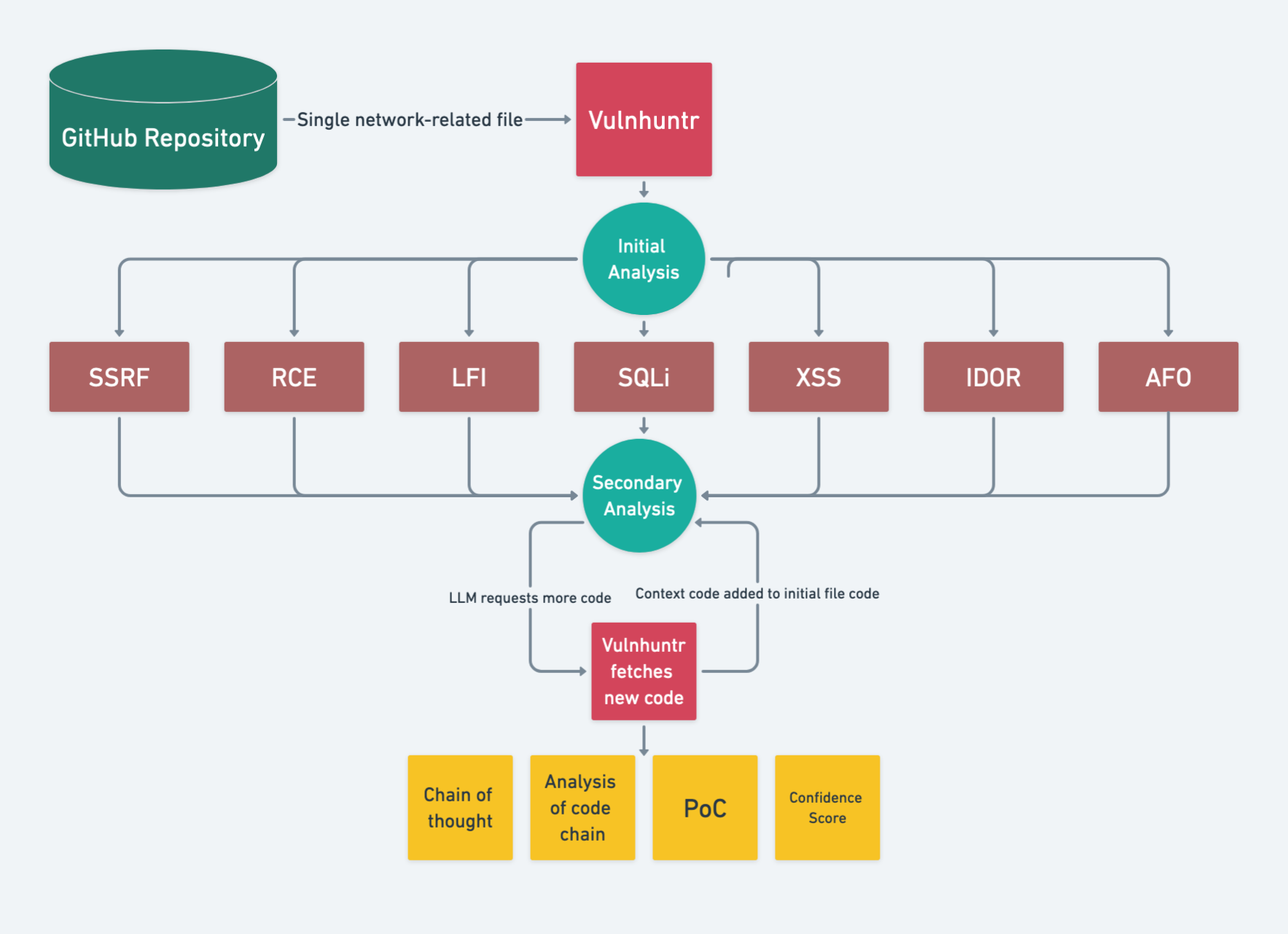
- LLM summarizes the README and includes this in the system prompt
- LLM does initial analysis on an entire file and reports any potential vulnerabilities
- Vulnhuntr then gives the LLM a vulnerability-specific prompt for secondary analysis
- Each time the LLM analyzes the code, it requests additional context functions/classes/variables from other files in the project
- It continues doing this until the entire call chain from user input to server processing is complete then gives a final analysis
- The final analysis consists of it's reasoning, a proof of concept exploit, and a confidence score
[!TIP] Generally confidence scores < 7 mean there's unlikely a vulnerability. Confidence scores of 7 mean it should be investigated, and confidence scores of 8+ mean it is very likely to be a valid vulnerability.
Output
The tool generates detailed reports in multiple formats:
- SARIF 2.1.0: For integration with GitHub Security, IDE security extensions, and CI/CD pipelines
- HTML: Interactive web-based reports with vulnerability details
- JSON: Machine-readable format for custom integrations
- CSV: Spreadsheet-compatible for tracking and analysis
- Markdown: Documentation-friendly format
Example: Generate Multiple Report Formats
vulnhuntr -r /path/to/repo --sarif report.sarif --html report.html --json report.json
Example: Export All Formats at Once
vulnhuntr -r /path/to/repo --export-all ./reports/
Console Output
Below is a truncated example from a vulnerability found in Ragflow:
analysis:
  The add_llm function uses user-supplied input (req['llm_factory']) to
  dynamically instantiate classes from model dictionaries. This allows
  arbitrary code execution via crafted factory values.

poc:
  POST /add_llm HTTP/1.1
  {"llm_factory": "__import__('os').system", "llm_name": "id", ...}

confidence_score: 8
vulnerability_types: [RCE]
Full output includes a scratchpad field with the LLM's reasoning chain.
Logging
The tool logs analysis steps and results to vulhuntr.log.
Authors
Original Authors (Protect AI):
- Dan McInerney: dan@protectai.com, @DanHMcinerney
- Marcello Salvati: marcello@protectai.com, @byt3bl33d3r
Current Developer for this Fork:
- Daniel Diaz Santiago: daniel.diaz.stg@gmail.com
License
This project is licensed under the GNU Affero General Public License v3.0 (AGPL-3.0).
See the LICENSE file for full details. Original project by Protect AI.
1 maintainer

Metadata
1 maintainer
Release files for vulnhuntr 1.2.2
For a detailed explanation of source distributions (sdists) and built distributions (wheels), please see the package formats documentation.
Source distribution (sdist)
| File | Size | Uploaded | |
|---|---|---|---|
| vulnhuntr-1.2.2.tar.gz | 175.2 kB | Details |
Built distribution (wheel)
| File | Interpreter | ABI | Platform | Reset |
|---|---|---|---|---|
| vulnhuntr-1.2.2-py3-none-any.whl | Python 3 | none | any | Details |
Total release size: 295.1 kB
Release files / vulnhuntr-1.2.2.tar.gz
| Download URL | vulnhuntr-1.2.2.tar.gz |
|---|---|
| Size | 175.2 kB |
| Tags | Source |
|
SHA-256 checksum How to use checksums |
00b4c71c39551edf0c652cdd02b88cc6fcf02efec45fa1b33ddd448fdd0d1998
|
|
BLAKE2b-256 checksum How to use checksums |
c5970a7bfaef1b411ab75e5bdce58464a2cf28fb029f42a21f911e9d197b5bc7
|
| Upload date | |
|
Uploaded using Trusted Publishing? What is trusted publishing? |
No |
| Uploaded via |
twine/6.1.0 CPython/3.12.8
|
Release files / vulnhuntr-1.2.2-py3-none-any.whl
| Download URL | vulnhuntr-1.2.2-py3-none-any.whl |
|---|---|
| Size | 119.9 kB |
| Tags | Python 3 |
|
SHA-256 checksum How to use checksums |
a70b582b513f2df718a9df1e910bd1cd51e9ddee91703c03f3641ac097f7ff83
|
|
BLAKE2b-256 checksum How to use checksums |
531051ef667d69117f8923fae6169da7a08f6eaf8e721a5b96d141609c76fa16
|
| Upload date | |
|
Uploaded using Trusted Publishing? What is trusted publishing? |
No |
| Uploaded via |
twine/6.1.0 CPython/3.12.8
|














