








wachtmeater
MEATER BBQ probe monitoring with Matrix chat alerts and SIP phone call notifications. Reads MEATER Cloud cooks directly from the cloud WebSocket (with CDP page scraping as fallback), posts status updates to E2E-encrypted Matrix rooms, and calls you when something needs attention (fire out, target reached, stall, cook ended, etc.). Supports automatic per-cook Matrix room creation and TOML-based configuration.
Why this exists
Long cooks — brisket, pulled pork, pork belly — routinely run 10 to 16 hours. You go to sleep, and while you sleep the fire can go out, the meat can stall for hours, or the target temperature gets reached with nobody there to pull it off. By the time you notice, the cook is ruined or at least far from ideal.
wachtmeater watches the MEATER Cloud page continuously and reaches out only when something actually needs your attention. Periodic Matrix messages give you the full picture at a glance — current internal and ambient temps, elapsed time, remaining estimate — so you can check in whenever you want without opening an app.
When things go sideways (or the cook finishes), a SIP phone call is triggered automatically. A phone call is the reliable escape hatch here: push notifications are easy to sleep through, but a ringing phone is not.
Tip: Save the calling number as a contact on your phone and mark it as a VIP / priority / starred contact. That way the call bypasses Do Not Disturb mode and actually wakes you up at 3 a.m. when your brisket hits target.
Screenshots
Real-world Beef Brisket cook, ~14 hours, monitored from start to finish.
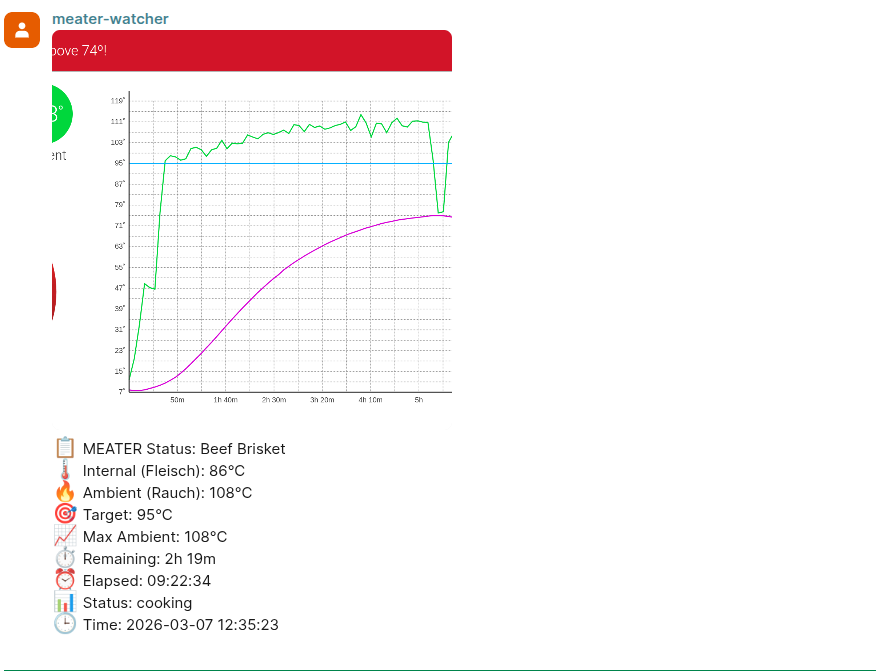
Matrix status update mid-cook — 86 °C internal, 9 h 22 min elapsed.
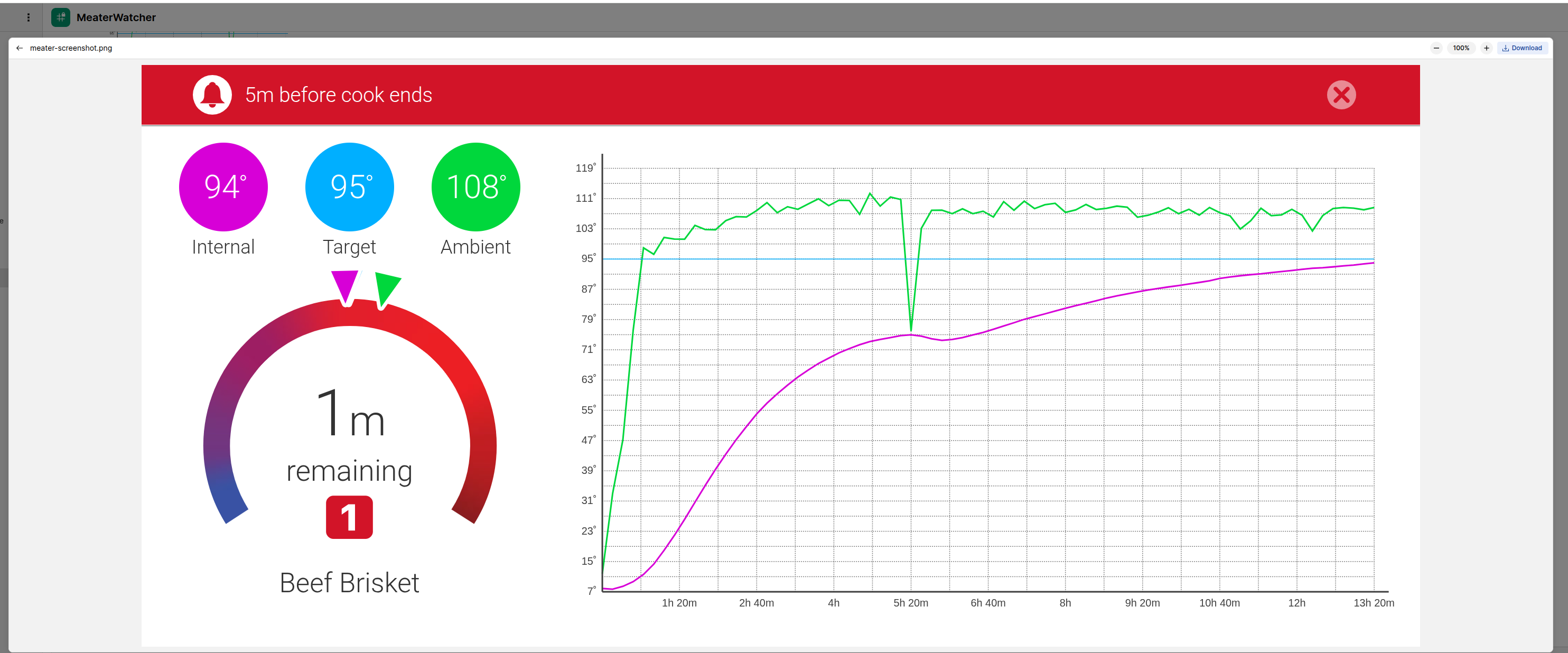
MEATER Cloud dashboard showing "5 minutes before cook ends" — 94 °C with 95 °C target.
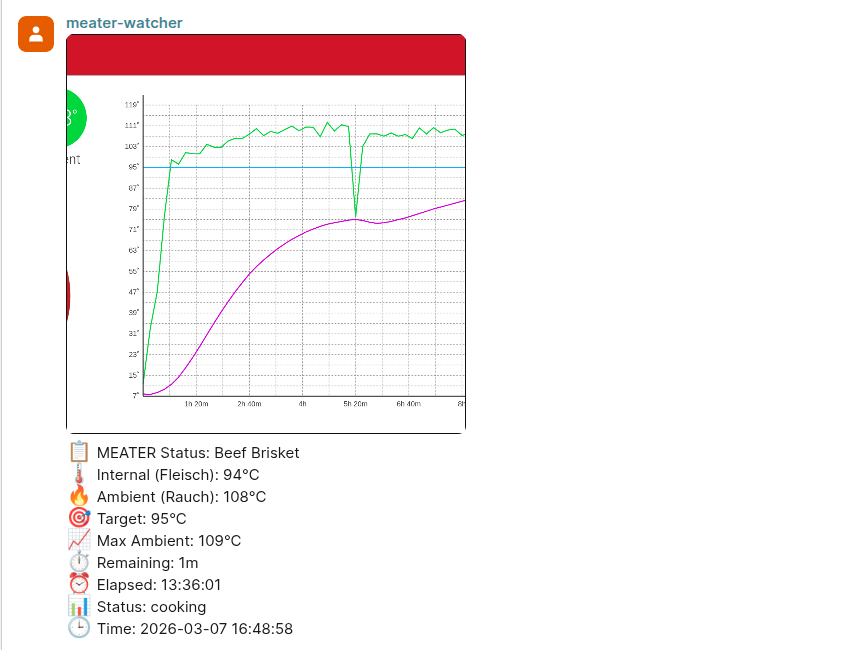
Matrix status update near the end — 94 °C internal, 13 h 36 min elapsed.
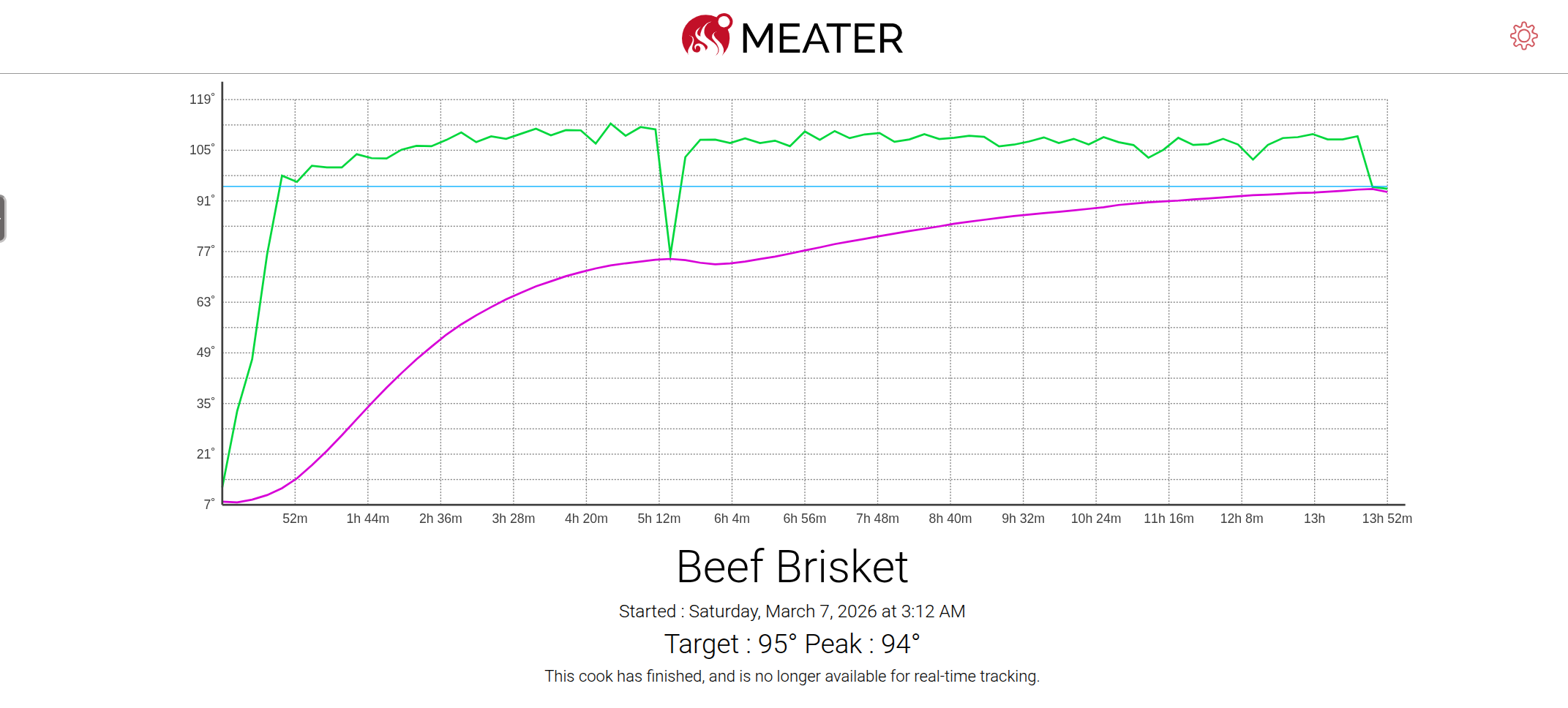
MEATER Cloud finished cook summary — target 95 °C, peak 94 °C, total time ~14 hours.
Components
| Module | Description |
|---|---|
meater_watcher |
Persistent async event loop: periodic MEATER checks + Matrix command interface |
meater_monitor |
Single-shot fetch: hybrid entry point (extract_cook_data) that prefers the cloud WebSocket and falls back to CDP page scraping; also captures the cook-page screenshot |
meater_cloud |
MEATER Cloud WebSocket client: sub-degree temperatures without a browser (see Temperature resolution) |
create_meater_watcher_job |
Deploys/destroys the watcher stack as a Kubernetes Job (Namespace, Secret, Job). In-cluster vs out-of-cluster auth detected automatically. |
operator |
Long-running Matrix-driven controller: spawns/destroys/lists watcher Jobs from operator … chat commands. Pitmaster-MXID gate, auto-trusts own Matrix devices for cross-pod E2E. |
call_pitmaster |
Triggers a SIP phone call via sipstuff-operator |
matrix_adapter |
nio-based Matrix backend; configured-room (ID or #alias:srv) and per-cook auto-created room can both be active simultaneously |
CLI Sub-Commands
| Sub-command | Purpose |
|---|---|
wachtmeater watcher [--skip-startup-test-call] |
Persistent watcher event loop with Matrix listener |
wachtmeater monitor [<url>] |
Single-shot MEATER status check via CDP |
wachtmeater call <text> |
Trigger a SIP phone call via sipstuff-operator |
wachtmeater send-matrix <text> [--image PATH] [--room ID] |
Send message (and optional screenshot) to Matrix rooms |
wachtmeater deploy --meater-url <URL> [--delete] |
Deploy/delete MEATER watcher K8s Job |
wachtmeater operator |
Long-running Matrix-driven controller. Same as wachtmeater-operator console script for K8s pods. |
Matrix Commands
Send these in the Matrix room the bot has joined (case-insensitive):
| Command | Description |
|---|---|
status |
Fetch and post current MEATER status |
eta / restzeit / prognose |
Run a fresh check but post only the remaining-time lines (MEATER estimate, watcher trend forecast, end-phase forecast) without screenshot |
enable tempdown |
Enable ambient temp drop alert (fire out detection). The ambient high-water mark is only tracked once the core reaches TEMPDOWN_WARMUP_CORE_TEMP (40 °C), so warm-up overshoots do not count |
disable tempdown |
Disable ambient temp drop alert |
enable ruhephase <temp> |
Enable rest/cooldown alert at target temp (C). Automatically disables tempdown — the cooldown is intended here and would otherwise trigger a false "fire is out" alarm. Re-arm with enable tempdown afterwards |
disable ruhephase |
Disable rest/cooldown alert (does not restore tempdown) |
enable stall [<rate>] |
Enable stall detection (optional: threshold in °C/h, default 4). Fires when the core rises slower than that over STALL_WINDOW_MINUTES inside STALL_CORE_MIN–STALL_CORE_MAX; falling temps and disturbances (lid open, probe re-seated) never count as a stall, and after the wrap it no longer asks to wrap |
disable stall |
Disable stall detection |
enable wrap <temp> |
Enable wrap reminder at internal temp (C) |
disable wrap |
Disable wrap reminder |
enable pull <temp> |
Take-out alert (Matrix message and SIP call) when the core temp reaches <temp> C; overrides the MEATER target for the target-reached alert. Aliases: rausnehmen <temp>, set pull <temp> |
disable pull |
Disable the take-out override (MEATER target governs again) |
enable ambient <min> <max> |
Enable ambient range alert (min/max C) |
disable ambient |
Disable ambient range alert |
enable cookend |
Enable cook-end detection (auto-stop) |
disable cookend |
Disable cook-end detection |
enable offline |
Enable station-offline alert (SIP phone call on prolonged station outage) |
disable offline |
Disable station-offline alert |
enable startcall |
Enable the startup test call (applied on the next watcher start) |
disable startcall |
Disable the startup test call |
set interval <secs> |
Override the periodic check interval (seconds); applies from the next cycle, persists per cook (min 30 s) |
reset interval |
Restore the config-default check interval |
reset stall |
Reset stall alert (re-arms after it fired) |
reset wrap |
Reset wrap alert (re-arms after it fired) |
reset ambient |
Clear the tracked ambient high-water mark (Max Ambient). The next check re-seeds it from the current reading, so tempdown measures its drop from there. Use after deliberately turning the fire down. Aliases: reset maxambient, reset max ambient, ambient reset |
pause [<min>] |
Lid open / wrapping: mute tempdown, stall and ambient range for <min> minutes (default PAUSE_DEFAULT_MINUTES); the ambient high-water mark is reset when the pause ends. Pull, offline and cook-end alerts stay active. Shown with remaining time in the status |
wrapped [<min>] |
Marks the wrap as done and starts the end-phase forecast (with <min> it also pauses like pause): from ENDPHASE_SETTLE_MINUTES after the wrap on, the watcher fits T(t) = A - (A - T0)·e^(-c·t) with A = pit (c and the start value T0 are fitted), and shows the ETA from the current reading |
set pit <temp> |
Real smoker temperature (°C) — A of the end-phase forecast. Default PIT_TEMP |
reset pit |
Back to PIT_TEMP |
trend ab HH:MM / trend reset |
Evaluate trend and stall rate only from HH:MM on (e.g. after a fire flare-up); trend reset goes back to all data |
resume |
End a pause early |
testcall [<text>] |
Trigger a SIP phone call to the pitmaster with optional spoken text (default: Wachtmeater Testanruf). The text keeps its original case so TTS pronounces names correctly. |
hilfe / help / ? / /help |
Show available commands |
stop / quit / beenden / exit |
Shut down the watcher loop |
Operator Commands
Operator commands are recognised only in the room configured as MATRIX_OPERATOR_LISTENING_ROOM, and only when the sender's MXID matches MATRIX_PITMASTER. Any other sender is silently ignored.
| Command | Description |
|---|---|
operator new <MEATER_URL> |
Spawn a new watcher Job for the given cook URL. Calls create_resources() end-to-end (namespace + Secret + Job). |
operator delete <spec> |
Delete a watcher. <spec> may be a full MEATER URL, the cook UUID, the 8-char short suffix, or the 1-based index from the most recent operator list reply. |
operator resume <spec> |
Recreate a watcher whose cook was already ended, with cook-end detection disabled so it keeps monitoring. Same <spec> forms as operator delete. |
operator restart <spec> |
Recreate a watcher Job (delete + create), e.g. to pick up a newly deployed image. The cook continues from its persisted state with all settings unchanged. Same <spec> forms as operator delete. Note: deleting a watcher pod directly does not work for this — the gracefully stopped pod counts as a successful completion and the Job is marked Complete. |
operator list |
List active meater-watcher-* Jobs in the namespace with status (Active/Succeeded/Failed/Pending) and cook URL. The shown indices feed operator delete <N>. |
operator status |
Operator's own health summary: uptime, K8s API reachability, watcher count, listening room. |
operator help / hilfe |
Show available operator commands |
Cook-End Detection
When cookend is enabled, the watcher uses four independent mechanisms to detect that a cook has finished:
| # | Mechanism | Trigger | Default threshold |
|---|---|---|---|
| A | Consecutive fetch errors | Fetch fails N times in a row | COOKEND_ERROR_THRESHOLD = 3 |
| B | Probe removed | Internal temp drops below threshold after having been above 50 °C | COOKEND_PROBE_REMOVED_TEMP = 35.0 °C |
| C | Status "done" | MEATER reports internal temp ≥ target | — |
| D | MEATER Cloud "finished" | Cook is reported finished (cookSummary.isFinished, or the #cook.finished CSS class when scraping) |
— |
Mechanisms A, B, and D post a Matrix message and trigger a SIP phone call. Mechanism C sets cook-ended state silently (the watcher loop posts a generic shutdown message). The watcher loop stops automatically once any mechanism fires.
A genuine HTTP 404/410 on the cook URL is treated as authoritative "cook is gone" on both fetch paths. Every other failure — CDP outage, cloud unreachable, timeout — is transient and never ends a cook.
Temperature resolution
The cook page renders temperatures already rounded to whole degrees (.internal-value literally contains 95°), so no amount of DOM parsing can recover decimals. The WebSocket feeding that page carries the underlying fixed-point integers instead, which is why meater_cloud is the preferred path:
| Field | Raw | ÷ 32 | Page shows |
|---|---|---|---|
internal |
3044 | 95.125 °C | 95° |
ambient |
3562 | 111.3125 °C | 111° |
target |
3136 | 98.0 °C | 98° |
The divisor is the share page's own DEFAULT_DENOMINATOR = 32 (TemperatureToCelsius(t) = t / 32), giving 1/32 °C = 0.03125 °C resolution. The connection token sits in the share page HTML (window.MEATER.config), so a plain HTTP GET is enough — no Playwright, no CDP.
Resolution is not accuracy. MEATER specifies roughly ±0.5–1 °C, so the decimals sharpen trends — stall detection in particular, which compares small deltas across checks — rather than making absolute readings more correct. Alert thresholds are unchanged; only the reported values got finer. Status output is formatted to one decimal place.
This is an undocumented internal interface and may change without notice, which is exactly why the scraper is retained as an automatic fallback. When the watcher falls back, its status message says so (Quelle: Browser-Fallback (nur ganze Grad)).
End-phase forecast
After wrapped, the watcher fits the end phase of the cook with Newton's law of heating, T(t) = A - (A - T0)·e^(-c·t), using its own core readings. A is the real smoker temperature (set pit, default 110 °C), the fit starts ENDPHASE_SETTLE_MINUTES after the wrap; c and the start value T0 are fitted with a robust (Huber) loss via scipy, so a single glitchy reading barely moves the curve. The status message shows the ETA to the pull target from the current reading. Background and validation: docs/kerntemperatur-prognose_en.md (German: docs/kerntemperatur-prognose.md).
Configuration
Settings are loaded from a TOML config file (wachtmeater.toml or path in $CONFIG), a flat .env file, or plain environment variables. Existing env vars always take precedence. See wachtmeater.toml.example for a full annotated example.
Local setup
wachtmeater.toml.example is the only config committed to git. For local development, create your own config from it:
cp wachtmeater.toml.example wachtmeater.local.toml
# then edit wachtmeater.local.toml with your MEATER URL, Matrix and SIP credentials
wachtmeater.local.toml is git-ignored (*.local.*) and never committed — keep your real credentials there. It is picked up automatically: read_dot_env_to_environ() searches (package dir, then CWD) for wachtmeater.toml → .env → .local.env → wachtmeater.local.toml. To use a different path explicitly, set CONFIG=/path/to/your.toml (e.g. CONFIG=wachtmeater.local.toml python -m pytest). In the container/K8s the config instead comes from the generated Secret mounted at /config/wachtmeater.toml.
| Variable | Description | Default |
|---|---|---|
MEATER_URL |
MEATER Cloud cook URL to monitor | — (required) |
BROWSER_CDP_URL |
CDP endpoint for headless Chrome | http://chrome-kasmvnc.kasmvnc.svc.cluster.local:9222 |
SCREENSHOT_DIR |
Directory for cook page screenshots | /data |
SCREENSHOT_ENABLED |
Capture a cook-page screenshot. Set false to run fully browserless (no CDP needed on the happy path) |
true |
CLOUD_WS_ENABLED |
Prefer the MEATER Cloud WebSocket over page scraping | true |
CLOUD_WS_TIMEOUT |
Seconds to wait for the share page and the first cook frame | 20.0 |
STATE_FILE_DIR |
Directory for the JSON state file | /data |
STATE_FILE_NAME |
State file name (auto-generated from cook UUID when empty) | "" |
CHECK_INTERVAL |
Seconds between periodic checks | 600 |
STALL_WINDOW_MINUTES |
Time window for the stall rise rate (independent of the check interval) | 30 |
STALL_CORE_MIN / STALL_CORE_MAX |
Core range (°C) in which stall detection runs | 60.0 / 82.0 |
STALL_DISTURBANCE_AMBIENT_DROP |
Minimum ambient drop (°C below the median of the last FORECAST_WINDOW_MINUTES) that marks a disturbance; raised to 3σ of the reading noise (Theil-Sen + MAD) on a jumpy pit |
15.0 |
STALL_DISTURBANCE_CORE_DROP |
Minimum core drop (°C vs. previous reading) that marks a disturbance; raised to 3σ of the reading noise when noisier | 1.0 |
STALL_DISTURBANCE_AMBIENT_RISE |
Minimum ambient rise (°C above the highest reading of the last FORECAST_WINDOW_MINUTES) that marks a flare-up and restarts trend and end-phase fit; raised to 3σ of the reading noise on a jumpy pit |
5.0 |
STALL_DISTURBANCE_PAUSE_CHECKS |
Checks stall detection sits out after a disturbance | 2 |
PAUSE_DEFAULT_MINUTES |
Default duration of pause |
20 |
FORECAST_WINDOW_MINUTES |
Window for the watcher's own linear ETA forecast to the pull target | 60 |
PIT_TEMP |
Real smoker temperature (°C) for the end-phase forecast, overridable per cook via set pit |
110.0 |
TEMPDOWN_WARMUP_CORE_TEMP |
Core temperature (°C) from which the ambient high-water mark for tempdown is tracked — warm-up overshoots below it are ignored. 0 = track from the first reading |
40.0 |
ENDPHASE_SETTLE_MINUTES |
End-phase fit start after wrapped (fixed) |
60 |
ENDPHASE_MIN_MINUTES |
Minimum end-phase data before the exponential forecast is shown | 60 |
AMBIENT_TEMP_DROP_THRESHOLD |
Ambient temp drop (°C) to trigger fire-out alert | 10 |
COOKEND_ERROR_THRESHOLD |
Consecutive fetch errors before declaring cook ended | 3 |
COOKEND_PROBE_REMOVED_TEMP |
Internal temp (°C) below which probe counts as removed | 35.0 |
STATION_OFFLINE_CALL_THRESHOLD |
Consecutive offline checks before the station-offline SIP call fires | 2 |
MATRIX_HOMESERVER |
Matrix homeserver URL | http://synapse.matrix.svc.cluster.local:8008 |
MATRIX_USER |
Matrix bot user ID | — (required) |
MATRIX_PASSWORD |
Matrix bot password | — (required) |
MATRIX_ROOM |
Default room ID or alias to join | !exampleroom:matrix.example.com |
MATRIX_AUTO_CREATE_ROOM |
Auto-create an E2E-encrypted Matrix room per cook UUID | false |
MATRIX_UPDATES_TO_BROADCAST_ROOM |
Whether cook updates also go to MATRIX_ROOM when a per-cook room exists (false = per-cook room only) |
true |
MATRIX_PITMASTER |
Matrix user ID to invite into auto-created rooms; also the only MXID allowed to issue operator … commands |
"" |
MATRIX_PITMASTER_ADMIN |
Grant the pitmaster admin (power level 100) in the auto-created per-cook room. Applies only to rooms the bot creates itself — existing rooms are never modified | true |
MATRIX_OPERATOR_LISTENING_ROOM |
Room (!id:srv or #alias:srv) the operator listens in for operator … commands |
"" |
CRYPTO_STORE_PATH |
Path for E2E encryption crypto store | /data/crypto_store |
OPERATOR_CRYPTO_STORE_PATH |
Separate crypto store for the operator pod (avoids SQLite races with watcher pods sharing the same MXID) | /data/operator_crypto_store |
AUTH_METHOD |
Auth method (password or jwt) |
password |
KEYCLOAK_URL |
Keycloak base URL (required if jwt) |
— |
KEYCLOAK_REALM |
Keycloak realm name | — |
KEYCLOAK_CLIENT_ID |
Keycloak client ID | — |
KEYCLOAK_CLIENT_SECRET |
Keycloak client secret | "" |
JWT_LOGIN_TYPE |
Matrix login type for JWT | com.famedly.login.token.oauth |
SOPERATORURL |
sipstuff-operator call endpoint | http://sipstuff-operator.sipstuff.svc.cluster.local/call |
Alert defaults (first run only)
These set the initial values written into a fresh per-cook state file. Once the watcher has saved state, runtime enable … / disable … Matrix commands take precedence — changes to these env vars are ignored on subsequent runs unless the state file is removed. The operator propagates all of these into spawned watcher TOMLs so each new cook starts with the operator's preferred profile.
| Variable | Description | Default |
|---|---|---|
ALERT_DEFAULT_TEMPDOWN_ENABLED |
Ambient temp drop alert (fire-out detection) | true |
ALERT_DEFAULT_RUHEPHASE_ENABLED |
Rest/cooldown alert | false |
ALERT_DEFAULT_RUHEPHASE_TARGET_TEMP |
Target cooldown temp (°C) | 0.0 |
ALERT_DEFAULT_STALL_ENABLED |
Stall detection | false |
ALERT_DEFAULT_STALL_MAX_RATE |
Stall threshold: core rise rate (°C/h) below which a stall is reported (replaces ALERT_DEFAULT_STALL_MIN_DELTA) |
4.0 |
ALERT_DEFAULT_WRAP_ENABLED |
One-shot wrap reminder | false |
ALERT_DEFAULT_WRAP_TARGET_TEMP |
Internal temp (°C) at which to remind about wrapping | 0.0 |
ALERT_DEFAULT_AMBIENT_RANGE_ENABLED |
Smoker too hot / too cold alert | false |
ALERT_DEFAULT_AMBIENT_RANGE_MIN |
Min acceptable ambient temp (°C) | 0.0 |
ALERT_DEFAULT_AMBIENT_RANGE_MAX |
Max acceptable ambient temp (°C) | 0.0 |
ALERT_DEFAULT_COOKEND_ENABLED |
Cook-end auto-detection | true |
ALERT_DEFAULT_STATION_OFFLINE_ENABLED |
Station-offline alert (SIP call on prolonged outage) | true |
Installation
pip install wachtmeater
From source
git clone https://github.com/vroomfondel/wachtmeater.git
cd wachtmeater
make install
source .venv/bin/activate
Running locally
# Single status check
./runcli.sh monitor

# Persistent watcher with Matrix listener
./runcli.sh watcher
Override settings in runcli.local.include.sh (sourced automatically, gitignored).
Kubernetes Deployment
There are two ways to run watcher Jobs in a cluster:
A) Direct CLI deploy (one cook at a time)
wachtmeater deploy --meater-url https://cooks.cloud.meater.com/cook/<uuid>
This creates: Namespace meater, Secret with the rendered wachtmeater.toml, and a Job running xomoxcc/wachtmeater:latest. Auth picks load_incluster_config() automatically when KUBERNETES_SERVICE_HOST is set, otherwise reads ~/.kube/config.
To tear down (deletes the per-cook Job and Secret; the shared meater namespace is kept):
wachtmeater deploy --meater-url https://cooks.cloud.meater.com/cook/<uuid> --delete
Alternative: module invocation
python -m wachtmeater.create_meater_watcher_job \
  --meater-url https://cooks.cloud.meater.com/cook/<uuid>
python -m wachtmeater.create_meater_watcher_job --delete
B) Operator (Matrix-driven, always-on)
For a more permanent setup, deploy the wachtmeater operator as a long-running Pod in the cluster. It listens in a configured Matrix room for operator new, operator delete, operator list, and operator status chat messages — so spawning a new watcher for the next cook is just a Matrix message away, no kubectl required.
The operator uses the same Matrix MXID as the watchers it spawns and auto-trusts every device of its own MXID at startup, so cross-pod E2E decryption works without manual verification. A separate crypto-store path (OPERATOR_CRYPTO_STORE_PATH) prevents SQLite-store races with watcher pods.
Reference manifests are in k8s/operator/:
| File | Purpose |
|---|---|
serviceaccount.yaml |
Dedicated ServiceAccount wachtmeater-operator |
role.yaml / rolebinding.yaml |
Namespaced RBAC (jobs/secrets/pods in meater) |
deployment.yaml |
replicas: 1, strategy: Recreate, runs wachtmeater-operator console script |
configmap.example.yaml |
Example wachtmeater.local.toml — copy and fill in |
README.md |
Step-by-step setup |
Quickstart:
kubectl create namespace meater
kubectl -n meater create configmap wachtmeater-operator-config \
    --from-file=wachtmeater.local.toml=./wachtmeater.local.toml
kubectl apply -f k8s/operator/serviceaccount.yaml
kubectl apply -f k8s/operator/role.yaml
kubectl apply -f k8s/operator/rolebinding.yaml
kubectl apply -f k8s/operator/deployment.yaml
kubectl -n meater logs deploy/wachtmeater-operator -f
The ConfigMap entry is mounted via subPath into the container's WORKDIR (/app/wachtmeater.local.toml), so the file is picked up by the built-in config-file lookup in read_dot_env_to_environ() — no CONFIG env var needed.
Development
| Target | Description |
|---|---|
make install |
Create virtualenv and install all dependencies |
make tests |
Run pytest |
make lint |
Format code with black (line length 120) |
make isort |
Sort imports with isort |
make tcheck |
Static type checking with mypy (strict) |
make commit-checks |
Run pre-commit hooks on all files |
make prepare |
Run tests + commit-checks |
make pypibuild |
Build sdist + wheel with hatch |
make pypipush |
Publish to PyPI with hatch |
License
This project is licensed under the LGPL where applicable/possible — see LICENSE.md. Some files/parts may use other licenses: MIT | GPL | LGPL. Always check per‑file headers/comments.
Authors
- Repo owner (primary author)
- Additional attributions are noted inline in code comments
Acknowledgments
- Inspirations and snippets are referenced in code comments where appropriate.
⚠️ Note
This is a development/experimental project. For production use, review security settings, customize configurations, and test thoroughly in your environment. Provided "as is" without warranty of any kind, express or implied, including but not limited to the warranties of merchantability, fitness for a particular purpose and noninfringement. In no event shall the authors or copyright holders be liable for any claim, damages or other liability, whether in an action of contract, tort or otherwise, arising from, out of or in connection with the software or the use or other dealings in the software. Use at your own risk.
1 maintainer

Metadata
1 maintainer
Release files for wachtmeater 0.0.18
For a detailed explanation of source distributions (sdists) and built distributions (wheels), please see the package formats documentation.
Source distribution (sdist)
| File | Size | Uploaded | |
|---|---|---|---|
| wachtmeater-0.0.18.tar.gz | 99.5 kB | Details |
Built distribution (wheel)
| File | Interpreter | ABI | Platform | Reset |
|---|---|---|---|---|
| wachtmeater-0.0.18-py3-none-any.whl | Python 3 | none | any | Details |
Total release size: 196.5 kB
Release files / wachtmeater-0.0.18.tar.gz
| Download URL | wachtmeater-0.0.18.tar.gz |
|---|---|
| Size | 99.5 kB |
| Tags | Source |
|
SHA-256 checksum How to use checksums |
42febbb03eae48b20f663c01027d8d8fbc15d4f1d26ba8bc1a4d199751a7d131
|
|
BLAKE2b-256 checksum How to use checksums |
61a67248973d2ba7205edcc163979a212f7e1a2418bf1f23cc21cc614909fa97
|
| Upload date | |
|
Uploaded using Trusted Publishing? What is trusted publishing? |
No |
| Uploaded via |
Hatch/1.16.5 cpython/3.14.4 HTTPX/0.28.1
|
Release files / wachtmeater-0.0.18-py3-none-any.whl
| Download URL | wachtmeater-0.0.18-py3-none-any.whl |
|---|---|
| Size | 97.0 kB |
| Tags | Python 3 |
|
SHA-256 checksum How to use checksums |
f1cfbd0fe741e9cb22dc27d5c08c3cce04001364c225149775161a0f30ee3643
|
|
BLAKE2b-256 checksum How to use checksums |
6b59eb679f1dd7de19a344ab28a66a0331ac38685feb606eae07c66defa97051
|
| Upload date | |
|
Uploaded using Trusted Publishing? What is trusted publishing? |
No |
| Uploaded via |
Hatch/1.16.5 cpython/3.14.4 HTTPX/0.28.1
|














