
wagtail-localize-dashboard
A translation dashboard for Wagtail sites using wagtail-localize.
Features
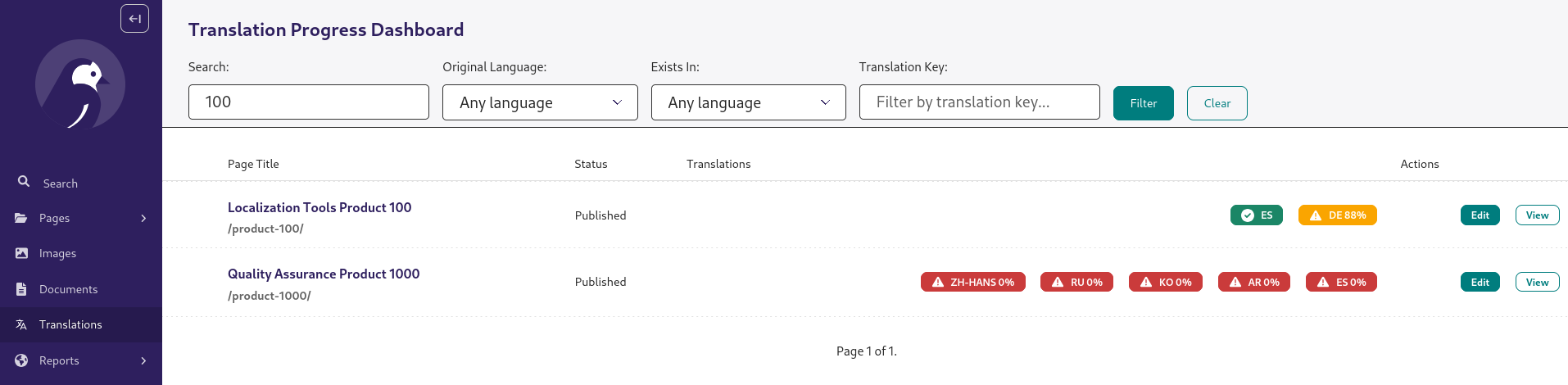
- Page Dashboard: Visual overview of translation progress for all pages
- Snippet Dashboard: Opt-in dashboard for translatable snippet models
- Auto-Updates: Signals automatically update percentages when translations change
- Performance: Translation percentages are stored in the database, for fast loading
- Filtering: Search by title, filter by language, translation key, or language group
- Color-Coded Status: Green (100%), Yellow (80-99%), Red (<80%)
- Admin Integration: Adds menu item to Wagtail admin
- Configurable: Enable/disable features via Django settings
Installation
pip install wagtail-localize-dashboard
Quick Start
1. Add to INSTALLED_APPS
# settings.py

INSTALLED_APPS = [
    # ... other apps
    "wagtail_localize",
    "wagtail_localize_dashboard",  # Add after wagtail-localize
    # ... other apps
]
2. Include URLs
# urls.py

from django.urls import path, include

urlpatterns = [
    # ... other patterns
    path("translations/", include("wagtail_localize_dashboard.urls")),
    # ... other patterns
]
3. Run Migrations
python manage.py migrate wagtail_localize_dashboard
4. Calculate Percentages
python manage.py rebuild_translation_progress
5. Access Dashboard
Navigate to /translations/ in your Wagtail admin, or click "Translations" in the admin menu.
Configuration
Customize behavior in your Django settings:
# settings.py
from django.utils.translation import gettext_lazy as _

# Enable/disable the entire feature (default: True)
WAGTAIL_LOCALIZE_DASHBOARD_ENABLED = True

# Enable automatic TranslationProgress updates via signals (default: True)
WAGTAIL_LOCALIZE_DASHBOARD_AUTO_UPDATE = True

# Track translation progress for Pages (default: True)
WAGTAIL_LOCALIZE_DASHBOARD_TRACK_PAGES = True

# Show dashboard in Wagtail admin menu (default: True)
WAGTAIL_LOCALIZE_DASHBOARD_SHOW_IN_MENU = True

# Menu item configuration (default label is translated via i18n;
# use gettext_lazy to keep it translatable when overriding)
WAGTAIL_LOCALIZE_DASHBOARD_MENU_LABEL = _("Translations")
WAGTAIL_LOCALIZE_DASHBOARD_MENU_ICON = "wagtail-localize-language"
WAGTAIL_LOCALIZE_DASHBOARD_MENU_ORDER = 800

# Items per page in dashboard (default: 50)
WAGTAIL_LOCALIZE_DASHBOARD_ITEMS_PER_PAGE = 50

# Column filter: group locales into named sets so users can filter
# which language columns are visible on the dashboard (default: [])
# Each tuple is (id, label, list_of_locale_codes).
WAGTAIL_LOCALIZE_DASHBOARD_COLUMN_FILTER_OPTIONS = [
    ("spanish", "Spanish", ["es-es", "es-ar", "es-mx", "es-cl"]),
    ("french", "French", ["fr-fr", "fr-ca", "fr-be"]),
]

# Core languages: languages that are considered mandatory/complete.
# When set, a "Core languages" filter option appears on the dashboard,
# letting users filter for pages that exist in all of these languages.
# Each entry is a (language_code, language_name) tuple (default: not set).
WAGTAIL_LOCALIZE_DASHBOARD_CORE_LANGUAGES = [
    ("en", "English"),
    ("de", "German"),
]

# Snippet models to track (default: [], snippets are opt-in).
# Each entry must be an "app_label.ModelName" string for a model that is a
# subclass of TranslatableMixin. An ImproperlyConfigured error is raised at
# startup if a string cannot be resolved or the model is not translatable.
WAGTAIL_LOCALIZE_DASHBOARD_TRACKED_SNIPPETS = [
    "myapp.NavigationMenu",
    "myapp.SiteAlert",
]
When WAGTAIL_LOCALIZE_DASHBOARD_COLUMN_FILTER_OPTIONS is configured, a "Show languages" dropdown appears on the dashboard. Selecting a group limits the displayed language columns to the locales in that group. Rows are not hidden — pages with no translations in the selected group will still appear.
When WAGTAIL_LOCALIZE_DASHBOARD_TRACKED_SNIPPETS is configured, a separate Snippet dashboard becomes available and the admin menu item expands into a submenu with "Pages" and "Snippets" entries. If the setting is empty (the default), the menu item links directly to the page dashboard as before.
Usage
Dashboard
The dashboard shows:
- All original pages (not translations)
- Translation progress for each locale (0-100%)
- Color-coded status badges
- Quick links to edit pages
Management Commands
Three commands are available depending on what you need to rebuild:
# Rebuild progress for pages and all tracked snippets (recommended after bulk imports)
python manage.py rebuild_translation_progress

# Rebuild progress for pages only
python manage.py rebuild_translation_progress_for_pages

# Rebuild progress for tracked snippets only
python manage.py rebuild_translation_progress_for_snippets
Use the targeted commands when you know only one type of content has changed, to avoid unnecessary work.
Programmatic API
from wagtail_localize_dashboard.utils import (
    get_translation_percentages,
    create_page_translation_progress,
    create_snippet_translation_progress,
    rebuild_all_progress,
    rebuild_all_progress_for_pages,
    rebuild_all_snippet_progress,
)

# Get translation percentage for a specific locale (works for pages and snippets)
from wagtail.models import Locale
locale_de = Locale.objects.get(language_code="de")
percent = get_translation_percentages(source_object, locale_de)

# Rebuild progress selectively
page_stats = rebuild_all_progress_for_pages()
snippet_stats = rebuild_all_snippet_progress()

# Or rebuild everything at once
stats = rebuild_all_progress()
print(f"Pages: {stats['pages']}, Snippets: {stats['snippets']}, Errors: {stats['errors']}")
Snippet Translation Dashboard
Snippet tracking is opt-in. By default only pages are tracked, so existing sites are unaffected after upgrading.
Enabling snippet tracking
Add the models you want to track to WAGTAIL_LOCALIZE_DASHBOARD_TRACKED_SNIPPETS in your Django settings:
WAGTAIL_LOCALIZE_DASHBOARD_TRACKED_SNIPPETS = [
    "myapp.NavigationMenu",
    "myapp.SiteAlert",
]
Each entry must be an "app_label.ModelName" string. The model must be a subclass of TranslatableMixin. If a string cannot be resolved, or the model is not translatable, Django raises ImproperlyConfigured at startup — so misconfiguration is caught immediately rather than silently at runtime.
Once the setting is non-empty:
- A Snippets dashboard is available at
/translations/snippets/. - The admin menu item expands into a Translations submenu with separate Pages and Snippets entries. Sites that leave
TRACKED_SNIPPETSempty see no change to the menu.
Building the initial cache
After adding snippets to TRACKED_SNIPPETS for the first time, populate the progress cache:
python manage.py rebuild_translation_progress_for_snippets
This only needs to be run once. After that, progress is kept up to date automatically by signals whenever a translation or snippet is saved.
The Status column
The snippet dashboard includes a Status column that shows whether a snippet is live, in draft, or both. This column is only populated for snippet models that use Wagtail's DraftStateMixin. For snippet types without a draft/live workflow the cell is empty — a note below the table explains this.
Internationalization (i18n)
All user-facing strings in the dashboard are translatable using Django's standard i18n framework. The package ships with English, Spanish, and Russian translations.
Adding a new translation
- Generate the
.pofile for your locale (e.g.frfor French):
cd wagtail_localize_dashboard
django-admin makemessages -l fr --no-wrap
-
Edit
locale/fr/LC_MESSAGES/django.poand fill in themsgstrvalues. -
Compile the translations:
django-admin compilemessages -l fr
- Restart the dev server to pick up the new translations.
Updating translations after code changes
If you add or change translatable strings, re-run makemessages for each locale:
cd wagtail_localize_dashboard
django-admin makemessages --all --no-wrap
django-admin compilemessages
How It Works
- Database Tables:
TranslationProgressstores pre-calculated percentages for pages;SnippetTranslationProgressdoes the same for tracked snippets. - Signals: Listen for translation changes and update the relevant table automatically when a translation or tracked snippet is saved.
- Dashboards: Display cached progress data — one view for pages, one for snippets.
- Management Commands: Rebuild the cache on demand after bulk imports or initial setup.
Requirements
- Python 3.10+
- Django 4.2+
- Wagtail 5.2+
- wagtail-localize 1.8+
Contributing
Contributions are welcome!
Development
Setting Up for Development
- Clone the repository:
git clone https://github.com/lincolnloop/wagtail-localize-dashboard.git
cd wagtail-localize-dashboard
- Install the package with development dependencies:
pip install -e ".[dev]"
This installs the package in editable mode along with testing tools.
Running Tests
Run the test suite with pytest:
pytest
Run tests with coverage:
pytest --cov=wagtail_localize_dashboard
Run specific test files:
pytest tests/test_utils.py
pytest tests/test_views.py
Run accessibility tests (requires pip install -e ".[test,accessibility]"):
pytest -m accessibility
Code Quality
Check code with ruff:
ruff check .
Format with ruff:
ruff format .
Release
In order to make a release, we add a git tag and push it to GitHub. We have a GitHub Action that releases the code to PyPI when we add a new tag.
License
MIT License - see LICENSE file for details.
Credits
Created by Lincoln Loop for the Wagtail community.
Inspired by the translation dashboard in the Springfield CMS.
Metadata
Release files for wagtail-localize-dashboard 0.5.0
For a detailed explanation of source distributions (sdists) and built distributions (wheels), please see the package formats documentation.
Source distribution (sdist)
| File | Size | Uploaded | |
|---|---|---|---|
| wagtail_localize_dashboard-0.5.0.tar.gz | 57.9 kB | Details |
Built distribution (wheel)
| File | Interpreter | ABI | Platform | Reset |
|---|---|---|---|---|
| wagtail_localize_dashboard-0.5.0-py3-none-any.whl | Python 3 | none | any | Details |
Total release size: 97.8 kB
Release files / wagtail_localize_dashboard-0.5.0.tar.gz
| Download URL | wagtail_localize_dashboard-0.5.0.tar.gz |
|---|---|
| Size | 57.9 kB |
| Tags | Source |
|
SHA-256 checksum How to use checksums |
d4a2711c5317968c7eb6804cf08d5a1b8b9db7d6724dc7f41d96599d53652468
|
|
BLAKE2b-256 checksum How to use checksums |
e6db87eebff68d3e7396c45ff10ed70e63e11e3c07c31adee2911c4ddd6595ed
|
| Upload date | |
|
Uploaded using Trusted Publishing? What is trusted publishing? |
Yes |
| Uploaded via |
twine/6.1.0 CPython/3.13.12
|
Provenance
Provenance describes where a file came from. On PyPI, provenance is shared via attestations, which provide a verifiable record of the build or publishing details. View details, limitations and caveats.


PyPI Publish Attestation
PyPI verified that this artifact, at this checksum, originated from the publisher listed below.
Signed by GitHub Actions, verified by PyPI on Apr 17, 2026.
Transparency logRelease files / wagtail_localize_dashboard-0.5.0-py3-none-any.whl
| Download URL | wagtail_localize_dashboard-0.5.0-py3-none-any.whl |
|---|---|
| Size | 40.0 kB |
| Tags | Python 3 |
|
SHA-256 checksum How to use checksums |
de8ba823e6c5455cf804d0414751d442c4befa22a9e2bb6742d597bf91b8db9d
|
|
BLAKE2b-256 checksum How to use checksums |
406c34e648d6b9adf927ea847eebf10ed55fc22ff9990b9e1686a15701c0e52b
|
| Upload date | |
|
Uploaded using Trusted Publishing? What is trusted publishing? |
Yes |
| Uploaded via |
twine/6.1.0 CPython/3.13.12
|
Provenance
Provenance describes where a file came from. On PyPI, provenance is shared via attestations, which provide a verifiable record of the build or publishing details. View details, limitations and caveats.
PyPI Publish Attestation
PyPI verified that this artifact, at this checksum, originated from the publisher listed below.
Signed by GitHub Actions, verified by PyPI on Apr 17, 2026.
Transparency log













