
Translation dashboard for wagtail-localize with caching
Project description
wagtail-localize-dashboard
A translation dashboard for Wagtail sites using wagtail-localize.
Features
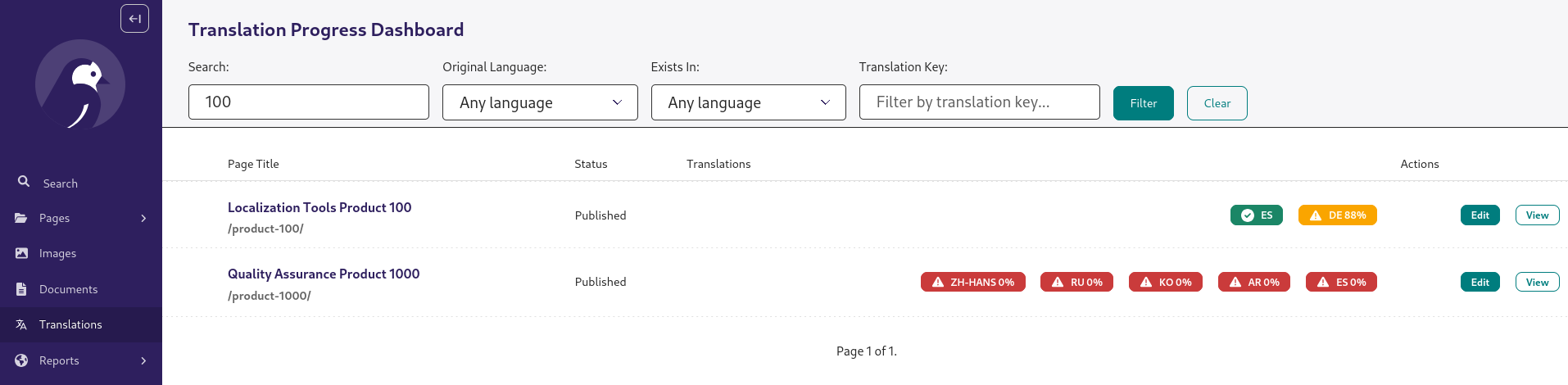
- Translation Dashboard: Visual overview of translation progress for all pages
- Auto-Updates: Signals automatically update percentages when translations change
- Performance: Translation percentages are stored in the database, for fast loading
- Filtering: Search by title, filter by language, translation key
- Color-Coded Status: Green (100%), Yellow (80-99%), Red (<80%)
- Admin Integration: Adds menu item to Wagtail admin
- Configurable: Enable/disable features via Django settings
Installation
pip install wagtail-localize-dashboard
Quick Start
1. Add to INSTALLED_APPS
# settings.py

INSTALLED_APPS = [
    # ... other apps
    "wagtail_localize",
    "wagtail_localize_dashboard",  # Add after wagtail-localize
    # ... other apps
]
2. Include URLs
# urls.py

from django.urls import path, include

urlpatterns = [
    # ... other patterns
    path("translations/", include("wagtail_localize_dashboard.urls")),
    # ... other patterns
]
3. Run Migrations
python manage.py migrate wagtail_localize_dashboard
4. Calculate Percentages
python manage.py rebuild_translation_progress
5. Access Dashboard
Navigate to /translations/ in your Wagtail admin, or click "Translations" in the admin menu.
Configuration
Customize behavior in your Django settings:
# settings.py

# Enable/disable the entire feature (default: True)
WAGTAIL_LOCALIZE_DASHBOARD_ENABLED = True

# Enable automatic TranslationProgress updates via signals (default: True)
WAGTAIL_LOCALIZE_DASHBOARD_AUTO_UPDATE = True

# Track translation progress for Pages (default: True)
WAGTAIL_LOCALIZE_DASHBOARD_TRACK_PAGES = True

# Show dashboard in Wagtail admin menu (default: True)
WAGTAIL_LOCALIZE_DASHBOARD_SHOW_IN_MENU = True

# Menu item configuration
WAGTAIL_LOCALIZE_DASHBOARD_MENU_LABEL = "Translations"
WAGTAIL_LOCALIZE_DASHBOARD_MENU_ICON = "wagtail-localize-language"
WAGTAIL_LOCALIZE_DASHBOARD_MENU_ORDER = 800

# Items per page in dashboard (default: 50)
WAGTAIL_LOCALIZE_DASHBOARD_ITEMS_PER_PAGE = 50
Usage
Dashboard
The dashboard shows:
- All original pages (not translations)
- Translation progress for each locale (0-100%)
- Color-coded status badges
- Quick links to edit pages
Management Commands
# Recalculate translation percentages for all pages
python manage.py rebuild_translation_progress

# Clean orphaned records and rebuild
python manage.py rebuild_translation_progress --clean-orphans
Programmatic API
from wagtail_localize_dashboard.utils import (
    get_translation_percentages,
    create_translation_progress,
    rebuild_all_progress,
)

# Get translation percentage for a specific locale
from wagtail.models import Locale
page = Page.objects.get(id=123)
locale_de = Locale.objects.get(language_code="de")
percent = get_translation_percentages(page, locale_de)

# Update progress for a page
create_translation_progress(page)

# Rebuild all progress
stats = rebuild_all_progress()
print(f"Processed {stats['pages']} pages")
How It Works
- Database Table: The
TranslationProgressmodel stores pre-calculated percentages - Signals: Listen for translation changes and update
TranslationProgresstable automatically - Dashboard: Displays
TranslationProgressdata for each page - Management Command: Rebuilds
TranslationProgressobjects when needed
Requirements
- Python 3.10+
- Django 4.2+
- Wagtail 5.2+
- wagtail-localize 1.8+
Contributing
Contributions are welcome!
Development
Setting Up for Development
- Clone the repository:
git clone https://github.com/lincolnloop/wagtail-localize-dashboard.git
cd wagtail-localize-dashboard
- Install the package with development dependencies:
pip install -e ".[dev]"
This installs the package in editable mode along with testing tools.
Running Tests
Run the test suite with pytest:
pytest
Run tests with coverage:
pytest --cov=wagtail_localize_dashboard
Run specific test files:
pytest tests/test_utils.py
pytest tests/test_views.py
Run accessibility tests (requires pip install -e ".[test,accessibility]"):
pytest -m accessibility
Code Quality
Check code with ruff:
ruff check .
Format with ruff:
ruff format .
License
MIT License - see LICENSE file for details.
Credits
Created by Lincoln Loop for the Wagtail community.
Inspired by the translation dashboard in the Springfield CMS.
Project details


Download files
Download the file for your platform. If you're not sure which to choose, learn more about installing packages.
Source Distribution
Built Distribution
Filter files by name, interpreter, ABI, and platform.
If you're not sure about the file name format, learn more about wheel file names.
Copy a direct link to the current filters
File details
Details for the file wagtail_localize_dashboard-0.1.0.tar.gz.
File metadata
- Download URL: wagtail_localize_dashboard-0.1.0.tar.gz
- Upload date:
- Size: 31.0 kB
- Tags: Source
- Uploaded using Trusted Publishing? No
- Uploaded via: twine/6.2.0 CPython/3.14.2
File hashes
| Algorithm | Hash digest | |
|---|---|---|
| SHA256 |
9ce3d41df4ae4038832c9e4ff9d9054e0531e1a073202d6464535e8b5e6a1031
|
|
| MD5 |
f79422b20d4d51c75a5b694ce5dd31bc
|
|
| BLAKE2b-256 |
2704302b7d2b92d79652820a9774f9bbf92714e84babf8e9628c7faffdcdfd05
|
File details
Details for the file wagtail_localize_dashboard-0.1.0-py3-none-any.whl.
File metadata
- Download URL: wagtail_localize_dashboard-0.1.0-py3-none-any.whl
- Upload date:
- Size: 20.5 kB
- Tags: Python 3
- Uploaded using Trusted Publishing? No
- Uploaded via: twine/6.2.0 CPython/3.14.2
File hashes
| Algorithm | Hash digest | |
|---|---|---|
| SHA256 |
f8683766ac1cb8e4439717c89d20b33d0f285d544af5d447acb92fc0311acef3
|
|
| MD5 |
1f62b5ff1731f98def99f22f33d504b6
|
|
| BLAKE2b-256 |
00eb7701b737615dec09c34a9de67f7544fae315aefa03e7823fb0ce7c94922f
|






