
A Wagtail block that displays thumbnail images for choice fields
Project description
Wagtail Thumbnail Choice Block
A reusable Wagtail block that displays thumbnail images for choice fields, making it easier for content editors to visually select options.
Examples
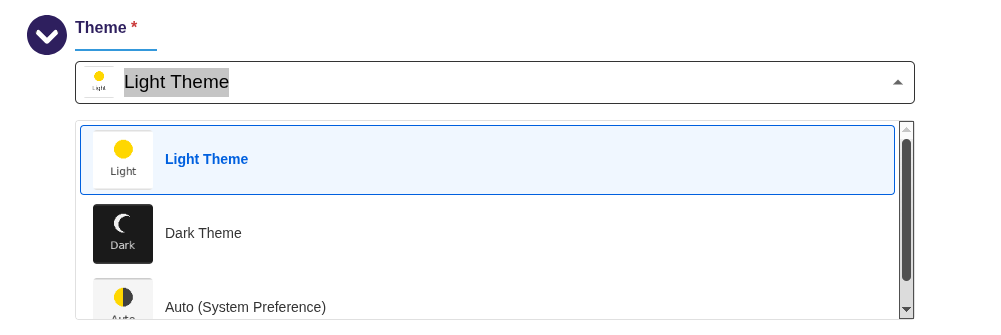
A theme field may want to display a thumbnail of each available theme:
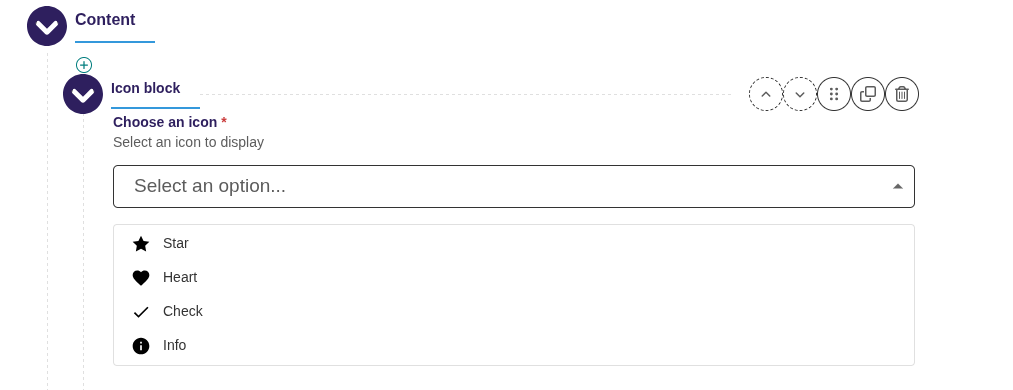
An icon field may want to display a thumbnail of each available icon:
Features
- Visual Selection: Display thumbnail images (recommended 80x80px) for each choice option
- Accessible: Built on Django's standard RadioSelect widget with full keyboard navigation
- Responsive: Works seamlessly with Wagtail's responsive admin interface
- Easy Integration: Simple API similar to Wagtail's built-in ChoiceBlock
- Portable: Self-contained package with no external dependencies beyond Django and Wagtail
Installation
pip install wagtail-thumbnail-choice-block
Add to your Django INSTALLED_APPS:
INSTALLED_APPS = [
    # ...
    'wagtail_thumbnail_choice_block',
    # ...
]
Usage
Basic Usage
from django.templatetags.static import static
from wagtail import blocks
from wagtail_thumbnail_choice_block import ThumbnailChoiceBlock

class BannerSettings(blocks.StructBlock):
    theme = ThumbnailChoiceBlock(
        choices=(
            ('light', 'Light Theme'),
            ('dark', 'Dark Theme'),
            ('auto', 'Auto'),
        ),
        thumbnails={
            'light': static('images/theme-light-thumb.png'),
            'dark': static('images/theme-dark-thumb.png'),
            'auto': static('images/theme-auto-thumb.png'),
        },
        default='light',
    )
Customizing Thumbnail Size
You can customize the size of thumbnails in the dropdown by passing the thumbnail_size parameter (in pixels). The default is 40px.
class BannerSettings(blocks.StructBlock):
    # Small thumbnails (24px)
    small_icon = ThumbnailChoiceBlock(
        choices=ICON_CHOICES,
        thumbnails=ICON_THUMBNAILS,
        thumbnail_size=24,
    )

    # Default size (40px)
    medium_icon = ThumbnailChoiceBlock(
        choices=ICON_CHOICES,
        thumbnails=ICON_THUMBNAILS,
    )

    # Large thumbnails (80px)
    large_theme = ThumbnailChoiceBlock(
        choices=THEME_CHOICES,
        thumbnails=THEME_THUMBNAILS,
        thumbnail_size=80,
    )
Note: While the thumbnails in the dropdown appear in the size configured by the user, the preview thumbnail shown in the input field is automatically sized proportionally and constrained between 20px and 32px, to ensure it fits nicely within the input.
One-Color Icon Thumbnails
If your thumbnails are monochrome icons that should inherit the current text color, pass thumbnail_is_one_color=True. The block will add the .one-color-icons class to the outer wrapper, and the admin CSS will tint the thumbnail to match the surrounding text color instead of showing it in its original colors.
Use this when you have a single-color icon set and want the selected and hovered states to stay visually consistent in both light and dark admin themes.
from wagtail import blocks
from wagtail_thumbnail_choice_block import ThumbnailChoiceBlock

class IconChoiceBlock(blocks.StructBlock):
    icon = ThumbnailChoiceBlock(
        thumbnail_directory="img/firefox/flare/icons",
        thumbnail_directory_label_fn=icon_display_label,
        thumbnail_directory_value_fn=icon_value_fn,
        thumbnail_size=20,
        thumbnail_is_one_color=True,
    )
With image-based thumbnails (thumbnails or thumbnail_directory), this works for any image format — the admin CSS builds a mask from the image's own alpha channel and fills it with the current text color, so no changes to the source images are needed.
Template-based thumbnails (thumbnail_templates) render arbitrary HTML, so there's no single image the library can mask automatically. Instead, thumbnail_is_one_color=True sets the wrapper's CSS color to the same tint — your template picks it up only if it actually uses that inherited color, e.g. an inline SVG with fill="currentColor":
# home/templates/home/icons/arrow-up.html
# <svg viewBox="0 0 24 24" fill="currentColor">
#   <path d="M12 19V5M5 12l7-7 7 7"/>
# </svg>

class IconChoiceBlock(blocks.StructBlock):
    icon = ThumbnailChoiceBlock(
        choices=[("up", "Up")],
        thumbnail_templates={"up": "home/icons/arrow-up.html"},
        thumbnail_size=20,
        thumbnail_is_one_color=True,
    )
A template whose icon hardcodes its own colors (e.g. a <path fill="#4CAF50">) will not be tinted — thumbnail_is_one_color only affects elements that inherit color from the wrapper.
Dynamic Choices with Callables
Both choices and thumbnails can be callables (functions) that return the data. This is useful when you need to generate choices dynamically from the database or other runtime sources.
Example: Selecting from Django Models
from wagtail import blocks
from wagtail_thumbnail_choice_block import ThumbnailChoiceBlock
from myapp.models import Category

def get_category_choices():
    """Generate choices from Category model."""
    return [
        (str(category.id), category.name)
        for category in Category.objects.filter(active=True)
    ]

def get_category_thumbnails():
    """Generate thumbnail mapping from Category model."""
    return {
        str(category.id): category.icon.url
        for category in Category.objects.filter(active=True)
        if category.icon
    }

class ContentBlock(blocks.StructBlock):
    category = ThumbnailChoiceBlock(
        choices=get_category_choices,
        thumbnails=get_category_thumbnails,
    )
Directory-Based Choices
When your choices are a set of image files, you can point ThumbnailChoiceBlock directly at a static-files directory and let it build the choices and thumbnail URLs automatically.
from wagtail import blocks
from wagtail_thumbnail_choice_block import ThumbnailChoiceBlock

class IconBlock(blocks.StructBlock):
    icon = ThumbnailChoiceBlock(
        thumbnail_directory="icons",
        thumbnail_size=40,
        label="Icon",
        help_text="Icons are loaded automatically from the static/icons/ folder.",
    )
The block scans the directory recursively. Each image file becomes a choice; subdirectory names become visual group headings in the Wagtail admin picker. For example, a layout like:
static/icons/
  sun.svg
  moon.svg
  arrows/
    left.svg
    right.svg
  shapes/
    circles/
      circle.svg
    squares/
      square.svg
produces a picker with a top-level group "Arrows" containing "Left" and "Right", a nested group "Shapes / Circles", and so on.
Stored value format
The value saved to the database is the relative path from the directory root, without the file extension (e.g. arrows/left). This keeps values short and independent of STATIC_URL.
Migration concern: renaming or moving files changes the stored value. Existing pages that hold the old value will see it displayed as "unavailable" in the admin until a new option is selected and saved.
Prerequisites
thumbnail_directorymust be a path relative to a staticfiles-findable location: an app'sstatic/folder, an entry inSTATICFILES_DIRS, orSTATIC_ROOT.- Django's built-in
AppDirectoriesFinderandFileSystemFinderare searched automatically;collectstaticis not required in development. - Custom staticfiles finders are not searched. If your project uses one, ensure the directory is also present under
STATIC_ROOT. STATICFILES_DIRSentries with a URL prefix (e.g.[('myprefix', '/path/')]) are not supported.- When
thumbnail_directory_auto_reloadisTrue, new thumbnails can be used immediately, but a server restart is required to pick up new files whenthumbnail_directory_auto_reload=False(the default).
Customising labels and sort order
By default, filenames are title-cased (left_arrow.svg → "Left Arrow") and choices are sorted alphabetically. Both behaviours are overridable:
icon = ThumbnailChoiceBlock(
    thumbnail_directory="icons",
    thumbnail_directory_label_fn=lambda stem: stem.upper(),          # custom label from stem
    thumbnail_directory_sort_key=lambda path: path.stat().st_mtime,  # sort by modification time
)
Customising stored values
By default the stored database value is the file's relative path from the directory root, without
its extension (e.g. arrows/forward-16 for arrows/forward-16.svg). Pass
thumbnail_directory_value_fn to transform this into a shorter or differently-shaped value:
import re

def icon_value(rel_path: str) -> str:
    # "arrows/forward-16" -> "arrows/forward"
    # "sun-16"            -> "sun"
    return re.sub(r"-\d+$", "", rel_path)

icon = ThumbnailChoiceBlock(
    thumbnail_directory="icons",
    thumbnail_directory_value_fn=icon_value,
)
The callable receives the full relative path without extension, not just the filename stem.
This lets a function distinguish two files with the same stem in different subdirectories
(e.g. solid/forward vs outline/forward), and return unique values for both.
The thumbnail URL in the admin picker always reflects the real file path — only the stored value changes.
thumbnail_directory_value_fn raises ImproperlyConfigured at startup if the function produces
the same value for two different files. This is intentional: the library will not silently
reassign a stored value from one file to another as the directory contents change. When a new
file causes a collision the server will refuse to start with an error naming both files and
suggesting a fix. To resolve it, either update thumbnail_directory_value_fn to return a
different value for the new path (typically by using more path components to distinguish it), or
rename or remove one of the files.
Use a module-level function, not a lambda. Each lambda literal is a distinct object, so two block instances with identical lambdas will not share the scan cache and will each perform a full filesystem scan. A named module-level function has stable identity and shares the cache correctly.
The example project (example/demo/home/) includes two files with the same filename stem in
different subdirectories (arrows/right-16.svg and mobile/arrows/right-16.svg) and a comment
in models.py showing the exact error a naive stem-only function would produce, alongside
_icon_value_fn which uses path context to produce unique values ("right" and
"mobile-right").
Live reload in development
Set thumbnail_directory_auto_reload=True to re-scan the directory on every admin render, so newly added files appear without restarting the server:
icon = ThumbnailChoiceBlock(
    thumbnail_directory="icons",
    thumbnail_directory_auto_reload=True,   # re-scan on each form render (dev only)
)
Note:
thumbnail_directoryis mutually exclusive withchoices,thumbnails, andthumbnail_templates. Passing both raises aValueErrorat startup.
Static Or Dynamic Thumbnail Templates
Sometimes, it may be preferable to use a template file for thumbnails. For example, if you are using sprites and do not have a separate file for each thumbnail, but are using a single HTML template for your thumbnails, you may define thumbnail_templates and pass relevant context for each thumbnail. You may do so statically
from wagtail_thumbnail_choice_block import ThumbnailChoiceBlock

class MySettings(blocks.StructBlock):
    icon = ThumbnailChoiceBlock(
        choices=[
            ('star', 'Star'),
            ('check', 'Check'),
        ],
        thumbnail_templates={
            'star': {
                'template': 'components/icon.html',
                'context': {'icon_name': 'star', 'extra_class': 'thumbnail-icon'}
            },
            'check': {
                'template': 'components/icon.html',
                'context': {'icon_name': 'check', 'extra_class': 'thumbnail-icon'}
            },
        }
    )
or dynamically
from wagtail_thumbnail_choice_block import ThumbnailChoiceBlock

def get_thumbnail_choices() -> list[tuple[str, str]]:
    return [
        (icon_name, icon_name.capitalize())
        for icon_name in ["star", "check"]
    ]

def get_thumbnail_templates() -> dict[str, str]:
    return {
        icon_name: {
            'template': 'components/icon.html',
            'context': {'icon_name': icon_name, 'extra_class': 'thumbnail-icon'}
        }
        for icon_name in ["star", "check"]
    }

class MySettings(blocks.StructBlock):
    icon = ThumbnailChoiceBlock(
        choices=get_thumbnail_choices,
        thumbnail_templates=get_thumbnail_templates
    )
Important Notes:
- Callables are evaluated at render time, so choices will always reflect the current database state
- Callables should be efficient as they may be called multiple times during form rendering
- Consider caching if your callable performs expensive database queries
- Callables should handle cases where data might not exist (e.g., missing images)
- If you are using
thumbnail_templates, the Wagtail interface may not be set up to load all of the CSS files that your regular pages load, so using an icon template may lead to an empty icon in Wagtail. In this case, you will need to update the CSS that is loaded in Wagtail to include the necessary CSS styles. For example, an HTML template like<span class="icon icon-android"></span>will need to use theiconandicon-androidCSS classes. Make sure that the CSS rules for those classes are being loaded in Wagtail.
API
ThumbnailChoiceBlock
Extends Wagtail's ChoiceBlock with thumbnail support.
Parameters:
choices: List of (value, label) tuples for the choice options, or a callable that returns such a list. Required unlessthumbnail_directoryis set.thumbnails: Dictionary mapping choice values to thumbnail image URLs/paths, or a callable that returns such a dictionarythumbnail_templates: Dictionary mapping choice values to template configurations (either a template path string or a dict with 'template' and 'context' keys), or a callable that returns such a dictionarythumbnail_size: Size of thumbnails in pixels (default: 40). The preview thumbnail in the input is automatically scaled proportionally (60%) and constrained between 20-32pxthumbnail_directory: Path to a directory of image files, relative to a staticfiles-findable location. The block scans the directory at startup and derives choices and thumbnail URLs automatically. Mutually exclusive withchoices,thumbnails, andthumbnail_templates.thumbnail_directory_auto_reload: Re-scanthumbnail_directoryon every form render instead of only at startup (default:False). Useful in development when adding new files without restarting the server.thumbnail_directory_sort_key: Callable(pathlib.Path) -> sort keyused to order files within each directory. Default:path.name.lower()(alphabetical, case-insensitive).thumbnail_directory_label_fn: Callable(str stem) -> strused to generate a display label from a filename stem. Default: replaces_and-with spaces, then appliesstr.title()(e.g.left_arrow→"Left Arrow").thumbnail_directory_value_fn: Callable(str rel_path_without_ext) -> strapplied to each file's relative path (without extension) to produce the stored choice value. RaisesImproperlyConfiguredat startup if two files produce the same value — this is intentional to prevent silent reassignment of stored values when new files are added. Default:None(the relative path is stored as-is). Use a module-level function rather than a lambda; see Customising stored values.default: Default selected value**kwargs: Any additional arguments supported by Wagtail's ChoiceBlock
Methods:
get_thumbnail_url(value: str) -> str
Returns the static URL for the thumbnail associated with the given stored choice value, or an empty string if the value is not found.
url = icon_block.get_thumbnail_url("forward")
# "/static/icons/arrows/forward-16.svg"
This is particularly useful when thumbnail_directory_value_fn is set and the stored value is
a logical name rather than a filesystem path. The URL always points at the real file regardless
of what thumbnail_directory_value_fn returns.
ThumbnailRadioSelect
The underlying Django widget. Can be used directly in Django forms.
Parameters:
attrs: HTML attributes for the widgetchoices: Available choices for the radio selectthumbnail_mapping: Dictionary mapping choice values to thumbnail URLs/pathsthumbnail_template_mapping: Dictionary mapping choice values to template configurationsthumbnail_size: Size of thumbnails in pixels (default: 40)tree_items: Pre-built list of heading/option dicts for directory mode (populated automatically byThumbnailChoiceBlockwhenthumbnail_directoryis used; not needed when constructing the widget directly)
Thumbnail Images
For best results:
- Use square images (80x80px recommended)
- Supported formats: PNG, JPG, SVG, WebP
- Images should clearly represent each option
- Consider both light and dark mode compatibility
Styling
The widget includes default CSS that can be customized by overriding these classes:
.thumbnail-radio-select- Container div.thumbnail-radio-option- Individual option label.thumbnail-radio-option.selected- Selected option state.thumbnail-wrapper- Thumbnail image container.thumbnail-image- The thumbnail image itself.thumbnail-label- The option label text
Requirements
- Python >= 3.10
- Django >= 4.2
- Wagtail >= 5.0
Example Project
An example Wagtail project demonstrating various uses of ThumbnailChoiceBlock is included in the repository. The example shows best practices including dynamic choices, template-based thumbnails, and different thumbnail configurations.
See example/README.md for setup instructions and details.
Development
# Clone the repository
git clone https://github.com/lincolnloop/wagtail-thumbnail-choice-block.git
cd wagtail-thumbnail-choice-block

# Install in development mode
pip install -e ".[dev,accessibility]"

# Run tests except for accessibility tests
pytest -m "not accessibility"

# Run accessibility tests (requires Chrome/ChromeDriver)
pip install -e ".[accessibility]"
pytest tests/test_accessibility_axe.py -m accessibility

# Run all tests
pytest
Accessibility Testing
The package includes automated accessibility tests using axe-core via selenium-axe-python. These tests verify:
- WCAG 2.1 Level AA compliance
- Keyboard accessibility
- Screen reader compatibility
- Color contrast requirements
To run accessibility tests:
# Install accessibility testing dependencies
pip install -e ".[accessibility]"

# Run only accessibility tests
pytest tests/test_accessibility_axe.py -m accessibility

# Or run all tests including accessibility
pytest
Note: Accessibility tests require a web browser (Chrome or Firefox) and the corresponding WebDriver to be available on your system.
License
This project is licensed under the MIT License.
Credits
Developed by Lincoln Loop.
Contributing
Contributions are welcome! Please feel free to submit a Pull Request.
Releases
Releases are done with GitHub Actions whenever a new tag is created. For more information, see build.yml. If adding a new tag, make sure to first update the version in pyproject.toml.
Project details


Download files
Download the file for your platform. If you're not sure which to choose, learn more about installing packages.
Source Distribution
Built Distribution
Filter files by name, interpreter, ABI, and platform.
If you're not sure about the file name format, learn more about wheel file names.
Copy a direct link to the current filters
File details
Details for the file wagtail_thumbnail_choice_block-0.3.0.tar.gz.
File metadata
- Download URL: wagtail_thumbnail_choice_block-0.3.0.tar.gz
- Upload date:
- Size: 81.5 kB
- Tags: Source
- Uploaded using Trusted Publishing? Yes
- Uploaded via: twine/6.1.0 CPython/3.13.12
File hashes
| Algorithm | Hash digest | |
|---|---|---|
| SHA256 |
9f644c2cc4bccc518fef5d563c27ef57cf95c8a26f695bddcee515f74a4b5b68
|
|
| MD5 |
d446a5187fefd0530af20b10eff0571c
|
|
| BLAKE2b-256 |
7b0c86b2d00f07cb262311759a7b4f0bb23f8b220094a719363ba1ef6a17c482
|
Provenance
The following attestation bundles were made for wagtail_thumbnail_choice_block-0.3.0.tar.gz:
Publisher:
build.yml on lincolnloop/wagtail-thumbnail-choice-block
-
Statement:
-
Statement type:
https://in-toto.io/Statement/v1 -
Predicate type:
https://docs.pypi.org/attestations/publish/v1 -
Subject name:
wagtail_thumbnail_choice_block-0.3.0.tar.gz -
Subject digest:
9f644c2cc4bccc518fef5d563c27ef57cf95c8a26f695bddcee515f74a4b5b68 - Sigstore transparency entry: 2189641823
- Sigstore integration time:
-
Permalink:
lincolnloop/wagtail-thumbnail-choice-block@5d50ac004db0c4228545f7b28d85d58098df9609 -
Branch / Tag:
refs/tags/0.3.0 - Owner: https://github.com/lincolnloop
-
Access:
public
-
Token Issuer:
https://token.actions.githubusercontent.com -
Runner Environment:
github-hosted -
Publication workflow:
build.yml@5d50ac004db0c4228545f7b28d85d58098df9609 -
Trigger Event:
push
-
Statement type:
File details
Details for the file wagtail_thumbnail_choice_block-0.3.0-py3-none-any.whl.
File metadata
- Download URL: wagtail_thumbnail_choice_block-0.3.0-py3-none-any.whl
- Upload date:
- Size: 34.0 kB
- Tags: Python 3
- Uploaded using Trusted Publishing? Yes
- Uploaded via: twine/6.1.0 CPython/3.13.12
File hashes
| Algorithm | Hash digest | |
|---|---|---|
| SHA256 |
168d0e0ed0b4d40a251734af74a71a257274d4026ccb55bf1a4c644aadf52143
|
|
| MD5 |
9e44d313b8be879c2cf5ba66b95b4ecf
|
|
| BLAKE2b-256 |
9e4c1f43b9a24497d546bf546b9412e4b2737abb8ac2a089d730bff51b7f7cd2
|
Provenance
The following attestation bundles were made for wagtail_thumbnail_choice_block-0.3.0-py3-none-any.whl:
Publisher:
build.yml on lincolnloop/wagtail-thumbnail-choice-block
-
Statement:
-
Statement type:
https://in-toto.io/Statement/v1 -
Predicate type:
https://docs.pypi.org/attestations/publish/v1 -
Subject name:
wagtail_thumbnail_choice_block-0.3.0-py3-none-any.whl -
Subject digest:
168d0e0ed0b4d40a251734af74a71a257274d4026ccb55bf1a4c644aadf52143 - Sigstore transparency entry: 2189641842
- Sigstore integration time:
-
Permalink:
lincolnloop/wagtail-thumbnail-choice-block@5d50ac004db0c4228545f7b28d85d58098df9609 -
Branch / Tag:
refs/tags/0.3.0 - Owner: https://github.com/lincolnloop
-
Access:
public
-
Token Issuer:
https://token.actions.githubusercontent.com -
Runner Environment:
github-hosted -
Publication workflow:
build.yml@5d50ac004db0c4228545f7b28d85d58098df9609 -
Trigger Event:
push
-
Statement type:






