
Wavelet Learned Lossy Compression

Project description
datasets:
- danjacobellis/LSDIR_540
- danjacobellis/musdb_segments
Wavelet Learned Lossy Compression
- Project page and documentation
- Paper: "Learned Compression for Compressed Learning"
- Additional code accompanying the paper
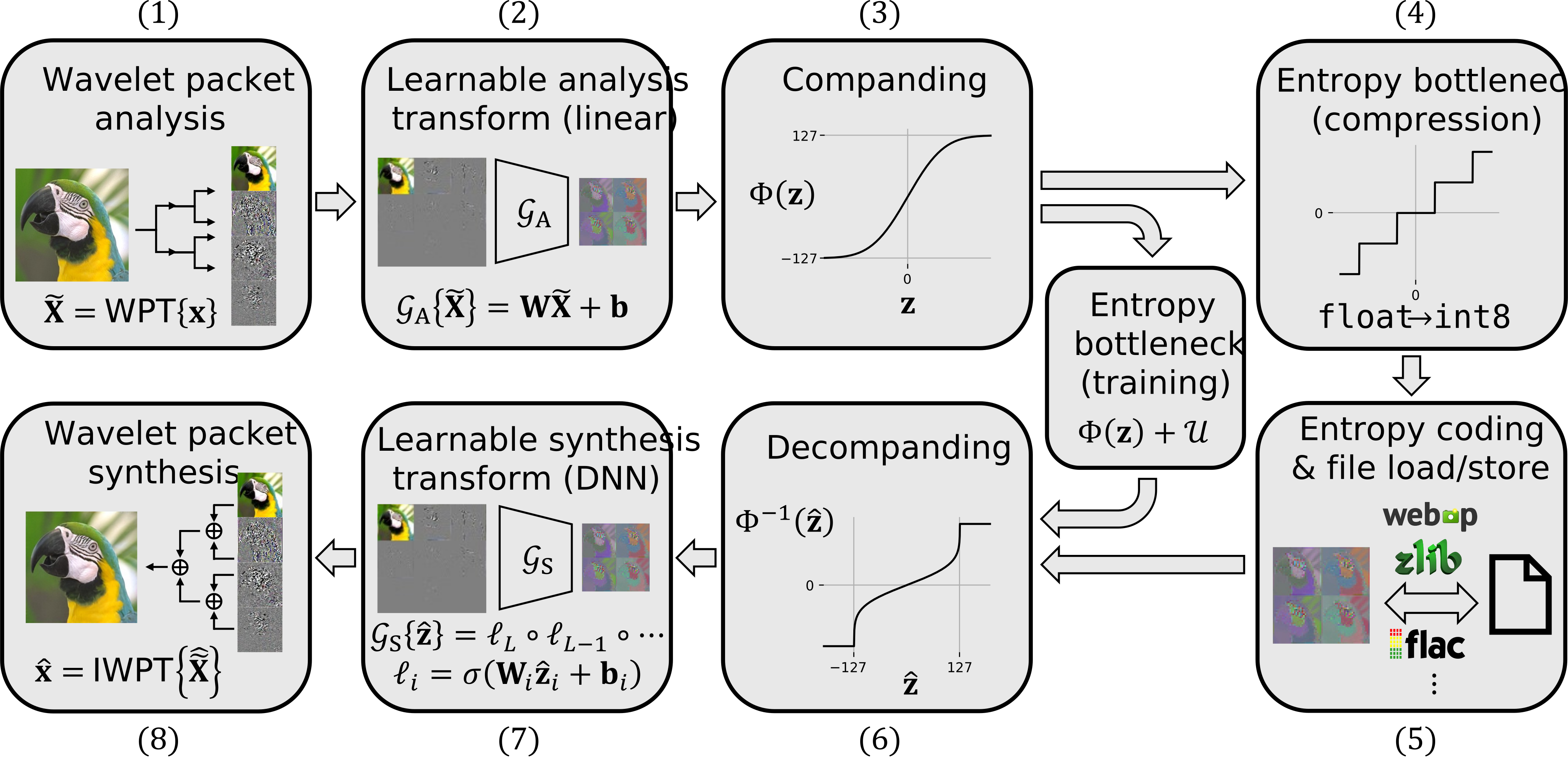
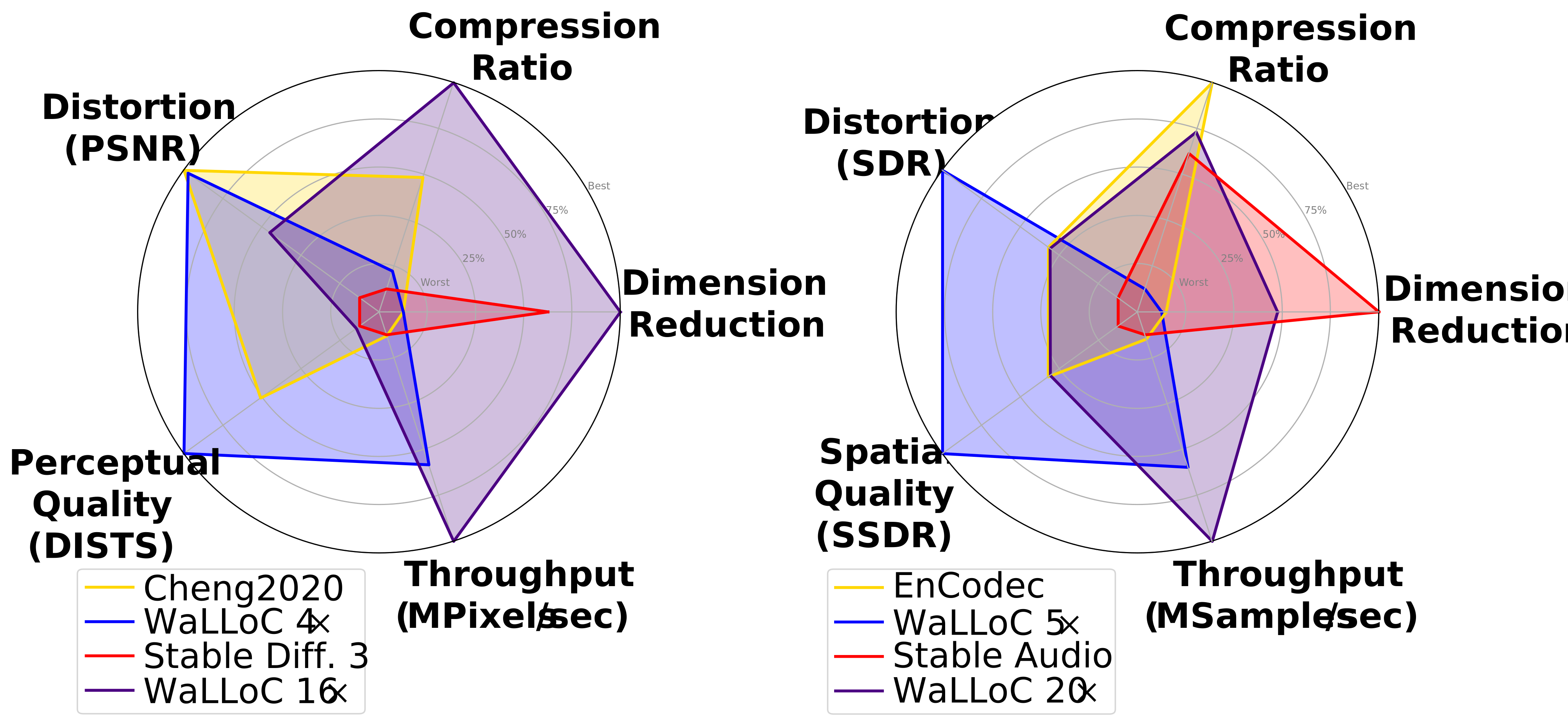
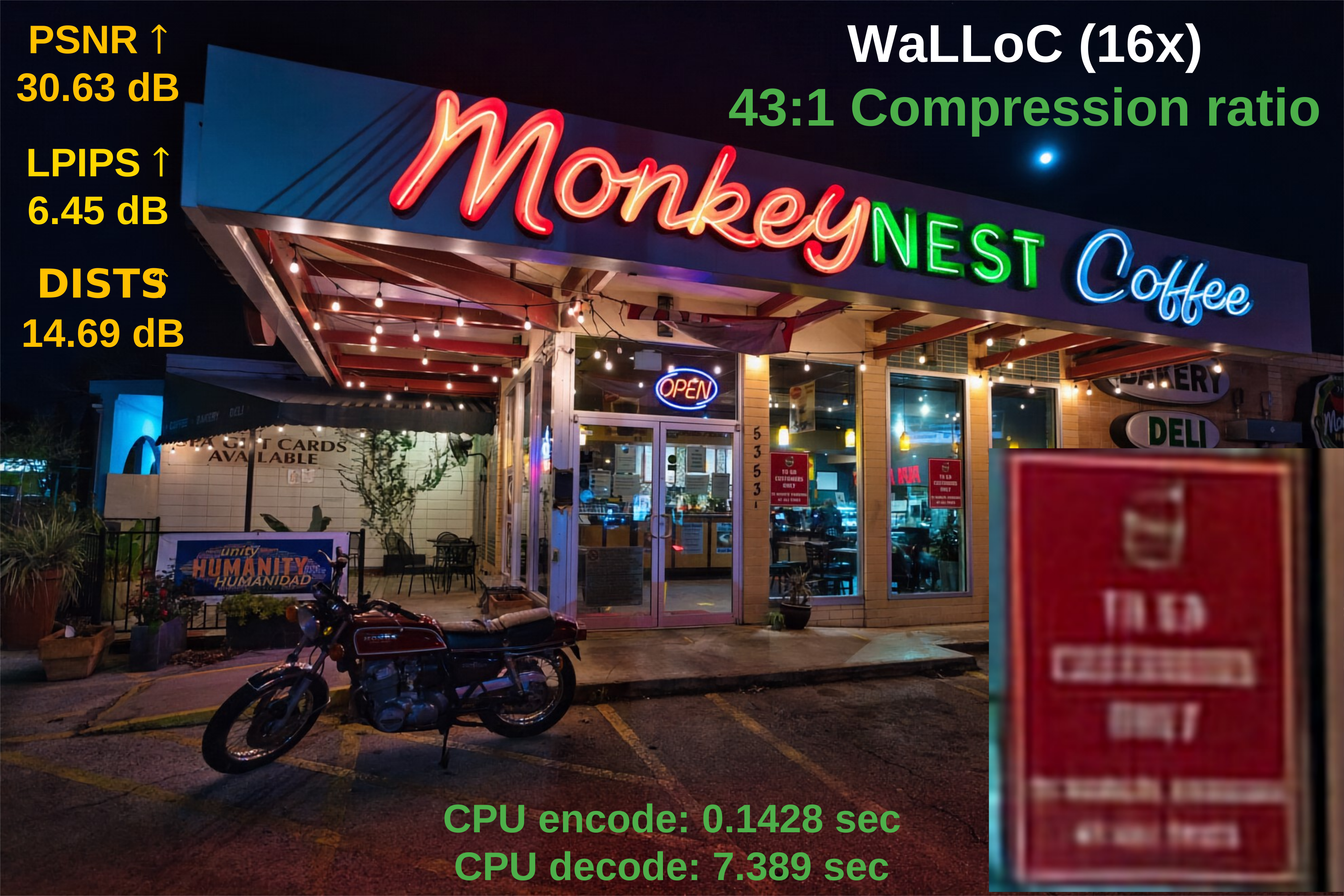
WaLLoC (Wavelet-Domain Learned Lossy Compression) is an architecture for learned compression that simultaneously satisfies three key requirements of compressed-domain learning:
-
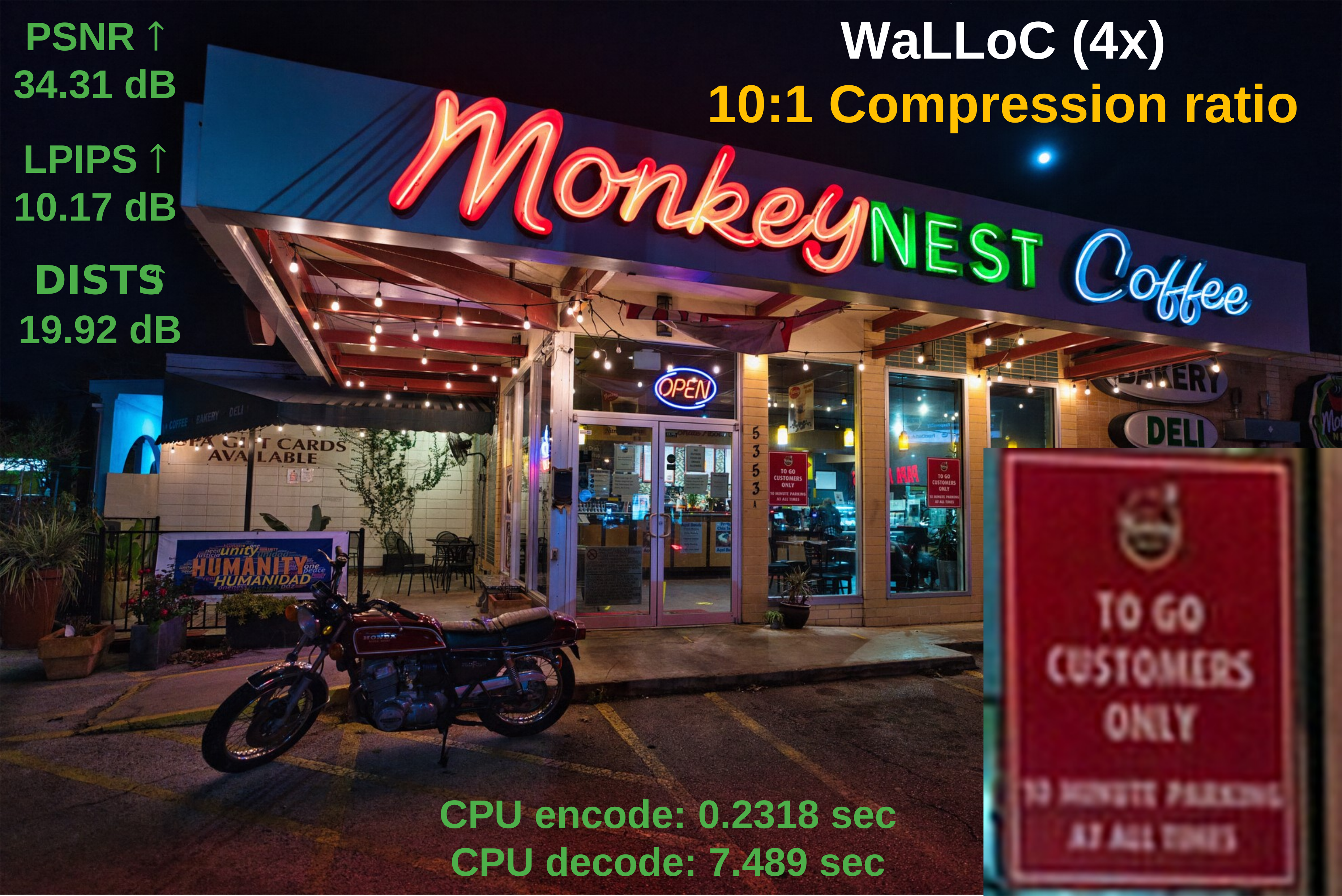
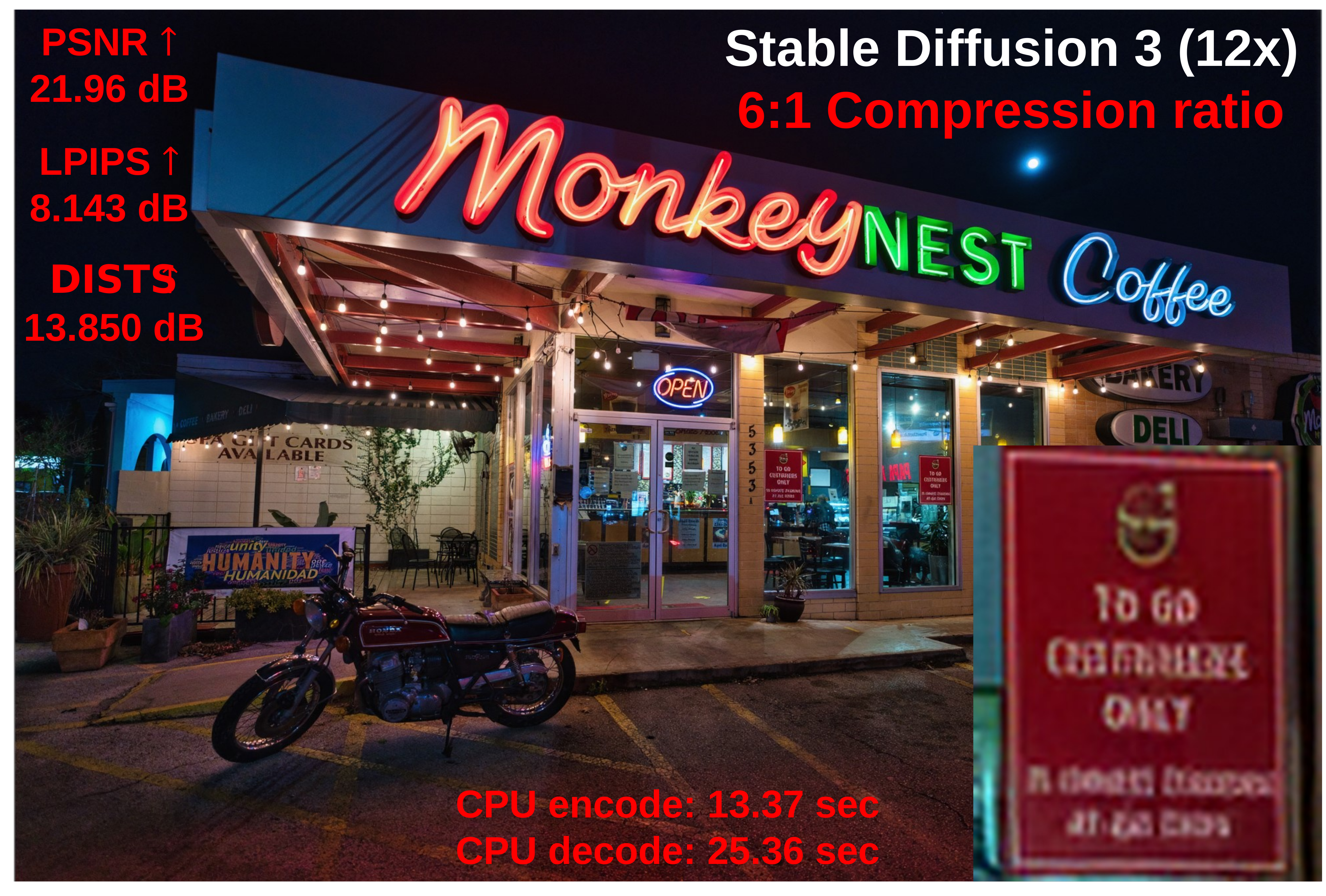
Computationally efficient encoding to reduce overhead in compressed-domain learning and support resource constrained mobile and remote sensors. WaLLoC uses a wavelet packet transform to expose signal redundancies prior to autoencoding. This allows us to replace the encoding DNN with a single linear layer (<100k parameters) without significant loss in quality. WaLLoC incurs <5% of the encoding cost compared to other neural codecs.
-
High compression ratio for storage and transmission efficiency. Lossy codecs typically achieve high compression with a combination of quantization and entropy coding. However, naive quantization of autoencoder latents leads to unpredictable and unbounded distortion. Instead, we apply additive noise during training as an entropy bottleneck, leading to quantization-resiliant latents. When combined with entropy coding, this provides nearly 12× higher compression ratio compared to the VAE used in Stable Diffusion 3, despite offering a higher degree of dimensionality reduction and similar quality.
-
Dimensionality reduction to accelerate compressed-domain modeling. WaLLoC’s encoder projects high-dimensional signal patches to low-dimensional latent representations, providing a reduction of up to 20×. This allows WaLLoC to be used as a drop-in replacement for resolution reduction while providing superior detail preservation and downstream accuracy.
WaLLoC does not require perceptual or adversarial losses to represent high-frequency detail, making it compatible with a wide variety of signal types. It currently supports 1D and 2D signals, including mono, stereo, and multi-channel audio and grayscale, RGB, and hyperspectral images.
@article{jacobellis2024learned,
  title={Learned Compression for Compressed Learning},
  author={Jacobellis, Dan and Yadwadkar, Neeraja J.},
  year={2024},
  note={Under review},
  url={http://danjacobellis.net/walloc}
}
Installation
- Follow the installation instructions for torch
- Install WaLLoC and other dependencies via pip
pip install walloc PyWavelets pytorch-wavelets
Image compression
import os
import torch
import json
import matplotlib.pyplot as plt
import numpy as np
from types import SimpleNamespace
from PIL import Image, ImageEnhance
from IPython.display import display
from torchvision.transforms import ToPILImage, PILToTensor
from walloc import walloc
from walloc.walloc import latent_to_pil, pil_to_latent
Load the model from a pre-trained checkpoint
wget https://hf.co/danjacobellis/walloc/resolve/main/RGB_16x.pth
wget https://hf.co/danjacobellis/walloc/resolve/main/RGB_16x.json
device = "cpu"
codec_config = SimpleNamespace(**json.load(open("RGB_16x.json")))
checkpoint = torch.load("RGB_16x.pth",map_location="cpu",weights_only=False)
codec = walloc.Codec2D(
    channels = codec_config.channels,
    J = codec_config.J,
    Ne = codec_config.Ne,
    Nd = codec_config.Nd,
    latent_dim = codec_config.latent_dim,
    latent_bits = codec_config.latent_bits,
    lightweight_encode = codec_config.lightweight_encode
)
codec.load_state_dict(checkpoint['model_state_dict'])
codec = codec.to(device)
codec.eval();
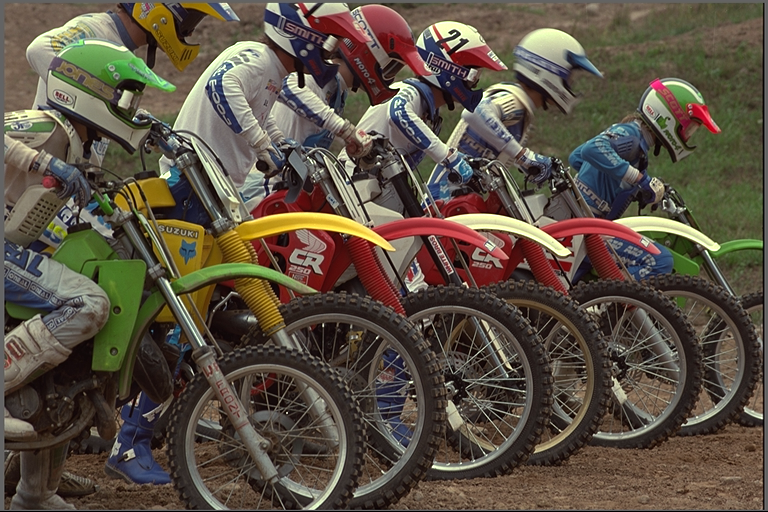
Load an example image
wget "https://r0k.us/graphics/kodak/kodak/kodim05.png"
img = Image.open("kodim05.png")
img
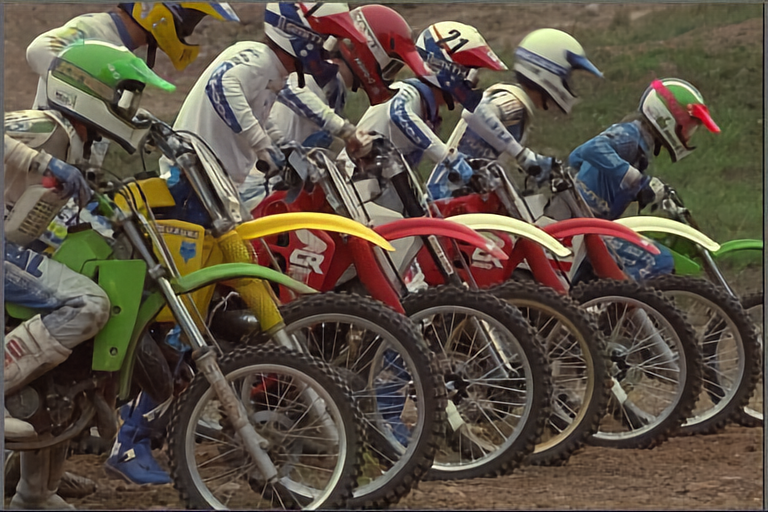
Full encoding and decoding pipeline with .forward()
-
If
codec.eval()is called, the latent is rounded to nearest integer. -
If
codec.train()is called, uniform noise is added instead of rounding.
with torch.no_grad():
    codec.eval()
    x = PILToTensor()(img).to(torch.float)
    x = (x/255 - 0.5).unsqueeze(0).to(device)
    x_hat, _, _ = codec(x)
ToPILImage()(x_hat[0]+0.5)
Accessing latents
with torch.no_grad():
    X = codec.wavelet_analysis(x,J=codec.J)
    z = codec.encoder[0:2](X)
    z_hat = codec.encoder[2](z)
    X_hat = codec.decoder(z_hat)
    x_rec = codec.wavelet_synthesis(X_hat,J=codec.J)
print(f"dimensionality reduction: {x.numel()/z.numel()}×")
dimensionality reduction: 16.0×
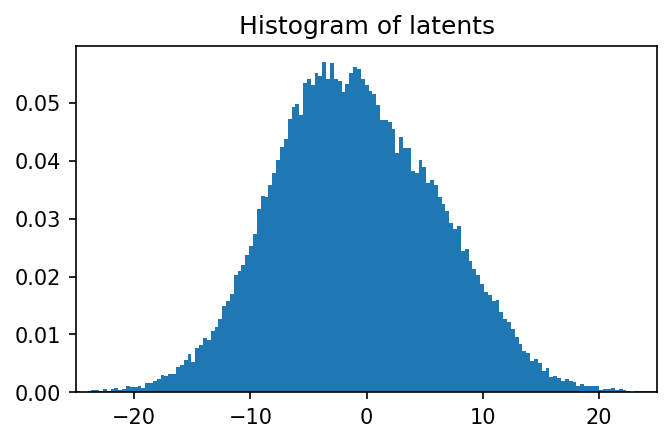
plt.figure(figsize=(5,3),dpi=150)
plt.hist(
    z.flatten().numpy(),
    range=(-25,25),
    bins=151,
    density=True,
);
plt.title("Histogram of latents")
plt.xlim([-25,25]);
Lossless compression of latents
def scale_for_display(img, n_bits):
    scale_factor = (2**8 - 1) / (2**n_bits - 1)
    lut = [int(i * scale_factor) for i in range(2**n_bits)]
    channels = img.split()
    scaled_channels = [ch.point(lut * 2**(8-n_bits)) for ch in channels]
    return Image.merge(img.mode, scaled_channels)
Single channel PNG (L)
z_padded = torch.nn.functional.pad(z_hat, (0, 0, 0, 0, 0, 4))
z_pil = latent_to_pil(z_padded,codec.latent_bits,1)
display(scale_for_display(z_pil[0], codec.latent_bits))
z_pil[0].save('latent.png')
png = [Image.open("latent.png")]
z_rec = pil_to_latent(png,16,codec.latent_bits,1)
assert(z_rec.equal(z_padded))
print("compression_ratio: ", x.numel()/os.path.getsize("latent.png"))

compression_ratio: 26.729991842653856
Three channel WebP (RGB)
z_pil = latent_to_pil(z_hat,codec.latent_bits,3)
display(scale_for_display(z_pil[0], codec.latent_bits))
z_pil[0].save('latent.webp',lossless=True)
webp = [Image.open("latent.webp")]
z_rec = pil_to_latent(webp,12,codec.latent_bits,3)
assert(z_rec.equal(z_hat))
print("compression_ratio: ", x.numel()/os.path.getsize("latent.webp"))

compression_ratio: 28.811254396248536
Four channel TIF (CMYK)
z_padded = torch.nn.functional.pad(z_hat, (0, 0, 0, 0, 0, 4))
z_pil = latent_to_pil(z_padded,codec.latent_bits,4)
display(scale_for_display(z_pil[0], codec.latent_bits))
z_pil[0].save('latent.tif',compression="tiff_adobe_deflate")
tif = [Image.open("latent.tif")]
z_rec = pil_to_latent(tif,16,codec.latent_bits,4)
assert(z_rec.equal(z_padded))
print("compression_ratio: ", x.numel()/os.path.getsize("latent.tif"))

compression_ratio: 21.04034530731638
Audio Compression
import io
import os
import torch
import torchaudio
import json
import matplotlib.pyplot as plt
from types import SimpleNamespace
from PIL import Image
from datasets import load_dataset
from einops import rearrange
from IPython.display import Audio
from walloc import walloc
Load the model from a pre-trained checkpoint
wget https://hf.co/danjacobellis/walloc/resolve/main/stereo_5x.pth
wget https://hf.co/danjacobellis/walloc/resolve/main/stereo_5x.json
codec_config = SimpleNamespace(**json.load(open("stereo_5x.json")))
checkpoint = torch.load("stereo_5x.pth",map_location="cpu",weights_only=False)
codec = walloc.Codec1D(
    channels = codec_config.channels,
    J = codec_config.J,
    Ne = codec_config.Ne,
    Nd = codec_config.Nd,
    latent_dim = codec_config.latent_dim,
    latent_bits = codec_config.latent_bits,
    lightweight_encode = codec_config.lightweight_encode,
    post_filter = codec_config.post_filter
)
codec.load_state_dict(checkpoint['model_state_dict'])
codec.eval();
/home/dan/g/lib/python3.12/site-packages/torch/nn/utils/weight_norm.py:143: FutureWarning: `torch.nn.utils.weight_norm` is deprecated in favor of `torch.nn.utils.parametrizations.weight_norm`.
  WeightNorm.apply(module, name, dim)
Load example audio track
MUSDB = load_dataset("danjacobellis/musdb_segments_val",split='validation')
audio_buff = io.BytesIO(MUSDB[40]['audio_mix']['bytes'])
x, fs = torchaudio.load(audio_buff,normalize=False)
x = x.to(torch.float)
x = x - x.mean()
max_abs = x.abs().max()
x = x / (max_abs + 1e-8)
x = x/2
Audio(x[:,:2**20],rate=44100)
Full encoding and decoding pipeline with .forward()
-
If
codec.eval()is called, the latent is rounded to nearest integer. -
If
codec.train()is called, uniform noise is added instead of rounding.
with torch.no_grad():
    codec.eval()
    x_hat, _, _ = codec(x.unsqueeze(0))
Audio(x_hat[0,:,:2**20],rate=44100)
Accessing latents
with torch.no_grad():
    X = codec.wavelet_analysis(x.unsqueeze(0),J=codec.J)
    z = codec.encoder[0:2](X)
    z_hat = codec.encoder[2](z)
    X_hat = codec.decoder(z_hat)
    x_rec = codec.wavelet_synthesis(X_hat,J=codec.J)
print(f"dimensionality reduction: {x.numel()/z.numel():.4g}×")
dimensionality reduction: 4.74×
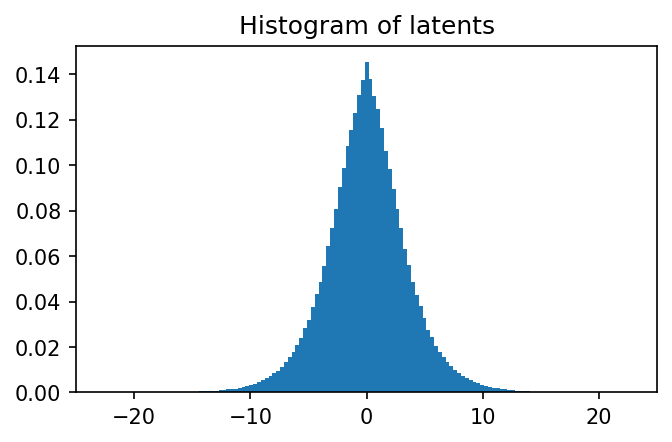
plt.figure(figsize=(5,3),dpi=150)
plt.hist(
    z.flatten().numpy(),
    range=(-25,25),
    bins=151,
    density=True,
);
plt.title("Histogram of latents")
plt.xlim([-25,25]);
Lossless compression of latents
def pad(audio, p=2**16):
    B,C,L = audio.shape
    padding_size = (p - (L % p)) % p
    if padding_size > 0:
        audio = torch.nn.functional.pad(audio, (0, padding_size), mode='constant', value=0)
    return audio
with torch.no_grad():
    L = x.shape[-1]
    x_padded = pad(x.unsqueeze(0), 2**16)
    X = codec.wavelet_analysis(x_padded,codec.J)
    z = codec.encoder(X)
    ℓ = z.shape[-1]
    z = pad(z,128)
    z = rearrange(z, 'b c (w h) -> b c w h', h=128).to("cpu")
    webp = walloc.latent_to_pil(z,codec.latent_bits,3)[0]
    buff = io.BytesIO()
    webp.save(buff, format='WEBP', lossless=True)
    webp_bytes = buff.getbuffer()
print("compression_ratio: ", x.numel()/len(webp_bytes))
webp
compression_ratio: 9.83650170496386

Decoding
with torch.no_grad():
    z_hat = walloc.pil_to_latent(
        [Image.open(buff)],
        codec.latent_dim,
        codec.latent_bits,
        3)
    X_hat = codec.decoder(rearrange(z_hat, 'b c h w -> b c (h w)')[:,:,:ℓ])
    x_hat = codec.wavelet_synthesis(X_hat,codec.J)
    x_hat = codec.post(x_hat)
    x_hat = codec.clamp(x_hat[0,:,:L])
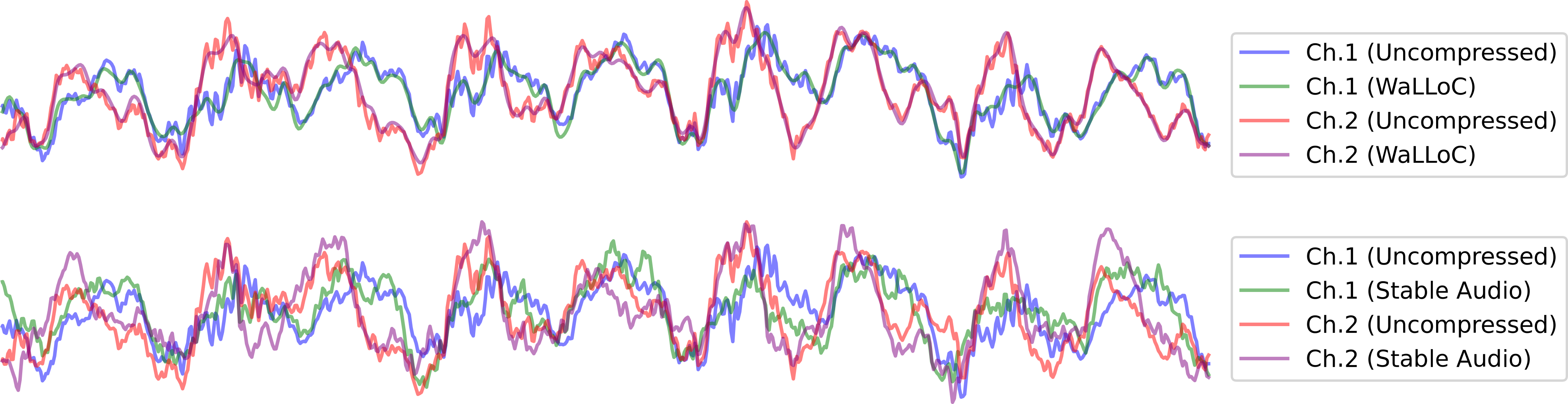
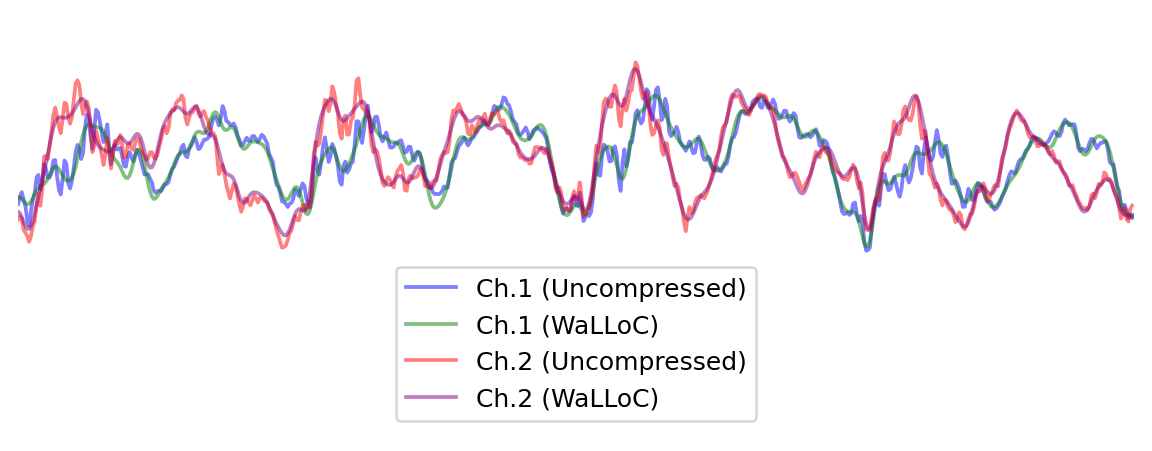
start, end = 0, 1000
plt.figure(figsize=(8, 3), dpi=180)
plt.plot(x[0, start:end], alpha=0.5, c='b', label='Ch.1 (Uncompressed)')
plt.plot(x_hat[0, start:end], alpha=0.5, c='g', label='Ch.1 (WaLLoC)')
plt.plot(x[1, start:end], alpha=0.5, c='r', label='Ch.2 (Uncompressed)')
plt.plot(x_hat[1, start:end], alpha=0.5, c='purple', label='Ch.2 (WaLLoC)')

plt.xlim([400,1000])
plt.ylim([-0.6,0.3])
plt.legend(loc='lower center')
plt.box(False)
plt.xticks([])
plt.yticks([]);
!jupyter nbconvert --to markdown README.ipynb
[NbConvertApp] Converting notebook README.ipynb to markdown
[NbConvertApp] Support files will be in README_files/
[NbConvertApp] Writing 12900 bytes to README.md
!sed -i 's|!\[png](README_files/\(README_[0-9]*_[0-9]*\.png\))||g' README.md
!sed -i 's|src="README_files/\(README_[0-9]*\.wav\)"|src="https://huggingface.co/danjacobellis/walloc/resolve/main/README_files/\1"|g' README.md
Release history Release notifications | RSS feed


Download files
Download the file for your platform. If you're not sure which to choose, learn more about installing packages.
Source Distribution
Built Distribution
Filter files by name, interpreter, ABI, and platform.
If you're not sure about the file name format, learn more about wheel file names.
Copy a direct link to the current filters
File details
Details for the file walloc-1.2.0.tar.gz.
File metadata
- Download URL: walloc-1.2.0.tar.gz
- Upload date:
- Size: 12.8 kB
- Tags: Source
- Uploaded using Trusted Publishing? No
- Uploaded via: twine/5.1.1 CPython/3.10.12
File hashes
| Algorithm | Hash digest | |
|---|---|---|
| SHA256 |
6ab31ea1f8f2f0e4d2b8e7b1d1082e4e0db73bf6869f1df9c60319b872e7800a
|
|
| MD5 |
2b381a66b6d334b8ccaddcc15db1dbd2
|
|
| BLAKE2b-256 |
042541e673795b359218f95ff2c7c582c6428f65534708921c4fabf43d65051e
|
File details
Details for the file walloc-1.2.0-py3-none-any.whl.
File metadata
- Download URL: walloc-1.2.0-py3-none-any.whl
- Upload date:
- Size: 8.9 kB
- Tags: Python 3
- Uploaded using Trusted Publishing? No
- Uploaded via: twine/5.1.1 CPython/3.10.12
File hashes
| Algorithm | Hash digest | |
|---|---|---|
| SHA256 |
fde0939e531fa124458a6d8f2eb346a951bfafc5bed05bf93d7142513d302467
|
|
| MD5 |
a1199e4686996b529139ee0c551adb33
|
|
| BLAKE2b-256 |
3fcbc6b57b19191cbd1f0a4d514caecbfb0620fdc7c0c2748022c276da30e678
|






