
Walsh-hadamard transform







Compressing images with a Hadamard transform
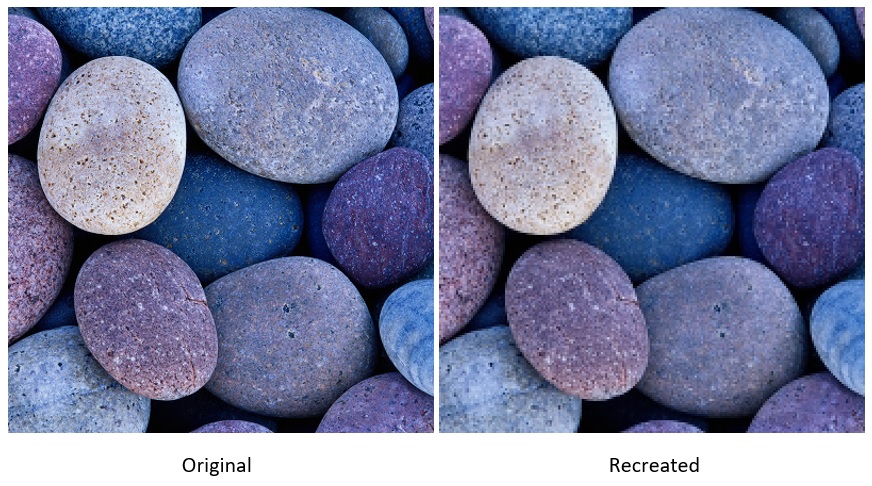
Description
From Wikipedia: The Hadamard transform (also known as the Walsh–Hadamard transform, Hadamard–Rademacher–Walsh transform, Walsh transform, or Walsh–Fourier transform) is an example of a generalized class of Fourier transforms. It performs an orthogonal, symmetric, involutive, linear operation on 2m real numbers (or complex numbers, although the Hadamard matrices themselves are purely real).
The Hadamard transform can be regarded as being built out of size-2
discrete Fourier transforms (DFTs), and is in fact equivalent to a
multidimensional DFT of size 2 × 2 × ⋯ × 2 × 2. It decomposes an
arbitrary input vector into a superposition of Walsh functions.
The transform is named for the French mathematician Jacques Hadamard, the German-American mathematician Hans Rademacher, and the American mathematician Joseph L. Walsh.
The Hadamard transform is also used in data encryption, as well as many signal processing
and data compression algorithms, such as JPEG XR and MPEG-4 AVC. In video compression
applications, it is usually used in the form of the sum of absolute transformed differences.
It is also a crucial part of Grover's algorithm and Shor's algorithm in quantum computing.
Contributing
See CONTRIBUTING.md for the development setup, the checks CI runs, and the conventions this codebase follows. Participation is covered by the Code of Conduct.
Acknowledgement
This code is partially based on the solution from ktisha/python2012
Installation
Requires Python 3.10 or newer.
pip install walsh
or, with uv:
uv add walsh          # into a project
uv tool install walsh # just the command line tool
The example script additionally needs matplotlib and Pillow, which are the
demo extra: pip install "walsh[demo]".
Development
uv.lock is committed, so a checkout reproduces exactly the environment CI
uses:
uv sync --group dev --all-extras
--group dev brings in pytest, ruff and mypy; --all-extras adds the demo
extra so examples/roundtrip.py runs too. Without uv:
pip install -e ".[demo]" -r requirements-dev.txt
How to run
Command line
walsh compress data/image.bmp data/transformed.cim
walsh extract  data/transformed.cim data/recreated.bmp
The format is taken from the filename suffix, so PPM works the same way, and a picture can be compressed from one format and restored as another:
walsh compress photo.ppm out.cim
walsh extract  out.cim restored.bmp     # PPM in, BMP out
walsh extract  out.cim restored.tif     # or TIFF out
walsh extract  out.cim restored.pam     # or PAM out
walsh extract  out.cim restored.npy     # or a bare NumPy array
compress accepts --packed-block-size (how many low-frequency coefficients
per axis to keep -- lower is smaller and lossier), --y-block-size,
--chroma-block-size and --coeff-removal. Add -v/-vv for progress
logging, and see walsh compress -h for the full list.
Writes are atomic: output goes to a temporary file beside the destination and
replaces it only on success, so a failed run leaves an existing file untouched.
walsh also refuses to write over its own input, since both pipelines read the
whole image before writing and would otherwise replace the original with a
lossy reconstruction of itself.
The .cim container counts each channel's blocks in a 16-bit field, so at the
default 8-pixel luma block an image must be under about 4.2 megapixels. Larger
images are refused with a message naming the block size that would fit them:
--y-block-size 16 roughly quadruples the ceiling, at some cost in detail.
--coeff-removal is the second, independent lossy knob: spectral coefficients
smaller than the given magnitude are zeroed. It does not change the .cim
file's size, because the format stores a fixed count of int16 values whether
or not they are zero, but it makes the result far more compressible. On
data/earth.ppm:
--coeff-removal |
non-zero coefficients | gzipped .cim |
PSNR |
|---|---|---|---|
| (unset) | 48,121 / 60,000 | 59,404 B | 25.07 dB |
| 5 | 29,049 | 45,080 B | 25.06 dB |
| 25 | 14,769 | 27,924 B | 24.71 dB |
| 50 | 8,917 | 19,285 B | 23.85 dB |
That table was measured at the default block sizes, 8 for luma and 16 for
chroma, and the threshold is an absolute magnitude, so its effect depends
on them. The surviving low-frequency coefficients grow with the block edge,
and the same number prunes less at a larger one. The same --coeff-removal 25 on data/earth.ppm, with luma and chroma blocks set equal:
| block edge | non-zero coefficients | zeroed | gzipped .cim |
|---|---|---|---|
| 8 | 88,277 → 18,292 | 79.3% | 94,658 → 32,235 B |
| 16 | 24,060 → 7,041 | 70.7% | 29,190 → 13,105 B |
| 32 | 6,921 → 2,617 | 62.2% | 9,435 → 5,192 B |
| 64 | 2,134 → 1,045 | 51.0% | 3,048 → 2,147 B |
A threshold tuned against the first table and then combined with a larger
--y-block-size has quietly stopped doing most of its work; retune it. Note
also that it thresholds spectral coefficients, never the Hadamard matrix,
whose entries all share one magnitude (0.35 at edge 8): a value at that scale
is a no-op.
Reading the PSNR figures
PSNR is peak signal-to-noise ratio, the standard way to put a number on how much a lossy codec changed an image. It compares the reconstruction against the original pixel by pixel:
PSNR = 10 * log10(255**2 / MSE)
where MSE is the mean squared difference across every channel of every pixel,
and 255 is the largest value an 8-bit channel can hold. It is measured in
decibels, and higher is better: a perfect reconstruction has infinite PSNR,
and every 3 dB gained means the mean squared error was halved.
Because the scale is logarithmic, small-looking differences matter. Going from 23 dB to 25 dB is not an 8% improvement, it is roughly a 37% reduction in error power. Equally, the near-identical 25.07 and 25.06 in the table above mean the first step of coefficient removal cost essentially nothing.
Rough expectations for 8-bit images, though they vary by content:
| PSNR | Typically means |
|---|---|
| above 40 dB | differences invisible without pixel-peeping |
| 30-40 dB | good lossy compression, artefacts hard to spot |
| 25-30 dB | visible softening and blocking |
| below 25 dB | obvious degradation |
The figures here sit around 25 dB because the defaults are aggressive: each
8x8 luma block keeps 16 of its 64 coefficients and each 16x16 chroma block
keeps 16 of 256. Raise --packed-block-size for a gentler setting.
One caveat worth knowing: PSNR measures arithmetic difference, not perceived quality. It is reproducible and easy to compare, which is why it is quoted here, but two images with the same PSNR can look noticeably different — it under- weights structured artefacts like block edges, which the eye picks out readily. Treat it as a consistent yardstick for comparing settings of this codec rather than an absolute measure of how good an image looks.
Exit codes follow the usual convention: 0 on success, 1 when the input
cannot be processed (not a 24-bit BMP, truncated, unreadable), and 2 for a
usage error such as a missing file or an unknown option.
As a library
from walsh import Task

Task().with_action("compress").with_input("data/image.bmp").with_output("out.cim").run()
Task().with_action("extract").with_input("out.cim").with_output("back.bmp").run()
Example
examples/roundtrip.py compresses the sample image, restores it, and plots
both images with their histograms side by side (needs the demo extra):
python examples/roundtrip.py
Requirements
The package needs numpy and click -- BMP parsing is done by hand with
struct, and click powers the command line interface. matplotlib and
Pillow are needed only by the example script, and are declared as the demo
extra. Versions are pinned in pyproject.toml;
requirements.txt, requirements-demo.txt and requirements-dev.txt mirror
them for plain pip install -r workflows.
Development commands
uv run pytest                          # test suite
uv run pytest --cov --cov-report=term-missing   # with coverage
uv run ruff check .                    # lint
uv run ruff format .                   # format
uv run mypy                            # strict type check
uv build                               # sdist + wheel into dist/
CI runs exactly these on every pull request, plus the test suite against Python 3.10 through 3.14.
Coverage
Coverage is measured with branch coverage on, and CI enforces a floor of 90%
on every supported Python version. A pull request that drops below it fails
the test jobs, which are required checks on master — so the badge above
states what is actually guaranteed rather than a number that could drift.
Coverage is opt-in locally (--cov) so a plain pytest stays fast; CI always
passes it.
Releasing
The version in pyproject.toml is the single source of truth. To cut a
release, bump it, add the matching ## [x.y.z] section to CHANGELOG.md, and
merge to master. The release workflow then tags v<version>, creates a
GitHub Release with those notes, and publishes the sdist and wheel to
PyPI using Trusted Publishing — no API token
is stored in this repository.
Merges that do not change the version are a no-op, since PyPI permanently refuses to accept the same version twice.
File formats
Input and output
| Suffix | Format | Notes |
|---|---|---|
.bmp |
Windows bitmap | 24-bit, single plane, uncompressed. Top-down (negative height) files are understood. |
.ppm, .pnm |
Netpbm portable pixmap | P6 binary and P3 ASCII are read; P6 is written. Header comments are skipped and a maxval below 255 is rescaled. 16-bit samples are rejected. |
.npy |
NumPy array | The raw pixel matrix in NumPy's own container, for images that already live in an array. Read: uint8 of shape (height, width, 3) as RGB, (height, width) or (height, width, 1) as greyscale, and (height, width, 4) as RGBA only when fully opaque. Other dtypes, other channel counts, transparency and CMYK are rejected by name; pickled files are refused from the header and never loaded. Written as (height, width, 3) uint8, so numpy.load reads it back as is. Channel order is RGB; a BGR array, as OpenCV produces, is array[..., ::-1]. |
.pam |
Netpbm portable arbitrary map | P7 with DEPTH 3, TUPLTYPE RGB (or none) and MAXVAL up to 255 is read and written; a lower maxval is rescaled. Header keys may come in any order, comment and blank lines are skipped. Greyscale, alpha, other tuple types and 16-bit samples are rejected by name. The writer's output is byte-identical to Netpbm's own pamtopam. |
.tif, .tiff |
Uncompressed baseline TIFF | Both byte orders and multi-strip files are read; little-endian single-strip is written. Only the uncompressed RGB 8-bit chunky profile is supported -- LZW, palette, CMYK, greyscale, 16-bit, planar and rotated files are rejected by name. |
Every reader presents the same in-memory view -- RGB pixels, top row first --
whatever the file itself stores. BMP is the awkward one on both counts, storing
blue-green-red samples in bottom-up rows, and BMPImage converts in each
direction. That shared contract is what makes cross-format conversion work.
The .cim container
compress writes a .cim file: an atypical, project-specific container, so
most commercial tools will not be able to read it. It stores the image
dimensions, three block-layout descriptions (Y, Cb, Cr), and the retained
Walsh-Hadamard coefficients as little-endian int16.
Note.
.cimfiles written by 0.1.x are not compatible with 0.2.0. The in-memory pixel contract changed, so an old file extracted with 0.2.0 comes back with red and blue swapped and vertically flipped. Re-compress from the source image instead.
1 maintainer

Release files for walsh 0.4.9
For a detailed explanation of source distributions (sdists) and built distributions (wheels), please see the package formats documentation.
Source distribution (sdist)
| File | Size | Uploaded | |
|---|---|---|---|
| walsh-0.4.9.tar.gz | 106.3 kB | Details |
Built distribution (wheel)
| File | Interpreter | ABI | Platform | Reset |
|---|---|---|---|---|
| walsh-0.4.9-py3-none-any.whl | Python 3 | none | any | Details |
Total release size: 162.5 kB
Release files / walsh-0.4.9.tar.gz
| Download URL | walsh-0.4.9.tar.gz |
|---|---|
| Size | 106.3 kB |
| Tags | Source |
|
SHA-256 checksum How to use checksums |
df06d7e3350965fc72bbe5ef70608499a62600dd626980a63ccfdcad153d79da
|
|
BLAKE2b-256 checksum How to use checksums |
d6555c6e3c716eb57c3e4c6dc647a5da020122d38cfccc6b4527da8b54f1cd24
|
| Upload date | |
|
Uploaded using Trusted Publishing? What is trusted publishing? |
Yes |
| Uploaded via |
twine/7.0.0 CPython/3.13.14
|
Provenance
Provenance describes where a file came from. On PyPI, provenance is shared via attestations, which provide a verifiable record of the build or publishing details. View details, limitations and caveats.


PyPI Publish Attestation
PyPI verified that this artifact, at this checksum, originated from the publisher listed below.
Signed by GitHub Actions, verified by PyPI on Sep 15, 2026.
Transparency logRelease files / walsh-0.4.9-py3-none-any.whl
| Download URL | walsh-0.4.9-py3-none-any.whl |
|---|---|
| Size | 56.3 kB |
| Tags | Python 3 |
|
SHA-256 checksum How to use checksums |
1fc0971d38f0833326fed1fa188ea9e5ad90eb0f09b400540f704df5f7f9d35f
|
|
BLAKE2b-256 checksum How to use checksums |
955c1ad333776beba546bdf10e093f4749a88a0b6bbce658a8ddd4896da36ca1
|
| Upload date | |
|
Uploaded using Trusted Publishing? What is trusted publishing? |
Yes |
| Uploaded via |
twine/7.0.0 CPython/3.13.14
|
Provenance
Provenance describes where a file came from. On PyPI, provenance is shared via attestations, which provide a verifiable record of the build or publishing details. View details, limitations and caveats.
PyPI Publish Attestation
PyPI verified that this artifact, at this checksum, originated from the publisher listed below.
Signed by GitHub Actions, verified by PyPI on Sep 15, 2026.
Transparency log













