
Official Python SDK for the Wandelbots

Project description
wandelbots-nova (Python SDK)



This library provides an SDK for the Wandelbots NOVA API.
The SDK will help you to build your own apps and services using Python on top of NOVA and makes programming a robot as easy as possible.
https://github.com/user-attachments/assets/f6157e4b-eea8-4b96-b302-1f3864ae44a9
Background
Wandelbots NOVA is an agnostic robot operating system that enables developers to virtually plan their industrial six-axis robot fleet, as well as to program, control and operate your robots on the shopfloor - all independent on the robot brand and through a unified API. It combines modern development tools (Python, JavaScript APIs) with an AI-driven approach to robot control and motion planning, enabling developers to build applications like gluing, grinding, welding, and palletizing without worrying about underlying hardware differences. The holistic software offers a variety of tools to create unique automation solutions along the whole automation process.
Prerequisites
- A running Nova instance (apply for access at wandelbots.com)
- Valid Nova API credentials
- Python >=3.10
🚀 Quick Start
See the examples for usage of this library and further examples utilizing rerun as a visualizer
# Add the package to your pyproject.toml
dependencies = [
    "wandelbots-nova[nova-rerun-bridge]>=0.12",
]
# Download the latest robot models
poetry run download-models
# Add credentials and instance to .env file
NOVA_API="https://your-instance.wandelbots.io"
NOVA_ACCESS_TOKEN="your-access-token"
from nova_rerun_bridge import NovaRerunBridge
from nova import Nova
from nova import api
from nova.actions import jnt, ptp
from nova.types import Pose
import asyncio

async def main():
  # Connect to your Nova instance (or use .env file)
  nova = Nova(
      host="https://your-instance.wandelbots.io",
      access_token="your-access-token"
  )
  bridge = NovaRerunBridge(nova)

  # Setup visualization
  await bridge.setup_blueprint()

  # Setup robot
  cell = nova.cell()
  controller = await cell.ensure_virtual_robot_controller(
      "ur",
      api.models.VirtualControllerTypes.UNIVERSALROBOTS_MINUS_UR10E,
      api.models.Manufacturer.UNIVERSALROBOTS,
  )

  # Connect to the controller and activate motion groups
  async with controller[0] as motion_group:
      home_joints = await motion_group.joints()
      tcp_names = await motion_group.tcp_names()
      tcp = tcp_names[0]

      # Get current TCP pose and offset it slightly along the x-axis
      current_pose = await motion_group.tcp_pose(tcp)
      target_pose = current_pose @ Pose((1, 0, 0, 0, 0, 0))

      actions = [
          jnt(home_joints),
          ptp(target_pose),
          jnt(home_joints),
      ]

      # Plan trajectory
      joint_trajectory = await motion_group.plan(actions, tcp)

      # Log a trajectory
      await bridge.log_trajectory(joint_trajectory, tcp, motion_group)


if __name__ == "__main__":
    asyncio.run(main())
Installation
We recommend installing the library with the nova-rerun-bridge extra to make usage of the visualization tool rerun.
See the extension README.md for further details.
pip install wandelbots-nova
# or
pip install "wandelbots-nova[nova-rerun-bridge]"
Or add to your pyproject.toml:
dependencies = [
    "wandelbots-nova[nova-rerun-bridge]>=0.12",
]
You need to download the robot models to visualize the robot models in the rerun viewer.
poetry run download-models
Usage
Import the library in your code to get started.
from nova import Nova
The SDK also includes an auto-generated API client for the NOVA API. You can access the API client using the api module.
from nova import api
Checkout the 01_basic and 02_plan_and_execute examples to learn how to use the library.
In this directory are more examples to explain the advanced usage of the SDK. If you want to utilize rerun as a visualizer you can find examples in the nova_rerun_bride examples folder.
Examples
Basic Usage
from nova import Nova

async def main():
    async with Nova() as nova:
        cell = nova.cell()
        controller = await cell.ensure_virtual_robot_controller(
            "ur10",
            "universalrobots-ur10e",
            "universalrobots"
        )

        async with controller[0] as motion_group:
            tcp = "Flange"
            home_joints = await motion_group.joints()
            current_pose = await motion_group.tcp_pose(tcp)
Robot Motion Examples
- Simple Point-to-Point Movement
from nova import Nova
from nova.actions import ptp, jnt
from nova.types import Pose

async def main():
    async with Nova() as nova:
        # ... setup code ...
        actions = [
            jnt(home_joints),
            ptp(current_pose @ Pose((100, 0, 0, 0, 0, 0))),  # Move 100mm in X
            jnt(home_joints)
        ]
        trajectory = await motion_group.plan(actions, tcp)
- Collision-Free Movement
from nova.actions import collision_free

actions = [
    collision_free(
        target=Pose((-500, -400, 200, pi, 0, 0)),
        collision_scene=collision_scene,
        settings=MotionSettings(tcp_velocity_limit=30)
    )
]
https://github.com/user-attachments/assets/0416151f-1304-46e2-a4ab-485fcda766fc
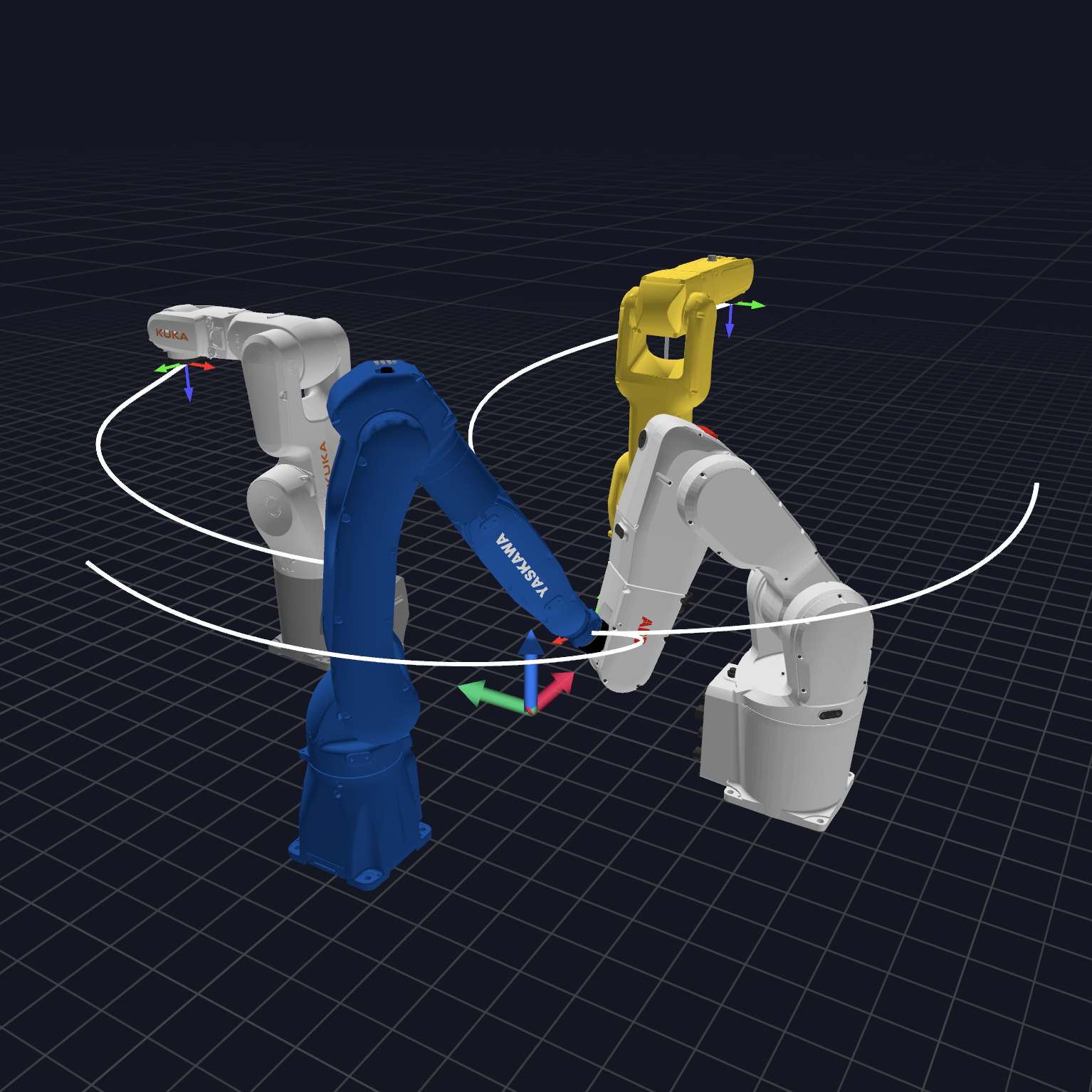
- Multiple Robot Coordination
async def move_robots():
    async with ur10[0] as ur_mg, kuka[0] as kuka_mg:
        await asyncio.gather(
            move_robot(ur_mg, "Flange"),
            move_robot(kuka_mg, "Flange")
        )
Advanced Features
- I/O Control
from nova.actions import io_write

actions = [
    jnt(home_joints),
    io_write(key="digital_out[0]", value=False),  # Set digital output
    ptp(target_pose),
    jnt(home_joints)
]
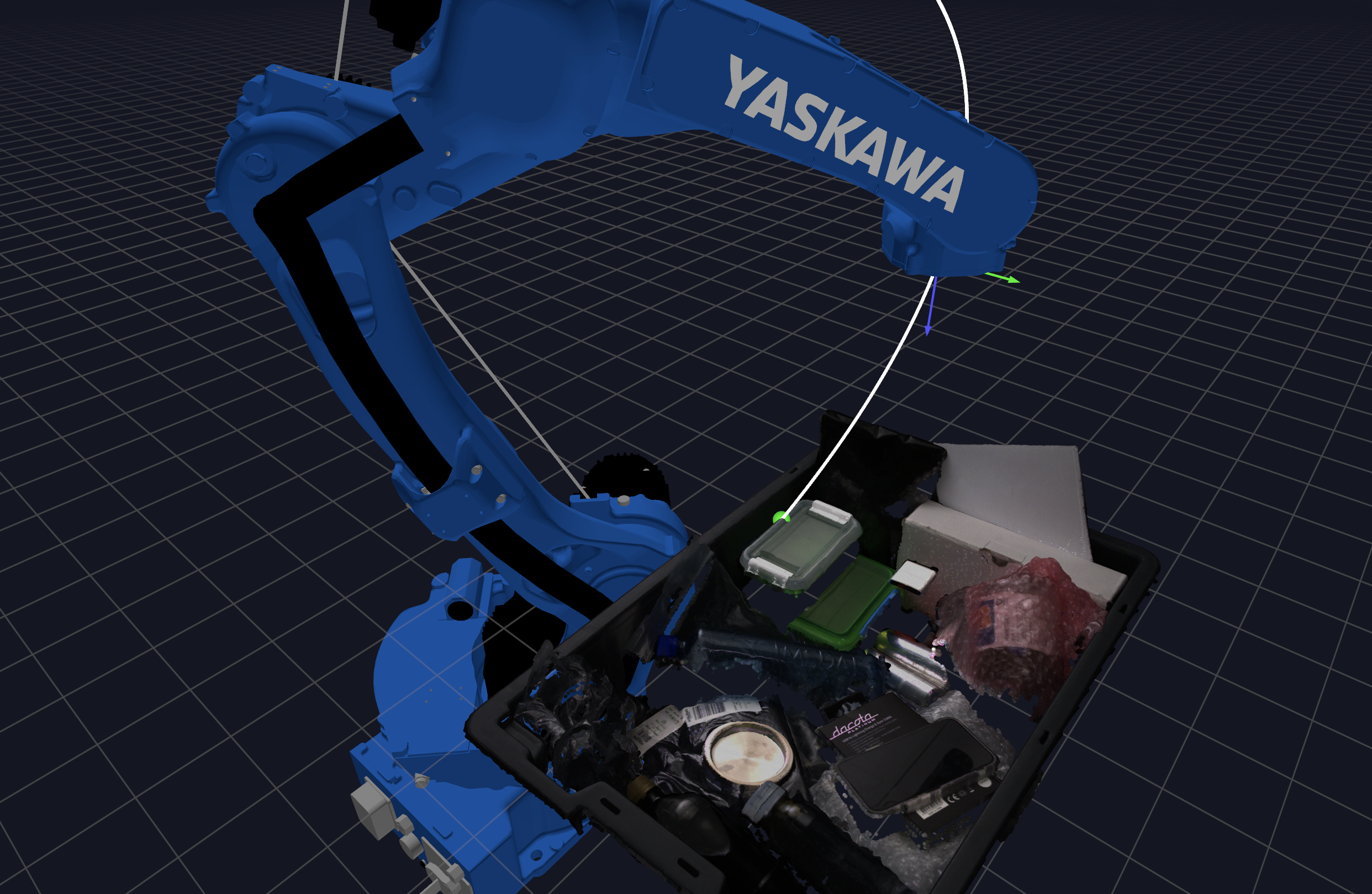
- Visualization with Rerun
from nova_rerun_bridge import NovaRerunBridge
import rerun as rr

async with Nova() as nova, NovaRerunBridge(nova) as bridge:
    await bridge.setup_blueprint()
    # ... robot setup ...
    await bridge.log_actions(actions)
    await bridge.log_trajectory(trajectory, tcp, motion_group)

    # use any rerun functions to e.g. show pointclouds and more
    # rr.log
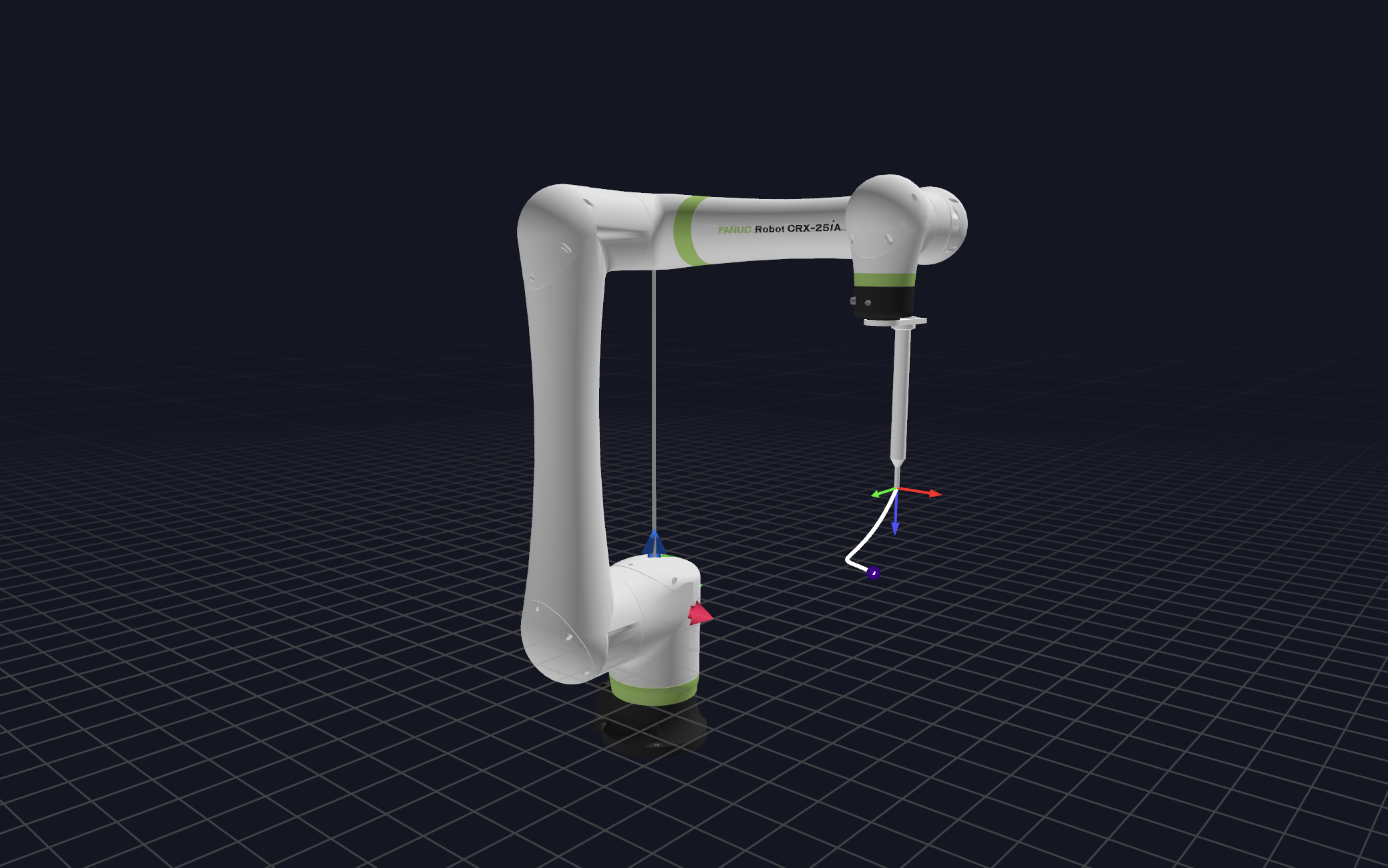
- Adding and Using Custom TCP (Tool Center Point)
from nova.api import models
import json

# Define TCP configuration
tcp_config = {
    "id": "vacuum_gripper",
    "readable_name": "Vacuum Gripper",
    "position": {"x": 0, "y": 0, "z": 100},  # 100mm in Z direction
    "rotation": {"angles": [0, 0, 0], "type": "EULER_ANGLES_EXTRINSIC_XYZ"}
}

async def setup_tcp():
    async with Nova() as nova:
        cell = nova.cell()
        controller = await cell.ensure_virtual_robot_controller(
            "robot1", models.VirtualControllerTypes.UNIVERSALROBOTS_MINUS_UR10E,
            models.Manufacturer.UNIVERSALROBOTS
        )

        # Add TCP to virtual robot
        tcp_config_obj = models.RobotTcp.from_json(json.dumps(tcp_config))
        await nova._api_client.virtual_robot_setup_api.add_virtual_robot_tcp(
            cell.cell_id,
            controller.controller_id,
            motion_group_idx=0,
            tcp_config_obj
        )

        # Use the new TCP
        async with controller[0] as motion_group:
            current_pose = await motion_group.tcp_pose("vacuum_gripper")
            # Plan motions using the new TCP
            actions = [ptp(current_pose @ Pose((100, 0, 0, 0, 0, 0)))]
            trajectory = await motion_group.plan(actions, "vacuum_gripper")
- Using Common Coordinate Systems for Multiple Robots
from wandelbots_api_client.models import CoordinateSystem, Vector3d, RotationAngles, RotationAngleTypes

async def setup_coordinated_robots():
    async with Nova() as nova:
        cell = nova.cell()

        # Setup robots
        robot1 = await cell.ensure_virtual_robot_controller("robot1", ...)
        robot2 = await cell.ensure_virtual_robot_controller("robot2", ...)

        # Define common world coordinate system
        world_mounting = CoordinateSystem(
            coordinate_system="world",
            name="mounting",
            reference_uid="",
            position=Vector3d(x=0, y=0, z=0),
            rotation=RotationAngles(
                angles=[0, 0, 0],
                type=RotationAngleTypes.EULER_ANGLES_EXTRINSIC_XYZ
            )
        )

        # Position robots relative to world coordinates
        await nova._api_client.virtual_robot_setup_api.set_virtual_robot_mounting(
            cell="cell",
            controller=robot1.controller_id,
            id=0,  # motion_group_id
            coordinate_system=CoordinateSystem(
                coordinate_system="world",
                name="robot1_mount",
                reference_uid="",
                position=Vector3d(x=500, y=0, z=0),  # Robot 1 at x=500mm
                rotation=RotationAngles(
                    angles=[0, 0, 0],
                    type=RotationAngleTypes.EULER_ANGLES_EXTRINSIC_XYZ
                )
            )
        )

        await nova._api_client.virtual_robot_setup_api.set_virtual_robot_mounting(
            cell="cell",
            controller=robot2.controller_id,
            id=0,  # motion_group_id
            coordinate_system=CoordinateSystem(
                coordinate_system="world",
                name="robot2_mount",
                reference_uid="",
                position=Vector3d(x=-500, y=0, z=0),  # Robot 2 at x=-500mm
                rotation=RotationAngles(
                    angles=[0, 0, pi],  # Rotated 180° around Z
                    type=RotationAngleTypes.EULER_ANGLES_EXTRINSIC_XYZ
                )
            )
        )

        # Now both robots can work in the same coordinate system
        async with robot1[0] as mg1, robot2[0] as mg2:
            # Movements will be relative to world coordinates
            await asyncio.gather(
                mg1.plan([ptp(Pose((0, 100, 0, 0, 0, 0)))], "tcp1"),
                mg2.plan([ptp(Pose((0, -100, 0, 0, 0, 0)))], "tcp2")
            )
Development
To install the development dependencies, run the following command
poetry install --extras "nova-rerun-bridge"
Formatting
poetry run ruff format
poetry run ruff check --select I --fix
Yaml Linting
docker run --rm -it -v $(pwd):/data cytopia/yamllint -d .yamllint .
Using Branch Versions For Testing
When having feature branches or forks, or might be helpful to test the library as dependency in other projects first. Poetry allows to pull the library from different sources. See the Poetry Doc for more information.
Poetry Version < 2:
wandelbots-nova = { git = "https://github.com/wandelbotsgmbh/wandelbots-nova.git", branch = "fix/http-prefix" }
Poetry Version >=2
wandelbots-nova @ git+https://github.com/wandelbotsgmbh/wandelbots-nova.git@fix/http-prefix
Environment Variables for NOVA Configuration
- Copy the Template: Make a copy of the provided
.env.templatefile and rename it to.envwithcp .env.template .env. - Fill in the Values: Open the
.envfile in a text editor and provide the necessary values for each variable. The table below describes each variable and its usage.
| Variable | Description | Required | Default | Example |
|---|---|---|---|---|
NOVA_API |
The base URL or hostname of the NOVA server instance. | Yes | None | https://nova.example.com or http://172.0.0.1 |
NOVA_USERNAME |
The username credential used for authentication with the NOVA service. | Yes* | None | my_username |
NOVA_PASSWORD |
The password credential used in conjunction with NOVA_USERNAME. |
Yes* | None | my_password |
NOVA_ACCESS_TOKEN |
A pre-obtained access token for NOVA if using token-based authentication. | Yes* | None | eyJhbGciOi... |
Note on Authentication: You can authenticate with NOVA using either username/password credentials or a pre-obtained access token, depending on your setup and security model:
- If using username/password: Ensure both
NOVA_USERNAMEandNOVA_PASSWORDare set, and leaveNOVA_ACCESS_TOKENunset.- If using an access token: Ensure
NOVA_ACCESS_TOKENis set, and leaveNOVA_USERNAMEandNOVA_PASSWORDunset.Only one method should be used at a time. If both methods are set, the token-based authentication (
NOVA_ACCESS_TOKEN) will typically take precedence.
Release history Release notifications | RSS feed


Download files
Download the file for your platform. If you're not sure which to choose, learn more about installing packages.
Source Distribution
Built Distribution
Filter files by name, interpreter, ABI, and platform.
If you're not sure about the file name format, learn more about wheel file names.
Copy a direct link to the current filters
File details
Details for the file wandelbots_nova-0.46.0.tar.gz.
File metadata
- Download URL: wandelbots_nova-0.46.0.tar.gz
- Upload date:
- Size: 16.5 MB
- Tags: Source
- Uploaded using Trusted Publishing? No
- Uploaded via: twine/6.1.0 CPython/3.12.9
File hashes
| Algorithm | Hash digest | |
|---|---|---|
| SHA256 |
a12ace3545c4e43fd6a04605b62ed498d69351805adbf849282b623bc66ba23b
|
|
| MD5 |
5f38b33cfc588e8459321fac023fe87e
|
|
| BLAKE2b-256 |
15465af97a0daa3e96f1937e18d346214a8e94c5f441fc6fe5d7a95aaa33264f
|
File details
Details for the file wandelbots_nova-0.46.0-py3-none-any.whl.
File metadata
- Download URL: wandelbots_nova-0.46.0-py3-none-any.whl
- Upload date:
- Size: 16.7 MB
- Tags: Python 3
- Uploaded using Trusted Publishing? No
- Uploaded via: twine/6.1.0 CPython/3.12.9
File hashes
| Algorithm | Hash digest | |
|---|---|---|
| SHA256 |
303eceda5a848550050bf6c119e8542583c3c95fa3c83e585fa71d6e478f9841
|
|
| MD5 |
7fd20281696d1a82fab84233ef0bbd57
|
|
| BLAKE2b-256 |
164b1b57e0cea2f1b6fe6b54f4d9dd1330095addb7ca7f1474e1140d99e5277d
|






