

Nothing binds a port without asking.




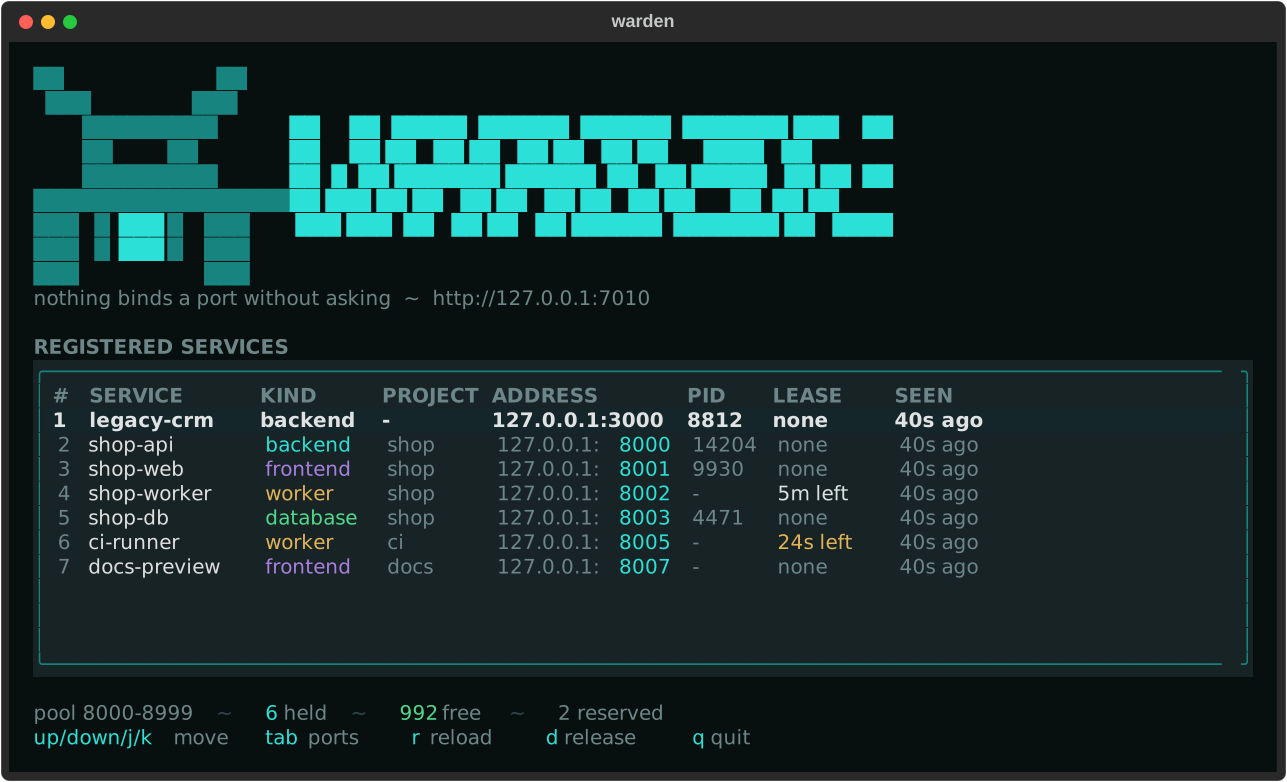
One place that decides which local port a service runs on. Services register under a name, say what they are, and get a port back. The same name keeps the same port across restarts, so a backend never wakes up on the port its frontend grabbed while it was down.
$ warden run -- npm run dev
shop-api  ->  8000

  VITE ready, listening on http://localhost:8000
Nothing to change in the project: the port arrives as PORT, is held while the
process runs, and goes back when it exits.
Install
uv tool install warden-ports        # the `warden` command, anywhere
uvx --from warden-ports warden ports  # or just once, without installing
The distribution is called warden-ports because warden on PyPI belongs to
something else. The command it installs is warden either way.
Installation covers pipx,
pip and a checkout.
What it does
| Hands out ports | A name asks, a port comes back, and it stays that port. One machine |
| Shows what is listening | warden ports reads the machine, not the registry — no server needed. Ports and processes |
| Remembers | warden history 8000 answers what had this port last week. |
| Says it as it happens | A live event stream, and webhooks for Discord, Slack, Teams or your own endpoint. Events and webhooks |
| Writes your proxy config | warden export caddy turns the registry into a Caddyfile. Reverse proxy |
| Reads a project file | warden.project.toml says which ports a project needs; warden apply makes it true. Projects |
| Decides what may cross | A firewall over nftables, iptables, pf or Windows, where every change undoes itself unless you confirm it. Firewall |
| Spans machines | One hub, many wardens, one view. Cluster |
| Answers for itself | warden doctor replaces four commands and a guess. Troubleshooting |
A tour
Ask for a port
$ warden register shop-api --kind backend --project shop
8000

$ warden ls
SERVICE   KIND     PROJECT  ADDRESS         PID
shop-api  backend  shop     127.0.0.1:8000  14204
Ask again tomorrow and it is still 8000. --preferred-port wishes for one,
--require-port insists and fails if it cannot have it, and
warden register stack --count 4 takes four at once — all of them or none.
See what is actually listening
$ warden ports --port 3000
PORT  PROTO  PROCESS   PID    USER  ADDRESS  WARDEN
3000  tcp    node.exe  25084  dev   0.0.0.0  -

$ warden kill 3000
Stop node.exe (25084) on port 3000? [y/N]: y
Neither needs a warden running: they read the machine directly. The WARDEN column names the service whenever the port did come from the registry, so anything unmarked arrived some other way.
Let a project say what it needs
# warden.project.toml, beside the code
[project]
name = "shop"

[services.api]
kind = "backend"

[services.web]
kind = "frontend"
preferred_port = 8905
$ warden apply --env .env
SERVICE   KIND      ADDRESS         WHAT
shop-api  backend   127.0.0.1:8900  taken
shop-web  frontend  127.0.0.1:8905  taken
wrote .env
Run it again and nothing moves — it renews rather than reshuffling a running project. A service that cannot get the port it insists on fails the whole run before anything is written. Projects has the whole file format.
Hear about it while it happens
$ warden events
09:41:02  registered   shop-api  127.0.0.1:8600
09:41:44  released     shop-api  127.0.0.1:8600
warden events --known lists everything it can tell you about: thirteen things
in three scopes, from a port changing hands to a node going quiet to a firewall
rolling itself back. GET /v1/events is the same stream as server-sent events.
A webhook sends them somewhere else — discord, slack and teams post something the chat window
renders, and json posts the event as it is, signed with an HMAC over exactly
the bytes sent so the far end can tell it really came from you.
Nothing ever waits on a webhook: delivery happens after the change is
committed, off the request path, and warden doctor says when the last one did
not arrive — because from the inside, a webhook failing all day looks exactly
like a quiet day.
Each of the thirteen carries a colour, an icon and a line of words, and warden settings embed changes them one event at a time against a preview of the
message it would send — the rest keep what they came with:
webhook_colours = { "node.stale" = "#e5544b" }
webhook_titles = { "node.stale" = "has stopped answering" }
webhook_icons = { "node.stale" = "!" }        # a single - means none at all
Discord gets an embed with the event and the mascot above the subject and the
node in the footer, Slack a coloured attachment with the facts as fields and
the time in the reader's own timezone, Teams an adaptive card whose header band
takes the nearest tone the format has a name for. Addresses are set as code
where the shape understands it, and none of the three repeats what its own
sentence already said. json carries none of it, because whatever reads it
decides how that looks.
Events and webhooks
has where to get an address, the shape of every event, and how to check the
signature.
Write the proxy config nobody wants to write by hand
$ warden export caddy --domain example.com
# Written by `warden export` from the warden on hub. Regenerate it; do not edit it.

shop-api.example.com {
	reverse_proxy 127.0.0.1:8000
}
caddy, nginx and traefik. --all takes the whole fleet and points each
service at the machine it actually runs on. It prints and stops: nothing is
written in place, and no proxy is reloaded.
Reverse proxy has the
rest.
Decide what may cross
warden also holds the machine's firewall, in whatever the machine actually uses — nftables, iptables, pf on macOS and the BSDs, Windows Defender Firewall:
$ warden firewall allow ssh --from 10.0.0.0/8
$ warden firewall apply
12 rules applied
rolling back in 60s unless you run `warden firewall confirm`
Every change undoes itself unless you confirm it. A snapshot is taken first, the rollback is armed second, and the change applied third. The watchdog runs detached, so it outlives the ssh session that armed it — a rule that locks you out is a minute of waiting rather than a drive to the machine.
warden firewall adopt takes over from ufw or firewalld: it reads their rules,
shows them, applies them as its own, and turns the other one off only once you
confirm. Until then it is still enabled, so rolling back returns the machine
exactly as it was. Anything it cannot translate is named before you decide —
a rule quietly lost here is a door quietly left open.
And because the registry is in the same program, a rule can belong to a service rather than to a number:
$ warden firewall open shop-api      # the port the registry handed out
$ warden firewall dev-mode --for 2   # the whole pool, for the afternoon
Both close themselves: the first when the service's lease lapses, the second
when its clock runs out. Neither can reach a port warden does not hand out —
22 and 3389 are outside the pool, and stay there.
From somewhere else, if that machine says so. A deploy that has just registered a service can ask the warden holding it to let the port through:
client.firewall_open("shop-api", source="10.0.0.0/8")
client.firewall_apply(rollback=60)      # undoes itself unless confirmed
client.firewall_confirm()
warden firewall status --on http://build-01:7010
warden firewall list   --on http://build-01:7010
warden firewall open shop-api --on http://build-01:7010
And through the hub, over the whole fleet. Forty machines is exactly where tending one firewall at a time stops being something anybody does:
warden firewall status --all             # one line per node
warden firewall list --all               # every rule anywhere, with its node
warden firewall open shop-api --all      # on every node that holds it
warden firewall apply --fleet --rollback 120
warden firewall confirm --fleet
Each node applies to itself, takes its own snapshot and arms its own watchdog, so a rule that shuts the door shuts it for two minutes rather than for good — a node that is never confirmed puts itself back without anybody driving there. A fleet-wide apply refuses to give that window up: it is the one place warden will not let it be left out.
Reading the rules is what a token already allows. Changing them needs
allow_remote_firewall set on the machine being asked, and it is off out of
the box — a warden that will change its own firewall on request, listens beyond
loopback and asks for no token is a way through the firewall rather than one,
and warden doctor fails on exactly that. Everything asked for this way still
passes every bound below: the pool, the declared networks, the service's lease.
Firewall has the whole of it, including the bounds a rule from the registry can never cross.
Find out why it is not working
$ warden doctor
ok    warden 0.2.0 answering at http://127.0.0.1:7010, role hub
ok    settings from ~/.config/warden/warden.toml
ok    pool 8000-8999, 3 held, 996 free
warn  1 of 3 registrations held by something that is gone - `warden reap`
ok    events to https://discord.com/... as discord, 12 delivered
One command instead of four and a guess. It exits non-zero only on fail, so a
warning about an unset token does not make a health check call the machine down.
Set it up once
warden setup
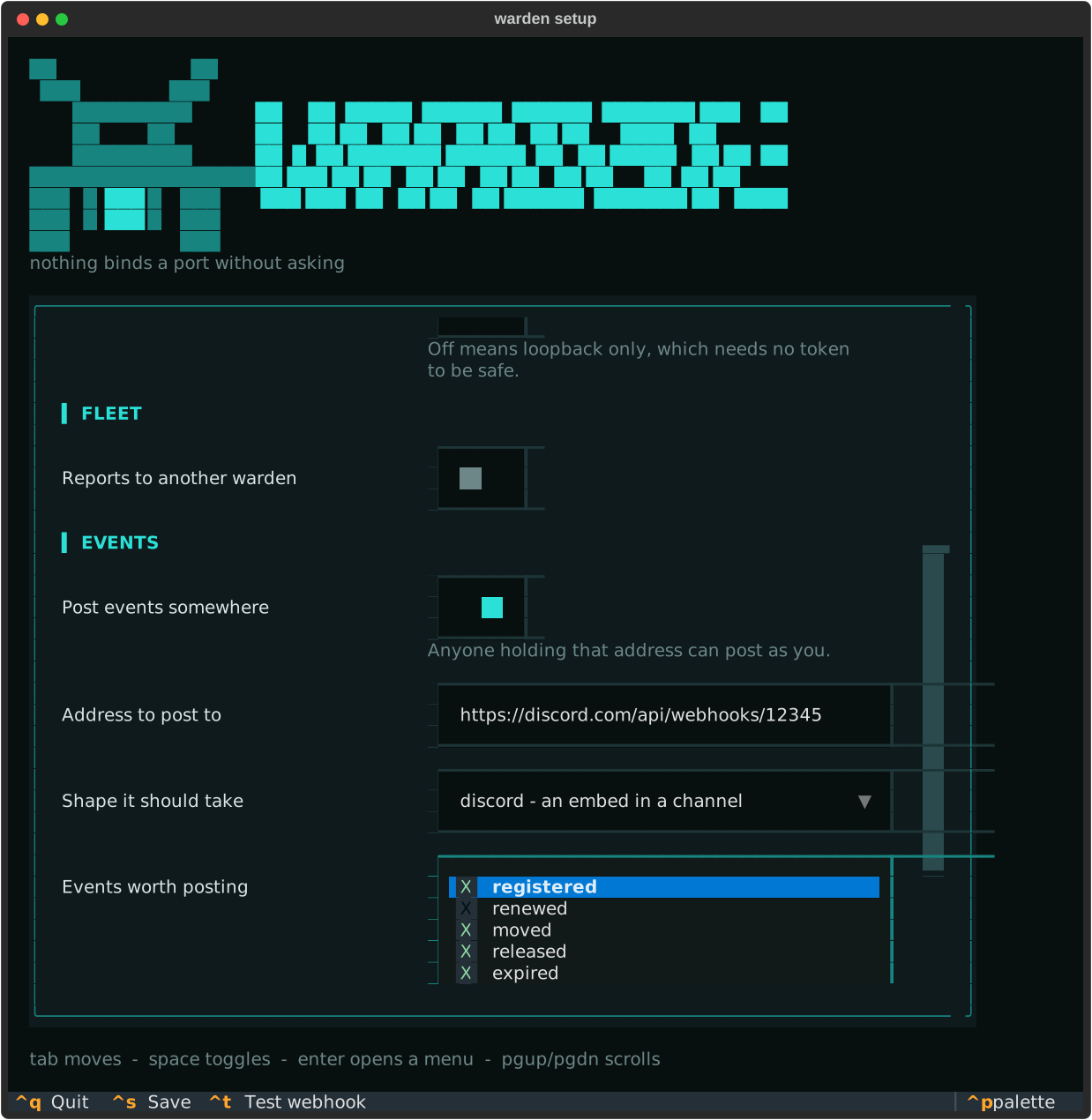
One screen in seven tabs: which ports to hand out, whether other machines may
reach it, which hub it reports to, where events go, what those events look like
in chat, whether it holds the firewall, and what it may do to a process.
ctrl+t posts a test event before anything is saved. Questions that nothing has
earned stay hidden — no token field until it listens beyond loopback, no webhook
shape until events go anywhere at all.
| Key | Action |
|---|---|
ctrl+left ctrl+right |
Move between tabs |
tab shift+tab |
Move between fields |
space |
Toggle a switch or a tick box |
enter |
Open a menu, or pick from it |
pgup pgdn |
Scroll without leaving the field you are in |
ctrl+t |
Post a test event to the address on screen |
ctrl+s ctrl+q |
Save · leave without writing |
It fits an 80 by 24 terminal, which is the size an ssh session usually opens at.
Without a terminal — a script piping answers in, a job on a build machine — the
same questions come one at a time, and warden setup --plain asks for that on
purpose.
warden settings opens the same screen afterwards, over what is already
written down, and naming a part goes straight there:
warden settings embed       # what each event looks like in chat
warden settings firewall    # which backend, and how long before it rolls back
warden settings --plain     # the table instead, with where each value came from
warden settings set port 7011
The difference from setup is what happens on the way out: setup writes
everything it asked about, and warden settings writes it over the file, so a
setting it never asks about survives.
Configuration
has every setting there is.
More than one machine
# on the hub
warden serve

# on each other machine
WARDEN_UPSTREAM=http://hub:7010 WARDEN_ADVERTISE=http://build-01:7010 warden serve
Each warden still hands out its own ports and never waits on the hub. The hub
adds one view over all of them: warden ls --all, warden pool --all,
warden firewall list --all, warden tui --all, and a node that did not answer
is named rather than quietly left out. The dashboard has three tabs
across the top - services, ports and firewall rules - the same bar the setup
screen has.
Cluster has the tokens, the
trust rules and what happens when a machine goes quiet.
From your own code
from warden import reserve

with reserve("shop-api", kind="backend") as port:
    serve(port)          # held while the block runs, released after
PORT=$(warden register shop-api --kind backend) # or from any shell
Python client has the client, the leases and the error types. HTTP API has every endpoint, for everything that is not Python.
Documentation
The wiki is the long form. This page is the tour.
| Page | For |
|---|---|
| Installation | Getting the warden command |
| One machine | The usual setup: a registry for your own projects |
| Ports and processes | Seeing and freeing ports, no server needed |
| Python client | Asking for a port from your own code |
| Projects | A warden.project.toml beside the code, and warden apply |
| Events and webhooks | Hearing about it as it happens, in chat or your own endpoint |
| Reverse proxy | Turning the registry into a Caddyfile, nginx or Traefik |
| Firewall | Deciding what may cross, and taking over from ufw or firewalld |
| Cluster | Several machines, one hub that knows them all |
| Docker | The image, a compose file, and what a container can see |
| Updates | Knowing a new version is out, and rolling it across a fleet |
| Configuration | Every setting there is |
| Command line | Every command and flag |
| HTTP API | Endpoints, payloads, status codes |
| Troubleshooting | When something does not behave |
Good to know
- The registry binds to loopback and has no token by default. Set
WARDEN_TOKENbefore binding it anywhere else. - The registry cannot open a port by itself. A rule that comes from it may only ever touch a port inside the pool, may only reach networks declared in advance, and closes when the service's lease does.
firewall_from_registryis off until you turn it on, andallow_remote_firewalldecides separately whether anybody over the API may ask. WARDEN_ALLOW_KILLis off on purpose. Stopping processes over the API is a much bigger thing to hand out than a port number.warden killon the command line acts locally and never asks the API.- macOS will not let an unprivileged process enumerate sockets, so
warden ports, the dashboard's ports view,warden ls --holdersandwarden reapneedsudothere. Handing out ports does not. - On a Linux server, check that your account lingers. A systemd user unit
stops when your last session ends.
warden service installlooks and says so.
The palette, if you are drawing something that has to match
It lives in warden/theme.py, so the dashboard, the setup screen and the
command line never drift apart.
| Role | Colour | |
|---|---|---|
| Ground | #08100f |
sculk black |
| Surface | #0e1a1c |
panels and tables |
| Border | #1e3538 |
|
| Text | #d9e4e2 |
|
| Muted | #6d8687 |
labels, empty cells |
| Live | #2be0d6 |
ports, focus, the banner |
frontend |
#a87fe0 |
|
worker |
#e0b457 |
also a lease about to run out |
database |
#4fd98c |
also free capacity |
| Conflict | #e5544b |
expired leases, errors |
Development
git clone https://github.com/vxnsin/warden
cd warden
uv sync --all-groups
uv run pytest
uv run ruff check .
The suite runs on Linux, macOS and Windows across Python 3.11, 3.12 and 3.13, and the Docker image and its three-warden compose file are built and brought up on every change.
License
MIT — see LICENSE.
1 maintainer

Download files
Download the file for your platform. If you're not sure which to choose, learn more about installing packages.
Source Distribution
Built Distribution
Filter files by name, interpreter, ABI, and platform.
If you're not sure about the file name format, learn more about wheel file names.
Copy a direct link to the current filters
File details
Details for the file warden_ports-0.5.0.tar.gz.
File metadata
- Download URL: warden_ports-0.5.0.tar.gz
- Upload date:
- Size: 247.2 kB
- Tags: Source
- Uploaded using Trusted Publishing? Yes
- Uploaded via:
twine/7.0.0 CPython/3.13.14
File hashes
| Algorithm | Hash digest | |
|---|---|---|
| SHA256 |
41fc8f32416ea26aa5ffda2ca53199a9bb473b9c1ad38562911ae11f4551a3a0
|
|
| MD5 |
13d3f8ed4a2dc331f0601dde6920dfec
|
|
| BLAKE2b-256 |
3af94a1b90de5ad9ac7e8e4c495a4dce26f4a857aad27f589f610389a9ddd36a
|
Provenance
The following attestation bundles were made for warden_ports-0.5.0.tar.gz:
Publisher:
release.yml on vxnsin/warden
-
Statement:
-
Statement type:
https://in-toto.io/Statement/v1 -
Predicate type:
https://docs.pypi.org/attestations/publish/v1 -
Subject name:
warden_ports-0.5.0.tar.gz -
Subject digest:
41fc8f32416ea26aa5ffda2ca53199a9bb473b9c1ad38562911ae11f4551a3a0 - Sigstore transparency entry: 2750977023
- Sigstore integration time:
-
Permalink:
vxnsin/warden@f4c772f4e52ab14d9f2b85c00a22383abc74dbc6 -
Branch / Tag:
refs/tags/v0.5.0 - Owner: https://github.com/vxnsin
-
Access:
public
-
Token Issuer:
https://token.actions.githubusercontent.com -
Runner Environment:
github-hosted -
Publication workflow:
release.yml@f4c772f4e52ab14d9f2b85c00a22383abc74dbc6 -
Trigger Event:
push
-
Statement type:
File details
Details for the file warden_ports-0.5.0-py3-none-any.whl.
File metadata
- Download URL: warden_ports-0.5.0-py3-none-any.whl
- Upload date:
- Size: 156.6 kB
- Tags: Python 3
- Uploaded using Trusted Publishing? Yes
- Uploaded via:
twine/7.0.0 CPython/3.13.14
File hashes
| Algorithm | Hash digest | |
|---|---|---|
| SHA256 |
d135696c02ae0ef2df1da08c1e2aeaa979be15040c192b51f7e71c091240f6c8
|
|
| MD5 |
96ca50ecfe147219a13879650bfa53c4
|
|
| BLAKE2b-256 |
9c1f99acdd630099b424918be9e6729bb1ba5f71c8c44071432a4af33cb6a74d
|
Provenance
The following attestation bundles were made for warden_ports-0.5.0-py3-none-any.whl:
Publisher:
release.yml on vxnsin/warden
-
Statement:
-
Statement type:
https://in-toto.io/Statement/v1 -
Predicate type:
https://docs.pypi.org/attestations/publish/v1 -
Subject name:
warden_ports-0.5.0-py3-none-any.whl -
Subject digest:
d135696c02ae0ef2df1da08c1e2aeaa979be15040c192b51f7e71c091240f6c8 - Sigstore transparency entry: 2750977063
- Sigstore integration time:
-
Permalink:
vxnsin/warden@f4c772f4e52ab14d9f2b85c00a22383abc74dbc6 -
Branch / Tag:
refs/tags/v0.5.0 - Owner: https://github.com/vxnsin
-
Access:
public
-
Token Issuer:
https://token.actions.githubusercontent.com -
Runner Environment:
github-hosted -
Publication workflow:
release.yml@f4c772f4e52ab14d9f2b85c00a22383abc74dbc6 -
Trigger Event:
push
-
Statement type:














