
A Python framework for high-performance simulation and graphics programming


Project description
NVIDIA Warp
Warp is a Python framework for writing high-performance simulation and graphics code. Warp takes regular Python functions and JIT compiles them to efficient kernel code that can run on the CPU or GPU.
Warp is designed for spatial computing and comes with a rich set of primitives that make it easy to write programs for physics simulation, perception, robotics, and geometry processing. In addition, Warp kernels are differentiable and can be used as part of machine-learning pipelines with frameworks such as PyTorch and JAX.
Please refer to the project Documentation for API and language reference and CHANGELOG.md for release history.


A selection of physical simulations computed with Warp
Installing
Warp supports Python versions 3.7.x onwards. The easiest way is to install from PyPi:
pip install warp-lang
Pre-built binary packages for Windows and Linux are also available on the Releases page. To install in your local Python environment extract the archive and run the following command from the root directory:
pip install .
Getting Started
An example first program that computes the lengths of random 3D vectors is given below:
import warp as wp
import numpy as np

wp.init()

num_points = 1024

@wp.kernel
def length(points: wp.array(dtype=wp.vec3),
           lengths: wp.array(dtype=float)):

    # thread index
    tid = wp.tid()

    # compute distance of each point from origin
    lengths[tid] = wp.length(points[tid])


# allocate an array of 3d points
points = wp.array(np.random.rand(num_points, 3), dtype=wp.vec3)
lengths = wp.zeros(num_points, dtype=float)

# launch kernel
wp.launch(kernel=length,
          dim=len(points),
          inputs=[points, lengths])

print(lengths)
Running Examples
The examples directory contains a number of scripts that show how to implement different simulation methods using the Warp API. Most examples will generate USD files containing time-sampled animations in the examples/outputs directory. Before running examples, users should ensure that the usd-core package is installed using:
pip install usd-core
USD files can be viewed or rendered inside NVIDIA Omniverse, Pixar's UsdView, and Blender. Note that Preview in macOS is not recommended as it has limited support for time-sampled animations.
Built-in unit tests can be run from the command-line as follows:
python -m warp.tests
Building
For developers who want to build the library themselves, the following tools are required:
- Microsoft Visual Studio 2019 upwards (Windows)
- GCC 7.2 upwards (Linux)
- CUDA Toolkit 11.5 or higher
- Git LFS installed
After cloning the repository, users should run:
python build_lib.py
This will generate the warp.dll / warp.so core library respectively. When building manually users should ensure that their CUDA_PATH environment variable is set, otherwise Warp will be built without CUDA support. Alternatively, the path to the CUDA toolkit can be passed to the build command as --cuda_path="...". After building, the Warp package should be installed using:
pip install -e .
This ensures that subsequent modifications to the library will be reflected in the Python package.
If you are cloning from Windows, please first ensure that you have enabled "Developer Mode" in Windows settings and symlinks in git:
git config --global core.symlinks true
This will ensure symlinks inside exts/omni.warp.core work upon cloning.
Omniverse
A Warp Omniverse extension is available in the extension registry inside Omniverse Kit or USD Composer:
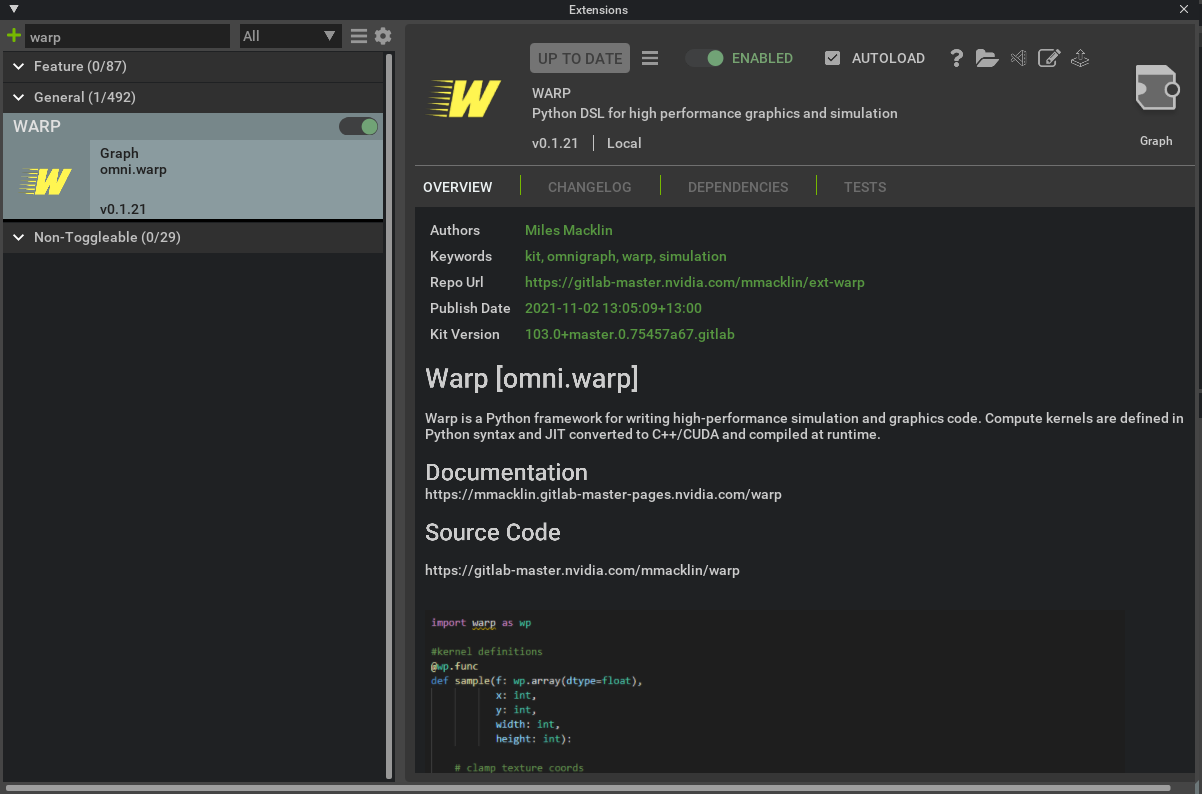
Enabling the extension will automatically install and initialize the Warp Python module inside the Kit Python environment. Please see the Omniverse Warp Documentation for more details on how to use Warp in Omniverse.
Learn More
Please see the following resources for additional background on Warp:
The underlying technology in Warp has been used in a number of research projects at NVIDIA including the following publications:
- Accelerated Policy Learning with Parallel Differentiable Simulation - Xu, J., Makoviychuk, V., Narang, Y., Ramos, F., Matusik, W., Garg, A., & Macklin, M. (2022)
- DiSECt: Differentiable Simulator for Robotic Cutting - Heiden, E., Macklin, M., Narang, Y., Fox, D., Garg, A., & Ramos, F (2021)
- gradSim: Differentiable Simulation for System Identification and Visuomotor Control - Murthy, J. Krishna, Miles Macklin, Florian Golemo, Vikram Voleti, Linda Petrini, Martin Weiss, Breandan Considine et al. (2021)
Citing
If you use Warp in your research please use the following citation:
@misc{warp2022,
title= {Warp: A High-performance Python Framework for GPU Simulation and Graphics},
author = {Miles Macklin},
month = {March},
year = {2022},
note= {NVIDIA GPU Technology Conference (GTC)},
howpublished = {\url{https://github.com/nvidia/warp}}
}
FAQ
How does Warp relate to other Python projects for GPU programming, e.g.: Numba, Taichi, cuPy, PyTorch, etc?
Warp is inspired by many of these projects and is closely related to Numba and Taichi, which both expose kernel programming to Python. These frameworks map to traditional GPU programming models, so many of the high-level concepts are similar, however there are some functionality and implementation differences.
Compared to Numba, Warp supports a smaller subset of Python, but offers auto-differentiation of kernel programs, which is useful for machine learning. Compared to Taichi, Warp uses C++/CUDA as an intermediate representation, which makes it convenient to implement and expose low-level routines. In addition, we are building in data structures to support geometry processing (meshes, sparse volumes, point clouds, USD data) as first-class citizens that are not exposed in other runtimes.
Warp does not offer a full tensor-based programming model like PyTorch and JAX, but is designed to work well with these frameworks through data sharing mechanisms like __cuda_array_interface__. For computations that map well to tensors (e.g.: neural-network inference) it makes sense to use these existing tools. For problems with a lot of e.g.: sparsity, conditional logic, heterogeneous workloads (like the ones we often find in simulation and graphics), then the kernel-based programming model like the one in Warp is often more convenient since users have control over individual threads.
Does Warp support all of the Python language?
No, Warp supports a subset of Python that maps well to the GPU. Our goal is to not have any performance cliffs so that users can expect consistently good behavior from kernels that is close to native code. Examples of unsupported concepts that don't map well to the GPU are dynamic types, list comprehensions, exceptions, garbage collection, etc.
When should I call wp.synchronize()?
One of the common sources of confusion for new users is when calls to wp.synchronize() are necessary. The answer is "almost never"! Synchronization is quite expensive, and should generally be avoided unless necessary. Warp naturally takes care of synchronization between operations (e.g.: kernel launches, device memory copies).
For example, the following requires no manual synchronization, as the conversion to NumPy will automatically synchronize:
# run some kernels
wp.launch(kernel_1, dim, [array_x, array_y], device="cuda")
wp.launch(kernel_2, dim, [array_y, array_z], device="cuda")

# bring data back to host (and implicitly synchronize)
x = array_z.numpy()
The only case where manual synchronization is needed is when copies are being performed back to CPU asynchronously, e.g.:
# copy data back to cpu from gpu, all copies will happen asynchronously to Python
wp.copy(cpu_array_1, gpu_array_1)
wp.copy(cpu_array_2, gpu_array_2)
wp.copy(cpu_array_3, gpu_array_3)

# ensure that the copies have finished
wp.synchronize()

# return a numpy wrapper around the cpu arrays, note there is no implicit synchronization here
a1 = cpu_array_1.numpy()
a2 = cpu_array_2.numpy()
a3 = cpu_array_3.numpy()
What happens when you differentiate a function like wp.abs(x)?
Non-smooth functions such as y=|x| do not have a single unique gradient at x=0, rather they have what is known as a subgradient, which is formally the convex hull of directional derivatives at that point. The way that Warp (and most auto-differentiation frameworks) handles these points is to pick an arbitrary gradient from this set, e.g.: for wp.abs(), it will arbitrarily choose the gradient to be 1.0 at the origin. You can find the implementation for these functions in warp/native/builtin.h.
Most optimizers (particularly ones that exploit stochasticity) are not sensitive to the choice of which gradient to use from the subgradient, although there are exceptions.
Does Warp support multi-GPU programming?
Yes! Since version 0.4.0 we support allocating, launching, and copying between multiple GPUs in a single process. We follow the naming conventions of PyTorch and use aliases such as cuda:0, cuda:1, cpu to identify individual devices.
Should I switch to Warp over IsaacGym / PhysX?
Warp is not a replacement for IsaacGym, IsaacSim, or PhysX - while Warp does offer some physical simulation capabilities this is primarily aimed at developers who need differentiable physics, rather than a fully featured physics engine. Warp is also integrated with IsaacGym and is great for performing auxiliary tasks such as reward and observation computations for reinforcement learning.
Discord
We have a #warp channel on the public Omniverse Discord server, come chat to us!
License
Warp is provided under the NVIDIA Source Code License (NVSCL), please see LICENSE.md for full license text. Note that the license currently allows only non-commercial use of this code.
Release history Release notifications | RSS feed


Download files
Download the file for your platform. If you're not sure which to choose, learn more about installing packages.
Source Distributions
Built Distributions
Filter files by name, interpreter, ABI, and platform.
If you're not sure about the file name format, learn more about wheel file names.
Copy a direct link to the current filters
File details
Details for the file warp_lang-0.11.0-py3-none-win_amd64.whl.
File metadata
- Download URL: warp_lang-0.11.0-py3-none-win_amd64.whl
- Upload date:
- Size: 47.1 MB
- Tags: Python 3, Windows x86-64
- Uploaded using Trusted Publishing? No
- Uploaded via: twine/4.0.2 CPython/3.11.3
File hashes
| Algorithm | Hash digest | |
|---|---|---|
| SHA256 |
a4a8fde25ca21fb71788ac371eb676a805ccf88917eb582e6cf0b58585116d71
|
|
| MD5 |
b795bd1f3e4f0ed22bc775d320ed385f
|
|
| BLAKE2b-256 |
1e7a1ec996fc0b57c003c94fc51d64bd6dc0e6bf59ea140e30a43852a904acf3
|
File details
Details for the file warp_lang-0.11.0-py3-none-manylinux2014_x86_64.whl.
File metadata
- Download URL: warp_lang-0.11.0-py3-none-manylinux2014_x86_64.whl
- Upload date:
- Size: 53.0 MB
- Tags: Python 3
- Uploaded using Trusted Publishing? No
- Uploaded via: twine/4.0.2 CPython/3.11.3
File hashes
| Algorithm | Hash digest | |
|---|---|---|
| SHA256 |
9911323bd6ed1a88d440ac3817eba8967c4cf786357c05e66c82b6270cdda688
|
|
| MD5 |
d9ea852699019b873668b8856529df32
|
|
| BLAKE2b-256 |
8163e052b86174dede99af001443858bad31c84609cb4597eb62be0962afd8f3
|
File details
Details for the file warp_lang-0.11.0-py3-none-manylinux2014_aarch64.whl.
File metadata
- Download URL: warp_lang-0.11.0-py3-none-manylinux2014_aarch64.whl
- Upload date:
- Size: 54.2 MB
- Tags: Python 3
- Uploaded using Trusted Publishing? No
- Uploaded via: twine/4.0.2 CPython/3.11.3
File hashes
| Algorithm | Hash digest | |
|---|---|---|
| SHA256 |
425f91bb50b7de2031f55d82b907d799257e9498c72065c89431120f9974138c
|
|
| MD5 |
3bdaedf79b01be3bfccee4ab0d59f313
|
|
| BLAKE2b-256 |
4fe74784869f458f7782d1095d1f577b9bc7c44cb2c22667429aedfb39299394
|
File details
Details for the file warp_lang-0.11.0-py3-none-macosx_10_13_universal2.whl.
File metadata
- Download URL: warp_lang-0.11.0-py3-none-macosx_10_13_universal2.whl
- Upload date:
- Size: 41.9 MB
- Tags: Python 3, macOS 10.13+ universal2 (ARM64, x86-64)
- Uploaded using Trusted Publishing? No
- Uploaded via: twine/4.0.2 CPython/3.11.3
File hashes
| Algorithm | Hash digest | |
|---|---|---|
| SHA256 |
10bf3d02c296d1936ea9c01c3fbbabc1bd110960197197b2ae839ad332bc71cc
|
|
| MD5 |
cae0e07996d816639b496e86f1cf0cbc
|
|
| BLAKE2b-256 |
5ca7d1188c07b3aa0f5752f5bfd3797e3fde8d65623b85508564f6f324994d1f
|






