
WaveMind
Verified experience for coding, support, and operations agents that repeat consequential work.
WaveMind turns independently verified tool work into compact, cited Experience Packets for the next run. Every packet keeps provenance, applicability boundaries, correction and rollback instead of asking an agent to trust an opaque history dump.
PyPI · Build status · Latest release · Python >=3.10 · MIT
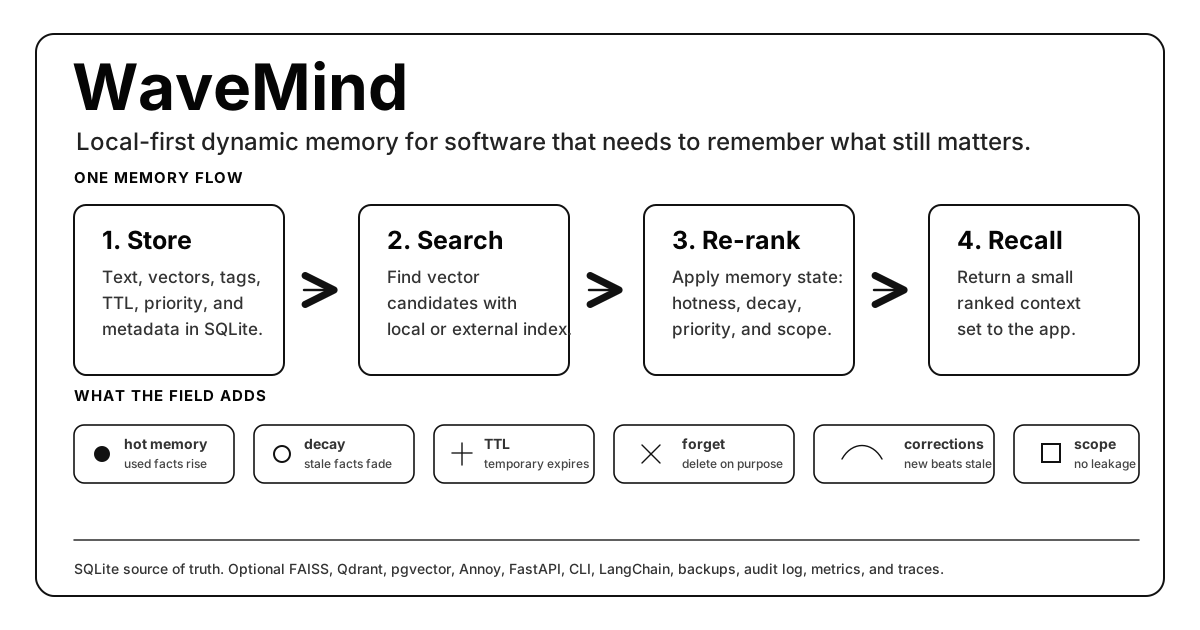
Quick Start · Documentation · Studio · Product site · Evidence · Roadmap · Contributing
Built For Repeated Agent Work
| Team | Pain WaveMind targets | First useful result |
|---|---|---|
| Coding agents | Repeating a known repository, build, test, or tool failure | Replay one verified fix with repository and environment scope |
| Support and CRM agents | Reusing stale policy or leaking state between customers | Apply one independently verified resolution inside a customer namespace |
| Browser and operations agents | Repeating an obsolete navigation or runbook step | Reuse a cited procedure after an external-state check |
| Agent-platform teams | Rebuilding provenance, promotion, deletion, and rollback per framework | Share one governed Experience Packet contract across providers |
| Private workflows | Learning without a reviewable source or exit path | Keep verified experience local, inspectable, and reversible |
The flagship loop is trace -> verification -> Experience Packet -> better next run -> explainable diff -> rollback. See the dated
market and product audit for the evidence.
What Makes It Different
Vector stores answer what is similar? Agent memory must also answer what still matters now?
| Capability | What WaveMind adds |
|---|---|
| Adaptive recall | Hotness, decay, priority, TTL, feedback, and correction handling around vector candidates. |
| Durable state | SQLite by default; PostgreSQL, Redis coordination, and service-backed vector indexes for production paths. |
| Explicit control | Namespaces, provenance, audit events, backup/restore, inspection, and deliberate deletion. |
| Small integration surface | Python API, CLI, FastAPI, MCP, LangChain memory, and framework adapters. |
| Evidence-first releases | Public JSON artifacts, admission gates, reproducible commands, and locked claims when proof is missing. |
WaveMind complements FAISS, Qdrant, pgvector, Chroma, and other candidate indexes. It is the memory policy and lifecycle around retrieval, not another claim that one vector database should replace every other system.
Verified Today
WaveMind is the trust layer that lets agents learn from completed work without silently learning incorrect behavior.
Canonical machine status:
docs/data/product-status.json.
| Product truth | Status | Evidence |
|---|---|---|
| Public release | v2.13.0; runtime source a23283123eb3 |
PyPI package wavemind and ghcr.io/caspiang/wavemind:2.13.0 |
| Release candidate | v2.14.0 at 27de55195fbd; blocked until its tag exists |
Upgrade admission pending_exact_sha_ci; tag-only release workflow |
| Safe Product snapshot | historical, 18/18 checks at 92c539d0a069 |
benchmarks/safe_product_admission_results.json |
| Current-source admission | Required per exact source SHA | .github/workflows/safe-product.yml |
| TypeScript SDK | @wavemind/http, repository-local; npm claim disabled |
Repository package only |
Only an admitted exact-SHA workflow artifact may describe the current source as admitted.
The rows below are checked-in evidence snapshots. They remain useful and auditable, but they do not become evidence for a newer source revision merely because the repository moved forward.
| Proof | Checked-in evidence snapshot | Source |
|---|---|---|
| Production Memory OS | admitted, 13/13 requirements |
memory_os_admission_results.json |
| Adaptive agent-memory advantage | Controlled adaptive slice passes, but the composite public gate remains blocked |
agent_memory_advantage_admission_results.json |
| Goal 4 generalization experiment | failed_experiment: full 451 quality uplift -0.44 pp; untouched 419 uplift -1.19 pp; context -41.0%; p95 +1.59 ms |
goal4_quality_experiment_results.json |
| Verified Agent Experience Runtime | admitted, 15/15 checks on 150 frozen stateful tasks across three domains; success 20% -> 100%; repeated errors -100%; context -39.2%; runtime p95 6.12 ms |
verified_experience_admission_results.json |
| Experienced Work Agent v1 | admitted only for its frozen local three-domain scenario: 12/12 checks; success 16.7% -> 100%; repeated errors 83.3% -> 0%; context -40% |
experience_quality_admission_results.json |
| Developer onboarding | admitted, 8/8 checks; Python, TypeScript, MCP, and Docker starters; first cited Experience Packet in 0.58s |
developer_experience_admission_results.json |
| Memory safety | admitted, 10/10 checks; 375 attacks contained, 100% benign acceptance, zero cross-namespace leakage, rollback/provenance 1.00 |
memory_safety_admission_results.json |
| Provider integrations | admitted, 10/10 checks and 11/11 mandatory cases across Python, OpenAI Agents, Anthropic, MCP, LangGraph, HTTP, portable bundles, Mem0 import, and a clean TypeScript package; semantic parity 1.00 |
integration_admission_results.json |
| Remote Redis/worker soak | 6 hours, 500/500 cycles, 2,500 attempts, zero failures or state corruption | memory_os_remote_worker_soak_results.json |
| LongMemEval-V2 protocol | Goal 4 completed a strict frozen 451-question experiment; it passed execution/context/latency controls but failed quality uplift, so no admission claim is made | failed experiment / Memory OS run / strict smoke |
| Proof-carrying scientific selector | v32 performance-only validation passed exact selection on 240/240 frozen synthetic queries across three repeats; indexed p95 0.151-0.156 s, p95 speedup 9.72-10.09x |
v32 validation / v31 failed admission |
| Core production readiness | pass, 39/39 criteria |
production_readiness_results.json |
| Public package | PyPI and GitHub release v2.13.0 |
PyPI / release |
Remote multi-region, managed serverless, 100M service evidence, and universal multimodal admission remain explicitly gated. See Known Limitations and the evidence ledger.
Quick Start
The shortest path from install to first recall:
python -m pip install wavemind
wavemind remember "Andrey is a trader" --namespace demo
wavemind query "What does Andrey do?" --namespace demo
Need a reminder after install?
wavemind quickstart
Want to see and manage memory in a browser?
wavemind studio
Want the differentiated five-minute loop instead of a generic add/search demo?
wavemind init my-agent --template python
cd my-agent
python app.py
The starter runs a cold attempt, verifies it, promotes a bounded procedure, and
reuses a cited packet. Run python examples/verified_experience_runtime.py for
the explicit cold-run -> packet -> replay -> rollback path.
Use --template typescript, --template mcp, or --template docker for the
other starter paths. The Docker starter runs with
docker compose up --build. Diagnose Python, SQLite, local state, the encoder,
the Experience Compiler, and optional Node/Docker/MCP support with:
wavemind doctor --project .
By default, WaveMind creates wavemind.sqlite3 in the current working
directory. That file is the local source of truth. Keep it out of git and back
it up like application state.
Verified Agent Experience
The Agent Experience Runtime captures tool runs, accepts outcomes only from an independent test, tool, environment, or operator, and keeps new procedures in shadow until repeated evidence promotes them. At query time it can remain silent or inject one compact, cited Experience Packet.
python examples/verified_experience_runtime.py
The example performs a real local cycle: a cold plan fails, the environment verifies the result, independently verified executions activate a procedure, and a held-out attempt succeeds using the cited procedure. The same lifecycle is available through Python, HTTP, OpenAI Agents, Anthropic hooks, LangGraph, MCP, TypeScript, and the Studio inspection views. See the runtime guide.
CLI Cheat Sheet
Start here if you only want to use WaveMind from the terminal:
| Goal | Command |
|---|---|
| Show first-run help | wavemind quickstart |
| Create a runnable starter | wavemind init my-agent --template python |
| Diagnose the local environment | wavemind doctor --project my-agent |
| Preview a safe package or Compose upgrade | wavemind upgrade --dry-run --json |
| Store a memory | wavemind remember "Andrey prefers short answers" --namespace user:42 |
| Search memory | wavemind query "answer style" --namespace user:42 |
| Consolidate active patterns | wavemind consolidate --namespace user:42 --seed "Rust compiler systems" |
| Open local dashboard | wavemind studio |
| See stored state | wavemind stats --namespace user:42 |
| Delete a namespace | wavemind forget --namespace user:42 |
| Import notes | wavemind import ./notes.txt --namespace project:alpha |
| Use another database file | wavemind --db ./state/memory.sqlite3 query "budget" --namespace user:42 |
| Start the HTTP API | wavemind --db ./state/memory.sqlite3 serve --host 127.0.0.1 --port 8000 |
After this point, choose the integration path you need: Python, HTTP, LangChain, framework adapters, benchmarks, or production deployment.
WaveMind Studio
WaveMind Studio is the built-in local dashboard. It runs on top of the same FastAPI app and SQLite database as the CLI:
wavemind studio
It opens http://127.0.0.1:8000/studio and gives you:
| View | What it is for |
|---|---|
| Memory map | See field energy as a heatmap. |
| Namespace explorer | Inspect memories per user, project, agent, or tenant. |
| Live query tester | Test recall before wiring it into an app. |
| Feedback buttons | Mark recalled memories as useful or not useful. |
| Import/export | Import local files and export a namespace snapshot. |
| Backup | Create SQLite backups from the browser. |
| Conflict visualizer | Inspect correction groups when memories disagree. |
| Memory OS Insights | See read-only hot-query, policy, execution-plan, and architecture suggestions before running background workers. |
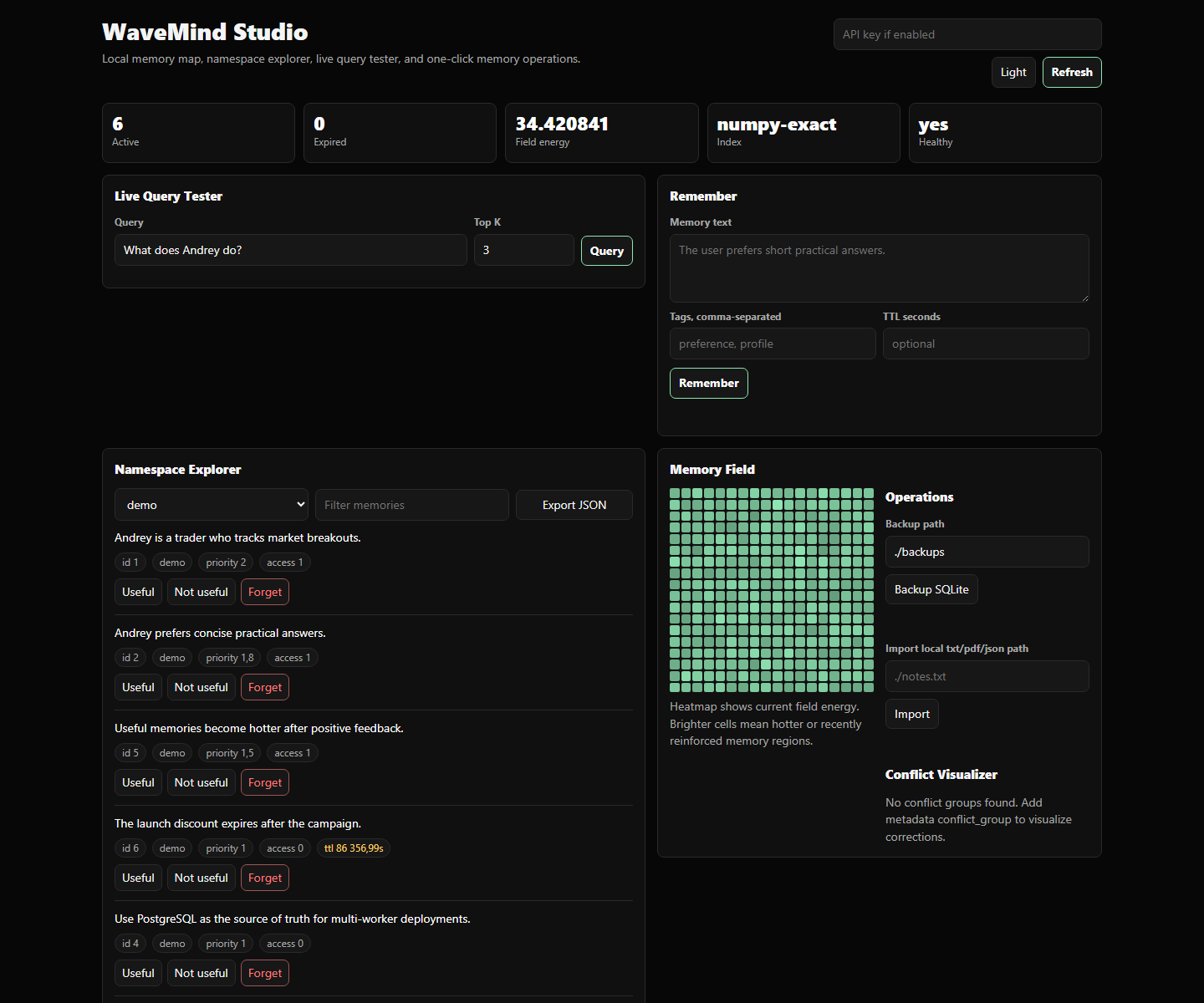
For a server-safe local bind:
wavemind --db ./state/wavemind.sqlite3 studio --host 127.0.0.1 --port 8000
Python Example
from wavemind import WaveMind

memory = WaveMind(db_path="./state/wavemind.sqlite3")

memory.remember(
    "The user prefers short practical answers.",
    namespace="user:42",
    tags=["preference"],
)

hits = memory.query("How should I answer this user?", namespace="user:42", top_k=3)
for hit in hits:
    print(hit.score, hit.text)
The integration pattern is intentionally small:
- Call
query()before your app, agent, tool, or UI needs context. - Pass the returned memories into your prompt, screen, search result, or decision function.
- Call
remember()after something worth keeping happens.
Queries can also apply exact metadata filters. A collection value means "match any", which is useful for tenant scopes, document sets, or benchmark haystacks:
hits = memory.query(
    "Which decision was approved?",
    namespace="team:research",
    metadata_filters={"document_id": ["report-17", "report-42"]},
)
HTTP Example
The FastAPI server is included in the base install:
wavemind --db ./state/wavemind.sqlite3 serve --host 127.0.0.1 --port 8000
Then use WaveMind from any language:
curl -X POST http://127.0.0.1:8000/remember \
  -H "Content-Type: application/json" \
  -d "{\"text\":\"Andrey prefers short answers\",\"namespace\":\"user:42\",\"tags\":[\"preference\"]}"

curl -X POST http://127.0.0.1:8000/query \
  -H "Content-Type: application/json" \
  -d "{\"query\":\"How should I answer?\",\"namespace\":\"user:42\",\"top_k\":3}"

curl -X POST http://127.0.0.1:8000/feedback \
  -H "Content-Type: application/json" \
  -d "{\"id\":1,\"namespace\":\"user:42\",\"useful\":true,\"strength\":0.5,\"reason\":\"used in answer\"}"

curl -X POST http://127.0.0.1:8000/feedback/batch \
  -H "Content-Type: application/json" \
  -d "{\"namespace\":\"user:42\",\"items\":[{\"id\":1,\"useful\":true,\"strength\":0.5},{\"id\":2,\"useful\":false,\"strength\":0.25}]}"

curl -X POST http://127.0.0.1:8000/forget/batch \
  -H "Content-Type: application/json" \
  -d "{\"items\":[{\"text\":\"Andrey prefers short answers\",\"namespace\":\"user:42\"}]}"
The same feedback loop is available from the CLI:
wavemind --db ./state/wavemind.sqlite3 feedback --id 1 --namespace user:42 --strength 0.5 --reason "used in answer"
wavemind --db ./state/wavemind.sqlite3 feedback-batch --file feedback.json
MCP Server
Give any MCP-compatible agent durable WaveMind tools:
python -m pip install "wavemind[mcp]"
wavemind-mcp --db ./state/agent-memory.sqlite3
Example client configuration:
{
  "mcpServers": {
    "wavemind": {
      "command": "wavemind-mcp",
      "args": ["--db", "./state/agent-memory.sqlite3"]
    }
  }
}
The server exposes remember, recall, feedback, forget,
inspect_memory, explain_memory, and manage_namespace. It uses local
stdio by default, persists to SQLite across restarts, isolates every
operation by namespace, and supports idempotent writes and provenance.
See MCP Integration for the tool contract, safety model, streamable HTTP loopback mode, and tested behavior.
Where Data Lives
WaveMind is local-first. The SQLite database stores memories, vectors, metadata, namespaces, tags, TTL, hotness, priority, and audit events.
| runtime | Suggested database path |
|---|---|
| quick CLI experiment | ./wavemind.sqlite3 |
| Python app or agent | ./state/wavemind.sqlite3 |
| desktop app | user data directory, for example %APPDATA% or ~/.local/share |
| server daemon | /var/lib/wavemind/wavemind.sqlite3 |
| Docker | mounted volume, for example /data/wavemind.sqlite3 |
Explicit path:
wavemind --db ./state/app_memory.sqlite3 remember "Andrey prefers short answers" --namespace user:42
wavemind --db ./state/app_memory.sqlite3 query "answer style" --namespace user:42
Common Ways To Use It
| You are building... | Start with... |
|---|---|
| Python app | from wavemind import WaveMind |
| LangChain agent | WaveMindMemory from wavemind.integrations.langchain |
| LangGraph workflow | make_recall_node() and make_persist_node() |
| LlamaIndex pipeline | WaveMindRetriever |
| CrewAI or AutoGen loop | The adapters in wavemind.integrations |
| Node, Go, Ruby, PHP, or no-code app | wavemind serve and the HTTP API |
| Personal knowledge base | Store notes by project namespace and query locally |
| Support or CRM workflow | Customer issues, resolutions, preferences, corrections, TTL, and namespace isolation. See examples/customer_support_memory.py. |
| Research or analyst notebook | Findings, hypotheses, decisions, source metadata, TTL, and project isolation. See examples/research_notebook_memory.py. |
For migrations from existing local vector memory, start with
docs/CHROMA_MIGRATION.md. The guide has a tested
offline fixture at examples/chroma_migration.py.
Minimal Agent Loop
from wavemind import WaveMind

memory = WaveMind(db_path="./state/agent.sqlite3")

def run_turn(user_id: str, user_text: str) -> str:
    namespace = f"user:{user_id}"
    hits = memory.query(user_text, namespace=namespace, top_k=5, min_score=0.25)
    recalled = "\n".join(f"- {hit.text}" for hit in hits)

    answer = call_your_llm(f"Relevant memory:\n{recalled}\n\nUser: {user_text}")

    memory.remember(f"User said: {user_text}", namespace=namespace, tags=["conversation"])
    memory.remember(f"Assistant answered: {answer}", namespace=namespace, tags=["conversation"])
    return answer
Terminal Demo
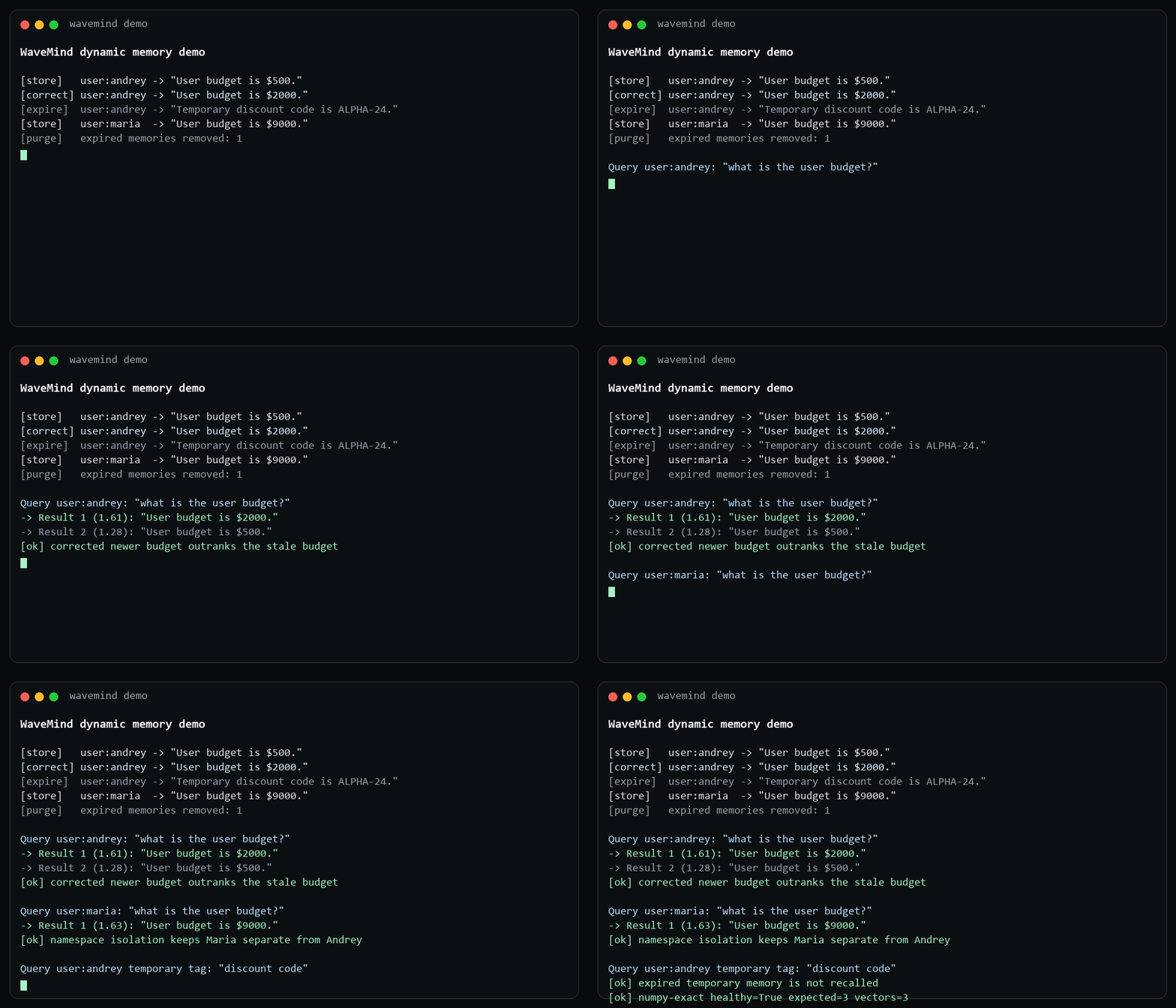
From a cloned repository:
$ python examples/demo.py
[ok] Remembered: "Andrey is a trader who tracks market breakouts."
[ok] Remembered: "Andrey prefers short practical answers about product decisions."

Query: "Andrey trader preferences"
-> Result 1 (0.60): "Andrey is a trader who tracks market breakouts."
-> Result 2 (0.30): "Andrey prefers short practical answers about product decisions."
The demo is offline, keyless, and uses the built-in hash encoder.
For correction, TTL, support/CRM, and research variants, use the linked examples in Common Ways To Use It or the demo script.
How The Memory Field Works
flowchart LR
    A["Text, event, note, document, or agent turn"] --> S["remember()"]
    S --> D[("SQLite: text + metadata + vectors + memory state")]
    Q["query()"] --> K["k-NN candidate search"]
    D --> K
    K --> W["wave-field re-rank"]
    W --> R["small ranked recall set"]
    R --> P["app, search UI, prompt, API, or tool"]
    P --> F["recall feedback updates hotness / priority"]
    F --> D
    F --> C["consolidate active clusters"]
    C --> D
The wave field is the dynamic layer around stored memories. It is not a replacement for embeddings; it is the policy that decides which candidate memories should still matter.
| signal | Plain meaning | Effect |
|---|---|---|
| vector similarity | This text is semantically close to the query. | Gets into the candidate set. |
| hotness | This memory has been useful before. | Moves upward during recall. |
| decay | This memory has not mattered recently. | Slowly loses influence. |
| priority | The app says this fact is important. | Raises ranking even before repetition. |
| TTL | This fact is temporary. | Drops out after expiry. |
| namespace and tags | This belongs to one user/project/type. | Prevents cross-user or cross-topic leakage. |
| graph dynamics | Related memories can excite or inhibit each other. | Helps clusters and corrections behave like memory, not a flat list. |
| consolidation | Active clusters can become durable concept memories. | Turns repeated patterns into inspectable higher-level memories with provenance. |
Technically, the current MemoryFieldGraph is a discrete graph over stored
memories, not a continuous mathematical physics field. That honesty matters:
WaveMind is useful today as a dynamic memory engine, while the research path is
to make the field dynamics more explicit, measurable, and scalable.
Self-organization is now part of the core surface. consolidate_concepts(),
wavemind consolidate, and POST /consolidate can turn an active graph cluster
into a new stored memory such as Consolidated memory: systems... without an
LLM call. The generated memory keeps the source memory ids in metadata, so it is
auditable instead of being a hidden summary.
Optional Embeddings
The base install is offline and keyless. Add sentence-transformers when you need semantic embeddings:
python -m pip install "wavemind[sentence]"
wavemind --encoder sentence remember "Andrey is a trader" --namespace demo
wavemind --encoder sentence query "What does Andrey do?" --namespace demo
Optional Index Backends
WaveMind separates durable state from candidate generation:
| index | Install | Notes |
|---|---|---|
numpy |
default | Exact cosine search, local, linear scan. |
quantized |
default | Local int8-compressed candidate index with int32-safe scoring. Useful for memory-footprint experiments; approximate recall and latency must still be measured per workload. |
annoy |
pip install "wavemind[indexes]" |
Local ANN. Faster at larger N, but recall must be checked. |
faiss / faiss-persisted |
pip install "wavemind[indexes]" |
Local FAISS, with an optional validated persisted snapshot. |
pgvector |
pip install "wavemind[postgres]" |
PostgreSQL/pgvector service candidate index. |
qdrant |
pip install "wavemind[indexes]" |
Qdrant service or local-mode candidate index. |
SQLite or PostgreSQL remains the source of truth. Missing service configuration fails clearly instead of silently switching backends. See Embeddings And Index Backends for setup, tuning, health checks, and persistence rules.
Scale Readiness
WaveMind ships local and service-backed storage, namespace sharding, replication,
Kubernetes/operator manifests, serverless lifecycle checks, backup/restore
drills, and strict evidence gates. The current production evidence gate passes
5/8 requirements; remote active-active, managed serverless telemetry, and a
real 100M sharded run remain explicitly locked.
The Checked-in production 50000-vector point covers
WaveMind faiss-persisted, Qdrant service, and pgvector tuning with
WAVEMIND_PGVECTOR_EF_SEARCH=400, pgvector-exact, and
pgvector-iterative.
Deployment references use ghcr.io/caspiang/wavemind. The
deploy/cloud/gcp-managed-serverless module creates billable Google Cloud
resources. deploy/cloud/gcp-remote-active-active also creates billable
infrastructure and does not unlock a production claim by itself.
deploy/cloud/gcp-qdrant-100m creates eight billable VMs; planning or applying
that module does not unlock the 100M claim without the measured artifact.
See Scale And Production for deployment modes, failure drills, strict claim boundaries, and exact reproduction commands. See Observability for metrics, traces, dashboards, and alerts.
Structured And Multimodal Memory
WaveMind supports typed image, audio, video, 3D, table, temporal-event, and knowledge-graph payloads. The checked real-encoder suite uses pinned local SentenceTransformers, CLIP, CLAP, and OpenShape PointBERT models over 1000 public assets and 200 independent queries. Its three exact-SHA runs all pass the production admission gate:
| Metric | Checked result |
|---|---|
| Macro / cross-modal / mixed precision@1 | 0.925 / 0.925 / 0.925 |
| Persisted / reload parity | 1.000 / 1.000 |
| Retrieval p99 | 48.64 ms |
| Errors | 0 |
The suite covers text, image, audio, video, and 3D retrieval and verifies the asset lifecycle against local S3-compatible MinIO. The separate precomputed-vector path remains an integration contract only; it does not prove encoder quality.
The production gate requires real local text, image, audio, video, and 3D encoders over at least 1000 real or publicly licensed assets and 200 independent queries. It also requires explicit compatible shared spaces, bidirectional cross-modal checks, per-modality quality and encoding budgets, stable repeated verdicts, and a verified S3-compatible lifecycle. Local MinIO is valid; descriptor, filename, metadata, OCR-only, synthetic-vector, and precomputed shortcuts are rejected as encoder evidence.
See Multimodal And Storage for payload schemas, cross-modal retrieval, temporal and graph queries, storage backends, object lifecycles, backup/restore, and API details.
HTTP API
Start the API with:
wavemind serve --host 127.0.0.1 --port 8000
The service exposes memory, feedback, lifecycle, health, metrics, cluster, and Memory OS routes. Production deployments should enable authentication, rate limits, TLS termination, durable storage, and monitoring. The complete route reference is in Multimodal And Storage.
Install From Source
For contributors installing from a local clone:
git clone https://github.com/CaspianG/wavemind.git
cd wavemind
python -m pip install -e ".[sentence]"
One-file setup scripts are also included in the repository:
sh install.sh
install.bat
LangChain Memory
WaveMind includes package adapters for LangChain, LangGraph, LlamaIndex, CrewAI, and AutoGen. The adapters preserve namespaces and use the same durable memory API as the CLI and HTTP service.
See Framework Integrations for complete examples, OpenClaw/Hermes guidance, and custom agent loops.
Research Branches
Experimental work stays isolated from release claims. In particular,
research/crypto-pattern-memory is an evidence-gated research branch and is
not part of the stable package or current production claims.
Benchmark
WaveMind publishes checked-in JSON and Markdown artifacts for dynamic-memory, long-term-memory, indexing, scale, Memory OS, and production-evidence profiles. The public leaderboard separates implemented, runner-ready, planned, local, loopback, and production evidence.
| Evidence | Current checked result |
|---|---|
| Verified Agent Experience Runtime | admitted; 150 frozen tasks, 5 repeats, 95% CIs, success 0.20 -> 1.00, context -39.2%, p95 6.12 ms |
| STATE-Bench Agent Learning adapter | runner_ready; official 100 x 3 train split validated at an exact upstream SHA; official paid evaluation not run |
| Memory OS admission | admitted, 13/13 requirements |
| Agent-memory advantage admission | Controlled adaptive slice passes; composite public gate blocked on strict LongMemEval-V2 |
| Memory OS remote soak | 6 hours, 500 cycles, 2500 attempts, zero corruption |
| Real multimodal admission | admitted; 1000 assets, 200 queries, precision@1 0.925, retrieval p99 48.64 ms |
| Direct Memory OS public runs | LoCoMo 1977 queries; LongMemEval-S 470 queries; strict isolated LongMemEval-V2 frozen-20 smoke |
| Strict production evidence | 5/8 requirements |
| LongMemEval evidence retrieval | WaveMind recall@5 0.782 |
| Real LoCoMo memory systems | WaveMind recall@5 0.548; Mem0 OSS 0.500; Hindsight OSS 0.316 |
| Large-N profiles | 10M Qdrant, 10M sharded Qdrant, 10M pgvector, 50M FAISS |
These results do not claim universal vector-database leadership or completed remote 100M/multi-region proof. See the full Benchmark Guide, real public memory-system report, public evidence ledger, and Benchmark Brief for methods, commands, limitations, and machine-readable artifacts.
Comparison
| feature | WaveMind | Chroma | Qdrant |
|---|---|---|---|
| Primary role | Dynamic memory engine | Embedding database | Production vector database |
| Local SQLite persistence | Yes | Yes | No, separate service/storage |
| HTTP API | FastAPI included | Included | Included |
| Audit log / metrics | SQLite audit events plus /metrics |
App-layer only | App-layer / service metrics |
| Dynamic memory priority | Wave-field hotness, TTL, priority | Metadata/filter driven | Payload/filter driven |
| Built-in forgetting | TTL and explicit forget | Manual delete/filtering | Manual delete/filtering |
| Best fit | Small to medium memory streams with dynamic recall | Local RAG apps and prototypes | Large-scale vector search |
| Scale target today | Local exact mode for small streams; FAISS/Qdrant/pgvector plus replicated namespaces for production paths | Larger than WaveMind local exact mode | Production vector scale |
WaveMind is not trying to replace dedicated vector databases at scale. The intended product gap is dynamic priority: frequently used memories can become hotter while old or low-priority memories fade. For static RAG over large document collections, use a mature vector database. For memory that needs persistence, scoped recall, TTL, forgetting, and reinforcement, WaveMind is designed to sit above or beside the vector index.
If you already use Chroma for local memory, see the practical migration guide:
docs/CHROMA_MIGRATION.md.
Known Limitations
- The default NumPy exact index is intended for local memory streams. Run
wavemind scale-planand move to FAISS, Qdrant, or pgvector before treating it as a large-N production index. - Dynamic memory policy adds latency compared with static nearest-neighbor retrieval. The value is stale suppression, reinforcement, TTL, scoped recall, and consolidation rather than winning every pure ANN latency test.
- Direct feedback-free Memory OS is not a universal quality boost. On LoCoMo it
is slightly below Core (
precision@1 0.2382vs0.2387); on LongMemEval-S it matches Core. The controlled sequential benchmark remains the admitted uplift evidence. - The earlier 451-question LongMemEval-V2 run proves execution coverage, but it
predates official per-question haystack filtering and isolated A/B stores, so
its
7.54% -> 9.09%result is not accepted as Memory OS uplift. The strict frozen-20 rerun reaches10%for both Core and Memory OS withqwen2.5:3b; a full strict rerun and the18%quality target remain open. MemoryFieldGraphis a discrete graph over stored memories, not a continuous physics field.- Production Memory OS is admitted for its documented remote Redis/worker topology. The broader cluster gate remains 5/8: remote multi-region, managed serverless telemetry, and 100M service evidence are not yet admitted.
- The checked real text/image/audio/video/3D suite is admitted for its pinned models, datasets, exact source SHA, and local MinIO topology. This is not a claim of universal cross-modal quality on unseen domains; precomputed vectors and descriptors still cannot unlock real-encoder admission.
- Large-N Qdrant and pgvector artifacts prove their stated GitHub-hosted service topologies, not independent multi-host or multi-region production.
Read the complete Known Limitations And Claim Boundaries before publishing performance, scale, or multimodal claims.
Roadmap
Full roadmap: docs/ROADMAP.md.
Launch and positioning kit: docs/LAUNCH_KIT.md.
Documentation map: docs/README.md.
Release history: CHANGELOG.md.
Near-term priorities:
- admit task-native measurement validity before resuming product quality tuning;
- demonstrate paired generalizable benefit on an agent/workflow family and an independent memory family;
- combine fast FAISS, Qdrant, or pgvector retrieval with bounded WaveMind reranking;
- publish the already admitted safe one-command upgrade candidate before WaveMind Connect;
- complete multi-region and 100M scale claims only on matching infrastructure.
Longer-term direction:
Make adaptive memory improve real workflows, then carry verified experience across agents through one provenance-aware lifecycle that scales without changing the application-level contract. Every public capability remains tied to an artifact, gate, or locked claim boundary.
Contributing
See CONTRIBUTING.md and
CODE_OF_CONDUCT.md.
Useful contribution paths:
- add reproducible benchmark adapters and checked-in result JSON;
- improve FAISS, Qdrant, pgvector, or other candidate-index backends;
- add framework examples and improve TTL, corrections, namespaces, graph dynamics, and consolidation;
- harden production operations: backups, audit logs, metrics, tracing, and migration tools.
GitHub issue templates are included for bugs, features, benchmarks, and integrations. Benchmark claims need a reproduction command and committed result artifact before they are added to README.
License
MIT. See LICENSE.
1 maintainer

Metadata
1 maintainer
Release files for wavemind 2.14.0
For a detailed explanation of source distributions (sdists) and built distributions (wheels), please see the package formats documentation.
Source distribution (sdist)
| File | Size | Uploaded | |
|---|---|---|---|
| wavemind-2.14.0.tar.gz | 2.8 MB | Details |
Built distribution (wheel)
| File | Interpreter | ABI | Platform | Reset |
|---|---|---|---|---|
| wavemind-2.14.0-py3-none-any.whl | Python 3 | none | any | Details |
Total release size: 3.4 MB
Release files / wavemind-2.14.0.tar.gz
| Download URL | wavemind-2.14.0.tar.gz |
|---|---|
| Size | 2.8 MB |
| Tags | Source |
|
SHA-256 checksum How to use checksums |
2b80f26927c61a8576cba2fec1f7eb547885893ec41e547c322fcc3c40012b85
|
|
BLAKE2b-256 checksum How to use checksums |
3e3cd94de88557f85d53a14e78516d71d77d1450b442ef17ee89715b997ae3b6
|
| Upload date | |
|
Uploaded using Trusted Publishing? What is trusted publishing? |
Yes |
| Uploaded via |
twine/7.0.0 CPython/3.13.14
|
Provenance
Provenance describes where a file came from. On PyPI, provenance is shared via attestations, which provide a verifiable record of the build or publishing details. View details, limitations and caveats.


PyPI Publish Attestation
PyPI verified that this artifact, at this checksum, originated from the publisher listed below.
Signed by GitHub Actions, verified by PyPI on Sep 6, 2026.
Transparency logRelease files / wavemind-2.14.0-py3-none-any.whl
| Download URL | wavemind-2.14.0-py3-none-any.whl |
|---|---|
| Size | 656.5 kB |
| Tags | Python 3 |
|
SHA-256 checksum How to use checksums |
56c219518f8b28e33c3206b533aa6643ef14f79a0c74aed5dd4e0f793613c3ff
|
|
BLAKE2b-256 checksum How to use checksums |
5cac21a33f001cf8c689487a3d469a385c0c2a4a744dcacf6ff4dda14474a9e8
|
| Upload date | |
|
Uploaded using Trusted Publishing? What is trusted publishing? |
Yes |
| Uploaded via |
twine/7.0.0 CPython/3.13.14
|
Provenance
Provenance describes where a file came from. On PyPI, provenance is shared via attestations, which provide a verifiable record of the build or publishing details. View details, limitations and caveats.
PyPI Publish Attestation
PyPI verified that this artifact, at this checksum, originated from the publisher listed below.
Signed by GitHub Actions, verified by PyPI on Sep 6, 2026.
Transparency log













