
WaveMind
Local-first dynamic memory for apps, agents, notebooks, and tools.
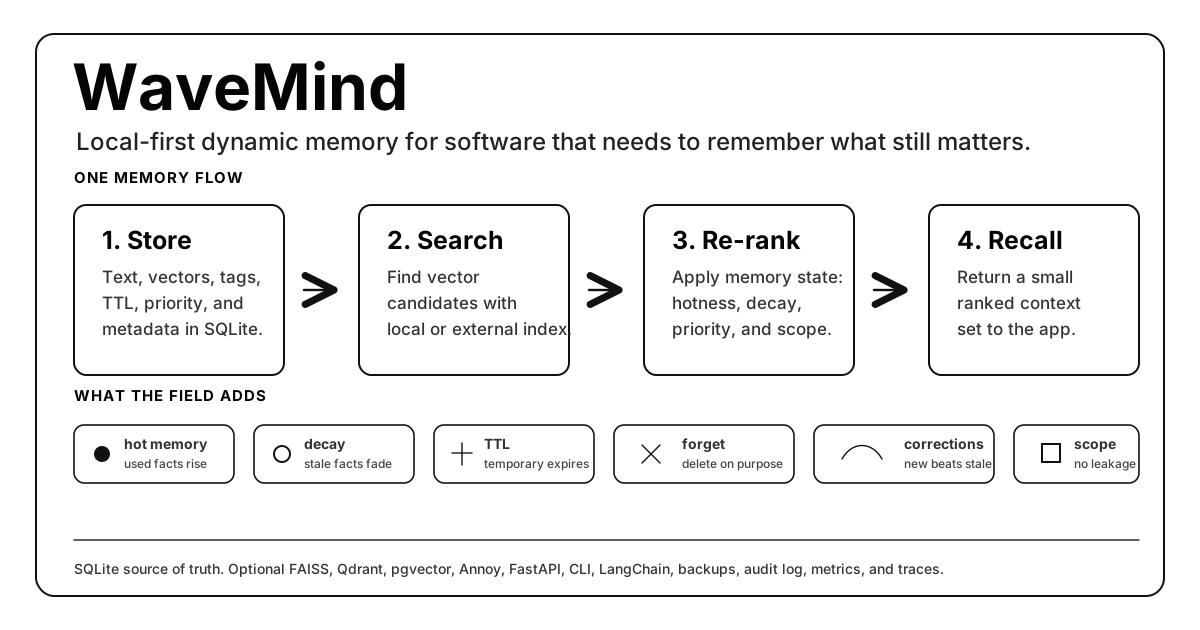
WaveMind stores memories in SQLite, finds relevant candidates with vector search, then uses a wave-field priority layer to decide what still matters: hot facts rise, stale facts fade, temporary facts expire, and namespaces keep users or projects isolated.




Quick Start | CLI | Studio | Python Example | HTTP Example | Where Data Lives | LangChain | Chroma Migration | Use Cases | HTTP API | Benchmarks | Benchmark Brief | Research Branches | Roadmap | Contributing | Limitations
What Is WaveMind?
WaveMind is a dynamic memory engine you can embed in a product.
Use it when your app needs to remember things like user preferences, decisions, corrections, notes, research snippets, support history, agent context, or temporary facts.
The short version:
normal vector search:  find the nearest text
WaveMind:              find the nearest useful memory
WaveMind is not trying to replace every vector database. It is the memory layer around retrieval: persistence, namespaces, TTL, hotness, priority, decay, explicit forgetting, audit events, and optional graph dynamics.
60-Second Version
| Question | Answer |
|---|---|
| What does it store? | Text memories, vectors, metadata, tags, TTL, priority, and recall state. |
| Where does it store data? | A local SQLite file by default; Postgres is available for production state. |
| How do I use it? | CLI, Python API, FastAPI HTTP server, LangChain memory, or framework adapters. |
| What is different from Chroma/Qdrant? | WaveMind adds memory policy: hotness, decay, TTL, correction handling, and scoped recall. |
| When should I not use it? | For huge static document search where a mature vector DB is already the right tool. |
| What is the simplest install? | python -m pip install wavemind |
Why Use It?
| If you need... | WaveMind gives you... |
|---|---|
| Memory that survives restarts | One SQLite file stores text, vectors, metadata, TTL, and recall state. |
| Per-user or per-project recall | Namespaces and tags keep memories separated. |
| Temporary facts | ttl_seconds lets facts expire automatically. |
| Corrections and changing preferences | Newer or reinforced memories can outrank stale ones. |
| A simple integration path | Python API, CLI, FastAPI server, and LangChain memory class. |
| Production hygiene | Backups, audit log, API keys, rate limits, Prometheus metrics, and OpenTelemetry traces. |
Quick Start
The shortest path from install to first recall:
python -m pip install wavemind
wavemind remember "Andrey is a trader" --namespace demo
wavemind query "What does Andrey do?" --namespace demo
Need a reminder after install?
wavemind quickstart
Want to see and manage memory in a browser?
wavemind studio
By default, WaveMind creates wavemind.sqlite3 in the current working
directory. That file is the local source of truth. Keep it out of git and back
it up like application state.
CLI Cheat Sheet
Start here if you only want to use WaveMind from the terminal:
| Goal | Command |
|---|---|
| Show first-run help | wavemind quickstart |
| Store a memory | wavemind remember "Andrey prefers short answers" --namespace user:42 |
| Search memory | wavemind query "answer style" --namespace user:42 |
| Consolidate active patterns | wavemind consolidate --namespace user:42 --seed "Rust compiler systems" |
| Open local dashboard | wavemind studio |
| See stored state | wavemind stats --namespace user:42 |
| Delete a namespace | wavemind forget --namespace user:42 |
| Import notes | wavemind import ./notes.txt --namespace project:alpha |
| Use another database file | wavemind --db ./state/memory.sqlite3 query "budget" --namespace user:42 |
| Start the HTTP API | wavemind --db ./state/memory.sqlite3 serve --host 127.0.0.1 --port 8000 |
After this point, choose the integration path you need: Python, HTTP, LangChain, framework adapters, benchmarks, or production deployment.
WaveMind Studio
WaveMind Studio is the built-in local dashboard. It runs on top of the same FastAPI app and SQLite database as the CLI:
wavemind studio
It opens http://127.0.0.1:8000/studio and gives you:
| View | What it is for |
|---|---|
| Memory map | See field energy as a heatmap. |
| Namespace explorer | Inspect memories per user, project, agent, or tenant. |
| Live query tester | Test recall before wiring it into an app. |
| Feedback buttons | Mark recalled memories as useful or not useful. |
| Import/export | Import local files and export a namespace snapshot. |
| Backup | Create SQLite backups from the browser. |
| Conflict visualizer | Inspect correction groups when memories disagree. |
| Memory OS Insights | See read-only hot-query, policy, execution-plan, and architecture suggestions before running background workers. |
For a server-safe local bind:
wavemind --db ./state/wavemind.sqlite3 studio --host 127.0.0.1 --port 8000
Python Example
from wavemind import WaveMind

memory = WaveMind(db_path="./state/wavemind.sqlite3")

memory.remember(
    "The user prefers short practical answers.",
    namespace="user:42",
    tags=["preference"],
)

hits = memory.query("How should I answer this user?", namespace="user:42", top_k=3)
for hit in hits:
    print(hit.score, hit.text)
The integration pattern is intentionally small:
- Call
query()before your app, agent, tool, or UI needs context. - Pass the returned memories into your prompt, screen, search result, or decision function.
- Call
remember()after something worth keeping happens.
HTTP Example
The FastAPI server is included in the base install:
wavemind --db ./state/wavemind.sqlite3 serve --host 127.0.0.1 --port 8000
Then use WaveMind from any language:
curl -X POST http://127.0.0.1:8000/remember \
  -H "Content-Type: application/json" \
  -d "{\"text\":\"Andrey prefers short answers\",\"namespace\":\"user:42\",\"tags\":[\"preference\"]}"

curl -X POST http://127.0.0.1:8000/query \
  -H "Content-Type: application/json" \
  -d "{\"query\":\"How should I answer?\",\"namespace\":\"user:42\",\"top_k\":3}"

curl -X POST http://127.0.0.1:8000/feedback \
  -H "Content-Type: application/json" \
  -d "{\"id\":1,\"namespace\":\"user:42\",\"useful\":true,\"strength\":0.5,\"reason\":\"used in answer\"}"

curl -X POST http://127.0.0.1:8000/feedback/batch \
  -H "Content-Type: application/json" \
  -d "{\"namespace\":\"user:42\",\"items\":[{\"id\":1,\"useful\":true,\"strength\":0.5},{\"id\":2,\"useful\":false,\"strength\":0.25}]}"

curl -X POST http://127.0.0.1:8000/forget/batch \
  -H "Content-Type: application/json" \
  -d "{\"items\":[{\"text\":\"Andrey prefers short answers\",\"namespace\":\"user:42\"}]}"
The same feedback loop is available from the CLI:
wavemind --db ./state/wavemind.sqlite3 feedback --id 1 --namespace user:42 --strength 0.5 --reason "used in answer"
wavemind --db ./state/wavemind.sqlite3 feedback-batch --file feedback.json
Where Data Lives
WaveMind is local-first. The SQLite database stores memories, vectors, metadata, namespaces, tags, TTL, hotness, priority, and audit events.
| runtime | Suggested database path |
|---|---|
| quick CLI experiment | ./wavemind.sqlite3 |
| Python app or agent | ./state/wavemind.sqlite3 |
| desktop app | user data directory, for example %APPDATA% or ~/.local/share |
| server daemon | /var/lib/wavemind/wavemind.sqlite3 |
| Docker | mounted volume, for example /data/wavemind.sqlite3 |
Explicit path:
wavemind --db ./state/app_memory.sqlite3 remember "Andrey prefers short answers" --namespace user:42
wavemind --db ./state/app_memory.sqlite3 query "answer style" --namespace user:42
Common Ways To Use It
| You are building... | Start with... |
|---|---|
| Python app | from wavemind import WaveMind |
| LangChain agent | WaveMindMemory from wavemind.integrations.langchain |
| LangGraph workflow | make_recall_node() and make_persist_node() |
| LlamaIndex pipeline | WaveMindRetriever |
| CrewAI or AutoGen loop | The adapters in wavemind.integrations |
| Node, Go, Ruby, PHP, or no-code app | wavemind serve and the HTTP API |
| Personal knowledge base | Store notes by project namespace and query locally |
| Support or CRM workflow | Customer issues, resolutions, preferences, corrections, TTL, and namespace isolation. See examples/customer_support_memory.py. |
| Research or analyst notebook | Findings, hypotheses, decisions, source metadata, TTL, and project isolation. See examples/research_notebook_memory.py. |
For migrations from existing local vector memory, start with
docs/CHROMA_MIGRATION.md. The guide has a tested
offline fixture at examples/chroma_migration.py.
Minimal Agent Loop
from wavemind import WaveMind

memory = WaveMind(db_path="./state/agent.sqlite3")

def run_turn(user_id: str, user_text: str) -> str:
    namespace = f"user:{user_id}"
    hits = memory.query(user_text, namespace=namespace, top_k=5, min_score=0.25)
    recalled = "\n".join(f"- {hit.text}" for hit in hits)

    answer = call_your_llm(f"Relevant memory:\n{recalled}\n\nUser: {user_text}")

    memory.remember(f"User said: {user_text}", namespace=namespace, tags=["conversation"])
    memory.remember(f"Assistant answered: {answer}", namespace=namespace, tags=["conversation"])
    return answer
Terminal Demo
From a cloned repository:
$ python examples/demo.py
[ok] Remembered: "Andrey is a trader who tracks market breakouts."
[ok] Remembered: "Andrey prefers short practical answers about product decisions."

Query: "Andrey trader preferences"
-> Result 1 (0.60): "Andrey is a trader who tracks market breakouts."
-> Result 2 (0.30): "Andrey prefers short practical answers about product decisions."
The demo is offline, keyless, and uses the built-in hash encoder.
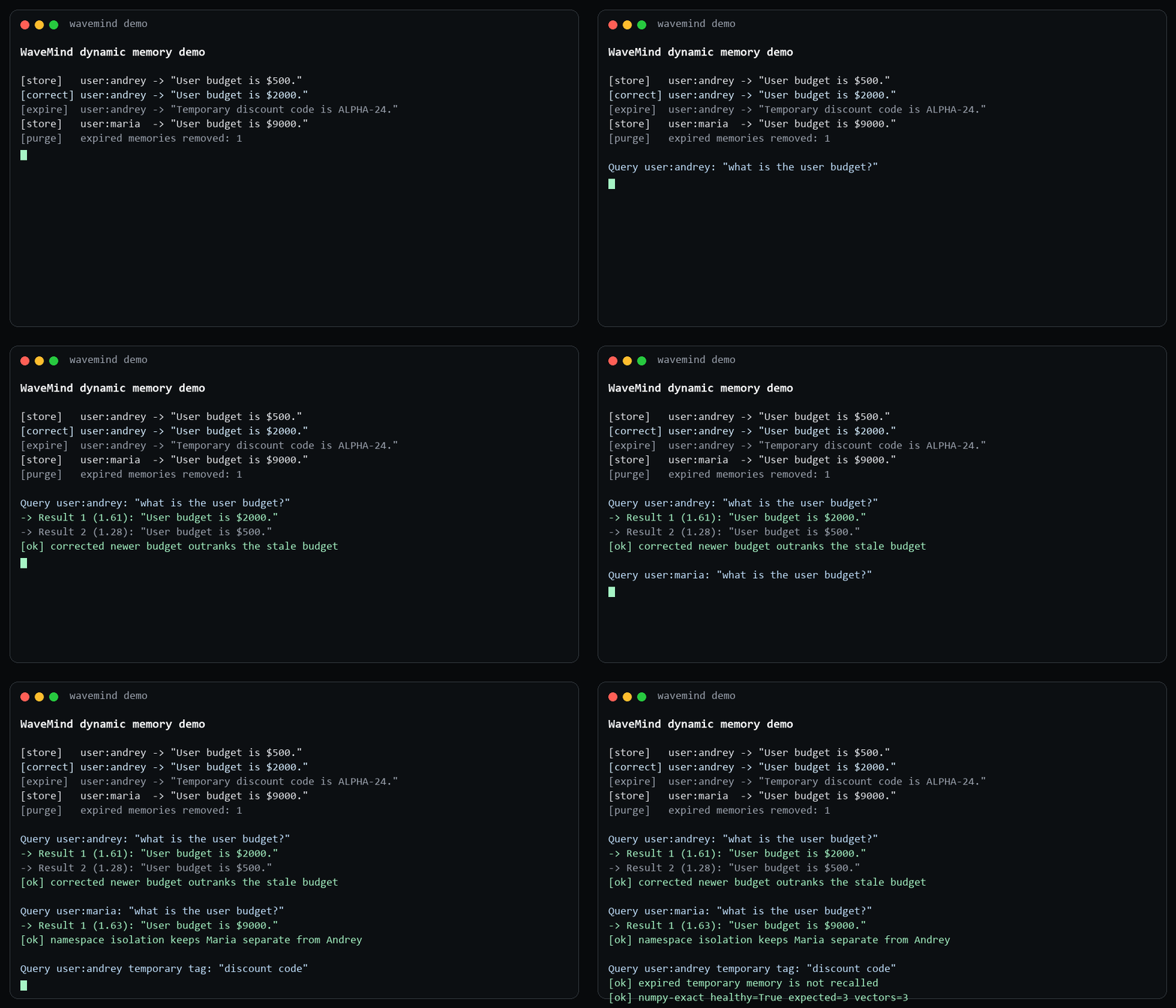
To see the behavior that plain vector search does not provide:
python examples/dynamic_memory_demo.py
That demo shows corrected facts outranking stale facts, temporary memory expiring, namespace isolation, and index-health reporting.
To see the same behavior in a practical support/CRM workflow:
python examples/customer_support_memory.py
That demo stores customer preferences, billing tickets, stale CRM data, temporary discount codes, and separate customer namespaces.
To see source-aware research memory:
python examples/research_notebook_memory.py
That demo stores analyst findings, temporary hypotheses, decisions, source metadata, and isolated project namespaces.
How The Memory Field Works
flowchart LR
    A["Text, event, note, document, or agent turn"] --> S["remember()"]
    S --> D[("SQLite: text + metadata + vectors + memory state")]
    Q["query()"] --> K["k-NN candidate search"]
    D --> K
    K --> W["wave-field re-rank"]
    W --> R["small ranked recall set"]
    R --> P["app, search UI, prompt, API, or tool"]
    P --> F["recall feedback updates hotness / priority"]
    F --> D
    F --> C["consolidate active clusters"]
    C --> D
The wave field is the dynamic layer around stored memories. It is not a replacement for embeddings; it is the policy that decides which candidate memories should still matter.
| signal | Plain meaning | Effect |
|---|---|---|
| vector similarity | This text is semantically close to the query. | Gets into the candidate set. |
| hotness | This memory has been useful before. | Moves upward during recall. |
| decay | This memory has not mattered recently. | Slowly loses influence. |
| priority | The app says this fact is important. | Raises ranking even before repetition. |
| TTL | This fact is temporary. | Drops out after expiry. |
| namespace and tags | This belongs to one user/project/type. | Prevents cross-user or cross-topic leakage. |
| graph dynamics | Related memories can excite or inhibit each other. | Helps clusters and corrections behave like memory, not a flat list. |
| consolidation | Active clusters can become durable concept memories. | Turns repeated patterns into inspectable higher-level memories with provenance. |
Technically, the current MemoryFieldGraph is a discrete graph over stored
memories, not a continuous mathematical physics field. That honesty matters:
WaveMind is useful today as a dynamic memory engine, while the research path is
to make the field dynamics more explicit, measurable, and scalable.
Self-organization is now part of the core surface. consolidate_concepts(),
wavemind consolidate, and POST /consolidate can turn an active graph cluster
into a new stored memory such as Consolidated memory: systems... without an
LLM call. The generated memory keeps the source memory ids in metadata, so it is
auditable instead of being a hidden summary.
Optional Embeddings
For sentence-transformer embeddings:
python -m pip install "wavemind[sentence]"
wavemind --encoder sentence remember "Andrey is a trader" --namespace demo
wavemind --encoder sentence query "What does Andrey do?" --namespace demo
Optional Index Backends
The default index is NumPy exact search. It is simple and reliable for local memory. For larger candidate generation, WaveMind also exposes optional index backends:
| index | Install | Notes |
|---|---|---|
numpy |
default | Exact cosine search, local, linear scan. |
quantized |
default | Local int8-compressed candidate index with int32-safe scoring. Useful for memory-footprint experiments; approximate recall and latency must still be measured per workload. |
annoy |
pip install "wavemind[indexes]" |
Local ANN. Faster at larger N, but recall must be checked. |
faiss |
pip install "wavemind[indexes]" |
FAISS flat inner-product path where faiss-cpu is available. |
faiss-persisted |
pip install "wavemind[indexes]" |
FAISS with an explicit persisted index snapshot and id map. |
pgvector |
pip install "wavemind[postgres]" |
PostgreSQL/pgvector candidate index. SQLite can still remain the local source of truth. |
qdrant |
pip install "wavemind[indexes]" |
Qdrant service/local-mode candidate index. SQLite remains the source of truth; Qdrant stores vectors. |
Persisted FAISS setup:
export WAVEMIND_FAISS_PATH="./state/wavemind.faiss"
wavemind --index faiss-persisted remember "Andrey is a trader" --namespace demo
wavemind --index faiss-persisted query "trader" --namespace demo
SQLite or Postgres remains the source of truth. The persisted FAISS files are a candidate-index snapshot and are validated against the current memory ids, vector dimension, vector count, and a SHA-256 checksum of normalized source vectors on load. If the snapshot does not match the stored memories, WaveMind rebuilds it from the durable store. You can also check and rebuild the candidate index explicitly:
wavemind --index faiss-persisted index-health --json
wavemind --index faiss-persisted rebuild-index
Index health compares durable memory ids against the candidate index. Local indexes report exact missing/extra ids; service backends report exact ids when the backend exposes an id scan and otherwise fall back to count-based health.
pgvector setup:
export WAVEMIND_PGVECTOR_DSN="postgresql://user:password@localhost:5432/wavemind"
wavemind --index pgvector remember "Andrey is a trader" --namespace demo
wavemind --index pgvector query "trader" --namespace demo
Optional pgvector environment variables:
WAVEMIND_PGVECTOR_TABLE- table name, defaultwavemind_vectors.WAVEMIND_PGVECTOR_COLLECTION- collection key, defaultdefault.WAVEMIND_PGVECTOR_CREATE_HNSW=1- create an HNSW index usingvector_cosine_opswhen the installed pgvector version supports it.WAVEMIND_PGVECTOR_HNSW_M- optional HNSW graph degree for index creation.WAVEMIND_PGVECTOR_HNSW_EF_CONSTRUCTION- optional HNSW build accuracy setting.WAVEMIND_PGVECTOR_EF_SEARCH- optional per-query HNSW search depth. Increase it when pgvector is fast but recall is too low.WAVEMIND_PGVECTOR_ITERATIVE_SCAN=strict_order|relaxed_order|off- optional pgvector iterative HNSW scan mode for higher recall on newer pgvector builds.WAVEMIND_PGVECTOR_MAX_SCAN_TUPLESandWAVEMIND_PGVECTOR_SCAN_MEM_MULTIPLIER- optional HNSW scan bounds for production recall/latency tuning.WAVEMIND_PGVECTOR_EXACT=1- force an exact scan for recall audits and correctness-sensitive jobs. This is slower than HNSW, but it gives a direct way to separate index approximation loss from WaveMind ranking behavior.
If WAVEMIND_PGVECTOR_DSN is missing, WaveMind raises a clear error instead of
silently falling back to another index backend.
The pgvector table is created with the current encoder dimension, so use a
separate table when switching between different vector sizes.
Qdrant setup:
export WAVEMIND_QDRANT_URL="http://localhost:6333"
export WAVEMIND_QDRANT_COLLECTION="wavemind_vectors"
wavemind --index qdrant remember "Andrey is a trader" --namespace demo
wavemind --index qdrant query "trader" --namespace demo
For local experiments you can set WAVEMIND_QDRANT_URL=":memory:", but
production latency and durability should be measured against a real Qdrant
service. If WAVEMIND_QDRANT_URL is missing, WaveMind raises a clear error
instead of silently falling back to another backend.
Scale Readiness
WaveMind ships local and service-backed storage, namespace sharding, replication,
Kubernetes/operator manifests, serverless lifecycle checks, backup/restore
drills, and strict evidence gates. The current production evidence gate passes
5/8 requirements; remote active-active, managed serverless telemetry, and a
real 100M sharded run remain explicitly locked.
The Checked-in production 50000-vector point covers
WaveMind faiss-persisted, Qdrant service, and pgvector tuning with
WAVEMIND_PGVECTOR_EF_SEARCH=400, pgvector-exact, and
pgvector-iterative.
Deployment references use ghcr.io/caspiang/wavemind. The
deploy/cloud/gcp-managed-serverless module creates billable Google Cloud
resources. deploy/cloud/gcp-remote-active-active also creates billable
infrastructure and does not unlock a production claim by itself.
deploy/cloud/gcp-qdrant-100m creates eight billable VMs; planning or applying
that module does not unlock the 100M claim without the measured artifact.
See Scale And Production for deployment modes, failure drills, strict claim boundaries, and exact reproduction commands. See Observability for metrics, traces, dashboards, and alerts.
Structured And Multimodal Memory
WaveMind supports typed image, audio, video, 3D, table, temporal-event, and knowledge-graph payloads. Current checked evidence proves the structured contract and external/precomputed vector path; it does not claim broad raw encoder quality for every modality.
See Multimodal And Storage for payload schemas, cross-modal retrieval, temporal and graph queries, storage backends, object lifecycles, backup/restore, and API details.
HTTP API
Start the API with:
wavemind serve --host 127.0.0.1 --port 8000
The service exposes memory, feedback, lifecycle, health, metrics, cluster, and Memory OS routes. Production deployments should enable authentication, rate limits, TLS termination, durable storage, and monitoring. The complete route reference is in Multimodal And Storage.
Install From Source
For contributors installing from a local clone:
git clone https://github.com/CaspianG/wavemind.git
cd wavemind
python -m pip install -e ".[sentence]"
One-file setup scripts are also included in the repository:
sh install.sh
install.bat
LangChain Memory
WaveMind includes package adapters for LangChain, LangGraph, LlamaIndex, CrewAI, and AutoGen. The adapters preserve namespaces and use the same durable memory API as the CLI and HTTP service.
See Framework Integrations for complete examples, OpenClaw/Hermes guidance, and custom agent loops.
Research Branches
Experimental work stays isolated from release claims. In particular,
research/crypto-pattern-memory is an evidence-gated research branch and is
not part of the stable package or current production claims.
Benchmark
WaveMind publishes checked-in JSON and Markdown artifacts for dynamic-memory, long-term-memory, indexing, scale, Memory OS, and production-evidence profiles. The public leaderboard separates implemented, runner-ready, planned, local, loopback, and production evidence.
| Evidence | Current checked result |
|---|---|
| Memory OS admission | admitted, 13/13 requirements |
| Memory OS remote soak | 6 hours, 500 cycles, 2500 attempts, zero corruption |
| Strict production evidence | 5/8 requirements |
| LongMemEval evidence retrieval | WaveMind recall@5 0.782 |
| Large-N profiles | 10M Qdrant, 10M sharded Qdrant, 10M pgvector, 50M FAISS |
These results do not claim universal vector-database leadership or completed remote 100M/multi-region proof. See the full Benchmark Guide, living dashboard, and Benchmark Brief for methods, commands, limitations, and machine-readable artifacts.
Comparison
| feature | WaveMind | Chroma | Qdrant |
|---|---|---|---|
| Primary role | Dynamic memory engine | Embedding database | Production vector database |
| Local SQLite persistence | Yes | Yes | No, separate service/storage |
| HTTP API | FastAPI included | Included | Included |
| Audit log / metrics | SQLite audit events plus /metrics |
App-layer only | App-layer / service metrics |
| Dynamic memory priority | Wave-field hotness, TTL, priority | Metadata/filter driven | Payload/filter driven |
| Built-in forgetting | TTL and explicit forget | Manual delete/filtering | Manual delete/filtering |
| Best fit | Small to medium memory streams with dynamic recall | Local RAG apps and prototypes | Large-scale vector search |
| Scale target today | Local exact mode for small streams; FAISS/Qdrant/pgvector plus replicated namespaces for production paths | Larger than WaveMind local exact mode | Production vector scale |
WaveMind is not trying to replace dedicated vector databases at scale. The intended product gap is dynamic priority: frequently used memories can become hotter while old or low-priority memories fade. For static RAG over large document collections, use a mature vector database. For memory that needs persistence, scoped recall, TTL, forgetting, and reinforcement, WaveMind is designed to sit above or beside the vector index.
If you already use Chroma for local memory, see the practical migration guide:
docs/CHROMA_MIGRATION.md.
Known Limitations
- Optimal capacity on the current NumPy exact index is up to 1000 records.
- At 5000 records, one-word
precision@1is currently 0.72 with the hash encoder; many misses are ambiguous queries where another sentence containing the same word ranks first. - For
N > 5000, the NumPy exact index is still reliable but scales linearly. Annoy is faster at 50000 vectors in the local curve, but current recall is only0.730; thequantizedbackend reaches0.934recall@10 with int8 storage and int32-safe scoring, but is still slower than NumPy on this workload. Use FAISS or a production vector service before claiming large-scale ANN quality. - Run
wavemind scale-plan --target-memories <N>before growing a deployment. It is a guardrail, not a benchmark replacement: it tells you when NumPy is no longer the right candidate index and which checks to run next. sentence-transformers/paraphrase-multilingual-mpnet-base-v2requires about 420 MB of model files. Benchmark runners cache embeddings so retrieval latency is measured separately from model encoding latency.- The Chroma comparison currently uses shared precomputed hash embeddings to isolate retrieval/ranking behavior; semantic model comparisons should be run separately.
- The BEIR SciFact run uses the hash encoder to isolate index/retrieval behavior. It is not a semantic embedding leaderboard result.
- On BEIR SciFact, WaveMind and Qdrant match on hash-encoder
nDCG@10, while Chroma is much faster. The next index milestone is FAISS/Annoy candidate generation plus WaveMind top-k re-ranking. - The LoCoMo results are retrieval-only evidence results, not final answer-quality scores. The sentence-transformers run is stronger than the hash run, but still needs answer generation and faithfulness checks.
- In the 200-fact agent benchmark, Chroma is faster on average while WaveMind is slightly higher at
precision@3. - The dynamic benchmark currently compares WaveMind against a static Chroma baseline. Chroma and Qdrant can implement similar behavior with extra application-layer metadata policy, deletes, filters, and reinforcement logic.
MemoryFieldGraphis a discrete graph over stored memories, not a continuous mathematical field. Its current build path should be optimized with incremental edge updates before large production use.- Kubernetes operator reconciliation now has durable Lease/etcd-backed leader
election with CAS and failover between operator replicas. The separate
ControlPlaneConsensusprofile remains a deterministic config-safety guard, not an implementation of a replicated Raft log for the WaveMind data plane. - The checked Kubernetes network drill writes
256deterministic memories through four pod-DNS API nodes in three worker zones, physically pauses one kind worker, detects the unreachable replica, preserves1.00quorum recall, and returns to1.00recall with no failed nodes after recovery. This is real non-loopback CI evidence, but it is still ephemeral kind evidence rather than remote multi-region production admission. Seebenchmarks/kubernetes_cluster_network_smoke_results.jsonand its traceable GitHub Actions run. - The checked active-active Kubernetes drill uses three separate replicated
region APIs with persistent volumes in three worker zones. During a physical
zone-B worker pause, regions A and C continue writes and delete propagation at
1.00convergence; the recovered region converges without resurrecting the deleted memory and the final sync is a no-op. This remains ephemeral kind evidence rather than independent remote-region admission. Seebenchmarks/kubernetes_active_active_region_smoke_results.jsonand its GitHub Actions run. - pgvector is a candidate-index backend. PostgreSQL source-of-truth storage is
also available separately. A Postgres-native PITR runbook/preflight now exists
through
wavemind postgres-pitr-planandbenchmarks/postgres_pitr_plan.json; migrations, real managed-Postgres PITR drill evidence, and larger service benchmark profiles still need more real deployment coverage. - The Qdrant backend is also a candidate-index backend. WaveMind rebuilds it from SQLite on load/build, so large service-mode deployments still need a measured rebuild strategy and index-health monitoring.
- The persisted FAISS backend validates a snapshot against current memory ids
and avoids unnecessary FAISS rebuilds when the snapshot matches. FAISS itself
is a single-node flat-index path; use
ReplicatedWaveMindor external database/service replication when that is not enough. - The current cross-modal layer supports deterministic descriptor embeddings, a strict precomputed-vector path for externally computed CLIP/audio/video/3D embeddings, and an optional sentence-transformers backend for CLIP-style local image/text retrieval. Audio, video, and 3D perception still require external embeddings or strong descriptors until dedicated backends are benchmarked.
wavemind multimodal-admissionkeeps production multimodal claims locked until an external encoder/object-store benchmark artifact proves real image/audio/video/3D quality, cross-modal routing, object-store verification, persistence, provenance, p99 query latency, encode p95, and error-rate thresholds. Usewavemind multimodal-external-evidenceto generate that artifact from a real external manifest; no fixture unlocks this claim.- The
quantizedbackend is an explicit int8 candidate-index experiment. It reduces vector precision, stores the local candidate matrix compactly, uses an int32 accumulator to avoid dot-product overflow, and must be benchmarked per workload before use. - The synthetic long-term memory evidence benchmark is useful for regression and product-shape proof, but public claims should lean on LoCoMo and LongMemEval instead.
- The main LongMemEval evidence result is retrieval-only. The checked-in Ollama answer-generation comparison now includes WaveMind, Chroma static, and Qdrant static over 50 questions, but it is still not a full LongMemEval leaderboard-equivalent score.
- Qdrant baselines in this README use embedded local mode. Qdrant itself warns that local mode is not recommended above 20000 points; use the
qdrant-servicebenchmark profile before making production latency claims. - The tuned 1M Qdrant streaming result depends on safe upsert chunking,
30seconds wait-after-build, and100warmup queries. The cold 1M run misses the p99 SLO, so production Qdrant claims must specify warmup/tuning behavior. - The Qdrant streaming path now has real single-service and four-service sharded 10M artifacts. These prove the tested local service topology and SLO, not multi-host or multi-region deployment.
- The pgvector streaming path has a real service smoke and a checked 10M preflight contract. It is not a completed 10M pgvector benchmark until
benchmarks/production_streaming_load_pgvector_10m_results.jsonis produced by a real run. - The production cost model is an engineering estimate from checked-in benchmark parameters: required replicas, target QPS, replica hourly cost, vector storage, and payload storage. It is not a cloud-provider bill and must be recalibrated for real hardware.
- MTEB, MIRACL, LMEB, official VectorDBBench, and RAGBench are listed as the public benchmark roadmap, not as completed results yet.
- Local Ollama answer generation now works with
qwen2.5:0.5bandqwen2.5:1.5b; WaveMind leads the checked-in Chroma/Qdrant smoke comparison, but answer quality is still limited by small-model reasoning and should be rerun with stronger local/API models before making product claims. - Public benchmark adapters require optional datasets, heavier dependencies, or running services. They are intentionally outside the minimal
pip install wavemindpath. - Dynamic memory is slower than static Chroma in the current local benchmark: 25.26 ms vs 1.75 ms average query latency on this machine.
- Current WaveMind-only dynamic checks keep
precision@1at 1.00 through 5000 memories, but average latency is around 48-54 ms. The next optimization target is field/re-ranking latency, not basic recall quality.
Roadmap
Full roadmap: docs/ROADMAP.md.
Launch and positioning kit: docs/LAUNCH_KIT.md.
Near-term priorities:
- Service-mode Qdrant, pgvector, and persisted-FAISS benchmark runs on a real production-like machine, with SLO and cost gates checked into the repo.
- Migration tooling and operational docs for Postgres source-of-truth storage.
- Tune the quantized int8 backend so compression does not cost more latency than exact NumPy on common workloads.
- Service-mode Qdrant and FAISS latency baselines using the explicit Qdrant backend, not only the standalone Qdrant benchmark baseline.
- LoCoMo and LongMemEval answer-quality evaluation, not retrieval only.
- Harden framework adapters: LangGraph, LlamaIndex, CrewAI, AutoGen, OpenClaw, and HTTP-only sidecar use.
- Faster dynamic re-ranking through smaller candidate windows, caching, and background updates.
- Better production operations: OpenTelemetry, SQLite point-in-time recovery, and replicated offsite snapshot jobs with verified portable archives, S3-compatible upload, latest-archive lookup, restore from latest, object-store DR drill, object-store retention, and a Postgres PITR runbook/preflight are implemented; richer latency histograms, index-health metrics, alerting examples, real cloud disaster-recovery drills, and a real managed-Postgres PITR drill report are next.
Longer-term direction:
- scale from thousands of memories to 100k-1M on one node;
- keep SQLite as the local source of truth while adding Postgres and external vector backends for production;
- evolve
MemoryFieldGraphfrom a regression-tested graph into a stronger field-memory model with excitation, inhibition, decay, and consolidation; - expand the built-in multimodal backend beyond CLIP-style local image/text retrieval into benchmarked audio/video/3D encoders while keeping the same provenance-preserving payload API;
- build enterprise features only after benchmarked retrieval, latency, and answer-quality evidence are solid.
Contributing
Contributing guide: CONTRIBUTING.md.
Community participation follows the
CODE_OF_CONDUCT.md.
Useful contribution paths:
- add reproducible benchmark adapters and checked-in result JSON;
- improve FAISS, Qdrant, pgvector, or other candidate-index backends;
- add examples for LangGraph, LlamaIndex, CrewAI, AutoGen, OpenClaw, and HTTP-only sidecar deployments;
- improve dynamic memory behavior around TTL, corrections, namespaces, graph excitation/inhibition, and consolidation;
- harden production operations: backups, audit logs, metrics, tracing, and migration tools.
GitHub issue templates are included for bugs, features, benchmarks, and integrations. Benchmark claims need a reproduction command and committed result artifact before they are added to README.
License
MIT. See LICENSE.
1 maintainer

Download files
Download the file for your platform. If you're not sure which to choose, learn more about installing packages.
Source Distribution
Built Distribution
Filter files by name, interpreter, ABI, and platform.
If you're not sure about the file name format, learn more about wheel file names.
Copy a direct link to the current filters
File details
Details for the file wavemind-2.6.3.tar.gz.
File metadata
- Download URL: wavemind-2.6.3.tar.gz
- Upload date:
- Size: 1.4 MB
- Tags: Source
- Uploaded using Trusted Publishing? Yes
- Uploaded via: twine/6.1.0 CPython/3.13.14
File hashes
| Algorithm | Hash digest | |
|---|---|---|
| SHA256 |
2a31d3c454a874162e3349d0264660294c06a75a552224f7249006ac3a314003
|
|
| MD5 |
20dd7052b6d8dce30b45bafab9d6dabf
|
|
| BLAKE2b-256 |
f1c804faaa876a0242d578835002b3c01e77821ed4ed4355ac47d443bb4c8962
|
Provenance
The following attestation bundles were made for wavemind-2.6.3.tar.gz:
Publisher:
publish.yml on CaspianG/wavemind
-
Statement:
-
Statement type:
https://in-toto.io/Statement/v1 -
Predicate type:
https://docs.pypi.org/attestations/publish/v1 -
Subject name:
wavemind-2.6.3.tar.gz -
Subject digest:
2a31d3c454a874162e3349d0264660294c06a75a552224f7249006ac3a314003 - Sigstore transparency entry: 2257360099
- Sigstore integration time:
-
Permalink:
CaspianG/wavemind@fbb0086a4edf15570420069db4ea1b195044d261 -
Branch / Tag:
refs/tags/v2.6.3 - Owner: https://github.com/CaspianG
-
Access:
public
-
Token Issuer:
https://token.actions.githubusercontent.com -
Runner Environment:
github-hosted -
Publication workflow:
publish.yml@fbb0086a4edf15570420069db4ea1b195044d261 -
Trigger Event:
push
-
Statement type:
File details
Details for the file wavemind-2.6.3-py3-none-any.whl.
File metadata
- Download URL: wavemind-2.6.3-py3-none-any.whl
- Upload date:
- Size: 329.0 kB
- Tags: Python 3
- Uploaded using Trusted Publishing? Yes
- Uploaded via: twine/6.1.0 CPython/3.13.14
File hashes
| Algorithm | Hash digest | |
|---|---|---|
| SHA256 |
effbc94f35c05c3e482f774e1f17d6ed193726f40f56cc9612551e0c16c8059d
|
|
| MD5 |
9854ea3bfe7fa63987abccc12580079f
|
|
| BLAKE2b-256 |
39243a3c6ebced1b02b1dee5aefc1b445fbea49c58c19418251401112bae5aa7
|
Provenance
The following attestation bundles were made for wavemind-2.6.3-py3-none-any.whl:
Publisher:
publish.yml on CaspianG/wavemind
-
Statement:
-
Statement type:
https://in-toto.io/Statement/v1 -
Predicate type:
https://docs.pypi.org/attestations/publish/v1 -
Subject name:
wavemind-2.6.3-py3-none-any.whl -
Subject digest:
effbc94f35c05c3e482f774e1f17d6ed193726f40f56cc9612551e0c16c8059d - Sigstore transparency entry: 2257360108
- Sigstore integration time:
-
Permalink:
CaspianG/wavemind@fbb0086a4edf15570420069db4ea1b195044d261 -
Branch / Tag:
refs/tags/v2.6.3 - Owner: https://github.com/CaspianG
-
Access:
public
-
Token Issuer:
https://token.actions.githubusercontent.com -
Runner Environment:
github-hosted -
Publication workflow:
publish.yml@fbb0086a4edf15570420069db4ea1b195044d261 -
Trigger Event:
push
-
Statement type:







