
Updates the firmware of Western Digital SSDs on Ubuntu / Linux Mint.

Reason this release was yanked:
non working release
Project description



wd_fw_update

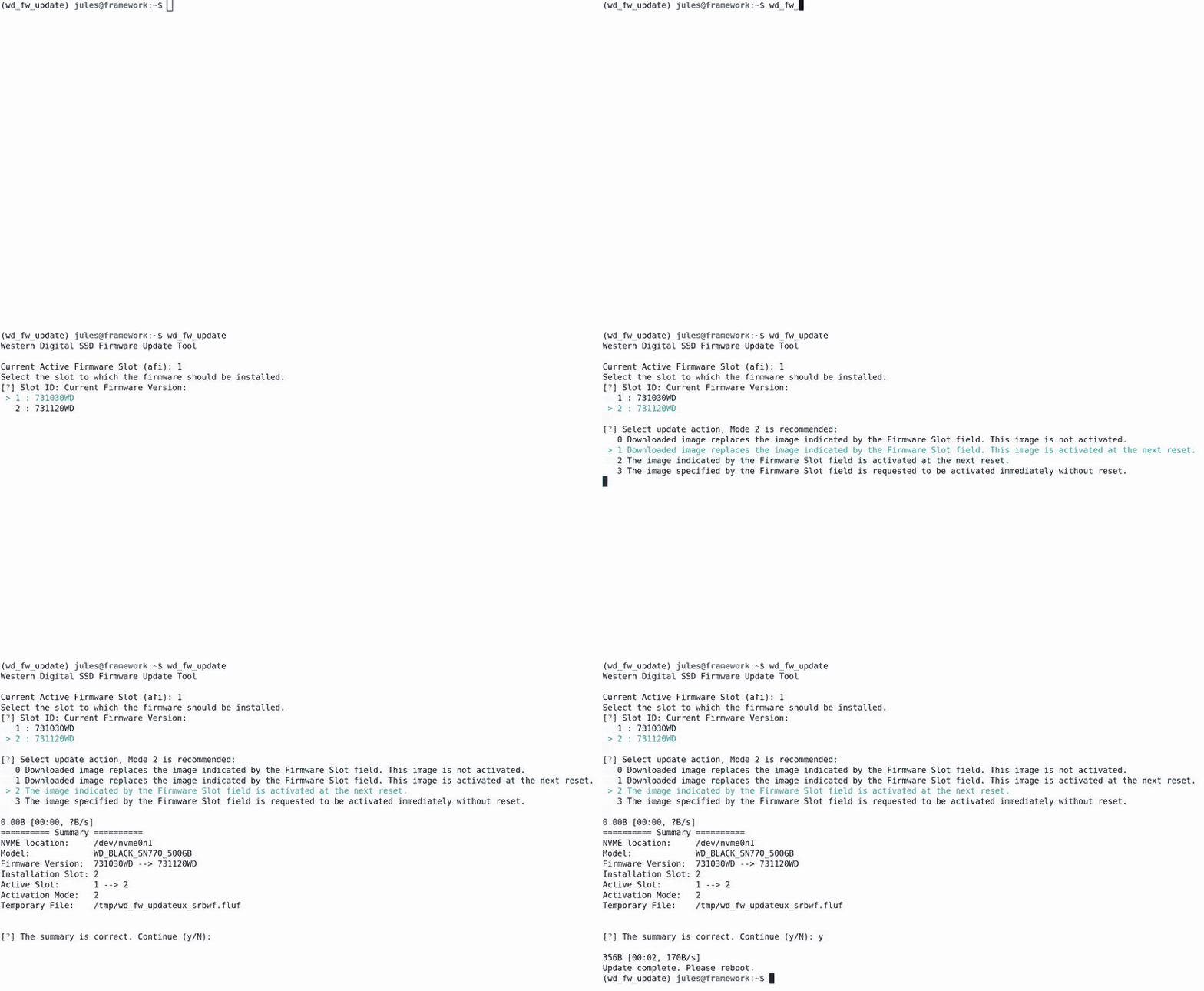
This is a firmware update tool for Western Digital SSDs on Ubuntu / Linux Mint.
It provides a user-friendly interface to select the firmware version for the update process.
It uses the Western Digital API and the NVME toolbox nvme-cli but is NOT associated in any case to them.
It was originally developed for Frame.Work laptops, but should work with any Ubuntu / Mint device with Western Digital NVME SSD.
See the discussion on: community.frame.work
Installation
Prerequisites
Make sure the following dependencies are installed on your system:
- sudo
- nvme-cli
Via source
Clone the repository:
git clone https://github.com/not-a-feature/wd_fw_update.git
cd wd_fw_update

pip install .
Via pypi:
The newest release is published on pypi.
pip install wd-fw-update
Usage
Run
wd_fw_update
Follow the on-screen prompts to select the appropriate options for your firmware update. The script will guide you through the process, and once completed, it will provide a summary of the update. Depending on the update mode, it may prompt you to reboot or switch to the new slot.
Command-Line Options
--version: Display the version of the firmware update tool.
-v, --verbose: Set the log level to INFO.
-vv, --very-verbose: Set the log level to DEBUG.
Note
This project has been set up using PyScaffold 4.5. For details and usage information on PyScaffold see https://pyscaffold.org/.
Dependencies
License
Copyright (C) 2024 by Jules Kreuer - @not_a_feature This piece of software is published unter the GNU General Public License v3.0 TLDR:
| Permissions | Conditions | Limitations |
|---|---|---|
| ✓ Commercial use | Disclose source | ✕ Liability |
| ✓ Distribution | License and copyright notice | ✕ Warranty |
| ✓ Modification | Same license | |
| ✓ Patent use | State changes | |
| ✓ Private use |
Go to LICENSE to see the full version.
Release history Release notifications | RSS feed


Download files
Download the file for your platform. If you're not sure which to choose, learn more about installing packages.
Source Distribution
Built Distribution
Filter files by name, interpreter, ABI, and platform.
If you're not sure about the file name format, learn more about wheel file names.
Copy a direct link to the current filters
File details
Details for the file wd_fw_update-1.1.1.tar.gz.
File metadata
- Download URL: wd_fw_update-1.1.1.tar.gz
- Upload date:
- Size: 324.1 kB
- Tags: Source
- Uploaded using Trusted Publishing? No
- Uploaded via: twine/5.0.0 CPython/3.12.3
File hashes
| Algorithm | Hash digest | |
|---|---|---|
| SHA256 |
5548aeaf512096c0f865041a95c3a314ccc710c7fba2ef86190d8195b4b91ac1
|
|
| MD5 |
a8d3e3ffb5b7c7abe7b3b6fd541f33eb
|
|
| BLAKE2b-256 |
ffcbc3e0a423b027fc2fe2b72787840eabf820cbbb0e3388fa407148f53a25a4
|
File details
Details for the file wd_fw_update-1.1.1-py3-none-any.whl.
File metadata
- Download URL: wd_fw_update-1.1.1-py3-none-any.whl
- Upload date:
- Size: 8.1 kB
- Tags: Python 3
- Uploaded using Trusted Publishing? No
- Uploaded via: twine/5.0.0 CPython/3.12.3
File hashes
| Algorithm | Hash digest | |
|---|---|---|
| SHA256 |
4b210c8d285624f87d316ed72e3d67058d520c02391aa71cf4fdef13049f8475
|
|
| MD5 |
b7d4b066eaa0e29bbfbedaa407033bd0
|
|
| BLAKE2b-256 |
2b79b68907aa4d4a7010ccd8eb4819ee8732848e40654c735bcdb0de953b3b71
|






