


wd_fw_update

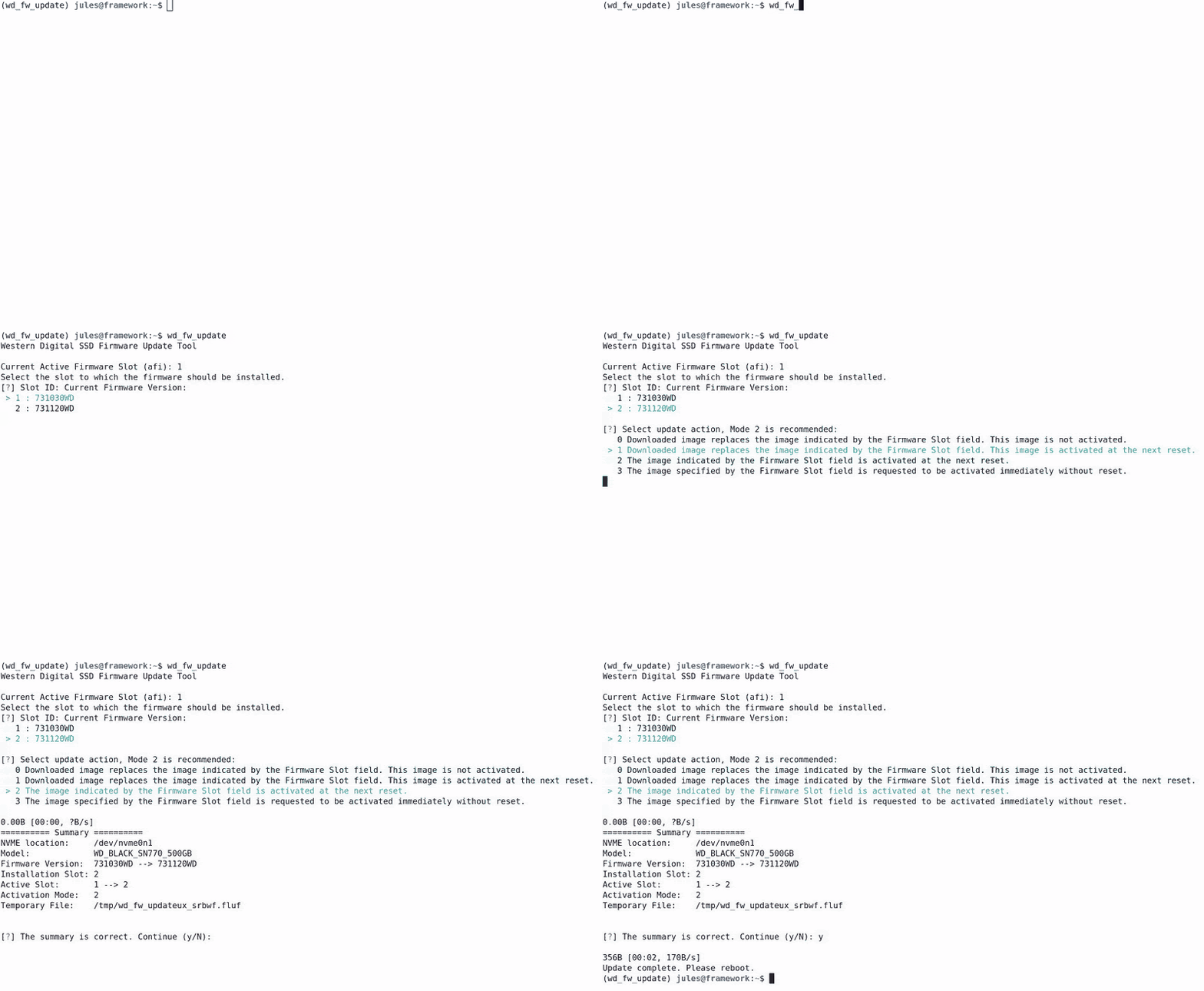
This is a firmware update tool for Western Digital SSDs on Ubuntu / Linux Mint.
It provides a user-friendly interface to select the firmware version for the update process.
It uses the Western Digital API and the NVME toolbox nvme-cli but is NOT associated in any case to them.
It was originally developed for Frame.Work laptops, but should work with any Ubuntu / Mint device with Western Digital NVME SSD.
See the discussion on: community.frame.work and juleskreuer.eu
Installation
Prerequisites
Make sure the following dependencies are installed on your system:
- sudo
- nvme-cli
Via source
Clone the repository:
git clone https://github.com/not-a-feature/wd_fw_update.git
cd wd_fw_update

pip install .
Via pypi:
The newest release is published on pypi.
pip install wd-fw-update
Usage
Run
wd_fw_update
Follow the on-screen prompts to select the appropriate options for your firmware update. The script will guide you through the process, and once completed, it will provide a summary of the update. Depending on the update mode, it may prompt you to reboot or switch to the new slot.
Command-Line Options
--version: Display the version of the firmware update tool.
-i, --info: Display information about the available drives.
-m, --manual: Disable version and dependency checks.
--ignore_ssl_errors: Disable SSL check.
-v, --verbose: Set the log level to INFO.
-vv, --very-verbose: Set the log level to DEBUG.
-i, --info
The -i flag will display about the available drives.
Example:
========== Device Info ==========
Device                   : /dev/nvme0n1
Model                    : WD_BLACK SN770 500GB
Current fw version       : 731120WD
Slot 1 readonly          : False
Slot count               : 2
Current slot             : 2
Slots with firmware      : {1: '731030WD', 2: '731120WD'}
-m, --manual
The -m flag enables manual mode, bypassing several checks:
- Displays all available firmware versions for selection, not just newer ones.
- Allows selection of firmware versions that do not list the current version as a dependency.
Note
This project has been set up using PyScaffold 4.5. For details and usage information on PyScaffold see https://pyscaffold.org/.
Dependencies
License
Copyright (C) 2026 by Jules Kreuer - @not_a_feature and contributers. This piece of software is published unter the GNU General Public License v3.0 TLDR:
| Permissions | Conditions | Limitations |
|---|---|---|
| ✓ Commercial use | Disclose source | ✕ Liability |
| ✓ Distribution | License and copyright notice | ✕ Warranty |
| ✓ Modification | Same license | |
| ✓ Patent use | State changes | |
| ✓ Private use |
Go to LICENSE to see the full version.
1 maintainer

Release files for wd-fw-update 2.3.0
For a detailed explanation of source distributions (sdists) and built distributions (wheels), please see the package formats documentation.
Source distribution (sdist)
| File | Size | Uploaded | |
|---|---|---|---|
| wd_fw_update-2.3.0.tar.gz | 326.6 kB | Details |
Built distribution (wheel)
| File | Interpreter | ABI | Platform | Reset |
|---|---|---|---|---|
| wd_fw_update-2.3.0-py3-none-any.whl | Python 3 | none | any | Details |
Total release size: 336.3 kB
Release files / wd_fw_update-2.3.0.tar.gz
| Download URL | wd_fw_update-2.3.0.tar.gz |
|---|---|
| Size | 326.6 kB |
| Tags | Source |
|
SHA-256 checksum How to use checksums |
555b3be14b3d774d04acd9adee50441ee52b63c45b39c3104e6deda3880b153b
|
|
BLAKE2b-256 checksum How to use checksums |
c696d8c2d08b38f28a908932a3bef11e38227a250b002572858a368b52b6d3c2
|
| Upload date | |
|
Uploaded using Trusted Publishing? What is trusted publishing? |
No |
| Uploaded via |
twine/6.1.0 CPython/3.13.7
|
Release files / wd_fw_update-2.3.0-py3-none-any.whl
| Download URL | wd_fw_update-2.3.0-py3-none-any.whl |
|---|---|
| Size | 9.7 kB |
| Tags | Python 3 |
|
SHA-256 checksum How to use checksums |
7b3ad29d6f5305a29d74e6b37b5bf2d35b91f255e22a731f9fc5bbb9587fe650
|
|
BLAKE2b-256 checksum How to use checksums |
c6bce1586c2a6f60705cb9ac26b2ec7235015f76a2c2b10197756f4bf54abe4b
|
| Upload date | |
|
Uploaded using Trusted Publishing? What is trusted publishing? |
No |
| Uploaded via |
twine/6.1.0 CPython/3.13.7
|














