
Visual Element-based Saliency Toolkit for multimodal webpage saliency extraction and scoring.


Project description
 V.E.S.T.


Read Me First
Welcome to the Visual Element-based Saliency Toolkit (V.E.S.T.)
High-level summary: This toolkit allows researchers to seamlessly extract and measure the importance of web page elements. This is accomplished using a formula that takes into account the relative location and size of a web page element as well as the prominence of the web page in which the element is located.
Core Mission: The primary goal is to assess the branding of a webpage and programmatically identify the kinds of topics and narratives that are most prevalent on it.
About the Package
Visual Element-based Saliency Toolkit
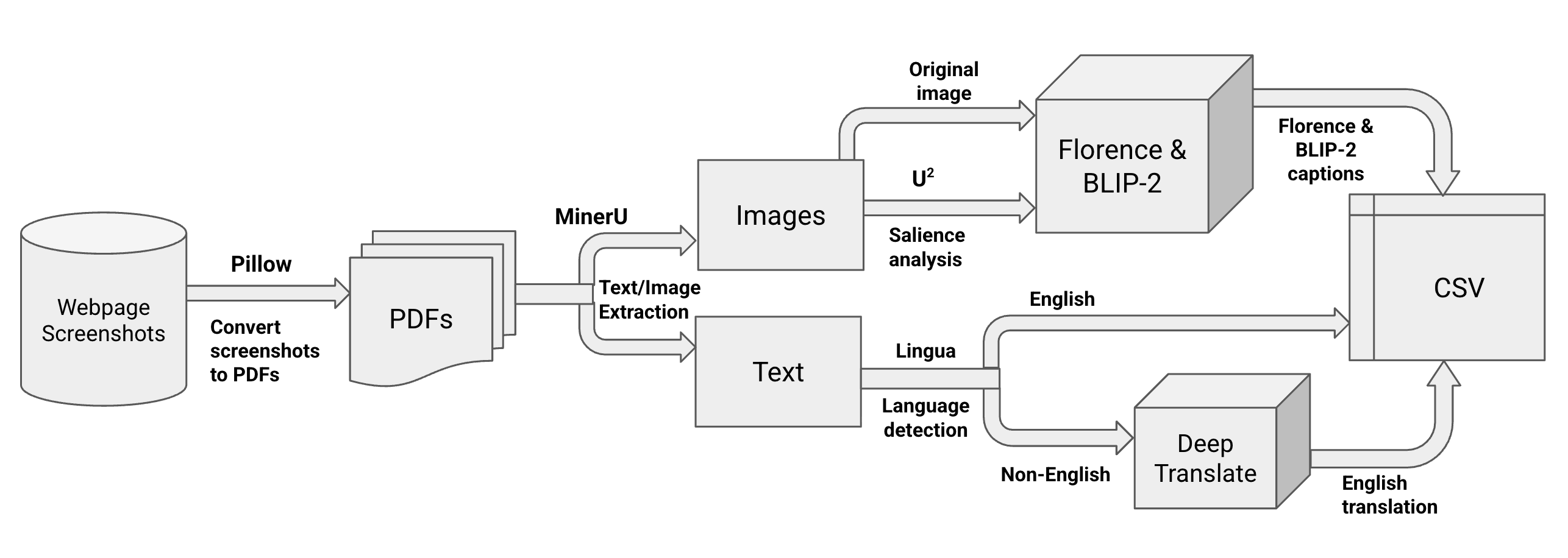
This package uses automated web crawling, topological graph generation and multimodal content extraction to generate a spreadsheet detailing the relative location, size, and web page address of a text or image element in an entire website. Additionally, the package comes with a bespoke element ranking formula, EleRank Formula, that utilizes an element's attributes to assign an importance for objective identification and analysis of web page elements in a web site.
Key Features Highlights
- Automated Web Crawling & Archiving: Crawl domains natively from
.txtlists, preserving structures and taking high-quality full-page screenshots. - Topological Graph Generation: Automatically map the structure of crawled domains as directed edge graphs serialized into GraphML format.
- Multimodal Content Extraction: Run a customizable, locally hosted image-to-text pipeline combining MinerU structuring, U2-Net saliency detection, and a choice of modern large vision models (e.g., FLORENCE-2, BLIP-2) to generate structured multimodal CSV datasets.
- Element Importance Scoring: Compute quantitative assessments of visual and textual elements using our bespoke EleRank Formula.
Table of Contents
- Installation
- Architecture & The VoT Formula
- Quick Start Guide
- Implemented Tools & Supported Models
- Usage Notes
Installation
This project leverages deep learning for computer vision and linguistics, requiring a robust environment setup. We recommend downloading the package from PyPI or using Conda to manage your dependencies. Downloading from PyPI
pip install web-vest
Setting up your Conda Environment
We will walk through setting up a dedicated workspace (vest), modeled after the project's internal environment:
- Create the virtual environment:
conda create -n vest python=3.10 -y
- Activate the environment:
conda activate vest
- Install Required Python Dependencies (aligned with
pyproject.toml; adjusttorchinstall for your hardware):pip install torch torchvision pip install transformers pillow deep-translator lingua-language-detector beautifulsoup4 gdown networkx numpy opencv-python pandas requests mineru playwright
- Optional: Install MinerU Extra Dependencies:
Use this if you want the full MinerU extras stack in your environment.
pip install --upgrade pip
pip install uv
uv pip install -U "mineru[all]"
Architecture & The VoT Formula
Pipeline Architecture
The EleRank Formula
Once elements are extracted, structured, captioned, and translated, they reflect specific themes and visual real estate on the host sites. To establish "what matters most" on any given parsed page, the toolkit uses the VoT Formula:
Importance = weight_1(size_of_content) + weight_2(coordinates_on_page) + weight_3(host_webpage_importance)
- size_of_content: The raw pixel area the text or image occupies on the screen.
- coordinates_on_page: Positional penalty/bonus (e.g., elements at the top coordinate space matter more).
- host_webpage_importance: A multiplier reflecting the domain graph's PageRank or explicitly defined weight of the host domain.
Quick Start Guide
1. Generate Site Graphs from a URL List
generate-site-graphs seeds.txt --output-folder site-graphs
seeds.txt should contain one website per line.
2. Run Preprocessing Independently
preprocess-folder data/raw data/interim
3. Run Webpage Element Extraction Independently
extract-webpage-elements data/interim data/interim
4. Run Captioning and Translation Independently
process-webpage-elements \
  data/interim \
  data/processed \
  --model florence \
  --hf-token "$HF_TOKEN" \
  --generate-salient-image no \
  --translate-to-eng yes
5. Rank Webpages (PageRank) Independently
rank-webpages site-graphs/visitqatar_com.graphml data/processed
This creates data/processed/visitqatar_com.csv with columns:
webpage_namerank
6. Score Webpages Independently
score-webpages \
  0.5 0.3 0.2 \
  data/processed/webpage_elements_captions.csv \
  data/processed/visitqatar_com.csv \
  data/processed/webpage_elements_scored.csv
7. Run the Entire Pipeline in One Command
web-saliency \
  --raw-files-path data/raw \
  --model florence \
  --generate-salient-image no \
  --translate-to-eng yes \
  --output-csv-name webpage_elements_captions.csv
Implemented Tools & Supported Models
| Type | Library / Model | Purpose |
|---|---|---|
| Crawling | Playwright, Requests | Archiving and rendering JavaScript-heavy pages |
| Topology | NetworkX | Parsing links into a directed GraphML object |
| Structuring | MinerU | Bounding box generation and modality classification |
| Saliency | U2-Net | "Soft dimming" background elements prior to captioning |
| Captioning | BLIP-2, Florence-2 | Vision-Language Models to summarize visual context |
| NLP | Lingua, Google Translate | Detecting languages and providing English homogenization |
Usage Notes
- Hugging Face Token: If you plan to use gated models like BLIP-2 (or want faster downloads), you may need to export a Hugging Face API token:
export HF_TOKEN="your_token". - GPU Acceleration: MinerU, Florence-2, and BLIP-2 all highly benefit from CUDA (NVIDIA GPUs) or MPS (Apple Silicon). When available, the pipeline automatically routes tensor processing to these accelerators.
- Data Preprocessing: Place directories containing the webpages into
data/raw. Make sure to structure folders cleanly (e.g.,Country/Webpage/dimensions/image.jpg).
Release history Release notifications | RSS feed


Download files
Download the file for your platform. If you're not sure which to choose, learn more about installing packages.
Source Distribution
Built Distribution
Filter files by name, interpreter, ABI, and platform.
If you're not sure about the file name format, learn more about wheel file names.
Copy a direct link to the current filters
File details
Details for the file web_vest-0.1.1.tar.gz.
File metadata
- Download URL: web_vest-0.1.1.tar.gz
- Upload date:
- Size: 1.6 MB
- Tags: Source
- Uploaded using Trusted Publishing? No
- Uploaded via: twine/6.2.0 CPython/3.12.12
File hashes
| Algorithm | Hash digest | |
|---|---|---|
| SHA256 |
9e2384e09d4637bfcf9ec470d07f3ef24028dee97e46a71ebbdf55f338170a0e
|
|
| MD5 |
bb7743e01038d3783c0a124619061220
|
|
| BLAKE2b-256 |
cb3c3e4461b350d6d5a6ce18e05df53ecdf401ce75bcf9750b6044c58c52d8c8
|
File details
Details for the file web_vest-0.1.1-py3-none-any.whl.
File metadata
- Download URL: web_vest-0.1.1-py3-none-any.whl
- Upload date:
- Size: 1.6 MB
- Tags: Python 3
- Uploaded using Trusted Publishing? No
- Uploaded via: twine/6.2.0 CPython/3.12.12
File hashes
| Algorithm | Hash digest | |
|---|---|---|
| SHA256 |
7d02804196714d4f3dd2547e9c53ca2ff10888135fe2764f30a14bdd8618e0bd
|
|
| MD5 |
44fc8d5ea80dd3da639c8921ce977156
|
|
| BLAKE2b-256 |
7baa46dd871196c4403247ea5837326ca3d58157c3e1ffb56c0ff3b0d86e695d
|






