
webtimeline
Python Web served time graph
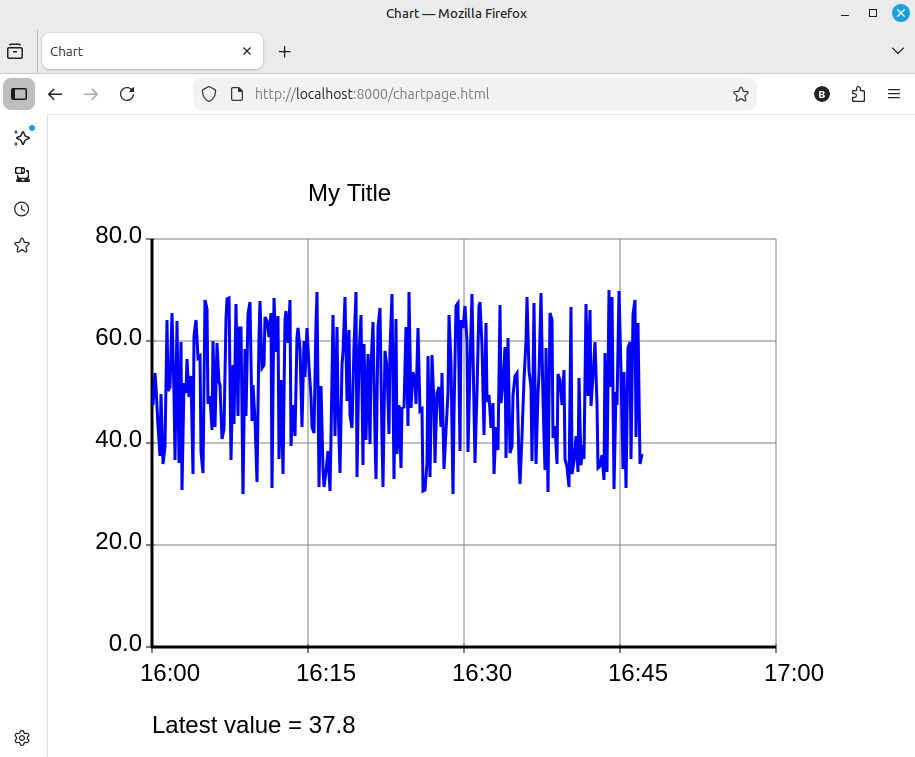
This provides a class 'WebTimeLine' which generates a web server, serving a page with a lineplot.
A coroutine method of the class can be used to add points, in the form of (time.time(), value)
These are dynamically added to the plot, and the web page will be updated as points are added.
An example browser image is:
The program can be installed from Pypi into a virtual environment, which will automaticall pull in dependencies.
Running "python3 -m webtimeline" will then run the following script and will serve the above chart:
import asyncio, time, random

from webtimeline import WebTimeLine

## This creates an example web service, with random measurements every ten seconds

tline =  WebTimeLine(host='localhost', port=8000, basepath=None, hours=1, title="My Title", description="Data display")

# set a y axis, lowest value 0.0
#               highest 80.0
#               with four intervals up the axis (five values shown at grid lines)
#               and axis numbers printed with one decimal point

tline.set_y_axis(ymin=0.0, ymax=80.0, yintervals=4, yformat=".1f")

async def my_function(tline):
    "Create data and send it using tline.putpoint()"
    while True:
        value = random.uniform(30, 70)   # random value used here
        tline.set_description(f"Latest value = {value:.1f}")
        await tline.putpoint(time.time(), value)
        await asyncio.sleep(10) # pause 10 seconds between readings

## create two tasks, one runs the web server, one gathers data

async def runchart():
    async with asyncio.TaskGroup() as tg:
        tg.create_task( tline.serve(tg) )
        tg.create_task( my_function(tline) )
        print("Now serving at localhost:8000")

asyncio.run(runchart())
Alternatively, if you use UV, simply running "uvx webtimeline" will load and run the above.
The web page is purposely minimal, without any CSS. The code could be obtained from github and the Mako templates altered for a more pleasant view. Feel free to adapt, this is public domain using the 'unlicense'.
Dependencies are:
litestar[standard]
mako
minilineplot
Details of the WebTimeLine class are:
WebTimeLine(host, port, basepath, hours, height, width, title, description)
host is a string, default 'localhost'
port is an integer, default 8000
basepath is either None, or a string such as '/graph/' which will set a path segment which will be prepended to the URL path.
hours is the hours, between 1 and 48, displayed along the x axis.
height is the height of the image, default 600.
width is the width of the image, default 800.
title, if given is a string shown at the top of the graph.
description, if given, is a string shown at the bottom of the graph.
Methods
serve(tg)
(async method) Set this as a task to serve the web page, tg should be a taskgroup
putpoint(t, v)
(async method) await this to add a point to the graph.
t must be a time.time() point, that is, a float which is seconds since January 1st 1970.
v is the value to be plotted.
The following methods, if called, will take affect on the next chart update when putpoint is called.
set_colors(backcol, gridcol, axiscol, chartbackcol, linecol)
If called sets chart colours.
backcol is default "white", The background colour of the whole image
gridcol is default "grey", The colour of the chart grid
axiscol is default "black", The colour of axis, title and description
chartbackcol is default "white", The background colour of the chart
linecol is default "blue", The colour of the line being plotted
All these colour names are SVG names and can be set as:
Color Names: "red", "blue" etc.
Hex Codes: "#FF0000" for red.
RGB/RGBA: "rgb(255,0,0)" or "rgba(255,0,0,0.5)" (with opacity).
HSL/HSLA: "hsl(0,100%,50%)" or "hsla(0,100%,50%,0.5)" (hue, saturation, lightness, alpha)
set_title(title)
Sets a new title on the graph.
set_description(description)
Sets a new description at the bottom of the graph.
set_y_axis(ymin, ymax, yintervals, yformat)
Sets the y axis minimum and maximum values.
If this is not called, an automatic y scaling will be used.
If it is called, then these values will be set, however if any y point exceeds these values, then the chart will revert to auto-scaling.
If you wish to purposely revert to auto-scaling, call this with None values.
yintervals sets the grid and number intervals up the y axis.
yformat is a string which defines how the y axis numbers are displayed. So the string ".2f" will show numbers with two decimal places.
The auto-scaling feature will inspect the line points, and attempt to set all these values automatically.
set_localtime(tflag)
If tflag is True, (the default) the time values on the x axis will show local time (local time of the server).
If tflag is False, the time values will be UTC.
1 maintainer

Release files for webtimeline 0.0.3
For a detailed explanation of source distributions (sdists) and built distributions (wheels), please see the package formats documentation.
Source distribution (sdist)
| File | Size | Uploaded | |
|---|---|---|---|
| webtimeline-0.0.3.tar.gz | 28.7 kB | Details |
Built distribution (wheel)
| File | Interpreter | ABI | Platform | Reset |
|---|---|---|---|---|
| webtimeline-0.0.3-py3-none-any.whl | Python 3 | none | any | Details |
Total release size: 58.4 kB
Release files / webtimeline-0.0.3.tar.gz
| Download URL | webtimeline-0.0.3.tar.gz |
|---|---|
| Size | 28.7 kB |
| Tags | Source |
|
SHA-256 checksum How to use checksums |
abc5f09ee55aab1e7cf196cfdd31274ec629ed196b2e877aa23798bb3791507b
|
|
BLAKE2b-256 checksum How to use checksums |
77d63d50ba740defc72b629b70efd556b33343c550d0580ea98dd37235d5665e
|
| Upload date | |
|
Uploaded using Trusted Publishing? What is trusted publishing? |
No |
| Uploaded via |
python-requests/2.32.5
|
Release files / webtimeline-0.0.3-py3-none-any.whl
| Download URL | webtimeline-0.0.3-py3-none-any.whl |
|---|---|
| Size | 29.7 kB |
| Tags | Python 3 |
|
SHA-256 checksum How to use checksums |
fa7180b14bc3607596663b59c9583d25434098d22564f554cf699c4fd0adc89b
|
|
BLAKE2b-256 checksum How to use checksums |
ac7860935c7fa3dc19a49807fbb99bb9c31a941260f4d594c21281756adf4a26
|
| Upload date | |
|
Uploaded using Trusted Publishing? What is trusted publishing? |
No |
| Uploaded via |
python-requests/2.32.5
|














