
Python Web served time graph

Project description
webtimeline
Python Web served time graph
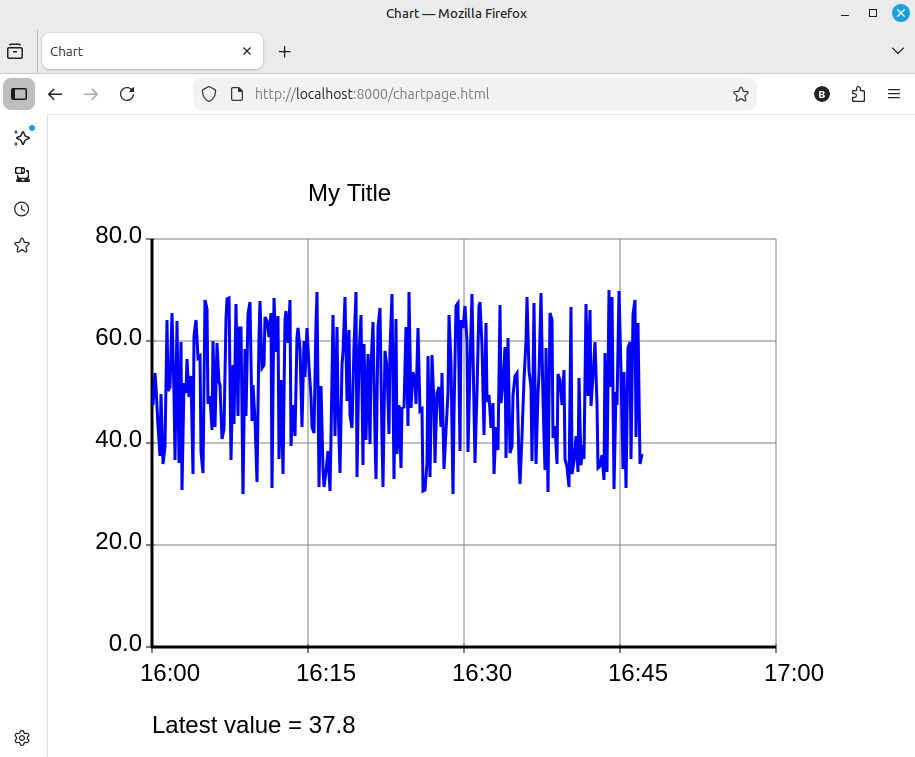
This provides a class 'WebTimeLine' which generates a web server, serving a page with a lineplot.
This is an example, using HTMX, MAKO and LITESTAR and is primarily intended as a record for myself.
A coroutine method of the class can be used to add points, in the form of (time.time(), value)
These are dynamically added to the plot, and the web page will be updated as points are added.
An example browser image is:
The program can be installed from Pypi into a virtual environment, which will automaticall pull in dependencies.
Running "python3 -m webtimeline" will then run the following script and will serve the above chart:
import asyncio, time, random

from webtimeline import WebTimeLine

## This creates an example web service, with random measurements every ten seconds

tline =  WebTimeLine(host='localhost', port=8000, basepath=None, hours=1, title="My Title", description="Data display")

# set a y axis, lowest value 0.0
#               highest 80.0
#               with four intervals up the axis (five values shown at grid lines)
#               and axis numbers printed with one decimal point

tline.set_y_axis(ymin=0.0, ymax=80.0, yintervals=4, yformat=".1f")

async def my_function(tline):
    "Create data and send it using tline.putpoint()"
    while True:
        value = random.uniform(30, 70)   # random value used here
        await tline.putpoint(time.time(), value)
        await asyncio.sleep(10) # pause 10 seconds between readings

## create two tasks, one runs the web server, one gathers data

async def runchart():
    async with asyncio.TaskGroup() as tg:
        tg.create_task( tline.serve(tg) )
        tg.create_task( my_function(tline) )
        print("Now serving at localhost:8000")

asyncio.run(runchart())
The web page is purposely minimal, without any CSS. The code could be obtained from github and the Mako templates altered for a more pleasant view.
Dependencies are:
litestar[standard]
mako
minilineplot
Details of the WebTimeLine class are:
WebTimeLine(host, port, basepath, hours, height, width, title, description)
host is a string, default 'localhost'
port is an integer, default 8000
basepath is either None, or a string such as '/graph/' which will set a path segment which will be prepended to the URL path.
hours is the hours, between 1 and 48, displayed along the x axis.
height is the height of the image, default 600.
width is the width of the image, default 800.
title, if given is a string shown at the top of the graph.
description, if given, is a string shown at the bottom of the graph.
Methods
serve(tg)
(async method) Set this as a task to serve the web page, tg should be a taskgroup
putpoint(t, v)
(async method) await this to add a point to the graph.
t must be a time.time() point.
v is the value to be plotted.
set_colors(backcol, gridcol, axiscol, chartbackcol, linecol)
If called sets chart colours.
backcol is default "white", The background colour of the whole image
gridcol is default "grey", The colour of the chart grid
axiscol is default "black", The colour of axis, title and description
chartbackcol is default "white", The background colour of the chart
linecol is default "blue", The colour of the line being plotted
All these colour names are SVG names and can be set as:
Color Names: "red", "blue" etc.
Hex Codes: "#FF0000" for red.
RGB/RGBA: "rgb(255,0,0)" or "rgba(255,0,0,0.5)" (with opacity).
HSL/HSLA: "hsl(0,100%,50%)" or "hsla(0,100%,50%,0.5)" (hue, saturation, lightness, alpha)
set_title(title)
Sets the title of the graph, and updates the graph with the new title.
set_description(description)
Sets the description of the graph, and updates the graph with the new description.
set_y_axis(ymin, ymax, yintervals, yformat)
If this is not called, an automatic y scaling will be used.
If it is called, then these values will be set, however if any y point exceeds these values, then the chart will revert to auto-scaling.
If you wish to revert to autoscaling, call this with None values.
Release history Release notifications | RSS feed


Download files
Download the file for your platform. If you're not sure which to choose, learn more about installing packages.
Source Distribution
Built Distribution
Filter files by name, interpreter, ABI, and platform.
If you're not sure about the file name format, learn more about wheel file names.
Copy a direct link to the current filters
File details
Details for the file webtimeline-0.0.1.tar.gz.
File metadata
- Download URL: webtimeline-0.0.1.tar.gz
- Upload date:
- Size: 28.1 kB
- Tags: Source
- Uploaded using Trusted Publishing? No
- Uploaded via: python-requests/2.32.5
File hashes
| Algorithm | Hash digest | |
|---|---|---|
| SHA256 |
63f5bc3def924839496658c4066e230cd2d93ec783639b5cb948ce3382129be3
|
|
| MD5 |
129cc3cf46016fd598b1bc1618ed4337
|
|
| BLAKE2b-256 |
7df688d312823376130ebe8b9d54461a79cfa3bf1a26e8cd2238fb718decd815
|
File details
Details for the file webtimeline-0.0.1-py3-none-any.whl.
File metadata
- Download URL: webtimeline-0.0.1-py3-none-any.whl
- Upload date:
- Size: 29.2 kB
- Tags: Python 3
- Uploaded using Trusted Publishing? No
- Uploaded via: python-requests/2.32.5
File hashes
| Algorithm | Hash digest | |
|---|---|---|
| SHA256 |
8b1e834695b8871a7c4055659852b12594003fc264fc26fe75dc7316144d30c1
|
|
| MD5 |
5f504bd76ec8446a5978a8dd73c75b55
|
|
| BLAKE2b-256 |
71f52a04b507fb15642a57f5473669d16861c082fecd4b633a6083e675088f16
|






